

Microsoft is reintroducing a compact, interactive meeting surface to the Windows taskbar: an Agenda view that surfaces upcoming calendar events and one‑tap meeting actions directly from the Notification Center, with built‑in hooks for Microsoft 365 Copilot and meeting prep — arriving first in a Windows Insider preview slated for December 2025.
When Windows 11 first launched, Microsoft redesigned the taskbar and Notification Center and removed the quick, glanceable agenda that Windows 10 users relied on — the small flyout that let you see today’s meetings and join them with a single click. That omission drove users to third‑party utilities and left a persistent usability gap. At Microsoft Ignite 2025 the company announced it would bring back a modernized Agenda view inside the Notification Center, positioning it as a productivity surface that reduces context switching and surfaces Copilot‑driven meeting actions just where users need them. The public timeline Microsoft shared targets a preview for Windows Insiders in December 2025, with a staged, tenant‑gated rollout thereafter; a final general‑availability date has not been confirmed.
Key day‑to‑day benefits:
The biggest near‑term technical risk is the reported WebView2 rendering approach and its short‑term resource footprint. That implementation decision buys development agility and web‑first flexibility, but it may create perceptible CPU/memory spikes on some systems and will be an important metric to validate during preview.
Source: Neowin https://www.neowin.net/news/outlook-for-windows-is-getting-an-interesting-meeting-feature-soon/
 Background
When Windows 11 first launched, Microsoft redesigned the taskbar and Notification Center and removed the quick, glanceable agenda that Windows 10 users relied on — the small flyout that let you see today’s meetings and join them with a single click. That omission drove users to third‑party utilities and left a persistent usability gap. At Microsoft Ignite 2025 the company announced it would bring back a modernized Agenda view inside the Notification Center, positioning it as a productivity surface that reduces context switching and surfaces Copilot‑driven meeting actions just where users need them. The public timeline Microsoft shared targets a preview for Windows Insiders in December 2025, with a staged, tenant‑gated rollout thereafter; a final general‑availability date has not been confirmed. What the Agenda view actually is
The core experience
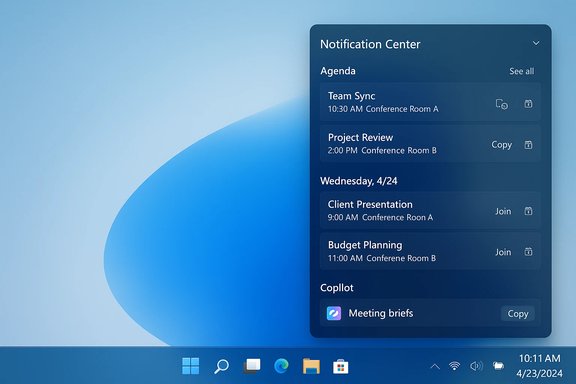
- The Agenda view appears inside the Notification Center (the flyout you open from the taskbar clock) and shows a chronological, scrollable list of upcoming events for today and the next few days.
- Each entry displays essential metadata — title, time, location, and where present, a meeting link — and exposes quick actions designed to reduce friction around meetings.
- Quick actions will include:
- Join (detect and open Teams or other meeting links),
- Open (open the full event in Calendar or Outlook),
- Copy meeting link or details,
- Invoke Copilot for pre‑meeting summaries, talking points, or relevant attachments (subject to tenant controls and licensing).
Integration plumbing
The Agenda surface is explicitly tied into Microsoft 365 through Microsoft Graph and the Calendar/Outlook ecosystem. Events sourced from Exchange Online and Microsoft 365 will be primary; calendars surfaced through the Windows Calendar app will also appear where supported. Copilot actions that produce meeting briefs and summaries call into Microsoft 365 services and will be gated by tenant settings and the user’s Copilot entitlement.Why this matters: small UI change, outsized productivity impact
Restoring an agenda to the taskbar is deceptively valuable. For knowledge workers who move from meeting to meeting, shaving even a few seconds per meeting — by surfacing the next meeting and offering a one‑click join or a quick Copilot‑generated brief — compounds into measurable time savings and reduced cognitive load. The Agenda view aims to make the taskbar a true “moment of need” surface where prep and join actions are immediate, not something that requires opening Outlook, Teams, or the full Calendar app.Key day‑to‑day benefits:
- Faster meeting joins and fewer app switches.
- One‑place meeting prep: Copilot actions available inline reduce the hunt for attached documents and relevant email threads.
- Familiarity for Windows 10 migrants: restores an affordance many users missed after migrating to Windows 11.
Technical specifics and verification
Multiple Microsoft communications and independent reporting align on these core facts:- Microsoft announced Agenda at Ignite 2025 and described it as coming to preview in December 2025.
- Agenda will surface events from Microsoft 365/Exchange and calendars exposed through the Windows Calendar app, using Microsoft Graph for metadata and actions.
- Copilot integration is planned for meeting prep tasks (summaries, attachment surfacing, suggested talking points), but these features require proper licensing and tenant opt‑in.
Notable implementation details and early concerns
WebView2 implementation & performance signals
Early hands‑on and community testing of preview builds indicated the Agenda UI may be rendered using WebView2 (Microsoft’s embedded Chromium engine). Observers reported multiple WebView2 sub‑processes spawning when the Notification Center opened and a noticeable, short‑term increase in CPU and memory while the flyout was active. Those processes often moved to a suspended state when the flyout closed. If Agenda leverages WebView2, it suggests Microsoft chose a web‑hosted rendering path for dynamic content rather than a purely native shell control — a pragmatic choice that has trade‑offs. Why this matters:- A WebView2 host can accelerate development and allow richer, web‑style layouts and remote feature toggling.
- It may increase short‑running resource usage when the flyout is open, which could be noticeable on lower‑powered devices or in scenarios where many WebView2 hosts already run.
Data surface and governance implications
Because Copilot actions rely on Microsoft Graph data (emails, attachments, SharePoint/OneDrive content), Agenda’s convenience is also an operational surface for enterprise governance:- Tenant administrators will need to confirm what Copilot actions are permitted, how prompts and results are logged, and where generated artifacts are stored.
- Licensing: many Copilot features are tied to specific Microsoft 365 Copilot entitlements; organizations without appropriate licensing will not see the full set of AI actions.
Multi‑account and cross‑calendar behavior
Important unanswered details to validate during preview:- How Agenda merges events from multiple accounts (work, personal, Google, iCloud) and whether third‑party calendar entries appear reliably.
- How Agenda treats private or restricted events, delegated calendars, and shared mailboxes — especially on shared or public devices.
- Time zone handling and cross‑calendar sorting when users have overlapping calendars across accounts.
Strengths: what Microsoft gets right
- Native, discoverable surface: Putting agenda items where users already look (the taskbar clock) is a high‑ROI UX move that reduces friction.
- Integrated actions: One‑tap join and Open in Calendar/Outlook lower the barrier for starting meetings and reviewing details.
- Copilot at the moment of need: Making meeting prep accessible inline aligns AI assistance with immediate user workflows rather than relegating it to a separate pane.
- Tenant control model: Microsoft’s model of gating Copilot features behind tenant opt‑in and licensing gives IT teams governance levers they need for enterprise deployments.
Risks and limitations
- Performance overhead: If Agenda uses WebView2, preview reports suggest a measurable CPU/memory footprint while the flyout is active — a user experience drawback on low‑spec machines. This is the primary technical critique raised by independent reporting.
- Privacy and data governance: Copilot’s need to ingest emails, attachments, and SharePoint content raises questions about telemetry, retention of generated summaries, and where outputs are stored. Admins must audit and control Graph permissions and Copilot entitlements.
- Third‑party calendar parity: Users who rely on Google Calendar, iCloud, or other ecosystems may find Agenda incomplete at first; cross‑calendar parity will depend on the Windows Calendar app connectors and syncing fidelity.
- Feature gating and inconsistency: Microsoft frequently uses server‑side feature flags for shell features. That can lead to inconsistent availability across Insider devices and tenant environments during preview.
Practical guidance — what IT admins and power users should do now
- Join the Windows Insider program on a small set of test devices and register for the Dev/Beta channel to evaluate the December preview. Treat this as a pilot window, not a company‑wide launch.
- Inventory calendar integrations in use (Exchange, Microsoft 365, Google Calendar, iCloud). Test Agenda’s behavior with your common multi‑account scenarios and confirm meeting join reliability for Teams, Zoom, Google Meet, and other conferencing tools.
- Check Copilot licensing and tenant settings now. Determine whether you have the necessary entitlements and prepare governance documentation for how Copilot accesses and processes tenant data.
- Draft acceptable‑use and privacy guidance for shared devices (kiosks, meeting rooms): define whether Agenda items should appear on lock screens or shared sessions and whether Copilot actions are permitted in those contexts.
- Monitor telemetry and pilot feedback for performance effects (CPU/memory) when the Notification Center opens. If your pilot group uses older hardware, confirm whether WebView2 rendering creates noticeable impacts.
Roadmap signals and what to watch for in preview
- Whether Agenda supports inline event creation and editing inside the flyout, or if those actions still open the full Calendar/Outlook experience. Early messaging suggests initial previews will prioritize viewing and joining rather than complex editing.
- Exact Copilot capabilities exposed from Agenda — will the UI offer brief generation, attachment summarization, attendee‑aware notes, or deeper action extraction? Each capability has different licensing and governance implications.
- The implementation story: if Microsoft documents a WebView2 host, expect future iterations to optimize resource usage or provide a more native control in later builds. If it remains web‑hosted, admins should plan for the associated process model.
- Rollout cadence: Microsoft’s typical pattern is Insider preview → targeted tenant pilots → staged GA. Expect staggered availability across channels and tenant rings.
Balanced assessment
The Agenda view is an elegantly pragmatic update: it restores a much‑missed convenience and intelligently places Copilot at the moment of need. For most users, the feature will feel like a logical quality‑of‑life restoration with meaningful productivity gains. For enterprises, Agenda is also a surface that amplifies governance, licensing, and privacy questions, and it will require administrative planning before broad deployment.The biggest near‑term technical risk is the reported WebView2 rendering approach and its short‑term resource footprint. That implementation decision buys development agility and web‑first flexibility, but it may create perceptible CPU/memory spikes on some systems and will be an important metric to validate during preview.
What this means for everyday users
- Expect to be able to check “what’s next” from the taskbar and join meetings faster, without hunting for links.
- If your organization uses Microsoft 365 and Copilot, Agenda will likely offer meeting briefs and quickly consumable context before meetings — provided your tenant enables those features.
- If you rely heavily on Google Calendar or iCloud, Agenda’s usefulness depends on how the Windows Calendar app synchronizes those accounts; preview testing will reveal parity.
Quick checklist for preview testers
- Enroll one or two non‑production devices in the Windows Insider preview channel.
- Verify events from all calendar accounts appear and sort correctly.
- Test join links across Teams, Zoom, Meet and confirm copy/link behavior.
- Run performance traces while opening Notification Center to watch process spawn and resource use.
- Validate Copilot prompts (if enabled) and track what tenant data is surfaced for summaries.
Conclusion
Microsoft’s Agenda view is a return to a small but essential desktop convenience, updated for a world of back‑to‑back video calls and AI‑augmented prep. The preview promised for December 2025 is the moment to verify whether Microsoft gets the execution right: delivering a responsive, privacy‑respecting, and broadly compatible mini‑agenda — or whether early implementation choices (notably the apparent WebView2 rendering path) will force trade‑offs in performance and native polish. Organizations should use the Insider preview to pilot the feature, exercise governance controls for Copilot, and validate multi‑calendar behavior before enabling it at scale. If those pieces align, Agenda will be a practical productivity win; if not, users may continue to rely on third‑party tools until Microsoft iterates on the experience.Source: Neowin https://www.neowin.net/news/outlook-for-windows-is-getting-an-interesting-meeting-feature-soon/
