

Microsoft’s latest Windows 11 Insider previews introduce a new operating‑system primitive called Agent Workspace, a deliberately gated environment that lets AI agents run under separate accounts and operate on local files and apps — moving Copilot from a conversational helper to an agent that can do things on your PC, while raising fresh questions about privacy, performance, and enterprise governance.
Windows has been evolving from a desktop platform with integrated AI assistants into what Microsoft calls an agentic OS: a system that can host autonomous helpers capable of multi‑step workflows. That roadmap couples three threads — Copilot conversation features, on‑device vision and voice inputs, and now a runtime that permits AI agents to act inside apps and on files. The Agent Workspace preview appears behind a single master toggle in Settings and is being rolled out to limited Windows Insider rings for testing and feedback. Microsoft’s official documentation frames Agent Workspace as a contained, per‑agent session with its own standard Windows account and scoped permissions, designed to keep agent activity auditable and interruptible while avoiding the overhead of full virtual machines. The company positions the feature as experimental and opt‑in, with an emphasis on transparency and revocation mechanisms for signed agents.
Strengths:
For users and IT teams the prudent path is a staged approach: pilot on noncritical machines, validate logging and DLP integrations, demand clear consent dialogs, and treat agents like any authoritative automation principal — with short‑lived permissions, auditable actions, and the ability to revoke quickly. Agent Workspace is the beginning of a new chapter for Windows; whether it becomes a secure, manageable productivity multiplier will depend on how rigorously Microsoft and customers harden the platform during the preview and early releases.
Source: Analytics Insight https://www.analyticsinsight.net/am...e-bringing-ai-closer-to-system-level-control/
 Background
Windows has been evolving from a desktop platform with integrated AI assistants into what Microsoft calls an agentic OS: a system that can host autonomous helpers capable of multi‑step workflows. That roadmap couples three threads — Copilot conversation features, on‑device vision and voice inputs, and now a runtime that permits AI agents to act inside apps and on files. The Agent Workspace preview appears behind a single master toggle in Settings and is being rolled out to limited Windows Insider rings for testing and feedback. Microsoft’s official documentation frames Agent Workspace as a contained, per‑agent session with its own standard Windows account and scoped permissions, designed to keep agent activity auditable and interruptible while avoiding the overhead of full virtual machines. The company positions the feature as experimental and opt‑in, with an emphasis on transparency and revocation mechanisms for signed agents. What Agent Workspace actually is
The core primitives
- Agent account: Each agent runs as its own standard (non‑admin) Windows account, making AI agents first‑class principals that can be audited, restricted by ACLs, and managed by enterprise controls.
- Agent Workspace: A lightweight, contained desktop session — effectively a parallel Windows session — that hosts the agent’s UI automation (clicking, typing, opening apps) while the signed‑in user continues working. Microsoft says this is more efficient than launching a full VM for routine automation tasks.
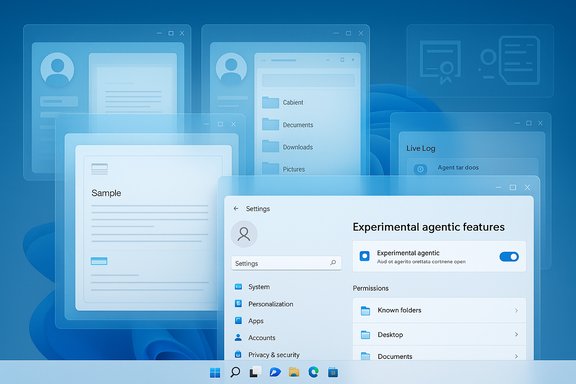
- Experimental toggle: The runtime and account provisioning are gated by a system setting (Settings → System → AI components → Agent tools → Experimental agentic features). The toggle is off by default and requires administrator permission to enable; enabling provisions agent accounts device‑wide for future agent sessions.
- Scoped permissions: Agents begin with limited access to “known folders” such as Documents, Desktop, Downloads, Pictures, Music and Videos and must request additional permissions to expand their reach. Microsoft emphasizes least‑privilege defaults during preview.
How agents act — the user flow
- A user enables the experimental toggle and initiates an action (for example, “organize my photos and create a summary doc”).
- Windows provisions an Agent Workspace and runs the agent under its dedicated account.
- The agent executes a plan by interacting with apps’ UIs: opening files, clicking controls, typing text, and moving or editing documents.
- Users see visible, step‑by‑step progress, with options to pause, stop, or take over the workspace at any time; actions generate logs to support auditing.
Why Microsoft built it this way
Microsoft’s design attempts to reconcile two competing needs: the productivity benefits of agentic automation and the security/control expectations of modern OS users and enterprises.- Treating agents as separate accounts gives IT teams actionable governance levers: group policy, Intune/MDM application, ACLs, and certificate revocation for misbehaving agents.
- Visible, interruptible workspaces are intended to prevent “silent automation” — the kind of background activity that sparked controversy in past Windows experiments — and to provide a human‑in‑the‑loop safeguard.
- A contained session model balances performance and isolation, aiming to be far cheaper in resource cost than a per‑agent VM while still offering stronger separation than in‑process plug‑ins.
Permissions, privacy, and the new data risks
Agent Workspace expands the OS-level capability set by allowing agents to access local content and manipulate files. That capability is the feature’s power and its primary privacy risk.- During the preview, Microsoft limits agents to a small set of known folders (Desktop, Documents, Downloads, Pictures, Music, Videos) and requires explicit grant paths; however, early hands‑on reports and preview builds show differences in how permissive folder access appears in the UI, so users should assume variability and review permission dialogs carefully.
- The Settings UI displays a warning that enabling agent workspaces may reduce security and affect privacy, and that there could be performance impacts because agents can run in the background. These explicit warnings are a welcome transparency measure; they also underscore that enabling agentic features is a nontrivial decision.
- Microsoft’s security narrative includes digital signing and revocation for agents, runtime isolation, and logs. That model helps mitigate supply‑chain and compromise risks, but does not remove them: a signed agent could be misconfigured, or an attacker could attempt to abuse a legitimate agent via crafted inputs or by compromising the agent’s connectors.
The prompt injection problem becomes an OS problem
When an agent can parse documents and execute plans, a maliciously crafted file — or a cleverly framed email — can act as a prompt injection vector that changes the agent’s behavior. Historically, prompt injection is an LLM‑specific concern; with Agent Workspace it becomes an OS‑level threat because injected instructions can produce real file modifications and automated flows. Defenses must include:- clear confirmation dialogs that explicitly show the actions an agent plans to take,
- DLP integration to block sensitive transfers, and
- enterprise policies limiting which agents can run and which folders they may access.
Security analysis — strengths and gaps
Strengths
- First‑class agent identity: Making agents named principals enables ACLs, policy application, and revocation, which is a major advantage for enterprise control and incident response.
- Human‑in‑the‑loop UX: Visible progress, pause/stop/takeover controls, and step logs reduce the risk of silent destructive actions. These are pragmatic mitigations against brittle UI automation.
- Signing and revocation: By requiring digital signatures for agents, Microsoft enables an operational kill switch for compromised or malicious agents through certificate revocation and AV/EDR controls.
Gaps and open questions
- Isolation fidelity: Microsoft describes Agent Workspace as “lighter than a full VM” and not equivalent to Windows Sandbox. That trade‑off may leave residual avenues for lateral movement between the agent session and the main user environment. For high‑assurance use cases, the workspace is not currently positioned as a replacement for full virtualization or hardware‑backed isolation.
- Audit and forensic detail: Enterprises will demand tamper‑evident, machine‑parseable logs that capture who (agent identity), what (exact file paths and operations), when, and which data was accessed — and that these logs ship to centralized SIEMs. Microsoft’s previews promise logs, but integration depth with enterprise telemetry is still maturing.
- Background agent lifecycle: Always‑on agents enlarge the attack surface. A long‑running agent that drifts in privilege or is targeted by supply‑chain attacks can become a persistent vector. Time‑bound privileges, expirations, and tighter session scoping are necessary mitigations still under development.
- Permission UX consistency: Early reports show inconsistent behavior in how folder permissions and prompts appear in previews. Any ambiguity in consent dialogs will be exploited in social‑engineering attacks; the consent UX must be explicit, granular, and easily auditable.
Performance and resource implications
Microsoft’s messaging says Agent Workspaces are lightweight and scale CPU and RAM usage by activity, and that there are no changes to Windows 11’s base hardware requirements. In practice:- Idle footprint should be small: a background agent with a minimal plan need not consume much beyond a resident service process.
- Active workloads (bulk file processing, local model inference, media tasks) will increase CPU, RAM, and storage I/O, and may impact foreground apps — particularly on older or lower‑powered devices. Microsoft has not published exact resource numbers for typical agent workloads, so real‑world impact will vary. Treat any claim of “negligible resource use” as conditional on workload type and hardware.
- Copilot+ and NPUs: Microsoft’s broader AI strategy includes a Copilot+ device tier — machines with dedicated NPUs and higher local inference capability — that can shift heavy model work off the cloud and reduce network round trips. But whether agents perform local inference or funnel work to cloud services depends on the device’s hardware and configuration, and on the agent’s design.
Enterprise implications and recommended controls
Agent Workspace changes endpoint risk models. Here’s a prioritized list for IT and security practitioners preparing for agentic Windows:- Inventory and policy: Treat agents as service principals. Inventory which agents are allowed, require digital signing, and publish allowed agent certificates in enterprise policy stores.
- DLP and SIEM integration: Ensure agent actions generate logs that are consumed by DLP and SIEM; validate that file reads/writes, cloud connector activity, and process chains are visible.
- Least privilege by default: Apply time‑bound, folder‑scoped permissions and avoid granting blanket profile access. Use Intune/MDM to enforce restrictions device‑wide.
- Human approvals: Require explicit, human‑readable confirmations for actions that move, exfiltrate, or delete sensitive data. Confirmations should show exact file paths and destinations.
- Test automation resilience: Validate agent automation against localized UI variations, language settings, and screen layout changes to reduce brittle UI‑driven failures.
- Incident response playbooks: Add agent compromise scenarios to IR runbooks; include certificate revocation, agent account disablement, and timeline reconstruction steps.
Practical advice for consumer users
- Keep the experimental toggle off on shared or work devices until you understand the permissions and logging behavior.
- If you enable the feature, review the permission prompts carefully and restrict agent access to specific folders you intend to automate.
- Watch the Agent Workspace while it runs. Use the “pause/stop/takeover” controls to maintain human oversight.
- Back up important files before running broad automation tasks that could modify or delete batches of content.
- On laptops or older desktops, monitor system responsiveness during agent actions and disable the feature if foreground performance becomes unacceptable.
Product strengths, tradeoffs, and the bigger picture
Agent Workspace is a pivotal evolution for Windows. It takes what began as assisted search and productivity (Copilot chat) and advances it to OS‑level automation that can save time on repetitive, multi‑app workflows — from extracting tables from PDFs to batch photo edits and automated report assembly.Strengths:
- Real productivity gains where API access is absent or brittle, enabling users to automate complex UI‑level tasks without scripting.
- A governance‑friendly architecture that treats agents as principals and surfaces actionable audit trails.
- Expanded attack surface due to always‑on agents and file access, requiring mature DLP and SIEM integration.
- Potential privacy leakage if consent flows, logging, or folder scoping aren’t clear and consistent.
- Reliability friction for brittle UI automation that may misfire across localized or updated app UIs.
What remains unverified or provisional
- Exact resource consumption profiles for typical agent workloads (Microsoft has not published concrete RAM/CPU baselines). Treat published performance claims as qualitative until Microsoft provides metrics or third‑party benchmarks.
- Precise enterprise integration depth for audit logs and DLP hooks in production environments; preview materials promise integration but some implementation details are still works in progress.
- Any claim that agents automatically gain broad profile access without per‑action consent should be treated as unverified unless Microsoft updates official documentation or the Settings UX clearly reflects that behavior. Early hands‑on reports have varied; rely on the official support content for authoritative guidance.
Conclusion
Agent Workspace marks a consequential shift in Windows’ evolution: it turns the OS into a platform that not only understands users but can perform real actions on their behalf. That capability promises meaningful productivity wins but also redefines endpoint risk. Microsoft’s preview — with per‑agent accounts, run‑time isolation, signing, and an opt‑in toggle — acknowledges these stakes and builds pragmatic guardrails. Yet the preview also surfaces unanswered questions about isolation fidelity, logging depth, permission UX consistency, and real‑world resource costs.For users and IT teams the prudent path is a staged approach: pilot on noncritical machines, validate logging and DLP integrations, demand clear consent dialogs, and treat agents like any authoritative automation principal — with short‑lived permissions, auditable actions, and the ability to revoke quickly. Agent Workspace is the beginning of a new chapter for Windows; whether it becomes a secure, manageable productivity multiplier will depend on how rigorously Microsoft and customers harden the platform during the preview and early releases.
Source: Analytics Insight https://www.analyticsinsight.net/am...e-bringing-ai-closer-to-system-level-control/
