

Microsoft and OpenAI have arrived at the same destination from different directions: browsers that not only search and display pages, but act on your behalf — filling forms, booking reservations, and remembering the context of previous browsing so you can resume projects with a single prompt. What started as incremental AI features in the browser has become a coordinated shift toward agentic browsing — and that change raises the practical and policy questions every Windows power user, IT pro, and privacy-minded reader needs to weigh now.
The browser has long been a passive conduit for the web: you type, click, read, repeat. That model is changing quickly as major players embed large language models and automation primitives directly into the browsing experience. Two recent moves crystallize the trend.
This arms race puts incumbents (Chrome) and challengers (Edge, Atlas) in direct competition over attention, privacy, and default settings.
This is expected for a nascent capability. Agentic features combine brittle web automation (which depends on inconsistent form layouts and site behaviors) with probabilistic model reasoning. The result is that for now:
In practice, the best immediate use-cases are the repetitive, rule-based chores where clear outcomes and confirmations are easy to verify.
Publishers will need to:
Adopt cautiously. Start with read-only, opt-in features. Insist on clarity from vendors about data residency, retention, and training use. Run small pilots to understand reliability and failure modes, and ensure administrative controls exist before enabling agentic browsing in managed environments. The AI browser revolution promises genuine productivity gains, but it also demands robust policies and technical safeguards if that promise is to be realized without unacceptable risk.
Source: Android Authority What a coincidence: Microsoft Edge has the same ideas as ChatGPT's browser
 Background
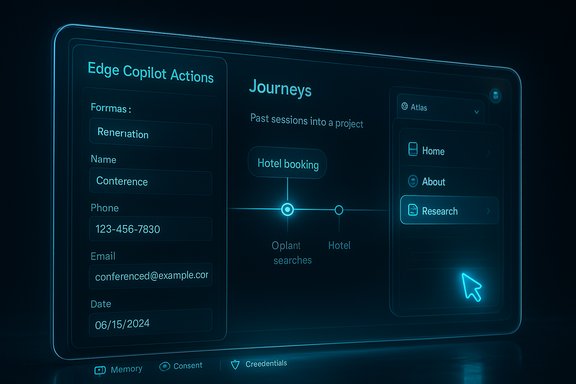
The browser has long been a passive conduit for the web: you type, click, read, repeat. That model is changing quickly as major players embed large language models and automation primitives directly into the browsing experience. Two recent moves crystallize the trend.- Microsoft expanded Edge’s Copilot Mode with two headline features: Actions, which lets the browser complete multi-step tasks for you (for example, unsubscribing from newsletters or making reservations), and Journeys, which groups past browsing into topic-based projects and surfaces them when you want to continue work. These are opt-in features that require explicit permission to access browsing history and, in some cases, active credentials or session contexts to act on the user’s behalf.
- OpenAI launched ChatGPT Atlas, a browser with a built-in ChatGPT sidebar, browser memories, and an agent mode that can open tabs, click through sites, and attempt multi-step tasks while keeping the chat context intact.
What the features actually do
Copilot Actions vs Agent Mode: two flavors of the same capability
At their cores, Actions (Edge) and Agent Mode (Atlas) are similar: they grant the browser the ability to open and interact with web pages programmatically to complete a user-specified task. That can mean:- Filling and submitting reservation or booking forms.
- Navigating account settings to unsubscribe from newsletters.
- Opening multiple product pages, comparing prices, and drafting a summary or recommendation.
- Pulling content from open tabs and synthesizing it into a single answer.
Journeys vs Browser Memories: recall, context, continuity
Both vendors are betting that the pain of lost context is a major usability problem. The two approaches:- Journeys (Edge) automatically groups past browsing into thematic projects, showing summaries and “next steps” so you can jump back into a previously started task without reopening dozens of tabs.
- Browser memories (Atlas) store snippets of your browsing context across sessions so ChatGPT can recall items you looked at previously — “reopen the shoes I looked at yesterday” or “show me the blue hoodie I was using last week.”
Why this matters now
The AI browser is an OS-level shift for workflows
Browsers are the platform for a huge chunk of productivity workflows — email, shopping, research, booking, collaboration. Embedding an assistant that can act across tabs and sign-in contexts effectively inserts a new layer between the user and every web service they use.- For individual users, that can mean big time savings: routine, repetitive chores like unsubscribing, booking, or aggregating research are now automatable.
- For businesses and enterprises, it creates governance questions: does automated browsing agent access violate corporate policy? How do admins audit or restrict the assistant’s ability to access corporate apps or credentials?
The browser wars accelerate from UI features to platform control
The competition is no longer just about rendering engines or extension ecosystems. It’s about who controls the personal context layer that can interpret intent and act across the web. Whoever gets that right can surface new value propositions — in-product commerce, contextual workflows, or seamless cross-site operations — and change how websites design for discovery and conversion.This arms race puts incumbents (Chrome) and challengers (Edge, Atlas) in direct competition over attention, privacy, and default settings.
Security and privacy: the critical trade-offs
Permissions, session access, and credential use
Agentic features frequently need access to the same cookies or sessions you have open in the browser to act on your behalf. That means:- The assistant may require access to session cookies, stored passwords, or form-autofill data to complete tasks.
- Edge and Atlas signal they will gate these flows behind explicit prompts, and offer toggles to enable/disable automatic use of browsing history.
- Where is browsing context and “memory” stored — locally, in your account cloud, or both?
- How long is it retained?
- Is it used to train underlying models, and if so, under what conditions?
- What visibility and audit logs exist for actions the assistant executes?
Attack surface and automation abuse
Automation in a browser opens new vectors for abuse:- An agent could be tricked into navigating to a malicious site and performing actions while a user is distracted, especially if prompts are insufficiently informative.
- Agentic flows complicate anti-phishing and anti-scam protections: typical markers (unexpected redirects, full-screen overlays) might be part of an automated flow that the assistant interprets as legitimate.
- Local AI-powered blockers (scareware blockers) are being added to intercept fake takeover pages, but they are a defensive layer that must be maintained and kept accurate against adversarial techniques.
Privacy: memory versus convenience
Memory features are expressly opt-in, but users often accept defaults to obtain convenience. That creates subtle risks:- Shared devices: opt-in memories tied to an account on a shared machine can leak context to other users unless sign-in boundaries are strict.
- Cross-account mixing: if a corporate-managed browser has agentic features enabled, personal and enterprise browsing memories could mix in unexpected ways.
- Data access for model training: even if a vendor says browsing data won’t be used for training by default, settings that permit it must be plainly visible and revocable.
Usability and real-world reliability
Promises vs reality
Early hands-on reports and previews show the promise — but also the brittleness — of agentic browsing. Test examples demonstrate successful unsubscribes or reservation workflows, but also occasional failures: incorrect form submissions, incomplete tasks, or actions reported as completed when they were not.This is expected for a nascent capability. Agentic features combine brittle web automation (which depends on inconsistent form layouts and site behaviors) with probabilistic model reasoning. The result is that for now:
- Expect occasional misfires and the need for human confirmation.
- Use agent mode for low-risk, high-friction tasks first (e.g., summarizing, flagging, filling non-sensitive forms).
- Reserve higher-risk flows (payments, transfers) for manual control until vendor reliability metrics improve.
Accessibility and productivity gains
When reliable, the features can materially improve productivity. Users with disabilities, for example, can benefit from natural-language navigation and automated form completion. Researchers and knowledge workers gain faster ways to synthesize scattered information across tabs.In practice, the best immediate use-cases are the repetitive, rule-based chores where clear outcomes and confirmations are easy to verify.
Web ecosystem impacts
Publishers and SEO
AI browsers that synthesize answers or perform tasks will change how users reach content. Sites optimized for discovery via search may find those visits reduced if the browser’s assistant extracts and summarizes content without a full page load.Publishers will need to:
- Ensure clear signals for AI access to their content (robots.txt-like controls for agentic browsing).
- Provide structured data and canonical summaries to ensure their content is fairly represented in generated summaries.
- Consider how monetization works when an assistant performs actions (like adding items to a cart) without a traditional clickstream.
Standards and opt-outs
Expect pressure for clearer standards around automated browsing agents and how sites can opt out or indicate supported behaviors. The web community must address:- Standardized headers or metadata to indicate whether a site allows automated agent interactions.
- Clear ways for users to control when an agent may act on a given site.
- Mechanisms to prevent unwanted scraping or automated purchases facilitated by assistant context.
Enterprise considerations and governance
Policy and compliance checklist
IT teams evaluating Copilot Mode or Atlas-like deployments should consider a short checklist:- Default state: Are agentic features disabled by default for managed endpoints?
- Data residency: Where are browser memories stored, and can enterprise tenants control retention?
- Audit logging: Are there logs of agent actions that can be exported to SIEMs or EDRs?
- Credential isolation: Can the browser isolate personal and corporate credentials to prevent cross-use?
- Training opt-in: Can data be excluded from vendor model training by default for enterprise accounts?
- User training: Are employees trained to recognize and confirm agentic actions and to revoke permissions?
Controlled pilot to evaluate risk
Deploy new browsing agent capabilities in a controlled pilot with:- A clearly defined user cohort.
- Monitoring for misbehaviors and edge-case failures.
- A rollback plan and enforced disablement for corporate devices if issues arise.
Practical guidance for everyday users
- Start with read-only features: try synthesis, summarization, and the new tab chat before enabling agentic actions.
- Keep agentic features off on shared or public devices.
- Audit permission prompts carefully; revoke access when not in use.
- Use password managers and two-factor authentication so automated flows cannot be subverted by session hijacking.
- Regularly clear browsing history or manage “memories” if you prefer a minimal footprint.
The competitive landscape: who benefits?
- Users benefit from convenience and time savings — when the agent is reliable.
- Vendors benefit by owning the contextual layer that can integrate commerce and services into the browser experience.
- Advertisers and e-commerce platforms may gain or lose, depending on whether assistants route users directly into partner checkout flows or summarize content without passing clicks.
- Enterprises and privacy-conscious users bear the most risk, since agentic features touch credentials and historical behavior.
Unverified or open claims to watch
- Vendor statements about training policies are evolving. Claims that browsing data won’t be used for training by default should be verified against published privacy policies and enterprise agreements.
- Performance and reliability vary by site and use-case. Reports of successful unsubscribes and bookings exist alongside documented misfires; assume uneven behavior until broader, independent testing demonstrates consistent success rates.
- Availability and pricing: free previews and limited regional rollouts are common. Future pricing, enterprise licensing, and admin controls remain subject to change.
Conclusion
The browser has entered a new phase: it’s now an assistant platform capable of remembering your work and acting for you. Microsoft’s Copilot Mode and OpenAI’s ChatGPT Atlas demonstrate a convergent vision: browsers will increasingly automate web tasks and hold context across sessions. For users, the upside is unmistakable — fewer repetitive chores and faster project resumption. For enterprises and privacy advocates, the upside comes bundled with real questions about governance, security, and data use.Adopt cautiously. Start with read-only, opt-in features. Insist on clarity from vendors about data residency, retention, and training use. Run small pilots to understand reliability and failure modes, and ensure administrative controls exist before enabling agentic browsing in managed environments. The AI browser revolution promises genuine productivity gains, but it also demands robust policies and technical safeguards if that promise is to be realized without unacceptable risk.
Source: Android Authority What a coincidence: Microsoft Edge has the same ideas as ChatGPT's browser
