

Microsoft’s recent webinar framing “agentic Copilot solutions” — built with Copilot Studio and the Power Platform — signals a practical pivot: conversational AI is no longer only about drafting and summarizing, it’s being engineered to own end‑to‑end business tasks, monitor events, and act inside enterprise systems with governance, telemetry, and human‑in‑the‑loop controls. The webinar lays out how organizations can convert manual, error‑prone processes into auditable, scalable agentic workflows — from ticket triage and document processing to service routing and task orchestration — while highlighting the platform plumbing that makes it possible.
Agentic Copilot solutions combine three company-grade building blocks: Copilot Studio as the agent authoring and runtime environment; Power Platform / Dataverse as the state and integration substrate; and Dynamics 365 / Microsoft 365 as the business application surfaces where agents deliver value. Together they let teams rapidly compose agents that are both conversational and action‑capable — able to read records, synthesize context, call connectors or APIs, and write back results or trigger workflows. This architectural pattern converts systems of record into systems of action. Microsoft and partners are positioning this stack as enterprise‑grade for several reasons: (1) tenant‑scoped data grounding via Dataverse, (2) built‑in observability and validation tools in Copilot Studio, and (3) Power Platform connectors that minimize bespoke integration work. That makes agentic workflows accessible to both citizen makers and pro developers — but it also forces organizations to treat these agents as first‑class operational assets that require governance, monitoring, and lifecycle management.
In sum, agentic Copilot solutions — when built on Copilot Studio, Dataverse and Power Platform, and managed with governance and observability — can automate complex business workflows that previously required heavy manual effort. The technical foundations are maturing quickly (document processors, computer‑use automations, agent flows), and early adopters are reporting measurable operational gains. The caveat is straightforward: these systems demand the same rigour as any production software delivery — disciplined data hygiene, explicit human‑in‑the‑loop policies, and careful capacity planning to convert potential into sustained, auditable value.
Source: MSDynamicsWorld.com How Agentic Copilot Solutions are Automating Real Business Workflows
 Background
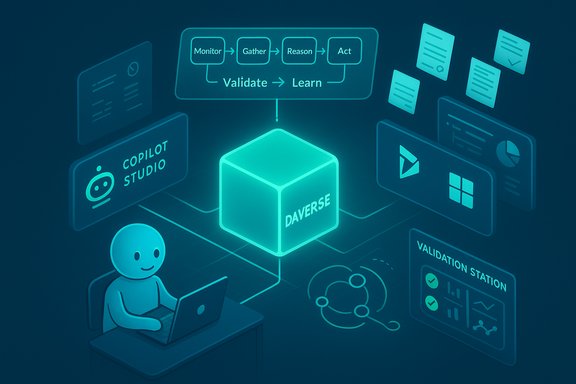
Agentic Copilot solutions combine three company-grade building blocks: Copilot Studio as the agent authoring and runtime environment; Power Platform / Dataverse as the state and integration substrate; and Dynamics 365 / Microsoft 365 as the business application surfaces where agents deliver value. Together they let teams rapidly compose agents that are both conversational and action‑capable — able to read records, synthesize context, call connectors or APIs, and write back results or trigger workflows. This architectural pattern converts systems of record into systems of action. Microsoft and partners are positioning this stack as enterprise‑grade for several reasons: (1) tenant‑scoped data grounding via Dataverse, (2) built‑in observability and validation tools in Copilot Studio, and (3) Power Platform connectors that minimize bespoke integration work. That makes agentic workflows accessible to both citizen makers and pro developers — but it also forces organizations to treat these agents as first‑class operational assets that require governance, monitoring, and lifecycle management. How agentic Copilot solutions work
The agent lifecycle — from trigger to outcome
A practical agent typically follows a repeatable lifecycle:- Monitor: watch for triggers — a new ticket, an incoming invoice, an SLA breach.
- Gather: collect context from Dataverse, Dynamics records, Microsoft Graph, or external APIs.
- Reason: use grounded prompts, knowledge indices, or specialized models to assess the situation.
- Validate: apply deterministic checks or human review (validation station) where risk is high.
- Act: update records, route work, generate documents, or start downstream flows.
- Learn: log outcomes and telemetry to tune prompts, thresholds, and error handling.
Key platform components and patterns
- Dataverse: acts as the agent’s knowledge and state store, providing schema, access control, and a centralized audit trail. Dataverse knowledge indexes both structured tables and unstructured content for real‑time reasoning.
- Copilot Studio: the low‑code/pro‑dev authoring surface that exposes tools (Model Context Protocol, agent flows, “computer use” for UI automation), prompt libraries, and validation stations. Agents created here can be published to Teams, web apps, or run as tenant services.
- Power Platform / Power Automate: provides deterministic flows, connectors, and environment governance. Many agents are implemented as hybrid flows: the LLM handles reasoning and text generation while Power Automate runs the deterministic orchestration and retries.
- Model Context Protocol (MCP) and tools: allow agents to call external knowledge servers, query Dataverse programmatically, and keep model prompts grounded in tenant data rather than hallucinating.
- Observability & Validation Station: prompt monitoring, run history, and human‑review screens are part of the recommended production pattern so every automated decision is traceable.
New capabilities to watch
- Document Processing Agents: prebuilt patterns for ingestion, classification, extraction, validation, and system write‑back (supports files up to 20MB and optimized throughput for production volumes). These agents reduce manual handoffs in invoicing, claims, and contract intake.
- Computer Use: agents can now simulate UI interactions — clicking menus, filling forms, navigating web pages — enabling automation where no API exists. This bridges the gap for legacy systems and vendor portals. The capability is similar to other vendor “operator” features but is embedded in Copilot Studio for enterprise orchestration.
Practical business workflows being automated today
The webinar and subsequent partner briefings present a set of repeatable, high‑value use cases where agentic Copilots are already delivering measurable impact.1) Ticket triage and routing
Agentic Copilots scan incoming tickets or emails, extract intent and urgency, enrich tickets with relevant CRM/ERP context, score priority, and route to the correct team or queue. They can auto‑assign SLAs and, for low‑risk requests, propose immediate replies that a human can approve. This reduces routing time and improves first‑touch resolution.2) Document ingestion and automated write‑back
Document Processing agents automate invoice extraction, contract clause recognition, and vendor statements. The typical flow is: monitor a mailbox or SharePoint folder → extract structured data with a multimodal model → present exceptions in a Validation Station → post approved entries to Dataverse or ERP. Customers report dramatic reductions in manual matching and reconciliation time when data quality upstream is addressed.3) Service and contact‑center orchestration
Customer service agents perform intent detection, draft suggested responses backed by the knowledge base, route to humans for complex cases, and run quality evaluation agents to score transcripts or responses. Organizations are using agents to reduce abandonment and improve routing accuracy while retaining human oversight for sensitive decisions.4) Reconciliation and finance automation
Account reconciliation agents can perform ledger matching, surface exceptions, and draft adjustment journal proposals that a finance analyst reviews. In pilots, teams have shifted from line‑by‑line matching to exception management, reducing the month‑end close burden significantly where source data is clean. These agents pair LLM reasoning with deterministic match rules and thresholds for auditability.5) Sales research and opportunity qualification
Prebuilt sales agents (Sales Research, Sales Qualification) gather account intelligence, prepare briefing notes and outreach drafts, and can even propose qualification actions. Microsoft has published benchmark artifacts for scored agent outputs in sales scenarios, and partners are shipping verticalized agents for common sales tasks.6) Field service and scheduling
Agents that evaluate resource constraints, propose dispatch plans, and produce order updates reduce manual scheduling toil; some demonstrators include visual Gantt comparisons and automated schedule locking to speed operational decisions.Where Copilot Studio + Power Platform fit in your AI roadmap
- Start with scope, not scale: pilot narrow, measurable processes where the agent can be safely validated (collections outreach, inbound supplier emails, single‑machine reconciliation). The partners in the webinar stressed run small, measure, iterate.
- Use Copilot Studio for agent design and Dataverse as the canonical store so data and actions are auditable.
- Treat connectors as the integration fabric; use Power Automate for deterministic flow and retries, and reserve agents for scenarios requiring natural‑language reasoning or multimodal extraction.
- Build governance up front: role‑based access, validation thresholds, a human‑in‑the‑loop policy catalog, and telemetry dashboards to measure agent accuracy and business outcomes.
Measured business value — what partners and customers report
Large enterprises piloting Copilot‑powered agents report consistent themes:- Time savings on repetitive tasks (examples: legal contract review hours reclaimed, reconciliation cycle reduction, faster case routing). Microsoft’s customer stories with Vodafone and Danone show multi‑hour weekly savings per user in information‑work tasks and broad rollouts to tens of thousands of seats as a next step.
- Higher throughput with fewer manual errors where agents are used for deterministic extraction and exception surfacing (invoice processing, payables queries).
- Better employee experience: staff spend less time on routine drafting and more on higher‑value exception handling and customer engagement.
- Cycle time reduction (e.g., days to process invoices → exceptions per day)
- First‑touch resolution uplift for service desks
- Time saved per knowledge worker (hours/week)
- Error rate reduction for reconciliations and posted transactions
Critical analysis — strengths, limitations, and operational risks
Strengths: why the approach is compelling
- Platform co‑design: Copilot Studio + Dataverse + Power Platform create a consistent substrate for context, identity, and telemetry, lowering integration friction for Microsoft‑centric enterprises.
- Speed of composition: low‑code authoring and prebuilt agent templates accelerate time‑to‑pilot and reduce pro‑dev dependency for common processes.
- Observability and governance features are baked into product patterns (validation stations, prompt libraries, run histories), which is critical for regulated environments.
Key risks and what to watch for
- Hallucinations & grounding failures: agents that are insufficiently grounded to authoritative data sources may generate plausible but incorrect outputs. Grounding via Dataverse, MCP, and strict validation is essential.
- Agent sprawl and privileged automation: when many teams spin up agents, risk surfaces multiply — excessive privileges, shadow automations, and inconsistent SLAs. Treat agents like software: inventory them, tie them to cost centers, and enforce least‑privilege.
- Data leakage and compliance: agents that access external connectors or "computer use" can create new data exfiltration paths if not tightly governed. Ensure tenant‑level policies, encryption, and explicit retention rules.
- Licensing & cost volatility: agentic usage consumes Copilot Credits (formerly “messages”); capacity planning is different from per‑user Copilot licensing and can be unpredictable without telemetry and budgets. Microsoft is shifting AI Builder to Copilot Credits and, as of late‑2025, introduced tenant‑pooled credits with some Premium SKUs — organizations should validate contractual terms and run cost pilots. These licensing details are vendor‑provided and should be validated with a Microsoft account team.
Engineering cautions
- Data quality is a gating factor: automated agents excel when upstream master data is clean. Agents accelerate processing but don’t fix systemic data problems — plan a parallel data hygiene program.
- Observability design up front: logging prompts, outputs, and decision rationales is essential for troubleshooting and regulatory needs. Many early adopters build a telemetry and retraining loop immediately.
- Human‑in‑the‑loop thresholds: design explicit confidence thresholds for autonomous actions, and instrument approvals as discrete, auditable events.
Implementation checklist — a practical, sequenced playbook
- Define the pilot outcome: choose a high‑frequency, moderate‑risk workflow with clear KPIs (e.g., reduce invoice processing time by X%).
- Assemble the team: business owner, Power Platform maker, Copilot Studio author, security/compliance lead, and an operations owner for monitoring.
- Prepare data: clean the relevant Dataverse tables, define schema, and set up access control.
- Build iteratively: start with a research‑only agent, measure accuracy, then enable write‑back to a sandboxed environment before production write operations.
- Add deterministic flow: implement Power Automate flows for retries, error handling, and transactionality.
- Instrument observability: log prompts, actions, and outcomes; set alerts for drift or error spikes.
- Run a controlled pilot: evaluate KPIs, adjust validation thresholds, document business process changes.
- Scale with guardrails: enforce agent registration, least privilege, budgeting for Copilot Credits, and change control processes.
Governance and safety: practical guardrails
- Catalog agents as identities with assigned owners and cost allocations.
- Enforce least‑privilege and explicit API scopes for connectors.
- Require Validation Stations for any write‑back that affects financial or compliance records.
- Maintain a prompt library and apply prompt monitoring to detect drift or prompt injection attempts.
- Schedule regular audit reviews and a retraining cadence based on telemetry.
Pricing and capacity — what CIOs need to know now
Agentic Copilots consume Copilot Credits for execution. Microsoft is transitioning AI Builder consumption to Copilot Credits and has begun packaging pooled Copilot Credits into some Dynamics 365 Premium SKUs starting late November 2025, which can materially affect operating models for agentic deployments. Organizations must forecast usage by agent type and include credit consumption estimates in pilot economics. Licensing updates and capacity models are vendor‑provided and should be validated directly with Microsoft or a trusted partner before large scale deployment.Real customer signals and partner roles
Large enterprises and system integrators are already packaging agent templates and industry accelerators. Customer stories from Vodafone and Danone highlight productivity wins when Copilot features are rolled out with disciplined change management and training; those real‑world wins are often paired with partner‑led integration, governance and adoption programs. Partners like JourneyTeam (featured in the webinar) help operationalize agents in Dynamics and Power Platform environments, bringing playbooks for readiness and governance.Final assessment — when agentic Copilots make sense
Agentic Copilot solutions represent a pragmatic next step in enterprise automation: they combine the language and reasoning advantages of LLMs with deterministic, connector‑based automation and a governed data fabric. The highest probability of success comes when organizations:- Start with narrow, high‑value workflows where outputs are easily validated.
- Invest in data quality and deterministic flows to reduce hallucination risk.
- Treat agents as first‑class IT assets with owner accountability, telemetry, and budgeted Copilot Credits.
- Use Copilot Studio for rapid iteration and Power Platform for deterministic orchestration and governance.
In sum, agentic Copilot solutions — when built on Copilot Studio, Dataverse and Power Platform, and managed with governance and observability — can automate complex business workflows that previously required heavy manual effort. The technical foundations are maturing quickly (document processors, computer‑use automations, agent flows), and early adopters are reporting measurable operational gains. The caveat is straightforward: these systems demand the same rigour as any production software delivery — disciplined data hygiene, explicit human‑in‑the‑loop policies, and careful capacity planning to convert potential into sustained, auditable value.
Source: MSDynamicsWorld.com How Agentic Copilot Solutions are Automating Real Business Workflows
