

Microsoft’s blunt claim that Windows is “evolving into an agentic OS” is more than marketing puffery — it describes a deliberate platform redesign that elevates AI from an add‑on assistant to a first‑class system component that can reason, plan, and act across apps, files, and services on your behalf. The company has already shipped preview primitives — Copilot Actions, a contained Agent Workspace, and native support for the Model Context Protocol (MCP) — and it is tying those primitives to a new hardware tier, Copilot+ PCs, that emphasizes on‑device NPUs for low‑latency, private inference. This article unpacks what “agentic OS” really means for Windows users and administrators, verifies the technical claims Microsoft and partners are making, and weighs the productivity upside against the privacy, security, and UX risks that follow.
Whether the agentic model becomes a universal good for Windows users depends on three things: governance, clarity, and humility in design. Governance must make agent access auditable and revocable; clarity must demystify telemetry and data use; and humility must keep the OS helpful rather than bossy. If Microsoft and the wider ecosystem get those disciplines right, agentic features will deliver meaningful automation for complex tasks, especially in enterprise settings. If they get it wrong, users will experience new attack surfaces, confusing prompts, and the same kind of reliability frustrations that fueled the initial backlash.
Treat the current previews as an invitation to evaluate, test, and build guardrails — not as an unavoidable enforcement. For admins, that means policy planning and forensic readiness. For consumers, that means cautious opt‑in, careful attention to permissions, and a skeptical eye toward any feature that promises to “do everything for you” without transparent controls. The agentic OS promises convenience; the question for Windows’ future is whether it will deliver convenience without surrendering control.
Source: How-To Geek What an 'agentic OS' really means for Windows
 Background / Overview
What is an “agentic OS” in plain terms?
An agentic operating system is an OS where autonomous AI agents are treated as first‑class runtime entities: they hold context across sessions, break down high‑level goals into multi‑step plans, call system and app tools, and execute actions — not just offer suggestions. Rather than waiting for a human click or keystroke, these agents can proactively perform sequences of tasks when given permission. That shift turns the OS from a passive orchestrator of installed software into an active manager of goals and workflows.What makes an AI component an “agent”?
An AI agent differs from a standard chatbot in three defining ways:- Autonomy — it can take multi‑step action without step‑by‑step human input.
- Planning & reasoning — it decomposes a complex goal into sub‑tasks and chooses tools for each step.
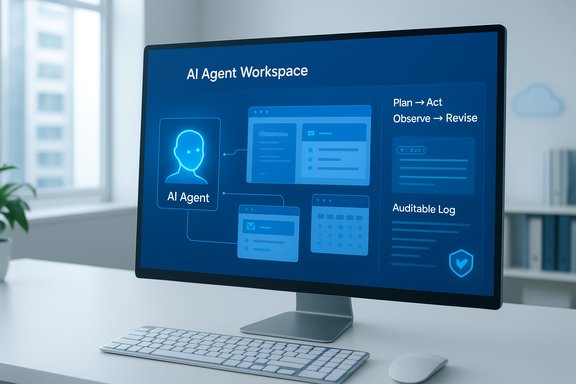
- Observation & adaptation — it checks outcomes, reflects, and adjusts the plan until the goal is met.
Microsoft’s Agentic Windows: The Building Blocks
Microsoft’s public materials and Insider previews consistently point to three architectural primitives at the heart of its agentic vision: Copilot Actions, Model Context Protocol (MCP) support, and the Agent Workspace. Each tackles a distinct engineering challenge that must be solved for agents to be useful and (relatively) safe.Copilot Actions: agents that do, not just advise
Copilot Actions is the user‑facing automation layer: you describe an outcome in natural language (text or voice), and the agent translates that into a sequence of interactions — opening apps, extracting data, editing files, or filling web forms — and executes them inside a contained environment. Early previews show Actions surfacing as visible, interruptible runs rather than silent background daemons. That visual grounding is intended to preserve user oversight while enabling genuine task automation.Model Context Protocol (MCP): the agent-to-tool plumbing
The Model Context Protocol (MCP) is an open standard first publicized by Anthropic that standardizes how models discover and call external tools, data sources, and connectors. Microsoft is integrating MCP into Windows so agents can request structured context from apps (for example, “list files in this folder”) instead of resorting to brittle screen‑scraping or OCR. MCP is already documented by Anthropic and has been adopted across multiple vendors as a common connector model — it’s the engineering answer to the “how do agents talk to apps?” problem.Agent Workspace: containment and identity
The Agent Workspace is Microsoft’s containment model: a lightweight, sandboxed desktop session where each agent runs under its own dedicated Windows account (an agent identity). That separation provides distinct access controls, logging, and an auditable trail of agent actions. In Windows Insider builds the feature is gated behind an experimental toggle and agents run in parallel with the user’s main session so tasks are visible and interruptible. This is Microsoft’s attempt to reconcile agent autonomy with system governance.Copilot+ PCs and the NPU floor
Microsoft is tying the richest on‑device agent experiences to a new device class called Copilot+ PCs, which include high‑performance NPUs rated at 40+ TOPS (trillions of operations per second). The practical claim: on‑device small models running on an NPU reduce latency and improve privacy by keeping more inference local, while cloud models handle heavier reasoning. Microsoft’s product pages and partner guidance explicitly reference the 40+ TOPS baseline as the performance envelope for premium on‑device features.The Mechanics: How Agents Will Actually Operate on Windows
Discovery and connectors
Under the MCP model, apps and system services expose MCP servers (connectors) that list available actions and provide structured context (for example: file listings, calendar events, or a document’s text). An agent discovers available MCP servers via a registry and requests specific data or action hooks. This avoids the error‑prone approach of using vision to parse UI elements and provides a standardized, auditable interface for agents to call tools. Microsoft’s File Explorer and Settings apps are early MCP connector candidates in previews.Isolation, accounts, and auditable actions
Each agent runs under its own standard (non‑admin) Windows account, which enables:- Distinct ACLs and audit trails for agent activity.
- Policy application via Intune/MDM to agent identities.
- Revocation and digital signing of agents so admins can block or revoke untrusted agents.
Multimodal inputs: voice and vision
Agentic Windows is explicitly multimodal. Microsoft’s previewed features include wake‑word voice activation (“Hey, Copilot”) with a local spotter for privacy, and Copilot Vision, a screen‑awareness capability that can analyze selected windows or desktop regions with explicit consent. Vision reduces friction for agents that need UI context but also significantly increases the sensitivity of the threat model: when the OS can “see” your screen, the stakes for misconfiguration or exploitation are higher. Microsoft positions these inputs as opt‑in and session‑bound in initial previews.Concrete Examples: What Agents Could Do for You
To make the concept concrete, here are a few plausible agent workflows that Microsoft demos or independent previews describe:- File triage and reorganization: describe how you want your Downloads folder sorted; an agent extracts file metadata, groups by type and date, creates Archive and Current folders, and moves files accordingly — all executed inside an Agent Workspace so you can watch and stop the run.
- Meeting preparation: “Prepare my Friday meeting pack” — agent gathers relevant emails, exports attachments, converts a slide deck to speaker notes, composes a summary email and attaches files, and leaves a visible log of every step taken.
- Form automation: agents can fill multi‑page web forms by programmatically navigating pages, populating fields, and submitting, while surfacing progress and requiring confirmation for sensitive operations.
Strengths: Why an Agentic OS Could Matter
- Reduced friction for multi‑step workflows. Agents can condense hours of repetitive clicking and cross‑app copying into a single natural‑language command.
- Consistent, system‑level permissioning and auditability. By baking agent identities and connectors into the OS, Microsoft can offer centralized policy controls that are familiar to IT admins (ACLs, Intune policies, revocation).
- Better privacy/latency through hybrid compute. On‑device NPUs can perform many inference steps locally, sending only minimal context to the cloud — a balance that addresses latency and some privacy concerns when implemented correctly.
- A platform for third‑party agent innovation. MCP creates a standard that third‑party apps and enterprise systems can adopt to safely expose actions to agents without brittle, per‑integration hacks.
Risks and Downsides: What Keeps Privacy and Security Experts Up at Night
While the engineering answers are sophisticated, the model also introduces new risk classes:1) Expanded attack surface and privilege escalation
Agents that can interact with UIs, read files, and call connectors create new high‑value targets. Compromise of an agent or an MCP server could enable an attacker to move laterally, exfiltrate data, or perform destructive operations under an agent identity that may be trusted by the OS. Security teams must harden agent signing, runtime isolation, and kernel‑level guards.2) Data exfiltration and telemetry ambiguity
When agents access local files or analyze screen content, users and admins legitimately ask: what data is transmitted off‑device, and could it be used to train models? Microsoft emphasizes opt‑in defaults and local spotters, but the technical reality is a spectrum: some flows will inevitably require cloud enrichment. Clarity on telemetry, retention, and model‑training policies is non‑negotiable. Early public skepticism was driven by past privacy controversies with features that took screenshots or logged context.3) Unwanted initiative and UX noise
A proactive OS that offers automations can easily become noisy and distracting. Users already complain about product upsell and persistent prompts; an agentic OS that surfaces constant suggestions or automatic background actions risks interrupting workflows more than helping them. The user experience challenge is to be helpful while remaining unobtrusive — a deceptively hard balance.4) Operational complexity for admins and developers
For IT and dev teams, deterministic systems are easier to troubleshoot. Autonomous agents introduce non‑determinism and new failure modes: race conditions with user tasks, unexpected system changes, or interactions with custom dev workflows. Organizations will need new logging, debugging, and rollback tools for agent activity.Evidence & Verification: Which Claims Are Verifiable Today
It is important to separate PR soundbites from documented engineering changes. Several core elements are verifiable:- Microsoft has publicly described Copilot Actions, Agent Workspace, and the Experimental agentic features toggle in Windows Insider builds — these primitives are shipping in preview channels.
- Anthropic’s MCP documentation is public and explains how agents can connect to tool servers; MCP is being adopted widely and is integrated into vendor tooling.
- Microsoft’s Copilot+ PC guidance explicitly cites NPUs capable of 40+ TOPS as the baseline for premium on‑device experiences. That hardware floor is documented on Microsoft’s Copilot+ pages.
- Predictions like “keyboards and mice becoming secondary by 2030” are aspirational framing from product vision documents and should be treated as strategy rather than near‑term inevitability. When vendors make multi‑year visions, the roadmap is subject to product, market, and regulatory change; treat such claims as directional. If a specific timeline or capability is critical to your planning, verify the current product roadmap at the time of procurement.
Enterprise vs Consumer Value: Where Agentic Windows Makes Sense
- Enterprise scenarios are the strongest early fit: standardized agent identities, MCP connectors to corporate systems, audit logs, and policy controls provide a compelling automation model for regulated workflows and IT‑managed endpoints. Enterprises already accept a higher baseline of managed features and can require agent signing and governance.
- For mainstream consumers, the calculus is different. Many users gain little from system‑level agents and may view them as intrusive or confusing. Hardware stratification (Copilot+ vs non‑Copilot devices) also creates an experience divide: the full on‑device benefits require specific NPUs, leaving older devices to rely on cloud fallbacks. The result is a heterogeneous landscape of capabilities that may frustrate users who expect parity across Windows devices.
Practical Guidance: How to Prepare and Protect Your Windows Devices
For power users and administrators who want to try agentic features safely, follow these practical steps:- Know the toggle: In Insider builds the agent primitives are gated under Settings → System → AI components → Agent tools → Experimental agentic features. Keep this off by default on production endpoints until governance is in place.
- Treat agents like principals: Implement signing, allow‑listing, and revocation policies for agent binaries and MCP connectors. Use MDM/Intune to manage agent account provisioning and permissions.
- Scope connector access: Limit MCP server exposure to the minimum needed (known folders, specific apps) and require explicit admin approval for enterprise connectors.
- Audit and monitor: Collect logs for agent actions and build playbooks to trace and revert agent changes. Visibility into agent activity is the single most important control for trust.
- Evaluate hardware needs: If on‑device privacy or latency is essential, verify Copilot+ NPU specs (40+ TOPS guidance) before procurement; otherwise expect hybrid cloud fallbacks.
What to Watch Next (and Where Microsoft Still Needs Work)
- Clarity on telemetry and training: vendors must publish explicit policies on whether agent‑collected data can be used for model training, how long it’s retained, and what opt‑out controls exist.
- Hardened MCP governance: MCP is powerful but becomes dangerous without strict authentication, authorization, and auditing for connectors.
- Developer tools for deterministic automation: robust debugging, stepwise execution logs, and safe test harnesses will be essential to prevent agent‑induced regressions in complex environments.
- UX tuning to avoid “assistive spam”: the product challenge is to make agents reliably helpful without becoming a constant source of interrupts and prompts. Early public backlash shows Microsoft still needs to earn user trust on UX and reliability.
Conclusion: A Pragmatic Verdict
The agentic OS is not a fantasy — the technical pieces are already being assembled and previewed: Copilot Actions, Agent Workspace, and MCP‑based connectors are concrete primitives under test in Windows Insider channels, and Microsoft’s Copilot+ hardware guidance ties a feasible on‑device model to specific NPU performance targets. Those are engineering facts you can verify today.Whether the agentic model becomes a universal good for Windows users depends on three things: governance, clarity, and humility in design. Governance must make agent access auditable and revocable; clarity must demystify telemetry and data use; and humility must keep the OS helpful rather than bossy. If Microsoft and the wider ecosystem get those disciplines right, agentic features will deliver meaningful automation for complex tasks, especially in enterprise settings. If they get it wrong, users will experience new attack surfaces, confusing prompts, and the same kind of reliability frustrations that fueled the initial backlash.
Treat the current previews as an invitation to evaluate, test, and build guardrails — not as an unavoidable enforcement. For admins, that means policy planning and forensic readiness. For consumers, that means cautious opt‑in, careful attention to permissions, and a skeptical eye toward any feature that promises to “do everything for you” without transparent controls. The agentic OS promises convenience; the question for Windows’ future is whether it will deliver convenience without surrendering control.
Source: How-To Geek What an 'agentic OS' really means for Windows
