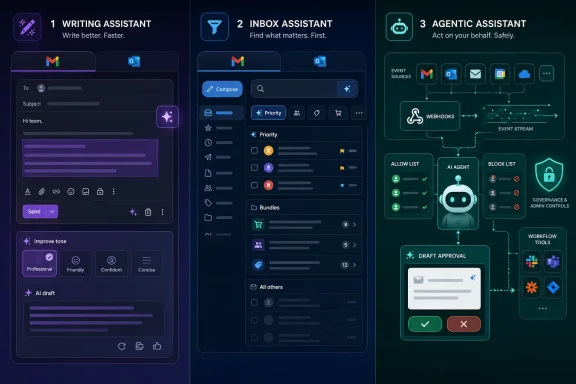
As of June 12, 2026, the AI email assistant market has split into writing tools, smart inbox clients, cleanup services, Microsoft and Google suite features, and newer agentic email infrastructure that turns incoming mail into triggers for automated workflows. The headline is not that email now has AI sprinkled on top. It is that vendors are quietly redefining what an inbox is for. Some still see email as a place where humans write faster; others now treat it as an event stream for machines.
That distinction matters because “AI email assistant” has become a suspiciously elastic phrase. It can mean a button that rewrites a stiff reply, a client that summarizes a 37-message thread, a filter that hides newsletters, or a webhook-ready mailbox designed to kick off an AI agent. Put those products in one ranked list and you get a useful buying guide; put them under a microscope and you get a map of where workplace software is headed.
For two decades, email clients competed on speed, storage, search, spam filtering, and mobile sync. Gmail made search the center of consumer email. Outlook made email the front door to calendar, identity, compliance, and enterprise workflow. Apple Mail, Thunderbird, and dozens of smaller clients mostly fought over taste and ergonomics.
AI changes the battleground because the inbox is no longer just a destination. It is a source of context, a place where customers make requests, contracts drift toward approval, hiring loops move, invoices arrive, calendar conflicts surface, and internal decisions become visible. If an assistant can read, summarize, classify, draft, and trigger action from that stream, email stops being merely a productivity problem and becomes an automation substrate.
That is why a list containing Gemini in Gmail, Microsoft Copilot for Outlook, Superhuman, Shortwave, SaneBox, Spark, Lindy, Fyxer, MailMaestro, and Hostinger Agentic Mail is more interesting than it first appears. These products are not all doing the same job. They are competing over which layer of email intelligence matters most: the writing layer, the attention layer, the workflow layer, or the infrastructure layer.
The user-facing pitch is simple: spend less time in email. The strategic pitch is sharper: whoever controls the assistant that reads your inbox may also control the next action your business takes.
Google’s advantage is that Gmail already owns the habits of hundreds of millions of users, and Workspace ties email to Docs, Drive, Calendar, Meet, and Chat. Gemini’s email features make most sense when they draw on that surrounding context. A draft can refer to a document. A summary can compress a sprawling thread. A search-style prompt can ask the inbox for an answer rather than a keyword match.
Microsoft’s version of the same play runs through Outlook and Microsoft Graph. Copilot is not just an Outlook add-on; it is part of the broader Microsoft 365 fabric, with access to documents, meetings, chats, calendars, and organizational context where permissions allow. In enterprise environments, that matters more than clever copywriting. The assistant’s value comes from knowing the work graph around the message.
This is also where IT departments should pause. Built-in AI feels safer because it comes from the vendor already entrusted with the tenant, identity stack, and compliance controls. But that convenience can blur the practical question: what exactly is the model allowed to see, summarize, retain, or infer? The fact that AI is native does not eliminate governance work. It merely moves that work into existing admin consoles, licensing agreements, and data boundary settings.
For ordinary users, though, the suite-native assistants are hard to beat. If all you want is a cleaner draft, a quick summary, or a better way to ask “what did this customer decide last month,” Gemini and Copilot are obvious first stops. They are not the most adventurous tools in the field. They are the default future arriving through the software people already open every morning.
Superhuman’s brand has always been built around velocity. The keyboard-first interface, split inbox, reminders, fast triage, and polished interaction model appeal to executives, founders, investors, sales teams, and anyone else who processes email as a high-volume operational task. AI drafting and summaries extend that thesis rather than replacing it. The point is not to marvel at generated prose; the point is to shave seconds or minutes from every email decision.
That also makes Superhuman expensive in a way that is both rational and limiting. A premium email client only makes sense if email is genuinely expensive for you. If your inbox is a light daily chore, paying a premium on top of Gmail or Outlook is a hard sell. If your inbox is where deals, hiring, support escalations, investor updates, and customer relationships move, the economics look different.
Shortwave is more interesting on search and comprehension. Its natural-language search pitch is the one Gmail should have fully owned years ago: ask for the meaning of something, not the exact words. “What did Marcus say about the contract renewal in October?” is the kind of query that exposes how crude classic email search can feel. AI search turns old correspondence into a retrievable institutional memory.
But Shortwave is also narrower. Its Gmail focus is a strength for users living in that world and a nonstarter for Outlook-heavy organizations. It is less an enterprise email platform than an AI-first rethinking of Gmail for people who want summaries, bundles, task extraction, and search that understands intent. In the broader market, that makes it a specialist rather than a universal answer.
That is still a real problem. Newsletters, notifications, marketing messages, receipts, automated alerts, status updates, and low-value threads can bury the messages that require human judgment. SaneBox works by learning behavior and filtering lower-priority mail into places like SaneLater, while reminders and digest features help keep the important leftovers from disappearing.
The distinction between behavioral filtering and generative AI matters. SaneBox may be marketed in the same broad AI productivity universe, but it is not trying to be a writing partner. It is closer to an attention firewall. For some users, that is more valuable than yet another compose assistant.
There is a lesson here for the rest of the market: inbox intelligence is not synonymous with content generation. A system that prevents you from seeing 200 unnecessary messages may save more time than a system that rewrites five replies beautifully. The glamour is in generation, but the practical value is often in subtraction.
Spark’s strength is breadth. It supports multiple providers, including Gmail, Outlook, Exchange, iCloud, and IMAP accounts, and it wraps email composition, smart inbox organization, cross-platform access, and team collaboration into one client. That makes it attractive for users who have one foot in personal mail, one in company mail, and another in team coordination.
The collaboration angle is important. Email is often treated as individual overload, but many workplace inbox problems are team problems wearing an individual costume. Shared drafts, private comments, delegation, and internal coordination reduce the ugly habit of forwarding customer messages around with “thoughts?” attached. AI writing helps, but workflow hygiene helps more.
Fyxer takes a more assistant-like approach. Its pitch is that it learns your writing style, drafts replies, triages messages, tracks follow-ups, and ties email to meeting notes. That last piece is crucial. Many “email problems” actually begin before the email is sent: unclear meetings, missing action items, and follow-up obligations that never make it into a clean system.
The trade-off is control and fit. Fixed categories, AI labeling mistakes, and the cost of a premium assistant can frustrate users whose workflows do not match the product’s assumptions. But for busy professionals whose inbox and meeting calendar are intertwined, Fyxer’s model reflects reality better than a pure writing assistant does.
Many workers do not need a new client. They do not need automation infrastructure. They do not need a premium keyboard-driven interface. They need to turn a rough thought into a tactful email, shorten a rambling reply, adjust tone, summarize a thread, or communicate across languages without sounding careless.
That is where focused writing tools remain relevant even as Google and Microsoft bundle AI into their suites. Specialization can still matter. Support for multiple languages, saved writing patterns, tone controls, attachment or thread summaries, and privacy-oriented features such as personal data anonymization are meaningful differentiators if the built-in assistant feels too generic.
The risk for MailMaestro and similar products is platform squeeze. When Gmail and Outlook users already see AI compose features in the product they use every day, a third-party writing assistant must be clearly better, safer, more configurable, or more pleasant. “Also writes email” is not enough anymore.
Still, the existence of MailMaestro points to a durable truth: writing remains the most visible pain point in email. People judge professionalism through email tone, timing, clarity, and brevity. Even if the infrastructure layer becomes more exciting, a large share of the market will continue buying tools that make them sound more competent in less time.
Lindy is an agent platform that includes email among its channels. A user can describe a workflow in natural language, connect services, and build an assistant that triages messages, schedules meetings, updates systems, drafts follow-ups, and chains actions together. Its value is not the inbox interface. Its value is orchestration.
Hostinger Agentic Mail is more infrastructural. Instead of selling a smarter human inbox, it exposes hosted mailboxes to automation tools and agents through mechanisms such as webhooks and controlled sending lists. When an email arrives, connected tools can be notified immediately, avoiding the polling-and-checking pattern that has long made email automation feel bolted on.
That distinction is subtle but important. Lindy is the layer where agent logic lives. Agentic Mail is the email layer that can feed such logic more cleanly. One is the assistant; the other is the mailbox infrastructure that makes assistants less awkward to connect.
For developers, AI builders, and automation-heavy teams, this is where email becomes newly interesting. A customer message can trigger a workflow in n8n, Make, Zapier, LangChain, or another orchestration tool. A support mailbox can route tickets. A lead qualification agent can inspect inbound mail, enrich context, and pass qualified messages to sales. A procurement process can begin from an invoice arriving in a dedicated mailbox.
The promise is powerful, but so is the risk. Once email becomes machine-actionable, mistakes scale faster. Allow lists, block lists, isolated mailboxes per agent, human approval steps, rate limits, audit trails, and clear ownership become essential. The old danger was missing an email. The new danger is an automated system confidently doing the wrong thing because it misunderstood one.
At the low end, SaneBox-style filtering can be priced as a utility. It removes clutter and works behind the scenes without demanding that users rewire their day. That makes it easier to justify for individuals who want relief but not transformation.
Midrange tools such as MailMaestro, Spark, and Shortwave ask users to pay for better writing, better organization, better search, or multi-account productivity. These are not throwaway subscriptions, but they are still priced for professionals and small teams rather than only executives.
Superhuman and Fyxer move into premium territory because they sell time back to people whose time is expensive. This is the logic of executive productivity software: if the tool saves even a few hours per month for a founder, salesperson, consultant, or manager, the subscription can be rational. If it does not, the same price looks absurd.
Microsoft Copilot and Gemini complicate the comparison because their real cost is bundled into broader ecosystems. Copilot is not just an Outlook feature; it is an add-on to a Microsoft 365 licensing relationship. Gemini’s value depends heavily on whether the user already lives in Gmail and Workspace or pays for Google’s AI plans. The assistant is priced less like a standalone tool and more like an ecosystem upgrade.
Agentic tools follow still another logic. Their value is not “how many minutes did this save while writing?” but “what workflow can now run without a person checking a mailbox?” That can be worth very little for a solo user and a great deal for a business with repeatable inbound processes.
That does not mean these tools are inherently unsafe. It means the risk model must be explicit. Users and administrators should ask what data the tool accesses, whether messages are used for model training, how third-party processors are involved, how long content is retained, what controls exist for admins, and whether sensitive details can be anonymized before being processed.
The built-in assistants have an advantage here because they sit inside existing Google or Microsoft trust frameworks. Enterprises may prefer to extend an existing vendor relationship rather than approve a new mailbox-reading service. But large-platform trust is not the same as zero risk. Misconfiguration, overbroad permissions, and user misunderstanding remain live issues.
Third-party tools must work harder to earn confidence. That is especially true for tools that draft in a user’s personal style or search across historical messages. The more useful the assistant becomes, the more intimate its access tends to be. Convenience and exposure rise together.
The agentic layer raises the stakes again. A writing assistant may produce a bad draft that a human catches before sending. An automated workflow may classify, forward, trigger, update, or respond before anyone notices the premise was wrong. For business users, human approval workflows are not a nicety; they are a control boundary.
If writing is the bottleneck, a focused drafting assistant or built-in suite AI will likely help fastest. Gemini, Copilot, and MailMaestro all address the blank-page problem and the tone problem without requiring users to change how email is fundamentally handled.
If search and comprehension are the bottlenecks, Shortwave and Superhuman’s summarization features become more compelling. Long threads, forgotten context, and vague memory are exactly where natural-language search and thread summaries feel like magic when they work.
If attention is the bottleneck, SaneBox may beat flashier tools. Hiding the wrong mail is often more useful than generating more text. Smart filtering is not glamorous, but neither is missing a client email because it sat between a coupon and an automated status alert.
If coordination is the bottleneck, Spark and Fyxer have stronger claims. They recognize that email overlaps with teams, meetings, shared responses, delegation, and follow-up. That makes them more realistic for users whose inbox is a social system, not just a personal queue.
If automation is the bottleneck, the writing assistants are the wrong category. Lindy and Agentic Mail point toward workflows where email is an event source, not a screen to stare at. That is the most important dividing line in the market.
Most products occupy more than one layer, but none occupies all of them perfectly. Google and Microsoft dominate the suite and identity layers. Superhuman and Shortwave compete on the client experience. MailMaestro specializes in composition. SaneBox specializes in filtering. Spark and Fyxer blend client productivity with assistant-like behavior. Lindy and Agentic Mail move toward automation and agent infrastructure.
That stack view is useful because it prevents bad comparisons. Asking whether SaneBox is “better” than Copilot is not a serious question unless the user’s problem is defined. One hides distractions; the other drafts and summarizes within a productivity suite. Asking whether Agentic Mail is “better” than Superhuman is equally misplaced. One is infrastructure for automation; the other is a premium human email client.
The more serious question is which layers will collapse into the platforms. Google and Microsoft will keep absorbing generic drafting, summarization, proofreading, and search. That puts pressure on standalone assistants that do not offer a strong reason to exist outside those ecosystems. The defensible products will either be sharply better at a specific workflow or sit in a layer the platforms do not fully serve.
Agentic email may be one of those layers. Microsoft and Google can certainly build automation hooks, and in many enterprise environments they already provide workflow capabilities through Power Automate, Apps Script, APIs, and ecosystem integrations. But developer-oriented, mailbox-specific infrastructure for AI agents is still young enough that smaller players can shape expectations.
That distinction matters because “AI email assistant” has become a suspiciously elastic phrase. It can mean a button that rewrites a stiff reply, a client that summarizes a 37-message thread, a filter that hides newsletters, or a webhook-ready mailbox designed to kick off an AI agent. Put those products in one ranked list and you get a useful buying guide; put them under a microscope and you get a map of where workplace software is headed.
 The Inbox Is Becoming a Control Plane
For two decades, email clients competed on speed, storage, search, spam filtering, and mobile sync. Gmail made search the center of consumer email. Outlook made email the front door to calendar, identity, compliance, and enterprise workflow. Apple Mail, Thunderbird, and dozens of smaller clients mostly fought over taste and ergonomics.AI changes the battleground because the inbox is no longer just a destination. It is a source of context, a place where customers make requests, contracts drift toward approval, hiring loops move, invoices arrive, calendar conflicts surface, and internal decisions become visible. If an assistant can read, summarize, classify, draft, and trigger action from that stream, email stops being merely a productivity problem and becomes an automation substrate.
That is why a list containing Gemini in Gmail, Microsoft Copilot for Outlook, Superhuman, Shortwave, SaneBox, Spark, Lindy, Fyxer, MailMaestro, and Hostinger Agentic Mail is more interesting than it first appears. These products are not all doing the same job. They are competing over which layer of email intelligence matters most: the writing layer, the attention layer, the workflow layer, or the infrastructure layer.
The user-facing pitch is simple: spend less time in email. The strategic pitch is sharper: whoever controls the assistant that reads your inbox may also control the next action your business takes.
Google and Microsoft Want AI Email to Feel Inevitable
Gemini in Gmail and Microsoft Copilot for Outlook are the least surprising products in this category and, for many users, the most important. They are not winning because they are necessarily the most flexible or imaginative. They are winning distribution.Google’s advantage is that Gmail already owns the habits of hundreds of millions of users, and Workspace ties email to Docs, Drive, Calendar, Meet, and Chat. Gemini’s email features make most sense when they draw on that surrounding context. A draft can refer to a document. A summary can compress a sprawling thread. A search-style prompt can ask the inbox for an answer rather than a keyword match.
Microsoft’s version of the same play runs through Outlook and Microsoft Graph. Copilot is not just an Outlook add-on; it is part of the broader Microsoft 365 fabric, with access to documents, meetings, chats, calendars, and organizational context where permissions allow. In enterprise environments, that matters more than clever copywriting. The assistant’s value comes from knowing the work graph around the message.
This is also where IT departments should pause. Built-in AI feels safer because it comes from the vendor already entrusted with the tenant, identity stack, and compliance controls. But that convenience can blur the practical question: what exactly is the model allowed to see, summarize, retain, or infer? The fact that AI is native does not eliminate governance work. It merely moves that work into existing admin consoles, licensing agreements, and data boundary settings.
For ordinary users, though, the suite-native assistants are hard to beat. If all you want is a cleaner draft, a quick summary, or a better way to ask “what did this customer decide last month,” Gemini and Copilot are obvious first stops. They are not the most adventurous tools in the field. They are the default future arriving through the software people already open every morning.
Superhuman and Shortwave Sell Speed to People Who Already Know Email Is Broken
Superhuman and Shortwave approach the inbox from a different angle. They assume the problem is not merely that users need AI writing help. The problem is that conventional email clients are too slow, too noisy, and too dependent on human memory.Superhuman’s brand has always been built around velocity. The keyboard-first interface, split inbox, reminders, fast triage, and polished interaction model appeal to executives, founders, investors, sales teams, and anyone else who processes email as a high-volume operational task. AI drafting and summaries extend that thesis rather than replacing it. The point is not to marvel at generated prose; the point is to shave seconds or minutes from every email decision.
That also makes Superhuman expensive in a way that is both rational and limiting. A premium email client only makes sense if email is genuinely expensive for you. If your inbox is a light daily chore, paying a premium on top of Gmail or Outlook is a hard sell. If your inbox is where deals, hiring, support escalations, investor updates, and customer relationships move, the economics look different.
Shortwave is more interesting on search and comprehension. Its natural-language search pitch is the one Gmail should have fully owned years ago: ask for the meaning of something, not the exact words. “What did Marcus say about the contract renewal in October?” is the kind of query that exposes how crude classic email search can feel. AI search turns old correspondence into a retrievable institutional memory.
But Shortwave is also narrower. Its Gmail focus is a strength for users living in that world and a nonstarter for Outlook-heavy organizations. It is less an enterprise email platform than an AI-first rethinking of Gmail for people who want summaries, bundles, task extraction, and search that understands intent. In the broader market, that makes it a specialist rather than a universal answer.
SaneBox Proves That Not Every Useful AI Tool Needs to Generate Text
SaneBox is the category’s useful corrective. It does not need to write a persuasive reply or impersonate your tone to earn its keep. Its central claim is older and more humble: your inbox is broken because too many unimportant messages reach the same visual priority as important ones.That is still a real problem. Newsletters, notifications, marketing messages, receipts, automated alerts, status updates, and low-value threads can bury the messages that require human judgment. SaneBox works by learning behavior and filtering lower-priority mail into places like SaneLater, while reminders and digest features help keep the important leftovers from disappearing.
The distinction between behavioral filtering and generative AI matters. SaneBox may be marketed in the same broad AI productivity universe, but it is not trying to be a writing partner. It is closer to an attention firewall. For some users, that is more valuable than yet another compose assistant.
There is a lesson here for the rest of the market: inbox intelligence is not synonymous with content generation. A system that prevents you from seeing 200 unnecessary messages may save more time than a system that rewrites five replies beautifully. The glamour is in generation, but the practical value is often in subtraction.
Spark and Fyxer Aim at the Working Day, Not Just the Message
Spark and Fyxer sit in the middle ground between classic email clients and AI executive assistants. They do not merely add a writing pane, but they also do not ask every customer to design agentic workflows. Their appeal is day-to-day productivity for people juggling multiple accounts, teams, meetings, and follow-ups.Spark’s strength is breadth. It supports multiple providers, including Gmail, Outlook, Exchange, iCloud, and IMAP accounts, and it wraps email composition, smart inbox organization, cross-platform access, and team collaboration into one client. That makes it attractive for users who have one foot in personal mail, one in company mail, and another in team coordination.
The collaboration angle is important. Email is often treated as individual overload, but many workplace inbox problems are team problems wearing an individual costume. Shared drafts, private comments, delegation, and internal coordination reduce the ugly habit of forwarding customer messages around with “thoughts?” attached. AI writing helps, but workflow hygiene helps more.
Fyxer takes a more assistant-like approach. Its pitch is that it learns your writing style, drafts replies, triages messages, tracks follow-ups, and ties email to meeting notes. That last piece is crucial. Many “email problems” actually begin before the email is sent: unclear meetings, missing action items, and follow-up obligations that never make it into a clean system.
The trade-off is control and fit. Fixed categories, AI labeling mistakes, and the cost of a premium assistant can frustrate users whose workflows do not match the product’s assumptions. But for busy professionals whose inbox and meeting calendar are intertwined, Fyxer’s model reflects reality better than a pure writing assistant does.
MailMaestro Is the Honest Specialist in a Market Full of Platforms
MailMaestro has a simpler proposition: it helps users write better professional emails inside Gmail or Outlook. That sounds modest compared with agentic workflows and semantic inbox search, but modesty is a virtue when the buyer’s problem is narrow.Many workers do not need a new client. They do not need automation infrastructure. They do not need a premium keyboard-driven interface. They need to turn a rough thought into a tactful email, shorten a rambling reply, adjust tone, summarize a thread, or communicate across languages without sounding careless.
That is where focused writing tools remain relevant even as Google and Microsoft bundle AI into their suites. Specialization can still matter. Support for multiple languages, saved writing patterns, tone controls, attachment or thread summaries, and privacy-oriented features such as personal data anonymization are meaningful differentiators if the built-in assistant feels too generic.
The risk for MailMaestro and similar products is platform squeeze. When Gmail and Outlook users already see AI compose features in the product they use every day, a third-party writing assistant must be clearly better, safer, more configurable, or more pleasant. “Also writes email” is not enough anymore.
Still, the existence of MailMaestro points to a durable truth: writing remains the most visible pain point in email. People judge professionalism through email tone, timing, clarity, and brevity. Even if the infrastructure layer becomes more exciting, a large share of the market will continue buying tools that make them sound more competent in less time.
Lindy and Agentic Mail Show Where the Category Is Really Going
The most consequential split in this market is between AI that helps a person handle email and AI that treats email as input for a broader system. Lindy and Hostinger Agentic Mail sit on that frontier, though from opposite sides.Lindy is an agent platform that includes email among its channels. A user can describe a workflow in natural language, connect services, and build an assistant that triages messages, schedules meetings, updates systems, drafts follow-ups, and chains actions together. Its value is not the inbox interface. Its value is orchestration.
Hostinger Agentic Mail is more infrastructural. Instead of selling a smarter human inbox, it exposes hosted mailboxes to automation tools and agents through mechanisms such as webhooks and controlled sending lists. When an email arrives, connected tools can be notified immediately, avoiding the polling-and-checking pattern that has long made email automation feel bolted on.
That distinction is subtle but important. Lindy is the layer where agent logic lives. Agentic Mail is the email layer that can feed such logic more cleanly. One is the assistant; the other is the mailbox infrastructure that makes assistants less awkward to connect.
For developers, AI builders, and automation-heavy teams, this is where email becomes newly interesting. A customer message can trigger a workflow in n8n, Make, Zapier, LangChain, or another orchestration tool. A support mailbox can route tickets. A lead qualification agent can inspect inbound mail, enrich context, and pass qualified messages to sales. A procurement process can begin from an invoice arriving in a dedicated mailbox.
The promise is powerful, but so is the risk. Once email becomes machine-actionable, mistakes scale faster. Allow lists, block lists, isolated mailboxes per agent, human approval steps, rate limits, audit trails, and clear ownership become essential. The old danger was missing an email. The new danger is an automated system confidently doing the wrong thing because it misunderstood one.
The Pricing Tells You Which Problem Each Vendor Thinks It Solves
The price spread across these tools is not random. It reflects fundamentally different assumptions about the value of email productivity.At the low end, SaneBox-style filtering can be priced as a utility. It removes clutter and works behind the scenes without demanding that users rewire their day. That makes it easier to justify for individuals who want relief but not transformation.
Midrange tools such as MailMaestro, Spark, and Shortwave ask users to pay for better writing, better organization, better search, or multi-account productivity. These are not throwaway subscriptions, but they are still priced for professionals and small teams rather than only executives.
Superhuman and Fyxer move into premium territory because they sell time back to people whose time is expensive. This is the logic of executive productivity software: if the tool saves even a few hours per month for a founder, salesperson, consultant, or manager, the subscription can be rational. If it does not, the same price looks absurd.
Microsoft Copilot and Gemini complicate the comparison because their real cost is bundled into broader ecosystems. Copilot is not just an Outlook feature; it is an add-on to a Microsoft 365 licensing relationship. Gemini’s value depends heavily on whether the user already lives in Gmail and Workspace or pays for Google’s AI plans. The assistant is priced less like a standalone tool and more like an ecosystem upgrade.
Agentic tools follow still another logic. Their value is not “how many minutes did this save while writing?” but “what workflow can now run without a person checking a mailbox?” That can be worth very little for a solo user and a great deal for a business with repeatable inbound processes.
Privacy Is the Tax Nobody Can Avoid
Every serious AI email assistant has to confront the same uncomfortable fact: email is among the most sensitive datasets most people possess. It contains contracts, passwords people should not have sent, medical appointments, financial notices, HR discussions, family matters, travel plans, identity clues, and years of behavioral context. Any assistant that reads the inbox is operating near the core of a user’s private life.That does not mean these tools are inherently unsafe. It means the risk model must be explicit. Users and administrators should ask what data the tool accesses, whether messages are used for model training, how third-party processors are involved, how long content is retained, what controls exist for admins, and whether sensitive details can be anonymized before being processed.
The built-in assistants have an advantage here because they sit inside existing Google or Microsoft trust frameworks. Enterprises may prefer to extend an existing vendor relationship rather than approve a new mailbox-reading service. But large-platform trust is not the same as zero risk. Misconfiguration, overbroad permissions, and user misunderstanding remain live issues.
Third-party tools must work harder to earn confidence. That is especially true for tools that draft in a user’s personal style or search across historical messages. The more useful the assistant becomes, the more intimate its access tends to be. Convenience and exposure rise together.
The agentic layer raises the stakes again. A writing assistant may produce a bad draft that a human catches before sending. An automated workflow may classify, forward, trigger, update, or respond before anyone notices the premise was wrong. For business users, human approval workflows are not a nicety; they are a control boundary.
The Best Tool Depends on Which Version of Email Pain You Actually Have
The temptation with AI tools is to buy the most futuristic one and hope it fixes everything. Email punishes that instinct. The right tool depends less on the feature list and more on the shape of the pain.If writing is the bottleneck, a focused drafting assistant or built-in suite AI will likely help fastest. Gemini, Copilot, and MailMaestro all address the blank-page problem and the tone problem without requiring users to change how email is fundamentally handled.
If search and comprehension are the bottlenecks, Shortwave and Superhuman’s summarization features become more compelling. Long threads, forgotten context, and vague memory are exactly where natural-language search and thread summaries feel like magic when they work.
If attention is the bottleneck, SaneBox may beat flashier tools. Hiding the wrong mail is often more useful than generating more text. Smart filtering is not glamorous, but neither is missing a client email because it sat between a coupon and an automated status alert.
If coordination is the bottleneck, Spark and Fyxer have stronger claims. They recognize that email overlaps with teams, meetings, shared responses, delegation, and follow-up. That makes them more realistic for users whose inbox is a social system, not just a personal queue.
If automation is the bottleneck, the writing assistants are the wrong category. Lindy and Agentic Mail point toward workflows where email is an event source, not a screen to stare at. That is the most important dividing line in the market.
The New Inbox Stack Is Already Taking Shape
The clearest way to understand this field is as a stack. At the bottom is the mailbox and identity layer: Gmail, Outlook, hosted business email, IMAP, Exchange, and domain-based mail. Above that sits the client layer: Spark, Superhuman, Shortwave, Outlook, Gmail. Above that sits the AI assistance layer: drafting, summarization, search, triage, translation, and reminders. Above that sits the automation layer: agents, webhooks, APIs, CRMs, ticketing systems, and no-code workflow builders.Most products occupy more than one layer, but none occupies all of them perfectly. Google and Microsoft dominate the suite and identity layers. Superhuman and Shortwave compete on the client experience. MailMaestro specializes in composition. SaneBox specializes in filtering. Spark and Fyxer blend client productivity with assistant-like behavior. Lindy and Agentic Mail move toward automation and agent infrastructure.
That stack view is useful because it prevents bad comparisons. Asking whether SaneBox is “better” than Copilot is not a serious question unless the user’s problem is defined. One hides distractions; the other drafts and summarizes within a productivity suite. Asking whether Agentic Mail is “better” than Superhuman is equally misplaced. One is infrastructure for automation; the other is a premium human email client.
The more serious question is which layers will collapse into the platforms. Google and Microsoft will keep absorbing generic drafting, summarization, proofreading, and search. That puts pressure on standalone assistants that do not offer a strong reason to exist outside those ecosystems. The defensible products will either be sharply better at a specific workflow or sit in a layer the platforms do not fully serve.
Agentic email may be one of those layers. Microsoft and Google can certainly build automation hooks, and in many enterprise environments they already provide workflow capabilities through Power Automate, Apps Script, APIs, and ecosystem integrations. But developer-oriented, mailbox-specific infrastructure for AI agents is still young enough that smaller players can shape expectations.
The Smart Money Is on Fit, Not the Flashiest Demo
The current AI email assistant market rewards buyers who are honest about their own workflows. A spectacular demo can hide a poor fit. A dull filtering tool can deliver more daily value than an agent platform if the real problem is newsletter sludge.- Gemini in Gmail and Microsoft Copilot for Outlook are the default choices for users already committed to Google Workspace or Microsoft 365.
- Superhuman and Shortwave make the most sense for high-volume users who need speed, summaries, and better search more than deep automation.
- SaneBox remains compelling because reducing inbox noise is often more valuable than generating more polished replies.
- Spark and Fyxer are stronger fits when email overlaps with multiple accounts, meetings, team coordination, and follow-up discipline.
- MailMaestro is best understood as a focused professional writing layer, not a replacement inbox or automation platform.
- Lindy and Hostinger Agentic Mail point toward the next phase, where email becomes a trigger for agents and workflows rather than only a message humans read.
References
- Primary source: Hostinger
Published: 2026-06-12T10:50:07.504880
10 best AI email assistant tools for productivity and automation
Explore the best AI email assistant tools for writing emails, managing inboxes, automating replies, and connecting email to AI workflows.www.hostinger.com - Related coverage: arstechnica.com
Google announces AI Overviews in Gmail search, experimental AI-organized inbox - Ars Technica
Last year's premium Gmail AI features are also rolling out to free users.arstechnica.com - Related coverage: techradar.com
Hostinger builds Agentic Mail so AI agents can finally run email workflows without waiting on outdated human systems | TechRadar
Hostinger Agentic Mail connects email, workflows, and agents seamlesslywww.techradar.com - Related coverage: pcgamer.com
Google isn't scanning your Gmail to train Gemini, it's letting Gemini scan your inbox to provide 'personalized insights' but I'm not sure that's better | PC Gamer
You can also let Gemini scan your photos to make more "personal images using Nano Banana."www.pcgamer.com