

In 2026, managers evaluating AI tools are choosing among general assistants, Microsoft and Google productivity copilots, meeting transcribers, project-management agents, analytics copilots, recruiting platforms, HR systems, and automation tools, with prices ranging from free tiers to enterprise contracts that can exceed tens of thousands of dollars a year. The harder question is not which tool is “best,” but which layer of management work should be automated first. The emerging stack is less a shopping list than a new operating model for supervision, coordination, and decision-making. Managers who treat AI as another SaaS category will buy too much; managers who treat it as leverage will redesign how work flows through their teams.
The old middle office of management was email, meetings, spreadsheets, status decks, recruiting screens, performance reviews, and the endless labor of remembering what everyone agreed to last Tuesday. AI is now colonizing that terrain one workflow at a time. A writing assistant fixes the memo, a meeting bot captures the decision, a project tool turns that decision into assigned tasks, and an analytics system watches whether the plan is working.
That is why the “28 best tools” framing is useful but incomplete. Grammarly, Microsoft 365 Copilot, Slack AI, Zoom AI Companion, Fireflies, Otter, Asana, ClickUp, Power BI, Greenhouse, Lattice, ChatGPT, Claude, Gemini, Perplexity, Zapier, and Synthesia are not interchangeable productivity toys. They sit at different layers of a manager’s day, and the value depends almost entirely on whether the organization has already made the underlying workflow legible.
The first rule of managerial AI is brutally simple: AI amplifies process quality. A team with clean project boards, consistent meeting hygiene, and well-maintained HR data will see faster returns than a team whose work lives in private DMs and heroic memory. The model can summarize chaos, but it cannot make chaos accountable.
This is also why the category feels simultaneously mature and unstable. Some tools now have boring, reliable uses: meeting summaries, email drafts, transcript search, status updates, dashboard explanations. Others are still sold with agentic promises that outrun day-to-day reliability. Managers need to separate the automation that saves an hour every week from the demo that looks miraculous once.
Microsoft 365 Copilot is the most obvious example. It is not just a text generator bolted onto Word. Its pitch is that the assistant can reason over the Microsoft Graph — email, files, meetings, chats, and calendar activity — and turn organizational exhaust into usable context. For a manager who already lives in Outlook, Teams, Excel, PowerPoint, and SharePoint, that integration is the product.
Google Gemini for Workspace makes the same argument from the other side of the productivity-suite divide. If Gmail, Docs, Sheets, Drive, Slides, and Meet are already the nervous system of the company, the lowest-friction AI adoption path is to put drafting, summarization, document search, and meeting intelligence inside that system. The attraction is not novelty; it is fewer context switches.
This embedded model has a major advantage over the “open a chatbot tab” habit. Managers do not merely need answers. They need answers connected to files they are allowed to access, meetings they attended, emails they received, and documents they are responsible for producing. Permission-aware AI is less glamorous than a frontier-model benchmark, but in corporate environments it is often the difference between useful and unusable.
There is a catch. Suite-based AI is only as good as the suite’s information architecture. If the company has six versions of the same strategy deck, vague file names, undocumented Teams channels, and no shared taxonomy, Copilot and Gemini will faithfully retrieve the mess. The AI transformation therefore starts to look suspiciously like the old knowledge-management transformation, except this time executives are paying attention.
The basic capability is now table stakes. Record the call, transcribe speakers, summarize the discussion, identify action items, and make the meeting searchable later. That alone changes team behavior. The casual “I think we agreed” becomes a searchable artifact, and the manager no longer has to rely on the most conscientious note-taker in the room.
Zoom AI Companion benefits from being inside the meeting platform itself. Fireflies and Otter are more portable across meeting systems and workflows. Fellow leans into structured agendas and 1:1 continuity. Gong is in a more specialized class, using call analysis to coach sales teams and forecast pipeline risk rather than merely preserve meeting memory.
The risk is that meeting AI can make bad meeting cultures more scalable. A pointless meeting with a beautiful transcript is still a pointless meeting. Worse, searchable transcripts can create a mild surveillance atmosphere if managers do not set norms around recording, access, retention, and how summaries are used.
The best teams will use AI notes to reduce meetings, not to justify more of them. If a manager can read a five-minute summary, scan decisions, and see assigned follow-ups, the recurring status call starts to look less defensible. The real productivity gain is not faster note-taking; it is fewer synchronous interruptions.
This is where managerial AI moves from clerical help to operational leverage. A manager does not want to open ten boards to learn which client deliverables are late. They want to ask the workspace, in plain English, where risk is accumulating. They want the answer tied to owners, deadlines, dependencies, and prior commitments.
Motion attacks the manager’s personal bottleneck: time. Its appeal is the dynamic calendar, where tasks, meetings, deadlines, and focus blocks continuously adjust as the day changes. For managers whose calendars are shredded by client calls and internal escalations, that can be more valuable than another project board.
Asana, ClickUp, Monday.com, and Notion come at the problem from the team side. Asana is strongest where structured project management already exists. ClickUp is betting heavily on AI as a workspace-wide brain. Monday remains attractive for teams that think visually. Notion is powerful where documentation and lightweight project tracking are intertwined.
The hidden implementation issue is discipline. AI cannot summarize a task that was never created, flag a dependency nobody logged, or infer an owner from a hallway conversation. The manager who wants AI project insight must first insist that work happen in the system of record. That is a cultural change disguised as a software rollout.
Power BI has a particular advantage in Microsoft-heavy organizations because it can sit close to Excel, Teams, Fabric, and Microsoft 365 identity. Tableau remains a visualization powerhouse for organizations with mature analytics teams and complex data storytelling needs. Looker’s strength is semantic consistency: a shared definition of metrics so that departments stop arguing over whose number is “real.”
The most important phrase here is not AI insight. It is metric governance. If revenue, active users, churn, utilization, or headcount are defined differently across systems, a natural-language interface may simply make wrong answers easier to obtain. A confident AI-generated narrative over inconsistent data is worse than a clunky dashboard that forces users to notice ambiguity.
For managers, the practical win is speed. A CFO asking for revenue variance by region, an operations head checking supplier-cost anomalies, or a sales director reviewing conversion trends can move faster when the first draft of analysis appears instantly. But the judgment still lives with the manager and the analyst. AI can propose the pattern; humans must decide whether the pattern matters.
This is where organizations should resist the fantasy that every manager becomes a data scientist. The better goal is that every manager becomes a more competent data consumer. AI should lower the barrier to asking good questions, while governance, auditability, and analytics expertise prevent the organization from believing attractive nonsense.
Greenhouse’s advantage is structured hiring. The most defensible use of AI in recruiting is not a black-box judgment that says “hire this person.” It is administrative acceleration around a consistent process: role criteria, scorecards, interview kits, feedback summaries, and candidate matching that humans can inspect. Structure matters because unstructured hiring is where bias and improvisation thrive.
HireVue sits in a more controversial space because video interviewing and AI-assisted assessment raise obvious concerns about transparency, candidate experience, and what exactly is being measured. Skills-based assessment can be useful, especially at scale, but managers should be wary of any vendor language that implies complex human potential can be cleanly reduced to a score.
Performance-management platforms have a different kind of risk. Lattice, 15Five, Leapsome, and Culture Amp can help managers write clearer reviews, notice engagement patterns, track goals, and prepare better 1:1s. Used well, they make feedback more specific and less dependent on memory. Used poorly, they turn employee development into dashboard watching.
The best HR AI implementations keep humans visibly accountable. AI may draft, summarize, cluster, or flag, but managers should own the decision and be able to explain it. In hiring and performance contexts, “the system recommended it” is not leadership. It is abdication with a software invoice.
ChatGPT’s breadth makes it the default assistant for many managers. It can draft an uncomfortable performance conversation, turn messy notes into a strategy memo, generate interview questions, explain a financial model, or role-play a negotiation. Its usefulness depends less on whether it is “the best model” in the abstract and more on whether the manager has learned how to ask for structured, context-rich work.
Claude is often favored by people who spend their days in long documents: legal teams, policy groups, analysts, researchers, executives reviewing contracts or board materials. Its reputation for careful prose and long-context work makes it particularly attractive when the task is synthesis rather than quick generation.
Perplexity is closer to an AI research engine. For managers doing competitive analysis, market scans, vendor comparisons, or regulatory reconnaissance, source-grounded answers are the point. The danger with any research assistant is not that it replaces judgment, but that it creates a polished briefing faster than the manager can evaluate the underlying evidence.
These assistants are also where managers develop AI literacy. Prompting is not magic phrasing; it is managerial clarity. The user must define the audience, constraints, available evidence, desired output, and decision context. A vague prompt produces a vague intern. A precise prompt produces leverage.
Zapier’s strategic role is connective tissue. A manager can create a workflow where survey results trigger Slack alerts, CRM updates, support tasks, and follow-up reminders without asking an operations analyst to glue systems together manually. The rise of AI-assisted automation builders makes this more accessible to nontechnical managers, though the old rule still applies: automating a broken process makes the breakage faster.
Synthesia solves a different problem: consistency at scale. Onboarding, compliance refreshers, process updates, and internal announcements often need to be repeated across locations, time zones, and languages. AI video generation makes it possible to update the script and regenerate the asset instead of scheduling another recording session.
This is useful, but it also changes the texture of internal communication. Employees can tell when every message has been templated and synthetic. Managers should reserve AI video for training and repeatable communication, not for moments that require human presence, accountability, or trust.
The broader pattern is clear. AI is moving from “help me write this” toward “help this workflow run.” That is a more powerful promise, and a more dangerous one. Once AI tools can trigger actions across systems, managers need stronger review points, permissions, and failure recovery.
Integration beats novelty because adoption is the scarce resource. Managers do not have unlimited patience to add logins, teach new interfaces, migrate old data, and police duplicate systems. If AI requires people to work somewhere else, it must be dramatically better than the native option.
That does not mean suites always win. Specialist tools can outperform embedded assistants when the workflow is deep enough. Gong is not just a meeting recorder; it is a revenue-intelligence platform. Greenhouse is not just a resume summarizer; it is a structured hiring system. Culture Amp is not just a survey tool; it is an employee-experience analytics platform.
The procurement question should therefore be brutally practical. Where does the work already happen? What data does the AI need? Who owns the output? What decision will change because of it? If those questions are fuzzy, the subscription will become shelfware with a chatbot icon.
Before adding another AI subscription, managers should write down the failure mode they are trying to fix. Are decisions getting lost after meetings? Are status updates consuming Fridays? Are performance reviews vague and late? Are dashboards too slow to answer operational questions? The right tool becomes obvious only after the managerial bottleneck is named.
This is also where governance becomes a practical concern rather than a compliance slogan. Managers need rules for sensitive data, customer information, employee records, meeting recordings, retention periods, vendor permissions, and human review. AI adoption without these guardrails will eventually produce a privacy incident, an employment dispute, or simply a collapse in employee trust.
The goal is not to ban experimentation. The goal is to make experimentation survivable. Teams should pilot tools in bounded workflows, measure whether they reduce cycle time or improve decision quality, and then expand only when the operating model is clear.
AI for managers is not a future trend anymore, but neither is it a magic layer sprinkled over bad operations. The real competitive edge will come from leaders who use these tools to make work more visible, decisions more accountable, and human attention more deliberately spent. As the software becomes more capable, the manager’s job will not shrink; it will move closer to the work only humans can do well — setting direction, building trust, resolving trade-offs, and deciding what should matter next.
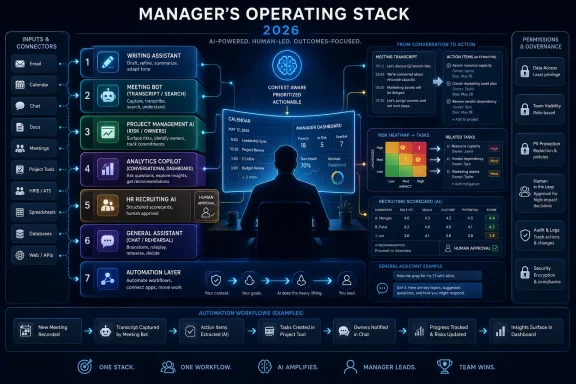 The AI Manager Stack Is Becoming the New Middle Office
The old middle office of management was email, meetings, spreadsheets, status decks, recruiting screens, performance reviews, and the endless labor of remembering what everyone agreed to last Tuesday. AI is now colonizing that terrain one workflow at a time. A writing assistant fixes the memo, a meeting bot captures the decision, a project tool turns that decision into assigned tasks, and an analytics system watches whether the plan is working.That is why the “28 best tools” framing is useful but incomplete. Grammarly, Microsoft 365 Copilot, Slack AI, Zoom AI Companion, Fireflies, Otter, Asana, ClickUp, Power BI, Greenhouse, Lattice, ChatGPT, Claude, Gemini, Perplexity, Zapier, and Synthesia are not interchangeable productivity toys. They sit at different layers of a manager’s day, and the value depends almost entirely on whether the organization has already made the underlying workflow legible.
The first rule of managerial AI is brutally simple: AI amplifies process quality. A team with clean project boards, consistent meeting hygiene, and well-maintained HR data will see faster returns than a team whose work lives in private DMs and heroic memory. The model can summarize chaos, but it cannot make chaos accountable.
This is also why the category feels simultaneously mature and unstable. Some tools now have boring, reliable uses: meeting summaries, email drafts, transcript search, status updates, dashboard explanations. Others are still sold with agentic promises that outrun day-to-day reliability. Managers need to separate the automation that saves an hour every week from the demo that looks miraculous once.
Microsoft and Google Want AI to Disappear Into the Workday
The biggest strategic fight is not between chatbot vendors. It is between standalone AI assistants and the productivity suites that already own the manager’s calendar, inbox, document store, video calls, and permissions model.Microsoft 365 Copilot is the most obvious example. It is not just a text generator bolted onto Word. Its pitch is that the assistant can reason over the Microsoft Graph — email, files, meetings, chats, and calendar activity — and turn organizational exhaust into usable context. For a manager who already lives in Outlook, Teams, Excel, PowerPoint, and SharePoint, that integration is the product.
Google Gemini for Workspace makes the same argument from the other side of the productivity-suite divide. If Gmail, Docs, Sheets, Drive, Slides, and Meet are already the nervous system of the company, the lowest-friction AI adoption path is to put drafting, summarization, document search, and meeting intelligence inside that system. The attraction is not novelty; it is fewer context switches.
This embedded model has a major advantage over the “open a chatbot tab” habit. Managers do not merely need answers. They need answers connected to files they are allowed to access, meetings they attended, emails they received, and documents they are responsible for producing. Permission-aware AI is less glamorous than a frontier-model benchmark, but in corporate environments it is often the difference between useful and unusable.
There is a catch. Suite-based AI is only as good as the suite’s information architecture. If the company has six versions of the same strategy deck, vague file names, undocumented Teams channels, and no shared taxonomy, Copilot and Gemini will faithfully retrieve the mess. The AI transformation therefore starts to look suspiciously like the old knowledge-management transformation, except this time executives are paying attention.
The Meeting Bot Is the First AI Coworker Most Teams Will Trust
Meeting assistants are the easiest category for managers to justify because the pain is universal and the output is concrete. Fireflies, Otter, Fellow, Zoom AI Companion, and Gong all attack the same managerial tax: human beings are bad at participating in a conversation while also producing a durable record of it.The basic capability is now table stakes. Record the call, transcribe speakers, summarize the discussion, identify action items, and make the meeting searchable later. That alone changes team behavior. The casual “I think we agreed” becomes a searchable artifact, and the manager no longer has to rely on the most conscientious note-taker in the room.
Zoom AI Companion benefits from being inside the meeting platform itself. Fireflies and Otter are more portable across meeting systems and workflows. Fellow leans into structured agendas and 1:1 continuity. Gong is in a more specialized class, using call analysis to coach sales teams and forecast pipeline risk rather than merely preserve meeting memory.
The risk is that meeting AI can make bad meeting cultures more scalable. A pointless meeting with a beautiful transcript is still a pointless meeting. Worse, searchable transcripts can create a mild surveillance atmosphere if managers do not set norms around recording, access, retention, and how summaries are used.
The best teams will use AI notes to reduce meetings, not to justify more of them. If a manager can read a five-minute summary, scan decisions, and see assigned follow-ups, the recurring status call starts to look less defensible. The real productivity gain is not faster note-taking; it is fewer synchronous interruptions.
Project-Management AI Works Only When the Work Is Already Visible
Asana Intelligence, ClickUp Brain, Monday AI, Motion, and Notion AI represent a more ambitious promise: not just remembering what happened, but helping decide what should happen next. They summarize projects, draft updates, identify blockers, generate plans, rebalance workloads, and in some cases attempt to automate multistep workflows.This is where managerial AI moves from clerical help to operational leverage. A manager does not want to open ten boards to learn which client deliverables are late. They want to ask the workspace, in plain English, where risk is accumulating. They want the answer tied to owners, deadlines, dependencies, and prior commitments.
Motion attacks the manager’s personal bottleneck: time. Its appeal is the dynamic calendar, where tasks, meetings, deadlines, and focus blocks continuously adjust as the day changes. For managers whose calendars are shredded by client calls and internal escalations, that can be more valuable than another project board.
Asana, ClickUp, Monday.com, and Notion come at the problem from the team side. Asana is strongest where structured project management already exists. ClickUp is betting heavily on AI as a workspace-wide brain. Monday remains attractive for teams that think visually. Notion is powerful where documentation and lightweight project tracking are intertwined.
The hidden implementation issue is discipline. AI cannot summarize a task that was never created, flag a dependency nobody logged, or infer an owner from a hallway conversation. The manager who wants AI project insight must first insist that work happen in the system of record. That is a cultural change disguised as a software rollout.
Analytics Copilots Make Dashboards Conversational, Not Magical
Power BI, Tableau, and Looker show how AI is changing managerial decision-making in a different way. The dashboard is no longer just something an analyst builds and an executive interprets. Increasingly, managers expect to interrogate data in natural language and receive charts, anomalies, explanations, and suggested next questions.Power BI has a particular advantage in Microsoft-heavy organizations because it can sit close to Excel, Teams, Fabric, and Microsoft 365 identity. Tableau remains a visualization powerhouse for organizations with mature analytics teams and complex data storytelling needs. Looker’s strength is semantic consistency: a shared definition of metrics so that departments stop arguing over whose number is “real.”
The most important phrase here is not AI insight. It is metric governance. If revenue, active users, churn, utilization, or headcount are defined differently across systems, a natural-language interface may simply make wrong answers easier to obtain. A confident AI-generated narrative over inconsistent data is worse than a clunky dashboard that forces users to notice ambiguity.
For managers, the practical win is speed. A CFO asking for revenue variance by region, an operations head checking supplier-cost anomalies, or a sales director reviewing conversion trends can move faster when the first draft of analysis appears instantly. But the judgment still lives with the manager and the analyst. AI can propose the pattern; humans must decide whether the pattern matters.
This is where organizations should resist the fantasy that every manager becomes a data scientist. The better goal is that every manager becomes a more competent data consumer. AI should lower the barrier to asking good questions, while governance, auditability, and analytics expertise prevent the organization from believing attractive nonsense.
Hiring AI Is Where Productivity Meets Legal and Ethical Drag
Recruiting and HR tools bring the sharpest trade-off in the entire stack. Greenhouse, HireVue, Lattice, 15Five, Leapsome, and Culture Amp promise faster hiring, more consistent feedback, better employee insight, and earlier detection of retention risk. They also operate in domains where biased automation can create real harm and regulatory scrutiny.Greenhouse’s advantage is structured hiring. The most defensible use of AI in recruiting is not a black-box judgment that says “hire this person.” It is administrative acceleration around a consistent process: role criteria, scorecards, interview kits, feedback summaries, and candidate matching that humans can inspect. Structure matters because unstructured hiring is where bias and improvisation thrive.
HireVue sits in a more controversial space because video interviewing and AI-assisted assessment raise obvious concerns about transparency, candidate experience, and what exactly is being measured. Skills-based assessment can be useful, especially at scale, but managers should be wary of any vendor language that implies complex human potential can be cleanly reduced to a score.
Performance-management platforms have a different kind of risk. Lattice, 15Five, Leapsome, and Culture Amp can help managers write clearer reviews, notice engagement patterns, track goals, and prepare better 1:1s. Used well, they make feedback more specific and less dependent on memory. Used poorly, they turn employee development into dashboard watching.
The best HR AI implementations keep humans visibly accountable. AI may draft, summarize, cluster, or flag, but managers should own the decision and be able to explain it. In hiring and performance contexts, “the system recommended it” is not leadership. It is abdication with a software invoice.
General Assistants Are the Manager’s Thinking Layer
ChatGPT, Claude, Gemini, and Perplexity occupy a different role from embedded workflow tools. They are not primarily systems of record. They are thinking environments: places to draft, rehearse, compare options, analyze documents, generate scenarios, prepare conversations, and test arguments.ChatGPT’s breadth makes it the default assistant for many managers. It can draft an uncomfortable performance conversation, turn messy notes into a strategy memo, generate interview questions, explain a financial model, or role-play a negotiation. Its usefulness depends less on whether it is “the best model” in the abstract and more on whether the manager has learned how to ask for structured, context-rich work.
Claude is often favored by people who spend their days in long documents: legal teams, policy groups, analysts, researchers, executives reviewing contracts or board materials. Its reputation for careful prose and long-context work makes it particularly attractive when the task is synthesis rather than quick generation.
Perplexity is closer to an AI research engine. For managers doing competitive analysis, market scans, vendor comparisons, or regulatory reconnaissance, source-grounded answers are the point. The danger with any research assistant is not that it replaces judgment, but that it creates a polished briefing faster than the manager can evaluate the underlying evidence.
These assistants are also where managers develop AI literacy. Prompting is not magic phrasing; it is managerial clarity. The user must define the audience, constraints, available evidence, desired output, and decision context. A vague prompt produces a vague intern. A precise prompt produces leverage.
Automation and Synthetic Media Push AI Beyond the Desk
Zapier and Synthesia are reminders that managerial AI is not only about text, chat, and meetings. Zapier turns cross-application friction into automated workflows. Synthesia turns scripts into training and internal video at a pace traditional production cannot match.Zapier’s strategic role is connective tissue. A manager can create a workflow where survey results trigger Slack alerts, CRM updates, support tasks, and follow-up reminders without asking an operations analyst to glue systems together manually. The rise of AI-assisted automation builders makes this more accessible to nontechnical managers, though the old rule still applies: automating a broken process makes the breakage faster.
Synthesia solves a different problem: consistency at scale. Onboarding, compliance refreshers, process updates, and internal announcements often need to be repeated across locations, time zones, and languages. AI video generation makes it possible to update the script and regenerate the asset instead of scheduling another recording session.
This is useful, but it also changes the texture of internal communication. Employees can tell when every message has been templated and synthetic. Managers should reserve AI video for training and repeatable communication, not for moments that require human presence, accountability, or trust.
The broader pattern is clear. AI is moving from “help me write this” toward “help this workflow run.” That is a more powerful promise, and a more dangerous one. Once AI tools can trigger actions across systems, managers need stronger review points, permissions, and failure recovery.
The Best Tool Is Usually the One Already Next to the Work
The most common AI purchasing mistake is to chase the most impressive standalone feature rather than the tool closest to the daily workflow. A manager who lives in Microsoft 365 may get more value from Copilot and Power BI than from a separate app with a better demo. A team that already runs projects in Asana should probably test Asana Intelligence before migrating to a new platform because an influencer praised its AI roadmap.Integration beats novelty because adoption is the scarce resource. Managers do not have unlimited patience to add logins, teach new interfaces, migrate old data, and police duplicate systems. If AI requires people to work somewhere else, it must be dramatically better than the native option.
That does not mean suites always win. Specialist tools can outperform embedded assistants when the workflow is deep enough. Gong is not just a meeting recorder; it is a revenue-intelligence platform. Greenhouse is not just a resume summarizer; it is a structured hiring system. Culture Amp is not just a survey tool; it is an employee-experience analytics platform.
The procurement question should therefore be brutally practical. Where does the work already happen? What data does the AI need? Who owns the output? What decision will change because of it? If those questions are fuzzy, the subscription will become shelfware with a chatbot icon.
The 2026 Manager Needs Fewer Apps and Better Operating Rules
The most durable lesson from the current AI tool boom is that managers should build a stack, not a junk drawer. One writing layer, one meeting memory layer, one project system of record, one analytics environment, one HR platform, one general assistant, and one automation layer may be plenty for most teams.Before adding another AI subscription, managers should write down the failure mode they are trying to fix. Are decisions getting lost after meetings? Are status updates consuming Fridays? Are performance reviews vague and late? Are dashboards too slow to answer operational questions? The right tool becomes obvious only after the managerial bottleneck is named.
This is also where governance becomes a practical concern rather than a compliance slogan. Managers need rules for sensitive data, customer information, employee records, meeting recordings, retention periods, vendor permissions, and human review. AI adoption without these guardrails will eventually produce a privacy incident, an employment dispute, or simply a collapse in employee trust.
The goal is not to ban experimentation. The goal is to make experimentation survivable. Teams should pilot tools in bounded workflows, measure whether they reduce cycle time or improve decision quality, and then expand only when the operating model is clear.
The Stack That Actually Helps a Manager on Monday Morning
A good AI rollout should be felt in the manager’s calendar before it appears in a strategy deck. The promise is not abstract transformation; it is a cleaner Monday morning, fewer unresolved decisions, better-prepared conversations, and less time spent turning work about work into more work.- A communication assistant should make important writing clearer, faster, and more consistent without flattening the manager’s voice.
- A meeting assistant should produce searchable decisions and action items, then help the team cancel meetings that no longer need to happen.
- A project-management assistant should expose risk, ownership, and workload problems only if the team keeps its work in the system of record.
- An analytics copilot should make it easier for managers to ask better questions, while governed metrics and human analysts keep answers honest.
- A recruiting or HR assistant should improve structure and consistency, but never become the unaccountable decision-maker in hiring, reviews, or employee development.
- A general assistant should become the manager’s private rehearsal room for strategy, writing, analysis, and difficult conversations.
AI for managers is not a future trend anymore, but neither is it a magic layer sprinkled over bad operations. The real competitive edge will come from leaders who use these tools to make work more visible, decisions more accountable, and human attention more deliberately spent. As the software becomes more capable, the manager’s job will not shrink; it will move closer to the work only humans can do well — setting direction, building trust, resolving trade-offs, and deciding what should matter next.
References
- Primary source: OfficeChai
Published: 2026-06-10T05:42:07.499007
AI For Managers: 28 Best Tools (With Examples) [2026]
AI for managers is being used to improve productivity and communication, help decision making and lead to greater morale within teams.officechai.com - Official source: learn.microsoft.com
Pricing for microsoft 365 co pilot - Microsoft Q&A
May i know what are the pricing for Microsoft Co pilotlearn.microsoft.com
