

AI-capable PCs are no longer a marketing label: they are a distinct engineering stack that mixes dedicated neural accelerators, heterogeneous compute (CPU + GPU + NPU), power/thermal trade‑offs, enterprise manageability and new software runtimes — and getting any of those elements wrong turns an “AI PC” into an expensive, underwhelming endpoint rather than a productivity multiplier.
Enterprise IT is being asked to buy devices that promise new AI features — fast, private transcription, low‑latency Copilot responses, on‑device summarization, and richer meeting experiences — but those features have strict hardware and platform dependencies. Microsoft’s Copilot+ initiative formalised a baseline: a Windows 11 device with at least 16 GB RAM, 256 GB NVMe, and an on‑board NPU capable of 40+ TOPS to unlock many local Copilot experiences. That baseline explains why OEMs and silicon vendors have rushed new designs into the market: some laptop and mini‑PC SKUs now advertise NPUs in the 40–50 TOPS range and platform TOPS (CPU+GPU+NPU combined) that exceed 100 TOPS in marketing copy. But the headline TOPS number is only one variable among several that matter to enterprise buyers: power draw and thermal behaviour, real‑world sustained throughput, software/runtimes that actually use the hardware, remote management and security, and the economics of fleet procurement. The Register’s recent sponsored feature sketched this same point: raw NPU power alone doesn’t make an AI PC urs — the whole xPU stack and energy envelope matter.
Source: theregister.com What exactly makes an AI PC fit for the enterprise?
 Background / Overview
Enterprise IT is being asked to buy devices that promise new AI features — fast, private transcription, low‑latency Copilot responses, on‑device summarization, and richer meeting experiences — but those features have strict hardware and platform dependencies. Microsoft’s Copilot+ initiative formalised a baseline: a Windows 11 device with at least 16 GB RAM, 256 GB NVMe, and an on‑board NPU capable of 40+ TOPS to unlock many local Copilot experiences. That baseline explains why OEMs and silicon vendors have rushed new designs into the market: some laptop and mini‑PC SKUs now advertise NPUs in the 40–50 TOPS range and platform TOPS (CPU+GPU+NPU combined) that exceed 100 TOPS in marketing copy. But the headline TOPS number is only one variable among several that matter to enterprise buyers: power draw and thermal behaviour, real‑world sustained throughput, software/runtimes that actually use the hardware, remote management and security, and the economics of fleet procurement. The Register’s recent sponsored feature sketched this same point: raw NPU power alone doesn’t make an AI PC urs — the whole xPU stack and energy envelope matter.What the term “AI PC” actually denotes for enterprises
The hardware baseline: more than just an NPU
- NPU (Neural Processing Unit): dedicated silicon for low‑power inference. Copilot+ calls out a 40+ TOPS NPU as the threshold to enable many local assistant features.
- Heterogeneous compute (xPU): CPUs, GPUs and NPUs are complementary: some inference and real‑time tasks are best on the NPU, some on the GPU (media, bulk matrix math), inference sometimes runs best on the CPU. Successful platforms expose all three and let software choose.
- Memory and storage: practical deployments require at least 16 GB RAM and a fast NVMe SSD (256 GB minimum) because models, caches and OS services consume significant footprint.
- Power envelope and thermal design: NPUs bring continuous or bursty power curves and platform tuning must preserve usable battery life and sustained performance under enterprise images (which add agents and background services).
Software, runtimes and developer tooling
Hardware without ecosystem support is handicapped. Enterprises need:- Runtimes that map ONNX/DirectML/PyTorch models to NPUs and GPUs with minimal developer rework.
- Vendor drivers and SDKs that are stable and supported on enterprise update schedules.
- Management hooks (Intune / vendor MDM integrations) and options for controlling on‑device model usage and telemetry.
Anatomy of modern AI PC silicon: an enterprise perspective
Heterogeneous throughput and “platform TOPS”
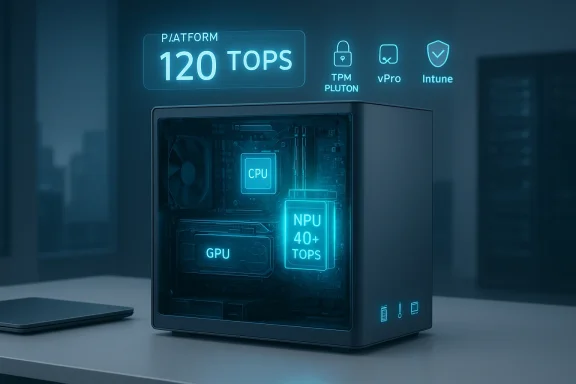
Vendors increasingly quote a platform TOPS figure — the sum of what the CPU, GPU and NPU can deliver for certain types of integer inference workloads. High‑end Intel Core Ultra (Series 2) SKUs, for example, are marketed with an NPU around 48 TOPS, integrated Arc GPU figures in the 60–70 TOPS range, and a combined platform figure near 120 TOPS on some SKUs; OEM product pages echo this multi‑element breakdown. Those numbers bring Copilot+ eligibility well into reach and give OEMs headroom for hybrid workloads. Important nuance: TOPS is an architecture‑level throughput metric measured under specific quantization and operator assumptions (typically INT8). It is useful for comparisons but not a guarantee of model performance ndwidth, kernel maturity, model shape, and sustained thermal behaviour all determine real throughput. Enterprises should therefore treat TOPS as an indicator, not the final specification.Process node and packaging: why manufacturing matters
Intel’s recent mobile CPU generations have moved significant compute tiles to TSMC’s advanced nodes (3nm N3/N3B for Lunar/Arrow/Lunar‑adjacent compute tiles), which improves energy efficiency and allowed denser NPUs and GPU engines in client silicon. That partnership — and the shift to advanced foundry nodes — is a big reason why on‑device NPUs crossed the 40 TOPS threshold. However, foundry sourcing can affect supply, SKU mixes and price.Memory on package and energy efficiency
Several modern platforms adopt on‑package or tightly integrated LPDDR5x/LPDDR5 memory to reduce latency and power when models run locally. Integrated memory reduces the energy cost of moving model weights and activations and can materially improve sustained inference behaviour in thin designs; it also constrains upgradeability (soldered RAM) and influences procurement decisions about repairability vs. efficiency.Enterprise-grade features beyond raw performance
Security, manageability and remote repair
For IT teams, on‑device AI features must coexist with enterprise security and support:- vgement: platforms that support Intel vPro (or equivalent) allow remote reimaging and recovery even if the OS is unusable — a critical serviceability requirement for fleet operations. The presence often a procurement checklist item.
- Root‑of‑trust (TPM/Pluton): Copilot+ messaging and enterprise-grade SKUs emphasise TPM 2.0/Pluton to anchor keys and attestation for on‑device models and may be mandated by compliance teams.
- Vendor SLAs for driver/firmware updates: NPUs, drivers and firmware require active maintenance. Enterprises should insist on published update cadences and long‑term support commitments for drivers and firmware — otherwise NPUs can become security and stability liabilities.
Privacy and governance
Local inference reduces the amount of sensitive data sent to cloud services, which is a win for privacy-sensitive industries (healthcare, finance, regulated government). But it raises governance questions:- How long are local model artifacts or recalls stored?
- Howsage and outputs?
- Do default settings expose data unintentionally?
Real workloads: which components do the work?
Understanding which xPU runs which job clarifies procurement.- NPU excels at: efficient, low‑power inference for quantized models (speech transcription, noise suppression, small‑to‑medium LLMs in INT8), real‑time video effects and always‑on features.
- GPU excels at: training variants, high‑throughput FP16/FP32 inference, and media encoding/decoding. GPUs dominate when models are larger or require flexible compute kernels.
- CPU excels at: latency‑sensitive decision logic, smaller real‑time inferences without context strating fallbacks between NPU/GPU/cloud. Some real‑time inference workloads are best kept on the CPU to avoid io/kernel overhead.
Practical procurement checklist for IT leaders
When evaluating AI PCs for the enterprise, use this checklist as a minimum acceptance test:- Confirm the exact SKU’s NPU TOPS rating — and whether the advertised TOPS is sustained or peak. Demand vendor documentation.
- Validate the platform TOPS breakdown (CPU / GPU / NPU) for the SKU you will actually purchase. Platform totals are useful but SKU splits reveal bottlenecks.
- Request independentent mixed‑use battery/thermals tests under your en, DRM, DLP) — not just vendor lab claims.
- Require a clear driver/firmware update SLA and a long‑term OS/drr NPU and graphics stacks.
- Confirm manageability: vPro/remote repair features, TPM/Pluton presence, and Intune/MDM interoperability.
- Pilot with representative users (5–20 devices) ar target Copilot features, battery life in your mixes, thermal behaviour, and maintenance/driver update pain points.
Deployment patterns and recommended pilots
- Start with high‑value user classes: contact centers, legal, clinical roles, and product teams where time saved on transcription/summarization is directly measurable.
- Use a hybrid approach: keep heavy model hosting in the cloud while enabling local inference for latency‑sensitive features.
- Define KPIs before pilots: minutes saved per activity, transcription accuracy, cloud inference calls avoided (and cost saved), mean time to repair improvements from out‑of‑band management.
- Negotiate pilot pricing and outcome guarantee where possible; subscription costs can turn device pilots into unexpected ongoing line items.
Strengths and opportunities
- Latency and privacy: local inference cuts round‑trip time and keeps sensitive material on the deres it. This is an immediate, tangible benefit for regulated industries.
- Energy efficiency for sustained small tasks: NPUs are designed for low watt, sustained inference (continuous captions, background noise removal) and can deliver longere for those workloads compared with CPU inference.
- New UX patterns: locally enabled assistant features (instant meeting summaries, on‑device generative templates) remove friction and can measurably compress common workflows — when supported end‑to‑end.
Risks, caveats and pragmatic warnings
- TOPS ≠ application performance: vendors use TOPS to market capability, but real models may not map cleanly to an NPU’s strengths. Always insist on woarks.
- Driver and runtime fragmentation: early NPUs came with vendor‑specific SDKs and inconsistent toolchains. That fragmentation increases procurement complexity and long‑term support ottling in thin designs:** ultraportable form factors can hit thermal limits, converting short bursts of great performance into disappointing sustained behavior under prolonged use. Validate sustained performance on the enterprise build.
- **Subscriptiopilot licensing and cloud fallback usage can create recurring costs that overshadow device CAPEX savings. Make total cost of ownership part of procurement decisions.
- Sustainability and e‑waste: raes driven by AI feature requirements risk accelerating e‑waste. Purchase and disposal policies should include refurbishment and secure data sanitization plans.
A sensible roadmap for enterprise adoption (practory and classification: tag endpoints by Windows 11 readiness and business criticality.
- Run targeted pilots (3‑6 months) with measurable KPIs for at least two distdate SKUs at scale: require independent mixed‑use battery/thermal testing under your exact enNegotiate driver/firmware SLAs, and require vendor commitment to security patch cadence for NPUs and GPUs.
- Build policies for on‑device artifacts, audit trails for assistant outputs, and central control over which on‑device mo-
Conclusion — What truly makes an AI PC fit for the enterprise
An AI PC that genuinely earns its place on the corporate desk is not merely one with a big NPU nated platform where:- hardware capability (NPU + GPU + CPU) meets
- energy‑aware design that preserves battery and sustained performance, and
- enterprise services (vPro/remote repair, TPM/Pluton, long‑term driver SLAs) plus
- software maturity (runtimes, ISV support, Intune/MDM integration) and
- clear governance and cost models for on‑device intelligence.
Source: theregister.com What exactly makes an AI PC fit for the enterprise?
