

Microsoft’s staged push to fold Copilot into the flow of work in Teams has reached the milestone the company set for itself: the new AI Workflows experience in the Teams Workflows app — powered by scheduled Microsoft 365 Copilot prompts and ready-made templates — is now reported as rolling out to general availability with the rollout window scheduled to complete in mid‑February 2026. This rollout brings a new practical vector for automation inside Teams: scheduled, Copilot‑driven prompts that run on a cadence, generate outputs, and feed those outputs into automated actions (posts, emails, task updates) without manual intervention — provided the tenant has Copilot licensing and has enabled the Workflows app.
Microsoft first signaled the Workflows redesign and Copilot integration in 2025, positioning the feature as a way to make intelligent automation accessible to knowledge workers without heavy Power Automate development. The public roadmap item and subsequent Message Center posts describe AI Workflows as templates that combine scheduled Copilot prompts with automation actions built on Power Automate plumbing, surfaced in the Teams Workflows app. Administrators retain control — the feature is off by default unless the Workflows app is enabled, and optional connected experiences (the admin toggle that governs scheduled prompts) can be turned off for entire tenants.
Microsoft’s documentation for scheduled prompts and optional connected experiences spells out the operational model: scheduled prompts are a tenant feature tied to Microsoft 365 Copilot licensing; they create a Power Platform environment on first use; and admins can disable the experience via Cloud Policy (Allow the use of additional optional connected experiences in Office). That connection between scheduled Copilot prompts and Power Platform is a core technical fact administrators must understand before enabling the feature broadly.
That said, it is not a trivial platform to adopt safely. The technical dependency on Power Platform, the licensing gate, the model‑led output risks, and the potential for governance drift all mean organizations must approach deployment deliberately. Administrators should assume that the feature is available (per Microsoft’s message center timeline and Learn documentation) but that actual visibility in your tenant depends on license assignment and admin configuration. Treat this as an enterprise feature that requires policy, training, and oversight — not simply a nice add‑on that you flip on and forget.
AI Workflows is an important and logical step in Copilot’s evolution — turning generative output into scheduled, repeatable actions inside the platform where most teams already collaborate. Organizations that invest the time now to stitch it into their governance, label it correctly, and monitor outcomes will see meaningful productivity dividends; those that don’t will expose themselves to compliance headaches and automation drift. The capability is here; the responsibility to use it wisely now rests with IT, security, and business leaders.
Source: Windows Report https://windowsreport.com/microsoft-confirms-ai-workflows-now-fully-live-worldwide-in-teams/
 Background / Overview
Microsoft first signaled the Workflows redesign and Copilot integration in 2025, positioning the feature as a way to make intelligent automation accessible to knowledge workers without heavy Power Automate development. The public roadmap item and subsequent Message Center posts describe AI Workflows as templates that combine scheduled Copilot prompts with automation actions built on Power Automate plumbing, surfaced in the Teams Workflows app. Administrators retain control — the feature is off by default unless the Workflows app is enabled, and optional connected experiences (the admin toggle that governs scheduled prompts) can be turned off for entire tenants.Microsoft’s documentation for scheduled prompts and optional connected experiences spells out the operational model: scheduled prompts are a tenant feature tied to Microsoft 365 Copilot licensing; they create a Power Platform environment on first use; and admins can disable the experience via Cloud Policy (Allow the use of additional optional connected experiences in Office). That connection between scheduled Copilot prompts and Power Platform is a core technical fact administrators must understand before enabling the feature broadly.
What exactly has landed in Teams?
The feature in practical terms
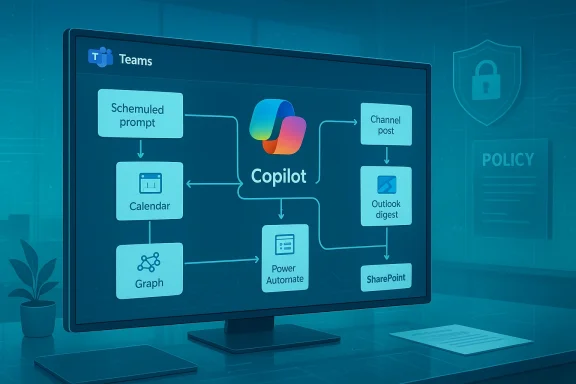
- AI workflow templates: Prebuilt templates (for example, “Help Me Prepare for My Day” and “Summarize Key Takeaways”) that use Copilot prompts on a schedule to gather information and then perform actions like posting a summary in a channel or emailing a digest. These templates are discoverable from the Workflows app home page in Teams.
- Scheduled Copilot prompts: Users can author a Copilot prompt and schedule it to run at specific times or intervals; scheduled prompts are the execution engine that makes AI workflows proactive. Microsoft’s support pages describe how users create and manage scheduled prompts across Teams, Outlook, and Microsoft 365 Chat.
- Licensing gate: Availability is restricted to users with a Microsoft 365 Copilot license; the templates and scheduled prompts will not appear for users or tenants that lack the appropriate subscription.
- Administrative controls: Admins can enable or disable the Workflows app at the tenant level and can also turn off optional connected experiences to prevent scheduled prompts from functioning. Audit and compliance tooling still applies: the workflows interact with tenant data under Microsoft’s enterprise privacy and service terms.
Platforms and initial scope
At launch, Microsoft documented the initial platform surface as Teams for Web and Teams for Mac (and the Workflows app surfaced from within Teams desktop experiences). The feature rolled through targeted release channels starting in late 2025 and entered general availability at the end of January 2026, with Microsoft’s message center and roadmap entries projecting rollout completion by mid‑February 2026. That timeline is the basis for reporting that the capability is now broadly available.Why this matters: the practical upside
AI Workflows represents an important step in making Copilot not just a chat or document assistant, but an active automation engine inside daily collaboration tools. The concrete benefits include:- Time reclaimed through scheduled automation — instead of manually running a Copilot prompt each morning, you can schedule it to generate a briefing and deliver it to the channel or mailbox you choose.
- Lower barrier to automation — prebuilt templates remove much of the complexity associated with building scheduled automations in Power Automate; non‑developers can stand up recurring AI tasks quickly.
- Contextualized outputs — because Copilot can draw on Microsoft Graph and tenant data, scheduled prompts can produce context‑aware summaries, decisions, and action lists tailored to the user or team.
- Integration into existing workflows — outputs can be routed into Teams posts, Planner tasks, Outlook items, or other actions supported by Power Automate connectors, enabling end‑to‑end productivity flows without switching tools.
Critical analysis: strengths, assumptions, and immediate caveats
Strengths
- Native placement inside Teams — embedding automation where people already work reduces friction and increases adoption potential.
- Template‑first model — offering ready templates accelerates time‑to‑value and sets sane defaults for how to structure Copilot prompts and subsequent actions.
- Admin control and enterprise governance — Microsoft deliberately tied the experience to optional connected experiences and Cloud Policy controls so tenant admins can manage exposure across regulated orgs.
Important assumptions and constraints
- Copilot license dependency — the experience requires Microsoft 365 Copilot licensing. Organizations without the license will not see AI Workflows, which creates a two‑tier experience in mixed licenses tenants.
- Power Platform backend — scheduled prompts and workflow actions rely on Power Platform environment provisioning and connectors. That dependency implies administrators must consider Power Platform governance, DLP policies, and environment lifecycle when enabling the feature. Microsoft documents explicitly note that a Microsoft 365 environment in Power Platform is automatically created when a scheduled prompt is first created.
- Data access and surface area — scheduled Copilot prompts pull from tenant data (chats, Exchange, SharePoint, OneDrive, Graph). For organizations with strict data handling rules, the feature increases the surface area of AI interactions with sensitive information. Microsoft’s docs call this out as a compliance consideration.
Risks and attack surface
- Privacy and compliance risk: Any automated process that synthesizes or moves data creates potential privacy or regulatory exposure. Admins must align the new workflows with existing retention, sensitivity labeling, and DLP policies.
- Unintended data exfiltration: If scheduled prompts are connected to actions that route outputs outside protected containers (for example, emailing summaries to external recipients), tenant policies must explicitly prevent unauthorized sharing.
- Governance drift: Template proliferation can lead to unmanaged automations in dozens or hundreds of teams, making visibility and lifecycle management harder for IT and security teams.
- Model reliability and hallucination: Copilot outputs can be inaccurate or overconfident. When automation runs unsupervised on a schedule, small hallucinations repeated over time could cause misleading records or erroneous task assignments. Organizations must build monitoring and human‑in‑the‑loop safeguards for high‑impact workflows. Microsoft’s own compliance notes indicate these agentic or scheduled capabilities “interact with customer data,” a phrase that underscores the need for oversight.
What administrators and security teams need to do now
Immediate checklist (practical steps)
- Inventory Copilot licensing — identify who has Microsoft 365 Copilot licenses and where AI Workflows will show up. This helps prioritize pilots and control risk exposure.
- Review Cloud Policy / optional connected experiences — decide whether tenant‑wide optional connected experiences should remain enabled; disabling them prevents scheduled prompts entirely. Microsoft documents this control and its consequences.
- Plan Power Platform governance — scheduled prompts create a Microsoft 365 environment in Power Platform. Apply environment DLP, connector restrictions, and lifecycle controls to avoid uncontrolled automation sprawl.
- Map sensitive actions — determine whether templates or user‑created scheduled prompts will send data externally or into places that need stronger protection; block or audit connectors that can exfiltrate data.
- Pilot with human oversight — start with a small, cross‑functional pilot that includes compliance, SecOps, and business owners. Validate outputs, log quality issues, and build response playbooks for incorrect or sensitive outputs.
- Educate users — teach prompt hygiene, sensitivity awareness, and the limits of Copilot. Encourage users to label data and apply sensitivity labels where appropriate before allowing automated workflows to touch it.
Recommended governance configuration
- Keep optional connected experiences enabled for pilot teams only while applying strict DLP rules.
- Use sensitivity labels and Purview controls to prevent scheduled prompts from summarizing or moving highly sensitive data.
- Enable logging and escalate alerts on workflows that touch external recipients or connectors not explicitly approved.
- Consider an approval workflow for publishing new team templates to an internal template gallery governed by IT or a CoE (Center of Excellence).
Real‑world examples and early templates
Microsoft demoed and documented a few illustrative templates that show the range of uses:- Help Me Prepare for My Day — scans your recent chats, calendar, and emails to generate a morning briefing and posts it to a preferred Teams channel or sends it by email. This is representative of personal‑productivity automation.
- Summarize Key Takeaways — pulls insights from a set of messages or meeting notes and creates a digest highlighting decisions and action items for follow‑up.
- Recurring status digest — scheduled prompts can summarize project status and update a Planner board or post a report to a channel on a weekly cadence.
How this fits into Microsoft’s broader Copilot strategy
AI Workflows is a natural extension of Microsoft’s roadmap for Copilot, which has been moving from conversational assistance toward agentic and orchestrated automation. Microsoft’s release notes and roadmap entries throughout 2025 and early 2026 position Copilot not only as an assistant but as a capability surface that can be embedded into agent pipelines, multi‑agent workflows, and app integrations. AI Workflows in Teams is one of several vectors — alongside Copilot Agents, the Copilot Agent Store, and deeper Power Platform integrations — that make Copilot a platform for productivity automation.Where the announcement reporting diverged — and what we can verify
Several outlets (including aggregated message‑center watchers and IT news sites) reported that Microsoft “confirmed” AI Workflows were “fully live worldwide.” The baseline, verifiable facts are these:- Microsoft’s Message Center entry (MC1147389) and Roadmap ID 500379 documented the targeted release and general availability schedule — with GA rolling in late January 2026 and expected completion by mid‑February 2026. That message is the official Microsoft artifact that sets expectations and is the authoritative timeline for tenants.
- Microsoft Learn and support pages for Manage scheduled prompts and Overview of optional connected experiences detail behavior, licensing, admin controls, and the Power Platform dependency; these docs represent the operational reality and governance knobs admins must use.
- Independent changelog and message‑center aggregators and IT blogs tracked the rollout schedule and updated timelines; these are useful secondary confirmations of the rollout cadence. However, public press releases stating a single‑line “now live worldwide” are not necessary for administrators to act — the Message Center entries and Learn docs are the functional confirmations.
Recommended rollout strategy for enterprises
- Assessment and discovery
- List who currently has Copilot licenses and which teams would most benefit from scheduled automation.
- Inventory connectors that would be used by workflows and run a DLP impact analysis.
- Controlled pilot
- Enable Workflows and scheduled prompts for a small set of teams with a formal approval gate for template publication.
- Assign a compliance and security reviewer to each pilot template.
- Operationalize governance
- Apply Power Platform environment controls, DLP policies, and sensitivity labels.
- Build an internal template catalog with sign‑off and versioning.
- Scale with monitoring
- Expand to additional teams only after establishing monitoring, logging, and incident playbooks for workflow errors or inappropriate outputs.
- User training and prompt hygiene
- Teach users to design explicit prompts, avoi identifiers, and validate outputs before they’re published or routed externally.
Final verdict — strategic opportunity, but not a click‑and‑forget fix
AI Workflows in Microsoft Teams turns Copilot from a reactive assistant into a proactive automation fabric inside the collaboration hub. For operations that benefit from recurring summaries, automated reporting, and routine status updates, the feature will reduce repetitive work and help teams move faster.That said, it is not a trivial platform to adopt safely. The technical dependency on Power Platform, the licensing gate, the model‑led output risks, and the potential for governance drift all mean organizations must approach deployment deliberately. Administrators should assume that the feature is available (per Microsoft’s message center timeline and Learn documentation) but that actual visibility in your tenant depends on license assignment and admin configuration. Treat this as an enterprise feature that requires policy, training, and oversight — not simply a nice add‑on that you flip on and forget.
Practical next steps (two‑week plan)
- Identify pilot teams and confirm Copilot licenses (days 1–3).
- Configure Power Platform DLP and set Cloud Policy for optional connected experiences for pilot tenants (days 3–7).
- Launch 2–3 pilot templates with cross‑functional review and logging (days 7–14).
- Measure output accuracy, compliance matches, and user satisfaction; refine prompts and governance accordingly (continuous).
AI Workflows is an important and logical step in Copilot’s evolution — turning generative output into scheduled, repeatable actions inside the platform where most teams already collaborate. Organizations that invest the time now to stitch it into their governance, label it correctly, and monitor outcomes will see meaningful productivity dividends; those that don’t will expose themselves to compliance headaches and automation drift. The capability is here; the responsibility to use it wisely now rests with IT, security, and business leaders.
Source: Windows Report https://windowsreport.com/microsoft-confirms-ai-workflows-now-fully-live-worldwide-in-teams/
