
AMD has confirmed that AMD Software: Adrenalin Edition 26.6.2 can break normal Radeon driver operation on some Windows 10 PCs, leaving affected Radeon RX systems with a Device Manager warning and an Adrenalin launch failure after installation. The immediate fix is not a registry trick, a clean-install ritual, or another round of update roulette. AMD’s own workaround is simpler and more revealing: roll back to Adrenalin 26.6.1 while engineers investigate. That makes this more than a one-off driver bug; it is another reminder that Windows 10 is now living in the uncomfortable space between “still widely used” and “no longer the platform where vendors want surprises.”
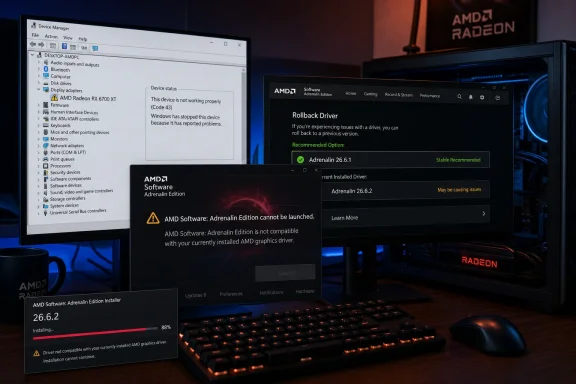
The visible symptom is brutally familiar to anyone who has supported graphics drivers on Windows for more than five minutes. A user installs a new Radeon package, reboots, opens AMD Software, and instead of the tuning panel, recording controls, update page, or game profiles, gets a compatibility warning: “The version of AMD Software that you have launched is not compatible with your currently installed AMD graphics driver.”
That message usually means one of two things. Either the installed Radeon control application and the underlying display driver are out of sync, or Windows believes the graphics device is in a bad state and refuses to expose the driver normally. In this case, AMD has tied the problem to Adrenalin Edition 26.6.2 on Windows 10 systems, with affected machines showing a yellow exclamation mark in Device Manager.
That matters because Device Manager is not cosmetic. A yellow warning on a GPU can mean reduced acceleration, missing feature access, Code 43-style device stoppage behavior, or a driver stack that is present but not usable in the way the vendor software expects. Even if Windows still displays a desktop, the Radeon software layer may be effectively cut off from the hardware.
AMD has not said how widespread the issue is. That absence is important but not exculpatory. Driver bugs often spread unevenly because the real trigger can be a narrow combination of GPU generation, OS build, prior driver residue, Windows Update behavior, chipset state, Secure Boot configuration, or installer path. For users hit by this one, however, the blast radius is obvious: the newest package is not the safest package.
That tells us the fault is likely not confined to the Adrenalin front end. If the control application were merely crashing or misdetecting a version string, AMD might provide a repair installer or app reset procedure. A rollback implies the 26.6.2 package itself can leave the Windows 10 driver stack in a state AMD does not want users to keep running.
There is a practical distinction here. A bad driver feature can often be worked around by disabling Anti-Lag, Instant Replay, frame generation, overlay capture, or a particular upscaler. A bad install state is different. Once Device Manager marks the graphics adapter with a warning, the system is no longer operating from the clean premise that the vendor driver is loaded and healthy.
For gamers, that can mean lost access to Radeon-specific controls, broken per-game profiles, degraded performance, or instability. For workstation users on Radeon RX hardware, it can interrupt display reliability and multi-monitor workflows. For IT staff managing lab PCs, classrooms, esports rooms, or shared creative machines, it means one optional driver update can generate a support queue out of proportion to the size of the release.
That makes driver reliability more strategic than it used to be. In the old model, a graphics driver mostly had to expose DirectX or OpenGL correctly, fix game bugs, and avoid crashing the desktop. In the current model, the driver package is also a feature delivery channel. It carries upscaling support, overlay controls, recording tools, latency options, tuning profiles, telemetry hooks, and compatibility shims for new titles.
The downside of that model is that every high-profile software feature increases the penalty for driver breakage. If Radeon owners are updating for better FSR support, new game support, or expanded GPU coverage, they are not expecting to lose access to the entire Adrenalin interface. When a driver release breaks on Windows 10 before the user even gets to the game, the marketing story collapses into a support story.
This is the central tension for AMD. The company needs to keep proving that Radeon is not just a cheaper alternative to GeForce but a platform with improving software. Yet every installer-level failure reopens the old criticism that AMD’s hardware can be competitive while its driver experience remains uneven. Fair or not, that reputation is sticky because graphics drivers are judged most harshly when they fail at the boring parts.
Microsoft’s mainstream consumer story has moved on. Windows 10 reached the end of standard support in October 2025, with extended security options available for those who qualify or pay. But the graphics ecosystem does not pivot overnight just because the OS lifecycle calendar says it should. GPU vendors still have to support the machines people actually own.
That creates a messy middle period. Windows 10 is old enough that vendors would rather validate less against it, but current enough that driver breakage becomes news. A Radeon RX owner on Windows 10 is not necessarily running museum hardware. They may have a modern GPU, a recent Ryzen CPU, a 144 Hz monitor, and a game library that still expects day-one driver attention.
The industry has been here before. Windows 7 lingered for years in gaming circles after Microsoft and hardware vendors wanted to move on. Windows 10 now occupies a similar role, except the hardware split is sharper because Windows 11 introduced stricter platform requirements and a more aggressive security baseline. The result is a user base that is large, technically active, and increasingly exposed to the consequences of second-priority validation.
The average Radeon user does not think in terms of Windows Driver Store versions, package manifests, or user-mode control panels. They think: I installed AMD’s new driver, and now AMD’s own software says the driver is incompatible. That is the kind of contradiction that makes users distrust both the vendor installer and Windows Update.
This is especially painful because the same error string has appeared in other AMD contexts over the years, often when Windows Update silently replaces or mismatches a display driver. That history makes the new 26.6.2 issue harder to parse for users. Is this AMD’s installer? Is it Windows Update? Is it an old driver remnant? Is it the wrong package? Is it because the user has Windows 10?
AMD’s advisory narrows the path by naming Adrenalin 26.6.2 and recommending 26.6.1. But the user experience remains muddy. When the Radeon control panel refuses to open, users lose the very interface that would normally help them inspect versions, check updates, and confirm configuration. The system’s diagnostic surface becomes Windows Device Manager, third-party forums, and whatever installer file is still sitting in Downloads.
That is the problem with fast driver cadence. It has trained enthusiasts to treat new GPU drivers like live-service content. New game? Install the driver. New upscaler support? Install the driver. Performance issue? Install the driver. Overlay bug? Install the driver. The driver package becomes the first troubleshooting step and the first source of new trouble.
For Windows 10 users, the better discipline is now boring but necessary: do not install a day-one optional driver unless it fixes a problem you actually have or supports a game you are about to play. That advice sounds conservative in a culture built around new builds and benchmark screenshots. It is also how sysadmins have treated endpoint drivers forever.
The difference between enthusiast and administrative driver hygiene is widening. Enthusiasts ask whether a driver improves performance. Administrators ask whether a driver is known-good, reversible, and necessary. The 26.6.2 issue is a case where the administrator’s instinct wins.
That strategy is necessary. Nvidia’s moat has never been only silicon. It is drivers, CUDA, DLSS, Reflex, Broadcast, Studio validation, GeForce Experience, the newer Nvidia app, and the confidence that day-one game support will probably arrive. AMD cannot compete purely on rasterization charts while ignoring the software layer where modern GPU loyalty is built.
But integration cuts both ways. When the control panel and driver version fall out of sync, the user does not experience a single broken component. They experience a broken platform. The same unification that makes Adrenalin useful also makes its failure more visible.
This is why a Windows 10 driver advisory deserves more attention than its narrow wording suggests. A graphics driver can be technically optional and strategically mandatory at the same time. If AMD wants users to associate Radeon with quick FSR adoption and modern game features, it has to make the update channel feel safe enough that users do not fear the next package.
This is also a good moment to separate official advice from forum folklore. Tools like Display Driver Uninstaller and AMD’s Cleanup Utility can be useful when a driver stack is badly tangled, but they are not magic. They can also remove state that a user did not intend to disturb. The first move should be AMD’s stated rollback, not an escalating sequence of increasingly destructive rituals.
Windows Update complicates the picture because it can install display drivers independently of AMD’s full Adrenalin package. That long-standing behavior is one reason AMD users have seen compatibility warnings before. On managed systems, driver delivery policy matters; on home systems, users may need to watch whether Windows attempts to replace the Radeon driver after a manual rollback.
The best immediate advice is therefore conservative. If 26.6.2 is already installed and everything works, there is no need to panic, but users should watch for Device Manager warnings and Adrenalin launch failures. If the system is affected, return to 26.6.1. If 26.6.2 is merely offered as an update on Windows 10, wait for AMD’s next advisory or a revised package.
Graphics drivers are privileged, complex, and unusually exposed to both performance complaints and stability failures. They sit below creative applications, CAD tools, video workflows, browser acceleration, conferencing apps, and multi-monitor setups. A broken GPU driver does not merely annoy the person who wants higher frame rates in a shooter. It can break the daily workstation experience.
The Windows 10 timing also intersects with migration planning. Organizations that extended Windows 10 because hardware refresh cycles did not line up with Microsoft’s deadline are now in the zone where vendor support friction will become more common. Even when vendors continue support, testing priority gradually shifts. Edge cases that would have been caught earlier may now surface in public releases.
That does not mean every Windows 10 Radeon system is suddenly at risk. It means IT teams should stop treating consumer GPU drivers as harmless routine updates. Pilot groups, rollback packages, blocked optional updates, and documented driver baselines are no longer overkill. They are table stakes for an operating system in its post-mainstream life.
This is especially true when the update is tied to features rather than security fixes. New FSR support, game optimizations, and performance improvements are attractive, but they do not automatically outweigh system stability. A PC that cannot launch its GPU control software is not enjoying a better graphics stack, no matter what the release notes promised.
The other lesson is that rollback paths matter. Users who keep prior installers, restore points, or at least a known-good version number have a much easier time recovering from driver regressions. Users who rely entirely on automatic update flows are more exposed when the newest package becomes the problem.
That is not a glamorous message, but it is the one Windows enthusiasts should internalize. The GPU driver is now part performance engine, part feature platform, part operating-system extension, and part live-service updater. That combination demands more caution than the old “newer is better” habit allows.
 AMD’s New Driver Landed With an Old Windows Problem
The visible symptom is brutally familiar to anyone who has supported graphics drivers on Windows for more than five minutes. A user installs a new Radeon package, reboots, opens AMD Software, and instead of the tuning panel, recording controls, update page, or game profiles, gets a compatibility warning: “The version of AMD Software that you have launched is not compatible with your currently installed AMD graphics driver.”That message usually means one of two things. Either the installed Radeon control application and the underlying display driver are out of sync, or Windows believes the graphics device is in a bad state and refuses to expose the driver normally. In this case, AMD has tied the problem to Adrenalin Edition 26.6.2 on Windows 10 systems, with affected machines showing a yellow exclamation mark in Device Manager.
That matters because Device Manager is not cosmetic. A yellow warning on a GPU can mean reduced acceleration, missing feature access, Code 43-style device stoppage behavior, or a driver stack that is present but not usable in the way the vendor software expects. Even if Windows still displays a desktop, the Radeon software layer may be effectively cut off from the hardware.
AMD has not said how widespread the issue is. That absence is important but not exculpatory. Driver bugs often spread unevenly because the real trigger can be a narrow combination of GPU generation, OS build, prior driver residue, Windows Update behavior, chipset state, Secure Boot configuration, or installer path. For users hit by this one, however, the blast radius is obvious: the newest package is not the safest package.
The Rollback Advice Says More Than the Error Message
AMD’s recommended workaround is to revert to AMD Software: Adrenalin Edition 26.6.1. That is the kind of support note that looks small until you read it like an administrator. AMD is not asking users to toggle a setting, disable a feature, delete a cache folder, or install a secondary patch. It is telling them to retreat to the last driver branch.That tells us the fault is likely not confined to the Adrenalin front end. If the control application were merely crashing or misdetecting a version string, AMD might provide a repair installer or app reset procedure. A rollback implies the 26.6.2 package itself can leave the Windows 10 driver stack in a state AMD does not want users to keep running.
There is a practical distinction here. A bad driver feature can often be worked around by disabling Anti-Lag, Instant Replay, frame generation, overlay capture, or a particular upscaler. A bad install state is different. Once Device Manager marks the graphics adapter with a warning, the system is no longer operating from the clean premise that the vendor driver is loaded and healthy.
For gamers, that can mean lost access to Radeon-specific controls, broken per-game profiles, degraded performance, or instability. For workstation users on Radeon RX hardware, it can interrupt display reliability and multi-monitor workflows. For IT staff managing lab PCs, classrooms, esports rooms, or shared creative machines, it means one optional driver update can generate a support queue out of proportion to the size of the release.
FSR Hype Meets Driver Plumbing
The timing is awkward because AMD has been pushing FidelityFX Super Resolution as one of the defining software stories around modern Radeon hardware. FSR is not merely a checkbox in a game menu anymore. It is AMD’s answer to a market where image reconstruction, frame generation, latency tools, and driver-level optimizations have become part of the GPU purchase argument.That makes driver reliability more strategic than it used to be. In the old model, a graphics driver mostly had to expose DirectX or OpenGL correctly, fix game bugs, and avoid crashing the desktop. In the current model, the driver package is also a feature delivery channel. It carries upscaling support, overlay controls, recording tools, latency options, tuning profiles, telemetry hooks, and compatibility shims for new titles.
The downside of that model is that every high-profile software feature increases the penalty for driver breakage. If Radeon owners are updating for better FSR support, new game support, or expanded GPU coverage, they are not expecting to lose access to the entire Adrenalin interface. When a driver release breaks on Windows 10 before the user even gets to the game, the marketing story collapses into a support story.
This is the central tension for AMD. The company needs to keep proving that Radeon is not just a cheaper alternative to GeForce but a platform with improving software. Yet every installer-level failure reopens the old criticism that AMD’s hardware can be competitive while its driver experience remains uneven. Fair or not, that reputation is sticky because graphics drivers are judged most harshly when they fail at the boring parts.
Windows 10 Is Still Too Big to Treat Like a Corner Case
The Windows 10 angle is not incidental. Windows 10 remains installed across a large base of gaming and productivity PCs, including many systems that are perfectly capable of running Radeon RX 6000, RX 7000, and newer cards. Some users stay because of hardware requirements, some because of enterprise policy, and some because Windows 11 still feels like an upgrade they did not ask for.Microsoft’s mainstream consumer story has moved on. Windows 10 reached the end of standard support in October 2025, with extended security options available for those who qualify or pay. But the graphics ecosystem does not pivot overnight just because the OS lifecycle calendar says it should. GPU vendors still have to support the machines people actually own.
That creates a messy middle period. Windows 10 is old enough that vendors would rather validate less against it, but current enough that driver breakage becomes news. A Radeon RX owner on Windows 10 is not necessarily running museum hardware. They may have a modern GPU, a recent Ryzen CPU, a 144 Hz monitor, and a game library that still expects day-one driver attention.
The industry has been here before. Windows 7 lingered for years in gaming circles after Microsoft and hardware vendors wanted to move on. Windows 10 now occupies a similar role, except the hardware split is sharper because Windows 11 introduced stricter platform requirements and a more aggressive security baseline. The result is a user base that is large, technically active, and increasingly exposed to the consequences of second-priority validation.
The Yellow Exclamation Mark Is a Trust Failure
Device Manager’s yellow exclamation mark is a tiny icon with enormous psychological weight. It tells users the operating system sees the hardware but does not trust the current driver state. That is worse than a missing feature because it undermines confidence in the whole update path.The average Radeon user does not think in terms of Windows Driver Store versions, package manifests, or user-mode control panels. They think: I installed AMD’s new driver, and now AMD’s own software says the driver is incompatible. That is the kind of contradiction that makes users distrust both the vendor installer and Windows Update.
This is especially painful because the same error string has appeared in other AMD contexts over the years, often when Windows Update silently replaces or mismatches a display driver. That history makes the new 26.6.2 issue harder to parse for users. Is this AMD’s installer? Is it Windows Update? Is it an old driver remnant? Is it the wrong package? Is it because the user has Windows 10?
AMD’s advisory narrows the path by naming Adrenalin 26.6.2 and recommending 26.6.1. But the user experience remains muddy. When the Radeon control panel refuses to open, users lose the very interface that would normally help them inspect versions, check updates, and confirm configuration. The system’s diagnostic surface becomes Windows Device Manager, third-party forums, and whatever installer file is still sitting in Downloads.
Optional Drivers Are Not Optional Once the Updater Offers Them
Graphics vendors love the phrase “optional update” because it implies informed consent. In practice, the boundary is much fuzzier. If the vendor’s own software offers a new package, many users read that as a recommendation. If the release notes mention new game support or FSR improvements, gamers are conditioned to install before launching the latest title.That is the problem with fast driver cadence. It has trained enthusiasts to treat new GPU drivers like live-service content. New game? Install the driver. New upscaler support? Install the driver. Performance issue? Install the driver. Overlay bug? Install the driver. The driver package becomes the first troubleshooting step and the first source of new trouble.
For Windows 10 users, the better discipline is now boring but necessary: do not install a day-one optional driver unless it fixes a problem you actually have or supports a game you are about to play. That advice sounds conservative in a culture built around new builds and benchmark screenshots. It is also how sysadmins have treated endpoint drivers forever.
The difference between enthusiast and administrative driver hygiene is widening. Enthusiasts ask whether a driver improves performance. Administrators ask whether a driver is known-good, reversible, and necessary. The 26.6.2 issue is a case where the administrator’s instinct wins.
AMD’s Software Ambition Raises the Cost of Small Mistakes
AMD has spent years trying to make Adrenalin feel like more than a driver wrapper. The software package now sits at the center of Radeon’s consumer identity: performance tuning, metrics, recording, streaming, game detection, Radeon Boost, Anti-Lag, HYPR-RX, and FSR-related pathways all reinforce the idea that buying a GPU means buying into a software console.That strategy is necessary. Nvidia’s moat has never been only silicon. It is drivers, CUDA, DLSS, Reflex, Broadcast, Studio validation, GeForce Experience, the newer Nvidia app, and the confidence that day-one game support will probably arrive. AMD cannot compete purely on rasterization charts while ignoring the software layer where modern GPU loyalty is built.
But integration cuts both ways. When the control panel and driver version fall out of sync, the user does not experience a single broken component. They experience a broken platform. The same unification that makes Adrenalin useful also makes its failure more visible.
This is why a Windows 10 driver advisory deserves more attention than its narrow wording suggests. A graphics driver can be technically optional and strategically mandatory at the same time. If AMD wants users to associate Radeon with quick FSR adoption and modern game features, it has to make the update channel feel safe enough that users do not fear the next package.
The Sensible Fix Is Boring, Which Is Why Users Ignore It
For affected Windows 10 users, the practical path is to uninstall or roll back 26.6.2 and return to 26.6.1. The cleanest version of that process depends on the system, but the principle is simple: get the driver and Adrenalin application back onto the same known-good release. Users should avoid repeatedly reinstalling 26.6.2 in the hope that the same package will behave differently.This is also a good moment to separate official advice from forum folklore. Tools like Display Driver Uninstaller and AMD’s Cleanup Utility can be useful when a driver stack is badly tangled, but they are not magic. They can also remove state that a user did not intend to disturb. The first move should be AMD’s stated rollback, not an escalating sequence of increasingly destructive rituals.
Windows Update complicates the picture because it can install display drivers independently of AMD’s full Adrenalin package. That long-standing behavior is one reason AMD users have seen compatibility warnings before. On managed systems, driver delivery policy matters; on home systems, users may need to watch whether Windows attempts to replace the Radeon driver after a manual rollback.
The best immediate advice is therefore conservative. If 26.6.2 is already installed and everything works, there is no need to panic, but users should watch for Device Manager warnings and Adrenalin launch failures. If the system is affected, return to 26.6.1. If 26.6.2 is merely offered as an update on Windows 10, wait for AMD’s next advisory or a revised package.
Enterprise IT Sees a Canary, Not a Gaming Glitch
It is tempting to treat this as a gamer problem because the Radeon brand lives mostly in gaming desktops. That would miss the broader lesson. Any organization that still runs Windows 10 endpoints with discrete AMD graphics should view the incident as a validation warning.Graphics drivers are privileged, complex, and unusually exposed to both performance complaints and stability failures. They sit below creative applications, CAD tools, video workflows, browser acceleration, conferencing apps, and multi-monitor setups. A broken GPU driver does not merely annoy the person who wants higher frame rates in a shooter. It can break the daily workstation experience.
The Windows 10 timing also intersects with migration planning. Organizations that extended Windows 10 because hardware refresh cycles did not line up with Microsoft’s deadline are now in the zone where vendor support friction will become more common. Even when vendors continue support, testing priority gradually shifts. Edge cases that would have been caught earlier may now surface in public releases.
That does not mean every Windows 10 Radeon system is suddenly at risk. It means IT teams should stop treating consumer GPU drivers as harmless routine updates. Pilot groups, rollback packages, blocked optional updates, and documented driver baselines are no longer overkill. They are table stakes for an operating system in its post-mainstream life.
The Driver That Should Make Radeon Owners More Conservative
The concrete lesson from Adrenalin 26.6.2 is not that AMD drivers are uniquely bad or that Windows 10 users must immediately upgrade. The lesson is that graphics driver updates have become high-value, high-risk software deployments. Radeon owners should treat them with the same skepticism they would apply to BIOS updates or major chipset packages.This is especially true when the update is tied to features rather than security fixes. New FSR support, game optimizations, and performance improvements are attractive, but they do not automatically outweigh system stability. A PC that cannot launch its GPU control software is not enjoying a better graphics stack, no matter what the release notes promised.
The other lesson is that rollback paths matter. Users who keep prior installers, restore points, or at least a known-good version number have a much easier time recovering from driver regressions. Users who rely entirely on automatic update flows are more exposed when the newest package becomes the problem.
That is not a glamorous message, but it is the one Windows enthusiasts should internalize. The GPU driver is now part performance engine, part feature platform, part operating-system extension, and part live-service updater. That combination demands more caution than the old “newer is better” habit allows.
The 26.6.2 Warning in Plain Terms
AMD’s advisory is narrow, but the practical meaning is broader: Windows 10 Radeon users should stop treating Adrenalin 26.6.2 as a routine update until AMD ships a fix or a replacement driver. The safest move is to preserve a working 26.6.1 setup unless there is a specific reason to test the newer package.- AMD has acknowledged that Adrenalin Edition 26.6.2 can cause problems on some Windows 10 PCs with compatible Radeon RX graphics cards.
- Affected systems may show a yellow warning in Device Manager and may prevent AMD Software from launching normally.
- The reported warning says the launched AMD Software version is not compatible with the currently installed AMD graphics driver.
- AMD’s recommended workaround is to revert to Adrenalin Edition 26.6.1 while the company investigates the root cause.
- Users who have not installed 26.6.2 on Windows 10 should wait unless they have a compelling need for that specific release.
- Administrators should treat the incident as another reason to pilot GPU driver updates before broad deployment on remaining Windows 10 fleets.
References
- Primary source: Windows Report
Published: 2026-06-23T10:03:12.465701
AMD Warns Radeon Users of FSR Driver Issue on Windows 10 PCs
AMD has confirmed an Adrenalin 26.6.2 driver issue affecting some Radeon RX users on Windows 10 and recommends a rollback. windowsreport.com
- Related coverage: tomshardware.com
AMD’s latest Adrenalin driver update drops Windows 10 from release notes, but the company says support continues | Tom's Hardware
Windows 10 isn’t listed, but it’s not abandonedwww.tomshardware.com - Related coverage: techspot.com
AMD Radeon Adrenalin Graphics Driver 26.6.2 Download | TechSpot
Download AMD Radeon Adrenalin Graphics Driver 26.6.2. OS support: Windows (all). Category: Graphics Cardswww.techspot.com - Related coverage: windowsdigitals.com
AMD Software Warning: Graphics Driver Replaced?
If AMD Software Adrenalin prompts a "Windows Update may have automatically replaced your AMD Graphics driver" warning, here's how to fix it.www.windowsdigitals.com - Related coverage: guidingtech.com
How to Fix Windows Update Replaced Your AMD Graphics Driver - Guiding Tech
Worried that a Windows Update replaced your AMD graphics driver? We show you some handy ways to fix this common error and restore your AMD drivers.www.guidingtech.com
- Related coverage: windowscentral.com
AMD kills Windows 10 support in its latest Adrenalin update — Battlefield 6 picks up bug fixes and optimizations | Windows Central
Also on the killing floor are new game and Vulkan extension support for RDNA 1 and RDNA 2 GPUs.www.windowscentral.com
- Related coverage: techradar.com
Are AMD GPUs no longer supported in Windows 10? Don't panic – here's what you need to know | TechRadar
Reports suggest Radeon GPUs are only supported in Windows 11 now, but that isn't the casewww.techradar.com - Related coverage: forums.tomshardware.com
- Related coverage: makeuseof.com
How to Fix Windows Update Automatically Replacing Your AMD Graphics Driver
Does Windows keep replacing your AMD drivers with its own? Stop it in its tracks with this guide. www.makeuseof.com
- Related coverage: geekchamp.com
How to Fix Windows Update Replaced Your AMD Graphics Driver - GeekChamp
×AIChipps - Easy Way to Repair your PC Issues + AI AssistantFix My PC with AI →⚙️PC Running Slow or... geekchamp.com