AMD confirmed on June 23, 2026, that AMD Software: Adrenalin Edition 26.6.2 can fail on Windows 10 systems, leaving Radeon RX GPUs with a yellow warning in Device Manager and advising affected users to roll back to version 26.6.1. The bad news is not merely that a driver shipped with a visible compatibility failure. The more revealing story is that AMD’s most visible gaming features are now moving faster than the Windows install base they are supposed to serve. For Windows users still sitting on Windows 10, the episode is a reminder that “supported” and “safe to install on day one” are no longer the same promise.
AMD’s 26.6.2 release was meant to be a feature-forward driver, the sort of update Radeon owners usually install because it promises day-one game support and fresh graphics technology rather than emergency repairs. The headline addition is support tied to FSR 4.1 for Radeon RX 7000-series GPUs, alongside profiles for new and upcoming games including Assassin’s Creed Black Flag Resynced and DOOM: The Dark Ages | Revelations. That is the kind of driver AMD wants enthusiasts to associate with progress: more frames, newer upscaling, and smoother launch-week play.
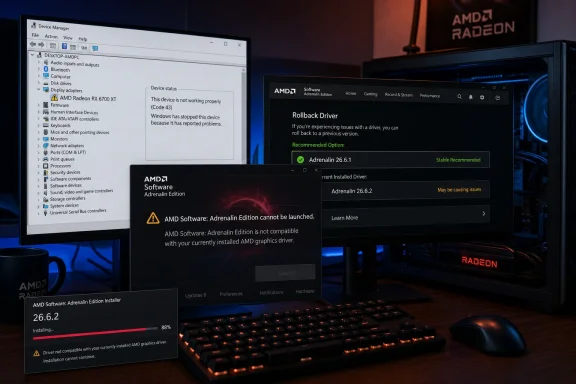
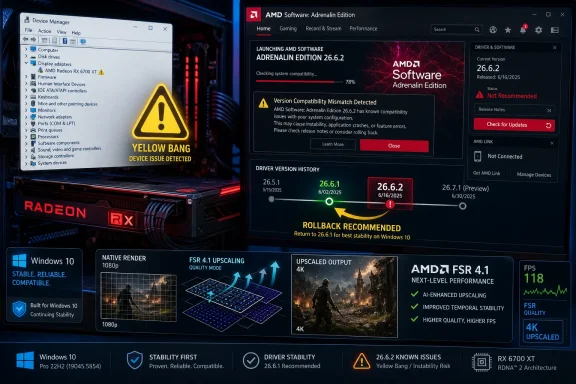
Instead, the update has become a small case study in how brittle the modern Windows graphics stack can be. On affected Windows 10 PCs, AMD Software: Adrenalin Edition may refuse to launch with a message saying the installed AMD Software version is not compatible with the currently installed AMD graphics driver. In Device Manager, the Radeon adapter may show the familiar yellow exclamation mark, the Windows shorthand for “something in this device stack is not healthy.”
That mismatch matters because AMD’s control panel is not a decorative launcher. It is where users manage driver settings, frame generation toggles, recording tools, display behavior, performance tuning, update behavior, and game-specific profiles. If the driver package leaves Windows and AMD Software disagreeing about what is installed, the user is not just missing a new feature; they are staring at a half-installed graphics environment.
AMD’s own workaround is blunt: affected users should revert to AMD Software: Adrenalin Edition 26.6.1 while engineers investigate. That is a reasonable short-term escape hatch, but it also means the newest game profiles and FSR support are functionally gated for a portion of the Windows audience until AMD ships a fixed package.
For enthusiasts, the ritual is familiar. Uninstall, reboot, run AMD Cleanup Utility or DDU, reboot again, reinstall, disable automatic updates, and hope Windows Update does not race the vendor installer to the finish line. For normal users, that is indistinguishable from black magic. A driver that requires a cleanup utility to retreat safely has already crossed the line from software update into maintenance event.
The irony is that AMD’s 26.6.1 release notes already recommend using AMD Cleanup Utility when downgrading to an older version. That advice is prudent, especially for graphics drivers that hook deeply into display, media, compute, and overlay services. But when the official fix for the newest driver is “go back to the previous one,” rollback hygiene becomes more than housekeeping. It becomes the difference between restoring the machine and compounding the install mess.
This is where AMD’s position is awkward. The company can accurately say Windows 10 64-bit version 21H2 and later remains in the compatibility list for the previous package, and the 26.6.2 problem is being investigated. But the affected customer does not experience a nuanced support matrix. They experience a GPU warning sign and a control panel that tells them AMD’s own software does not match AMD’s own driver.
Microsoft’s mainstream Windows 10 support story has been winding down, but that is not the same as Windows 10 disappearing from real-world PCs. Gamers often delay OS upgrades because their current build is stable, their anti-cheat stack behaves, their VR setup works, or their hardware falls into the gray zone of Windows 11 requirements. Small businesses delay because imaging, licensing, app validation, and user disruption are expensive.
That makes a Windows 10-specific Radeon driver failure more consequential than the raw release-note language suggests. If the driver technically advertises Windows 10 support but fails widely enough that AMD has to publish a warning and rollback recommendation, then the practical support boundary is not where the compatibility table says it is. It is where the installer succeeds, the device starts, and the control panel launches.
The market transition also creates an incentive problem. AMD, Nvidia, Intel, and game studios all want to optimize for the newer stack: newer WDDM behavior, newer Windows security defaults, newer scheduling assumptions, and newer graphics APIs. But the customer base is still split. Every driver package has to straddle that split, and 26.6.2 shows how quickly a feature release can turn into a platform compatibility referendum.
Modern driver packages are larger, more integrated, and more ambitious. They do not merely expose a card to Windows. They bundle recording services, telemetry, overlays, AI-adjacent features, upscaling controls, per-game optimization databases, anti-lag plumbing, display enhancements, and sometimes support for entire new rendering paths. A problem in the packaging or install detection layer can break the experience before the user ever launches a game.
The 26.6.2 incident is a particularly clean example because it pits two rational user behaviors against each other. A Radeon owner who wants official support for newly listed games has a reason to update. A Windows 10 user who wants a stable display driver now has a reason not to. AMD’s workaround resolves the stability side by reverting to 26.6.1, but that rollback may leave those same users without the driver-level support they installed 26.6.2 to get.
That tension is becoming a normal part of PC gaming. The newest driver may be best for one game, worse for another, and broken on a subset of operating systems. Enthusiasts have learned to treat drivers almost like firmware: read the notes, scan the known issues, wait for reports from users with similar hardware, and keep the previous installer close. The old “latest is greatest” reflex is looking increasingly obsolete.
That distinction matters. If AMD Software alone failed to launch, users might reasonably suspect a broken control panel, cached files, corrupted profiles, or a background service problem. When Device Manager marks the GPU itself, the issue moves lower in the stack. The OS, the driver package, and the device registration path are not lining up cleanly.
This is also why Windows administrators tend to dislike consumer GPU driver drama. On a personal gaming PC, a rollback is an evening annoyance. In a lab, classroom, esports venue, CAD shop, or small office with standardized Radeon systems, a bad driver can become a fleet problem. Even if the affected population is mostly Windows 10, that is still a large enough estate to make staged deployment the only sane policy.
The lesson is not that AMD uniquely ships imperfect drivers. Nvidia and Intel have had their own share of regressions, black screens, installation failures, and application-specific weirdness. The lesson is that graphics drivers sit at the boundary of kernel-mode reliability and consumer software velocity. When they fail, they fail with the blast radius of infrastructure and the release cadence of gaming software.
The trouble is that rollback advice always creates a second problem: version fragmentation. Some Radeon users will remain on 26.6.2 because it works for them, especially on Windows 11. Some Windows 10 users will roll back cleanly to 26.6.1. Others will land on older drivers because cleanup and reinstall attempts fail, Windows Update intervenes, or they choose a known-good version from before the 26.6 branch.
That fragmentation complicates support. Game developers, forum helpers, and AMD’s own support staff must now ask not only which GPU a user owns, but which OS build, which driver package, whether the install was upgraded in place or cleaned, and whether Windows is reporting the adapter normally. A driver release that was supposed to simplify support for new games temporarily expands the matrix.
For WindowsForum readers, the practical advice is conservative. If you are on Windows 10 and have not installed 26.6.2, wait. If you already installed it and Device Manager shows a warning on your Radeon RX adapter, roll back to 26.6.1 using AMD’s recommended cleanup path rather than layering installers over a broken state. If you are on Windows 11 and 26.6.2 is behaving normally, there is no need to panic, but keeping the 26.6.1 installer handy is still sensible.
That is especially important for Radeon RX 7000-series users. RDNA 3 owners have spent much of this GPU generation watching the market narrative bend around AI-assisted upscaling, frame generation, and driver-level performance polish. AMD needs those users to feel that buying Radeon does not mean waiting longer or accepting rougher edges when new features arrive.
A driver failure on Windows 10 does not invalidate FSR 4.1. It does, however, blur the launch message. Instead of talking only about image quality, frame pacing, latency, and game support, the conversation shifts to whether the driver installs cleanly. In competitive graphics marketing, that is wasted oxygen.
The broader point is that software features are only as strong as their delivery channel. AMD can build a compelling upscaling stack, but if the driver pipeline stumbles on a still-common Windows platform, the feature becomes less accessible than the slide deck implies. Reliability is not separate from graphics innovation; it is the mechanism by which graphics innovation reaches users.
The uncomfortable part is that consumers do not sign up to be a canary deployment ring. They install a driver because it is offered by the vendor’s own software, because it promises support for a game they want to play, or because the update badge implies it is the recommended path. When that update breaks the display adapter registration on their OS, “our engineers are investigating” may be accurate, but it does not feel like a fair trade.
This is where AMD could improve its communication. A clear, prominent advisory in the driver notes and in the Adrenalin update flow would reduce unnecessary installs while the issue is under investigation. If the problem is confined to Windows 10, the updater should say so before download. If certain GPU families are more exposed, the advisory should name them. Silence forces the community to reverse-engineer the blast radius.
There is also a case for more granular rollout controls. Browser vendors, Microsoft, and many enterprise software platforms already use staged deployments because they know a full-speed rollout can magnify a bad build. GPU vendors have historically leaned on manual downloads and user choice, but their own control panels increasingly behave like update platforms. Once that is true, update-platform discipline should follow.
The situation is especially relevant for organizations that still run Windows 10 with Radeon hardware. Some may be waiting on hardware refreshes before moving to Windows 11. Others may have specialized software or peripherals that are validated only on Windows 10. A driver marked compatible with Windows 10 is not enough reason to waive testing.
Admins should treat 26.6.2 as a hold unless they have a specific Windows 11 use case that requires it and have validated it on representative hardware. For Windows 10 fleets, the safer baseline is 26.6.1 or a previously approved driver until AMD publishes a corrected release. The goal is not to avoid all updates; it is to avoid becoming part of the failure curve before the vendor has mapped it.
There is a lesson here for documentation, too. Release notes often bury known issues below marketing highlights, while download pages foreground the new games and features. That ordering mirrors consumer interest, but it does not match operational risk. When a known issue can leave a GPU with a Device Manager warning, it belongs near the top of the page and inside the updater itself.
But the more durable fix is process. AMD needs to show that Windows 10 remains a first-class validation target for as long as the company lists it as supported. If support is narrowing, AMD should say that plainly. If Windows 10 support remains full, the company needs to ensure the install and launch path gets the same attention as the Windows 11 path, especially for feature releases carrying major FSR changes.
Users also need to update their own habits. A GPU driver is not a game patch. It is privileged software that can determine whether the system displays correctly at all. Keeping older installers, reading known issues before updating, and delaying nonessential driver upgrades by a few days are not paranoid behaviors anymore. They are normal maintenance for a platform whose complexity keeps increasing.
The industry has trained users to chase the newest driver for the newest game. Incidents like this teach the counterlesson: when your current system is stable, the newest driver should have to earn its place.
 AMD’s FSR Push Hits the Windows 10 Wall
AMD’s 26.6.2 release was meant to be a feature-forward driver, the sort of update Radeon owners usually install because it promises day-one game support and fresh graphics technology rather than emergency repairs. The headline addition is support tied to FSR 4.1 for Radeon RX 7000-series GPUs, alongside profiles for new and upcoming games including Assassin’s Creed Black Flag Resynced and DOOM: The Dark Ages | Revelations. That is the kind of driver AMD wants enthusiasts to associate with progress: more frames, newer upscaling, and smoother launch-week play.Instead, the update has become a small case study in how brittle the modern Windows graphics stack can be. On affected Windows 10 PCs, AMD Software: Adrenalin Edition may refuse to launch with a message saying the installed AMD Software version is not compatible with the currently installed AMD graphics driver. In Device Manager, the Radeon adapter may show the familiar yellow exclamation mark, the Windows shorthand for “something in this device stack is not healthy.”
That mismatch matters because AMD’s control panel is not a decorative launcher. It is where users manage driver settings, frame generation toggles, recording tools, display behavior, performance tuning, update behavior, and game-specific profiles. If the driver package leaves Windows and AMD Software disagreeing about what is installed, the user is not just missing a new feature; they are staring at a half-installed graphics environment.
AMD’s own workaround is blunt: affected users should revert to AMD Software: Adrenalin Edition 26.6.1 while engineers investigate. That is a reasonable short-term escape hatch, but it also means the newest game profiles and FSR support are functionally gated for a portion of the Windows audience until AMD ships a fixed package.
The Error Message Says Compatibility, but the Problem Is Trust
The error text users are seeing sounds like a version mismatch: the AMD Software front end thinks it does not belong with the driver currently loaded by Windows. That may be technically accurate, but it is also the least reassuring way for a GPU driver to fail. A crash is obvious. A missing frame-generation toggle is annoying. A Device Manager warning on the display adapter is existential; it makes users wonder whether Windows is running the real driver, a fallback display driver, or some half-registered remnant from a failed install.For enthusiasts, the ritual is familiar. Uninstall, reboot, run AMD Cleanup Utility or DDU, reboot again, reinstall, disable automatic updates, and hope Windows Update does not race the vendor installer to the finish line. For normal users, that is indistinguishable from black magic. A driver that requires a cleanup utility to retreat safely has already crossed the line from software update into maintenance event.
The irony is that AMD’s 26.6.1 release notes already recommend using AMD Cleanup Utility when downgrading to an older version. That advice is prudent, especially for graphics drivers that hook deeply into display, media, compute, and overlay services. But when the official fix for the newest driver is “go back to the previous one,” rollback hygiene becomes more than housekeeping. It becomes the difference between restoring the machine and compounding the install mess.
This is where AMD’s position is awkward. The company can accurately say Windows 10 64-bit version 21H2 and later remains in the compatibility list for the previous package, and the 26.6.2 problem is being investigated. But the affected customer does not experience a nuanced support matrix. They experience a GPU warning sign and a control panel that tells them AMD’s own software does not match AMD’s own driver.
Windows 10 Is Still Too Big to Treat Like a Footnote
The industry has spent years trying to make Windows 11 feel inevitable, yet Windows 10 remains stubbornly present in gaming rigs, older workstations, and home-built systems that still perform well. Many of those machines use Radeon RX 6000- and RX 7000-series cards, the exact kinds of GPUs whose owners are likely to install a feature driver quickly. This is not a museum audience running a decade-old operating system for nostalgia.Microsoft’s mainstream Windows 10 support story has been winding down, but that is not the same as Windows 10 disappearing from real-world PCs. Gamers often delay OS upgrades because their current build is stable, their anti-cheat stack behaves, their VR setup works, or their hardware falls into the gray zone of Windows 11 requirements. Small businesses delay because imaging, licensing, app validation, and user disruption are expensive.
That makes a Windows 10-specific Radeon driver failure more consequential than the raw release-note language suggests. If the driver technically advertises Windows 10 support but fails widely enough that AMD has to publish a warning and rollback recommendation, then the practical support boundary is not where the compatibility table says it is. It is where the installer succeeds, the device starts, and the control panel launches.
The market transition also creates an incentive problem. AMD, Nvidia, Intel, and game studios all want to optimize for the newer stack: newer WDDM behavior, newer Windows security defaults, newer scheduling assumptions, and newer graphics APIs. But the customer base is still split. Every driver package has to straddle that split, and 26.6.2 shows how quickly a feature release can turn into a platform compatibility referendum.
Day-One Game Drivers Are Becoming Riskier Bets
There was a time when the advice for PC gamers was simple: install the latest GPU driver before playing a major new release. That advice made sense when game-ready drivers mostly meant bug fixes, shader profile updates, and performance tuning for a specific title. It still often makes sense, but the bargain has changed.Modern driver packages are larger, more integrated, and more ambitious. They do not merely expose a card to Windows. They bundle recording services, telemetry, overlays, AI-adjacent features, upscaling controls, per-game optimization databases, anti-lag plumbing, display enhancements, and sometimes support for entire new rendering paths. A problem in the packaging or install detection layer can break the experience before the user ever launches a game.
The 26.6.2 incident is a particularly clean example because it pits two rational user behaviors against each other. A Radeon owner who wants official support for newly listed games has a reason to update. A Windows 10 user who wants a stable display driver now has a reason not to. AMD’s workaround resolves the stability side by reverting to 26.6.1, but that rollback may leave those same users without the driver-level support they installed 26.6.2 to get.
That tension is becoming a normal part of PC gaming. The newest driver may be best for one game, worse for another, and broken on a subset of operating systems. Enthusiasts have learned to treat drivers almost like firmware: read the notes, scan the known issues, wait for reports from users with similar hardware, and keep the previous installer close. The old “latest is greatest” reflex is looking increasingly obsolete.
The Yellow Bang Is Windows Doing Its Job
The yellow exclamation mark in Device Manager is ugly, but it is also useful. It tells the user that Windows has not accepted the device state as normal. That can mean many things depending on the code behind it, but in this case it gives affected Radeon owners a concrete place to confirm that the issue is not merely an Adrenalin UI glitch.That distinction matters. If AMD Software alone failed to launch, users might reasonably suspect a broken control panel, cached files, corrupted profiles, or a background service problem. When Device Manager marks the GPU itself, the issue moves lower in the stack. The OS, the driver package, and the device registration path are not lining up cleanly.
This is also why Windows administrators tend to dislike consumer GPU driver drama. On a personal gaming PC, a rollback is an evening annoyance. In a lab, classroom, esports venue, CAD shop, or small office with standardized Radeon systems, a bad driver can become a fleet problem. Even if the affected population is mostly Windows 10, that is still a large enough estate to make staged deployment the only sane policy.
The lesson is not that AMD uniquely ships imperfect drivers. Nvidia and Intel have had their own share of regressions, black screens, installation failures, and application-specific weirdness. The lesson is that graphics drivers sit at the boundary of kernel-mode reliability and consumer software velocity. When they fail, they fail with the blast radius of infrastructure and the release cadence of gaming software.
AMD’s Rollback Advice Is Sensible, but It Leaves Users in Limbo
AMD’s recommendation to return to 26.6.1 is the correct immediate move. The previous driver was released earlier in June and carried support for Windows 10 and Windows 11, including a listed Windows Driver Store version and compatibility with multiple Radeon RX generations. It also fixed several issues and documented known problems, which is exactly what users need when they are trying to find a stable landing point.The trouble is that rollback advice always creates a second problem: version fragmentation. Some Radeon users will remain on 26.6.2 because it works for them, especially on Windows 11. Some Windows 10 users will roll back cleanly to 26.6.1. Others will land on older drivers because cleanup and reinstall attempts fail, Windows Update intervenes, or they choose a known-good version from before the 26.6 branch.
That fragmentation complicates support. Game developers, forum helpers, and AMD’s own support staff must now ask not only which GPU a user owns, but which OS build, which driver package, whether the install was upgraded in place or cleaned, and whether Windows is reporting the adapter normally. A driver release that was supposed to simplify support for new games temporarily expands the matrix.
For WindowsForum readers, the practical advice is conservative. If you are on Windows 10 and have not installed 26.6.2, wait. If you already installed it and Device Manager shows a warning on your Radeon RX adapter, roll back to 26.6.1 using AMD’s recommended cleanup path rather than layering installers over a broken state. If you are on Windows 11 and 26.6.2 is behaving normally, there is no need to panic, but keeping the 26.6.1 installer handy is still sensible.
FSR 4.1 Raises the Stakes for Driver Quality
FSR is not just another checkbox in AMD’s control panel. It is one of the company’s most important answers to Nvidia’s DLSS advantage and Intel’s XeSS push, and each new revision carries strategic weight. When AMD attaches a driver release to FSR 4.1 support, it is signaling to Radeon owners that the software stack is evolving with the hardware.That is especially important for Radeon RX 7000-series users. RDNA 3 owners have spent much of this GPU generation watching the market narrative bend around AI-assisted upscaling, frame generation, and driver-level performance polish. AMD needs those users to feel that buying Radeon does not mean waiting longer or accepting rougher edges when new features arrive.
A driver failure on Windows 10 does not invalidate FSR 4.1. It does, however, blur the launch message. Instead of talking only about image quality, frame pacing, latency, and game support, the conversation shifts to whether the driver installs cleanly. In competitive graphics marketing, that is wasted oxygen.
The broader point is that software features are only as strong as their delivery channel. AMD can build a compelling upscaling stack, but if the driver pipeline stumbles on a still-common Windows platform, the feature becomes less accessible than the slide deck implies. Reliability is not separate from graphics innovation; it is the mechanism by which graphics innovation reaches users.
Enthusiasts Are Once Again the Test Ring
Every GPU vendor relies on enthusiasts as an unofficial early-warning system. A new driver lands, power users install it within hours, and forums rapidly fill with reports sorted by GPU, OS, monitor configuration, and game. That messy feedback loop often detects problems faster than formal release validation can, especially across the absurd diversity of Windows PCs.The uncomfortable part is that consumers do not sign up to be a canary deployment ring. They install a driver because it is offered by the vendor’s own software, because it promises support for a game they want to play, or because the update badge implies it is the recommended path. When that update breaks the display adapter registration on their OS, “our engineers are investigating” may be accurate, but it does not feel like a fair trade.
This is where AMD could improve its communication. A clear, prominent advisory in the driver notes and in the Adrenalin update flow would reduce unnecessary installs while the issue is under investigation. If the problem is confined to Windows 10, the updater should say so before download. If certain GPU families are more exposed, the advisory should name them. Silence forces the community to reverse-engineer the blast radius.
There is also a case for more granular rollout controls. Browser vendors, Microsoft, and many enterprise software platforms already use staged deployments because they know a full-speed rollout can magnify a bad build. GPU vendors have historically leaned on manual downloads and user choice, but their own control panels increasingly behave like update platforms. Once that is true, update-platform discipline should follow.
Enterprise IT Sees a Familiar Pattern
For managed Windows environments, the 26.6.2 issue reinforces a rule that should already be policy: consumer GPU drivers do not belong in broad deployment on release day. That is true even when the release contains tempting fixes. The cost of a bad display driver is high because it can disrupt login, remote support, multi-monitor setups, hardware acceleration, and the applications users need to do their jobs.The situation is especially relevant for organizations that still run Windows 10 with Radeon hardware. Some may be waiting on hardware refreshes before moving to Windows 11. Others may have specialized software or peripherals that are validated only on Windows 10. A driver marked compatible with Windows 10 is not enough reason to waive testing.
Admins should treat 26.6.2 as a hold unless they have a specific Windows 11 use case that requires it and have validated it on representative hardware. For Windows 10 fleets, the safer baseline is 26.6.1 or a previously approved driver until AMD publishes a corrected release. The goal is not to avoid all updates; it is to avoid becoming part of the failure curve before the vendor has mapped it.
There is a lesson here for documentation, too. Release notes often bury known issues below marketing highlights, while download pages foreground the new games and features. That ordering mirrors consumer interest, but it does not match operational risk. When a known issue can leave a GPU with a Device Manager warning, it belongs near the top of the page and inside the updater itself.
The Real Fix Is Not Just a Hotfix Driver
AMD will likely resolve this with a revised package, a point release, or a corrected installer path. That will address the immediate breakage, and for most users the story will end there. Install the fixed driver, confirm Device Manager is clean, launch Adrenalin, and move on.But the more durable fix is process. AMD needs to show that Windows 10 remains a first-class validation target for as long as the company lists it as supported. If support is narrowing, AMD should say that plainly. If Windows 10 support remains full, the company needs to ensure the install and launch path gets the same attention as the Windows 11 path, especially for feature releases carrying major FSR changes.
Users also need to update their own habits. A GPU driver is not a game patch. It is privileged software that can determine whether the system displays correctly at all. Keeping older installers, reading known issues before updating, and delaying nonessential driver upgrades by a few days are not paranoid behaviors anymore. They are normal maintenance for a platform whose complexity keeps increasing.
The industry has trained users to chase the newest driver for the newest game. Incidents like this teach the counterlesson: when your current system is stable, the newest driver should have to earn its place.
Radeon Owners Get a Clear Signal From a Messy Release
The practical picture is not complicated, even if the driver stack underneath it is. AMD shipped an ambitious Radeon update, Windows 10 users hit a serious install or compatibility failure, and AMD’s safe harbor is the previous Adrenalin release. Until a fixed package appears, the smart move is restraint.- Windows 10 Radeon users should avoid AMD Software: Adrenalin Edition 26.6.2 unless they are prepared to troubleshoot or roll back.
- A yellow warning on the Radeon adapter in Device Manager is a strong sign that the issue is deeper than the Adrenalin user interface.
- AMD’s recommended temporary workaround is to return to AMD Software: Adrenalin Edition 26.6.1.
- Users who depend on new 26.6.2 game profiles may have to choose between official launch support and driver stability for now.
- Administrators should hold 26.6.2 from Windows 10 deployments until AMD publishes and documents a fix.
- Anyone downgrading should use a clean removal path rather than stacking installers over a failed 26.6.2 installation.
References
- Primary source: Neowin
Published: Tue, 23 Jun 2026 04:29:34 GMT
AMD confirms 26.6.2 FSR driver breaks on many Windows PCs - Neowin
AMD has confirmed a major driver issue that is affecting many users running Windows PCs with the latest 26.6.2 update. www.neowin.net
- Related coverage: changelog.gg
AMD Software: Adrenalin Edition | Changelog.gg
AMD Software: Adrenalin Edition release notes, official source links, and public driver updates on Changelog.gg.changelog.gg - Related coverage: tech.yahoo.com
AMD’s latest Adrenalin driver update drops Windows 10 from release notes, but the company says support continues
The company says Windows 10 users can still install the Adrenalin Edition 25.10.2 drivers via the Windows 11 installer, even as Microsoft’s older OS officially moves into end-of-life status.tech.yahoo.com - Related coverage: igorslab.de
AMD Adrenalin 26.6.1: Radeon driver adds new game profiles and fixes …
On June 2, 2026, AMD released the driver AMD Software: Adrenalin Edition 26.6.1.www.igorslab.de