

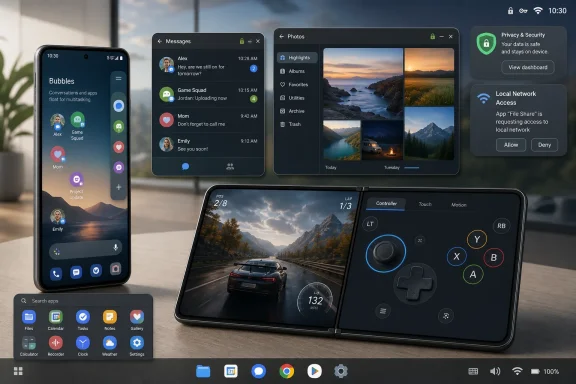
Google began rolling out Android 17 on June 16, 2026, with headline user-facing changes including floating app “Bubbles,” a larger-screen bubble bar, and a foldable gaming mode that splits the screen between gameplay and a dynamic controller layout. The update is not merely another Android polish pass; it is Google’s clearest admission yet that phones, foldables, tablets, and AI-era workflows now need a more flexible interface than the old full-screen app model. The company is trying to make Android feel less like a stack of isolated rectangles and more like a workspace. That is a bigger shift than the cheery “multitasking” branding suggests.
Android has always claimed to be a multitasking operating system, but for most users that has meant notifications, recent-app switching, picture-in-picture video, and the occasional split-screen session that looked better in demos than in daily use. Android 17’s floating app bubbles change the tone. Any app can be minimized into a movable bubble from the launcher, giving users a lightweight way to park an app without fully leaving the task at hand.
That sounds small until you consider how people actually use their phones. A user checking a delivery app while messaging a friend, comparing prices while reading a review, or keeping a notes app nearby during a video call has usually been forced into an awkward dance of swipes and app switches. Android 17 tries to turn that dance into a visual layer.
The important distinction is that these are not just chat bubbles wearing a new coat of paint. Google describes Bubbles as a windowing mode separate from the older messaging bubble API, and that matters because it moves the feature from a narrow communications trick into a broader system behavior. It is Android borrowing from desktop metaphors without fully becoming a desktop.
The risk, of course, is clutter. Floating UI is powerful when it is predictable and maddening when every app behaves like it has a right to hover over your screen. Google’s challenge is not simply enabling bubbles; it is teaching users when bubbles are useful and forcing developers to respect the boundaries of a small, touch-first display.
For foldable owners, this is the kind of feature that can make the form factor feel less like a novelty and more like a distinct device class. A foldable should not merely be a phone that opens; it should expose interaction patterns that slab phones cannot match. Gaming is a natural test case because touch controls have always been a compromise, especially when fingers cover the action.
Google’s move also pressures developers and hardware makers. If Android itself begins defining better behavior for foldables, then app makers have fewer excuses for lazy layouts, fixed orientations, and tablet-sized dead zones. Foldables are still expensive, still physically complicated, and still a niche compared with mainstream phones, but platform-level support can make the niche less fragile.
The WindowsForum angle is hard to miss. Microsoft learned with Surface, Continuum, Windows 8, and Windows on ARM that new form factors do not succeed on hardware ambition alone. They need a software model that makes the hardware’s oddness feel useful rather than experimental. Google is now making the same argument from the Android side.
Instead of declaring that Android is now a desktop operating system, Google is adding desktop-like affordances where they make sense. Bubbles preserve the phone-first model while giving users a way to keep tasks alive at the edge of attention. The bubble bar on larger screens goes further, acting like a lightweight taskbar for floating app sessions.
That restraint is probably wise. Traditional desktop windowing can become miserable on touch screens because precision, overlapping windows, and dense controls all assume a pointer. Android 17 is not trying to recreate Windows 11 on a foldable. It is trying to borrow just enough of the desktop’s persistence to make mobile multitasking less disposable.
There is a strategic motive here as well. Google needs Android to remain the default platform for odd hardware. Foldables, tablets, handheld gaming devices, car systems, XR interfaces, and dual-screen experiments all benefit from an operating system that can adapt beyond the single-app slab. If Android cannot do that gracefully, OEMs will keep building their own layers, and fragmentation will do what fragmentation always does: delight power users while exhausting everyone else.
This is not entirely new. Google has been pushing developers toward better large-screen support for years, and Android 16 already started ignoring certain orientation, aspect ratio, and resizability restrictions on large screens for apps targeting the newer SDK. Android 17 tightens that story by removing more of the escape hatch for apps targeting API level 37 and higher. The message is clear: the era of “portrait phone only” as a default design assumption is ending.
That is good for users and uncomfortable for lazy software. Apps that assume fixed dimensions, block resizing, or bury state in fragile activity lifecycles may expose their flaws more visibly under Android 17. Floating windows and foldable-aware layouts make bad app architecture harder to hide.
The practical consequence for IT departments is that app validation gets more complicated. A corporate Android app that works acceptably on a managed slab phone may behave strangely when bubbled on a tablet or run on a foldable in half-screen mode. The upgrade question is no longer just whether the app launches; it is whether the app behaves predictably across the device shapes Android now wants to normalize.
Local network access is one of the more consequential changes. Android 17 introduces a runtime permission for apps that want to discover or connect to devices on the local network, such as smart home gear, casting targets, printers, or companion devices. That may sound like another annoying permission dialog, but it addresses a real privacy gap: local network visibility can reveal a great deal about a user’s home, office, and habits.
There is also expanded protection around SMS one-time passcodes. Android has been moving against OTP interception for years, and Android 17 extends protections to more standard SMS messages containing one-time codes, delaying access for many apps that should not be reading those messages in the first place. For users, that means fewer silent opportunities for shady apps to harvest login codes. For developers still relying on SMS scraping, it means the clock has run out.
Google is also enabling certificate transparency by default for apps targeting Android 17, hardening background activity launches, and extending safer dynamic code loading rules to native libraries. These are not features that sell phones on billboards. They are the platform plumbing that makes Android harder to abuse, and they deserve attention precisely because they are easy to miss.
But the more durable Android 17 story may be interface architecture, not AI. Generative tools change quickly, get renamed frequently, and often depend on cloud-side availability that varies by device, region, and account. Windowing behavior, app resizing rules, local permissions, and foldable interaction models are slower, deeper platform commitments.
That distinction matters for Windows users and IT pros because it mirrors the tension in Microsoft’s own ecosystem. Copilot gets the stage time, but deployment teams still care about servicing models, security baselines, app compatibility, and UI changes that affect support tickets. The same is true here. Gemini may be the marketing sizzle, but Bubbles, foldable layouts, and permission changes are the operating system asserting itself.
Android 17 is therefore less flashy than it first appears and more consequential than it may be credited for. A floating app bubble is not revolutionary on its own. A platform-wide shift toward persistent, resizable, multi-form-factor computing is.
Floating app behavior, taskbars, large-screen layouts, and gaming modes are areas where manufacturers already differentiate. Samsung has long treated multitasking as a core advantage on Galaxy Z Fold devices and tablets. Lenovo and other vendors have their own ideas about productivity modes. Google adding native support does not erase those efforts; it creates a baseline that OEMs can either harmonize with or complicate.
That is the old Android bargain. Google defines the platform, OEMs customize the experience, and users get both choice and inconsistency. With Android 17, inconsistency could be more visible because multitasking is something users touch constantly. If bubbles work one way on a Pixel Fold and another way on a Galaxy Fold, the feature may feel less like Android and more like another manufacturer-specific trick.
Still, a baseline is better than a vacuum. Developers are more likely to support floating and resizable behaviors when they are part of core Android rather than a vendor extension. That, in turn, makes the ecosystem healthier for large screens. Google does not need every OEM to implement Android 17 identically; it needs enough common ground that app makers stop treating foldables and tablets as edge cases.
Any time an operating system changes multitasking, help desks inherit new vocabulary. Users will ask why an app is floating, where a bubble went, how to close it, why a gamepad layout appears on one device but not another, and why an internal app does not scale properly on a foldable. Those are not reasons to avoid the update. They are reasons to test it like a workflow change rather than a routine patch.
Mobile device management policies may also need review. Organizations that restrict overlays, background behavior, local network discovery, or SMS access should examine how Android 17’s defaults interact with existing controls. The platform may now block or gate behaviors that an enterprise previously managed through policy, app design, or user training.
The deeper issue is procurement. If Android 17 makes foldables and tablets more capable, some organizations may be tempted to treat them as laptop substitutes in narrow roles. That could work for field operations, retail, healthcare, logistics, or executive travel, but only where apps are validated for the new windowing and resizing model. A foldable running Android 17 is not automatically a PC replacement. It is a more capable mobile endpoint, and that distinction still matters.
Android is approaching the same problem from the opposite direction. It began with the assumption that one app owns the screen, then gradually added exceptions: notifications, widgets, split screen, picture-in-picture, freeform windows in limited contexts, taskbars, and now more generalized bubbles. The platform is not abandoning mobile simplicity. It is admitting that simplicity alone is no longer enough.
The lesson from Windows is that windowing is not a feature; it is a system of expectations. Users need to understand where apps live, whether they are running, how they are closed, how they preserve state, and what happens when the screen size changes. Developers need APIs and design rules that make those expectations reliable. Administrators need policy controls that keep the system supportable.
If Google gets this right, Android 17 becomes a stepping stone toward a more mature large-screen ecosystem. If it gets it wrong, Bubbles become another clever feature power users praise and ordinary users ignore. The difference will not be decided by the launch announcement. It will be decided by app behavior six months from now.
That is a product-design challenge, not a technical one. If the bubble affordance is too hidden, users will never discover it. If it is too aggressive, they will resent it. If apps behave inconsistently, the whole model will feel unreliable. Successful multitasking features must become muscle memory, and muscle memory is earned through restraint.
Foldable gaming mode faces a similar test. The idea is strong, but its value depends on game compatibility, controller layout quality, latency, ergonomics, and whether developers embrace the pattern. A dynamic gamepad is useful only if it feels better than simply pairing a controller or using a conventional touch overlay.
Google is betting that users are ready for more layered mobile computing. The bet is plausible. Phones are more powerful, foldables are more credible, tablets are less neglected, and users increasingly juggle AI assistants, messaging, media, shopping, work apps, and browser sessions in rapid succession. Android 17 gives that behavior a more formal shape.
 Google Finally Treats the Phone Screen Like a Workspace
Android has always claimed to be a multitasking operating system, but for most users that has meant notifications, recent-app switching, picture-in-picture video, and the occasional split-screen session that looked better in demos than in daily use. Android 17’s floating app bubbles change the tone. Any app can be minimized into a movable bubble from the launcher, giving users a lightweight way to park an app without fully leaving the task at hand.That sounds small until you consider how people actually use their phones. A user checking a delivery app while messaging a friend, comparing prices while reading a review, or keeping a notes app nearby during a video call has usually been forced into an awkward dance of swipes and app switches. Android 17 tries to turn that dance into a visual layer.
The important distinction is that these are not just chat bubbles wearing a new coat of paint. Google describes Bubbles as a windowing mode separate from the older messaging bubble API, and that matters because it moves the feature from a narrow communications trick into a broader system behavior. It is Android borrowing from desktop metaphors without fully becoming a desktop.
The risk, of course, is clutter. Floating UI is powerful when it is predictable and maddening when every app behaves like it has a right to hover over your screen. Google’s challenge is not simply enabling bubbles; it is teaching users when bubbles are useful and forcing developers to respect the boundaries of a small, touch-first display.
The Foldable Is No Longer a Science Project
The second big story is the foldable gaming mode, because it shows Google trying to solve a problem that has shadowed foldables since their consumer debut: too many apps still behave as if the device is just a stretched phone. Android 17’s gaming layout divides the screen into a 50/50 arrangement, with the game on one half and a dynamic gamepad on the other. It is an obvious idea, but obvious ideas often take years to become platform features.For foldable owners, this is the kind of feature that can make the form factor feel less like a novelty and more like a distinct device class. A foldable should not merely be a phone that opens; it should expose interaction patterns that slab phones cannot match. Gaming is a natural test case because touch controls have always been a compromise, especially when fingers cover the action.
Google’s move also pressures developers and hardware makers. If Android itself begins defining better behavior for foldables, then app makers have fewer excuses for lazy layouts, fixed orientations, and tablet-sized dead zones. Foldables are still expensive, still physically complicated, and still a niche compared with mainstream phones, but platform-level support can make the niche less fragile.
The WindowsForum angle is hard to miss. Microsoft learned with Surface, Continuum, Windows 8, and Windows on ARM that new form factors do not succeed on hardware ambition alone. They need a software model that makes the hardware’s oddness feel useful rather than experimental. Google is now making the same argument from the Android side.
Bubbles Are Google’s Answer to the Desktop Temptation
Every mobile platform eventually wrestles with the same temptation: should a powerful phone become a little PC? Samsung has DeX, Lenovo has experimented with desktop-like Android modes, Apple has slowly pushed iPadOS toward more elaborate multitasking, and Microsoft spent years trying to make one operating system span phones, tablets, laptops, and desktops. Google’s Android 17 approach is more cautious.Instead of declaring that Android is now a desktop operating system, Google is adding desktop-like affordances where they make sense. Bubbles preserve the phone-first model while giving users a way to keep tasks alive at the edge of attention. The bubble bar on larger screens goes further, acting like a lightweight taskbar for floating app sessions.
That restraint is probably wise. Traditional desktop windowing can become miserable on touch screens because precision, overlapping windows, and dense controls all assume a pointer. Android 17 is not trying to recreate Windows 11 on a foldable. It is trying to borrow just enough of the desktop’s persistence to make mobile multitasking less disposable.
There is a strategic motive here as well. Google needs Android to remain the default platform for odd hardware. Foldables, tablets, handheld gaming devices, car systems, XR interfaces, and dual-screen experiments all benefit from an operating system that can adapt beyond the single-app slab. If Android cannot do that gracefully, OEMs will keep building their own layers, and fragmentation will do what fragmentation always does: delight power users while exhausting everyone else.
Developers Get the Bill for Google’s New Flexibility
For users, Android 17’s new interface ideas look like convenience. For developers, they look like another invoice from the future. Apps now need to behave well when resized, bubbled, moved, paused, resumed, rotated, and displayed on screens that may be phone-sized one moment and tablet-like the next.This is not entirely new. Google has been pushing developers toward better large-screen support for years, and Android 16 already started ignoring certain orientation, aspect ratio, and resizability restrictions on large screens for apps targeting the newer SDK. Android 17 tightens that story by removing more of the escape hatch for apps targeting API level 37 and higher. The message is clear: the era of “portrait phone only” as a default design assumption is ending.
That is good for users and uncomfortable for lazy software. Apps that assume fixed dimensions, block resizing, or bury state in fragile activity lifecycles may expose their flaws more visibly under Android 17. Floating windows and foldable-aware layouts make bad app architecture harder to hide.
The practical consequence for IT departments is that app validation gets more complicated. A corporate Android app that works acceptably on a managed slab phone may behave strangely when bubbled on a tablet or run on a foldable in half-screen mode. The upgrade question is no longer just whether the app launches; it is whether the app behaves predictably across the device shapes Android now wants to normalize.
Security Changes Hide Behind the Flashier Demo
The consumer coverage understandably gravitates toward floating apps and foldable gaming, but Android 17 also carries security and privacy changes that matter more to administrators. Google is continuing the slow campaign to make Android less permissive by default, especially for apps that target the new API level.Local network access is one of the more consequential changes. Android 17 introduces a runtime permission for apps that want to discover or connect to devices on the local network, such as smart home gear, casting targets, printers, or companion devices. That may sound like another annoying permission dialog, but it addresses a real privacy gap: local network visibility can reveal a great deal about a user’s home, office, and habits.
There is also expanded protection around SMS one-time passcodes. Android has been moving against OTP interception for years, and Android 17 extends protections to more standard SMS messages containing one-time codes, delaying access for many apps that should not be reading those messages in the first place. For users, that means fewer silent opportunities for shady apps to harvest login codes. For developers still relying on SMS scraping, it means the clock has run out.
Google is also enabling certificate transparency by default for apps targeting Android 17, hardening background activity launches, and extending safer dynamic code loading rules to native libraries. These are not features that sell phones on billboards. They are the platform plumbing that makes Android harder to abuse, and they deserve attention precisely because they are easy to miss.
The AI Story Is Present, But It Is Not the Whole Story
Google cannot launch anything in 2026 without AI orbiting the announcement, and Android 17 is no exception. The broader rollout sits alongside Gemini-related additions and Google’s continuing attempt to thread AI through Android, Chrome, media creation, and device assistance. That is the story Google would probably prefer to dominate.But the more durable Android 17 story may be interface architecture, not AI. Generative tools change quickly, get renamed frequently, and often depend on cloud-side availability that varies by device, region, and account. Windowing behavior, app resizing rules, local permissions, and foldable interaction models are slower, deeper platform commitments.
That distinction matters for Windows users and IT pros because it mirrors the tension in Microsoft’s own ecosystem. Copilot gets the stage time, but deployment teams still care about servicing models, security baselines, app compatibility, and UI changes that affect support tickets. The same is true here. Gemini may be the marketing sizzle, but Bubbles, foldable layouts, and permission changes are the operating system asserting itself.
Android 17 is therefore less flashy than it first appears and more consequential than it may be credited for. A floating app bubble is not revolutionary on its own. A platform-wide shift toward persistent, resizable, multi-form-factor computing is.
Google’s Real Audience Is Samsung as Much as Pixel Users
The first stable Android rollout always invites the same consumer question: when will my phone get it? Pixel devices sit at the front of the line, while Samsung, OnePlus, Motorola, Xiaomi, Oppo, and others translate the release into their own skins and schedules. That staggered rollout is familiar, but Android 17’s features make OEM implementation unusually important.Floating app behavior, taskbars, large-screen layouts, and gaming modes are areas where manufacturers already differentiate. Samsung has long treated multitasking as a core advantage on Galaxy Z Fold devices and tablets. Lenovo and other vendors have their own ideas about productivity modes. Google adding native support does not erase those efforts; it creates a baseline that OEMs can either harmonize with or complicate.
That is the old Android bargain. Google defines the platform, OEMs customize the experience, and users get both choice and inconsistency. With Android 17, inconsistency could be more visible because multitasking is something users touch constantly. If bubbles work one way on a Pixel Fold and another way on a Galaxy Fold, the feature may feel less like Android and more like another manufacturer-specific trick.
Still, a baseline is better than a vacuum. Developers are more likely to support floating and resizable behaviors when they are part of core Android rather than a vendor extension. That, in turn, makes the ecosystem healthier for large screens. Google does not need every OEM to implement Android 17 identically; it needs enough common ground that app makers stop treating foldables and tablets as edge cases.
The Enterprise Upgrade Conversation Gets More Nuanced
For managed Android fleets, Android 17 presents a familiar mix of promise and friction. Security teams will like the direction of travel: tighter local network permissions, better OTP protections, certificate transparency defaults, and background activity hardening all align with enterprise risk reduction. Support teams may be less enthusiastic about the UI behavior changes arriving alongside them.Any time an operating system changes multitasking, help desks inherit new vocabulary. Users will ask why an app is floating, where a bubble went, how to close it, why a gamepad layout appears on one device but not another, and why an internal app does not scale properly on a foldable. Those are not reasons to avoid the update. They are reasons to test it like a workflow change rather than a routine patch.
Mobile device management policies may also need review. Organizations that restrict overlays, background behavior, local network discovery, or SMS access should examine how Android 17’s defaults interact with existing controls. The platform may now block or gate behaviors that an enterprise previously managed through policy, app design, or user training.
The deeper issue is procurement. If Android 17 makes foldables and tablets more capable, some organizations may be tempted to treat them as laptop substitutes in narrow roles. That could work for field operations, retail, healthcare, logistics, or executive travel, but only where apps are validated for the new windowing and resizing model. A foldable running Android 17 is not automatically a PC replacement. It is a more capable mobile endpoint, and that distinction still matters.
Windows Veterans Have Seen This Movie Before
Windows readers may feel a strange sense of déjà vu watching Google inch toward richer multitasking on mobile hardware. Microsoft spent decades refining window management, then spent the 2010s discovering how difficult it is to adapt that heritage to touch-first devices. Windows 8 went too far in one direction, Windows 10 pulled back, and Windows 11 continues to negotiate between desktop productivity and simplified interaction.Android is approaching the same problem from the opposite direction. It began with the assumption that one app owns the screen, then gradually added exceptions: notifications, widgets, split screen, picture-in-picture, freeform windows in limited contexts, taskbars, and now more generalized bubbles. The platform is not abandoning mobile simplicity. It is admitting that simplicity alone is no longer enough.
The lesson from Windows is that windowing is not a feature; it is a system of expectations. Users need to understand where apps live, whether they are running, how they are closed, how they preserve state, and what happens when the screen size changes. Developers need APIs and design rules that make those expectations reliable. Administrators need policy controls that keep the system supportable.
If Google gets this right, Android 17 becomes a stepping stone toward a more mature large-screen ecosystem. If it gets it wrong, Bubbles become another clever feature power users praise and ordinary users ignore. The difference will not be decided by the launch announcement. It will be decided by app behavior six months from now.
The Upgrade Is Really a Bet on New Habits
The most interesting thing about Android 17 is that its signature features depend on users learning new habits. People already know how to open an app, swipe home, and switch through recents. They do not necessarily know when they should bubble an app, park it, move it, return to it, or combine it with another task.That is a product-design challenge, not a technical one. If the bubble affordance is too hidden, users will never discover it. If it is too aggressive, they will resent it. If apps behave inconsistently, the whole model will feel unreliable. Successful multitasking features must become muscle memory, and muscle memory is earned through restraint.
Foldable gaming mode faces a similar test. The idea is strong, but its value depends on game compatibility, controller layout quality, latency, ergonomics, and whether developers embrace the pattern. A dynamic gamepad is useful only if it feels better than simply pairing a controller or using a conventional touch overlay.
Google is betting that users are ready for more layered mobile computing. The bet is plausible. Phones are more powerful, foldables are more credible, tablets are less neglected, and users increasingly juggle AI assistants, messaging, media, shopping, work apps, and browser sessions in rapid succession. Android 17 gives that behavior a more formal shape.
The Android 17 Upgrade Is Less About Novelty Than Control
Android 17’s most concrete changes are easy to summarize, but their importance lies in how they shift control between users, apps, developers, and the platform. Google is giving users more ways to keep apps present, while taking away some developer assumptions that made large-screen Android feel brittle. It is also tightening privacy and security defaults in places where old Android permissiveness had become a liability.- Android 17 introduces floating app Bubbles that let users keep apps accessible without fully switching away from their current task.
- Larger-screen devices get a bubble bar that makes Android feel more like a persistent workspace without fully adopting desktop window management.
- Foldable gaming mode uses a split layout with gameplay on one side and a dynamic gamepad on the other.
- Developers targeting Android 17 face stronger expectations around resizable, large-screen, and multi-window behavior.
- Privacy and security changes, including local network permissions and stronger SMS OTP protections, may matter more to enterprise users than the visual features.
- The rollout’s real success will depend on OEM consistency and whether major apps behave well outside the traditional full-screen phone model.
References
- Primary source: channelnews.com.au
Published: Wed, 17 Jun 2026 00:15:27 GMT
- Independent coverage: Engadget
Published: Tue, 16 Jun 2026 18:00:00 GMT
Google Launches 'Bubble' Multi-Tasking And Foldable Gaming Mode With Android 17
Google has started rolling out Android 17.www.engadget.com - Related coverage: techcrunch.com
Android 17 launches with new multitasking tools as Google expands Gemini features | TechCrunch
Google has released Android 17 and Wear OS 7, introducing new multitasking features, parental controls, security tools, and smartwatch upgrades. The launch is also accompanied by a Pixel Drop that brings Google’s latest AI models to its devices.techcrunch.com - Related coverage: phonearena.com
Google unveils Android 17: Gemini Intelligence, "Rambler," and the end of doom-scrolling - PhoneArena
No longer an operating system, Android is transitioning to an Intelligence System.www.phonearena.com - Related coverage: macrumors.com
Google Previews Android 17 With 'Gemini Intelligence' a Month Before Apple's iOS 27 Reveal
Google today previewed Android 17, the next version of Android that it is bringing to smartphones and other devices. Android 17 includes multiple new AI features, and it comes about a month ahead of when Apple plans to unveil iOS 27 with new AI capabilities. Google is now calling the AI features...www.macrumors.com - Related coverage: androidcentral.com
Android 17 beta 2 brings a new multitasking trick and cross-device handoff | Android Central
Users can now turn any app into a floating bubble and manage them from a new taskbar bubble bar on large-screen devices.www.androidcentral.com
- Official source: 9to5google.com
Multitasking 'Bubbles' now live in Android 17 Beta 3 update
It might be unfair to say that Android 17 Beta 3’s Bubbles are a new feature, but the premise has...9to5google.com - Related coverage: thetechbasket.com
Android 17: Every Feature Explained | The Tech Basket
Android 17 is the biggest Android update ever. From agentic Gemini AI to App Bubbles, Material 3 Expressive, and a complete security overhaul, here is everything that is new.www.thetechbasket.com - Related coverage: gadgets360.com
- Related coverage: smartprix.com
Android 17 Release: 9 New Features You Should Know About - Smartprix
Android 17 is rolling out now. From Bubbles multitasking to foldable gaming mode and tighter security, here are the 9 features that matter most. www.smartprix.com
- Related coverage: androidheadlines.com
Android 17 Beta 2 Changes in Images: App Bubbles, New Search Bar, and More
Changes that the Android 17 Beta 2 brought have been pictured in a series of images. App Bubbles is arguably the most notable addition. www.androidheadlines.com
- Related coverage: androidauthority.com
Hands-on: Android's Bubble Bar makes multitasking way better on phones
Google is working on a new bubble bar feature for Android phones, and once it rolls out, it'll make multitasking way better.www.androidauthority.com - Related coverage: technobezz.com
Google's Android 17 Beta 2 Adds Floating App Bubbles and Cross-Device Handoff | Technobezz
Android 17 Beta 2 introduces floating app bubbles and cross-device handoff, advancing desktop features and ecosystem continuity.www.technobezz.com - Related coverage: techradar.com
Google says Android 17 is still 'coming soon' – here are the 5 biggest features to look forward to | TechRadar
Worth the waitwww.techradar.com - Related coverage: tomsguide.com
I tried Android 17 and these are the 5 new changes worth paying attention to | Tom's Guide
Android 17 introduces several useful new features, including app bubbles and improved screen recording.www.tomsguide.com - Related coverage: developer.android.com
- Related coverage: android-developers.googleblog.com
Android Developers Blog: The First Beta of Android 17
News and insights on the Android platform, developer tools, and events.android-developers.googleblog.com
