

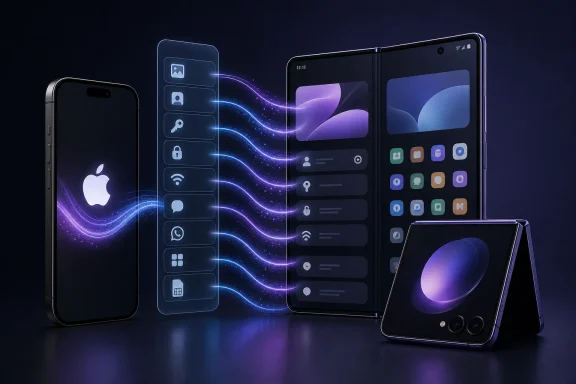
Google’s upgraded Android Switch experience is beginning to reach Samsung’s newest foldables, turning the Galaxy Z Fold8 Ultra, Galaxy Z Fold8, and Galaxy Z Flip8 into early showcases for a much more ambitious iPhone-to-Android migration process. Built around Android 17, the new tool goes beyond the familiar transfer of photos, contacts, and SMS messages, aiming to bring over passwords, passkeys, Wi-Fi credentials, device preferences, home-screen organization, eSIM information, voice recordings, and a broader set of messaging data.
For anyone considering a jump from iPhone to Samsung’s latest foldable hardware, that is a consequential change. The physical device has long been the easiest part of switching platforms; the difficult part has been recreating a daily digital life without losing access, context, convenience, or confidence. Android 17’s enhanced migration tool attempts to close that gap by treating the setup process as a restoration of a working environment rather than a basic file-copy operation.
Samsung’s newly announced foldables are among the first devices to expose the upgraded process, while eligible Pixel devices running Android 17 are also gaining access in stages. The rollout is significant not simply because it adds another setup wizard option, but because it addresses several stubborn pain points that historically kept iPhone owners from moving to Android.
The standard Android onboarding flow has supported migration from iPhone for years. Users could connect their old phone, select data categories, transfer local media and contacts, download matching apps from Google Play, and continue setup. That remains useful, but it has never fully replicated an iPhone user’s familiar environment.
The Android 17 version of Android Switch expands the scope substantially. It is designed to preserve more of the information that makes a phone feel personal and immediately usable after the transfer. The distinction matters because modern smartphones hold much more than files. They contain identity credentials, app sessions, network access, communication histories, accessibility preferences, layout habits, subscription-linked services, and carrier provisioning.
The enhanced iOS migration feature can cover a broad collection of data categories, including:
That makes iPhone switchers a particularly relevant audience.
For a former iPhone user, the Fold8 Ultra’s appeal is not only the hardware. It is the ability to migrate a familiar digital setup and then expand it into a tablet-like workspace. Passwords, passkeys, home-screen organization, files, wireless settings, and messaging history can provide a familiar foundation while Samsung’s multitasking tools, split-screen capabilities, and large display create the new experience.
The transfer tool helps reduce the awkward “day one” period where a new device is technically impressive but not yet dependable. That is especially important for a premium foldable, where users expect to begin working, communicating, and traveling with the device immediately.
A polished iOS-to-Android migration process strengthens that proposition. It reduces the sense that a user is abandoning established routines merely to try a novel form factor. Instead, the Fold8 can retain familiar app access, local media, network settings, key records, and much of a user’s organizational structure.
A Flip8 buyer can bring over much of the practical data that matters while embracing a phone that changes how it fits into a pocket, bag, or everyday routine. The upgraded Android Switch experience ensures that a smaller foldable is not treated as a smaller transition.
A contact list is data. A phone that reconnects to familiar Wi-Fi networks, retains a recognizable app layout, keeps essential credentials accessible, carries over alarms, and preserves communication context begins to offer continuity.
Passkeys are particularly important because they represent a modern, device-backed alternative to traditional passwords. Their migration is more complicated than copying a text file because passkeys depend on secure credential systems, account providers, device protections, and service compatibility.
There is an essential caveat: iPhone users who rely entirely on iCloud Keychain should not assume every stored credential will appear automatically in Google Password Manager. The exact outcome depends on the source credential system, the destination account setup, and the apps or sites involved. Users should prepare for some manual sign-ins, especially for high-security services and accounts protected by multi-factor authentication.
That limitation does not diminish the feature’s value. It simply reflects the reality of moving between platforms with separate identity frameworks.
Android and iOS do not use identical launchers or widget systems, so a transfer cannot promise pixel-perfect duplication. Still, carrying over a recognizable structure reduces the initial disorientation. It also demonstrates that Google understands switching is not just about moving content; it is about minimizing disruption.
Network credentials are especially useful. A user who switches phones may have saved Wi-Fi networks at home, work, schools, hotels, relatives’ homes, and public spaces. Re-entering those credentials can be tedious, particularly if the old device is being traded in or wiped immediately after setup.
Expanded support for settings and accessibility preferences is similarly meaningful. Users who depend on font scaling, display adjustments, hearing support, interaction controls, or other accessibility features should always verify their configuration afterward. But being able to start from transferred preferences rather than a blank slate is a genuine improvement.
Android 17’s upgraded transfer supports a broader range of message data, including transferable iMessage text and media, alongside SMS and MMS history. This gives users a better record of prior conversations on their new Android device.
However, it is crucial to distinguish between transferring historical iMessage content and continuing to use Apple’s iMessage service on Android. The migration does not turn Android into an iMessage client. After moving, users must disable iMessage on the old iPhone to prevent messages from continuing to route through Apple’s service instead of arriving as SMS, MMS, or RCS messages.
That remains one of the most important post-switch steps:
This is not a minor technicality. Users should not erase, trade in, reset, or disconnect their iPhone before confirming that WhatsApp history has appeared correctly on the new Galaxy device.
The same practical caution applies to any encrypted messaging platform. Each service has its own account, backup, device-linking, and key-management policies. Android Switch can make the initial move easier, but it cannot override a third-party service’s security model.
A streamlined eSIM handoff could save users considerable time, especially when moving to a premium foldable that may be purchased online and set up at home.
Still, eSIM support should be treated as conditional rather than universal. Carrier policies differ widely, and compatibility may depend on:
The uneven nature of the rollout deserves attention. Not every Android 17-capable phone necessarily receives the full enhanced transfer flow at the same time, and older Pixel generations may not be included in this upgrade. That is a common Android reality: platform capabilities can be tied not only to the operating system version but also to device-specific hardware, manufacturer software, regional approvals, and app updates.
Samsung users should also understand that Smart Switch and Android Switch are overlapping rather than competing concepts. Smart Switch remains Samsung’s established transfer brand and can handle a range of migration tasks. Android Switch supplies the upgraded Android 17 foundation and user experience behind compatible iPhone-to-Android migrations.
The practical result is encouraging: Samsung’s new foldables are not waiting on a vague future software promise. They are already part of the first wave.
Subscriptions may continue if they are linked directly to an account with the app developer, but billing arrangements can be more complicated when payment is handled through Apple. Users should check subscriptions for streaming, fitness, productivity, cloud storage, and specialized professional apps before switching.
That distinction can surprise users who assume their photo library is physically present on the old phone. Large iCloud libraries often use storage optimization, keeping originals in the cloud and lower-resolution versions on the device. Before beginning the move, users should confirm what is local, what is cloud-only, and whether Google Photos or another service will become the long-term destination.
Before starting, take these steps:
Apple’s ecosystem advantage has often relied on the feeling that leaving would be expensive, confusing, and disruptive. Hardware may be replaceable, but a person’s passwords, messages, photos, digital purchases, wireless connections, watch pairing, and contact habits create a web of dependency. Google and Samsung cannot make every boundary disappear, but reducing the effort required to cross the boundary changes the purchasing calculation.
Samsung’s newest foldables make that strategy visible. The company is no longer asking potential switchers merely to choose Android over iPhone. It is asking them to choose a different kind of device without sacrificing the information and routines built on their previous one.
That is why the availability of the upgraded Android Switch tool on the Galaxy Z Fold8 Ultra, Galaxy Z Fold8, and Galaxy Z Flip8 matters. The feature will not erase every complication of moving from iOS, particularly around Apple services, paid apps, cloud content, and encrypted identity credentials. But it makes the transition more complete, more thoughtful, and considerably less intimidating.
For the first time, the most compelling reason to choose Samsung’s latest foldables may not be just the display that bends or the hardware that fits differently in a pocket. It may be the growing confidence that switching no longer means starting over.
For anyone considering a jump from iPhone to Samsung’s latest foldable hardware, that is a consequential change. The physical device has long been the easiest part of switching platforms; the difficult part has been recreating a daily digital life without losing access, context, convenience, or confidence. Android 17’s enhanced migration tool attempts to close that gap by treating the setup process as a restoration of a working environment rather than a basic file-copy operation.
Samsung’s newly announced foldables are among the first devices to expose the upgraded process, while eligible Pixel devices running Android 17 are also gaining access in stages. The rollout is significant not simply because it adds another setup wizard option, but because it addresses several stubborn pain points that historically kept iPhone owners from moving to Android.
 Overview: Android Switch Becomes More Than a Setup Utility
The standard Android onboarding flow has supported migration from iPhone for years. Users could connect their old phone, select data categories, transfer local media and contacts, download matching apps from Google Play, and continue setup. That remains useful, but it has never fully replicated an iPhone user’s familiar environment.The Android 17 version of Android Switch expands the scope substantially. It is designed to preserve more of the information that makes a phone feel personal and immediately usable after the transfer. The distinction matters because modern smartphones hold much more than files. They contain identity credentials, app sessions, network access, communication histories, accessibility preferences, layout habits, subscription-linked services, and carrier provisioning.
The enhanced iOS migration feature can cover a broad collection of data categories, including:
- Google Account sign-in and associated settings
- Passwords and passkeys where supported by the migration flow
- Wi-Fi network credentials
- Device settings, including expanded accessibility-related preferences
- Contacts, calendars, call history, alarms, and wallpaper
- Photos, videos, files, and folders stored locally
- Home-screen layout
- Voice Memos
- SMS, MMS, and transferable iMessage text and media history
- WhatsApp chat history and media, subject to the required migration steps
- eSIM transfer on compatible carriers, devices, and plans
- Free Android equivalents of eligible iPhone apps
Why Samsung’s Latest Foldables Are a Natural Launch Platform
Samsung’s Galaxy Z Fold8 Ultra, Galaxy Z Fold8, and Galaxy Z Flip8 are not ordinary Android handsets. They are premium devices sold on the promise of a different way to use a phone: larger displays, flexible form factors, multitasking, enhanced camera workflows, and a more expansive interface than the traditional slab-style smartphone provides.That makes iPhone switchers a particularly relevant audience.
The Galaxy Z Fold8 Ultra: A Productivity-First Landing Spot
The Galaxy Z Fold8 Ultra is Samsung’s flagship foldable and a logical destination for users who want their next phone to feel fundamentally different. Its large internal display, full-size cover screen, and thin unfolded profile place it squarely in the productivity-focused category.For a former iPhone user, the Fold8 Ultra’s appeal is not only the hardware. It is the ability to migrate a familiar digital setup and then expand it into a tablet-like workspace. Passwords, passkeys, home-screen organization, files, wireless settings, and messaging history can provide a familiar foundation while Samsung’s multitasking tools, split-screen capabilities, and large display create the new experience.
The transfer tool helps reduce the awkward “day one” period where a new device is technically impressive but not yet dependable. That is especially important for a premium foldable, where users expect to begin working, communicating, and traveling with the device immediately.
The Galaxy Z Fold8: A Different Shape for Media and Everyday Use
The standard Galaxy Z Fold8 takes a different approach, emphasizing a more compact profile and an internal screen built for immersive content. For iPhone owners drawn to a foldable but unwilling to make the leap to the most expensive model, it may represent the more accessible entry point into Samsung’s larger-screen ecosystem.A polished iOS-to-Android migration process strengthens that proposition. It reduces the sense that a user is abandoning established routines merely to try a novel form factor. Instead, the Fold8 can retain familiar app access, local media, network settings, key records, and much of a user’s organizational structure.
The Galaxy Z Flip8: A Compact Alternative Without a Data Compromise
The Galaxy Z Flip8 is the most fashion-forward and pocketable device in the lineup, but it benefits from the same migration improvements. Switching from an iPhone to a compact foldable has traditionally involved a choice between a new design and a laborious setup process. Android 17 makes that choice less punishing.A Flip8 buyer can bring over much of the practical data that matters while embracing a phone that changes how it fits into a pocket, bag, or everyday routine. The upgraded Android Switch experience ensures that a smaller foldable is not treated as a smaller transition.
What the New Migration Tool Actually Changes
The headline feature is not merely that more data transfers. It is that Android Switch increasingly recognizes the difference between data and continuity.A contact list is data. A phone that reconnects to familiar Wi-Fi networks, retains a recognizable app layout, keeps essential credentials accessible, carries over alarms, and preserves communication context begins to offer continuity.
Passwords and Passkeys Are the Most Important Addition
The inclusion of passwords and passkeys is arguably the most consequential part of the Android 17 upgrade. Users can tolerate reinstalling an app. They are far less tolerant of losing the ability to sign in to banking, work, shopping, travel, health, and communication services.Passkeys are particularly important because they represent a modern, device-backed alternative to traditional passwords. Their migration is more complicated than copying a text file because passkeys depend on secure credential systems, account providers, device protections, and service compatibility.
There is an essential caveat: iPhone users who rely entirely on iCloud Keychain should not assume every stored credential will appear automatically in Google Password Manager. The exact outcome depends on the source credential system, the destination account setup, and the apps or sites involved. Users should prepare for some manual sign-ins, especially for high-security services and accounts protected by multi-factor authentication.
That limitation does not diminish the feature’s value. It simply reflects the reality of moving between platforms with separate identity frameworks.
Home-Screen Layout Migration Is a Quality-of-Life Feature
Moving a home-screen layout may sound cosmetic, but it can have a disproportionate impact on the perceived quality of a switch. People often develop muscle memory around folder placement, frequently used apps, widgets, and visual grouping.Android and iOS do not use identical launchers or widget systems, so a transfer cannot promise pixel-perfect duplication. Still, carrying over a recognizable structure reduces the initial disorientation. It also demonstrates that Google understands switching is not just about moving content; it is about minimizing disruption.
Wi-Fi Credentials and Device Settings Save Time
Migrating Wi-Fi credentials, alarms, wallpaper, and device settings will not excite spec-sheet readers, but these are the details that separate a smooth setup from an annoying evening spent reconstructing a phone.Network credentials are especially useful. A user who switches phones may have saved Wi-Fi networks at home, work, schools, hotels, relatives’ homes, and public spaces. Re-entering those credentials can be tedious, particularly if the old device is being traded in or wiped immediately after setup.
Expanded support for settings and accessibility preferences is similarly meaningful. Users who depend on font scaling, display adjustments, hearing support, interaction controls, or other accessibility features should always verify their configuration afterward. But being able to start from transferred preferences rather than a blank slate is a genuine improvement.
Messaging: More Complete, but Still Not Seamless
Messaging remains the most emotionally charged part of switching from iPhone to Android. A smartphone migration can be considered successful only if people can continue conversations without confusion, missing messages, or account registration issues.Android 17’s upgraded transfer supports a broader range of message data, including transferable iMessage text and media, alongside SMS and MMS history. This gives users a better record of prior conversations on their new Android device.
However, it is crucial to distinguish between transferring historical iMessage content and continuing to use Apple’s iMessage service on Android. The migration does not turn Android into an iMessage client. After moving, users must disable iMessage on the old iPhone to prevent messages from continuing to route through Apple’s service instead of arriving as SMS, MMS, or RCS messages.
That remains one of the most important post-switch steps:
- Complete the phone setup and transfer process.
- Confirm the new Android phone can send and receive regular text messages.
- Disable iMessage on the former iPhone.
- Disable FaceTime if the old phone number will no longer be used with an iPhone.
- Ask close contacts to start new message threads if delivery problems persist.
WhatsApp Transfer Still Has Conditions
WhatsApp migration is another area where users should read the on-screen instructions closely. Chat history and media can move from iPhone to Android, but the process may require a direct cable connection during setup and verification with the same phone number.This is not a minor technicality. Users should not erase, trade in, reset, or disconnect their iPhone before confirming that WhatsApp history has appeared correctly on the new Galaxy device.
The same practical caution applies to any encrypted messaging platform. Each service has its own account, backup, device-linking, and key-management policies. Android Switch can make the initial move easier, but it cannot override a third-party service’s security model.
eSIM Transfer Could Remove a Major Switching Barrier
Support for eSIM transfer is one of the biggest signs that Android Switch is evolving into a complete onboarding system. Moving a physical SIM card is simple. Moving an eSIM can involve carrier apps, activation codes, QR codes, account authentication, restrictions, and support calls.A streamlined eSIM handoff could save users considerable time, especially when moving to a premium foldable that may be purchased online and set up at home.
Still, eSIM support should be treated as conditional rather than universal. Carrier policies differ widely, and compatibility may depend on:
- The mobile operator
- The type of plan
- The originating iPhone model
- The destination Android model
- Whether the line is consumer, business, prepaid, or managed
- Regional rules and carrier provisioning systems
- Whether the device is unlocked
Availability: Strong Early Support, Uneven Device Coverage
The upgraded Android Switch experience is available first on Samsung’s newest Galaxy foldables, including the Galaxy Z Fold8 Ultra, Galaxy Z Fold8, and Galaxy Z Flip8. It is also rolling out across selected Pixel hardware running Android 17, with availability varying by model and software release.The uneven nature of the rollout deserves attention. Not every Android 17-capable phone necessarily receives the full enhanced transfer flow at the same time, and older Pixel generations may not be included in this upgrade. That is a common Android reality: platform capabilities can be tied not only to the operating system version but also to device-specific hardware, manufacturer software, regional approvals, and app updates.
Samsung users should also understand that Smart Switch and Android Switch are overlapping rather than competing concepts. Smart Switch remains Samsung’s established transfer brand and can handle a range of migration tasks. Android Switch supplies the upgraded Android 17 foundation and user experience behind compatible iPhone-to-Android migrations.
The practical result is encouraging: Samsung’s new foldables are not waiting on a vague future software promise. They are already part of the first wave.
Critical Risks and What Will Not Transfer Perfectly
The expanded transfer list is impressive, but no migration utility can eliminate every platform boundary. Buyers should approach the process with realistic expectations.Purchased Apps and App Store Billing Do Not Magically Move
Free iPhone apps with Android versions can generally be found and installed from Google Play. But paid iOS apps are tied to Apple’s storefront and licensing system. A purchase on the App Store does not automatically become an Android purchase.Subscriptions may continue if they are linked directly to an account with the app developer, but billing arrangements can be more complicated when payment is handled through Apple. Users should check subscriptions for streaming, fitness, productivity, cloud storage, and specialized professional apps before switching.
iCloud Content Requires Separate Planning
Photos and videos stored directly on the iPhone can be transferred during setup. Content held only in iCloud may require a separate export or transfer process.That distinction can surprise users who assume their photo library is physically present on the old phone. Large iCloud libraries often use storage optimization, keeping originals in the cloud and lower-resolution versions on the device. Before beginning the move, users should confirm what is local, what is cloud-only, and whether Google Photos or another service will become the long-term destination.
Apple Ecosystem Services Remain Apple Ecosystem Services
The migration tool reduces friction, but it cannot migrate proprietary Apple services into Android equivalents. Users leaving iPhone should expect to replace or reconfigure workflows involving:- Apple Watch
- Apple Pay
- iCloud Keychain
- Apple Notes
- FaceTime
- Find My
- iCloud Drive
- Apple-only accessories and automations
- Purchases tied to Apple’s media storefronts
A Better Preparation Checklist for iPhone-to-Galaxy Transfers
The upgraded Android Switch process is most effective when the user prepares both devices. A rushed transfer, low battery, outdated apps, or an early trade-in can create avoidable problems.Before starting, take these steps:
- Update the iPhone and the new Galaxy device to the latest available software.
- Charge both phones fully and keep them connected to power where possible.
- Use a reliable USB-C-to-Lightning or USB-C-to-USB-C cable if the transfer flow recommends one.
- Confirm iPhone storage status, particularly for iCloud Photos and files that may not be stored locally.
- Review password-manager usage and ensure access to critical recovery methods.
- Check two-factor authentication methods, including authenticator apps, backup codes, and trusted-device prompts.
- Keep the old iPhone active until messages, calls, eSIM service, WhatsApp, and major apps are fully verified.
- Do not erase or trade in the old device immediately after the setup screen ends.
- Disable iMessage and FaceTime after the new Android phone is successfully receiving communications.
- Audit subscriptions and paid apps to identify services that require separate sign-in, installation, or billing changes.
The Strategic Importance of a Frictionless Switch
The Android 17 migration update is about more than setup convenience. It is a competitive move against the stickiness of smartphone ecosystems.Apple’s ecosystem advantage has often relied on the feeling that leaving would be expensive, confusing, and disruptive. Hardware may be replaceable, but a person’s passwords, messages, photos, digital purchases, wireless connections, watch pairing, and contact habits create a web of dependency. Google and Samsung cannot make every boundary disappear, but reducing the effort required to cross the boundary changes the purchasing calculation.
Samsung’s newest foldables make that strategy visible. The company is no longer asking potential switchers merely to choose Android over iPhone. It is asking them to choose a different kind of device without sacrificing the information and routines built on their previous one.
That is why the availability of the upgraded Android Switch tool on the Galaxy Z Fold8 Ultra, Galaxy Z Fold8, and Galaxy Z Flip8 matters. The feature will not erase every complication of moving from iOS, particularly around Apple services, paid apps, cloud content, and encrypted identity credentials. But it makes the transition more complete, more thoughtful, and considerably less intimidating.
For the first time, the most compelling reason to choose Samsung’s latest foldables may not be just the display that bends or the hardware that fits differently in a pocket. It may be the growing confidence that switching no longer means starting over.
References
- Primary source: gsmarena.com
Published: 2026-07-23T06:55:02+00:00
Android 17's new iOS migration tool now available on Samsung's latest foldables - GSMArena.com news
It’s also available on Google’s Pixel 8 and later running Android 17. Google announced an upgraded Android Switch iOS migration tool for Android 17 during...www.gsmarena.com
