

AnduinOS is an Ubuntu-based Linux distribution created by Microsoft engineer Anduin Xue that deliberately recreates much of the Windows 11 desktop experience, using GNOME extensions, Windows-like theming, Flatpak-first app delivery, and a lightweight install aimed at users leaving Microsoft’s ecosystem. That makes it more than a visual joke. It is a small but telling answer to a large Windows problem: millions of users know their PCs still work, but the official upgrade path increasingly tells them otherwise.
There is a reason AnduinOS feels more interesting in 2026 than a themed Linux desktop might have felt five years ago. Windows 10 support ended on October 14, 2025, and Microsoft’s preferred answer remains a migration to Windows 11, a newer PC, or temporary Extended Security Updates. For many households, small offices, labs, clubs, and second-machine users, that is not a technical roadmap so much as a purchasing nudge.
Windows 11’s hardware floor changed the psychology of the upgrade cycle. TPM 2.0, Secure Boot, supported CPU lists, Microsoft account pressure during setup, and a heavier cloud-service posture all made the operating system feel less like a neutral continuation of Windows 10 and more like a gatekeeper. Some of those requirements have defensible security arguments. But the practical effect is still that a perfectly usable machine can become officially undesirable overnight.
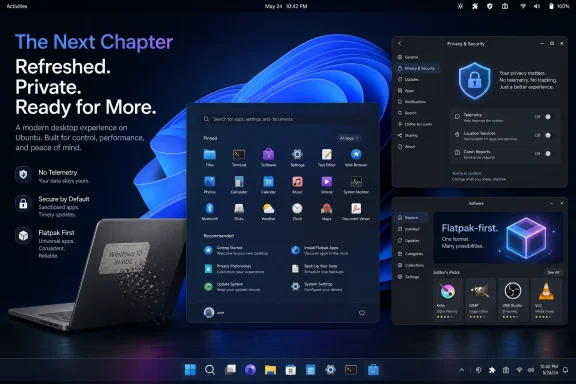
AnduinOS enters that gap with a simple pitch: keep the workflow shape, change the operating system underneath. The desktop offers a centered taskbar, a Start-menu-like launcher, familiar tray behavior, rounded corners, translucent surfaces, and a visual rhythm that strongly echoes Windows 11. The trick is not that Linux can be customized to look like Windows; that has been true for decades. The trick is packaging that illusion tightly enough that a normal user can stop thinking about the illusion.
That is what makes the project unsettling. It suggests that the Windows desktop, stripped of Microsoft’s services, update model, telemetry defaults, and licensing constraints, is no longer as inseparable from Windows as Microsoft would like users to believe.
The Windows 11 resemblance comes from theming and extensions rather than a ground-up desktop rewrite. GNOME extensions such as Dash to Panel can merge the traditional GNOME top bar and dock into a Windows-like taskbar, while ArcMenu can provide a familiar application launcher in the lower center of the screen. With enough polish, those pieces stop looking like add-ons and start feeling like a coherent shell.
That distinction is easy for Linux veterans to dismiss. They know that a desktop environment is modular, that theming is not architecture, and that a taskbar clone is not the same thing as application compatibility. But for a user who has spent 20 years learning where the Start button lives, visual and behavioral continuity is not superficial. It is the interface contract.
AnduinOS’s wager is that the first hour matters more than the first benchmark. If the user boots into a desktop that looks legible, opens a browser, finds settings, launches a file manager, and installs software without reading a wiki, the battle is half-won. Linux distributions have often treated that kind of familiarity as pandering. In practice, it may be the missing migration tool.
That makes the project more technically conservative than it looks. A novice sees a Windows clone. An administrator sees Ubuntu repositories, GNOME components, Debian packages, Flatpak support, and a system that should largely behave like a recognizable Ubuntu derivative. The desktop is the flamboyant layer; the maintenance story is boring in the right ways.
The MakeUseOf account of the distro highlights a particularly important packaging decision: AnduinOS removes Snap from the default experience. Canonical’s Snap format remains one of the most divisive parts of modern Ubuntu, not because sandboxed app delivery is inherently bad, but because Canonical’s implementation is closely tied to its own infrastructure and has sometimes produced slower, less predictable desktop experiences. By leaning on Flatpak for graphical applications and traditional
That decision will appeal disproportionately to the exact audience likely to recommend the distro to others. New users may not know what Snap or Flatpak means, but the family member, sysadmin, or forum regular helping them migrate absolutely does. Removing one recurring source of Ubuntu friction makes AnduinOS easier to defend.
That is where AnduinOS needs to be understood as a bridge, not a replacement fantasy. It can reduce interface shock, especially for users whose computing life is mostly browser tabs, email, remote desktop, documents, photos, streaming, messaging, and light productivity. It cannot eliminate the hard boundary between Windows software and Linux software.
Wine, Proton, Bottles, and other compatibility layers have made enormous progress, particularly for games and older desktop applications. But they remain compatibility layers, not a universal guarantee. Anyone migrating a work PC, a gaming rig, or a machine tied to specific peripherals still needs to audit their must-have applications before wiping Windows.
This is where the Windows-like design cuts both ways. It lowers anxiety, but it can also blur the line between “this looks familiar” and “this will run everything I used before.” A responsible migration path has to preserve that distinction. If AnduinOS becomes popular, its biggest support challenge may not be Linux itself; it may be managing expectations created by its own excellent disguise.
Users negotiate account requirements. They negotiate defaults. They negotiate ads, prompts, widgets, backup nags, Edge reappearances, Copilot placement, telemetry settings, Start menu recommendations, and the precise definition of “optional.” Some of these annoyances are minor in isolation. Together they create a sense that the PC is no longer entirely the user’s machine.
Linux has its own irritations, and pretending otherwise helps no one. Hardware support can still be uneven. Fractional scaling can be messy. Sleep behavior varies by laptop. Some printer and scanner workflows remain inexplicably fragile. But Linux generally does not treat the desktop as a funnel into a commercial account ecosystem. That difference is becoming more visible as Microsoft pushes Windows toward a service surface rather than a neutral local environment.
AnduinOS weaponizes that contrast by making the first impression look Microsoft-like while the defaults are philosophically un-Microsoft. No base-system telemetry, no built-in Microsoft account dependency, no Snap-first Ubuntu experience, and a small installed footprint combine to create a provocative message: perhaps what many users liked about Windows was never Microsoft’s modern Windows strategy. Perhaps it was just the workflow.
But that biographical detail can mislead as much as it illuminates. AnduinOS is not a Microsoft product, not an official Microsoft experiment, and not evidence of some corporate pivot toward desktop Linux. It is an independent open-source project by an individual developer. Treating it as a secret message from Redmond would be fun, but unserious.
Still, the detail matters culturally. It undercuts the stale tribalism that once defined the Windows-versus-Linux debate. Microsoft itself now ships Windows Subsystem for Linux, maintains a major presence on GitHub, contributes to open source, runs Linux heavily in Azure, and sells tools to developers who move freely between platforms. A Microsoft engineer making a Linux desktop for Windows switchers is not a contradiction in 2026. It is a sign of how porous the old borders have become.
That porosity is exactly why AnduinOS feels plausible. A Windows user no longer needs to imagine Linux as a foreign country. They may already use cross-platform browsers, Visual Studio Code, Discord, Steam, web apps, cloud storage, remote desktops, and containerized development tools. The operating system still matters, but for many users it matters less as an application platform and more as a comfort layer around the applications they already use.
There are legitimate reasons operating systems collect diagnostics. Crash data improves reliability, telemetry can help identify compatibility problems, and security signals can protect users at scale. The issue is not whether data collection can be useful. The issue is whether users believe the operating system’s incentives align with their own.
For many Windows enthusiasts, that trust has thinned. The frustration is not only about privacy in the narrow legal sense. It is about agency. Users want to decide what runs, what syncs, what appears in the Start menu, what account is required, and whether their desktop doubles as a billboard for services.
AnduinOS benefits from being able to say no to all of that by default. Its open-source availability does not magically guarantee perfect security, and “the code is public” should never be mistaken for “the code has been thoroughly audited.” But openness changes the relationship. A hidden agenda is harder to maintain when builds, scripts, and source are available for inspection, and when the project’s survival depends on community trust rather than platform lock-in.
For aging Windows 10 hardware, restraint matters. A 2017 laptop with 8 GB of RAM and a modest SSD may be undesirable by current retail standards but perfectly usable for browsing, writing, video calls, remote access, and media playback. The environmental and economic case for keeping such machines in service is obvious. The official Windows 11 compatibility story often makes that harder than it needs to be.
Linux distributions have long advertised themselves as rescue platforms for old PCs. What has changed is the scale of the opportunity. Windows 10’s end of support created a large class of machines whose owners are not necessarily hobbyists but suddenly have to make a decision: pay for temporary security updates, bypass Windows 11 requirements, buy a new PC, move to ChromeOS Flex, or try Linux.
AnduinOS is built for the user who might accept Linux only if it does not announce itself too loudly. That is a humbler ambition than converting the world to free software philosophy, but it may be more effective. Most people do not switch operating systems because they have discovered a new ideology. They switch because the old arrangement became inconvenient.
This is good product judgment. New Linux users are often overwhelmed not by scarcity but by abundance. A distro that ships three text editors, two package front ends, four media tools, and a maze of overlapping settings panels may impress enthusiasts while confusing everyone else. Minimalism is not only aesthetic; it is pedagogical.
The Flatpak-first graphical software story also makes sense for a Windows migrant. The user expects an app store, not a terminal lecture. Flatpak is not perfect, especially around permissions, theming consistency, and duplicate runtimes, but it provides a clear model: search, install, update, remove. That model is closer to what mainstream users understand.
The tradeoff is that AnduinOS must get software discovery right. If GNOME Software feels slow, if Flatpak permissions confuse users, or if expected applications are missing or poorly labeled, the Windows-like shell will not save the experience. The desktop can get users through the front door, but app availability determines whether they stay.
The purist answer has merit. Linux is not Windows, and hiding that fact can delay necessary learning. Users eventually need to understand package management, permissions, filesystems, drivers, updates, repositories, and the difference between native applications and compatibility layers. A familiar taskbar does not remove the need for new mental models.
But the purist answer often assumes that learning must begin with discomfort. That is not how most successful migrations work. Good transitions preserve enough old behavior that users have the confidence to absorb the new behavior gradually. A Windows-like layout is not a betrayal of Linux. It is an onboarding strategy.
The existence of Linux Mint, Zorin OS, Kubuntu, and countless Windows-styled KDE setups already proved the demand. AnduinOS simply sharpens the pitch for the Windows 11 era. Its distinguishing feature is not that it wants to be friendly. It is that it wants to be familiar in a very specific, contemporary way.
The threat is softer but still important. AnduinOS contributes to the normalization of Windows exit ramps. It gives forum helpers, refurbishers, schools, hobbyists, and small organizations one more credible thing to recommend when Windows 11 is not welcome or not supported. It makes “try Linux” sound less like a lifestyle change and more like a practical salvage operation.
That matters because operating system loyalty is partly habit. If users discover that their old Windows 10 laptop can become a pleasant, secure, familiar Linux machine, they may not rush back to Microsoft for their next secondary device. If a family member gets through a month on AnduinOS without complaint, the mythology of Windows indispensability weakens a little.
Microsoft does not need to lose the desktop war for this to matter. It only needs to lose the assumption that every aging PC inevitably returns to Windows. In a world of web apps, cross-platform tools, and cloud services, that assumption is already less durable than it once was.
A current Linux distribution is generally a better answer than unsupported Windows for everyday use, but “Linux” is not a force field. Users still need updates, browser patches, sane passwords, disk encryption where appropriate, backups, cautious extension habits, and skepticism toward random install scripts. The attack surface changes; it does not disappear.
AnduinOS inherits much of Ubuntu’s security maintenance model, which is a strong starting point. Its challenge is making updates visible and unsurprising to users trained by Windows Update. Linux update prompts can feel more transparent than Windows, but they can also expose unfamiliar package names and dependency details. A beginner-focused distro must make routine maintenance feel safe, not cryptic.
The lack of default telemetry is a privacy win, but security and privacy are different disciplines. An OS can collect little data and still be misconfigured. It can be open source and still contain bugs. AnduinOS’s best security argument is not purity; it is that a supported, actively maintained Linux base is a far better destination than pretending Windows 10’s lifecycle clock did not run out.
But enterprise IT should still pay attention to the signal. The same employee who likes AnduinOS at home may ask why a web-app-heavy role needs a full Windows stack at work. The same finance department replacing unsupported Windows 10 machines may notice that some workflows are browser-bound. The same sustainability office may ask why hardware is being retired when an alternative OS could extend its life.
The more Microsoft moves Windows toward cloud identity, subscription services, and AI-infused management, the more some organizations will evaluate whether they need Windows everywhere. They may not choose AnduinOS. They may choose Ubuntu LTS, Red Hat, ChromeOS Flex, thin clients, virtual desktops, or managed browser endpoints. But the desktop conversation changes once Windows is no longer assumed to be the only humane interface for nontechnical users.
That is AnduinOS’s wider significance. It is not the enterprise answer. It is a consumer-shaped proof of concept for a more general idea: the Windows workflow can be separated from the Windows platform.
Microsoft’s modern Windows strategy often seems to assume the desktop must be continuously re-enchanted: widgets, feeds, assistants, recommendations, cloud backup prompts, service tie-ins, AI entry points. Some users like those features. Many tolerate them. A meaningful subset simply wants the operating system to recede.
Linux, at its best, is very good at receding. It can also be maddeningly visible when something breaks, but the daily experience on supported hardware can be uneventful in the best sense. AnduinOS packages that uneventfulness behind a layout Windows users already understand.
That makes it dangerous in a quiet way. It does not ask the user to become a Linux person. It asks only whether they can do today’s work on a machine that looks familiar, updates cleanly, and does not constantly renegotiate the terms of ownership.
That is where this little distro becomes more than a novelty. AnduinOS shows that the post-Windows 10 migration story does not have to be a binary choice between buying new hardware and clinging to an aging Microsoft stack. For some users, the most comfortable future for an old Windows PC may be a Linux desktop that has the nerve to look exactly like the thing they thought they were leaving behind.
 A Windows-Like Linux Desktop Arrives at Exactly the Wrong Time for Microsoft
There is a reason AnduinOS feels more interesting in 2026 than a themed Linux desktop might have felt five years ago. Windows 10 support ended on October 14, 2025, and Microsoft’s preferred answer remains a migration to Windows 11, a newer PC, or temporary Extended Security Updates. For many households, small offices, labs, clubs, and second-machine users, that is not a technical roadmap so much as a purchasing nudge.Windows 11’s hardware floor changed the psychology of the upgrade cycle. TPM 2.0, Secure Boot, supported CPU lists, Microsoft account pressure during setup, and a heavier cloud-service posture all made the operating system feel less like a neutral continuation of Windows 10 and more like a gatekeeper. Some of those requirements have defensible security arguments. But the practical effect is still that a perfectly usable machine can become officially undesirable overnight.
AnduinOS enters that gap with a simple pitch: keep the workflow shape, change the operating system underneath. The desktop offers a centered taskbar, a Start-menu-like launcher, familiar tray behavior, rounded corners, translucent surfaces, and a visual rhythm that strongly echoes Windows 11. The trick is not that Linux can be customized to look like Windows; that has been true for decades. The trick is packaging that illusion tightly enough that a normal user can stop thinking about the illusion.
That is what makes the project unsettling. It suggests that the Windows desktop, stripped of Microsoft’s services, update model, telemetry defaults, and licensing constraints, is no longer as inseparable from Windows as Microsoft would like users to believe.
The Clone Is Really a Translation Layer
The most important thing about AnduinOS is that it is not trying to be a new Linux foundation. Under the skin, it is Ubuntu with the GNOME desktop environment, not an exotic fork with a new package manager or a custom kernel philosophy. That choice matters because the more adventurous a beginner-focused distribution gets under the hood, the more likely it is to strand the very users it claims to rescue.The Windows 11 resemblance comes from theming and extensions rather than a ground-up desktop rewrite. GNOME extensions such as Dash to Panel can merge the traditional GNOME top bar and dock into a Windows-like taskbar, while ArcMenu can provide a familiar application launcher in the lower center of the screen. With enough polish, those pieces stop looking like add-ons and start feeling like a coherent shell.
That distinction is easy for Linux veterans to dismiss. They know that a desktop environment is modular, that theming is not architecture, and that a taskbar clone is not the same thing as application compatibility. But for a user who has spent 20 years learning where the Start button lives, visual and behavioral continuity is not superficial. It is the interface contract.
AnduinOS’s wager is that the first hour matters more than the first benchmark. If the user boots into a desktop that looks legible, opens a browser, finds settings, launches a file manager, and installs software without reading a wiki, the battle is half-won. Linux distributions have often treated that kind of familiarity as pandering. In practice, it may be the missing migration tool.
The Windows 11 Costume Works Because GNOME Does the Heavy Lifting
The irony is that AnduinOS’s Windows-like appearance depends on the maturity of GNOME, a desktop environment often criticized for being too opinionated and too unlike Windows. GNOME’s extension ecosystem gives AnduinOS the levers it needs: panel placement, launcher behavior, menu structure, shell theming, workspace behavior, tray affordances, and system UI styling. AnduinOS does not defeat GNOME’s design model so much as redirect it.That makes the project more technically conservative than it looks. A novice sees a Windows clone. An administrator sees Ubuntu repositories, GNOME components, Debian packages, Flatpak support, and a system that should largely behave like a recognizable Ubuntu derivative. The desktop is the flamboyant layer; the maintenance story is boring in the right ways.
The MakeUseOf account of the distro highlights a particularly important packaging decision: AnduinOS removes Snap from the default experience. Canonical’s Snap format remains one of the most divisive parts of modern Ubuntu, not because sandboxed app delivery is inherently bad, but because Canonical’s implementation is closely tied to its own infrastructure and has sometimes produced slower, less predictable desktop experiences. By leaning on Flatpak for graphical applications and traditional
.deb packages for core system components, AnduinOS positions itself closer to what many desktop Linux users already prefer.That decision will appeal disproportionately to the exact audience likely to recommend the distro to others. New users may not know what Snap or Flatpak means, but the family member, sysadmin, or forum regular helping them migrate absolutely does. Removing one recurring source of Ubuntu friction makes AnduinOS easier to defend.
Familiarity Is Not the Same as Compatibility
The danger with any Windows-like Linux distribution is that it can oversell the switch. A Windows-style taskbar does not make Adobe Creative Cloud native. A Start menu clone does not make every anti-cheat system cooperate. A rounded file manager does not make years of line-of-business software magically portable.That is where AnduinOS needs to be understood as a bridge, not a replacement fantasy. It can reduce interface shock, especially for users whose computing life is mostly browser tabs, email, remote desktop, documents, photos, streaming, messaging, and light productivity. It cannot eliminate the hard boundary between Windows software and Linux software.
Wine, Proton, Bottles, and other compatibility layers have made enormous progress, particularly for games and older desktop applications. But they remain compatibility layers, not a universal guarantee. Anyone migrating a work PC, a gaming rig, or a machine tied to specific peripherals still needs to audit their must-have applications before wiping Windows.
This is where the Windows-like design cuts both ways. It lowers anxiety, but it can also blur the line between “this looks familiar” and “this will run everything I used before.” A responsible migration path has to preserve that distinction. If AnduinOS becomes popular, its biggest support challenge may not be Linux itself; it may be managing expectations created by its own excellent disguise.
Microsoft’s Desktop Problem Is Now Cultural, Not Just Technical
Windows 11 is not failing in the way Windows Vista failed. It is stable on supported hardware, broadly compatible, visually modern, and deeply integrated with Microsoft’s security and cloud stack. The problem is different: Windows increasingly feels like an operating system that must be negotiated with.Users negotiate account requirements. They negotiate defaults. They negotiate ads, prompts, widgets, backup nags, Edge reappearances, Copilot placement, telemetry settings, Start menu recommendations, and the precise definition of “optional.” Some of these annoyances are minor in isolation. Together they create a sense that the PC is no longer entirely the user’s machine.
Linux has its own irritations, and pretending otherwise helps no one. Hardware support can still be uneven. Fractional scaling can be messy. Sleep behavior varies by laptop. Some printer and scanner workflows remain inexplicably fragile. But Linux generally does not treat the desktop as a funnel into a commercial account ecosystem. That difference is becoming more visible as Microsoft pushes Windows toward a service surface rather than a neutral local environment.
AnduinOS weaponizes that contrast by making the first impression look Microsoft-like while the defaults are philosophically un-Microsoft. No base-system telemetry, no built-in Microsoft account dependency, no Snap-first Ubuntu experience, and a small installed footprint combine to create a provocative message: perhaps what many users liked about Windows was never Microsoft’s modern Windows strategy. Perhaps it was just the workflow.
The Microsoft Engineer Detail Is a Distraction — and Also the Hook
The fact that AnduinOS was created by a Microsoft engineer is irresistible. It gives the story an almost cinematic neatness: a Microsoft employee builds a Linux distribution that looks like Windows 11, just as Windows 10 users are being pushed toward new hardware. The headline writes itself.But that biographical detail can mislead as much as it illuminates. AnduinOS is not a Microsoft product, not an official Microsoft experiment, and not evidence of some corporate pivot toward desktop Linux. It is an independent open-source project by an individual developer. Treating it as a secret message from Redmond would be fun, but unserious.
Still, the detail matters culturally. It undercuts the stale tribalism that once defined the Windows-versus-Linux debate. Microsoft itself now ships Windows Subsystem for Linux, maintains a major presence on GitHub, contributes to open source, runs Linux heavily in Azure, and sells tools to developers who move freely between platforms. A Microsoft engineer making a Linux desktop for Windows switchers is not a contradiction in 2026. It is a sign of how porous the old borders have become.
That porosity is exactly why AnduinOS feels plausible. A Windows user no longer needs to imagine Linux as a foreign country. They may already use cross-platform browsers, Visual Studio Code, Discord, Steam, web apps, cloud storage, remote desktops, and containerized development tools. The operating system still matters, but for many users it matters less as an application platform and more as a comfort layer around the applications they already use.
The Anti-Telemetry Pitch Lands Because Windows Trained Users to Hear It
AnduinOS’s privacy posture is not merely a checklist item. It lands because Windows has spent years making privacy-conscious users feel like they are swimming upstream. During setup, in Settings, inside Edge, across widgets, through account prompts, and now around AI features, Microsoft repeatedly frames data sharing as the path of least resistance.There are legitimate reasons operating systems collect diagnostics. Crash data improves reliability, telemetry can help identify compatibility problems, and security signals can protect users at scale. The issue is not whether data collection can be useful. The issue is whether users believe the operating system’s incentives align with their own.
For many Windows enthusiasts, that trust has thinned. The frustration is not only about privacy in the narrow legal sense. It is about agency. Users want to decide what runs, what syncs, what appears in the Start menu, what account is required, and whether their desktop doubles as a billboard for services.
AnduinOS benefits from being able to say no to all of that by default. Its open-source availability does not magically guarantee perfect security, and “the code is public” should never be mistaken for “the code has been thoroughly audited.” But openness changes the relationship. A hidden agenda is harder to maintain when builds, scripts, and source are available for inspection, and when the project’s survival depends on community trust rather than platform lock-in.
A Lightweight Desktop Is a Political Statement Now
The reported size of AnduinOS is striking: an ISO under 2 GB, an installed footprint around 6 to 7 GB, and idle memory use around 1.3 GB. Those numbers are not miraculous by Linux standards, but they are meaningful in contrast to the expectations around modern Windows. The point is not that every user should obsess over idle RAM. The point is that a general-purpose desktop operating system can still feel restrained.For aging Windows 10 hardware, restraint matters. A 2017 laptop with 8 GB of RAM and a modest SSD may be undesirable by current retail standards but perfectly usable for browsing, writing, video calls, remote access, and media playback. The environmental and economic case for keeping such machines in service is obvious. The official Windows 11 compatibility story often makes that harder than it needs to be.
Linux distributions have long advertised themselves as rescue platforms for old PCs. What has changed is the scale of the opportunity. Windows 10’s end of support created a large class of machines whose owners are not necessarily hobbyists but suddenly have to make a decision: pay for temporary security updates, bypass Windows 11 requirements, buy a new PC, move to ChromeOS Flex, or try Linux.
AnduinOS is built for the user who might accept Linux only if it does not announce itself too loudly. That is a humbler ambition than converting the world to free software philosophy, but it may be more effective. Most people do not switch operating systems because they have discovered a new ideology. They switch because the old arrangement became inconvenient.
The Minimal App Loadout Is Smarter Than It Looks
One of the more sensible AnduinOS choices is its restrained default application set. Firefox, GNOME utilities, a photo manager, a music player, and remote desktop tooling are enough to make the system useful without turning the install into a museum of someone else’s preferences. LibreOffice, mail clients, chat apps, graphics tools, IDEs, and media editors can be installed afterward.This is good product judgment. New Linux users are often overwhelmed not by scarcity but by abundance. A distro that ships three text editors, two package front ends, four media tools, and a maze of overlapping settings panels may impress enthusiasts while confusing everyone else. Minimalism is not only aesthetic; it is pedagogical.
The Flatpak-first graphical software story also makes sense for a Windows migrant. The user expects an app store, not a terminal lecture. Flatpak is not perfect, especially around permissions, theming consistency, and duplicate runtimes, but it provides a clear model: search, install, update, remove. That model is closer to what mainstream users understand.
The tradeoff is that AnduinOS must get software discovery right. If GNOME Software feels slow, if Flatpak permissions confuse users, or if expected applications are missing or poorly labeled, the Windows-like shell will not save the experience. The desktop can get users through the front door, but app availability determines whether they stay.
Linux Veterans Will Sneer, and They Will Mostly Miss the Point
There is a predictable Linux reaction to projects like AnduinOS: why mimic Windows at all? Why not teach users GNOME as GNOME, KDE Plasma as Plasma, Cinnamon as Cinnamon? Why not embrace the platform’s own design traditions instead of flattering Microsoft’s?The purist answer has merit. Linux is not Windows, and hiding that fact can delay necessary learning. Users eventually need to understand package management, permissions, filesystems, drivers, updates, repositories, and the difference between native applications and compatibility layers. A familiar taskbar does not remove the need for new mental models.
But the purist answer often assumes that learning must begin with discomfort. That is not how most successful migrations work. Good transitions preserve enough old behavior that users have the confidence to absorb the new behavior gradually. A Windows-like layout is not a betrayal of Linux. It is an onboarding strategy.
The existence of Linux Mint, Zorin OS, Kubuntu, and countless Windows-styled KDE setups already proved the demand. AnduinOS simply sharpens the pitch for the Windows 11 era. Its distinguishing feature is not that it wants to be friendly. It is that it wants to be familiar in a very specific, contemporary way.
The Bigger Threat to Microsoft Is Not Market Share Overnight
No one should pretend AnduinOS is about to dent Windows desktop share in any dramatic way. Most users will continue buying PCs with Windows preinstalled. Most businesses will continue standardizing on Microsoft management tools, identity systems, endpoint security, Office integration, and compliance workflows. Most gamers will still treat Windows as the default until every anti-cheat, launcher, peripheral utility, and performance edge says otherwise.The threat is softer but still important. AnduinOS contributes to the normalization of Windows exit ramps. It gives forum helpers, refurbishers, schools, hobbyists, and small organizations one more credible thing to recommend when Windows 11 is not welcome or not supported. It makes “try Linux” sound less like a lifestyle change and more like a practical salvage operation.
That matters because operating system loyalty is partly habit. If users discover that their old Windows 10 laptop can become a pleasant, secure, familiar Linux machine, they may not rush back to Microsoft for their next secondary device. If a family member gets through a month on AnduinOS without complaint, the mythology of Windows indispensability weakens a little.
Microsoft does not need to lose the desktop war for this to matter. It only needs to lose the assumption that every aging PC inevitably returns to Windows. In a world of web apps, cross-platform tools, and cloud services, that assumption is already less durable than it once was.
The Security Story Is Better Than Unsupported Windows, but Not Magic
For Windows 10 users outside Extended Security Updates, remaining on an unsupported operating system is a bad long-term plan. Once security fixes stop arriving, each newly discovered vulnerability becomes part of a growing permanent exposure. Antivirus software and careful browsing can reduce risk, but they cannot turn an unsupported OS into a supported one.A current Linux distribution is generally a better answer than unsupported Windows for everyday use, but “Linux” is not a force field. Users still need updates, browser patches, sane passwords, disk encryption where appropriate, backups, cautious extension habits, and skepticism toward random install scripts. The attack surface changes; it does not disappear.
AnduinOS inherits much of Ubuntu’s security maintenance model, which is a strong starting point. Its challenge is making updates visible and unsurprising to users trained by Windows Update. Linux update prompts can feel more transparent than Windows, but they can also expose unfamiliar package names and dependency details. A beginner-focused distro must make routine maintenance feel safe, not cryptic.
The lack of default telemetry is a privacy win, but security and privacy are different disciplines. An OS can collect little data and still be misconfigured. It can be open source and still contain bugs. AnduinOS’s best security argument is not purity; it is that a supported, actively maintained Linux base is a far better destination than pretending Windows 10’s lifecycle clock did not run out.
Enterprises Will Watch the Idea, Not the Distro
AnduinOS is unlikely to become a standard enterprise desktop. Large organizations care about fleet management, identity integration, endpoint detection and response, compliance reporting, support contracts, predictable lifecycle policies, and vendor accountability. A community-driven Windows-like Ubuntu remix does not automatically satisfy those requirements.But enterprise IT should still pay attention to the signal. The same employee who likes AnduinOS at home may ask why a web-app-heavy role needs a full Windows stack at work. The same finance department replacing unsupported Windows 10 machines may notice that some workflows are browser-bound. The same sustainability office may ask why hardware is being retired when an alternative OS could extend its life.
The more Microsoft moves Windows toward cloud identity, subscription services, and AI-infused management, the more some organizations will evaluate whether they need Windows everywhere. They may not choose AnduinOS. They may choose Ubuntu LTS, Red Hat, ChromeOS Flex, thin clients, virtual desktops, or managed browser endpoints. But the desktop conversation changes once Windows is no longer assumed to be the only humane interface for nontechnical users.
That is AnduinOS’s wider significance. It is not the enterprise answer. It is a consumer-shaped proof of concept for a more general idea: the Windows workflow can be separated from the Windows platform.
The Part Microsoft Should Actually Fear Is the Boredom
The most effective thing about AnduinOS may be that it looks almost boring after the first shock. Once the user gets past the uncanny Windows 11 resemblance, the system settles into a conventional desktop: browser, files, settings, app store, tray, updates, windows, menus. That is exactly what many users want from an operating system.Microsoft’s modern Windows strategy often seems to assume the desktop must be continuously re-enchanted: widgets, feeds, assistants, recommendations, cloud backup prompts, service tie-ins, AI entry points. Some users like those features. Many tolerate them. A meaningful subset simply wants the operating system to recede.
Linux, at its best, is very good at receding. It can also be maddeningly visible when something breaks, but the daily experience on supported hardware can be uneventful in the best sense. AnduinOS packages that uneventfulness behind a layout Windows users already understand.
That makes it dangerous in a quiet way. It does not ask the user to become a Linux person. It asks only whether they can do today’s work on a machine that looks familiar, updates cleanly, and does not constantly renegotiate the terms of ownership.
The AnduinOS Lesson for Windows Refugees
AnduinOS should not be treated as a universal prescription. It is a strong candidate for a particular kind of user and a poor fit for others. The closer your computing life is to standard web and productivity workflows, the more plausible it becomes; the more you depend on specialized Windows-only software, the more careful your testing needs to be.- AnduinOS is best understood as an Ubuntu-based migration desktop, not as a Windows replacement that runs every Windows application.
- Its Windows 11-like shell is useful because it reduces first-day confusion, especially for users leaving Windows 10-era hardware behind.
- Its decision to avoid Snap by default and emphasize Flatpak will appeal to many Linux desktop users who already distrust Canonical’s packaging direction.
- Its low footprint makes it especially relevant for older PCs that remain capable but fall outside Microsoft’s preferred Windows 11 path.
- Its privacy pitch is credible as a default posture, but users should still treat updates, backups, and application sources as part of their security model.
- Its biggest limitation is not the desktop illusion itself, but the gap between familiar appearance and true Windows application compatibility.
That is where this little distro becomes more than a novelty. AnduinOS shows that the post-Windows 10 migration story does not have to be a binary choice between buying new hardware and clinging to an aging Microsoft stack. For some users, the most comfortable future for an old Windows PC may be a Linux desktop that has the nerve to look exactly like the thing they thought they were leaving behind.
References
- Primary source: MakeUseOf
Published: Fri, 05 Jun 2026 19:30:20 GMT
This Linux distro looks so much like Windows 11 that it's unsettling
This is Linux in a Windows costume. www.makeuseof.com
- Related coverage: windowscentral.com
A Microsoft engineer made a Linux distro that's like a comfort blanket to ex-Windows users — I finally tried it, and I'm surprised how good it is | Windows Central
AnduinOS is the brainchild of Anduin Xue, a software engineer at the company famous for not building Linux distros. It's not Windows, but it has that familiarity.www.windowscentral.com - Related coverage: tomshardware.com
I took a look at AnduinOS, a Linux distro that feels like home for Windows users | Tom's Hardware
More Windows, less panewww.tomshardware.com - Related coverage: en.gamegpu.com
A Microsoft engineer has released AnduinOS, a lightweight Linux distribution with an interface Windows 11
In response to growing interest in Linux and the upcoming end of support Windows 10 AnduinOS appeared - friendly to beginnersen.gamegpu.com - Related coverage: comptoiropensource.org
AnduinOS : la distribution Linux créée par un ingénieur Microsoft - Le Comptoir Open Source ASBL
AnduinOS est une distribution Linux moderne et pensée pour rassurer les nouveaux venus, en proposant une version élégante et épurée de GNOME façon Windows 11.www.comptoiropensource.org - Related coverage: abit.ee
AnduinOS: the Ubuntu-based distro that looks like Windows 11 and may be the easiest migration path yet
AnduinOS is a Ubuntu 24.04-based Linux distro that looks nearly identical to Windows 11. Created by a former Microsoft engineer, it works out of the box with minimal retraining.abit.ee
- Related coverage: windowsforum.com
AnduinOS: The Windows 11-Inspired Linux Remix for Easy Transition and Performance | Windows Forum
For decades, the debate over which operating system offers the most user-friendly, performance-driven environment has simmered, with Linux frequently...windowsforum.com - Related coverage: tecnoblog.net
AnduinOS: distro Linux de funcionário da Microsoft é a cara do Windows 11 • Tecnoblog
AnduinOS é uma distribuição Linux baseada no Ubuntu que tem interface semelhante ao Windows 11. Projeto foi criado por engenheiro da Microsoft. tecnoblog.net
- Related coverage: mundobytes.com
AnduinOS: what this Linux distro is and why it stands out
Discover what AnduinOS is, the Ubuntu-based Linux distro that mimics Windows 11 and makes switching from Windows easy.mundobytes.com - Related coverage: computerbild.de
AnduinOS: Review – Linux-Distribution bildet Windows 11 nach - COMPUTER BILD
Sieht aus wie Windows 11, ist aber Linux drin: Die Linux-Distribution "AnduinOS" wirkt wie ein Betriebssystem von Microsoft.www.computerbild.de - Related coverage: tech2geek.net
AnduinOS: A Linux Distro That Looks and Feels Like Windows 11 - Tech2Geek
AnduinOS might not ring a bell, but this little Linux distribution is worth a closer look. Built on Ubuntu, it's designed for curious users seeking anwww.tech2geek.net - Related coverage: linux-community.de
linuxUSER_black_tiefschw_4c.eps
Stock market exchange trader desk with six displays for monitoring, forecasting financial indexes data online. Diagrams and trading candlestick charts analysis. Flat style modern vector illustration.www.linux-community.de
- Related coverage: mankatotechs.com
- Related coverage: ubuntutor.com
- Official source: support.microsoft.com
Windows 10 support has ended on October 14, 2025 | Microsoft Support
Windows 10 support ends on October 14, 2025. Upgrade to Windows 11 now to ensure continued security and feature updates. Learn more about the transition.support.microsoft.com - Official source: microsoft.com
Windows 10 Extended Security Updates | Microsoft Windows
Use Windows 10 securely with the Extended Security Updates program. See how it helps protect your PC and find out how to get it.www.microsoft.com - Official source: learn.microsoft.com
Extended Security Updates (ESU) program for Windows 10 | Microsoft Learn
Learn about the Extended Security Updates (ESU) program for Windows 10. The ESU program gives customers the option to receive security updates for Windows 10.learn.microsoft.com - Related coverage: windowslatest.com
Microsoft publishes Windows 10 $30 ESU (Extended security updates) in the Store
Windows 10 End of Life is today, October 14, 2025, but you can increase its lifespan with the Extended Security Updates program www.windowslatest.com
- Related coverage: as.com
Cómo seguir usando Windows 10 después del fin del soporte en octubre de 2025: así funciona el programa ESU de Microsoft - Meristation
Microsoft continuará ofreciendo una alternativa para los usuarios de Windows 10 tras el cese del soporte oficial. Así funciona el programa ESU de W10.as.com - Related coverage: atomicdata.com
- Related coverage: causeofamerica.org
- Related coverage: transparity.com
