

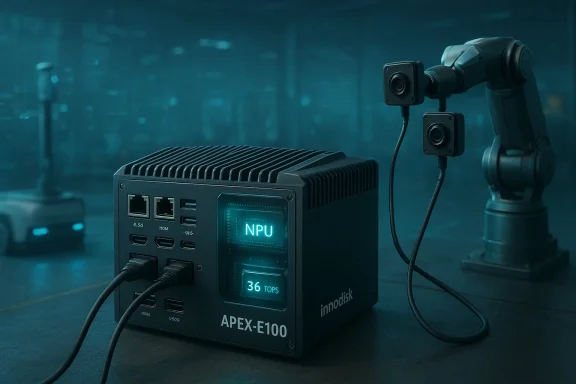
Innodisk’s new APEX-E100 AI Box PC aims to push mainstream edge vision and inference out of the server rack and into compact, ruggedized field deployments—packing an Intel Core Ultra (Meteor Lake) platform with an integrated NPU, multi-camera MIPI support, industrial-grade storage, and a selection of I/O that’s clearly aimed at AGV/AMR, surveillance, smart-city, and automated optical inspection workloads. (innodisk.com) (embeddedcomputing.com)
Edge AI is no longer a niche: manufacturers, logistics operators, and smart-city projects increasingly demand on-prem inference that is resilient to network outages, low-latency, and power-efficient. Innodisk’s APEX family is explicitly designed for that market, and the APEX-E100 is the smallest, Intel-based entry intended for vision-centric tasks that need a compact, industrial form factor. The vendor positions the unit as a turnkey “AI box PC” with preinstalled memory and NVMe storage, an integrated NPU for on-device inference, and patented MIPI-over-Type-C camera interfaces that simplify multi-camera wiring. (innodisk.com)
This article analyzes the APEX-E100’s hardware and software claims, explains where it fits in real-world deployments, highlights notable strengths, and calls out risks and caveats system designers should understand before committing to a design or purchase.
However, the story is not entirely straightforward: several Innodisk pages in other locales and some product briefs reference 34 TOPS instead of 36 TOPS, suggesting either a documentation update, regional copy differences, or different measurement baselines (total package TOPS vs. NPU-only TOPS, or different numeric rounding conventions). Because TOPS reporting can vary by vendor (e.g., whether CPU/GPU contributions are included, bit-width assumed, or test mode used), buyers should treat the TOPS number as an approximate indicator of on-device raw integer throughput rather than a precise benchmark for every workload.
Supported OS images include Ubuntu 22.04 (the canonical Linux LTS for current AI tooling) and Windows 10 IoT Enterprise 2021 LTSC. For many vision workloads, Ubuntu will be the primary platform due to the maturity of inference runtimes and container tooling; Windows IoT Enterprise remains useful for legacy industrial automation stacks that depend on Microsoft tooling. The platform also includes fTPM 2.0 for firmware-level security primitives such as measured boot and key storage.
Key integration considerations:
However, several practical points matter:
That said, system engineers should not buy on the headline TOPS number alone. The documentation shows slight inconsistencies in reported TOPS (34 vs. 36), and sustained real-world inference depends on thermal headroom, model conversion, and runtime maturity. The sensible path is to perform representative, sustained benchmarks with your exact models and environmental conditions, obtain Innodisk’s validated images and SDKs, and confirm long-term support terms before full-scale rollout. (innodisk.com)
Source: Embedded Computing Design Product of the Week: Innodisk’s APEX-E100 AI Box PC - Embedded Computing Design
 Background / Overview
Edge AI is no longer a niche: manufacturers, logistics operators, and smart-city projects increasingly demand on-prem inference that is resilient to network outages, low-latency, and power-efficient. Innodisk’s APEX family is explicitly designed for that market, and the APEX-E100 is the smallest, Intel-based entry intended for vision-centric tasks that need a compact, industrial form factor. The vendor positions the unit as a turnkey “AI box PC” with preinstalled memory and NVMe storage, an integrated NPU for on-device inference, and patented MIPI-over-Type-C camera interfaces that simplify multi-camera wiring. (innodisk.com)This article analyzes the APEX-E100’s hardware and software claims, explains where it fits in real-world deployments, highlights notable strengths, and calls out risks and caveats system designers should understand before committing to a design or purchase.
What the APEX-E100 actually ships with
Core platform and compute
- CPU: Intel Core Ultra (Meteor Lake) family options (Core Ultra 7/5/3 SKUs available). (innodisk.com)
- Integrated accelerator: Innodisk advertises a built-in NPU delivering up to 36 TOPS of inference capability, with combined CPU + GPU + NPU support for AI workloads. Note: some Innodisk regional pages show a 34 TOPS figure; this discrepancy appears in vendor content and is discussed below. (innodisk.com)
Memory and storage
- Preinstalled: 16 GB DDR5 (two SODIMM slots populated as shipped). Expandable to up to 96 GB via 2 x DDR5 5600 SODIMM modules. (innodisk.com)
- Storage: 512 GB Innodisk M.2 4TG2‑P NVMe SSD (PCIe Gen4 x4) included; the 4TG2‑P family is Innodisk’s industrial-grade M.2 offering with wide temperature support and PLP (power-loss protection) options. (innodisk.com)
I/O, cameras, and networking
- Network: 2 x 2.5G RJ45 ports for higher-than-Gigabit LAN throughput. (innodisk.com)
- Display & USB: 2 x HDMI, 2 x USB 3.2 Gen2, plus 2 x USB 3.2 Gen1 ports (and additional legacy USB / COM as required by variants). (innodisk.com)
- Cameras: 2 x MIPI-over-Type-C camera interfaces using Innodisk’s patented MIPI-over‑Type‑C technology; the company claims cable extension to up to 1 meter while preserving MIPI bandwidth and low latency. (innodisk.com)
Security, OS, and ruggedization
- Firmware security: fTPM 2.0 (firmware TPM) is listed as part of the platform. (embeddedcomputing.com)
- Supported OS: Linux Ubuntu 22.04 and Microsoft Windows 10 IoT Enterprise 2021 LTSC are supported for development and production images.
- Mechanical: compact chassis 188 × 140 × 56 mm and an operating range the vendor lists commonly as -20°C to 60°C, built for shock, vibration and humidity typical of industrial edge deployments.
Deep dive: performance claims and what “TOPS” means here
The headline: “up to 36 TOPS”
Innodisk markets the APEX-E100 with an on-package NPU capable of “up to 36 TOPS”—a shorthand many vendors use to describe peak inference throughput in low‑precision integer formats. The 36 TOPS figure is repeated across Innodisk’s product pages and in reseller material. (innodisk.com)However, the story is not entirely straightforward: several Innodisk pages in other locales and some product briefs reference 34 TOPS instead of 36 TOPS, suggesting either a documentation update, regional copy differences, or different measurement baselines (total package TOPS vs. NPU-only TOPS, or different numeric rounding conventions). Because TOPS reporting can vary by vendor (e.g., whether CPU/GPU contributions are included, bit-width assumed, or test mode used), buyers should treat the TOPS number as an approximate indicator of on-device raw integer throughput rather than a precise benchmark for every workload.
How to interpret TOPS for real workloads
- TOPS (tera-operations per second) is useful as a high-level indicator but does not translate linearly into model performance across different neural network architectures, precisions (INT8, FP16, BF16, FP4/FP8, etc.), or software stacks. A device rated at 36 TOPS for INT8 might achieve very different latency or throughput for a quantized object-detection model versus a transformer-based language model.
- Practical performance depends on memory bandwidth, cache sizes, model conversion and quantization quality, thermal limits (sustained vs. burst TOPS), and driver/SDK maturity. Innodisk’s documentation indicates the APEX-E100 is intended for edge inference (vision, AOI, AMR perception), not for large LLM training or high‑density generative AI serving. (innodisk.com)
I/O, camera integration, and the MIPI-over-Type-C pitch
Why MIPI-over-Type-C matters for vision systems
MIPI CSI-2 remains the standard camera interface for embedded vision, but traditional MIPI cabling limits cable length and mechanical flexibility. Innodisk’s proprietary MIPI-over-Type-C approach converts MIPI signals to a Type-C physical interface to make installation easier and supports longer cable runs (the product page cites up to 1 meter extension) while maintaining low latency and high bandwidth—an attractive proposition for factory floors, robots, and vehicle mounts where sensor heads are physically separated from compute. (innodisk.com)Practical I/O layout
The combination of dual HDMI, four modern USB ports (Gen 2 & Gen 1), and dual 2.5G Ethernet offers real-world flexibility for:- connecting displays and local operator HMIs;
- attaching external accelerators or capture devices (via USB);
- connecting to higher-than-gigabit LAN backbones that are becoming common in industrial networks.
Software, SDKs, and system services
Innodisk positions the APEX-E100 as more than a chassis: they offer customizable AI system services covering software stacks, thermal and mechanical design, BIOS/firmware support, and I/O customization. That is important because edge AI projects frequently require vendor co-engineering—optimizing thermal profiles, pre-loading models, and integrating with factory orchestration systems. (innodisk.com)Supported OS images include Ubuntu 22.04 (the canonical Linux LTS for current AI tooling) and Windows 10 IoT Enterprise 2021 LTSC. For many vision workloads, Ubuntu will be the primary platform due to the maturity of inference runtimes and container tooling; Windows IoT Enterprise remains useful for legacy industrial automation stacks that depend on Microsoft tooling. The platform also includes fTPM 2.0 for firmware-level security primitives such as measured boot and key storage.
Key integration considerations:
- Confirm compatibility with your preferred inference toolkit (OpenVINO, TensorRT, ONNX Runtime, vendor NPUs’ SDK) and validate conversion/quantization pipelines for your models.
- Ask Innodisk for a validated deployment image and a list of pre-certified model runtimes; having vendor-provided images can greatly reduce integration time.
- Verify long-term support windows for firmware and BIOS updates if devices will be deployed in production for years.
Ruggedization, thermal behavior, and deployed reliability
The APEX-E100 is presented as an industrial box PC: compact mechanical dimensions (188 × 140 × 56 mm) and operating-temperature claims (commonly listed as −20°C to 60°C) make it suitable for many indoor and semi-exposed outdoor deployments. Innodisk and authorized resellers emphasize shock/vibration tolerance and a sealed metal chassis to withstand industrial settings.However, several practical points matter:
- Small chassis and high-performance parts (Core Ultra + NPU) can mean constrained thermal headroom: sustained inference loads may trigger thermal throttling and reduce sustained TOPS compared with short bursts. Confirm whether Innodisk provides thermal profiles (sustained vs. peak TOPS) for continuous inference. (innodisk.com)
- Wide temperature SSDs and industrial DRAM improve reliability, but system-level validation (shock, vibration, dust ingress) must be performed for mobile or vehicle-mounted applications. Innodisk’s SSDs (the 4TG2‑P family) are rated for wide temps and PLP, which reduces storage-related failure risk in the field.
Real-world use cases where APEX-E100 fits—and where it doesn't
Excellent fit
- Edge vision analytics and AOI (automated optical inspection) where compact size, MIPI camera support, and moderate model complexity are required. (innodisk.com)
- On-board perception for AMRs and AGVs where wiring ease (Type‑C camera links), local inference, and rugged packaging reduce dependence on vehicle-to-cloud links. (innodisk.com)
- Smart city edge nodes for localized analytics (traffic counting, anomaly detection) where 2.5G uplinks and local processing reduce central bandwidth costs.
Poor fit
- Large LLM inference, model training, or multi‑tenant generative AI serving—those use cases generally require discrete GPUs or rack-scale accelerators and will outperform an integrated-NPU box.
- Workloads that require many simultaneous high-resolution camera feeds running heavy DNNs—if you need sustained multi‑camera throughput at high resolutions and high FPS, verify the APEX-E100’s sustained thermal behavior and memory bandwidth first.
Strengths: what genuinely stands out
- Compact, integrated solution targeted at vision edge use cases. Innodisk delivers a coherent package—CPU, NPU, camera I/O, and industrial storage—so engineers do not have to assemble multiple components. (innodisk.com)
- Industrial-grade storage and memory compatibility with Innodisk’s own components (M.2 4TG2‑P SSD and DDR5 5600 SODIMMs) reduce compatibility risk and simplify procurement.
- Practical networking I/O (2.5G) and MIPI-over-Type-C camera interface that addresses a real pain point in field camera wiring and length limitations. (innodisk.com)
- Vendor willingness to provide system-level customizations (BIOS/firmware, thermal design, software images), which matters for production-grade edge deployments. (innodisk.com)
Risks, unknowns, and practical caveats
- TOPS inconsistency and measurement opacity: vendor pages show 34 TOPS in some locales and 36 TOPS in others. Because TOPS reporting can be inconsistent across vendors and may combine CPU/GPU/NPU contributions differently, buyers should treat the number as indicative rather than definitive and require benchmarked proof for their workload. (innodisk.com)
- Sustained performance vs. peak: peak TOPS is rarely sustained in small chassis without active cooling. Ask Innodisk for thermal throttling curves and sustained inference benchmarks for your target models and ambient temperatures. (innodisk.com)
- Software and tooling maturity: integrated NPUs depend on software stacks and converters. Validate model conversion (quantization, pruning) and runtime performance on actual workloads—vendor claims rarely include conversion losses or end-to-end latencies. Request reference images, SDKs, and sample integrations as part of procurement. (innodisk.com)
- Long-term support and lifecycle: edge deployments can last many years; confirm firmware update policies, extended support windows, and spare-parts availability. Innodisk offers customization and services, but contract terms (SLA, RMA, field-replacement logistics) must be explicit for production rollouts. (innodisk.com)
How to validate the APEX-E100 for your project: a checklist
- Define the representative models you intend to run (e.g., YOLOv8‑Tiny INT8 at X FPS, a quantized ResNet for defect classification, or a small transformer for keyword spotting).
- Request Innodisk-provided reference images and model runtime stacks (OpenVINO/ONNX Runtime or other supported runtimes) and confirm they support your quantization path. (innodisk.com)
- Run end-to-end tests that include camera capture (MIPI over Type‑C), preprocessing, inference, and postprocessing at the target resolution and FPS; measure latency, throughput, and thermal behavior over multi-hour runs.
- Validate storage endurance and thermal behavior of the included M.2 4TG2‑P SSD under your I/O profile (log writes, model loading patterns). Innodisk’s industrial SSD family has wide-temperature ratings and PLP features that mitigate data-loss risk.
- If deployed in mobile or vehicle contexts, perform shock-and-vibration tests and confirm connector retention and cable strain relief for Type‑C camera links.
Purchasing and integration tips
- Ask for SKU-level clarifications: confirm which Intel Core Ultra SKU is shipped in your unit (7/5/3) since CPU core counts, TDP, and clocks materially affect thermal envelopes and sustained performance. Innodisk lists multiple CPU SKUs for the APEX-E100 series—confirm the configured SKU for each quote. (innodisk.com)
- Bundle vendor services early: if you need thermal customization, pre-provisioned OS images, or particular certified SSD/DRAM options, include those in the initial purchase order rather than retrofitting later. Innodisk advertises these services as a competitive differentiator. (innodisk.com)
- Reserve a firmware and BIOS update plan: industrial devices often need a steady stream of security and stability fixes; secure update delivery and validation workflows avoid field bricking risks.
Short comparative context
- Against small NVIDIA or Qualcomm‑based edge boxes, the APEX-E100’s advantage is the integrated Intel Core Ultra platform with a balanced CPU and NPU combo and native support for MIPI camera workflows. It trades off the absolute top-end TOPS of external, discrete accelerators for a compact, vendor-supported system tailored for industrial reliability. (innodisk.com)
- Compared with larger APEX siblings (GPU-accelerated rack or multi‑GPU nodes), the E100 is optimized for local vision inference and embedded control rather than large-scale model hosting. If your use case requires sustained multi‑model inference at high throughput, consider the GPU-based APEX platforms instead.
Final assessment: who should buy the APEX-E100?
Buy the APEX-E100 if you:- Need a compact, industrial-grade edge AI box for vision tasks and prefer a pre-integrated package (CPU + NPU + MIPI camera support + industrial SSD). (innodisk.com)
- Are deploying AMRs, AGVs, small AOI stations, or smart‑edge nodes where cabling simplicity and robustness are priorities. (innodisk.com)
- Value vendor collaboration for system-level customization and ready-made OS images (Ubuntu 22.04 / Windows 10 IoT Enterprise 2021 LTSC) and need TPM-level firmware security primitives.
- Rely on sustained high-throughput inference beyond what a compact chassis can run without throttling. Ask for sustained-performance benchmarks first. (innodisk.com)
- Require precise, reproducible TOPS guarantees for new model classes—treat the vendor TOPS numbers as directional and validate end-to-end performance on your models.
Conclusion
Innodisk’s APEX-E100 is a credible, thoughtfully engineered entry in the compact industrial edge AI category: it combines Intel’s Core Ultra family with an integrated NPU, industrial SSD and DIMM compatibility, practical 2.5G networking, and a pragmatic approach to camera wiring with MIPI-over‑Type‑C. Those features make it a strong candidate for vision-first deployments where integration speed, robustness, and vendor support matter.That said, system engineers should not buy on the headline TOPS number alone. The documentation shows slight inconsistencies in reported TOPS (34 vs. 36), and sustained real-world inference depends on thermal headroom, model conversion, and runtime maturity. The sensible path is to perform representative, sustained benchmarks with your exact models and environmental conditions, obtain Innodisk’s validated images and SDKs, and confirm long-term support terms before full-scale rollout. (innodisk.com)
Source: Embedded Computing Design Product of the Week: Innodisk’s APEX-E100 AI Box PC - Embedded Computing Design
