AyyyJono
New Member
- Joined
- Jul 16, 2019
- Messages
- 2
- Thread Author
- #1
I've recently come across something that has perplexed me and I do not understand the reason for it.
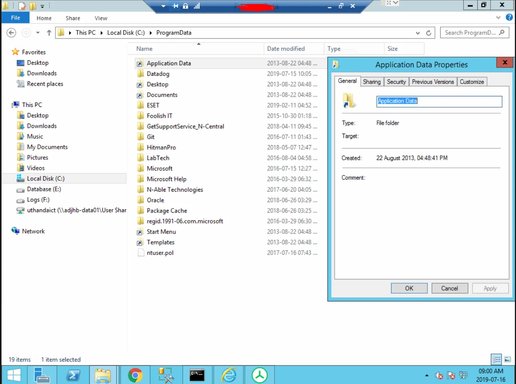
Under C:\Users there is a shortcut called All Users. This takes me to C:\ProgramData. In ProgramData there is a shortcut for Desktop, Documents, Start Menu, Templates but oddly, ApplicationData as well. It seems to loop and take me to the same directory as where I view the shortcut in ProgramData.
Properties of the shortcut does not display any target location or any other hints of what it's purpose is. I have attached a screenshot and would like to know what this could be? The server was recently hit with Ransomware and restored, my superior has a suspicion that it might be linked to the Ransomware returning or leaving a trace behind.
I have tried looking online for more information but don't seem to get an accurate answer.
Regards,
Jono.
Under C:\Users there is a shortcut called All Users. This takes me to C:\ProgramData. In ProgramData there is a shortcut for Desktop, Documents, Start Menu, Templates but oddly, ApplicationData as well. It seems to loop and take me to the same directory as where I view the shortcut in ProgramData.
Properties of the shortcut does not display any target location or any other hints of what it's purpose is. I have attached a screenshot and would like to know what this could be? The server was recently hit with Ransomware and restored, my superior has a suspicion that it might be linked to the Ransomware returning or leaving a trace behind.
I have tried looking online for more information but don't seem to get an accurate answer.
Regards,
Jono.