

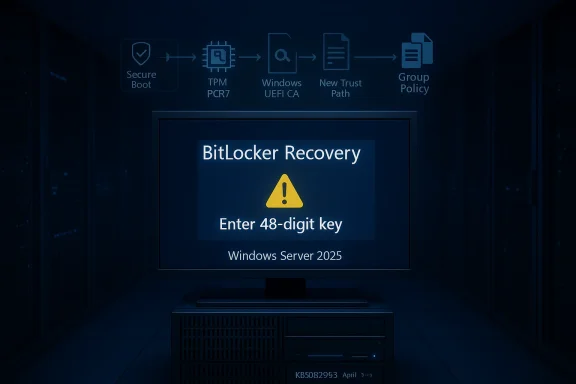
Microsoft’s April 2026 Patch Tuesday has done something administrators dread: it has turned a routine security rollout into a boot-time recovery event for a narrow but important slice of Windows fleets. Microsoft’s own support notes for KB5082063 confirm that some Windows Server 2025 systems can be pushed into BitLocker recovery after the Secure Boot changes, and the same class of issue also appears in the Windows 11 April wave. The upside is that the blast radius is limited to enterprise-managed machines with a very specific TPM Group Policy setup; the downside is that the affected devices can ask for a 48-digit recovery key at the first reboot, right when IT expects a smooth compliance pass.
The story here is less about a single broken update than about a recurring collision between boot-chain modernization and enterprise BitLocker policy. Microsoft is continuing its phased transition to the newer 2023 Windows UEFI CA certificates, and that transition changes how the platform evaluates boot trust. On some systems, the interaction with PCR7-based validation produces a mismatch that BitLocker treats as suspicious enough to demand recovery. Microsoft now explicitly recommends that enterprises audit BitLocker policies, check PCR7 binding status in msinfo32, and either remove the TPM validation policy before updating or use a Known Issue Rollback first.
The important nuance is that Microsoft says this is unlikely to hit ordinary consumer devices. That makes sense, because the problematic configuration is not a default home-user setup; it is the sort of tightly managed posture used in enterprise, imaging, and compliance-heavy environments. In other words, this is a sysadmin problem first and a consumer problem second, although consumers may still hear about it through the usual drumbeat of scary Windows update headlines.
What makes the April 2026 incident especially notable is that it is not happening in isolation. Windows admins have seen multiple rounds of BitLocker-related servicing friction in the last few years, and this one lands in a month where Microsoft also shipped security fixes for actively exploited vulnerabilities. That creates a familiar but uncomfortable tradeoff: the update is important enough to install, but complex enough that it can break the very systems meant to protect data at rest.
The practical lesson for IT teams is that update deployment now needs boot-aware change management. A patch can be fully signed, fully supported, and still create an operational incident if the device’s measured boot state changes enough to upset BitLocker’s expectations. Microsoft’s guidance is basically an admission that the company knows this tension is real.
The weak point in this case is PCR7 validation. Microsoft’s support article says the issue appears when administrators have configured the TPM platform validation profile for native UEFI firmware configurations, with PCR7 included, while the device also reports that Secure Boot State PCR7 Binding is “Not Possible.” That combination is rare enough to be outside normal consumer setups, but common enough in carefully hardened enterprise environments that Microsoft had to document it immediately.
At the same time, Microsoft is phasing in the 2023-signed Windows Boot Manager as part of its Secure Boot certificate refresh effort. The company says the presence of the 2023 certificate in the Secure Boot Signature Database can make a device eligible for the newer boot manager to become the default. If the machine is still running an older boot manager when the update shifts that trust path, BitLocker can interpret the change as meaningful enough to halt at recovery.
The deeper concern is that certificate transitions and recovery mechanisms do not exist in separate worlds. Secure Boot changes affect how the system measures trust; BitLocker watches those measurements; enterprise policy decides how strict the machine should be. Once all three intersect, the line between security hardening and operational disruption becomes very thin.
The company also tightened its explanation with a five-condition checklist. BitLocker must be enabled on the OS drive. The TPM validation profile must explicitly include PCR7. msinfo32.exe must report Secure Boot State PCR7 Binding as “Not Possible.” The Windows UEFI CA 2023 certificate must be present in the device’s Secure Boot Signature Database. And the device must not already be using the 2023-signed Windows Boot Manager. Only when all five align does the recovery prompt appear.
It also explains why Microsoft is telling enterprises to audit before they deploy. If the problem were generic, there would be no point in asking admins to check PCR7 explicitly. The recommendation itself is a clue that the company expects many organizations to have a policy posture they barely remember setting years ago, often as part of a broader compliance baseline.
For consumer Windows users, the story is more indirect. Most home systems will never meet the full trigger list, and even those that do are likely to be on an unusual hardware or policy path. But consumers still absorb the reputational damage of these incidents, because every BitLocker headline reinforces the same uncomfortable public impression: Windows updates can still surprise you at boot time.
Enterprises, by contrast, have a concrete operational response to plan. They need to identify the devices that have PCR7 validation configured, determine whether those devices have already shifted to the 2023 boot manager, and decide whether to remove policy or hold deployment until KIR is in place. That is a much more demanding workflow than simply waiting for Windows Update to “do the right thing.”
That is why Microsoft’s advice is unusually procedural. The company is not just telling admins to “be careful.” It is telling them exactly which policy node to inspect, which state to verify, and which remediation path is preferable before rollout. That level of specificity is a sign that Microsoft knows how easily this kind of issue can snowball in enterprise operations.
The KIR option is especially important for organizations that cannot simply remove the Group Policy setting. Microsoft says the rollback must be deployed before the update lands on affected devices, which makes timing critical. That detail alone tells you the company views this as a deployment choreography problem, not a simple patch-and-forget fix.
Microsoft also points administrators to a familiar but often overlooked step: build an inventory of impacted systems before the update wave reaches them. In practice, that means checking policy baselines, firmware trust state, and reboot readiness together rather than treating each as a separate task. That is good change management, but it is also extra work at exactly the moment IT teams are already busy dealing with Patch Tuesday churn.
The support article on Windows Server 2025 makes that explicit by describing additional high-confidence device data used to expand the set of machines eligible for automatic Secure Boot certificate delivery. That is a controlled rollout, not a fire-and-forget change. Microsoft is clearly trying to modernize the boot chain without detonating the ecosystem in the process.
There is a real design tension here. The more Microsoft locks down the boot path, the more likely it is that legacy policy assumptions will clash with the new reality. The more cautiously it rolls out certificate changes, the longer the trust migration takes. Neither option is clean, and Windows administrators are living in the space between them.
This also explains why Microsoft has invested in status visibility and telemetry around boot trust. The more the company can tell whether a device is ready for the new certificate chain, the less likely it is to shove a machine into a bad state. The bad news is that not every machine reports the same thing, and not every fleet is equally ready.
That model has real advantages. It allows Microsoft to respond quickly when an issue touches boot security, identity, or recovery. It also lets the company keep smaller problems out of the next monthly bundle rather than forcing every customer to absorb the same remediation. The tradeoff is complexity: more package types, more timing rules, and more chances for admins to miss the fine print.
The recurring BitLocker theme matters because it affects confidence. If the same category of boot-related update has repeatedly triggered recovery events since 2022, admins start to view even legitimate security workarounds with a bit more suspicion. That is not irrational; it is the natural result of being asked to trust updates that sometimes look harmless until the first reboot.
That is one reason Microsoft’s documentation matters so much. It is trying to keep the trust tax manageable by telling IT exactly which branch of the tree to follow. In a platform as large as Windows, clarity is a security feature.
That history is important because it shifts the conversation from “Did Microsoft make one bad patch?” to “How should Windows manage boot trust during a multi-year certificate migration?” The latter is the more useful question, and it is the one administrators should keep asking. If the answer is “with more phased rollout and more policy auditing,” then this April incident is a warning shot rather than a one-off embarrassment.
There is also a wider market implication. Microsoft is effectively proving that operating-system trust chains can no longer be treated as static infrastructure. They are now living systems, subject to certificate expirations, revocation timing, and update sequencing. That makes Windows more secure in the long run, but it also makes it less forgiving in the short run.
The upside is that Microsoft’s own documentation has become better at naming the trigger conditions. The downside is that the company is clearly still discovering how modern Secure Boot changes interact with long-standing BitLocker policy patterns. That is not unusual for a platform this large, but it is still disruptive.
The larger opportunity is for Microsoft to improve boot-state visibility so that administrators can see risk before a reboot, not after it. The company is already moving in that direction with Secure Boot status reporting and high-confidence device signals. If that work matures, future certificate migrations could become much less dramatic.
There is also a governance risk. Many organizations do not know where all their PCR7-related policy settings live, especially if the configuration was inherited from older hardening templates. If the audit is incomplete, one branch of the fleet can drift into a different boot state than the rest, which complicates troubleshooting and compliance reporting.
The second thing to watch is how the Secure Boot certificate migration progresses through 2026. Microsoft’s gradual approach is designed to prevent widespread breakage, but gradual also means prolonged. Every new boot update between now and the certificate-expiration window will be evaluated against the same compatibility tension that surfaced here.
The third thing to watch is the behavior of enterprise tooling. If deployment systems start accounting for PCR7 policy and boot-manager state by default, then the industry will have learned the lesson the hard way. If not, the same category of incident will likely come back under a different KB number and a slightly different set of symptoms.
Source: WinBuzzer Microsoft April Update Forces BitLocker Recovery on Servers
 Overview
The story here is less about a single broken update than about a recurring collision between boot-chain modernization and enterprise BitLocker policy. Microsoft is continuing its phased transition to the newer 2023 Windows UEFI CA certificates, and that transition changes how the platform evaluates boot trust. On some systems, the interaction with PCR7-based validation produces a mismatch that BitLocker treats as suspicious enough to demand recovery. Microsoft now explicitly recommends that enterprises audit BitLocker policies, check PCR7 binding status in msinfo32, and either remove the TPM validation policy before updating or use a Known Issue Rollback first.The important nuance is that Microsoft says this is unlikely to hit ordinary consumer devices. That makes sense, because the problematic configuration is not a default home-user setup; it is the sort of tightly managed posture used in enterprise, imaging, and compliance-heavy environments. In other words, this is a sysadmin problem first and a consumer problem second, although consumers may still hear about it through the usual drumbeat of scary Windows update headlines.
What makes the April 2026 incident especially notable is that it is not happening in isolation. Windows admins have seen multiple rounds of BitLocker-related servicing friction in the last few years, and this one lands in a month where Microsoft also shipped security fixes for actively exploited vulnerabilities. That creates a familiar but uncomfortable tradeoff: the update is important enough to install, but complex enough that it can break the very systems meant to protect data at rest.
Why this matters now
Windows security has become a layered system of trust anchors, firmware assumptions, and policy-driven validation. When Microsoft updates the boot trust chain, it is no longer just changing a low-level component in isolation; it is touching the same early-startup surface that BitLocker, Secure Boot, and TPM measurements all depend on. That is why a seemingly minor certificate migration can cascade into a recovery prompt.The practical lesson for IT teams is that update deployment now needs boot-aware change management. A patch can be fully signed, fully supported, and still create an operational incident if the device’s measured boot state changes enough to upset BitLocker’s expectations. Microsoft’s guidance is basically an admission that the company knows this tension is real.
Background
BitLocker’s job is simple in theory: protect the operating system volume so that a stolen disk does not equal a stolen Windows installation. In practice, it relies on the TPM, boot measurements, and configuration data that tells it whether the startup path looks trustworthy. If the machine’s measured boot chain changes in a way BitLocker does not expect, the safest response is to stop and request the recovery key. That is a feature, not a bug — until a servicing update unintentionally trips it.The weak point in this case is PCR7 validation. Microsoft’s support article says the issue appears when administrators have configured the TPM platform validation profile for native UEFI firmware configurations, with PCR7 included, while the device also reports that Secure Boot State PCR7 Binding is “Not Possible.” That combination is rare enough to be outside normal consumer setups, but common enough in carefully hardened enterprise environments that Microsoft had to document it immediately.
At the same time, Microsoft is phasing in the 2023-signed Windows Boot Manager as part of its Secure Boot certificate refresh effort. The company says the presence of the 2023 certificate in the Secure Boot Signature Database can make a device eligible for the newer boot manager to become the default. If the machine is still running an older boot manager when the update shifts that trust path, BitLocker can interpret the change as meaningful enough to halt at recovery.
The certificate transition story
This is not just a patch bug. It is part of a broader, long-running certificate modernization process that Microsoft has been telegraphing to administrators for months. The company is trying to move Windows devices from older trust anchors to newer ones while preserving compatibility with the massive, messy reality of the PC ecosystem. That is a hard migration, and hard migrations often surface in exactly this kind of edge-case behavior.The deeper concern is that certificate transitions and recovery mechanisms do not exist in separate worlds. Secure Boot changes affect how the system measures trust; BitLocker watches those measurements; enterprise policy decides how strict the machine should be. Once all three intersect, the line between security hardening and operational disruption becomes very thin.
What Microsoft Says Happened
Microsoft’s own wording is unusually direct. For Windows Server 2025, KB5082063 says the update addresses an issue where a device might enter BitLocker Recovery after Secure Boot updates. For Windows 11, the corresponding April releases carry the same warning language: devices with an unrecommended BitLocker Group Policy configuration might need to enter their BitLocker recovery key. That is Microsoft acknowledging that the problem is not hypothetical and not limited to one product line.The company also tightened its explanation with a five-condition checklist. BitLocker must be enabled on the OS drive. The TPM validation profile must explicitly include PCR7. msinfo32.exe must report Secure Boot State PCR7 Binding as “Not Possible.” The Windows UEFI CA 2023 certificate must be present in the device’s Secure Boot Signature Database. And the device must not already be using the 2023-signed Windows Boot Manager. Only when all five align does the recovery prompt appear.
Why the trigger set is so specific
That five-part trigger list matters because it tells us this is not a broad quality regression. It is a narrowly gated interaction between a security update and a boot policy configuration that many enterprises adopted for defensible reasons. In a sense, the incident validates how layered Windows security has become: the deeper the stack gets, the more precise the failure modes can be.It also explains why Microsoft is telling enterprises to audit before they deploy. If the problem were generic, there would be no point in asking admins to check PCR7 explicitly. The recommendation itself is a clue that the company expects many organizations to have a policy posture they barely remember setting years ago, often as part of a broader compliance baseline.
The one-time recovery pattern
Microsoft says the recovery key should only be needed once, as long as the group policy configuration does not change afterward. That is a useful detail, because it separates this issue from a persistent brick-the-machine failure. Still, “only once” is not a comforting phrase when it appears on a production server or an executive laptop at 8:00 a.m. on reboot day.Enterprise Impact Versus Consumer Impact
The immediate blast radius is clearly enterprise-first. Microsoft says the affected configurations are unlikely to be found on unmanaged personal devices, and the policy language strongly suggests this is a managed-fleet issue. That means the pain lands where update coordination, compliance, and recovery tooling matter most: schools, hospitals, factories, agencies, and corporate IT departments.For consumer Windows users, the story is more indirect. Most home systems will never meet the full trigger list, and even those that do are likely to be on an unusual hardware or policy path. But consumers still absorb the reputational damage of these incidents, because every BitLocker headline reinforces the same uncomfortable public impression: Windows updates can still surprise you at boot time.
Enterprises, by contrast, have a concrete operational response to plan. They need to identify the devices that have PCR7 validation configured, determine whether those devices have already shifted to the 2023 boot manager, and decide whether to remove policy or hold deployment until KIR is in place. That is a much more demanding workflow than simply waiting for Windows Update to “do the right thing.”
Why managed environments feel this harder
Managed environments amplify small faults. A recovery prompt on one machine becomes a help desk ticket; a help desk ticket becomes a deployment question; a deployment question becomes a policy review. In other words, a one-time BitLocker unlock event is not just a local inconvenience — it can create a support cascade.That is why Microsoft’s advice is unusually procedural. The company is not just telling admins to “be careful.” It is telling them exactly which policy node to inspect, which state to verify, and which remediation path is preferable before rollout. That level of specificity is a sign that Microsoft knows how easily this kind of issue can snowball in enterprise operations.
Workarounds and Mitigation
Microsoft has offered two temporary paths. The first is to remove the TPM validation policy before installing the update, then suspend and re-enable BitLocker so the bindings can refresh cleanly. The second is to apply a Known Issue Rollback before deployment so the system does not automatically switch to the 2023 Boot Manager in the problematic way.The KIR option is especially important for organizations that cannot simply remove the Group Policy setting. Microsoft says the rollback must be deployed before the update lands on affected devices, which makes timing critical. That detail alone tells you the company views this as a deployment choreography problem, not a simple patch-and-forget fix.
Microsoft also points administrators to a familiar but often overlooked step: build an inventory of impacted systems before the update wave reaches them. In practice, that means checking policy baselines, firmware trust state, and reboot readiness together rather than treating each as a separate task. That is good change management, but it is also extra work at exactly the moment IT teams are already busy dealing with Patch Tuesday churn.
Recommended response order
- Audit systems for the PCR7 BitLocker policy before deployment.
- Check msinfo32 for PCR7 binding status.
- Decide whether the device is eligible for KIR or should have policy removed.
- If needed, suspend BitLocker, apply the update, and then re-enable protection.
- Reboot once, verify state, and confirm that later restarts are clean.
Why Microsoft did not recommend simple deferral
A tempting instinct is to pause the update and wait for the dust to settle. But April 2026 Patch Tuesday also delivered serious security fixes, including protection for actively exploited issues in the broader Windows ecosystem. That means blanket deferral carries real security costs, especially for enterprise fleets that cannot afford to skip a monthly cycle indefinitely.The Secure Boot Modernization Problem
This incident sits inside Microsoft’s wider Secure Boot modernization effort, and that is what makes it more than an isolated annoyance. Microsoft is moving devices toward newer boot trust assets, including the 2023 certificate set, as part of the long transition away from aging signing infrastructure. That transition improves the platform’s long-term resilience, but it can temporarily expose awkward seams between old and new trust states.The support article on Windows Server 2025 makes that explicit by describing additional high-confidence device data used to expand the set of machines eligible for automatic Secure Boot certificate delivery. That is a controlled rollout, not a fire-and-forget change. Microsoft is clearly trying to modernize the boot chain without detonating the ecosystem in the process.
There is a real design tension here. The more Microsoft locks down the boot path, the more likely it is that legacy policy assumptions will clash with the new reality. The more cautiously it rolls out certificate changes, the longer the trust migration takes. Neither option is clean, and Windows administrators are living in the space between them.
The trust chain is getting more complicated
A decade ago, Secure Boot and BitLocker could be explained as separate lines of defense. Today they behave more like cooperating systems with shared assumptions about the startup path. That means a certificate migration can affect encryption recovery behavior even if the patch never mentions disk encryption in the headline.This also explains why Microsoft has invested in status visibility and telemetry around boot trust. The more the company can tell whether a device is ready for the new certificate chain, the less likely it is to shove a machine into a bad state. The bad news is that not every machine reports the same thing, and not every fleet is equally ready.
How This Fits Microsoft’s Servicing Pattern
The BitLocker recovery issue is also another example of Microsoft’s increasingly reactive servicing model. In 2026, the company is comfortable shipping rapid follow-up fixes, targeted rollbacks, and special deployment guidance when a field issue is serious enough. That is operationally mature in one sense, but it also signals that Windows servicing now behaves more like a continuous response system than a clean monthly cadence.That model has real advantages. It allows Microsoft to respond quickly when an issue touches boot security, identity, or recovery. It also lets the company keep smaller problems out of the next monthly bundle rather than forcing every customer to absorb the same remediation. The tradeoff is complexity: more package types, more timing rules, and more chances for admins to miss the fine print.
The recurring BitLocker theme matters because it affects confidence. If the same category of boot-related update has repeatedly triggered recovery events since 2022, admins start to view even legitimate security workarounds with a bit more suspicion. That is not irrational; it is the natural result of being asked to trust updates that sometimes look harmless until the first reboot.
The enterprise trust tax
Every emergency workaround carries a hidden tax. Teams have to test it, document it, distribute it, and then reverse it at the right time. If the fix is a KIR, there is also the overhead of getting that rollback before the patch rather than after. That turns patch management into a scheduling exercise with real security consequences.That is one reason Microsoft’s documentation matters so much. It is trying to keep the trust tax manageable by telling IT exactly which branch of the tree to follow. In a platform as large as Windows, clarity is a security feature.
Historical Context
This is the fourth notable BitLocker recovery scare in roughly four years, and that recurrence is the real story beneath the headline. The pattern goes back to 2022 and has shown up again in later servicing cycles, including issues Microsoft had to correct in 2024 and 2025. The details differ, but the shape of the problem is the same: a Windows update changes a boot-related trust assumption and BitLocker responds conservatively.That history is important because it shifts the conversation from “Did Microsoft make one bad patch?” to “How should Windows manage boot trust during a multi-year certificate migration?” The latter is the more useful question, and it is the one administrators should keep asking. If the answer is “with more phased rollout and more policy auditing,” then this April incident is a warning shot rather than a one-off embarrassment.
There is also a wider market implication. Microsoft is effectively proving that operating-system trust chains can no longer be treated as static infrastructure. They are now living systems, subject to certificate expirations, revocation timing, and update sequencing. That makes Windows more secure in the long run, but it also makes it less forgiving in the short run.
Why recurrence matters
When the same category of problem repeats, organizations start to build policy around the expectation of recurrence. That means more test rings, more maintenance windows, and more exceptions for devices that sit at the edge of compatibility. In a perverse way, the repeated BitLocker incidents can push Windows shops toward better discipline — but only after they pay the cost in disruption first.The upside is that Microsoft’s own documentation has become better at naming the trigger conditions. The downside is that the company is clearly still discovering how modern Secure Boot changes interact with long-standing BitLocker policy patterns. That is not unusual for a platform this large, but it is still disruptive.
Strengths and Opportunities
Microsoft deserves credit for not hiding the issue and for giving administrators specific, actionable guidance. The update notes are unusually clear about which policy setting matters, how the trigger works, and how to avoid the recovery event. That clarity reduces panic and gives IT teams a real path to safe deployment.The larger opportunity is for Microsoft to improve boot-state visibility so that administrators can see risk before a reboot, not after it. The company is already moving in that direction with Secure Boot status reporting and high-confidence device signals. If that work matures, future certificate migrations could become much less dramatic.
- Microsoft is being transparent about the trigger conditions.
- Enterprises have workable mitigation paths.
- The issue is narrow enough to target rather than blanket-fix.
- Secure Boot modernization is moving forward instead of stalling.
- Windows is gaining better trust-state telemetry.
- KIR gives admins a non-destructive emergency option.
- The event reinforces the need for proactive boot-chain auditing.
Risks and Concerns
The biggest risk is not that this one update breaks every server. It is that every new boot-chain migration will now be judged through the lens of past BitLocker surprises. That erodes confidence, even when the root cause is understandable and the fix is available. Trust is hard to earn back once admins start assuming every reboot might be a trap.There is also a governance risk. Many organizations do not know where all their PCR7-related policy settings live, especially if the configuration was inherited from older hardening templates. If the audit is incomplete, one branch of the fleet can drift into a different boot state than the rest, which complicates troubleshooting and compliance reporting.
- Misread policy baselines can cause avoidable lockouts.
- Sequencing errors can make remediation harder than the original issue.
- Mixed boot states can fragment fleet management.
- Emergency updates can create update fatigue in IT teams.
- Security teams may delay deployment if the guidance feels too complex.
- Recovery-key handling introduces a support burden.
- Older imaging workflows may not reflect the new boot trust chain.
Looking Ahead
The most immediate thing to watch is whether Microsoft folds this mitigation into a broader cumulative path or keeps it as a narrow, enterprise-centric fix. If later April servicing packages absorb the workaround more cleanly, the issue will fade into the category of “annoying but solved.” If not, it will stay a live deployment concern for administrators running mixed fleets.The second thing to watch is how the Secure Boot certificate migration progresses through 2026. Microsoft’s gradual approach is designed to prevent widespread breakage, but gradual also means prolonged. Every new boot update between now and the certificate-expiration window will be evaluated against the same compatibility tension that surfaced here.
The third thing to watch is the behavior of enterprise tooling. If deployment systems start accounting for PCR7 policy and boot-manager state by default, then the industry will have learned the lesson the hard way. If not, the same category of incident will likely come back under a different KB number and a slightly different set of symptoms.
- Whether Microsoft broadens the fix into a simpler delivery path.
- Whether more devices receive status checks before the boot-manager switch.
- Whether admins report the same PCR7 edge case across more hardware models.
- Whether the KIR remains the preferred escape hatch.
- Whether subsequent Patch Tuesday releases avoid repeating the same recovery pattern.
Source: WinBuzzer Microsoft April Update Forces BitLocker Recovery on Servers
