

Microsoft’s April Windows update does more than patch vulnerabilities: it now gives users a clearer readout on whether Secure Boot is actually protected by the newer certificate set that Microsoft is rolling out ahead of the June 2026 expiration deadline. That matters because Secure Boot is one of the few defenses that can stop bootkit-style malware before Windows even starts, and the new Windows Security status makes that protection visible instead of leaving users to guess. The update also lands in a month packed with security fixes, including a large patch set that Microsoft says is unusually heavy for April.
Secure Boot has always been one of those security technologies most users never think about until something breaks. It sits below the operating system and checks whether the boot chain is signed by trusted keys before Windows fully loads. In plain English, it helps keep the machine from starting with tampered low-level code, which is why it is so effective against bootkit malware and similar pre-OS threats.
The reason this story suddenly matters is that Microsoft’s original Secure Boot certificates, issued in 2011, are now approaching their expiration window. Microsoft says the first expirations begin in June 2026, with additional expirations later in 2026, and that creates a rare infrastructure-level transition for the Windows ecosystem. This is not a routine patch Tuesday tweak; it is a trust-chain renewal that affects supported Windows 10, Windows 11, and multiple Windows Server releases.
That background explains why Microsoft has been pushing certificate updates well before the deadline. If a device fails to receive the newer certificates, Secure Boot can still be enabled, but it may no longer be able to validate future boot components in the way Microsoft intends. The result is not just a warning message; it can become a long-term security gap that administrators and home users may not notice until later.
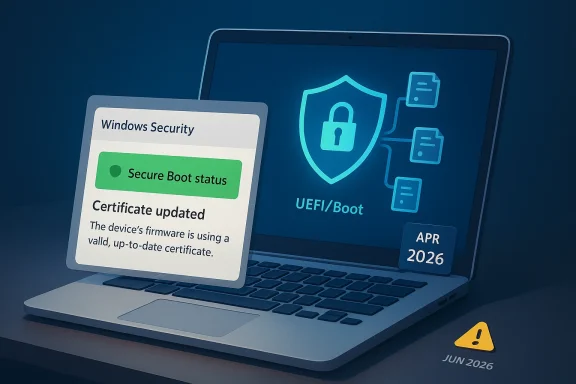
The April 2026 update is also notable because Microsoft chose to expose Secure Boot status directly in the Windows Security app. Instead of relying on obscure logs, firmware menus, or enterprise tooling, the company is surfacing a simple badge and explanatory text inside Device security. That is a meaningful usability shift, because most security failures become dangerous only when they are invisible.
At the same time, the timing underscores a broader pattern in Microsoft’s security strategy. Windows is becoming more proactive, more state-aware, and more willing to surface health signals that previously lived only in management consoles. That reflects both a defensive need and a communication problem: if users do not know they are running on outdated trust material, they cannot make informed decisions about update urgency.
Microsoft also describes what the other badges mean. A yellow badge signals that a recommendation is pending, while a red badge means immediate attention is required. That is a familiar Windows Security pattern, but applying it to Secure Boot gives users a visual cue for something that was previously mostly hidden. For administrators, it also creates a more consistent language for support teams and help desks.
The wording matters because not every problem is the same. Microsoft distinguishes between devices that are on older trust material, devices that need certificate updates, and devices that may be unable to receive automated updates due to firmware or hardware limitations. That means the badge is not just a health indicator; it is a triage tool.
The move also reflects how certificate transitions work in the real world. Security infrastructure changes often fail not because the patch is bad, but because people assume “auto update” means “every device is already covered.” Microsoft is trying to remove that assumption by showing whether the latest trust configuration is actually present. That is quietly one of the most useful parts of the update.
This is a subtle but important change. In the past, “Secure Boot enabled” could make users feel safe even if the underlying certificates were aging out. The new message resolves that ambiguity by separating the feature’s on/off state from its update state. That gives users a more honest answer to the question they actually care about: am I protected right now?
The update process itself is supposed to be automatic for most home users. Microsoft says applying the latest Windows updates should bring in the necessary Secure Boot certificate updates. For many people, that means the best action is simply to open Windows Update, install the latest cumulative update, and then re-check the Secure Boot status afterward.
That is why certificate expiration is not just a housekeeping issue. If the trust anchors are stale, the system’s ability to validate future boot components becomes weaker or potentially unreliable, especially once Microsoft begins relying more heavily on the new certificates. A machine can look healthy from the desktop while quietly drifting toward a trust problem underneath.
Microsoft’s emphasis on updated certificates also hints at a larger operational lesson. Security features are only as strong as the trust infrastructure beneath them, and trust infrastructure ages. If users and administrators treat Secure Boot as a one-time setting rather than a maintained control, the protection degrades over time. That is exactly the kind of hidden failure mode Microsoft is trying to prevent.
For enterprise teams, the stakes are larger because fleet heterogeneity changes the math. Some devices may receive updates normally, some may be behind policy controls, and some may depend on firmware behavior that blocks automated certificate refreshes. Microsoft says the new reporting is disabled by default on commercial devices and servers, which means organizations need to handle verification through management channels instead of assuming the consumer experience applies.
This is not the same as a sudden brick event. The more likely outcome is gradual loss of assurance, mixed state across fleets, and support incidents when devices begin to report warnings or fail to accept certain protections. That kind of slow degradation is often more dangerous than an obvious failure because people postpone action when the system still seems functional.
Microsoft’s message is therefore preventive, not dramatic. It wants systems updated well before the deadline so there is no scramble in June. The fact that the new Windows Security UI is showing status now suggests Microsoft is trying to convert a date problem into a visibility problem, and visibility problems are easier to solve.
The practical implication is that waiting until the last minute is risky. Microsoft recommends updating well before expiration, and that makes sense because certificate transitions can expose hardware, firmware, and policy dependencies you did not know you had. The earlier you find them, the less likely they are to become emergency outages later.
The presence of zero-days adds another layer. Microsoft’s April update arrives alongside public security guidance and a wider industry focus on urgent remediation, which means patch managers will likely treat it as a high-priority rollout rather than a normal monthly maintenance window. That is especially true when the release also carries boot-trust messaging and status reporting changes.
The combination of Secure Boot visibility and major vulnerability fixes is politically and operationally useful for Microsoft. It lets the company frame the update as both important and user-friendly: important because of the raw security load, and user-friendly because it offers a new way to see protection status. That dual message should improve adoption if users pay attention.
The broader lesson is that security updates are increasingly carrying policy telemetry with them. A patch may not just fix bugs; it may also change how Windows tells you about device health. That makes the April release more consequential than a typical Patch Tuesday payload.
The second challenge is policy alignment. Because the new Windows Security badge is not enabled by default in managed environments, local user-visible status may differ from centralized compliance views. That gap can create confusion if help desk teams and endpoint managers are not using the same terminology. Better documentation and clearer runbooks will matter here.
The third challenge is hardware support. Microsoft notes that some devices may not support automated Secure Boot certificate updates due to hardware or firmware limitations, in which case users are told to contact the manufacturer. In an enterprise, that can mean a small but costly subset of older systems requires manual intervention or replacement planning.
A good enterprise response is to treat this like a phased trust refresh, not a one-click patch. That means scheduling inventory, confirming update eligibility, checking policy exceptions, and then verifying the state after deployment. If that sounds more complex than a normal Windows update, that is because it is.
This is one of those cases where a little knowledge is enough. You do not need to understand UEFI chains or certificate authorities in detail to act responsibly. You just need to know that green is not always the end of the story, and the message text is more important than the color alone.
If the device reports a red or yellow warning, users should not ignore it. Microsoft’s guidance suggests the message will explain whether the issue is simply pending updates or whether the hardware cannot take the automated path. That distinction is useful because it tells the user whether patience, updates, or vendor support is the right next step.
That matters because most consumer security failures come from drift, not deliberate neglect. A user updates apps, sees no issues, and assumes the machine is fine. Windows now has a better opportunity to say, “Not quite—here is what still needs attention.” That is a small design change with a large security payoff.
The final risk is organizational inertia. Plenty of systems will be “eventually updated” right up until they are not. Microsoft’s rollout is designed to prevent that outcome, but it will only work if users and administrators actually look at the new status and act on it. Visibility is helpful; follow-through is what closes the gap.
Microsoft also says more changes are coming in May 2026, including notifications outside the Windows Security app and more in-app guidance and controls. That suggests the company expects some devices to need nudges, not just a passive badge. If those follow-up alerts are clear and well-timed, they could materially reduce the number of stranded endpoints when June arrives.
In the end, this is less about a badge color than about a trust transition that touches the whole Windows ecosystem. The new Windows Security status gives people a practical answer to a once-opaque question: is Secure Boot merely enabled, or is it actually current? That is a meaningful difference, and in June 2026, it may be the difference that counts most.
Source: ZDNET Microsoft's latest Windows update now confirms if your PC is Secure Boot-protected - how it works
 Background
Secure Boot has always been one of those security technologies most users never think about until something breaks. It sits below the operating system and checks whether the boot chain is signed by trusted keys before Windows fully loads. In plain English, it helps keep the machine from starting with tampered low-level code, which is why it is so effective against bootkit malware and similar pre-OS threats.The reason this story suddenly matters is that Microsoft’s original Secure Boot certificates, issued in 2011, are now approaching their expiration window. Microsoft says the first expirations begin in June 2026, with additional expirations later in 2026, and that creates a rare infrastructure-level transition for the Windows ecosystem. This is not a routine patch Tuesday tweak; it is a trust-chain renewal that affects supported Windows 10, Windows 11, and multiple Windows Server releases.
That background explains why Microsoft has been pushing certificate updates well before the deadline. If a device fails to receive the newer certificates, Secure Boot can still be enabled, but it may no longer be able to validate future boot components in the way Microsoft intends. The result is not just a warning message; it can become a long-term security gap that administrators and home users may not notice until later.
The April 2026 update is also notable because Microsoft chose to expose Secure Boot status directly in the Windows Security app. Instead of relying on obscure logs, firmware menus, or enterprise tooling, the company is surfacing a simple badge and explanatory text inside Device security. That is a meaningful usability shift, because most security failures become dangerous only when they are invisible.
At the same time, the timing underscores a broader pattern in Microsoft’s security strategy. Windows is becoming more proactive, more state-aware, and more willing to surface health signals that previously lived only in management consoles. That reflects both a defensive need and a communication problem: if users do not know they are running on outdated trust material, they cannot make informed decisions about update urgency.
What Microsoft Changed
The central change is simple: the Windows Security app now displays additional Secure Boot certificate update information starting in April 2026. Microsoft says the feature appears under Device security > Secure Boot and uses a green, yellow, or red badge to reflect the current state. That makes the status readable at a glance, which is a big improvement over the old “it’s enabled” style of reporting.The new status model
A green badge does not necessarily mean everything is perfect. Microsoft’s own guidance says the badge can still be green even when the message underneath explains that the device is using an older boot trust configuration that should be updated. In other words, the color tells you the broad condition, but the text tells you whether the certificates are current. That distinction is crucial and easy to miss if you only glance at the icon.Microsoft also describes what the other badges mean. A yellow badge signals that a recommendation is pending, while a red badge means immediate attention is required. That is a familiar Windows Security pattern, but applying it to Secure Boot gives users a visual cue for something that was previously mostly hidden. For administrators, it also creates a more consistent language for support teams and help desks.
The wording matters because not every problem is the same. Microsoft distinguishes between devices that are on older trust material, devices that need certificate updates, and devices that may be unable to receive automated updates due to firmware or hardware limitations. That means the badge is not just a health indicator; it is a triage tool.
- Green can still require reading the message text.
- Yellow means action is recommended.
- Red means immediate attention is needed.
- The badge reflects certificate-update state, not just Secure Boot being switched on.
Why Microsoft surfaced it now
Microsoft’s timing suggests it wants users to self-verify before the June 2026 certificate deadline creates support noise. By exposing status now, the company can shift some of the burden away from incident response and toward preventive maintenance. That is a classic enterprise move, but it also helps consumers who would otherwise never know their device had fallen behind.The move also reflects how certificate transitions work in the real world. Security infrastructure changes often fail not because the patch is bad, but because people assume “auto update” means “every device is already covered.” Microsoft is trying to remove that assumption by showing whether the latest trust configuration is actually present. That is quietly one of the most useful parts of the update.
How to Check Your Device
Checking the new Secure Boot status is straightforward, and Microsoft has kept the path inside the standard Windows Security interface. In Windows 11, users go to Settings, then Privacy & security, then Windows Security, then Device security, and finally Secure Boot. In Windows 10, the route is Settings, Update & security, Windows Security, Device security, and then Secure Boot.Where the status appears
The Secure Boot panel now includes the badge and a descriptive message. That means two devices with the same green indicator may still have different certificate states depending on what the text says. One machine may say it is fully updated, while another may say Secure Boot is on but the boot trust configuration is older and should be refreshed.This is a subtle but important change. In the past, “Secure Boot enabled” could make users feel safe even if the underlying certificates were aging out. The new message resolves that ambiguity by separating the feature’s on/off state from its update state. That gives users a more honest answer to the question they actually care about: am I protected right now?
The update process itself is supposed to be automatic for most home users. Microsoft says applying the latest Windows updates should bring in the necessary Secure Boot certificate updates. For many people, that means the best action is simply to open Windows Update, install the latest cumulative update, and then re-check the Secure Boot status afterward.
A simple verification checklist
- Open Windows Security from Settings.
- Go to Device security.
- Open the Secure Boot section.
- Read both the badge and the message text.
- Install the latest Windows updates if the text suggests the device is behind.
- Re-check the status after the update completes.
Why Secure Boot Still Matters
Secure Boot is one of the rare Windows protections that operates before the operating system and before most endpoint security products can intervene. That makes it especially valuable against threats that try to hook the boot process itself. If a malicious loader can win that race, it can undermine later defenses and persist with unusual stealth.Bootkits are the reason this exists
Bootkits are dangerous because they live lower in the stack than normal antivirus visibility. By the time Windows Defender or another security suite is fully active, the attacker may already have seeded code in firmware-adjacent or boot-time pathways. Secure Boot helps prevent that by checking signatures before the handoff to the operating system.That is why certificate expiration is not just a housekeeping issue. If the trust anchors are stale, the system’s ability to validate future boot components becomes weaker or potentially unreliable, especially once Microsoft begins relying more heavily on the new certificates. A machine can look healthy from the desktop while quietly drifting toward a trust problem underneath.
Microsoft’s emphasis on updated certificates also hints at a larger operational lesson. Security features are only as strong as the trust infrastructure beneath them, and trust infrastructure ages. If users and administrators treat Secure Boot as a one-time setting rather than a maintained control, the protection degrades over time. That is exactly the kind of hidden failure mode Microsoft is trying to prevent.
Consumer and enterprise stakes
For consumers, the issue is mostly about staying protected without thinking about it too much. Most people will never manually inspect Secure Boot, which is why surfacing the status in Windows Security is so helpful. If Windows can tell a home user that the machine is current or aging out, the user can act without understanding UEFI internals.For enterprise teams, the stakes are larger because fleet heterogeneity changes the math. Some devices may receive updates normally, some may be behind policy controls, and some may depend on firmware behavior that blocks automated certificate refreshes. Microsoft says the new reporting is disabled by default on commercial devices and servers, which means organizations need to handle verification through management channels instead of assuming the consumer experience applies.
- Consumer devices benefit from a more visible, self-service warning.
- Enterprise devices may need policy-driven inventory and remediation.
- Servers and managed endpoints are treated differently by default.
- Firmware and vendor support still matter for some hardware.
The June 2026 Deadline
The looming expiration date is the real reason this story is urgent. Microsoft says the original Secure Boot certificates begin expiring in June 2026, and the company has framed that as a large-scale, first-of-its-kind trust transition for Windows devices. That means the clock is not theoretical; it is running.What happens if a device lags
If a device does not receive the new certificates, it may continue to show Secure Boot as enabled while still being out of sync with Microsoft’s updated trust chain. Over time, that can translate into reduced protection for the Windows boot experience and a greater chance that security fixes related to boot components cannot be applied as intended. Microsoft is explicit that devices may no longer receive future security fixes related to Windows boot manager updates or Secure Boot if the certificates expire.This is not the same as a sudden brick event. The more likely outcome is gradual loss of assurance, mixed state across fleets, and support incidents when devices begin to report warnings or fail to accept certain protections. That kind of slow degradation is often more dangerous than an obvious failure because people postpone action when the system still seems functional.
Microsoft’s message is therefore preventive, not dramatic. It wants systems updated well before the deadline so there is no scramble in June. The fact that the new Windows Security UI is showing status now suggests Microsoft is trying to convert a date problem into a visibility problem, and visibility problems are easier to solve.
Why this is different from ordinary patching
Ordinary patching usually fixes code already installed on the machine. Secure Boot certificate updates are different because they alter the trust material used to decide what code is allowed to start. That puts the update in the same conceptual category as certificate rotation on web infrastructure: the underlying function is the same, but the trust anchors are changing.The practical implication is that waiting until the last minute is risky. Microsoft recommends updating well before expiration, and that makes sense because certificate transitions can expose hardware, firmware, and policy dependencies you did not know you had. The earlier you find them, the less likely they are to become emergency outages later.
April Patch Tuesday in Context
The Secure Boot visual change is only one part of a much bigger April release. Microsoft’s update cycle this month addresses 164 vulnerabilities, including multiple critical issues and at least two zero-day flaws. That is a lot of security work for one month, and it raises the urgency for users who might otherwise focus only on feature updates or cosmetic changes.Why the volume matters
A large patch count is not just a bragging number. It signals breadth across subsystems, components, and product lines, which increases the chance that at least one issue will matter directly to a given user or enterprise. In practice, the more vulnerabilities that ship in a single month, the more justified it is to prioritize deployment.The presence of zero-days adds another layer. Microsoft’s April update arrives alongside public security guidance and a wider industry focus on urgent remediation, which means patch managers will likely treat it as a high-priority rollout rather than a normal monthly maintenance window. That is especially true when the release also carries boot-trust messaging and status reporting changes.
The combination of Secure Boot visibility and major vulnerability fixes is politically and operationally useful for Microsoft. It lets the company frame the update as both important and user-friendly: important because of the raw security load, and user-friendly because it offers a new way to see protection status. That dual message should improve adoption if users pay attention.
What this means for update strategy
For home users, the strategy is uncomplicated: install the latest cumulative update promptly. For enterprises, the strategy is more layered because you want to balance security urgency against change control, app compatibility, and fleet readiness. Still, the Secure Boot warning alone is a strong reason to move quickly.The broader lesson is that security updates are increasingly carrying policy telemetry with them. A patch may not just fix bugs; it may also change how Windows tells you about device health. That makes the April release more consequential than a typical Patch Tuesday payload.
- 164 vulnerabilities is an unusually heavy monthly load.
- Zero-days increase urgency.
- The Secure Boot warning makes the patch more visible.
- Consumer and enterprise deployment playbooks will differ.
Enterprise Implications
Enterprises should not assume the new status display solves their problem automatically. Microsoft says the device-security enhancements are disabled by default on commercial devices and servers, which means organizations must use their own management process to track certificate rollout and remediate gaps. That keeps responsibility where it belongs: with IT, not end users.Management and inventory challenges
The first challenge is inventory. Administrators need to know which devices already have the updated certificates and which are still on the older trust configuration. Microsoft points organizations toward enterprise guidance, Microsoft-managed update paths, and in some cases inventory scripts or reporting in tools like Windows Autopatch and Intune.The second challenge is policy alignment. Because the new Windows Security badge is not enabled by default in managed environments, local user-visible status may differ from centralized compliance views. That gap can create confusion if help desk teams and endpoint managers are not using the same terminology. Better documentation and clearer runbooks will matter here.
The third challenge is hardware support. Microsoft notes that some devices may not support automated Secure Boot certificate updates due to hardware or firmware limitations, in which case users are told to contact the manufacturer. In an enterprise, that can mean a small but costly subset of older systems requires manual intervention or replacement planning.
What admins should prioritize
Organizations should focus on the oldest devices first because they are the most likely to have firmware constraints or delayed update paths. They should also validate that update delivery channels can reach the relevant Microsoft domains and that boot-related updates are not being blocked by policy or network filtering. Microsoft explicitly warns that connectivity and diagnostic-data assumptions matter for successful rollout.A good enterprise response is to treat this like a phased trust refresh, not a one-click patch. That means scheduling inventory, confirming update eligibility, checking policy exceptions, and then verifying the state after deployment. If that sounds more complex than a normal Windows update, that is because it is.
- Inventory devices by model, firmware, and update channel.
- Confirm which endpoints are already on the new trust configuration.
- Review firewall, WSUS, Intune, and third-party update routing.
- Identify legacy hardware that may need vendor involvement.
- Keep help desk scripts aligned with Microsoft’s new badge language.
Consumer Impact
For everyday users, the story is much simpler and, arguably, more reassuring. If you keep Windows Update current, Microsoft intends for the certificate transition to happen in the background. The new Secure Boot readout simply tells you whether that has happened yet.What home users should do
Home users should install the April 2026 Windows update, then check the Windows Security app to see whether the message confirms that all required certificate updates have been applied. If the message still mentions an older boot trust configuration, the machine likely needs more time to finish the rollout or another update pass.This is one of those cases where a little knowledge is enough. You do not need to understand UEFI chains or certificate authorities in detail to act responsibly. You just need to know that green is not always the end of the story, and the message text is more important than the color alone.
If the device reports a red or yellow warning, users should not ignore it. Microsoft’s guidance suggests the message will explain whether the issue is simply pending updates or whether the hardware cannot take the automated path. That distinction is useful because it tells the user whether patience, updates, or vendor support is the right next step.
The hidden benefit
The hidden benefit for consumers is transparency. Security features often fail at the communication layer, not the cryptographic layer. By exposing Secure Boot certificate status in a familiar settings panel, Microsoft is reducing the chance that users live with a false sense of protection.That matters because most consumer security failures come from drift, not deliberate neglect. A user updates apps, sees no issues, and assumes the machine is fine. Windows now has a better opportunity to say, “Not quite—here is what still needs attention.” That is a small design change with a large security payoff.
Strengths and Opportunities
The biggest strength of Microsoft’s approach is that it turns a technical certificate transition into a user-visible state. That helps both individual users and IT teams identify gaps earlier, before the June 2026 expiration causes support headaches. It also aligns well with Microsoft’s broader push toward proactive security telemetry and clearer device health reporting.- Improved visibility for a previously hidden security state.
- Earlier remediation before certificate expiration hits.
- Better user understanding of what Secure Boot is doing.
- Reduced support ambiguity for help desks and admins.
- Stronger trust-chain hygiene across Windows devices.
- More actionable guidance than a simple on/off Secure Boot flag.
- Potentially lower incident volume when June arrives.
Risks and Concerns
The biggest concern is misinterpretation. A green badge can still indicate an older trust configuration, which means users may falsely assume they are fully protected if they do not read the message text. That is a good reason for Microsoft to keep refining the wording and perhaps make the distinction even harder to miss.- User confusion if color and text seem to disagree.
- Uneven enterprise adoption because the feature is disabled by default on managed devices.
- Hardware incompatibility on older systems or limited firmware.
- Delayed remediation if organizations treat it as cosmetic.
- Policy fragmentation across WSUS, Intune, Autopatch, and third-party tools.
- Potential support spikes as June 2026 approaches.
- False confidence from devices that show Secure Boot enabled but outdated.
The final risk is organizational inertia. Plenty of systems will be “eventually updated” right up until they are not. Microsoft’s rollout is designed to prevent that outcome, but it will only work if users and administrators actually look at the new status and act on it. Visibility is helpful; follow-through is what closes the gap.
Looking Ahead
The next few months will determine whether Microsoft’s Secure Boot certificate transition becomes a smooth background process or a noisy support event. The April 2026 UI change is a smart move because it gives users an immediate way to see whether the new trust material has arrived, but the real test comes when organizations with mixed hardware and mixed update policies start checking their fleets. In that sense, April is the beginning of verification, not the end of the rollout.Microsoft also says more changes are coming in May 2026, including notifications outside the Windows Security app and more in-app guidance and controls. That suggests the company expects some devices to need nudges, not just a passive badge. If those follow-up alerts are clear and well-timed, they could materially reduce the number of stranded endpoints when June arrives.
What to watch
- Whether consumer devices start showing the new badge consistently after April updates.
- How well managed environments surface equivalent reporting through admin tools.
- Whether the May 2026 notification layer reduces missed updates.
- How many older systems require manufacturer or firmware assistance.
- Whether Microsoft expands similar status reporting to other trust-sensitive components.
In the end, this is less about a badge color than about a trust transition that touches the whole Windows ecosystem. The new Windows Security status gives people a practical answer to a once-opaque question: is Secure Boot merely enabled, or is it actually current? That is a meaningful difference, and in June 2026, it may be the difference that counts most.
Source: ZDNET Microsoft's latest Windows update now confirms if your PC is Secure Boot-protected - how it works
Last edited:
