

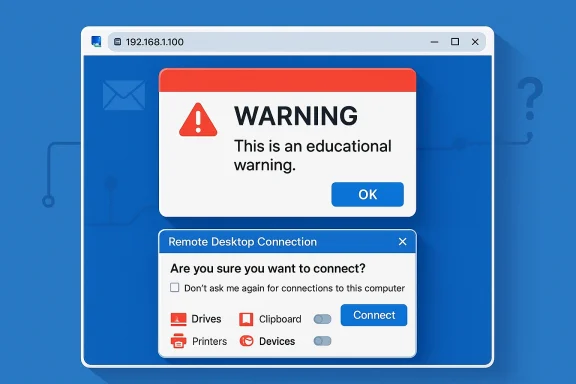
Microsoft’s April 2026 Windows security updates are quietly changing one of the oldest habits in enterprise computing: double-clicking an .rdp file and trusting it to do exactly what it says. The new behavior adds a one-time educational warning the first time a user opens an RDP file, then forces a detailed confirmation prompt on every subsequent launch, with all redirected resources turned off by default. In practical terms, that means Microsoft is trying to make a stealthy phishing technique much harder to execute without drawing attention. The move is a direct response to campaigns that have abused RDP files to hide malicious connections and siphon data.
Remote Desktop has been part of Windows for so long that many users treat it as plumbing rather than a security-sensitive workflow. In office environments, .rdp files are often used as shortcuts that store connection settings, allowing employees and administrators to launch remote sessions without re-entering the same details every time. That convenience has always been the point, but convenience and security have never been natural allies. Microsoft’s latest change is a reminder that the very features that make remote access efficient can also make it exploitable.
The risk is not theoretical. Microsoft has already documented a large-scale spear-phishing campaign in which Midnight Blizzard used RDP files as attachments to lure users into opening connections that looked routine. Those files can appear harmless, yet they may quietly redirect the session to attacker-controlled infrastructure while requesting access to local resources such as drives, the clipboard, and even credential material. Once the session begins, the victim may not realize anything unusual happened until data has already been exposed.
The April 2026 updates change the default expectations around that workflow. Microsoft says the Remote Desktop Connection app now shows the remote computer address and each requested redirection setting before the connection proceeds, and the settings are disabled unless the user explicitly opts in. The first time an RDP file is opened after installing the update, Windows also shows an educational warning that explains what the file does and why phishing attackers like this format.
That matters because the attack surface lives in the gap between what users think they are authorizing and what the file actually requests. RDP redirection can include drives, clipboard, printers, and device channels, all of which can become data-exfiltration paths if the remote endpoint is malicious. Microsoft’s own protocol documentation has long described how those channels expose the local machine to the remote session. The new warning stack is therefore less about inventing a new defense than about surfacing a very old risk that too many people have ignored.
The broader lesson is familiar across modern Windows security: defaults matter more than ever. Microsoft has spent the past few years steadily hardening redirection, authentication, and file-exchange behavior across Windows 11, Azure Virtual Desktop, Windows 365, and server platforms. The RDP file update fits that pattern. It is not a sweeping redesign of Remote Desktop itself, but it is a meaningful tightening of the weakest point in the chain: the user opening a file that can silently change the security posture of the connection.
The second change is the connection security dialog that appears every time an RDP file is opened. This prompt surfaces the remote computer address, shows whether the file is signed, and lists the requested local resources. The important shift is that those resource requests are now off by default. Users have to actively approve each item rather than inheriting a permissive session configuration from the file. That is a classic secure-by-default move, and it is one of the simplest ways to cut off accidental exposure.
The update also gives organizations a temporary escape hatch. Microsoft documents a registry-based way to revert to the previous dialog behavior using the
The actual danger comes from redirection. An RDP session can map local drives, copy clipboard contents, redirect smart cards, expose ports, and move data between the local endpoint and the remote host. Microsoft’s own protocol descriptions confirm that file system redirection and clipboard redirection are core parts of RDP’s design. If the remote host is hostile, those features can become a bridge into the victim’s local environment rather than a convenience feature.
There is also a useful distinction between RDP files and the standard Remote Desktop client. Microsoft says the new protections apply when opening .rdp files directly, not when initiating sessions through the normal client experience. That means the update is targeting the attachment-style threat model, where a file is sent by email or other channels and then opened with little review. The direct-client path remains largely unchanged, which is consistent with Microsoft’s desire to reduce abuse without breaking normal admin usage.
The signature status is especially important. Microsoft notes that some RDP files, including ones distributed by Microsoft services such as Azure Virtual Desktop and Windows 365, are usually signed. If a file cannot be verified, the dialog warns that the publisher is unknown. This is not a perfect trust model, but it gives users and administrators one more clue about whether a file deserves confidence.
This also creates a useful audit opportunity for IT teams. If users are routinely opening files that request drive or clipboard access, administrators can treat that pattern as a governance signal. That could lead to tighter file-distribution practices, better email filtering, and more disciplined use of pre-signed RDP templates. Security controls work best when they generate visibility as well as friction.
For enterprises, the impact is more complicated. Remote Desktop is deeply embedded in support, administration, and hybrid work practices, so adding prompts can slow down legitimate tasks. That is the tradeoff Microsoft is making: slightly more operational friction in exchange for fewer silent redirection events. The effect may be especially noticeable in service desks, managed service providers, and environments that rely on user-opened RDP bundles.
There is also a policy-management angle. Microsoft’s documentation shows that some organizations can tune RDP behavior through registry and policy settings. That flexibility is helpful, but it can create a split brain between secure defaults and local exceptions. The more exceptions a company allows, the more likely its users are to internalize the wrong behavior as normal. That is where security gains can erode over time.
This also has implications for Microsoft’s own ecosystem products. Azure Virtual Desktop and Windows 365 already depend on signed RDP files in many scenarios, and Microsoft says those files are usually signed by Microsoft. That gives the company a cleaner trust story than a generic third-party RDP attachment, but it also means Microsoft has to preserve a smooth onboarding experience while imposing stronger protections. Balancing security and service usability is now part of the product design.
For rivals, the message is clear: remote access is no longer just a feature race. It is a trust architecture race. Products that continue to lean on permissive defaults may look more convenient at first, but they will increasingly appear riskier in enterprise procurement conversations. In that sense, Microsoft’s move may help normalize stricter baseline controls across the entire remote desktop market.
Administrators who need to manage compatibility can use the documented registry setting to revert the dialog version temporarily. Microsoft’s guidance points to the
It is also worth reviewing how RDP files are distributed inside the organization. If they travel by email, chat, or ticketing systems, then the security model depends heavily on sender trust and file integrity. Signed files, controlled distribution, and documented connection templates will all matter more once users get used to the new warnings. That is where policy and patching finally meet.
The opportunity is bigger than RDP files alone. If organizations respond by tightening distribution practices, reviewing redirection policies, and standardizing signed connection files, they could reduce a whole class of “trusted attachment” abuse. The update can therefore serve as a catalyst for better remote-access governance across the enterprise.
Another concern is compatibility. Some businesses may have legacy automation or third-party tooling that depends on the old behavior, especially where redirection settings are baked into standard connection files. Those environments may be tempted to disable the new dialog, but doing so would preserve the attack path the patch is trying to close. That is a classic security debt trap.
Finally, the update does not eliminate RDP-file risk entirely. It improves the odds that users will notice what they are opening, but it does not stop attackers from crafting convincing social-engineering lures or abusing trusted publishers. As with most Windows security changes, this is a hardening step, not a silver bullet. And that distinction matters.
Enterprises should expect this to be the new normal. Microsoft has repeatedly shown that it prefers to harden defaults first and leave exceptions for temporary compatibility. That strategy can be disruptive, but it usually wins over time because attackers adapt faster than users do. The organizations that benefit most will be the ones that use the change as a prompt to modernize their own remote-access governance.
Source: PhoneWorld New Windows Update Blocks Hidden Remote Desktop Threats - How to Enable it - PhoneWorld
 Background
Remote Desktop has been part of Windows for so long that many users treat it as plumbing rather than a security-sensitive workflow. In office environments, .rdp files are often used as shortcuts that store connection settings, allowing employees and administrators to launch remote sessions without re-entering the same details every time. That convenience has always been the point, but convenience and security have never been natural allies. Microsoft’s latest change is a reminder that the very features that make remote access efficient can also make it exploitable.The risk is not theoretical. Microsoft has already documented a large-scale spear-phishing campaign in which Midnight Blizzard used RDP files as attachments to lure users into opening connections that looked routine. Those files can appear harmless, yet they may quietly redirect the session to attacker-controlled infrastructure while requesting access to local resources such as drives, the clipboard, and even credential material. Once the session begins, the victim may not realize anything unusual happened until data has already been exposed.
The April 2026 updates change the default expectations around that workflow. Microsoft says the Remote Desktop Connection app now shows the remote computer address and each requested redirection setting before the connection proceeds, and the settings are disabled unless the user explicitly opts in. The first time an RDP file is opened after installing the update, Windows also shows an educational warning that explains what the file does and why phishing attackers like this format.
That matters because the attack surface lives in the gap between what users think they are authorizing and what the file actually requests. RDP redirection can include drives, clipboard, printers, and device channels, all of which can become data-exfiltration paths if the remote endpoint is malicious. Microsoft’s own protocol documentation has long described how those channels expose the local machine to the remote session. The new warning stack is therefore less about inventing a new defense than about surfacing a very old risk that too many people have ignored.
The broader lesson is familiar across modern Windows security: defaults matter more than ever. Microsoft has spent the past few years steadily hardening redirection, authentication, and file-exchange behavior across Windows 11, Azure Virtual Desktop, Windows 365, and server platforms. The RDP file update fits that pattern. It is not a sweeping redesign of Remote Desktop itself, but it is a meaningful tightening of the weakest point in the chain: the user opening a file that can silently change the security posture of the connection.
What Microsoft Changed
The most visible change is the first-launch dialog. After the April 2026 security update, the first time a user opens an RDP file, Windows displays an educational prompt explaining that the file controls a remote connection and that phishing actors have abused this behavior. Once the user acknowledges it, the message does not reappear for that account unless the dialog version is changed in the future. Microsoft frames this as a user-awareness step, but the real value is behavioral: it slows people down just enough to make them read the prompt.The second change is the connection security dialog that appears every time an RDP file is opened. This prompt surfaces the remote computer address, shows whether the file is signed, and lists the requested local resources. The important shift is that those resource requests are now off by default. Users have to actively approve each item rather than inheriting a permissive session configuration from the file. That is a classic secure-by-default move, and it is one of the simplest ways to cut off accidental exposure.
Why the default matters
If the old model relied on users noticing what was being shared, the new model assumes they probably will not. That is a realistic assumption, especially in busy help desks and systems administration workflows where speed often beats scrutiny. By forcing explicit opt-in, Microsoft is making redirection a conscious action rather than a hidden side effect. In security terms, that is a substantial improvement in user intent alignment.The update also gives organizations a temporary escape hatch. Microsoft documents a registry-based way to revert to the previous dialog behavior using the
RedirectionWarningDialogVersion value under the Terminal Services client policy path. But Microsoft also warns that future updates may remove support for that setting, which suggests the company views the new dialog as a transition point, not an optional experiment. In other words, administrators can defer the change, but they should not expect to escape it indefinitely.- The first-time warning is educational, not just transactional.
- The per-connection prompt makes each requested redirection visible.
- The default-off model blocks silent data exposure.
- The registry override is temporary, not a strategic solution.
- The experience is meant to reduce implicit trust in RDP attachments.
Why RDP Files Became an Attack Vector
RDP files are attractive to attackers because they look ordinary. A user opening one expects a remote support session, a jump box, or a normal admin connection. That expectation is exactly why phishing works here: the malicious file is not trying to imitate a login page or a fake invoice, it is trying to exploit a legitimate productivity workflow. That subtlety gives attackers a stealth advantage over many other delivery methods.The actual danger comes from redirection. An RDP session can map local drives, copy clipboard contents, redirect smart cards, expose ports, and move data between the local endpoint and the remote host. Microsoft’s own protocol descriptions confirm that file system redirection and clipboard redirection are core parts of RDP’s design. If the remote host is hostile, those features can become a bridge into the victim’s local environment rather than a convenience feature.
The hidden-cost problem
The psychological trick is that the user often thinks the file is only describing a connection, not making decisions about access. In practice, the file can specify a package of sharing permissions and transport behavior that most people never inspect. That is why Microsoft’s new dialog is so focused on surfacing the remote address, the signature status, and the resource list. It is trying to turn hidden state into visible state.There is also a useful distinction between RDP files and the standard Remote Desktop client. Microsoft says the new protections apply when opening .rdp files directly, not when initiating sessions through the normal client experience. That means the update is targeting the attachment-style threat model, where a file is sent by email or other channels and then opened with little review. The direct-client path remains largely unchanged, which is consistent with Microsoft’s desire to reduce abuse without breaking normal admin usage.
- RDP files are dangerous because they look familiar.
- Attackers can hide redirection requests inside a normal-looking connection file.
- File and clipboard sharing can expose local information.
- The new warnings target the attachment scenario, not all RDP usage.
- The threat is especially effective in trust-based IT workflows.
How the New Warnings Work
The new security flow is built around two prompts. The first appears only once per account after the update: it explains the purpose of RDP files and warns about phishing abuse. The second appears every time an RDP file is opened and details the specific connection settings, including the remote address and any requested local resources. That is a thoughtful split between education and enforcement.The signature status is especially important. Microsoft notes that some RDP files, including ones distributed by Microsoft services such as Azure Virtual Desktop and Windows 365, are usually signed. If a file cannot be verified, the dialog warns that the publisher is unknown. This is not a perfect trust model, but it gives users and administrators one more clue about whether a file deserves confidence.
What users will actually see
In practice, the user experience should feel a bit like modern browser download warnings. You get a one-time explanatory note, then a recurring confirmation screen whenever a file wants to initiate a connection. The difference is that the prompts are more specific than a generic security banner. Microsoft is showing the target host and the requested resources, which makes the warning more actionable and less abstract.This also creates a useful audit opportunity for IT teams. If users are routinely opening files that request drive or clipboard access, administrators can treat that pattern as a governance signal. That could lead to tighter file-distribution practices, better email filtering, and more disciplined use of pre-signed RDP templates. Security controls work best when they generate visibility as well as friction.
- The prompt sequence is designed to be both educational and behavioral.
- Unknown publishers trigger a stronger caution posture.
- Signed files may still be questioned depending on policy.
- The new screen gives admins more insight into what users are approving.
- The model rewards organizations that standardize RDP delivery.
Enterprise vs Consumer Impact
For consumers, the update is mostly about reducing the chance that a scam email or malicious attachment turns into a remote access compromise. Most home users do not live inside RDP workflows, but that is exactly why the threat can be so deceptive: a file that looks obscure may still be dangerous if it is opened out of curiosity or by mistake. The new warning is a friction point, and in consumer security, friction often prevents impulsive clicks.For enterprises, the impact is more complicated. Remote Desktop is deeply embedded in support, administration, and hybrid work practices, so adding prompts can slow down legitimate tasks. That is the tradeoff Microsoft is making: slightly more operational friction in exchange for fewer silent redirection events. The effect may be especially noticeable in service desks, managed service providers, and environments that rely on user-opened RDP bundles.
Where admins will feel it most
The most sensitive environments are those that rely on frequent connection-file exchanges. If technicians send RDP files to end users, or if administrators use them as part of a repeatable provisioning workflow, every extra prompt becomes a process change. That is not necessarily bad, but it does mean documentation, training, and policy enforcement need to be updated in parallel. Otherwise users will hunt for workarounds.There is also a policy-management angle. Microsoft’s documentation shows that some organizations can tune RDP behavior through registry and policy settings. That flexibility is helpful, but it can create a split brain between secure defaults and local exceptions. The more exceptions a company allows, the more likely its users are to internalize the wrong behavior as normal. That is where security gains can erode over time.
- Consumers gain protection from accidental attachment-driven attacks.
- Enterprises gain visibility but must absorb workflow friction.
- Help desks and MSPs may need new playbooks.
- Policy exceptions can weaken the value of the default change.
- Training will matter more than technical toggles alone.
The Competitive and Security Landscape
Microsoft’s move fits a larger industry pattern: reducing the power of file-based trust. Browsers, email clients, and office apps have all spent years hardening their handling of attachments and active content. RDP files were one of the remaining pieces of old-school infrastructure that still carried a lot of implicit trust. By tightening this path now, Microsoft is closing a gap that attackers had begun to exploit more aggressively.This also has implications for Microsoft’s own ecosystem products. Azure Virtual Desktop and Windows 365 already depend on signed RDP files in many scenarios, and Microsoft says those files are usually signed by Microsoft. That gives the company a cleaner trust story than a generic third-party RDP attachment, but it also means Microsoft has to preserve a smooth onboarding experience while imposing stronger protections. Balancing security and service usability is now part of the product design.
The broader hardening trend
The update aligns with other Microsoft hardening efforts that default redirection off in managed desktop products. Azure Virtual Desktop, for example, has already moved to disable clipboard, drive, USB, and printer redirections by default for newly created host pools. The RDP file change is therefore not an isolated event; it is part of a wider push toward safer defaults across remote-access surfaces.For rivals, the message is clear: remote access is no longer just a feature race. It is a trust architecture race. Products that continue to lean on permissive defaults may look more convenient at first, but they will increasingly appear riskier in enterprise procurement conversations. In that sense, Microsoft’s move may help normalize stricter baseline controls across the entire remote desktop market.
- Microsoft is shrinking a long-standing trust gap.
- Azure and Windows 365 already point toward stricter redirection defaults.
- Remote access vendors may face higher expectations for safety-first design.
- Enterprise buyers will compare convenience against phishing resistance more directly.
- The market is moving toward assumed-hostility rather than assumed-trust.
How to Enable or Adjust the Feature
For most users, there is nothing to “enable” manually if the April 2026 update is installed. The warnings and default-off redirection behavior arrive as part of the updated Remote Desktop Connection experience. In other words, the feature is effectively turned on by the patch itself, which is how Microsoft typically rolls out security hardening that needs broad adoption.Administrators who need to manage compatibility can use the documented registry setting to revert the dialog version temporarily. Microsoft’s guidance points to the
RedirectionWarningDialogVersion value under the Terminal Services client policy path. However, the company warns that this is a transitional mechanism and may not remain available forever, which makes it a stopgap rather than a long-term strategy.Practical rollout steps
A sane rollout approach is straightforward. First, verify which endpoints received the April 2026 cumulative update. Second, test common RDP-file workflows in a pilot group. Third, update user guidance so people understand why they are seeing extra prompts. Fourth, evaluate whether any legacy processes still rely on silent redirection and should be redesigned instead of exempted.It is also worth reviewing how RDP files are distributed inside the organization. If they travel by email, chat, or ticketing systems, then the security model depends heavily on sender trust and file integrity. Signed files, controlled distribution, and documented connection templates will all matter more once users get used to the new warnings. That is where policy and patching finally meet.
- The feature is delivered through the April 2026 security update.
- No separate user-side toggle is normally required.
- Administrators can temporarily revert dialog behavior with policy.
- Pilot testing is essential before wide deployment.
- Distribution hygiene becomes more important when prompts increase.
Strengths and Opportunities
Microsoft’s approach is strong because it attacks the problem at the point of user interaction, not after compromise. It also uses clear language and visible context rather than obscure technical controls, which is exactly what phishing defenses need. Perhaps most importantly, the update makes unsafe sharing the exception rather than the default.The opportunity is bigger than RDP files alone. If organizations respond by tightening distribution practices, reviewing redirection policies, and standardizing signed connection files, they could reduce a whole class of “trusted attachment” abuse. The update can therefore serve as a catalyst for better remote-access governance across the enterprise.
- Better phishing resistance at the file-opening stage.
- Reduced accidental data exposure through clipboard and drive sharing.
- More visible connection intent for users and admins.
- Stronger default posture across Windows remote-access workflows.
- Potential for better governance around signed RDP files and templates.
- Improved alignment with Microsoft’s broader Secure Future Initiative style of hardening.
Risks and Concerns
The biggest risk is operational fatigue. If users see too many prompts, they may click through them without reading, which would undermine the entire design. Security warnings only work when they remain meaningful, and that means organizations must keep the surrounding workflow tight enough that the prompts are not just background noise.Another concern is compatibility. Some businesses may have legacy automation or third-party tooling that depends on the old behavior, especially where redirection settings are baked into standard connection files. Those environments may be tempted to disable the new dialog, but doing so would preserve the attack path the patch is trying to close. That is a classic security debt trap.
Friction points to watch
There is also a user-education problem. A one-time warning is only helpful if people understand why it exists. Without training, employees may think the feature is an annoyance introduced by IT rather than a response to real-world abuse. That mindset can push them toward unsafe shortcuts or external workarounds.Finally, the update does not eliminate RDP-file risk entirely. It improves the odds that users will notice what they are opening, but it does not stop attackers from crafting convincing social-engineering lures or abusing trusted publishers. As with most Windows security changes, this is a hardening step, not a silver bullet. And that distinction matters.
- Prompt fatigue could reduce the value of the warning.
- Legacy workflows may break or require redesign.
- Users may misread the change as a nuisance instead of protection.
- Trusted-publisher abuse remains possible in some scenarios.
- The patch hardens behavior, but it does not end social engineering.
- Overreliance on policy exceptions could weaken long-term security.
Looking Ahead
The most important question is whether Microsoft extends this model to other file-driven remote-access and management flows. If the company sees a measurable reduction in phishing success rates, similar warnings could show up in adjacent tools where a file or shortcut silently alters connection behavior. That would be consistent with the broader Windows trajectory: fewer implicit permissions, more explicit consent, and more visible state before a session begins.Enterprises should expect this to be the new normal. Microsoft has repeatedly shown that it prefers to harden defaults first and leave exceptions for temporary compatibility. That strategy can be disruptive, but it usually wins over time because attackers adapt faster than users do. The organizations that benefit most will be the ones that use the change as a prompt to modernize their own remote-access governance.
What to watch next
- Whether Microsoft adds similar warnings to other attachment-style admin workflows.
- Whether organizations standardize signed RDP files across support teams.
- Whether help desks see a measurable drop in risky redirection usage.
- Whether attackers shift to other lures once RDP files become noisier.
- Whether Microsoft eventually removes the registry-based rollback option.
Source: PhoneWorld New Windows Update Blocks Hidden Remote Desktop Threats - How to Enable it - PhoneWorld
