

Microsoft’s April 2026 Windows cumulative updates quietly delivered one of the more meaningful security hardenings in recent memory: new guardrails around Remote Desktop Protocol files, better known as .rdp files. For a feature most users barely think about, the change matters because .rdp attachments have already been weaponized in real-world phishing campaigns to redirect victims into attacker-controlled sessions and expose credentials, clipboard data, and redirected drives. Microsoft is now forcing Windows to show more of what an .rdp file is trying to do before it ever connects, and that extra visibility could blunt a class of attacks that has relied on user trust and habit.
Remote Desktop has long been one of Windows’ most useful enterprise tools, and one of its most misunderstood from a security standpoint. Administrators use .rdp files to preconfigure connection settings, which makes life easier for IT teams and power users who regularly jump between systems. That convenience, however, also creates a perfect delivery vehicle for social engineering, because the file format looks ordinary while carrying instructions that can redirect a session, map local resources, and steer the user into a deceptive workflow.
Microsoft’s concern here is not theoretical. In October 2024, the company disclosed a large-scale spear-phishing campaign by Midnight Blizzard, also tracked as APT29, UNC2452, and Cozy Bear, in which malicious emails contained signed Remote Desktop configuration files that connected targets to actor-controlled infrastructure. Microsoft said those messages were sent to thousands of users across more than 100 organizations, and the files were designed to expose sensitive local resources once the connection was established. That campaign provided a vivid demonstration that an RDP file can be far more than a simple shortcut.
The danger is amplified by the fact that digital signatures do not solve the trust problem on their own. A signed file may confirm provenance, but it does not automatically tell the user whether the publisher is legitimate, whether the file was created for a malicious purpose, or whether the connection target is safe. Microsoft has now made that ambiguity more obvious by surfacing warnings and connection details directly in the opening flow, rather than relying on users to notice subtle cues or read file contents manually.
This is also a useful reminder that modern phishing rarely depends on crude malware alone. Attackers increasingly rely on living-off-the-land tactics, built-in system components, and trusted workflows to bypass suspicion. The more a malicious action resembles a normal administrative task, the more likely it is to succeed, especially in organizations where remote access files are routinely exchanged by email, chat, or ticketing systems.
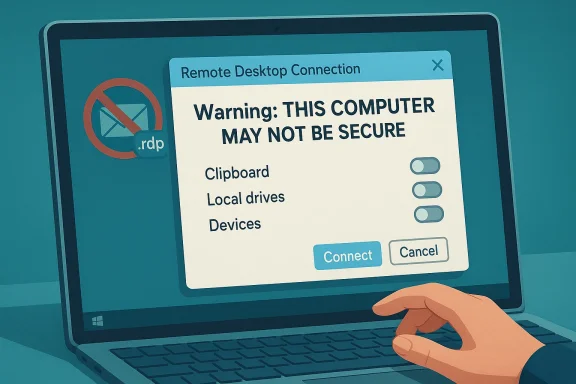
The practical effect is straightforward: Windows is no longer treating the file as a benign preset and a near-immediate path to connection. Instead, it exposes the connection details, makes the redirections opt-in, and requires the user to pause before any session starts. That is exactly the kind of friction security teams usually want when a workflow has been abused in phishing campaigns.
This matters because phishing attacks succeed when users mentally file a dangerous object into a familiar category. An .rdp file can look like a harmless admin convenience, especially if it arrives from what appears to be an internal sender or a support desk. The new warning is Microsoft’s way of interrupting that false sense of familiarity.
That default-off approach is especially important for enterprise environments where technicians may assume a file was created by a trusted colleague or tool. Security defaults only help when they apply before the risky action begins, and Microsoft appears to have placed the checkpoint in the right spot. The new flow makes it harder for an attacker to hide resource redirection in the background.
Microsoft’s 2024 disclosure showed how effective the technique can be when combined with social engineering. The campaign used a signed .rdp attachment and lured recipients with themes that would resonate in business settings, including Microsoft, AWS, and “Zero Trust” language. The weaponization was successful because the file looked like a normal administrative aid while silently connecting the victim to attacker-controlled infrastructure.
This is also why the update is likely to be more useful than a purely informational security bulletin. Users are bad at judging invisible risk, and RDP files create risk through configuration rather than obvious code execution. By exposing the session parameters up front, Microsoft is making the attack surface visible in a way users can actually evaluate.
Instead, Windows is now nudging users to treat the signature as one data point among several, not a final verdict. That is the right mental model. A valid publisher identity might say who created the file, but the connection target and the requested resource redirections still determine whether the session is appropriate.
The update also appears to preserve administrative flexibility. Microsoft notes that administrators can temporarily disable the warnings through a registry key, although the company clearly recommends leaving the protections in place. That is a familiar Microsoft pattern: harden by default, allow exceptions for compatibility, and trust enterprises to manage edge cases if they truly need to.
This is a much better design for a world where attackers excel at hiding malicious behavior inside normal IT workflows. It does not stop every possible abuse, but it forces a conscious decision before the dangerous part begins. In security engineering, that is often half the battle.
At the same time, it means defenders should not assume the problem is solved simply because Windows 11 and Windows 10 are updated. Security teams still need to evaluate how RDP files are distributed, who can create them, and whether users have been trained to verify the destination before opening them. Software guardrails help, but process discipline still matters.
Security teams will probably welcome the reduction in silent redirection risk. A rogue .rdp file can be especially dangerous in a managed environment because it may be delivered through channels employees already trust, such as internal email or ticketing systems. The new warnings create an extra checkpoint before users expose clipboard contents, local drives, or peripheral access to an external endpoint.
A sensible enterprise response would include at least three measures. First, restrict who can distribute .rdp files. Second, document approved connection sources and signing practices. Third, make sure help desk and privileged-access teams explain why the new prompt should not simply be dismissed out of habit.
Enterprises with strict change-control environments may also need to test whether their internal RDP distribution tools behave as expected. Even if the warning is benign, it can affect end-user experience and help desk scripts. That is a small price to pay compared with the potential damage from a successful phishing campaign using a forged remote connection profile.
For consumers, the biggest benefit may be education. Many attacks succeed because the victim has never seen the file type before and does not know what to look for. Microsoft’s one-time warning gives users a better chance to stop and think before granting access to drives, clipboard data, or connected devices.
There is also a broader lesson here about file-based trust in Windows. If a file can trigger a complex network interaction, it should not be treated like a passive document. The update reflects that reality without demanding that every user become a security analyst.
Users should still treat unexpected .rdp files the same way they would treat any unsolicited attachment. Verify the sender through another channel, confirm the destination, and avoid enabling redirections unless there is a clear reason to do so. The patch helps, but it does not remove the need for caution.
Security engineering often moves slowly until a threat becomes undeniable. Once a technique is seen at scale, in the wild, and across many organizations, the calculus changes. Microsoft’s April 2026 update suggests the company judged that the cost of extra prompts was lower than the cost of continued silent exploitation.
The same logic has already influenced other parts of Windows security, where the operating system increasingly surfaces more context before potentially dangerous actions happen. This RDP change fits that trend neatly. It is one more step toward a Windows experience that explains itself before executing on trust.
That leverage is what makes the patch noteworthy. It does not require endpoint agents, network redesign, or major admin retraining to start paying dividends. It simply makes the user stop and inspect what they are about to authorize. That is often enough to break an attack chain.
For Windows admins, this update is a reminder to review how remote access artifacts are distributed, signed, and audited. If .rdp files are part of your normal workflow, they should be treated as security-sensitive objects, not just convenience files. That means tightening distribution channels, validating publishers, and making sure help desk scripts explain why the new warnings matter.
For everyday users, the lesson is even simpler: a file that opens a remote connection is not just a file. It is a decision point. The more clearly Windows can surface that reality, the less room attackers have to hide behind routine.
Source: Digital Trends Microsoft adds new safety rails to save you from remote desktop attacks
 Background
Remote Desktop has long been one of Windows’ most useful enterprise tools, and one of its most misunderstood from a security standpoint. Administrators use .rdp files to preconfigure connection settings, which makes life easier for IT teams and power users who regularly jump between systems. That convenience, however, also creates a perfect delivery vehicle for social engineering, because the file format looks ordinary while carrying instructions that can redirect a session, map local resources, and steer the user into a deceptive workflow.Microsoft’s concern here is not theoretical. In October 2024, the company disclosed a large-scale spear-phishing campaign by Midnight Blizzard, also tracked as APT29, UNC2452, and Cozy Bear, in which malicious emails contained signed Remote Desktop configuration files that connected targets to actor-controlled infrastructure. Microsoft said those messages were sent to thousands of users across more than 100 organizations, and the files were designed to expose sensitive local resources once the connection was established. That campaign provided a vivid demonstration that an RDP file can be far more than a simple shortcut.
The danger is amplified by the fact that digital signatures do not solve the trust problem on their own. A signed file may confirm provenance, but it does not automatically tell the user whether the publisher is legitimate, whether the file was created for a malicious purpose, or whether the connection target is safe. Microsoft has now made that ambiguity more obvious by surfacing warnings and connection details directly in the opening flow, rather than relying on users to notice subtle cues or read file contents manually.
This is also a useful reminder that modern phishing rarely depends on crude malware alone. Attackers increasingly rely on living-off-the-land tactics, built-in system components, and trusted workflows to bypass suspicion. The more a malicious action resembles a normal administrative task, the more likely it is to succeed, especially in organizations where remote access files are routinely exchanged by email, chat, or ticketing systems.
What Microsoft changed
Microsoft’s April 2026 updates introduce a more explicit warning and review experience for .rdp files across supported Windows releases. In the Windows 10 April 14, 2026 update notes, Microsoft says the update “improves protection against phishing attacks that use Remote Desktop (.rdp) files,” and that when you open an .rdp file, Remote Desktop now shows all requested connection settings before connecting, with each setting turned off by default. The same note says a one-time security warning appears the first time you open an .rdp file on a device.The practical effect is straightforward: Windows is no longer treating the file as a benign preset and a near-immediate path to connection. Instead, it exposes the connection details, makes the redirections opt-in, and requires the user to pause before any session starts. That is exactly the kind of friction security teams usually want when a workflow has been abused in phishing campaigns.
The one-time warning matters
The first-open warning is more important than it may sound. Security measures are often defeated by repetition fatigue, but a one-time educational prompt can still reset user expectations before the workflow becomes habitual. In other words, Microsoft is trying to teach the user what the file means rather than assuming they already know.This matters because phishing attacks succeed when users mentally file a dangerous object into a familiar category. An .rdp file can look like a harmless admin convenience, especially if it arrives from what appears to be an internal sender or a support desk. The new warning is Microsoft’s way of interrupting that false sense of familiarity.
Connection settings are now front and center
The update also forces Windows to surface every requested connection setting before the session begins. That includes items such as local drive redirection, clipboard access, and connected device sharing, all of which can create a bridge between the victim’s local environment and the remote server. Microsoft says these options are off by default, which is a meaningful shift because it reduces the chance that a user will unknowingly leak local data into a hostile session.That default-off approach is especially important for enterprise environments where technicians may assume a file was created by a trusted colleague or tool. Security defaults only help when they apply before the risky action begins, and Microsoft appears to have placed the checkpoint in the right spot. The new flow makes it harder for an attacker to hide resource redirection in the background.
Why RDP files are attractive to attackers
RDP files are useful precisely because they compress a lot of operational complexity into a small, portable artifact. That convenience is a strength for admins but a weakness for defenders, because the same file can carry enough metadata to shape a remote session in ways a user may not understand at a glance. In an attack, that means the file can become a controlled launch point for credential theft, drive harvesting, and data exposure.Microsoft’s 2024 disclosure showed how effective the technique can be when combined with social engineering. The campaign used a signed .rdp attachment and lured recipients with themes that would resonate in business settings, including Microsoft, AWS, and “Zero Trust” language. The weaponization was successful because the file looked like a normal administrative aid while silently connecting the victim to attacker-controlled infrastructure.
Trust abuse, not just malware
The core problem is trust abuse. Attackers do not always need to exploit a technical vulnerability if they can instead exploit the user’s assumption that a file extension is harmless. A remote connection profile feels less suspicious than a macro-laced document or a binary payload, yet it can be just as effective at opening the door to data leakage.This is also why the update is likely to be more useful than a purely informational security bulletin. Users are bad at judging invisible risk, and RDP files create risk through configuration rather than obvious code execution. By exposing the session parameters up front, Microsoft is making the attack surface visible in a way users can actually evaluate.
Signed does not mean safe
One of the most subtle parts of the attack chain is that a signed file can still be dangerous. Microsoft noted in its 2024 blog that Midnight Blizzard used a signed RDP configuration file, showing that the presence of a valid signature does not eliminate the risk of malicious intent. That is an important lesson for users who may have been trained to equate “signed” with “safe enough.”Instead, Windows is now nudging users to treat the signature as one data point among several, not a final verdict. That is the right mental model. A valid publisher identity might say who created the file, but the connection target and the requested resource redirections still determine whether the session is appropriate.
How the new protections work
The new behavior is not a wholesale redesign of Remote Desktop, but a targeted intervention at the file-opening stage. Microsoft says the protections apply when users open an .rdp file directly, and they do not change the experience when connecting through the Windows Remote Desktop client itself. That distinction is important because it limits the user-facing disruption to the path that has proven exploitable.The update also appears to preserve administrative flexibility. Microsoft notes that administrators can temporarily disable the warnings through a registry key, although the company clearly recommends leaving the protections in place. That is a familiar Microsoft pattern: harden by default, allow exceptions for compatibility, and trust enterprises to manage edge cases if they truly need to.
What users will see
When the update is installed, the first .rdp file you open triggers a one-time explanation of the security risks. After that, every .rdp file launch surfaces a connection dialog that lists the remote address and each requested redirection option. The file does not silently inherit your local resources into the session; you have to actively approve what gets shared.This is a much better design for a world where attackers excel at hiding malicious behavior inside normal IT workflows. It does not stop every possible abuse, but it forces a conscious decision before the dangerous part begins. In security engineering, that is often half the battle.
What it does not change
The update does not affect every form of Remote Desktop usage. Regular connections launched through the Remote Desktop client remain essentially as they were, which means Microsoft is preserving a familiar experience for managed environments while adding friction to the file-based path. That separation reduces the chance of breaking established remote support workflows.At the same time, it means defenders should not assume the problem is solved simply because Windows 11 and Windows 10 are updated. Security teams still need to evaluate how RDP files are distributed, who can create them, and whether users have been trained to verify the destination before opening them. Software guardrails help, but process discipline still matters.
Enterprise impact
For enterprises, this update is likely to be a net win with relatively low operational cost. Organizations that use RDP files for support desks, contractor access, or admin jump workflows should appreciate the fact that Microsoft has chosen a narrow change rather than a broad breakage of the Remote Desktop stack. That means fewer surprises for IT teams and a lower chance of compatibility fallout.Security teams will probably welcome the reduction in silent redirection risk. A rogue .rdp file can be especially dangerous in a managed environment because it may be delivered through channels employees already trust, such as internal email or ticketing systems. The new warnings create an extra checkpoint before users expose clipboard contents, local drives, or peripheral access to an external endpoint.
Policy and training implications
This is also a policy issue, not just a patch issue. If employees are accustomed to opening .rdp files without scrutiny, the new prompt may become an effective training moment, especially if IT reinforces why it exists. The best result is a user base that begins asking whether an .rdp file should be opened at all, rather than treating it like a standard shortcut.A sensible enterprise response would include at least three measures. First, restrict who can distribute .rdp files. Second, document approved connection sources and signing practices. Third, make sure help desk and privileged-access teams explain why the new prompt should not simply be dismissed out of habit.
Operational tradeoffs
There will be some friction, especially for teams that value speed over ceremony. Remote support relies on fast handoffs, and any added dialog can annoy power users who are used to clicking through warnings. But in this case, the warning is the point; a few extra seconds are cheap insurance against an attack path already used in the wild.Enterprises with strict change-control environments may also need to test whether their internal RDP distribution tools behave as expected. Even if the warning is benign, it can affect end-user experience and help desk scripts. That is a small price to pay compared with the potential damage from a successful phishing campaign using a forged remote connection profile.
Consumer impact
Consumers are less likely than enterprises to trade RDP files day to day, but the update still matters. Home users who remotely access work machines, school systems, or a family computer may not understand that an .rdp file can silently map local resources into a remote session. The new prompts should make those risks more visible to people who would otherwise assume a file from a “support person” is safe.For consumers, the biggest benefit may be education. Many attacks succeed because the victim has never seen the file type before and does not know what to look for. Microsoft’s one-time warning gives users a better chance to stop and think before granting access to drives, clipboard data, or connected devices.
A better default for casual users
Most casual users are not going to inspect the anatomy of an .rdp file. They are more likely to trust the sender, trust the name, and click through. That is precisely why stronger default behavior is valuable: it compensates for the fact that average users will not perform the kind of review that administrators might.There is also a broader lesson here about file-based trust in Windows. If a file can trigger a complex network interaction, it should not be treated like a passive document. The update reflects that reality without demanding that every user become a security analyst.
Remaining user risks
The protection is useful, but it is not magic. If a user is already conditioned to approve every prompt, the warning may still be clicked away. That means consumer protection will depend partly on Windows’ UI and partly on user judgment, which is always a mixed result in phishing defense.Users should still treat unexpected .rdp files the same way they would treat any unsolicited attachment. Verify the sender through another channel, confirm the destination, and avoid enabling redirections unless there is a clear reason to do so. The patch helps, but it does not remove the need for caution.
Why Microsoft acted now
The timing of the change makes sense when viewed against Microsoft’s own threat intelligence. The company had already documented active abuse of .rdp files in real phishing operations in 2024, and that public disclosure likely gave Microsoft a strong evidentiary basis for hardening the file-opening flow. In other words, this was not a speculative defense, but a response to observed abuse.Security engineering often moves slowly until a threat becomes undeniable. Once a technique is seen at scale, in the wild, and across many organizations, the calculus changes. Microsoft’s April 2026 update suggests the company judged that the cost of extra prompts was lower than the cost of continued silent exploitation.
From passive file to active checkpoint
The deeper significance of the update is philosophical. Microsoft is shifting .rdp files from passive configuration objects into active security checkpoints. That is a healthier model because it aligns the user interface with the actual risk involved in starting a remote session.The same logic has already influenced other parts of Windows security, where the operating system increasingly surfaces more context before potentially dangerous actions happen. This RDP change fits that trend neatly. It is one more step toward a Windows experience that explains itself before executing on trust.
A small change with broad leverage
One reason this update is likely to be effective is that it targets a narrow but high-leverage behavior. A tiny file can open a path to a big compromise if the file controls remote connectivity and resource redirection. A small warning at the right point in the workflow can therefore have outsized defensive value.That leverage is what makes the patch noteworthy. It does not require endpoint agents, network redesign, or major admin retraining to start paying dividends. It simply makes the user stop and inspect what they are about to authorize. That is often enough to break an attack chain.
Strengths and Opportunities
Microsoft’s new .rdp protections land in the right place: at the moment of first trust, where a user is deciding whether to let a remote session inherit local resources. That makes the change both practical and proportionate, and it gives enterprises a low-friction way to reduce phishing risk without dismantling existing remote support workflows. The update also creates a natural opening for better user education, clearer admin policy, and more deliberate handling of signed remote access files.- Better visibility into connection settings before a session starts.
- Default-off redirection for sensitive local resources.
- One-time education that can reset user expectations.
- Limited scope, reducing compatibility risk for normal Remote Desktop use.
- Strong fit for enterprise policy, especially in help desk and admin workflows.
- Useful for consumer safety, where users are less likely to understand .rdp file behavior.
- Timely response to a threat vector Microsoft has already seen abused in the wild.
Where the update can pay off most
The strongest gains will likely come in environments where .rdp files are exchanged routinely and often under time pressure. In those settings, even a brief prompt can force a sanity check that prevents a bad connection from being established. The result may not be flashy, but it is exactly the kind of quiet security improvement that prevents incidents before they start.Risks and Concerns
The main concern is not that Microsoft’s warnings are too weak, but that users may become numb to them over time. Security dialogs can turn into wallpaper if organizations do not reinforce their meaning, and a defense that depends entirely on user vigilance can be uneven in practice. There is also a chance that some admins will disable the warnings to preserve convenience, which would weaken the protection exactly where it may be needed most.- Prompt fatigue may reduce the effectiveness of the warning over time.
- Admin overrides could be used too casually in the name of convenience.
- Training gaps may leave users unsure how to judge an .rdp file.
- Unsigned or suspicious files may still reach users through trusted channels.
- Compatibility exceptions may create inconsistency across departments.
- Attackers may adapt by shifting to other file-based or trust-based lures.
- Residual risk remains if users routinely approve every connection detail.
The human factor remains decisive
The update makes a dangerous action more transparent, but it does not eliminate the human decision at the center of the workflow. If users are rushed, distracted, or overconfident, they may still approve a malicious connection. That is why the patch should be seen as a control, not a cure.Attackers will not stand still
Security improvements rarely end the story. Once a tactic becomes harder, adversaries look for adjacent weaknesses, whether in alternate file formats, messaging channels, or support workflows. The likely winner here is the defender, but only if the update is paired with sensible policy and user awareness.Looking Ahead
The most likely next phase is broader hardening around how Windows treats file-driven remote access and other configuration artifacts that can silently launch sensitive actions. Microsoft has shown that it is willing to add friction where attackers have repeatedly found success, and that means we should expect more context-aware prompts in places where trust has historically been implicit. The best security features often look simple after the fact because they intercept abuse at the earliest possible moment.For Windows admins, this update is a reminder to review how remote access artifacts are distributed, signed, and audited. If .rdp files are part of your normal workflow, they should be treated as security-sensitive objects, not just convenience files. That means tightening distribution channels, validating publishers, and making sure help desk scripts explain why the new warnings matter.
For everyday users, the lesson is even simpler: a file that opens a remote connection is not just a file. It is a decision point. The more clearly Windows can surface that reality, the less room attackers have to hide behind routine.
- Monitor adoption of the April 2026 cumulative updates across supported Windows versions.
- Review admin policies for when, if ever, the registry override should be used.
- Reinforce training around unexpected .rdp attachments and remote access requests.
- Audit distribution channels that commonly carry remote connection files.
- Watch for attacker adaptation to similar trust-based delivery mechanisms.
- Validate enterprise workflows to ensure the new prompts do not obscure legitimate use cases.
Source: Digital Trends Microsoft adds new safety rails to save you from remote desktop attacks
