

Microsoft’s April 2026 Windows 11 update is doing more than the usual Patch Tuesday housekeeping. With KB5083769, Microsoft is tightening how Remote Desktop Protocol files behave, adding new warnings and defaulting potentially risky resource redirection settings off before a connection is established. The change is designed to blunt phishing campaigns that abuse
Remote Desktop has always occupied an awkward place in Windows security. It is indispensable for IT support, remote administration, and hybrid work, yet it is also one of the most persistent attack surfaces in the Windows ecosystem. Microsoft has spent years hardening the protocol and its surrounding workflows, but the problem is not only the network transport itself. The human layer matters just as much, especially when a malicious actor can persuade a user to open a file that looks like a legitimate connection shortcut.
That is the key distinction in the April 2026 changes. Microsoft is not changing the Remote Desktop client’s core connectivity model for manual sessions. Instead, it is focusing on the .rdp file workflow, which is often used to package connection details and, critically, resource redirection settings. Those settings can include access to the clipboard, local drives, printers, smart cards, microphones, cameras, ports, and even location data. In the wrong hands, a convenience feature becomes a data-exfiltration path.
The timing is also notable. Microsoft’s official KB for Windows 11 version 25H2 and 24H2 confirms the April 14, 2026 cumulative update KB5083769, and Microsoft’s Windows Server 2019 release notes describe the same Remote Desktop phishing protections in plain terms: when an
There is also a broader security context. Microsoft has repeatedly hardened identity, input, and remote-access pathways over the last several update cycles, from credential dialog restrictions to stronger Secure Boot handling. The April 2026 update fits that pattern: reduce implicit trust, force explicit user action, and make the most dangerous defaults harder to reach. In practice, that means more friction for end users, but also less room for phishing to ride on autopilot.
That matters because the threat model has changed. Attackers do not need a fresh Remote Desktop exploit if they can simply trick someone into opening a malicious connection file. Microsoft’s own security guidance notes that RDP files can be used in phishing, and its recent warning page for
The update also differentiates between two user journeys. Connections launched through opening an
Microsoft’s documentation further signals that this is not meant to be a subtle tweak. Unsigned
There is also a lesson in the wording Microsoft uses. The company now talks about remote desktop spoofing and phishing attacks rather than only about transport-level security. That implies the issue is not simply “is RDP encrypted?” but “who is the user actually trusting when they click open?” This is a social-engineering hardening move as much as a protocol change. That distinction is easy to miss, but it is the heart of the update. (support.microsoft.com)
Just as important, the defaults have changed. Each redirection setting is switched off unless the user actively enables it. That means clipboard forwarding, device sharing, and other convenience features no longer ride along silently with the initial connection. In security terms, Microsoft is moving from implicit consent to explicit consent, which is usually a good trade when the workflow is triggered by external files. (support.microsoft.com)
That design tries to correct a classic phishing weakness: people often trust the attachment rather than the destination. A fake document can be obvious, but an
The one-time educational warning is especially telling. A security dialogue that appears only once is less likely to become user fatigue, while still providing a clear nudge at the exact moment a user first encounters the file type after the update. That is a compromise between security theater and operational usability, and it seems designed to be memorable without being permanently irritating. (support.microsoft.com)
The key takeaway is that the damage is not limited to whatever is on the remote machine. The local workstation can become an exfiltration source, a surveillance target, or a bridge into other systems. Attackers love settings that feel harmless because they reduce suspicion while broadening access. In the case of
That is why Microsoft’s default-off posture matters. In a phishing scenario, the attacker wants the victim to accept the connection, leave redirection enabled, and move on. If the workflow requires extra confirmation for each requested capability, the attacker loses speed and stealth. Security rarely eliminates abuse completely; it mostly raises the cost of abuse. (support.microsoft.com)
At the same time, Microsoft’s change is not a wholesale ban. Administrators can still manage behavior through policy and registry-based controls, and Microsoft has documented a rollback-style registry value under
A strong deployment plan will likely include user education, controlled distribution of signed
Consumers are also less likely to understand what redirection settings mean, which is precisely why the default-off behavior matters. A user who has never thought about clipboard forwarding may not realize that a remote session can access far more than the screen. By requiring explicit consent, Microsoft is lowering the chance that an inexperienced user will accept a dangerous default out of habit. (support.microsoft.com)
Microsoft appears to be betting that the first-run warning plus per-connection visibility will strike a workable balance. The company is not blocking the workflow, just making it slower and clearer. For most consumers, that is probably the right compromise, especially given how sophisticated phishing has become. (support.microsoft.com)
There is also a strategic benefit for Microsoft. Windows security gets judged not just by the severity of its vulnerabilities, but by how well it handles common abuse patterns. If attackers can repeatedly weaponize file-based workflows without Microsoft changing the UX, then the platform looks reactive. If the company moves preemptively to reduce attack success rates, it can claim progress even when no single exploit is the headline problem.
This approach has strengths and weaknesses. It can dramatically reduce opportunistic abuse, but it also shifts more responsibility to end users to make correct decisions in a moment of uncertainty. Microsoft seems willing to accept that trade because the alternative is to keep treating risky file-based actions as ordinary convenience features. That was sustainable a decade ago; it is much less sustainable now.
It is also a good time to revisit which redirection features are truly necessary. Not every team needs clipboard, smart card, printer, camera, microphone, or drive redirection in daily use. The fewer features you allow, the fewer things an attacker can coax a user into exposing. This is one of those cases where narrowing permissions can produce a real security dividend without a major infrastructure change. (support.microsoft.com)
The other question is whether Microsoft extends this model to other file-based trust boundaries. If
For now, organizations should assume the default behavior is here to stay and plan accordingly. The safer path is to redesign workflows so that Remote Desktop connections are initiated from trusted tools and governed by policy, not handed around like ordinary files. That is the real lesson of KB5083769: when a convenience feature becomes a phishing vector, the platform has to make trust visible again. In that sense, the April 2026 update is not just about Remote Desktop. It is about Windows finally treating remote access as something that must be earned, not assumed.
Source: Neowin Microsoft details Windows 11 KB5083769 Remote Desktop changes
.rdp attachments, and it lands after a year in which attackers repeatedly demonstrated that Remote Desktop can be turned into a surprisingly effective social-engineering delivery vehicle. For admins, the update is both a security improvement and a compatibility test.
 Background
Remote Desktop has always occupied an awkward place in Windows security. It is indispensable for IT support, remote administration, and hybrid work, yet it is also one of the most persistent attack surfaces in the Windows ecosystem. Microsoft has spent years hardening the protocol and its surrounding workflows, but the problem is not only the network transport itself. The human layer matters just as much, especially when a malicious actor can persuade a user to open a file that looks like a legitimate connection shortcut.That is the key distinction in the April 2026 changes. Microsoft is not changing the Remote Desktop client’s core connectivity model for manual sessions. Instead, it is focusing on the .rdp file workflow, which is often used to package connection details and, critically, resource redirection settings. Those settings can include access to the clipboard, local drives, printers, smart cards, microphones, cameras, ports, and even location data. In the wrong hands, a convenience feature becomes a data-exfiltration path.
The timing is also notable. Microsoft’s official KB for Windows 11 version 25H2 and 24H2 confirms the April 14, 2026 cumulative update KB5083769, and Microsoft’s Windows Server 2019 release notes describe the same Remote Desktop phishing protections in plain terms: when an
.rdp file is opened, Remote Desktop now shows all requested connection settings before connecting, with each setting turned off by default, and a one-time warning appears the first time a user opens an .rdp file on a device. That is a meaningful shift in the trust model. (support.microsoft.com)There is also a broader security context. Microsoft has repeatedly hardened identity, input, and remote-access pathways over the last several update cycles, from credential dialog restrictions to stronger Secure Boot handling. The April 2026 update fits that pattern: reduce implicit trust, force explicit user action, and make the most dangerous defaults harder to reach. In practice, that means more friction for end users, but also less room for phishing to ride on autopilot.
Overview
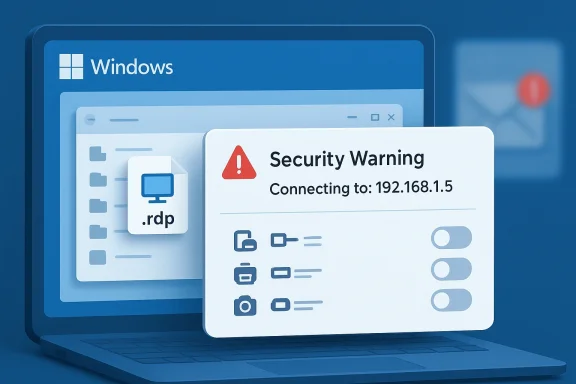
The headline change in KB5083769 is straightforward but important: RDP files now trigger security-facing prompts that expose the connection target and requested redirection options before the session starts. Microsoft says the requested settings are shown in the dialog and are disabled by default, so a user must consciously opt in to each one. The company also adds a one-time educational warning the first time an.rdp file is opened after the patch, framing the risk as a phishing defense rather than a mere interface change. (support.microsoft.com)That matters because the threat model has changed. Attackers do not need a fresh Remote Desktop exploit if they can simply trick someone into opening a malicious connection file. Microsoft’s own security guidance notes that RDP files can be used in phishing, and its recent warning page for
.rdp files exists specifically to explain why the dialog now appears. The message is clear: if the file tells the client to redirect local resources or connect to an unexpected system, the user should treat it with suspicion.The update also differentiates between two user journeys. Connections launched through opening an
.rdp file are now wrapped in the new warning and consent flow, while sessions started manually in the Remote Desktop app are not affected in the same way. That distinction is important for enterprise operations, because many organizations rely on manually entered hostnames or centrally managed Remote Desktop entry points. Microsoft is targeting the file-based social-engineering path, not normal administrative use. (support.microsoft.com)Microsoft’s documentation further signals that this is not meant to be a subtle tweak. Unsigned
.rdp files are labeled with an “Unknown publisher” style warning and a caution indicator, while signed files display the signer’s name but still advise verification. In other words, the patch is trying to teach users that a digital signature is useful but not sufficient. A convincing name can still be deceptive, which is why the new dialog is designed to slow the entire flow down.Why Microsoft is doing this now
The most obvious explanation is that phishing campaigns have become more operationally mature. Microsoft publicly described a 2024 spear-phishing campaign that used RDP files signed with a Let’s Encrypt certificate, showing that attackers already understood how to make malicious shortcuts look plausibly legitimate. If an RDP attachment can carry a trusted-looking signature and still be weaponized, then the old trust cues were not strong enough.There is also a lesson in the wording Microsoft uses. The company now talks about remote desktop spoofing and phishing attacks rather than only about transport-level security. That implies the issue is not simply “is RDP encrypted?” but “who is the user actually trusting when they click open?” This is a social-engineering hardening move as much as a protocol change. That distinction is easy to miss, but it is the heart of the update. (support.microsoft.com)
The New Warning Flow
The new prompt is designed to surface information that users typically ignore or never see. Before the connection is made, Remote Desktop now shows the destination computer address, any available publisher information, and the requested access to local resources. The theory is that a user who sees the real target and the scope of redirection rights may pause long enough to notice something off. (support.microsoft.com)Just as important, the defaults have changed. Each redirection setting is switched off unless the user actively enables it. That means clipboard forwarding, device sharing, and other convenience features no longer ride along silently with the initial connection. In security terms, Microsoft is moving from implicit consent to explicit consent, which is usually a good trade when the workflow is triggered by external files. (support.microsoft.com)
What users will actually see
The dialog is meant to communicate three things at once. First, it tells the user where the session is going. Second, it shows whether the file is signed and by whom. Third, it spells out which local resources the session wants to touch. If the file is unsigned, the publisher is shown as unknown and the warning language becomes more aggressive. (support.microsoft.com)That design tries to correct a classic phishing weakness: people often trust the attachment rather than the destination. A fake document can be obvious, but an
.rdp file can feel like an administrative artifact and therefore safer. Microsoft is trying to break that assumption by making the connection details impossible to miss. It is a small interface change with a large behavioral goal.The one-time educational warning is especially telling. A security dialogue that appears only once is less likely to become user fatigue, while still providing a clear nudge at the exact moment a user first encounters the file type after the update. That is a compromise between security theater and operational usability, and it seems designed to be memorable without being permanently irritating. (support.microsoft.com)
Why Redirection Is Risky
Microsoft’s rationale for hardening the dialog is rooted in the fact that RDP redirection can expose a lot more than people realize. Clipboard sharing can leak passwords or confidential text. Smart card support and Windows Hello credentials can be abused to extend access. Microphones and cameras can be turned into surveillance vectors. Printer, port, and location redirection can all become abuse opportunities in a malicious session.The key takeaway is that the damage is not limited to whatever is on the remote machine. The local workstation can become an exfiltration source, a surveillance target, or a bridge into other systems. Attackers love settings that feel harmless because they reduce suspicion while broadening access. In the case of
.rdp files, those settings are often predeclared in the file itself, which means the malicious intent can be hidden in plain sight.The hidden cost of convenience
Most users only think about Remote Desktop in terms of getting a screen back. IT teams think about it in terms of support efficiency. But the update is a reminder that every convenience feature expands the attack surface unless it is tightly constrained. A shared clipboard is useful right up until it is the fastest way to move a password into the wrong environment. (support.microsoft.com)That is why Microsoft’s default-off posture matters. In a phishing scenario, the attacker wants the victim to accept the connection, leave redirection enabled, and move on. If the workflow requires extra confirmation for each requested capability, the attacker loses speed and stealth. Security rarely eliminates abuse completely; it mostly raises the cost of abuse. (support.microsoft.com)
Enterprise Impact
For enterprise administrators, the immediate question is whether the new behavior will break established workflows. The answer is: some will, intentionally. Any environment that distributes.rdp files as part of help desk support, contractor onboarding, third-party access, or jump-host workflows should expect at least some user confusion. The patch is meant to make people stop and think, which is exactly what well-designed phishing defenses should do. (support.microsoft.com)At the same time, Microsoft’s change is not a wholesale ban. Administrators can still manage behavior through policy and registry-based controls, and Microsoft has documented a rollback-style registry value under
HKLM\Software\Policies\Microsoft\Windows NT\Terminal Services\Client with RedirectionWarningDialogVersion set as a REG_DWORD. That provides a temporary compatibility path for organizations that run into conflicts, though Microsoft explicitly warns that future updates may remove rollback options.Admin trade-offs
The enterprise advantage is obvious: fewer chances for a user to accept a malicious file and quietly expose local resources. The enterprise drawback is equally obvious: more prompts can slow legitimate work, especially in help desk environments that rely on file-based connection handoffs. This is where security policy and operational discipline have to meet halfway.A strong deployment plan will likely include user education, controlled distribution of signed
.rdp files, and guidance about when to prefer direct client launches over attachment-based workflows. It may also include a decision to prohibit local resource redirection except in tightly defined cases. That would be a cleaner long-term stance than relying on exceptions forever. Exceptions tend to become habits, and habits become incident reports.Consumer Impact
For consumers, the change will feel more like a safety nudge than a policy framework. Most home users only encounter RDP files occasionally, often when remote support is involved or when an organization sends them a file to connect to a work system. In those cases, the warning is doing exactly what it is supposed to do: forcing a moment of reflection before the file opens a remote session. (support.microsoft.com)Consumers are also less likely to understand what redirection settings mean, which is precisely why the default-off behavior matters. A user who has never thought about clipboard forwarding may not realize that a remote session can access far more than the screen. By requiring explicit consent, Microsoft is lowering the chance that an inexperienced user will accept a dangerous default out of habit. (support.microsoft.com)
The usability question
There will, however, be friction. Some users may see the dialog as an annoyance or mistake it for a problem with the file itself. Others may become conditioned to click through it if they encounter many legitimate.rdp files. That is the classic tension in consumer security UI: too much friction creates fatigue, while too little friction creates blind trust.Microsoft appears to be betting that the first-run warning plus per-connection visibility will strike a workable balance. The company is not blocking the workflow, just making it slower and clearer. For most consumers, that is probably the right compromise, especially given how sophisticated phishing has become. (support.microsoft.com)
How This Fits Microsoft’s Broader Security Strategy
The April 2026 Remote Desktop hardening is part of a broader pattern in Microsoft’s security posture: reduce trust in ambient inputs, elevate warnings for sensitive workflows, and make the risky path harder to take accidentally. The company’s January 2026 credential-input hardening already showed a preference for protecting authentication interfaces from untrusted or automated entry. Remote Desktop file warnings extend that same philosophy into connection setup.There is also a strategic benefit for Microsoft. Windows security gets judged not just by the severity of its vulnerabilities, but by how well it handles common abuse patterns. If attackers can repeatedly weaponize file-based workflows without Microsoft changing the UX, then the platform looks reactive. If the company moves preemptively to reduce attack success rates, it can claim progress even when no single exploit is the headline problem.
Security by interruption
Microsoft is increasingly using what might be called security by interruption. The idea is not to block every malicious action outright, but to insert meaningful checkpoints where users and admins can intervene. That is visible in the new RDP warnings, and it is visible in other April 2026 security-related changes as well. The effect is a Windows experience that is more cautious, more verbose, and less forgiving of old trust assumptions. (support.microsoft.com)This approach has strengths and weaknesses. It can dramatically reduce opportunistic abuse, but it also shifts more responsibility to end users to make correct decisions in a moment of uncertainty. Microsoft seems willing to accept that trade because the alternative is to keep treating risky file-based actions as ordinary convenience features. That was sustainable a decade ago; it is much less sustainable now.
Practical Admin Response
For organizations, the best response is not to wait for users to “get used to it.” The right move is to adjust documentation, support scripts, and remote-access standards now. If your help desk sends.rdp files, those files should be verified, signed, and distributed through trusted channels. If they are generated dynamically, the workflow should be reviewed for opportunities to eliminate file attachment entirely.It is also a good time to revisit which redirection features are truly necessary. Not every team needs clipboard, smart card, printer, camera, microphone, or drive redirection in daily use. The fewer features you allow, the fewer things an attacker can coax a user into exposing. This is one of those cases where narrowing permissions can produce a real security dividend without a major infrastructure change. (support.microsoft.com)
A sane rollout checklist
- Identify all business processes that rely on
.rdpfiles. - Confirm which files are signed and which are unsigned.
- Test the new warning flow in a pilot group before broad deployment.
- Update support documentation to explain the new dialog in plain language.
- Review which local resources truly need redirection by default.
- Decide whether a temporary registry rollback is justified in any environment.
- Plan for removal of rollback options in future updates.
Strengths and Opportunities
Microsoft’s changes are strongest where they address real-world phishing behavior rather than theoretical protocol flaws. They also create a useful opportunity for organizations to clean up old Remote Desktop habits and enforce better access hygiene. The result could be a safer and more understandable remote-access experience if admins treat the change as a policy reset rather than a nuisance. That would be the best-case outcome.- Better phishing resistance for
.rdpfile workflows. - Clearer visibility into destination hosts and requested redirection settings.
- Safer defaults with local resources disabled unless explicitly approved.
- Improved user education through the one-time warning prompt.
- Stronger admin leverage to standardize Remote Desktop usage.
- Lower exfiltration risk from clipboard, device, and credential redirection.
- A chance to modernize workflows away from attachment-driven remote access.
Risks and Concerns
The main risk is operational friction, especially in enterprises that rely on file-based remote access as a routine support tool. There is also a danger that users will become prompt-blind if they see too many legitimate warnings, or that admins will be tempted to suppress the protection in the name of convenience. That would defeat much of the point.- User confusion when legitimate
.rdpfiles suddenly behave differently. - Help desk slowdowns if staff need to re-explain the warning on every ticket.
- Prompt fatigue if users encounter too many signed but still suspicious files.
- Rollback dependency if organizations rely on the registry workaround for too long.
- Inconsistent policy enforcement across departments and endpoint types.
- Residual social-engineering risk if attackers adapt the wording or branding of malicious files.
- Future compatibility uncertainty because Microsoft warns rollback options may disappear.
Looking Ahead
The most important question is whether attackers adapt faster than users do. Microsoft has improved the warning model, but phishing is an adaptive business, and criminals will look for ways to make malicious.rdp files seem even more ordinary. If history is any guide, they will also probe for environments where administrators suppress the new protections or where users are trained to click through them without reading.The other question is whether Microsoft extends this model to other file-based trust boundaries. If
.rdp files now deserve a richer warning system because they can quietly expose local resources, then similar scrutiny may eventually be applied to other launchable artifacts that carry implicit trust. The company has already shown a willingness to harden credential and remote-access surfaces in stages, so this may be less of a one-off change than a template.For now, organizations should assume the default behavior is here to stay and plan accordingly. The safer path is to redesign workflows so that Remote Desktop connections are initiated from trusted tools and governed by policy, not handed around like ordinary files. That is the real lesson of KB5083769: when a convenience feature becomes a phishing vector, the platform has to make trust visible again. In that sense, the April 2026 update is not just about Remote Desktop. It is about Windows finally treating remote access as something that must be earned, not assumed.
Source: Neowin Microsoft details Windows 11 KB5083769 Remote Desktop changes
