

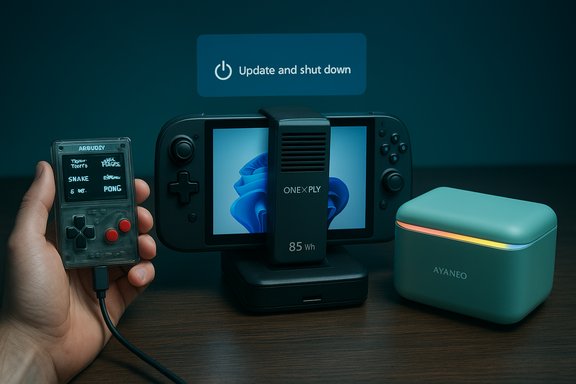
The past week’s gadget headlines traded big‑budget handheld ambition for a reminder that sometimes the smallest fixes matter most: Kevin Bates’ tiny Arduboy gets a modern refresh with the Arduboy FX‑C, several boutique handheld PC makers pushed new high‑power hardware into crowdfunded territory, AYANEO teased a playful mini‑PC design, and Microsoft quietly rolled a servicing correction that should make the Start menu’s “Update and shut down” option behave the way users expect. This roundup pulls those announcements together, verifies key specs where possible, and explains what enthusiasts and admins should actually care about next.
The consumer tech scene has polarized: one camp chases desktop‑class performance squeezed into pocketable chassis, while another keeps iterating on minimalist, open hardware experiences for hobbyists and retro gamers. That split shows up clearly this week. The Arduboy FX‑C continues a decade‑long story of affordable, programmable pocket gaming. At the opposite end, the OneXFly Apex and similar devices push extreme TDPs, liquid cooling, and desktop‑class silicon into handheld form factors — raising questions about portability, battery life, and user expectations.
Meanwhile, Microsoft’s servicing change for Windows Update addresses a long‑running UX failure that quietly cost users battery life and trust: the OS option labeled Update and shut down sometimes performed a restart instead of powering off. Microsoft has validated a fix in Insider preview builds and packaged it into the October 28, 2025 preview cumulative update (KB5067036), a change that should reach mainstream users in the normal Patch Tuesday cycle once telemetry looks good. The company’s documentation and preview notes make that timeline and the nature of the change clear.
On the software side, Microsoft’s fix for the long‑standing Update and shut down inconsistency is quietly important. It’s not a flashy OS headline, but by restoring trust in a two‑word menu action, Microsoft reduces energy waste and administrative friction for millions of users — provided the staged rollout remains disciplined and telemetry confirms behavior across diverse hardware. The documentation and Insider notes show the company shipped a servicing‑level remediation and packaged it into the October 28 preview KB (KB5067036); that preview is the cautious path to earlier access, but production deployments should wait for the mainstream cumulative update unless you have a tested ring. These stories reflect a broader truth about modern computing: small changes — whether a better USB port, a thoughtful physical control, or a single servicing orchestration fix — can be as meaningful as headline specs. The job of buyers and admins is to read the fine print, validate claims across reputable outlets, and match product promises to real workflows.
Source: Liliputing Lilbits: Arduboy FX-C, AYANEO AM03, OneXFly Apex announcements... and maybe Windows 11 will actually shut down when it's supposed to soon - Liliputing
 Background / Overview
The consumer tech scene has polarized: one camp chases desktop‑class performance squeezed into pocketable chassis, while another keeps iterating on minimalist, open hardware experiences for hobbyists and retro gamers. That split shows up clearly this week. The Arduboy FX‑C continues a decade‑long story of affordable, programmable pocket gaming. At the opposite end, the OneXFly Apex and similar devices push extreme TDPs, liquid cooling, and desktop‑class silicon into handheld form factors — raising questions about portability, battery life, and user expectations.Meanwhile, Microsoft’s servicing change for Windows Update addresses a long‑running UX failure that quietly cost users battery life and trust: the OS option labeled Update and shut down sometimes performed a restart instead of powering off. Microsoft has validated a fix in Insider preview builds and packaged it into the October 28, 2025 preview cumulative update (KB5067036), a change that should reach mainstream users in the normal Patch Tuesday cycle once telemetry looks good. The company’s documentation and preview notes make that timeline and the nature of the change clear.
Arduboy FX‑C — compact hardware, big community value
What’s new, in plain terms
The Arduboy FX‑C is the next iteration of a tiny, credit‑card sized handheld built around hobbyist‑friendly Arduino hardware. The FX‑C modernizes the platform with a USB‑C port that handles charging and data, increases preloaded library capacity, and — notably for a retro portable — supports direct multiplayer by linking two units with a USB cable. Early reporting shows the device ships with around 300 preinstalled 8‑bit homebrew games and is offered in a $99 Founder’s edition for early buyers.Why that matters
- The Arduboy community has always been about programming first: creators write games in a familiar microcontroller ecosystem and hobbyists modify firmware or build new carts.
- USB‑C brings dependable charging and easier file transfer for game uploads, lowering the barrier for newcomers to load homebrew titles.
- Native, wired multiplayer is a practical, low‑latency feature that keeps the device social without adding networking stacks, batteries, or radios.
Strengths and caveats
- Strengths
- Accessibility: low price and simple hardware keep the ecosystem open to developers and learners.
- Longevity: decades of community content and established tooling mean users gain immediate value.
- Portability and battery life: simple monochrome hardware is power efficient.
- Caveats
- The platform is purposefully minimal — it’s not for modern AAA or streaming games.
- Availability and shipping windows for boutique runs can be unpredictable; pre‑orders and founder editions are common in this niche.
- If you need polished storefront integration or cloud saves, Arduboy is not aimed at that market.
Ideal buyer and use cases
The FX‑C is for retro‑game hobbyists, educators teaching embedded systems, and anyone who values programmability and community‑created content over raw graphical fidelity. The device’s price point and open ethos make it an excellent classroom or maker’s workshop project.The OneXFly Apex and the arms race for handheld PC performance
Anatomy of the Apex
The OneXFly Apex is squarely in the “desktop‑class in a handheld chassis” category. Public specs from manufacturer announcements and independent coverage show:- An 8‑inch FHD+ 120 Hz display (landscape orientation).
- Silicon choices aligned to AMD’s high‑power stack — devices in this class use the Ryzen AI / Ryzen AI Max (Strix Halo) family — with configurations reported that push device power budgets well beyond typical handheld limits.
- A removable 85 Wh battery pack and an optional external liquid cooling / tower accessory to enable sustained 80–120 W TDP operation.
- Memory and storage options at the high end (multiple tens of gigabytes of RAM and TB‑class NVMe), and premium audio and I/O (USB4/USB‑C, Mini‑SSD expansion). Regional pre‑order pricing in Chinese markets was reported in the 1,000–2,000 USD equivalent range depending on configuration; international crowdfunding and launch prices were expected to start in the ~$1,200 neighborhood for some SKUs.
The technical tradeoffs
- Performance vs. portability: delivering 80–120 W sustained power in handhelds takes heavy thermal solutions and often external power sources. That reduces “handheld” portability in practice.
- Battery life: an 85 Wh external pack is large for a handheld. When you push silicon to 80–120 W, even an 85 Wh battery will drain in well under an hour at peak loads.
- Thermals and noise: liquid cooling or large vapor chambers mitigate throttling but add complexity and potential points of failure (tubes, seals, external docking).
- Cost and support: premium components and cooling systems raise price and complicate warranties and long‑term support.
Strengths and risks
- Strengths
- Desktop‑like performance in a portable form factor for demanding PC games and AI‑enabled workloads.
- Expandable storage and generous RAM options make it attractive for power users and content creators.
- Optional accessories let buyers tune the device for either mobility or desktop‑grade sessions.
- Risks
- Misaligned expectations: marketing that emphasizes “handheld” alongside 120 W TDP and external cooling risks user disappointment when battery life is poor or lugging accessories becomes necessary.
- Heat and reliability: pushing high sustained TDPs into small cases stresses power delivery and cooling subsystems more than mainstream laptops do.
- High price: premium components place these machines in a niche, enthusiast pricing tier rather than mainstream affordability.
Who should consider an Apex‑class device
Power users who want near‑desktop performance for PC gaming, GPU‑accelerated content creation, or local model inference and are comfortable with the tradeoffs (weight, external accessories, price) will find devices like the Apex compelling. Casual gamers or buyers seeking a lightweight always‑portable console experience should look elsewhere.AYANEO AM03 — a mini‑PC that wants to be decorative
Design first, specs second
AYANEO — better known for handheld PCs — teased the AM03 mini‑PC as an “artistic” departure from standard mini‑PC aesthetics. Official images and company messaging show a softened, design‑oriented chassis with pastel color options, a curved RGB light element, and several physical controls on top including what appears to be a dial and five buttons. The company’s own reveal materials emphasize form and lifestyle appeal; detailed specs are intentionally scarce for now. NotebookCheck and AYANEO’s product messaging corroborate the design focus but note that internal hardware details remain unconfirmed.What to expect and what to watch for
- Expect mid‑to‑high‑range AMD silicon in line with AYANEO’s other mini‑PC and handheld offerings; official confirmation of exact CPU/GPU SKUs is pending.
- The AM03’s design choices — covered front ports that hide connectors, a potential rotary control, and a decorative light bar — position it as a desktop accent as much as a workstation.
- If you value aesthetic integration on a desk and want a compact Windows PC with personality, AM03’s concept is interesting. If raw compute per dollar matters more than looks, other mini‑PCs (including conventional Intel/AMD NUC variants) will be better value.
Strengths and caveats
- Strengths
- Visual differentiation in a category where most micro PCs look like boxes.
- Potentially strong I/O if AYANEO carries forward high‑end connectivity from its earlier AM01S designs.
- Caveats
- Lack of official specs means buyers should wait for confirmed CPU, RAM, storage, and pricing.
- AYANEO has occasionally revised or cancelled announced SKUs; cautious buyers should treat teasers as provisional.
Other hardware tidbits (Orico OmniPlus, Lenovo tablet rumor)
- Orico’s OmniPlus was described in some reporting as a Mac‑mini lookalike built around laptop‑class components such as an AMD Ryzen 5 7535H, with ambitious I/O including dual 40 Gbps USB4 ports and two 2.5 GbE LAN ports. That combination would make the device unusually well‑connected for a small desktop, but I/O claims and regional listings still require confirmation against Orico’s product pages; at the time of reporting those details appeared in regional outlets and product teasers rather than global press releases. Treat those specs as reported rather than fully validated until the manufacturer posts an official spec sheet. (IThome and other regionals carried early coverage. The Orico OmniPlus story is notable because it shows vendors blending laptop‑grade chips with enhanced connectivity in micro desktop shells, a configuration appealing to media servers and compact workstation users.
- Lenovo rumor: coverage surfaced suggesting Lenovo’s 5th‑gen Android gaming tablet would use a Snapdragon 8 Elite Gen5, a 8.8‑inch 3040×1904 165 Hz LCD, LPDDR5x‑9600 memory, and UFS 4.1 storage. This is a rumor aggregated from regional leak reporting; Lenovo has not globally announced a specification‑complete product, and prior generations still await full international rollout in some regions. Treat these early rumors as plausible but not final.
Windows 11: the “Update and shut down” fix — what changed and why it matters
The user problem, succinctly
For a multi‑year period a subset of Windows users reported that selecting Update and shut down would install updates but then return to the lock screen or desktop instead of powering off — effectively performing a restart. The symptom was intermittent, hardware‑dependent, and disproportionately painful for laptop owners (battery drain), admins (maintenance windows), and privacy‑sensitive use cases. Community reporting and telemetry traced the issue across several update cycles.What Microsoft shipped
Microsoft validated a servicing‑level correction in Windows Insider Dev and Beta channel builds and included the same remediation in the October 28, 2025 preview cumulative update KB5067036 (OS builds 26100.7019 and 26200.7019). The public KB entry explicitly lists: “Improved: Addressed underlying issue which can cause ‘Update and shutdown’ to not actually shut down your PC after updating.” The Insider release notes also include the same wording. These artifacts confirm Microsoft changed the orchestration that decides whether post‑update actions should end in a shutdown or a restart rather than merely renaming UI text.Why this wasn’t just a label problem
Modern Windows servicing is a multi‑phase orchestration involving:- Staging: update payloads are often prepared while Windows runs.
- Offline commits: some files and components are replaced only during shutdown/boot sequences.
- Power management semantics: features like Fast Startup (hybrid shutdown) alter kernel state and can interact with offline servicing.
- Sign‑in/finish flows: options that use credentials to finish setup after an update can change whether Windows chooses to reboot to complete configuration.
How to get the fix today (practical, step‑by‑step)
- Check your Windows build: press Win+R → type winver → Enter. Compare the build to the preview build tokens (26100.7019 or 26200.7019).
- Optional preview (fastest path): Settings → Windows Update → Optional updates. If KB5067036 appears under optional updates, install it. This bundles the latest servicing stack update (SSU) and the preview cumulative update (LCU).
- Validate on a spare/non‑critical device: schedule a small update, choose Update and shut down, and confirm the machine is powered off the next morning.
- Conservative path: wait for the fix to reach the mainstream cumulative update (Patch Tuesday) distribution if you prefer reduced regression risk.
Strengths, limitations, and unresolved details
- Strengths
- Restores a basic UX promise: a simple Start‑menu choice now has predictable behavior again for many configurations.
- Real operational wins: reduced overnight battery drain and restored determinism for maintenance automation.
- Limitations
- The precise internal root cause — including the exact race condition or handle the engineers fixed — is not publicly detailed beyond the KB note; this is normal but means internal telemetry‑weighted decision logic remains opaque.
- Incidence variability: the fix targets conditions Microsoft validated in preview rings; some rare OEM driver or management agent combinations could still produce different results.
- Unresolved
- Broad telemetry and long‑tail regressions will be visible only after mainstream rollout; early preview installs noted some unrelated regressions (for example, Task Manager duplication) that underscore the need for staged validation.
Critical analysis — reading between the headlines
The hardware narrative: where innovation meets realism
- The Arduboy FX‑C embodies an important principle: hardware need not be expensive to be meaningful. Its combination of low cost, open tooling, and tangible social features (multiplayer via USB) shows how focused design can multiply community value. For educators and hobbyists, that’s a win.
- The OneXFly Apex and similar premium handheld PCs illustrate a different force: pushing the performance envelope inevitably forces tradeoffs. Marketing copy that emphasizes “handheld” plus 120 W TDP and external liquid cooling risks overpromising portability. Real‑world buyers need careful disclosure of battery life, weight, and accessory dependence. Independent coverage rightly highlights the optional cooler and the need for a removable battery to achieve the published numbers — not every buyer will accept that practical cost.
- AYANEO’s AM03 demonstrates a niche many buyers will appreciate: design as product differentiation. When mini‑PC vendors compete on looks and desk presence, customers gain options beyond raw compute metrics. But design‑forward products must still transparently list performance and support details before buyers commit.
The software lesson: small UX fixes can have outsized value
Microsoft’s “Update and shut down” remediation is small in code size but large in impact. Users rely on simple labels and deterministic behavior for workflows; when the OS breaks that promise, trust erodes and users adopt workarounds that increase complexity and reduce energy efficiency. Microsoft’s staged approach — Insider validation → optional preview → Patch Tuesday mainstreaming — is how the company reduces risk, but the presence of collateral regressions in previews reminds organizations to pilot updates.Security and update hygiene
- For businesses and power users, the right path is conservative: pilot preview updates on non‑critical hardware, collect diagnostics, and then accept the mainstream CU once the November Patch Tuesday package ships and third‑party reporting confirms stability.
- For home users who were personally affected by the reboot issue and are comfortable testing, installing KB5067036 on a spare machine can provide early relief, but monitor for unrelated regressions and be ready to roll updates back.
Practical recommendations — what readers should do now
- If you value deterministic Update‑and‑Shutdown behavior and can test safely:
- Confirm Windows version and build (Win+R → winver).
- Consider installing KB5067036 from Optional updates on a spare device and test the Update and shut down workflow.
- If you manage fleets, pilot the preview in a limited ring and confirm sign‑in, Fast Startup, and driver interactions under representative workloads before broad deployment.
- If you’re into handheld hardware:
- For retro and maker experiences, the Arduboy FX‑C is a cheap, community‑rich purchase to support learning and hobbyist development. Expect straightforward, low‑power operation and a rich homebrew library.
- For desktop‑class gaming on the go, read OneXFly Apex spec sheets carefully: understand battery life at realistic TDPs, required accessories, and warranty implications before preorder or crowdfunding commitments. Cross‑check multiple outlets and wait for hands‑on reviews if portability is essential.
- For design‑minded desktop buyers, AYANEO’s AM03 is a concept to watch; wait for full specs and pricing before budgeting.
Final verdict
This week’s headlines illustrate a healthy breadth in personal computing: from intentionally tiny, programmable devices that nourish creativity and grassroots communities, to boutique engineering that crams near‑desktop silicon into palmable chassis. Both directions push the ecosystem forward, but they ask different things of buyers: the Arduboy FX‑C asks you to participate; the OneXFly Apex asks you to accept compromises in portability for raw power.On the software side, Microsoft’s fix for the long‑standing Update and shut down inconsistency is quietly important. It’s not a flashy OS headline, but by restoring trust in a two‑word menu action, Microsoft reduces energy waste and administrative friction for millions of users — provided the staged rollout remains disciplined and telemetry confirms behavior across diverse hardware. The documentation and Insider notes show the company shipped a servicing‑level remediation and packaged it into the October 28 preview KB (KB5067036); that preview is the cautious path to earlier access, but production deployments should wait for the mainstream cumulative update unless you have a tested ring. These stories reflect a broader truth about modern computing: small changes — whether a better USB port, a thoughtful physical control, or a single servicing orchestration fix — can be as meaningful as headline specs. The job of buyers and admins is to read the fine print, validate claims across reputable outlets, and match product promises to real workflows.
Source: Liliputing Lilbits: Arduboy FX-C, AYANEO AM03, OneXFly Apex announcements... and maybe Windows 11 will actually shut down when it's supposed to soon - Liliputing
