

Asus’s ZenBook 3 arrived in 2016 as a very deliberate provocation: a Windows 10 ultraportable that copied the MacBook’s silhouette so closely that the resemblance became the story. It packed a 12.5-inch display into an ultra-thin aluminum shell, pushed the weight down to roughly two pounds, and still found room for 7th-gen Intel Core processors, up to 16GB of RAM, and as much as 1TB of PCIe SSD storage. But the most Apple-like detail may have been the most controversial one: the machine shipped with just a single USB-C port, a choice that made it feel modern, minimal, and maddening all at once. Asus’s official materials confirmed the design language, the performance hardware, the 0.8mm keyboard travel, the Windows Hello fingerprint reader, and the lone USB-C connector that defined the whole product philosophy.
The ZenBook 3 did not appear in a vacuum. In 2016, laptop design was in the middle of a reset, driven by thinner chassis, USB-C adoption, and a premium market that increasingly rewarded portability over expansion. Apple had already made the 12-inch MacBook a symbol of that shift, and Asus clearly understood both the appeal and the backlash. The ZenBook 3 borrowed the MacBook’s visual minimalism, but tried to justify itself as a stronger, more practical Windows machine with better performance, a fingerprint sensor, a more conventional keyboard feel, and a higher-end configuration ceiling.
That tension is the heart of the ZenBook 3 story. On paper, it looked like a MacBook competitor that did not simply imitate Apple’s design, but also accepted the same compromises. The body was slim enough to be compared directly with Apple’s 12-inch machine, and its single-port layout immediately triggered the familiar how am I supposed to live with this? reaction. Asus was not trying to hide the comparison; it was inviting it. The company’s press materials leaned hard into the premium finish, the spun-metal aesthetic, and the “ultra-sleek” form factor that made the laptop look like a fashion object as much as a work device.
At the same time, Asus tried to make the ZenBook 3 more than a clone. The keyboard offered 0.8mm of key travel, which was notably deeper than the 12-inch MacBook’s famously shallow mechanism, and the inclusion of Windows Hello gave it a more modern sign-in story than many rivals could offer at the time. The 0.8mm figure may sound tiny, but in ultrabook design, every fraction of a millimeter matters because it changes how typing feels over a long workday. Asus was signaling that it knew the MacBook comparison would be unavoidable, but it also believed it could win users by improving the experience in the small, tactile places that matter most.
The other important context is pricing. Asus positioned the ZenBook 3 as a premium machine, not an aggressive value play. The highest-end configuration was announced at roughly €1,999, and the broader range sat firmly in luxury-laptop territory. That mattered because it reframed the device as a statement piece rather than a budget alternative. In other words, Asus was not only chasing Apple’s industrial design; it was chasing Apple’s idea that a laptop can be aspirational hardware, not just a utilitarian box.
The company’s own language made the premium narrative explicit. ZenBook 3 used an aerospace-grade aluminum alloy, a spun-metal lid pattern, and diamond-cut highlights meant to signal refinement rather than raw utility. It came in Royal Blue, Rose Gold, and Quartz Grey, which were clearly chosen for showroom impact as much as for everyday ownership. That matters because industrial design is not only about shape; it is about emotional positioning. Asus wanted buyers to feel like they were choosing a status object with Windows inside, not merely a thin laptop with a trendy port.
What makes this noteworthy is how much confidence it took to release such a close competitor. Asus knew the comparison would be immediate, and in 2016 that meant inviting scrutiny from reviewers who cared deeply about whether a device was inspired by Apple or merely borrowing its homework. The ZenBook 3 therefore became a test of whether Windows OEMs could compete on the same emotional terrain without defaulting to chunky industrial design or gamer aesthetics.
Still, thinner laptops often trade long-term serviceability for style, and that tension was already becoming a defining theme in the premium notebook market. In hindsight, the ZenBook 3 sits at a moment when vendors were willing to make the laptop as sleek as possible before later generations of devices reintroduced more ports and slightly thicker frames. That broader industry correction is part of the ZenBook 3’s legacy too. It helped prove that users would buy minimalist hardware, but it also showed that too little I/O can become a brand liability.
This matters because ports are not just hardware details; they are a proxy for how a company imagines users will work. A single-port machine assumes a wireless, cloud-first, dongle-friendly lifestyle. That can make sense for some travelers, executives, and students, but it can feel punishing for anyone who needs to connect peripherals, external storage, projectors, or network adapters without thinking about it. In that sense, the ZenBook 3 was not just thin; it was opinionated.
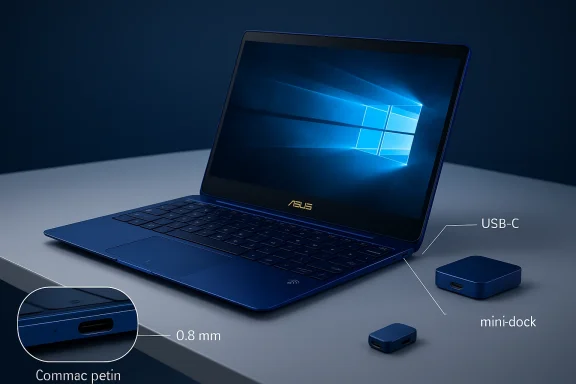
The irony is that Asus appears to have understood this problem in advance. The company bundled a USB-C mini-dock with at least some configurations, which added HDMI, a traditional USB connection, and another USB-C socket. That was a tacit admission that one port is rarely enough in daily use. But it was also a clever way to preserve the clean exterior while shifting the mess of connectivity into an optional accessory.
For enterprise buyers, the port question is even sharper. IT teams care about reproducibility, predictability, and supportability, and a single-port platform increases the chance that users will show up with incompatible accessories or fail to connect to legacy meeting-room gear. A machine like the ZenBook 3 may be easy to deploy in a modern office, but it can be awkward in a mixed environment where old projectors and USB-A peripherals still dominate. That is one reason minimalist laptops so often sell better as aspirational consumer hardware than as fleet standards.
Battery life was rated at up to nine hours, which fit the expected use case for a light, thin, business-friendly notebook. That figure should always be read as a manufacturer estimate rather than a universal guarantee, but it suggests Asus expected the machine to spend most of its life moving between meetings, coffee shops, and commute bags rather than anchored to a desk. In the context of 2016, that was exactly the kind of promise premium ultrabooks were supposed to make.
That distinction is important because thin laptops often get judged unfairly. Buyers see the slim chassis and assume the device is weak, when in reality the target use case is simply different. In the ZenBook 3’s case, the combination of fast SSD storage and high-end U-series processors gave it the kind of quick, everyday responsiveness that premium buyers notice immediately. That responsiveness is often more important than benchmark bragging rights.
The ZenBook 3’s form factor suggests it was never meant to compete with heavier performance notebooks in sustained compute. Instead, it was built to deliver strong bursts of productivity within a shell that travelers could tolerate all day. That is exactly why the machine’s appeal rested more on experience than raw spec-sheet superiority. When laptops get this thin, the question is not simply “How fast is it?” but “How long can it stay fast?”
The inclusion of a glass-covered Precision Touchpad and a fingerprint reader with Windows Hello support also revealed that Asus was trying to make the machine feel more current than Apple’s contemporaneous offering. In a Windows notebook, biometrics are not just a convenience; they are an invitation to think of the device as a secure, frictionless portal into Microsoft’s ecosystem. That gave the ZenBook 3 a practical edge in mixed Windows environments, where identity and authentication increasingly mattered.
The key question is whether the ZenBook 3’s keyboard delivered enough of a tactile advantage to overcome the machine’s other compromises. On balance, that answer depends on the user. Writers and office workers may appreciate the slightly deeper travel, while users who prioritize rigid consistency or desktop-grade feedback may still prefer a bulkier machine. But the intent is clear: Asus wanted the keyboard to be a reason to choose Windows, not just an acceptable compromise.
That matters because premium buyers often judge small frictions more harshly than big ones. If a machine is thin, expensive, and polished, every clumsy interaction feels like a design failure. The fingerprint reader gave Asus a chance to reduce those moments, and in the process it made the ZenBook 3 feel more complete than many rivals that had better port selection but less personality.
Audio was also part of the pitch. Asus advertised quad speakers with Harman Kardon tuning, which gave the machine another point of contrast with many ultra-thin competitors that sounded tinny or hollow. In a product category where the chassis leaves little room for acoustic engineering, good speakers can become a meaningful advantage because they reduce dependence on headphones for casual use.
The display also reinforced the laptop’s mobile-first identity. If the machine is going to be small, light, and expensive, then the screen has to pull double duty as both a productivity surface and a luxury artifact. Asus understood that a premium ultraportable must do more than be thin; it has to feel pleasing every time the lid opens.
Taken together, the display and audio package made the ZenBook 3 feel like an intentionally premium object rather than a shrunken compromise. That does not erase the port limitation, but it does help explain why some buyers would have found the machine worth considering anyway. The product wasn’t trying to be the best workstation; it was trying to be the best compact lifestyle laptop Asus could build.
That positioning put it in an awkward but fascinating spot. It was cheaper than many MacBook Pro configurations, but more expensive than mainstream Windows ultrabooks. So the ZenBook 3 had to win on emotional appeal and industrial design rather than raw value. That is a difficult market to dominate, but it can be profitable because the buyers are less price-sensitive and more willing to reward differentiation.
That said, the ZenBook 3 also had to contend with the gravitational pull of the MacBook brand. When people compare a Windows machine to Apple, they are often comparing not just specs but ecosystems, resale value, and perceived polish. Asus therefore had to make the ZenBook 3 feel like a credible alternative in a market where Apple’s brand was still synonymous with premium laptop design.
For Asus, the ZenBook 3 likely served another purpose: proof of capability. A machine like this tells the market that the company can do premium industrial design at a level that competes with the best consumer hardware in the world. That kind of brand signal can outlast the product itself, especially when the form factor becomes part of the conversation around the company’s broader notebook strategy.
That strategy put pressure on competitors from two sides. On one side, it challenged other PC makers to stop assuming that consumers would accept ugly plastic or bulky bezels if the specs were good enough. On the other, it challenged Apple by proving that a Windows laptop could look almost as desirable as a Mac while still offering familiar Microsoft features. In that sense, the ZenBook 3 was less a single product than a message to the industry.
At the same time, the ZenBook 3 demonstrated the limits of minimalism. A laptop can be gorgeous and still leave users annoyed if the port story feels too restrictive. Competitors learned that you can absolutely sell a fashion-forward notebook, but you need to be very careful about how much convenience you trade away. The ultrathin era would eventually correct itself partly because consumers and reviewers kept repeating that lesson.
For consumers, the appeal was easier to understand. The ZenBook 3 looked like something you would want to carry, not just something you would tolerate. That emotional component is often underrated in hardware coverage, but it is one of the biggest reasons premium notebooks succeed. People do not only buy laptops to compute; they buy them to feel like their tools reflect their taste.
The opportunity was just as important. Asus had a chance to reach buyers who liked Apple’s design language but needed Windows compatibility, or who simply wanted a stylish high-end machine without leaving the Microsoft ecosystem. That is a valuable niche because it overlaps with both the consumer and professional markets. It also gives Asus a premium brand halo that can lift interest in the rest of its notebook lineup.
The second risk was practical. A one-port laptop is a niche choice no matter how elegant it looks, and many users discover the limitations only after they have already bought into the aesthetic. Once that happens, the machine’s biggest strength becomes the thing they are most likely to complain about. That is especially true for users who alternate between mobility and desk use.
More broadly, the ZenBook 3 belongs to a generation of devices that forced buyers and manufacturers to confront the tradeoffs of thin-and-light computing. It is easy to mock the single-port era now, but those machines helped push the industry toward better materials, better screens, better biometric logins, and better industrial design. The lesson was never that ports do not matter; it was that premium users will accept a lot of compromise if the rest of the device feels like a coherent vision.
Source: Mashable Asus ZenBook 3 looks just like a MacBook, except it runs Windows 10
 Overview
The ZenBook 3 did not appear in a vacuum. In 2016, laptop design was in the middle of a reset, driven by thinner chassis, USB-C adoption, and a premium market that increasingly rewarded portability over expansion. Apple had already made the 12-inch MacBook a symbol of that shift, and Asus clearly understood both the appeal and the backlash. The ZenBook 3 borrowed the MacBook’s visual minimalism, but tried to justify itself as a stronger, more practical Windows machine with better performance, a fingerprint sensor, a more conventional keyboard feel, and a higher-end configuration ceiling.That tension is the heart of the ZenBook 3 story. On paper, it looked like a MacBook competitor that did not simply imitate Apple’s design, but also accepted the same compromises. The body was slim enough to be compared directly with Apple’s 12-inch machine, and its single-port layout immediately triggered the familiar how am I supposed to live with this? reaction. Asus was not trying to hide the comparison; it was inviting it. The company’s press materials leaned hard into the premium finish, the spun-metal aesthetic, and the “ultra-sleek” form factor that made the laptop look like a fashion object as much as a work device.
At the same time, Asus tried to make the ZenBook 3 more than a clone. The keyboard offered 0.8mm of key travel, which was notably deeper than the 12-inch MacBook’s famously shallow mechanism, and the inclusion of Windows Hello gave it a more modern sign-in story than many rivals could offer at the time. The 0.8mm figure may sound tiny, but in ultrabook design, every fraction of a millimeter matters because it changes how typing feels over a long workday. Asus was signaling that it knew the MacBook comparison would be unavoidable, but it also believed it could win users by improving the experience in the small, tactile places that matter most.
The other important context is pricing. Asus positioned the ZenBook 3 as a premium machine, not an aggressive value play. The highest-end configuration was announced at roughly €1,999, and the broader range sat firmly in luxury-laptop territory. That mattered because it reframed the device as a statement piece rather than a budget alternative. In other words, Asus was not only chasing Apple’s industrial design; it was chasing Apple’s idea that a laptop can be aspirational hardware, not just a utilitarian box.
Design Philosophy
The ZenBook 3’s design was the most obvious reason people talked about it, and also the most interesting. Asus did not simply reduce thickness and add a brushed-metal finish; it built a machine that visually echoed one of the most recognizable notebooks in the world. The result was a product that felt familiar by design and controversial by intent. That strategy can work in consumer hardware when the imitation becomes shorthand for prestige, but it also risks making the device feel derivative if the rest of the experience does not meaningfully exceed the reference point.The company’s own language made the premium narrative explicit. ZenBook 3 used an aerospace-grade aluminum alloy, a spun-metal lid pattern, and diamond-cut highlights meant to signal refinement rather than raw utility. It came in Royal Blue, Rose Gold, and Quartz Grey, which were clearly chosen for showroom impact as much as for everyday ownership. That matters because industrial design is not only about shape; it is about emotional positioning. Asus wanted buyers to feel like they were choosing a status object with Windows inside, not merely a thin laptop with a trendy port.
A MacBook-like silhouette with Windows identity
The silhouette was the point. The 11.9mm chassis, two-pound class weight, and narrow-bezel 12.5-inch display put the ZenBook 3 into the same visual category as the MacBook. But Asus layered in enough differentiators to avoid total identity collapse, including the lifted hinge profile and the signature concentric finish that long defined the ZenBook family. The company was essentially saying that elegance and Windows exclusivity could coexist in the same machine.What makes this noteworthy is how much confidence it took to release such a close competitor. Asus knew the comparison would be immediate, and in 2016 that meant inviting scrutiny from reviewers who cared deeply about whether a device was inspired by Apple or merely borrowing its homework. The ZenBook 3 therefore became a test of whether Windows OEMs could compete on the same emotional terrain without defaulting to chunky industrial design or gamer aesthetics.
Materials and portability
The use of premium aluminum was not merely cosmetic. A thin chassis only works if the structure is rigid enough to survive the compromises of portability, and Asus highlighted the strength-to-weight tradeoff as part of the pitch. That is a subtle but important point: ultra-thin laptops are often sold as engineering feats, but users only care if the machine still feels dependable on a lap, in a bag, and on a cramped tray table. Asus’s materials were intended to reassure buyers that the ZenBook 3 was light without feeling fragile.Still, thinner laptops often trade long-term serviceability for style, and that tension was already becoming a defining theme in the premium notebook market. In hindsight, the ZenBook 3 sits at a moment when vendors were willing to make the laptop as sleek as possible before later generations of devices reintroduced more ports and slightly thicker frames. That broader industry correction is part of the ZenBook 3’s legacy too. It helped prove that users would buy minimalist hardware, but it also showed that too little I/O can become a brand liability.
The Port Problem
If the ZenBook 3 looked like a MacBook, the port situation made the analogy unavoidable. Asus gave the machine a single USB-C port for charging, data, and video output, plus a headphone jack. That was it. The decision was technically modern and aesthetically clean, but it also placed the laptop squarely in the same compromise class as Apple’s 12-inch MacBook, which had already taught buyers that minimalism is easiest to admire in renderings and hardest to tolerate in real life.This matters because ports are not just hardware details; they are a proxy for how a company imagines users will work. A single-port machine assumes a wireless, cloud-first, dongle-friendly lifestyle. That can make sense for some travelers, executives, and students, but it can feel punishing for anyone who needs to connect peripherals, external storage, projectors, or network adapters without thinking about it. In that sense, the ZenBook 3 was not just thin; it was opinionated.
Why one port was both a feature and a flaw
One port made the laptop elegant. It also made the laptop dependent on accessories. That is the tradeoff modern ultrabook buyers have to evaluate, and the ZenBook 3 leaned hard into the idea that a minimal desktop is worth the friction if the machine is beautiful enough and portable enough. For some users, that bargain is acceptable; for others, it is a warning sign that the design team cared more about the product shot than the workflow.The irony is that Asus appears to have understood this problem in advance. The company bundled a USB-C mini-dock with at least some configurations, which added HDMI, a traditional USB connection, and another USB-C socket. That was a tacit admission that one port is rarely enough in daily use. But it was also a clever way to preserve the clean exterior while shifting the mess of connectivity into an optional accessory.
What this meant for everyday users
For consumers, the one-port layout created a simple but frustrating decision tree. If you mostly type, browse, stream, and sync wirelessly, the ZenBook 3’s design can feel pleasantly uncluttered. If your routine includes flash drives, projectors, card readers, wired mice, or older docks, the machine quickly becomes an adapter exercise. That was true in 2016, and it remains true in the broader history of ultrathin laptops: sleekness often spreads complexity from the chassis to the desk.For enterprise buyers, the port question is even sharper. IT teams care about reproducibility, predictability, and supportability, and a single-port platform increases the chance that users will show up with incompatible accessories or fail to connect to legacy meeting-room gear. A machine like the ZenBook 3 may be easy to deploy in a modern office, but it can be awkward in a mixed environment where old projectors and USB-A peripherals still dominate. That is one reason minimalist laptops so often sell better as aspirational consumer hardware than as fleet standards.
Performance and Internals
Under the hood, Asus did not treat the ZenBook 3 like a style-only product. The company equipped it with 7th-generation Intel Core i5 or i7 processors, up to 16GB of 2133MHz RAM, and up to a 1TB PCIe 3.0 x4 SSD. In the premium ultrabook class, that was serious hardware. Asus was clearly trying to prevent the machine from becoming a pretty shell with underpowered internals, and in doing so it positioned the ZenBook 3 as a capable daily driver rather than a design trophy.Battery life was rated at up to nine hours, which fit the expected use case for a light, thin, business-friendly notebook. That figure should always be read as a manufacturer estimate rather than a universal guarantee, but it suggests Asus expected the machine to spend most of its life moving between meetings, coffee shops, and commute bags rather than anchored to a desk. In the context of 2016, that was exactly the kind of promise premium ultrabooks were supposed to make.
Kaby Lake and premium responsiveness
The choice of 7th-gen Intel chips mattered because it anchored the ZenBook 3 in the Kaby Lake generation, which was aimed at better efficiency and smoother mainstream performance rather than raw workstation power. For the audience Asus targeted, that was the right balance. The machine was supposed to feel fast when opening apps, handling office workflows, and waking from sleep, not necessarily when rendering video or crunching professional-grade workloads for hours.That distinction is important because thin laptops often get judged unfairly. Buyers see the slim chassis and assume the device is weak, when in reality the target use case is simply different. In the ZenBook 3’s case, the combination of fast SSD storage and high-end U-series processors gave it the kind of quick, everyday responsiveness that premium buyers notice immediately. That responsiveness is often more important than benchmark bragging rights.
Cooling, acoustics, and sustained loads
Asus also talked up the cooling system, including what it described as a very thin fan design. That detail may sound like engineer-speak, but it is actually central to the laptop’s identity. In an ultrathin chassis, thermal management determines whether performance is consistent or merely impressive for a few minutes at a time. A beautiful machine that throttles aggressively under pressure becomes a lesson in disappointment.The ZenBook 3’s form factor suggests it was never meant to compete with heavier performance notebooks in sustained compute. Instead, it was built to deliver strong bursts of productivity within a shell that travelers could tolerate all day. That is exactly why the machine’s appeal rested more on experience than raw spec-sheet superiority. When laptops get this thin, the question is not simply “How fast is it?” but “How long can it stay fast?”
Keyboard, Trackpad, and Biometrics
Asus understood that copying the MacBook’s size would not be enough if the typing experience felt worse. That is why the company emphasized 0.8mm of key travel and full-size key spacing, details that look tiny on paper but matter a great deal to people who type for hours. The keyboard was one of the ZenBook 3’s best arguments that imitation does not have to mean concession.The inclusion of a glass-covered Precision Touchpad and a fingerprint reader with Windows Hello support also revealed that Asus was trying to make the machine feel more current than Apple’s contemporaneous offering. In a Windows notebook, biometrics are not just a convenience; they are an invitation to think of the device as a secure, frictionless portal into Microsoft’s ecosystem. That gave the ZenBook 3 a practical edge in mixed Windows environments, where identity and authentication increasingly mattered.
Typing feel versus Apple’s shallow keyboard
Apple’s 12-inch MacBook was famously criticized for its shallow keyboard, and Asus clearly saw an opening. By offering slightly more travel, the ZenBook 3 positioned itself as the machine that looked like a MacBook but might be easier to live with for long writing sessions. That difference is easy to dismiss until you spend a full day drafting documents, editing spreadsheets, or answering email. Then a fraction of a millimeter becomes a meaningful comfort factor.The key question is whether the ZenBook 3’s keyboard delivered enough of a tactile advantage to overcome the machine’s other compromises. On balance, that answer depends on the user. Writers and office workers may appreciate the slightly deeper travel, while users who prioritize rigid consistency or desktop-grade feedback may still prefer a bulkier machine. But the intent is clear: Asus wanted the keyboard to be a reason to choose Windows, not just an acceptable compromise.
Windows Hello as a differentiator
The fingerprint reader deserves more attention than it usually gets. On a premium Windows notebook, secure sign-in is part of the experience, and Windows Hello made the ZenBook 3 feel more polished than generic fingerprint-equipped laptops of the era. This was not just a security feature; it was a quality-of-life feature that reinforced the sense that Asus was building a modern Windows flagship.That matters because premium buyers often judge small frictions more harshly than big ones. If a machine is thin, expensive, and polished, every clumsy interaction feels like a design failure. The fingerprint reader gave Asus a chance to reduce those moments, and in the process it made the ZenBook 3 feel more complete than many rivals that had better port selection but less personality.
Audio, Display, and Multimedia
The ZenBook 3’s 12.5-inch Full HD display gave it the panel size that made the MacBook comparison inevitable, but Asus still tried to add its own value proposition. The screen was framed as a high-resolution, edge-to-edge panel with wide color coverage, protected by Gorilla Glass 4 and intended to make the machine feel premium in both image and touch. That is the kind of display specification that sounds ordinary now, but in 2016 it helped differentiate the ZenBook 3 from the average thin-and-light Windows laptop.Audio was also part of the pitch. Asus advertised quad speakers with Harman Kardon tuning, which gave the machine another point of contrast with many ultra-thin competitors that sounded tinny or hollow. In a product category where the chassis leaves little room for acoustic engineering, good speakers can become a meaningful advantage because they reduce dependence on headphones for casual use.
Why display quality mattered in a laptop this small
At 12.5 inches, screen quality matters more than size because every inch has to earn its place. A small, sharp, colorful panel can make a machine feel more premium than its diagonal measurement suggests. That is part of why the ZenBook 3’s display played such an important role in the overall product story: it helped justify the high price and the compact footprint at the same time.The display also reinforced the laptop’s mobile-first identity. If the machine is going to be small, light, and expensive, then the screen has to pull double duty as both a productivity surface and a luxury artifact. Asus understood that a premium ultraportable must do more than be thin; it has to feel pleasing every time the lid opens.
Audio as a premium signal
Quad-speaker audio is one of those details that seems secondary until you compare it to the thin, weak sound common in compact notebooks. Asus knew that the ZenBook 3 would spend a lot of time streaming, conferencing, and playing background media, so the audio story was part of the broader “we didn’t forget the user” message. It also helped separate the machine from cheaper slim laptops that simply chased dimensions without investing in the user experience.Taken together, the display and audio package made the ZenBook 3 feel like an intentionally premium object rather than a shrunken compromise. That does not erase the port limitation, but it does help explain why some buyers would have found the machine worth considering anyway. The product wasn’t trying to be the best workstation; it was trying to be the best compact lifestyle laptop Asus could build.
Pricing and Market Position
The ZenBook 3’s pricing told you exactly where Asus thought the battlefield was. This was not a volume machine; it was a prestige machine. With the top configuration priced around €1,999 at announcement, Asus was not asking buyers to choose it because it was cheap or practical in a broad sense. It was asking them to choose it because it looked right, felt right, and promised enough performance to justify a luxury purchase.That positioning put it in an awkward but fascinating spot. It was cheaper than many MacBook Pro configurations, but more expensive than mainstream Windows ultrabooks. So the ZenBook 3 had to win on emotional appeal and industrial design rather than raw value. That is a difficult market to dominate, but it can be profitable because the buyers are less price-sensitive and more willing to reward differentiation.
Who the ZenBook 3 was really for
The target buyer was not everybody. It was the traveler, the executive, the designer, the style-conscious student, or the user who wanted a premium Windows notebook that felt special in hand. These are the kinds of customers who can forgive a limited port selection if the machine solves the right daily problems elegantly. They are also the buyers most likely to care about whether a laptop feels like an accessory or a tool.That said, the ZenBook 3 also had to contend with the gravitational pull of the MacBook brand. When people compare a Windows machine to Apple, they are often comparing not just specs but ecosystems, resale value, and perceived polish. Asus therefore had to make the ZenBook 3 feel like a credible alternative in a market where Apple’s brand was still synonymous with premium laptop design.
A statement product in a crowded field
The broader Windows laptop market in 2016 already had plenty of thin, attractive notebooks, but few leaned as hard into the MacBook-like premium fantasy as the ZenBook 3. That made the device memorable, even if it also made it polarizing. In tech, being unforgettable can be almost as valuable as being universally loved, especially when a company wants to shift how people think about its brand.For Asus, the ZenBook 3 likely served another purpose: proof of capability. A machine like this tells the market that the company can do premium industrial design at a level that competes with the best consumer hardware in the world. That kind of brand signal can outlast the product itself, especially when the form factor becomes part of the conversation around the company’s broader notebook strategy.
Competitive Implications
The ZenBook 3 mattered because it showed that Windows OEMs could borrow Apple’s design language without abandoning Windows-specific strengths. The fingerprint reader, broader processor options, and slightly more generous keyboard travel were small but meaningful signals that Asus did not want to be a carbon copy. Instead, it aimed to be the Windows version of a premium ultraportable: elegant, compromised, but still more flexible than the MacBook in the places that matter to some users.That strategy put pressure on competitors from two sides. On one side, it challenged other PC makers to stop assuming that consumers would accept ugly plastic or bulky bezels if the specs were good enough. On the other, it challenged Apple by proving that a Windows laptop could look almost as desirable as a Mac while still offering familiar Microsoft features. In that sense, the ZenBook 3 was less a single product than a message to the industry.
What rivals had to learn
The lesson for rivals was not “copy the MacBook” so much as “stop being afraid of elegance.” Asus made a bet that premium design would matter more than the old assumption that Windows notebooks must look utilitarian to be credible. That is a bigger strategic idea than it first appears, and it helped reshape the category toward more refined materials, slimmer bezels, and better attention to the tactile details users notice every day.At the same time, the ZenBook 3 demonstrated the limits of minimalism. A laptop can be gorgeous and still leave users annoyed if the port story feels too restrictive. Competitors learned that you can absolutely sell a fashion-forward notebook, but you need to be very careful about how much convenience you trade away. The ultrathin era would eventually correct itself partly because consumers and reviewers kept repeating that lesson.
Enterprise versus consumer appeal
In the enterprise, the ZenBook 3 was plausible but not ideal. IT departments often care about docks, standardized peripherals, and supportable configurations, all of which become more annoying when a machine has only one data port. Consumers, by contrast, are more likely to accept a dongle-based workflow if the machine feels luxurious and portable enough. That split is why the ZenBook 3 reads more like a lifestyle product that can do office work than a pure business tool.For consumers, the appeal was easier to understand. The ZenBook 3 looked like something you would want to carry, not just something you would tolerate. That emotional component is often underrated in hardware coverage, but it is one of the biggest reasons premium notebooks succeed. People do not only buy laptops to compute; they buy them to feel like their tools reflect their taste.
Strengths and Opportunities
The ZenBook 3’s strengths were obvious enough that they almost overshadowed its drawbacks. It was thin, light, fast for mainstream work, visually striking, and more thoughtfully equipped than a pure clone would have been. Asus also used the platform to show that Windows Hello, premium materials, and strong battery ambitions could live inside a machine that still fit the modern ultraportable mold.The opportunity was just as important. Asus had a chance to reach buyers who liked Apple’s design language but needed Windows compatibility, or who simply wanted a stylish high-end machine without leaving the Microsoft ecosystem. That is a valuable niche because it overlaps with both the consumer and professional markets. It also gives Asus a premium brand halo that can lift interest in the rest of its notebook lineup.
- Premium industrial design that made the machine feel far more expensive than a typical Windows notebook.
- Strong mainstream performance from 7th-gen Intel Core processors and fast PCIe SSD storage.
- Better keyboard travel than Apple’s famously shallow 12-inch MacBook mechanism.
- Windows Hello support that improved both security and convenience.
- Ultra-portability that made the laptop attractive to frequent travelers and commuters.
- A clear brand statement that Asus could compete at the very top of the Windows notebook market.
- Modern USB-C positioning that placed the device in the future-facing category, even if the execution was controversial.
Risks and Concerns
The biggest risk was obvious from day one: the ZenBook 3 could be perceived as a MacBook copy with a Windows logo slapped on top. That perception is dangerous because it can flatten the product’s identity and make the design feel opportunistic rather than inspired. Even if the hardware is genuinely good, the comparison can trap the conversation in branding instead of usability.The second risk was practical. A one-port laptop is a niche choice no matter how elegant it looks, and many users discover the limitations only after they have already bought into the aesthetic. Once that happens, the machine’s biggest strength becomes the thing they are most likely to complain about. That is especially true for users who alternate between mobility and desk use.
- Design imitation backlash could make the machine seem less original than Asus intended.
- Single-port frustration could alienate users who rely on legacy accessories.
- Thermal limits might appear under sustained heavy workloads.
- Premium pricing reduces the margin for error in perceived value.
- Battery expectations can clash with real-world usage patterns.
- Enterprise adoption may be limited by docking and connectivity needs.
- Accessory dependence can turn a clean laptop into a cluttered workflow.
Looking Ahead
The ZenBook 3 should be understood as a marker of where the laptop market was headed, not just a product from 2016. It helped normalize the idea that a Windows notebook could be both sleek and aspirational, while also underscoring the cost of taking minimalism too far. The machine stands as evidence that design ambition is valuable, but only if the user experience remains grounded in daily reality.More broadly, the ZenBook 3 belongs to a generation of devices that forced buyers and manufacturers to confront the tradeoffs of thin-and-light computing. It is easy to mock the single-port era now, but those machines helped push the industry toward better materials, better screens, better biometric logins, and better industrial design. The lesson was never that ports do not matter; it was that premium users will accept a lot of compromise if the rest of the device feels like a coherent vision.
- Future thin laptops will likely keep balancing elegance against I/O flexibility.
- Windows OEMs will continue borrowing premium design cues from Apple while trying to add functional advantages.
- Consumer expectations will keep rising for biometric login, better keyboards, and high-quality displays.
- Docking ecosystems will remain essential for ultra-thin machines that ship with limited ports.
- Premium branding will stay a key differentiator in an increasingly crowded notebook market.
Source: Mashable Asus ZenBook 3 looks just like a MacBook, except it runs Windows 10
