

The ASUS Zenbook A14 (UX3407) is a 14-inch Windows 11 Copilot+ ultraportable announced by ASUS in January 2025, built around Qualcomm’s Snapdragon X-series processors, an all-Ceraluminum chassis, OLED display options, and a headline weight that can dip below 1kg depending on configuration. Its real story is not that ASUS has invented the fastest Windows laptop. It is that the company has built one of the clearest examples yet of where the premium business notebook market is heading: away from raw benchmark theatre and toward endurance, portability, materials engineering, and local AI acceleration.
There is a familiar rhythm to premium laptop marketing. Every new generation is described as faster, smarter, thinner, lighter, and more capable than the one before it, as if enterprise buyers are still making decisions by scanning a spec sheet and circling the highest number. The Zenbook A14 is interesting because it resists that old hierarchy.
This machine is not trying to be a mobile workstation. It is not trying to replace a desktop tower for engineers, video editors, or anyone whose day is defined by sustained GPU load. It is instead a bet that the most valuable business laptop in 2026 is the one that disappears into the working day: light enough to carry without calculation, efficient enough to survive meetings and travel, and quiet enough not to remind the user that thermal limits exist.
That may sound modest, but it is a serious strategic shift. For years, Windows ultraportables lived in the shadow of the MacBook Air not because they lacked features, but because too many of them still behaved like small versions of larger PCs. They were fast in bursts, inconsistent under battery, and often dependent on charger access in a way that made the “mobile” part of mobile computing feel conditional.
The Zenbook A14 belongs to the first wave of Windows laptops that tries to break that pattern by treating efficiency as a first-class performance metric. In enterprise terms, that is not a lifestyle feature. It is a cost-control mechanism.
That caution matters because the Zenbook A14 name is doing a lot of work. Depending on market and SKU, buyers may encounter Snapdragon X, Snapdragon X Plus, or Snapdragon X Elite variants, with differences in core count, memory, storage, wireless support, battery capacity, and display specification. A review of “the Zenbook A14” can therefore describe the family well while still being wrong for a specific purchase order.
The broad shape, however, is consistent. This is a thin 14-inch Windows notebook with OLED display options, LPDDR5x memory, PCIe storage, USB-C charging, USB4-class connectivity on higher configurations, HDMI, USB-A, and an emphasis on very low weight. ASUS’s official material also positions the machine as a Copilot+ PC, which means it meets Microsoft’s platform requirements for local AI features, including an NPU capable of accelerating supported workloads without sending every task to the cloud.
That is the correct framing. The Zenbook A14 is not merely “an AI laptop” in the vague showroom sense. It is a Windows-on-Arm productivity machine whose AI story is inseparable from its battery story, because both depend on shifting useful work away from high-power CPU and GPU paths.
For enterprise buyers, materials are not cosmetic. They influence visible wear, resale value, user satisfaction, repair rates, and the awkward middle period of a device lifecycle when a machine still performs adequately but looks tired enough to invite replacement pressure. A laptop that resists scratches and day-to-day scuffs is not just nicer to hold; it can stay in service longer without feeling like a hand-me-down.
There is also a behavioural dimension. A lighter, more durable-feeling device changes how people use it. Consultants bring it to client rooms. Executives carry it between meetings instead of leaving it docked. Field staff are less tempted to substitute a phone for tasks that still benefit from a proper keyboard and full desktop browser.
This is where the Zenbook A14 makes its strongest case. At roughly 1kg or less in some configurations, it occupies the psychological zone where a laptop stops being cargo. That may sound soft compared with benchmark numbers, but anyone who has watched employees choose between carrying a laptop bag or “just checking email later” knows that portability has operational consequences.
A device that comfortably lasts through flights, client visits, conference days, and home-office interruptions reduces the number of small failures that do not show up in procurement dashboards. Missed notes, delayed approvals, charger hunts, drained machines before a presentation, and employees quietly lowering screen brightness to survive the day are all productivity taxes. They are individually trivial and collectively expensive.
The Zenbook A14’s Snapdragon platform is designed to attack exactly that problem. Qualcomm’s Windows-on-Arm push has not made every compatibility concern vanish, but it has forced the Windows PC market to take efficiency seriously in a way Intel and AMD have also had to answer. The result is good for buyers: battery life is no longer a secondary comfort feature but a competitive battleground.
ASUS pairs that silicon strategy with battery capacities that are unusually generous for the weight class, including 70Wh batteries on some configurations. That combination is the real trick. A laptop can be light because it has a tiny battery, or long-lasting because it has a large one. The Zenbook A14 tries to be both, and that is why it feels more consequential than yet another thin notebook refresh.
But “many” is not “all.” Enterprise computing is full of old VPN clients, browser plug-ins, security agents, line-of-business applications, finance tools, print utilities, device drivers, and forgotten middleware that only become visible when they break. A machine can be excellent for an individual reviewer and still be wrong for a company with one stubborn x86 dependency buried inside a critical workflow.
That does not disqualify the Zenbook A14. It simply means ASUS’s strongest business pitch depends on proper deployment hygiene. Pilot the device with real users. Validate security software, endpoint management, printing, conferencing peripherals, smart-card workflows, and any specialised applications before ordering by the pallet.
This is not unique to ASUS. It is the cost of entering the Arm era on Windows. The reward is substantial battery life and responsiveness under mobile conditions; the price is that IT departments must rediscover the old discipline of application compatibility testing instead of assuming every Windows machine is interchangeable.
The Zenbook A14 is better understood as a machine ready for the gradual migration of small, repetitive, latency-sensitive AI tasks onto the client. Noise suppression, background effects, live captions, transcription, semantic search, image organisation, and certain assistant features make more sense when they can run locally or semi-locally. They become faster, less dependent on connectivity, and potentially less exposed to the privacy concerns of cloud round trips.
That last point matters in business. The most compelling AI features for knowledge workers often involve sensitive information: meeting audio, internal documents, customer names, presentation drafts, sales notes, and financial data. Organisations will be more willing to adopt AI workflows when some processing can happen on managed devices under policy control.
Still, buyers should resist the idea that Copilot+ alone justifies a refresh cycle. The better argument is that a machine like the Zenbook A14 buys optionality. It is a capable laptop today and a better host for local AI features as Microsoft, ASUS, Qualcomm, and third-party developers mature the software stack.
The Zenbook A14’s OLED options give it a premium feel that matters for executives and mobile professionals who spend much of the day in documents, dashboards, browsers, slide decks, and video calls. Deep contrast helps with readability. Wide colour reproduction helps creative-adjacent users. A 16:10 aspect ratio, where present, gives more vertical space for real work than the old 16:9 panels that dominated Windows laptops for too long.
There are trade-offs. Some configurations use FHD+ rather than ultra-high-resolution panels, and refresh rates vary by SKU. That is not automatically a problem for productivity users, but it is another reason procurement teams should not treat the UX3407 name as a single fixed object.
Display quality is also a place where ASUS understands the buying psychology of premium Windows laptops. A machine can be rationally justified by weight and battery life, but it still has to feel worth its price every time the lid opens. OLED helps close that emotional sale.
Even so, the claim has relevance. Thin-and-light laptops are now expected to live rougher lives than their predecessors. They move between home, office, airports, conference rooms, cafés, classrooms, and client sites. They are dropped into bags, opened repeatedly, used on trains, charged from third-party USB-C adapters, and exposed to more temperature and vibration variation than the old deskbound corporate notebook.
In that context, durability testing is a signal that the design target was not merely shelf appeal. Combined with the Ceraluminum chassis, it suggests ASUS is trying to build a machine that can survive the ordinary abuse of modern work rather than simply photograph well on a launch stage.
The distinction is important. Enterprise buyers do not need every employee laptop to be rugged. They do need premium machines to remain structurally and cosmetically acceptable through a full lifecycle. A thin laptop that ages poorly is not a bargain, no matter how elegant it looked on day one.
That is because hardware cost is not the same as ownership cost. The acquisition price is visible, budgeted, and negotiated. The real pain often arrives later, in cracked displays, damaged chassis, liquid incidents, depot delays, spare units, employee downtime, and administrative overhead. A warranty that absorbs even a portion of that chaos can change the economics of a fleet.
This is especially true for ultraportables. The same mobility that makes a device productive also exposes it to more risk. A laptop carried everywhere is a laptop more likely to be knocked, dropped, compressed, or used in places with coffee, weather, and hard floors.
ASUS is not alone in recognising this. Lenovo, Dell, HP, Apple, and Microsoft all sell service and protection as part of the enterprise value proposition. But ASUS’s inclusion of Perfect Warranty in the Zenbook A14 conversation reinforces the broader point: the modern premium laptop is a bundle of hardware, software readiness, service coverage, and lifecycle assumptions.
The Zenbook A14 is one of the more direct answers. It is light, efficient, quiet, and built for the work patterns that made the Air so dominant among executives, students, writers, consultants, and office professionals. It also has a Windows advantage in organisations where Microsoft management, legacy applications, Windows security tooling, and established procurement channels matter.
But Apple’s advantage is not only hardware. It controls silicon, operating system, power management, app distribution incentives, and platform transitions with a degree of integration Windows vendors cannot fully replicate. ASUS can build an excellent chassis, and Qualcomm can supply compelling silicon, but Microsoft and the broader software ecosystem still determine whether the user experiences the machine as seamless.
That is why the Zenbook A14 is both impressive and transitional. It shows that Windows laptops can now compete credibly on the Air’s traditional strengths. It also shows that the Windows ecosystem’s complexity has not disappeared just because the hardware has become more elegant.
Against ThinkPad, ASUS must prove that elegance can coexist with fleet practicality. ThinkPad buyers value keyboards, manageability, service options, global availability, and institutional familiarity. ASUS has made real progress in premium hardware, but enterprise trust is built over refresh cycles, not press releases.
Against XPS, the question is whether ASUS can offer a more pragmatic premium machine. Dell has often leaned into minimalism and display-forward design, sometimes at the expense of ports or repair comfort. The Zenbook A14’s inclusion of useful legacy connectivity, including USB-A and HDMI on many configurations, makes it feel less doctrinaire and more travel-ready.
Against Surface, the issue is software intimacy. Microsoft’s own laptops are the reference expression of Windows, especially for Copilot+ messaging. ASUS counters with materials, weight, OLED appeal, and often aggressive value depending on region and configuration. For many buyers, the decision will come down not to a single winner, but to which compromise best fits existing infrastructure.
The danger comes when AI PC marketing blurs categories. A laptop can have a powerful NPU and still be a poor fit for GPU-bound professional work. TOPS numbers do not replace CUDA support, workstation drivers, VRAM, or sustained thermal headroom. The Zenbook A14 is designed to accelerate certain modern client-side AI features, not to become a portable engineering workstation.
That clarity helps buyers. The right user is the person who lives in Outlook, Teams, PowerPoint, Excel, Word, browsers, CRM tools, dashboards, web apps, PDFs, and video calls. The wrong user is the person whose workday depends on specialised x86 software, heavy emulation, GPU acceleration, or niche drivers.
ASUS deserves credit for building a laptop that does not pretend otherwise. The Zenbook A14’s best quality is that it knows what it is.
Its weight reduces the interruption of deciding whether to carry it. Its battery life reduces the interruption of charger planning. Its local AI hardware reduces some dependency on cloud round trips. Its display reduces the fatigue of long sessions. Its chassis reduces anxiety about wear. Its warranty can reduce the financial sting of accidents.
None of those benefits makes for a spectacular benchmark chart. Together, they describe the kind of machine that can quietly improve the working day for a large class of professionals. That is why the review’s 9.3/10 rating, while generous, is not absurd within the intended category.
The caveat is that organisations must evaluate the whole platform, not just the device. A Zenbook A14 fleet will be successful where workflows are modern, cloud-connected, Microsoft 365-heavy, browser-centric, and not trapped by old x86 dependencies. It will be riskier where specialised software and hardware integrations still dominate.
That distinction is becoming more important across the PC market. Intel, AMD, Qualcomm, Microsoft, and the OEMs are all now fighting over efficiency, AI acceleration, and experience-level performance rather than only peak CPU scores. The Zenbook A14 sits directly inside that transition.
Its weaknesses are real. Windows on Arm still requires application validation. Integrated graphics limit professional creative and engineering use. Premium configurations may face strong competition from Apple, Lenovo, Dell, HP, and Microsoft. SKU variation means buyers need to read the fine print.
But the machine’s strengths are coherent. It is not a random collection of fashionable features. It is a laptop designed around a specific thesis: the future of the business ultraportable is lighter, longer-lasting, locally AI-capable, and less tolerant of daily friction.
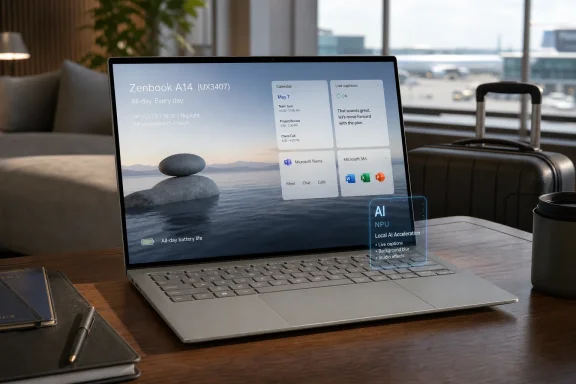 ASUS Is Selling Less Laptop, and That Is the Point
There is a familiar rhythm to premium laptop marketing. Every new generation is described as faster, smarter, thinner, lighter, and more capable than the one before it, as if enterprise buyers are still making decisions by scanning a spec sheet and circling the highest number. The Zenbook A14 is interesting because it resists that old hierarchy.This machine is not trying to be a mobile workstation. It is not trying to replace a desktop tower for engineers, video editors, or anyone whose day is defined by sustained GPU load. It is instead a bet that the most valuable business laptop in 2026 is the one that disappears into the working day: light enough to carry without calculation, efficient enough to survive meetings and travel, and quiet enough not to remind the user that thermal limits exist.
That may sound modest, but it is a serious strategic shift. For years, Windows ultraportables lived in the shadow of the MacBook Air not because they lacked features, but because too many of them still behaved like small versions of larger PCs. They were fast in bursts, inconsistent under battery, and often dependent on charger access in a way that made the “mobile” part of mobile computing feel conditional.
The Zenbook A14 belongs to the first wave of Windows laptops that tries to break that pattern by treating efficiency as a first-class performance metric. In enterprise terms, that is not a lifestyle feature. It is a cost-control mechanism.
The Spec Sheet Finally Serves the Workday
The Zenbook A14’s most important numbers are not the ones enthusiasts traditionally argue about. ASUS lists configurations built around Qualcomm Snapdragon X and Snapdragon X Elite processors, with integrated Adreno graphics and a Hexagon NPU rated up to 45 TOPS on current Snapdragon X Elite-based models. Some recent coverage has referred to Snapdragon X2 Elite and 80 TOPS-class AI hardware, but buyers should be careful here: available UX3407 configurations and regional naming vary, and procurement teams should verify the exact CPU, NPU, display, memory, and wireless configuration before standardising on a fleet.That caution matters because the Zenbook A14 name is doing a lot of work. Depending on market and SKU, buyers may encounter Snapdragon X, Snapdragon X Plus, or Snapdragon X Elite variants, with differences in core count, memory, storage, wireless support, battery capacity, and display specification. A review of “the Zenbook A14” can therefore describe the family well while still being wrong for a specific purchase order.
The broad shape, however, is consistent. This is a thin 14-inch Windows notebook with OLED display options, LPDDR5x memory, PCIe storage, USB-C charging, USB4-class connectivity on higher configurations, HDMI, USB-A, and an emphasis on very low weight. ASUS’s official material also positions the machine as a Copilot+ PC, which means it meets Microsoft’s platform requirements for local AI features, including an NPU capable of accelerating supported workloads without sending every task to the cloud.
That is the correct framing. The Zenbook A14 is not merely “an AI laptop” in the vague showroom sense. It is a Windows-on-Arm productivity machine whose AI story is inseparable from its battery story, because both depend on shifting useful work away from high-power CPU and GPU paths.
Ceraluminum Is More Than a Branding Exercise
ASUS’s most distinctive hardware decision is the chassis. The company calls the material Ceraluminum, a ceramic-treated aluminium material that it has used to make the Zenbook A14 unusually light while retaining a premium surface feel. Marketing departments love invented material names, but this one deserves more attention than the usual texture-and-colour flourish.For enterprise buyers, materials are not cosmetic. They influence visible wear, resale value, user satisfaction, repair rates, and the awkward middle period of a device lifecycle when a machine still performs adequately but looks tired enough to invite replacement pressure. A laptop that resists scratches and day-to-day scuffs is not just nicer to hold; it can stay in service longer without feeling like a hand-me-down.
There is also a behavioural dimension. A lighter, more durable-feeling device changes how people use it. Consultants bring it to client rooms. Executives carry it between meetings instead of leaving it docked. Field staff are less tempted to substitute a phone for tasks that still benefit from a proper keyboard and full desktop browser.
This is where the Zenbook A14 makes its strongest case. At roughly 1kg or less in some configurations, it occupies the psychological zone where a laptop stops being cargo. That may sound soft compared with benchmark numbers, but anyone who has watched employees choose between carrying a laptop bag or “just checking email later” knows that portability has operational consequences.
Battery Life Has Become a Management Feature
The rise of hybrid work changed what battery life means. In the old office model, a laptop battery was a backup system between wall sockets. In the current model, it is part of workforce infrastructure.A device that comfortably lasts through flights, client visits, conference days, and home-office interruptions reduces the number of small failures that do not show up in procurement dashboards. Missed notes, delayed approvals, charger hunts, drained machines before a presentation, and employees quietly lowering screen brightness to survive the day are all productivity taxes. They are individually trivial and collectively expensive.
The Zenbook A14’s Snapdragon platform is designed to attack exactly that problem. Qualcomm’s Windows-on-Arm push has not made every compatibility concern vanish, but it has forced the Windows PC market to take efficiency seriously in a way Intel and AMD have also had to answer. The result is good for buyers: battery life is no longer a secondary comfort feature but a competitive battleground.
ASUS pairs that silicon strategy with battery capacities that are unusually generous for the weight class, including 70Wh batteries on some configurations. That combination is the real trick. A laptop can be light because it has a tiny battery, or long-lasting because it has a large one. The Zenbook A14 tries to be both, and that is why it feels more consequential than yet another thin notebook refresh.
Windows on Arm Is No Longer Exotic, but It Still Demands Discipline
The awkward truth for any Snapdragon Windows laptop is that the processor is both the selling point and the caveat. Windows on Arm is far more credible than it was in the early Surface Pro X era, and mainstream productivity workflows are now largely comfortable. Microsoft 365, Teams, Edge, Chrome, Zoom, Slack, and a growing library of native Arm64 applications have made the platform viable for many office users.But “many” is not “all.” Enterprise computing is full of old VPN clients, browser plug-ins, security agents, line-of-business applications, finance tools, print utilities, device drivers, and forgotten middleware that only become visible when they break. A machine can be excellent for an individual reviewer and still be wrong for a company with one stubborn x86 dependency buried inside a critical workflow.
That does not disqualify the Zenbook A14. It simply means ASUS’s strongest business pitch depends on proper deployment hygiene. Pilot the device with real users. Validate security software, endpoint management, printing, conferencing peripherals, smart-card workflows, and any specialised applications before ordering by the pallet.
This is not unique to ASUS. It is the cost of entering the Arm era on Windows. The reward is substantial battery life and responsiveness under mobile conditions; the price is that IT departments must rediscover the old discipline of application compatibility testing instead of assuming every Windows machine is interchangeable.
Copilot+ Is Useful When It Stops Being a Slogan
The AI PC label has been abused so thoroughly that buyers are right to be sceptical. Too much of the category has been sold as if an NPU magically changes the nature of work. It does not. A neural processing unit is a specialised accelerator, not a productivity strategy.The Zenbook A14 is better understood as a machine ready for the gradual migration of small, repetitive, latency-sensitive AI tasks onto the client. Noise suppression, background effects, live captions, transcription, semantic search, image organisation, and certain assistant features make more sense when they can run locally or semi-locally. They become faster, less dependent on connectivity, and potentially less exposed to the privacy concerns of cloud round trips.
That last point matters in business. The most compelling AI features for knowledge workers often involve sensitive information: meeting audio, internal documents, customer names, presentation drafts, sales notes, and financial data. Organisations will be more willing to adopt AI workflows when some processing can happen on managed devices under policy control.
Still, buyers should resist the idea that Copilot+ alone justifies a refresh cycle. The better argument is that a machine like the Zenbook A14 buys optionality. It is a capable laptop today and a better host for local AI features as Microsoft, ASUS, Qualcomm, and third-party developers mature the software stack.
The OLED Display Is a Productivity Feature, Not Just a Luxury
OLED panels are often treated as entertainment upgrades, but in a business laptop they affect more than Netflix. Text clarity, contrast, colour accuracy, viewing angles, and perceived quality all shape how tolerable a machine is over long working sessions. A good display reduces friction in the same quiet way a good keyboard does.The Zenbook A14’s OLED options give it a premium feel that matters for executives and mobile professionals who spend much of the day in documents, dashboards, browsers, slide decks, and video calls. Deep contrast helps with readability. Wide colour reproduction helps creative-adjacent users. A 16:10 aspect ratio, where present, gives more vertical space for real work than the old 16:9 panels that dominated Windows laptops for too long.
There are trade-offs. Some configurations use FHD+ rather than ultra-high-resolution panels, and refresh rates vary by SKU. That is not automatically a problem for productivity users, but it is another reason procurement teams should not treat the UX3407 name as a single fixed object.
Display quality is also a place where ASUS understands the buying psychology of premium Windows laptops. A machine can be rationally justified by weight and battery life, but it still has to feel worth its price every time the lid opens. OLED helps close that emotional sale.
Durability Claims Matter, but They Are Not Magic
ASUS says the Zenbook A14 meets MIL-STD-810H durability testing, a phrase that appears across the laptop industry so frequently it risks becoming meaningless. The standard itself covers a range of environmental stress procedures, but vendors choose specific tests and conditions, and a passing claim should not be confused with ruggedisation. This is not a Toughbook.Even so, the claim has relevance. Thin-and-light laptops are now expected to live rougher lives than their predecessors. They move between home, office, airports, conference rooms, cafés, classrooms, and client sites. They are dropped into bags, opened repeatedly, used on trains, charged from third-party USB-C adapters, and exposed to more temperature and vibration variation than the old deskbound corporate notebook.
In that context, durability testing is a signal that the design target was not merely shelf appeal. Combined with the Ceraluminum chassis, it suggests ASUS is trying to build a machine that can survive the ordinary abuse of modern work rather than simply photograph well on a launch stage.
The distinction is important. Enterprise buyers do not need every employee laptop to be rugged. They do need premium machines to remain structurally and cosmetically acceptable through a full lifecycle. A thin laptop that ages poorly is not a bargain, no matter how elegant it looked on day one.
Warranty Is Part of the Product Now
The review material highlights ASUS’s Perfect Warranty, which provides accidental damage protection for a limited period when registered within the required window. Warranty programmes are easy to treat as after-sales paperwork, but they increasingly belong in the core product evaluation.That is because hardware cost is not the same as ownership cost. The acquisition price is visible, budgeted, and negotiated. The real pain often arrives later, in cracked displays, damaged chassis, liquid incidents, depot delays, spare units, employee downtime, and administrative overhead. A warranty that absorbs even a portion of that chaos can change the economics of a fleet.
This is especially true for ultraportables. The same mobility that makes a device productive also exposes it to more risk. A laptop carried everywhere is a laptop more likely to be knocked, dropped, compressed, or used in places with coffee, weather, and hard floors.
ASUS is not alone in recognising this. Lenovo, Dell, HP, Apple, and Microsoft all sell service and protection as part of the enterprise value proposition. But ASUS’s inclusion of Perfect Warranty in the Zenbook A14 conversation reinforces the broader point: the modern premium laptop is a bundle of hardware, software readiness, service coverage, and lifecycle assumptions.
The MacBook Air Is the Shadow Competitor
No review of a lightweight Arm-based productivity laptop can avoid Apple. The MacBook Air remains the benchmark for the category because Apple made the combination of silence, instant responsiveness, battery life, and premium build feel normal. Windows OEMs have spent years trying to match that everyday consistency.The Zenbook A14 is one of the more direct answers. It is light, efficient, quiet, and built for the work patterns that made the Air so dominant among executives, students, writers, consultants, and office professionals. It also has a Windows advantage in organisations where Microsoft management, legacy applications, Windows security tooling, and established procurement channels matter.
But Apple’s advantage is not only hardware. It controls silicon, operating system, power management, app distribution incentives, and platform transitions with a degree of integration Windows vendors cannot fully replicate. ASUS can build an excellent chassis, and Qualcomm can supply compelling silicon, but Microsoft and the broader software ecosystem still determine whether the user experiences the machine as seamless.
That is why the Zenbook A14 is both impressive and transitional. It shows that Windows laptops can now compete credibly on the Air’s traditional strengths. It also shows that the Windows ecosystem’s complexity has not disappeared just because the hardware has become more elegant.
ThinkPad, XPS, and Surface Define the Enterprise Test
The Zenbook A14’s rivals are not only Apple machines. Lenovo’s ThinkPad X1 Carbon remains the symbolic corporate ultraportable, Dell’s XPS 13 continues to represent the premium Windows design lane, and Microsoft’s Surface Laptop offers the cleanest first-party Windows experience. Each competitor exposes a different question for ASUS.Against ThinkPad, ASUS must prove that elegance can coexist with fleet practicality. ThinkPad buyers value keyboards, manageability, service options, global availability, and institutional familiarity. ASUS has made real progress in premium hardware, but enterprise trust is built over refresh cycles, not press releases.
Against XPS, the question is whether ASUS can offer a more pragmatic premium machine. Dell has often leaned into minimalism and display-forward design, sometimes at the expense of ports or repair comfort. The Zenbook A14’s inclusion of useful legacy connectivity, including USB-A and HDMI on many configurations, makes it feel less doctrinaire and more travel-ready.
Against Surface, the issue is software intimacy. Microsoft’s own laptops are the reference expression of Windows, especially for Copilot+ messaging. ASUS counters with materials, weight, OLED appeal, and often aggressive value depending on region and configuration. For many buyers, the decision will come down not to a single winner, but to which compromise best fits existing infrastructure.
Integrated Graphics Keep the Machine Honest
The Zenbook A14’s integrated Adreno graphics are sufficient for productivity, media, light creative work, and some casual workloads, but they set a clear boundary. This is not the machine for serious CAD, 3D rendering, high-end video production, scientific visualisation, or gaming-heavy users. That limitation is not a flaw so much as a definition.The danger comes when AI PC marketing blurs categories. A laptop can have a powerful NPU and still be a poor fit for GPU-bound professional work. TOPS numbers do not replace CUDA support, workstation drivers, VRAM, or sustained thermal headroom. The Zenbook A14 is designed to accelerate certain modern client-side AI features, not to become a portable engineering workstation.
That clarity helps buyers. The right user is the person who lives in Outlook, Teams, PowerPoint, Excel, Word, browsers, CRM tools, dashboards, web apps, PDFs, and video calls. The wrong user is the person whose workday depends on specialised x86 software, heavy emulation, GPU acceleration, or niche drivers.
ASUS deserves credit for building a laptop that does not pretend otherwise. The Zenbook A14’s best quality is that it knows what it is.
The Real Upgrade Is Fewer Interruptions
The best business devices are rarely thrilling in isolation. They become valuable because they reduce interruptions. The Zenbook A14 fits that model almost perfectly.Its weight reduces the interruption of deciding whether to carry it. Its battery life reduces the interruption of charger planning. Its local AI hardware reduces some dependency on cloud round trips. Its display reduces the fatigue of long sessions. Its chassis reduces anxiety about wear. Its warranty can reduce the financial sting of accidents.
None of those benefits makes for a spectacular benchmark chart. Together, they describe the kind of machine that can quietly improve the working day for a large class of professionals. That is why the review’s 9.3/10 rating, while generous, is not absurd within the intended category.
The caveat is that organisations must evaluate the whole platform, not just the device. A Zenbook A14 fleet will be successful where workflows are modern, cloud-connected, Microsoft 365-heavy, browser-centric, and not trapped by old x86 dependencies. It will be riskier where specialised software and hardware integrations still dominate.
ASUS Has Built a Strong Laptop for the Post-Benchmark Buyer
The Zenbook A14’s most persuasive audience is not the enthusiast chasing maximum performance per dollar. It is the executive, consultant, sales leader, academic, public-sector manager, founder, analyst, or mobile professional who values low weight, long endurance, premium feel, and predictable productivity. For that user, performance is not irrelevant; it is simply judged by whether the machine keeps up without becoming another thing to manage.That distinction is becoming more important across the PC market. Intel, AMD, Qualcomm, Microsoft, and the OEMs are all now fighting over efficiency, AI acceleration, and experience-level performance rather than only peak CPU scores. The Zenbook A14 sits directly inside that transition.
Its weaknesses are real. Windows on Arm still requires application validation. Integrated graphics limit professional creative and engineering use. Premium configurations may face strong competition from Apple, Lenovo, Dell, HP, and Microsoft. SKU variation means buyers need to read the fine print.
But the machine’s strengths are coherent. It is not a random collection of fashionable features. It is a laptop designed around a specific thesis: the future of the business ultraportable is lighter, longer-lasting, locally AI-capable, and less tolerant of daily friction.
The Zenbook A14’s Best Arguments Fit in a Travel Bag
The Zenbook A14 is easiest to understand as a practical answer to the way professionals actually work now. It is not a universal PC, and that is precisely why it is interesting. ASUS has optimised for the user who moves constantly, communicates constantly, and needs the laptop to remain ready without demanding attention.- The Zenbook A14 is best viewed as a premium mobility machine, not a workstation replacement.
- Buyers should verify the exact UX3407 configuration because processor, display, wireless, memory, storage, and battery details can vary by region and SKU.
- The Snapdragon X platform gives the device its strongest advantage in battery life and responsiveness, but Windows-on-Arm compatibility testing remains essential for enterprise deployments.
- ASUS’s Ceraluminum chassis and low weight are not just design flourishes; they directly support longer lifecycle value and better day-to-day portability.
- The Copilot+ and NPU story is most convincing when treated as local acceleration for practical workflows, not as a reason by itself to refresh every laptop.
- The strongest business case combines endurance, durability, warranty protection, and reduced user friction rather than headline benchmark performance.
References
- Primary source: Techeconomy
Published: 2026-06-19T14:52:07.646659
ASUS Zenbook A14 (UX3407) Review: A Business-Class AI PC That Prioritises Productivity Over Power
Every laptop makes promises; faster performance, longer battery life, smarter AI and even better productivity. The challenge for enterprise buyerstecheconomy.ng - Related coverage: asus.com

ASUS Zenbook A14 (UX3407) | Ultra- Lightweight Copilot+ PC - Tech Specs
ASUS Zenbook A14: Discover a lightweight Copilot+ PC with Snapdragon® X2 Elite (Glymur), 33+ hrs battery life, and full Ceraluminum™ chassis for multitasking.
www.asus.com
- Related coverage: press.asus.com
ASUS Announces All-New Zenbook A14 | ASUS Pressroom - Official Global News & Updates
Discover the ASUS Zenbook A14, the world's lightest 14-inch Copilot+ PC with Snapdragon X Series AI processor, 32-hour battery life, and Ceraluminum chassis. Subscribe to ASUS Pressroom for the latest tech updates! press.asus.com
- Related coverage: rtings.com
ASUS Zenbook A14 UX3407 (2025) Review - RTINGS.com
The ASUS Zenbook A14 UX3407 (2025) is an ARM-based Windows ultraportable laptop. It's available with a Qualcomm Snapdragon X, X Plus, or X Elite SoC, with up to ... www.rtings.com
- Related coverage: ultrabookreview.com
Asus Zenbook A14 review (UX3407 model, Snapdragon)
This is my detailed review of the Asus Zenbook A14 series, the early-2025 addition to the Zenbook lineup, a brand new chassis design for a computer built onwww.ultrabookreview.com - Related coverage: nanoreview.net
Asus Zenbook A14 (UX3407): full specs, tests and user reviews
Asus Zenbook A14 (UX3407): detailed specifications, user reviews, performance, display and battery life tests.nanoreview.net
- Related coverage: itpro.com
Asus Zenbook A14 (UX3407) review | IT Pro
While it falls down on raw performance, the Zenbook A14 excels as an effective, ultramobile, AI-ready devicewww.itpro.com - Related coverage: techradar.com
Asus Zenbook A14 review: A super light yet high-performing laptop with a price to match | TechRadar
It might prioritize portability, but the Asus Zenbook A14 is no slouch when it comes to performance.www.techradar.com - Related coverage: windowscentral.com
ASUS Zenbook A14 review: The lightest, longest-lasting AI PC | Windows Central
The ASUS Zenbook A14 (2025) amazed the entire Windows Central crew at CES 2025, and it really is an incredible, gorgeous AI PC. The models are confusing, though.www.windowscentral.com - Related coverage: bttr.reviews
ASUS Zenbook A14 (UX3407) review: Don’t underestimate the power of the light side
At just 980 grams, the ASUS Zenbook A14 is one of the lightest laptops I've ever tested. Is that enough? www.bttr.reviews
- Related coverage: fonearena.com
- Related coverage: asus.com.cn

灵耀14 Air 骁龙版 (UX3407)丨笔记本电脑丨ASUS华硕 - 规格参数
灵耀14 Air 骁龙版 (UX3407) 不到1 kg, 高达约22小时长续航, Snapdragon® X 系列处理器, AI PC, 高科技陶瓷铝.
www.asus.com.cn
- Related coverage: technext24.com
ASUS Zenbook A14 (UX3407) Review: Is This the Lightest Copilot+ PC and the Perfect Ultrabook?
Of a truth, the ASUS Zenbook A14 (UX3407) is a cutting-edge laptop designed for professionals and tech enthusiasts…technext24.com
