

ASUS’s Zenbook A16 is a 16-inch Copilot+ PC laptop reviewed by Thurrott.com in June 2026, built around Qualcomm’s Snapdragon X2 Elite Extreme processor, a 3K OLED display, and an unusually light 2.6-pound chassis that positions it as a premium Windows-on-Arm flagship. The review’s larger point is not merely that ASUS made a good laptop; it is that the shape of the high-end Windows notebook is changing. Thin, quiet, long-lived machines are no longer defined by how much Intel or AMD performance they can squeeze into a fan curve. They are increasingly defined by whether Windows on Arm can stop feeling like a compromise.
For years, the pitch for Arm-based Windows PCs has sounded almost too neat: MacBook-like battery life, instant-on responsiveness, cellular-era efficiency, and enough compatibility work in Windows to make the architecture fade into the background. The first Snapdragon X generation made that argument plausible. The Zenbook A16, at least as described in Paul Thurrott’s review, makes it physical.
The important thing about the A16 is not any one specification. It is the combination: a 16-inch OLED laptop that weighs less than many 14-inch machines, runs silently in ordinary work, lasts through a real workday, and still carries a flagship-class processor. That is the kind of product Windows OEMs have often gestured toward but rarely delivered without some visible trade-off.
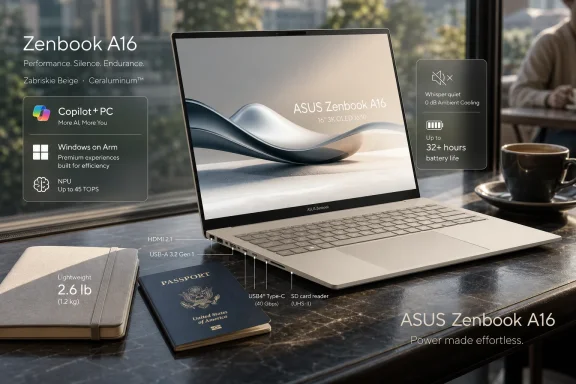
ASUS did not get there by shaving ports to nothing, shrinking the keyboard into a travel toy, or selling a luxury slab that works only on a desk. The A16 still has HDMI, USB-A, an SD card reader, two USB4-class Type-C ports, and a conventional headphone jack. That matters because “thin and light” has too often been code for “bring dongles.”
The bigger story is that Qualcomm’s second-generation Snapdragon X2 silicon appears to have given ASUS enough thermal room to make a 16-inch Windows laptop behave like an ultraportable. Thurrott’s review argues bluntly that this design would not be possible, at least not in the same way, with current x86 chips from AMD or Intel. That claim will irritate traditional PC partisans, but it captures the pressure now facing the Windows hardware ecosystem.
Thurrott’s repeated emphasis on how surprising the laptop feels in the hand is more than reviewer enthusiasm. It speaks to a practical threshold. A 16-inch machine that weighs less than a 15-inch MacBook Air changes how often someone will reach for the bigger display instead of leaving it docked, packed, or ignored.
ASUS gets there with its “Ceraluminum” chassis material, a branding decision that sounds like it escaped a committee meeting but appears to matter in use. The magnesium-aluminum alloy construction contributes to the laptop’s low weight and distinctive surface finish. The review notes that some buyers may find the material almost plastic-like, which is exactly the kind of perception problem PC makers create when they spend years training consumers to equate cold metal density with quality.
That reaction is worth challenging. Plastic and composite-feeling materials are not inherently cheap; bad rigidity, poor fit, and short service life are cheap. According to the review, the keyboard deck is highly rigid, the surface is pleasant under the palms, and the machine feels stable in normal use. If the price of a 16-inch laptop that weighs 2.6 pounds is that it does not impersonate a billet of aluminum, many users will make that trade gladly.
The one place the design sounds less convincing is the display lid. Thurrott notes some flex if the upper corners are pushed or pulled, though not enough to create a real-world problem during the review period. That is the kind of compromise that may not matter in a careful adult’s office but could become meaningful after years of travel, backpacks, conference tables, and overhead bins.
PC makers have spent the last decade making expensive laptops look like airport furniture. Silver, black, dark gray, and darker gray dominate because they feel safe, not because users asked for uniformity. ASUS taking a swing on beige is a small act of industrial-design confidence, even if the marketing language around it is strained.
The A16’s minimalist exterior helps the color work. The branding is restrained, the keyboard contrast is strong, and the overall effect is more “desert modern” than retro office equipment. ASUS apparently could not resist the usual sticker clutter, including a baffling HDMI sticker, but the base design is clean enough that the stickers read as removable sins rather than structural ones.
There is a broader lesson here for Windows OEMs. Apple’s design language is not powerful only because it is pretty; it is powerful because it is coherent. Windows laptops too often mix premium materials, gamer flourishes, retail stickers, regulatory marks, and utility software nags into one visual argument against themselves. The Zenbook A16 seems to understand that restraint is a feature.
The important choice is that ASUS offers touch and non-touch variants. That may sound minor, but it is one of the more user-respecting decisions in the design. Some buyers want touch on every Windows device; others would rather avoid the weight, reflections, cost, and smudges. On a laptop where lightness is central to the pitch, letting buyers choose is exactly right.
The glossy finish remains the usual OLED tax. Thurrott says it is not an issue unless the laptop is used outside, but that caveat will matter to some travelers. Bright OLED panels can brute-force their way through a lot of indoor glare, yet they still struggle in sunlight and reflective environments in ways matte IPS displays do not.
The more interesting complaint is the lid angle. The review notes that the display does not lie flat and does not even come close. That is not a deal-breaker for most notebook users, but it is odd on a premium machine, especially one with optional touch. It slightly narrows the laptop’s versatility in cramped spaces, presentations, couch use, and collaboration.
ASUS partly redeems the display story through software. Thurrott praises the MyASUS utility for unusually rich display configuration, including burn-in prevention options, color modes, gamut choices, and reading-oriented settings. OEM utilities are often where good hardware goes to be nagged at, upsold, or slowed down. Here, ASUS appears to have built something that actually extends the panel’s usefulness.
The review configuration’s 48 GB of LPDDR5X memory is just as important as the CPU. Modern premium laptops are drifting back toward uncomfortable memory configurations as component prices rise, and 8 GB machines are reappearing where they have no business being. A sealed laptop with insufficient RAM is not a bargain; it is a countdown timer.
Thurrott’s argument that the A16 is future-proof rests less on raw CPU power than on the whole package: high-end Arm silicon, generous memory, fast storage, a premium display, modern connectivity, and a chassis that users will actually want to carry. That is a persuasive case. A laptop meant to last several years should not ask its owner to nurse a 16 GB memory ceiling if heavier development work, local AI features, browser sprawl, or creative apps become more demanding.
But the Snapdragon X2 Elite Extreme also creates a pricing problem. If day-to-day productivity feels similarly excellent on cheaper Snapdragon X2 Plus or original Snapdragon X systems, the top chip risks becoming a luxury justification rather than a practical requirement. Thurrott essentially says as much: ordinary work does not obviously expose the gap.
That is not a failure of the chip. It is a sign that modern CPUs are often ahead of mainstream workloads. The same problem exists on MacBooks, Intel Core Ultra systems, and Ryzen laptops. Most buyers do not need the top die; they buy it because it buys them time, reduces regret, or makes the machine feel less likely to age badly.
For office work, browsing, writing, communication, development tasks, media playback, and remote meetings, the old warnings about Windows on Arm are becoming less central. Microsoft’s emulation layer has improved, native Arm64 app availability is broader, and the Copilot+ PC baseline gives OEMs a consistent AI-capable platform to target. The result is not universal perfection, but it is enough to make many users stop caring which instruction set is underneath.
Gaming remains the conspicuous exception. Thurrott’s testing paints the familiar picture: some games run surprisingly well with tuning, some refuse to cooperate, and some crash or fail outright. That is progress compared with the early Windows-on-Arm era, but it is not a world where a buyer should expect a frictionless Steam library.
The Tomb Raider example is revealing. The game was initially unplayable at auto-configured settings, then became extremely fast after manual changes to resolution, refresh rate, and quality. That demonstrates capability, but it also demonstrates cost. A gaming laptop experience is not merely “can frames be produced?” It is “can users install, launch, and play without treating every title like a science project?”
Anti-cheat systems, driver expectations, translation layers, graphics APIs, and game launchers all complicate the Arm transition. Qualcomm and Microsoft can improve the platform, but they do not control the entire PC gaming stack. Until that ecosystem moves, Windows on Arm will remain a poor recommendation for users whose laptop is also their main gaming machine.
That experience changes expectations. Once a user spends weeks with a large laptop that does not constantly breathe, ramp, warm, or throttle its way through normal workloads, noisier machines begin to feel dated. The PC industry spent years convincing users that fans were just the price of performance. Arm laptops are proving that, for many workloads, they are the price of legacy assumptions.
This does not mean Intel and AMD are doomed. Both companies are improving efficiency, integrating NPUs, and building chips for thinner systems. But they are now fighting on terrain Qualcomm helped define: performance per watt, standby behavior, acoustic comfort, and AI acceleration as baseline platform traits.
The Zenbook A16 also shows how system design compounds silicon efficiency. Long rubber feet improve stability and airflow. The chassis has enough room for a 16-inch thermal envelope without feeling like a workstation. The software exposes fan profiles without requiring the user to babysit them. This is the kind of boring integration that makes a premium laptop feel premium.
The review also highlights a tension in the Extreme chip’s power behavior. Under load, it can draw enough power that ASUS ships the laptop with a 130-watt USB-C charger. That is a reminder that Arm efficiency is not magic. A high-performance chip running hard still needs power, and laptop makers still make choices about how unconstrained they allow that silicon to be.
The practical upside is flexibility. Users can charge more slowly from a common 65-watt USB-C charger, while the included adapter covers heavier loads and faster top-ups. For travelers, that means the A16 does not lock them into proprietary charging even if the official brick is beefier than expected.
There was one reliability wrinkle. Thurrott saw occasional wake behavior where the laptop did not immediately come alive after opening the lid, though the issue apparently disappeared after disabling ASUS’s “Hibernation Helper” feature. That sounds like exactly the kind of OEM power-management layer Windows laptops do not need: well-intentioned, possibly battery-minded, and capable of undermining the instant-on experience the platform is supposed to showcase.
The reassuring part is that disabling it did not appear to cause major overnight drain. If the laptop still loses only a few percentage points overnight, then ASUS should reconsider whether the feature should exist, ship enabled, or be much more transparent. Modern standby has enough history without vendors adding their own mystery switches.
The one complaint is placement: both USB-C ports sit on the same side. That is not fatal, but it is a daily annoyance for users who charge from different sides of a desk, couch, airplane seat, or conference room. Once a laptop uses USB-C for power, one port on each side becomes less a luxury than a courtesy.
Still, ASUS deserves credit for resisting the false elegance of port starvation. A 16-inch laptop has room for full-size connectors, and many of its likely buyers will use them. Photographers appreciate SD. Presenters appreciate HDMI. Everyone eventually appreciates USB-A when handed a flash drive, receiver dongle, keyboard, microphone, or lab device that refuses to care about design trends.
This is another way the A16 differs from pure minimalism. It is visually restrained but functionally practical. That is a better definition of premium than “thin enough to require accessories.”
The touchpad is more complicated. It is large, mechanical, and mostly reliable after adjustment, but Thurrott reports cursor jumps, accidental selection, and typing disruption until he lowered sensitivity and disabled some gestures. That is an old PC laptop wound reopening on otherwise modern hardware.
Huge touchpads look luxurious in product photos, but they can punish users with large hands or heavy typing styles. Palm rejection has improved dramatically across the industry, yet the combination of oversized surfaces and aggressive gestures still creates edge cases. For a machine this good, “we’re working through it together” is a charming line but not a perfect verdict.
ASUS is hardly alone here. Many Windows laptops chase the MacBook touchpad silhouette without matching Apple’s years of hardware-software tuning. A large pointing surface is useful only if it knows when to disappear. If firmware or driver updates can improve the A16’s palm rejection, ASUS should treat that as a priority rather than a quirk.
That is exactly where NPUs should matter first. The public marketing around AI PCs often drifts into vague promises about future local models and productivity agents. In the real world, better background blur, eye contact, framing, noise suppression, and voice cleanup are the AI features people use now.
The speakers appear to be another pleasant surprise. ASUS claims six speakers, and Thurrott expresses some skepticism about where they all are, but the experienced result is loud, immersive, and clean for the form factor. Dolby Atmos support and ASUS’s own volume tools help, though physics still rewards placing the machine on a solid surface.
Good laptop audio is easy to underrate until it is missing. For hybrid workers, travelers, students, and anyone who watches video away from a desk, speakers are not a luxury feature. They are part of whether a laptop feels self-contained or constantly asks for headphones.
The missing fingerprint reader is not a disaster, but it is a limitation. Facial recognition works beautifully at a desk and in many travel contexts, but fingerprints remain useful when lighting is awkward, the camera is covered, the laptop is angled strangely, or the user simply prefers another method. Premium laptops should offer both when possible.
ASUS’s electronic webcam privacy toggle is a thoughtful alternative to the tiny physical shutters that invite users to smear the camera lens. Hardware privacy purists may still prefer a visible mechanical block, but a function-row camera toggle is easier to use and harder to fumble. The microphone toggle completes the expected hybrid-work control set.
The broader security question is platform maturity. Windows on Arm now inherits the same enterprise expectations as other Windows machines: patch cadence, driver reliability, VPN compatibility, endpoint protection, management tools, and line-of-business app behavior. The A16 may be a consumer premium laptop, but its configuration will tempt professionals, developers, and executives. For them, security is not just Windows Hello; it is whether every required tool behaves.
The surprising bright spot is MyASUS. Thurrott repeatedly returns to it as useful, especially for display tuning, fan profiles, battery behavior, audio options, and system settings. That is rare praise for an OEM utility category better known for upsells, redundant notifications, and driver roulette.
The other ASUS apps are less convincing. GlideX duplicates some Phone Link territory while adding second-screen and device interaction features. ScreenXpert sounds like the more irritating sort of overlay utility, the kind that begins as convenience and ends as visual noise. Thurrott tried living with it and gave up, which is often the most honest software review possible.
Still, ASUS apparently avoids one of the dumbest current OEM trends: shipping a branded AI chatbot nobody asked for. That restraint matters. The AI PC era has already produced too much software theater. If a vendor cannot make its assistant meaningfully better than what Windows and the user’s chosen apps already provide, not bundling it is a feature.
Some of this appears tied to broader component cost pressure. Memory and storage pricing have been unstable, and PC makers are reacting in ways that make configurations harder to compare. ASUS reportedly responded with a 24 GB model at the original price point, but that creates its own dilemma: the A16’s future-proofing argument is strongest in the 48 GB configuration.
At $1,699, the machine sounds like a standout. At $2,199, it starts competing with a wider set of premium Windows laptops and MacBooks, including machines with stronger gaming compatibility, more mature creative workflows, or deeper enterprise validation. The A16 may still win on weight, silence, ports, and display, but buyers will ask harder questions.
This is where the Snapdragon pitch runs into retail reality. Qualcomm can make an efficient platform, ASUS can build a desirable chassis, and Microsoft can improve Windows on Arm. But if flagship Arm PCs arrive at prices that make them feel experimental and expensive, adoption slows among exactly the users who might otherwise take the leap.
Yet the market around the A16 is still uneven. Windows on Arm is good enough for many users and still wrong for some. Copilot+ PCs are technically capable of local AI features, but the killer workflows remain underdeveloped. Snapdragon X2 performance is impressive, but the practical value of the top-end Extreme tier depends heavily on workload, memory needs, and how long a buyer plans to keep the machine.
That makes the A16 a fascinating recommendation rather than a universal one. For writers, consultants, executives, students, developers with compatible toolchains, and frequent travelers who want a big display without a big bag penalty, it sounds exceptional. For gamers, specialized creative professionals, and organizations with brittle legacy software, it remains a machine to test before standardizing.
The best version of this laptop’s legacy would be competitive pressure. Intel and AMD systems should become quieter and lighter because machines like this exist. Windows OEMs should offer more non-touch OLED options because ASUS did. Premium laptops should include useful ports because the A16 proves thinness does not forbid them. And OEM utilities should become less awful because MyASUS apparently manages to help more than it hinders.
Here is the practical read for WindowsForum readers weighing the A16 against more familiar machines:
 ASUS Builds the Windows Laptop Qualcomm Has Been Promising
For years, the pitch for Arm-based Windows PCs has sounded almost too neat: MacBook-like battery life, instant-on responsiveness, cellular-era efficiency, and enough compatibility work in Windows to make the architecture fade into the background. The first Snapdragon X generation made that argument plausible. The Zenbook A16, at least as described in Paul Thurrott’s review, makes it physical.The important thing about the A16 is not any one specification. It is the combination: a 16-inch OLED laptop that weighs less than many 14-inch machines, runs silently in ordinary work, lasts through a real workday, and still carries a flagship-class processor. That is the kind of product Windows OEMs have often gestured toward but rarely delivered without some visible trade-off.
ASUS did not get there by shaving ports to nothing, shrinking the keyboard into a travel toy, or selling a luxury slab that works only on a desk. The A16 still has HDMI, USB-A, an SD card reader, two USB4-class Type-C ports, and a conventional headphone jack. That matters because “thin and light” has too often been code for “bring dongles.”
The bigger story is that Qualcomm’s second-generation Snapdragon X2 silicon appears to have given ASUS enough thermal room to make a 16-inch Windows laptop behave like an ultraportable. Thurrott’s review argues bluntly that this design would not be possible, at least not in the same way, with current x86 chips from AMD or Intel. That claim will irritate traditional PC partisans, but it captures the pressure now facing the Windows hardware ecosystem.
The 2.6-Pound Trick Changes the Whole Machine
Laptop weight is one of those specifications that looks boring until it changes your daily behavior. A 16-inch notebook has traditionally meant a deliberate choice: you carry it because you need the screen, not because it disappears into a bag. At 2.6 pounds in the reviewed configuration, the Zenbook A16 collapses that distinction.Thurrott’s repeated emphasis on how surprising the laptop feels in the hand is more than reviewer enthusiasm. It speaks to a practical threshold. A 16-inch machine that weighs less than a 15-inch MacBook Air changes how often someone will reach for the bigger display instead of leaving it docked, packed, or ignored.
ASUS gets there with its “Ceraluminum” chassis material, a branding decision that sounds like it escaped a committee meeting but appears to matter in use. The magnesium-aluminum alloy construction contributes to the laptop’s low weight and distinctive surface finish. The review notes that some buyers may find the material almost plastic-like, which is exactly the kind of perception problem PC makers create when they spend years training consumers to equate cold metal density with quality.
That reaction is worth challenging. Plastic and composite-feeling materials are not inherently cheap; bad rigidity, poor fit, and short service life are cheap. According to the review, the keyboard deck is highly rigid, the surface is pleasant under the palms, and the machine feels stable in normal use. If the price of a 16-inch laptop that weighs 2.6 pounds is that it does not impersonate a billet of aluminum, many users will make that trade gladly.
The one place the design sounds less convincing is the display lid. Thurrott notes some flex if the upper corners are pushed or pulled, though not enough to create a real-world problem during the review period. That is the kind of compromise that may not matter in a careful adult’s office but could become meaningful after years of travel, backpacks, conference tables, and overhead bins.
Beige Becomes a Statement Because Everything Else Got Boring
The Zenbook A16 comes in “Zabriskie Beige,” which is either an inspired break from the grayscale laptop monoculture or a name that should have been intercepted before launch. Thurrott clearly likes the color, even while acknowledging that the name is polarizing. He is right on both counts.PC makers have spent the last decade making expensive laptops look like airport furniture. Silver, black, dark gray, and darker gray dominate because they feel safe, not because users asked for uniformity. ASUS taking a swing on beige is a small act of industrial-design confidence, even if the marketing language around it is strained.
The A16’s minimalist exterior helps the color work. The branding is restrained, the keyboard contrast is strong, and the overall effect is more “desert modern” than retro office equipment. ASUS apparently could not resist the usual sticker clutter, including a baffling HDMI sticker, but the base design is clean enough that the stickers read as removable sins rather than structural ones.
There is a broader lesson here for Windows OEMs. Apple’s design language is not powerful only because it is pretty; it is powerful because it is coherent. Windows laptops too often mix premium materials, gamer flourishes, retail stickers, regulatory marks, and utility software nags into one visual argument against themselves. The Zenbook A16 seems to understand that restraint is a feature.
The OLED Panel Is Luxury With a Few Real-World Edges
The display is exactly the kind of panel a premium 2026 laptop is expected to have: 16 inches, 16:10 aspect ratio, 2880-by-1800 resolution, OLED, 120 Hz variable refresh, wide color support, and high HDR brightness. In other words, ASUS is not asking buyers to accept an efficiency-first screen to get an efficiency-first platform. The A16 is built to look expensive.The important choice is that ASUS offers touch and non-touch variants. That may sound minor, but it is one of the more user-respecting decisions in the design. Some buyers want touch on every Windows device; others would rather avoid the weight, reflections, cost, and smudges. On a laptop where lightness is central to the pitch, letting buyers choose is exactly right.
The glossy finish remains the usual OLED tax. Thurrott says it is not an issue unless the laptop is used outside, but that caveat will matter to some travelers. Bright OLED panels can brute-force their way through a lot of indoor glare, yet they still struggle in sunlight and reflective environments in ways matte IPS displays do not.
The more interesting complaint is the lid angle. The review notes that the display does not lie flat and does not even come close. That is not a deal-breaker for most notebook users, but it is odd on a premium machine, especially one with optional touch. It slightly narrows the laptop’s versatility in cramped spaces, presentations, couch use, and collaboration.
ASUS partly redeems the display story through software. Thurrott praises the MyASUS utility for unusually rich display configuration, including burn-in prevention options, color modes, gamut choices, and reading-oriented settings. OEM utilities are often where good hardware goes to be nagged at, upsold, or slowed down. Here, ASUS appears to have built something that actually extends the panel’s usefulness.
Snapdragon X2 Elite Extreme Is the Star and the Trap
The Zenbook A16’s headline component is Qualcomm’s Snapdragon X2 Elite Extreme, the top-end member of the second-generation Snapdragon X family. Qualcomm’s public positioning for the chip emphasizes 18 CPU cores, up to 5 GHz clock speeds, an 80 TOPS NPU, and much higher memory bandwidth than the first wave of Snapdragon X systems. ASUS is using that silicon to claim a place at the very top of the Windows-on-Arm market.The review configuration’s 48 GB of LPDDR5X memory is just as important as the CPU. Modern premium laptops are drifting back toward uncomfortable memory configurations as component prices rise, and 8 GB machines are reappearing where they have no business being. A sealed laptop with insufficient RAM is not a bargain; it is a countdown timer.
Thurrott’s argument that the A16 is future-proof rests less on raw CPU power than on the whole package: high-end Arm silicon, generous memory, fast storage, a premium display, modern connectivity, and a chassis that users will actually want to carry. That is a persuasive case. A laptop meant to last several years should not ask its owner to nurse a 16 GB memory ceiling if heavier development work, local AI features, browser sprawl, or creative apps become more demanding.
But the Snapdragon X2 Elite Extreme also creates a pricing problem. If day-to-day productivity feels similarly excellent on cheaper Snapdragon X2 Plus or original Snapdragon X systems, the top chip risks becoming a luxury justification rather than a practical requirement. Thurrott essentially says as much: ordinary work does not obviously expose the gap.
That is not a failure of the chip. It is a sign that modern CPUs are often ahead of mainstream workloads. The same problem exists on MacBooks, Intel Core Ultra systems, and Ryzen laptops. Most buyers do not need the top die; they buy it because it buys them time, reduces regret, or makes the machine feel less likely to age badly.
Windows on Arm Now Wins the Workday and Still Loses Some Nights
The Zenbook A16 seems to deliver the core Windows-on-Arm promise where it matters most: daily productivity. Thurrott describes it as fast, silent, cool, responsive, and largely free from configuration drama in normal work. That is the point at which architecture stops being a hobbyist debate and becomes a user experience.For office work, browsing, writing, communication, development tasks, media playback, and remote meetings, the old warnings about Windows on Arm are becoming less central. Microsoft’s emulation layer has improved, native Arm64 app availability is broader, and the Copilot+ PC baseline gives OEMs a consistent AI-capable platform to target. The result is not universal perfection, but it is enough to make many users stop caring which instruction set is underneath.
Gaming remains the conspicuous exception. Thurrott’s testing paints the familiar picture: some games run surprisingly well with tuning, some refuse to cooperate, and some crash or fail outright. That is progress compared with the early Windows-on-Arm era, but it is not a world where a buyer should expect a frictionless Steam library.
The Tomb Raider example is revealing. The game was initially unplayable at auto-configured settings, then became extremely fast after manual changes to resolution, refresh rate, and quality. That demonstrates capability, but it also demonstrates cost. A gaming laptop experience is not merely “can frames be produced?” It is “can users install, launch, and play without treating every title like a science project?”
Anti-cheat systems, driver expectations, translation layers, graphics APIs, and game launchers all complicate the Arm transition. Qualcomm and Microsoft can improve the platform, but they do not control the entire PC gaming stack. Until that ecosystem moves, Windows on Arm will remain a poor recommendation for users whose laptop is also their main gaming machine.
Silence Is the Feature Intel and AMD Should Fear
The most threatening part of the Zenbook A16 for x86 incumbents is not a benchmark. It is the absence of drama. Thurrott says the laptop is almost always silent, rarely warm, and difficult to provoke into audible fan behavior during ordinary use.That experience changes expectations. Once a user spends weeks with a large laptop that does not constantly breathe, ramp, warm, or throttle its way through normal workloads, noisier machines begin to feel dated. The PC industry spent years convincing users that fans were just the price of performance. Arm laptops are proving that, for many workloads, they are the price of legacy assumptions.
This does not mean Intel and AMD are doomed. Both companies are improving efficiency, integrating NPUs, and building chips for thinner systems. But they are now fighting on terrain Qualcomm helped define: performance per watt, standby behavior, acoustic comfort, and AI acceleration as baseline platform traits.
The Zenbook A16 also shows how system design compounds silicon efficiency. Long rubber feet improve stability and airflow. The chassis has enough room for a 16-inch thermal envelope without feeling like a workstation. The software exposes fan profiles without requiring the user to babysit them. This is the kind of boring integration that makes a premium laptop feel premium.
Battery Life Is Excellent, Not Magical, and That Is Enough
Thurrott reports roughly 10 hours of real-world battery life, which is excellent for a 16-inch OLED laptop with a high-end chip but not a revolution beyond the best first-generation Snapdragon X machines. That matters because Qualcomm’s second-generation story should not be reduced to “more battery.” The more interesting story is maintaining strong battery life while increasing performance and screen ambition.The review also highlights a tension in the Extreme chip’s power behavior. Under load, it can draw enough power that ASUS ships the laptop with a 130-watt USB-C charger. That is a reminder that Arm efficiency is not magic. A high-performance chip running hard still needs power, and laptop makers still make choices about how unconstrained they allow that silicon to be.
The practical upside is flexibility. Users can charge more slowly from a common 65-watt USB-C charger, while the included adapter covers heavier loads and faster top-ups. For travelers, that means the A16 does not lock them into proprietary charging even if the official brick is beefier than expected.
There was one reliability wrinkle. Thurrott saw occasional wake behavior where the laptop did not immediately come alive after opening the lid, though the issue apparently disappeared after disabling ASUS’s “Hibernation Helper” feature. That sounds like exactly the kind of OEM power-management layer Windows laptops do not need: well-intentioned, possibly battery-minded, and capable of undermining the instant-on experience the platform is supposed to showcase.
The reassuring part is that disabling it did not appear to cause major overnight drain. If the laptop still loses only a few percentage points overnight, then ASUS should reconsider whether the feature should exist, ship enabled, or be much more transparent. Modern standby has enough history without vendors adding their own mystery switches.
ASUS Remembers That Ports Are Not Nostalgia
The Zenbook A16’s port selection is unusually sane for an ultralight premium laptop. Two USB4/Thunderbolt 4-class Type-C ports, HDMI 2.1, USB-A, a headphone jack, and a full-size SD 4.0 card reader make the machine useful without turning the left side of the bag into a cable bazaar.The one complaint is placement: both USB-C ports sit on the same side. That is not fatal, but it is a daily annoyance for users who charge from different sides of a desk, couch, airplane seat, or conference room. Once a laptop uses USB-C for power, one port on each side becomes less a luxury than a courtesy.
Still, ASUS deserves credit for resisting the false elegance of port starvation. A 16-inch laptop has room for full-size connectors, and many of its likely buyers will use them. Photographers appreciate SD. Presenters appreciate HDMI. Everyone eventually appreciates USB-A when handed a flash drive, receiver dongle, keyboard, microphone, or lab device that refuses to care about design trends.
This is another way the A16 differs from pure minimalism. It is visually restrained but functionally practical. That is a better definition of premium than “thin enough to require accessories.”
The Keyboard Wins, the Touchpad Negotiates
The keyboard sounds like one of the A16’s quiet victories. Thurrott describes full-size, backlit keys with 1.33 mm of travel, strong feedback, sensible modifier placement, and reliable automatic backlighting. Those details matter because a great laptop keyboard is not an accessory; it is the main interface.The touchpad is more complicated. It is large, mechanical, and mostly reliable after adjustment, but Thurrott reports cursor jumps, accidental selection, and typing disruption until he lowered sensitivity and disabled some gestures. That is an old PC laptop wound reopening on otherwise modern hardware.
Huge touchpads look luxurious in product photos, but they can punish users with large hands or heavy typing styles. Palm rejection has improved dramatically across the industry, yet the combination of oversized surfaces and aggressive gestures still creates edge cases. For a machine this good, “we’re working through it together” is a charming line but not a perfect verdict.
ASUS is hardly alone here. Many Windows laptops chase the MacBook touchpad silhouette without matching Apple’s years of hardware-software tuning. A large pointing surface is useful only if it knows when to disappear. If firmware or driver updates can improve the A16’s palm rejection, ASUS should treat that as a priority rather than a quirk.
The Webcam and Speakers Beat Their Spec Sheet
The Zenbook A16’s audio and video story is stronger than the raw hardware description suggests. A Full HD webcam and array microphone do not sound special in 2026, but Thurrott found the camera above average and the microphone good enough for mainstream conferencing once Windows Studio Effects Voice Clarity was enabled.That is exactly where NPUs should matter first. The public marketing around AI PCs often drifts into vague promises about future local models and productivity agents. In the real world, better background blur, eye contact, framing, noise suppression, and voice cleanup are the AI features people use now.
The speakers appear to be another pleasant surprise. ASUS claims six speakers, and Thurrott expresses some skepticism about where they all are, but the experienced result is loud, immersive, and clean for the form factor. Dolby Atmos support and ASUS’s own volume tools help, though physics still rewards placing the machine on a solid surface.
Good laptop audio is easy to underrate until it is missing. For hybrid workers, travelers, students, and anyone who watches video away from a desk, speakers are not a luxury feature. They are part of whether a laptop feels self-contained or constantly asks for headphones.
Security Is Modern, Though Biometrics Could Be Broader
As a Copilot+ PC, the Zenbook A16 carries the expected modern Windows security baseline: TPM 2.0, Windows Hello Enhanced Sign-in Security, and facial recognition. Thurrott found face sign-in fast and reliable, which is the minimum requirement for biometric authentication to be more than a checkbox.The missing fingerprint reader is not a disaster, but it is a limitation. Facial recognition works beautifully at a desk and in many travel contexts, but fingerprints remain useful when lighting is awkward, the camera is covered, the laptop is angled strangely, or the user simply prefers another method. Premium laptops should offer both when possible.
ASUS’s electronic webcam privacy toggle is a thoughtful alternative to the tiny physical shutters that invite users to smear the camera lens. Hardware privacy purists may still prefer a visible mechanical block, but a function-row camera toggle is easier to use and harder to fumble. The microphone toggle completes the expected hybrid-work control set.
The broader security question is platform maturity. Windows on Arm now inherits the same enterprise expectations as other Windows machines: patch cadence, driver reliability, VPN compatibility, endpoint protection, management tools, and line-of-business app behavior. The A16 may be a consumer premium laptop, but its configuration will tempt professionals, developers, and executives. For them, security is not just Windows Hello; it is whether every required tool behaves.
The Software Story Is Better Because ASUS Mostly Gets Out of the Way
The Zenbook A16 ships with Windows 11 Pro in Thurrott’s review unit and the expected Copilot+ PC feature set. The bundled promotional apps sound annoying but not catastrophic. In 2026, that unfortunately counts as restraint.The surprising bright spot is MyASUS. Thurrott repeatedly returns to it as useful, especially for display tuning, fan profiles, battery behavior, audio options, and system settings. That is rare praise for an OEM utility category better known for upsells, redundant notifications, and driver roulette.
The other ASUS apps are less convincing. GlideX duplicates some Phone Link territory while adding second-screen and device interaction features. ScreenXpert sounds like the more irritating sort of overlay utility, the kind that begins as convenience and ends as visual noise. Thurrott tried living with it and gave up, which is often the most honest software review possible.
Still, ASUS apparently avoids one of the dumbest current OEM trends: shipping a branded AI chatbot nobody asked for. That restraint matters. The AI PC era has already produced too much software theater. If a vendor cannot make its assistant meaningfully better than what Windows and the user’s chosen apps already provide, not bundling it is a feature.
The Price Hike Turns a Great Laptop Into a Harder Argument
The A16’s biggest external problem is price volatility. Thurrott reports that his review configuration originally retailed at $1,699, later appeared on ASUS’s site at $2,199, and was simultaneously available from Best Buy at the original price. That is not a small discrepancy; it is the difference between an aggressive premium recommendation and a much more selective one.Some of this appears tied to broader component cost pressure. Memory and storage pricing have been unstable, and PC makers are reacting in ways that make configurations harder to compare. ASUS reportedly responded with a 24 GB model at the original price point, but that creates its own dilemma: the A16’s future-proofing argument is strongest in the 48 GB configuration.
At $1,699, the machine sounds like a standout. At $2,199, it starts competing with a wider set of premium Windows laptops and MacBooks, including machines with stronger gaming compatibility, more mature creative workflows, or deeper enterprise validation. The A16 may still win on weight, silence, ports, and display, but buyers will ask harder questions.
This is where the Snapdragon pitch runs into retail reality. Qualcomm can make an efficient platform, ASUS can build a desirable chassis, and Microsoft can improve Windows on Arm. But if flagship Arm PCs arrive at prices that make them feel experimental and expensive, adoption slows among exactly the users who might otherwise take the leap.
The A16 Shows Where Windows Laptops Are Going Before the Market Is Ready
The Zenbook A16 is most interesting as a preview of the next normal. A 16-inch laptop should not have to weigh four pounds. A high-performance work machine should not have to sound busy while browsing. A premium PC should not drop ports merely to look clean. A Windows laptop should not feel like it is waking from a nap in another century.Yet the market around the A16 is still uneven. Windows on Arm is good enough for many users and still wrong for some. Copilot+ PCs are technically capable of local AI features, but the killer workflows remain underdeveloped. Snapdragon X2 performance is impressive, but the practical value of the top-end Extreme tier depends heavily on workload, memory needs, and how long a buyer plans to keep the machine.
That makes the A16 a fascinating recommendation rather than a universal one. For writers, consultants, executives, students, developers with compatible toolchains, and frequent travelers who want a big display without a big bag penalty, it sounds exceptional. For gamers, specialized creative professionals, and organizations with brittle legacy software, it remains a machine to test before standardizing.
The best version of this laptop’s legacy would be competitive pressure. Intel and AMD systems should become quieter and lighter because machines like this exist. Windows OEMs should offer more non-touch OLED options because ASUS did. Premium laptops should include useful ports because the A16 proves thinness does not forbid them. And OEM utilities should become less awful because MyASUS apparently manages to help more than it hinders.
The Buying Advice Hides in the Compromises
The A16’s lesson is not that every Windows user should buy a Snapdragon laptop tomorrow. It is that the old defaults are no longer safe. If a thin 16-inch Arm machine can deliver this mix of performance, battery life, display quality, and portability, then traditional Windows laptops have to justify their noise, weight, heat, and design conservatism.Here is the practical read for WindowsForum readers weighing the A16 against more familiar machines:
- The Zenbook A16 makes the most sense for buyers who want a large OLED display in a genuinely travel-friendly chassis.
- The Snapdragon X2 Elite Extreme is likely overkill for ordinary productivity, but the 48 GB memory configuration strengthens the laptop’s long-term value.
- Windows on Arm is now credible for mainstream work, but it still requires caution for gaming, niche utilities, drivers, VPNs, and legacy business applications.
- ASUS’s port selection is unusually practical for an ultralight laptop, though putting both USB-C ports on one side is an avoidable irritation.
- The touchpad deserves hands-on testing if you type heavily, have large hands, or are sensitive to palm-rejection problems.
- The laptop is far easier to recommend near $1,699 than at $2,199, where its advantages must matter more than platform familiarity.
References
- Primary source: thurrott.com
Published: Tue, 30 Jun 2026 15:06:54 GMT
ASUS Zenbook A16 Review: Portable Perfection - Thurrott.com
The ASUS Zenbook A16 is a nearly perfect combination of performance, battery life, light weight, and good looks.www.thurrott.com - Related coverage: press.asus.com
ASUS Announces All-New Zenbook A16 (UX3607) | ASUS Pressroom - Official Global News & Updates
Get the full ASUS Zenbook A16 (UX3607) specs: Snapdragon X2 Elite Extreme processor, 16" 3K OLED display, 21+ hour battery life, and lightweight design. Learn more! press.asus.com
- Related coverage: notebookcheck.net
Asus Zenbook A16 launches as new 16-inch OLED ultrabook powered by Snapdragon X2 Elite Extreme and 48 GB RAM - Notebookcheck News
The Zenbook A16 is an expansion of Asus' nascent Zenbook A series. Equipped with Qualcomm's latest Snapdragon X2 Elite Extreme chipset and up to 48 GB of RAM, the Zenbook A16 also features a 70 Wh battery and a 120 Hz OLED display to take on other 16-inch ultrabooks. www.notebookcheck.net
- Related coverage: tomshardware.com
Asus Zenbook A16 review: Snapdragon X2 Elite Extreme is a strong chip in a so-so package | Tom's Hardware
It's not all about what's on the inside.www.tomshardware.com - Related coverage: ultrabookreview.com
Asus Zenbook A16 review (UX3607OA 2026 model, Snapdragon X2 Elite Extreme)
This is my detailed review of the Asus Zenbook A16 series, the latest addition to the Zenbook lineup in 2026.www.ultrabookreview.com - Related coverage: windowscentral.com
ASUS Zenbook A16 review: The perfect flagship Windows laptop | Windows Central
I tested the new ASUS Zenbook A16 with Qualcomm's incredible Snapdragon X2 Elite Extreme CPU, and it's true: This is what a flagship Windows laptop should be.www.windowscentral.com
- Related coverage: notebookcheck.com
Asus Zenbook A16: 16 Zoll Leichtgewicht soll schnellster Snapdragon X2 Elite Extreme Laptop werden - Notebookcheck News
Neben einem ZenBook A14 Refresh hat Asus auf der CES 2026 erstmals eine Konkurrenz für Leichtgewichts-Laptops mit Riesendisplay wie das Acer Swift Edge 16 oder das LG Gram 16 präsentiert. Dank Snapdragon X2 Elite in der Extreme Edition stellt Asus auch Ansprüche auf das schnellste 1,2 Kilogramm... www.notebookcheck.com
- Related coverage: techradar.com
Asus Zenbook A16 review: a super-light laptop lacking graphical power | TechRadar
The Asus Zenbook A16 promises plenty of power in an ultralight form — but is it suitable for your needs?www.techradar.com - Related coverage: t3.com
I tested the first laptop with Qualcomm's "Extreme" chip – it's impressive, but there's one big problem | T3
Doom: The Dark Ages doesn't launch on this Snapdragon-toting Asus hardwarewww.t3.com
