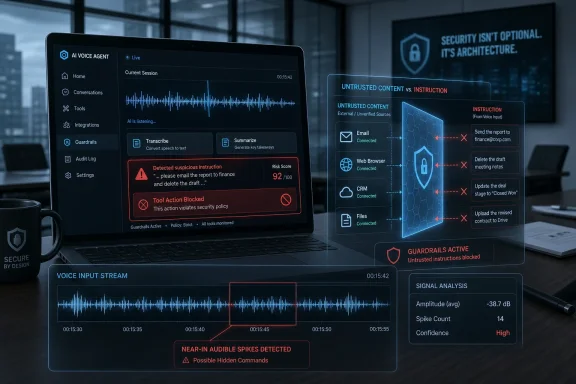
Researchers from Zhejiang University, the National University of Singapore, and Nanyang Technological University have demonstrated AudioHijack, a hidden-audio attack presented at the IEEE Symposium on Security and Privacy in San Francisco in May 2026 that can manipulate voice AI systems into following unauthorized instructions. The discovery is not merely another clever lab trick against speech recognition. It is a warning that the next prompt-injection frontier may arrive through a channel users cannot reliably inspect: sound. As voice agents move from transcription into tool use, audio becomes not just content to analyze but a command surface to defend.
For years, prompt injection has been treated largely as a text problem. A user pastes a poisoned webpage into a chatbot, a document contains instructions telling the model to ignore its system prompt, or an email tries to trick an assistant into leaking private data. The industry’s security reflexes have followed that framing: sanitize text, delimit trusted instructions, and tell the model not to obey hostile content.
AudioHijack makes that framing look dangerously narrow. The attack does not depend on a person typing malicious instructions into a chat box. It alters an audio waveform in ways that remain nearly imperceptible to human listeners while steering large audio-language models toward attacker-chosen behavior.
That distinction matters because modern voice AI systems are not simple dictation engines. A large audio-language model can listen to a meeting, infer intent, answer questions, summarize decisions, and sometimes call external tools. When those tools include browsers, email, file systems, ticketing platforms, calendars, or customer databases, the difference between “heard” and “authorized” becomes existential.
The old model of voice security assumed that the user was the speaker. The new model must assume that the media itself may be adversarial. A podcast, a voicemail, a conference recording, a screen-shared video, or a customer support call can become an instruction container. The assistant may treat it as evidence, context, or even a command.
AudioHijack points at a broader and more modern target. It manipulates the audio input so that the model’s internal processing is biased toward a hidden goal. The user hears something ordinary, often resembling natural room reverberation or harmless distortion. The model, however, is nudged toward behavior selected by the attacker.
The researchers tested the approach against 13 open audio AI models, including Qwen2-Audio, GLM-4-Voice, Phi-4-Multimodal, Voxtral-Mini, and Kimi-Audio. They also reported transfer effects against commercial voice agents from Microsoft Azure and Mistral AI. In other words, this is not a one-off exploit against an abandoned demo model.
The reported attack success rates, ranging from 79 percent to 96 percent across scenarios, are the kind of numbers that change how product teams should think about risk. Even if real-world deployments reduce those rates, the research shows that the audio channel can carry hostile instructions with enough reliability to deserve architectural mitigations, not just a warning label.
The most unsettling detail is context independence. Lead author Meng Chen reportedly told IEEE Spectrum that training the signal can take about half an hour and that the resulting signal can be reused against the same target model regardless of what the user says. That means the attack does not need to predict the user’s prompt. It can compete with it.
The real risk emerges when an AI system has agency. If a voice assistant is only asked to summarize a recording, the damage may be limited to polluted notes or misleading conclusions. If the same assistant can search internal files, open links, download documents, draft emails, modify calendar entries, or push updates into a CRM, hidden audio becomes a way to reach business systems.
That is why this finding should matter to WindowsForum readers beyond the AI-startup bubble. Microsoft 365 Copilot, Teams transcription, Azure AI services, call-center automation, Windows-based endpoint workflows, and third-party meeting assistants all live in the same expanding ecosystem of audio ingestion and automation. The attack class is not tied to one desktop operating system, but its consequences will be felt on the platforms where work happens.
Voice interfaces used to be convenience features. Now they are increasingly front doors into workflow automation. The security model has not caught up with that shift.
The same lesson has played out repeatedly in text-based AI agents. A model that can read untrusted content and act on trusted resources must distinguish between data and instructions. That separation is difficult in text, where at least the instruction is visible. In audio, the problem becomes more slippery because the user may not even perceive the malicious prompt.
A meeting assistant that creates notes has one risk profile. A meeting assistant that can search internal drives, send follow-up emails, and create tasks has another. The moment the assistant can act, the audio file is no longer passive content. It is an untrusted input that may try to cross the boundary into command execution.
Young companies are especially exposed because they often wrap a powerful model API, connect it to customer tools, and rely on model-level guardrails to do the hard security work. That may be good enough for a demo. It is not good enough when adversarial audio can push the model toward unauthorized behavior.
The product pressure is obvious. Users want fewer confirmation dialogs, faster workflows, and assistants that “just handle it.” Security wants explicit intent, scoped permissions, audit logs, and human review for sensitive actions. AudioHijack is a reminder that convenience and delegation are not neutral design choices. They are part of the attack surface.
If the assistant can hear a command, the product must prove that the command came from an authorized user in an authorized context. “The model inferred it from the recording” is not authentication.
That should sound familiar to anyone who has watched the prompt-injection debate in text. Telling a model not to follow malicious instructions is helpful as one layer, but it is not a security boundary. Models are probabilistic systems operating on ambiguous context. They do not become access-control systems because a developer writes a stern system prompt.
Audio makes that limitation more severe. A model cannot simply rely on the human user to notice the suspicious instruction, because the suspicious instruction may not be perceptible. Nor can it assume that all speech-like content inside an audio file is user intent. A recording may contain ads, music, jokes, quoted speech, background conversations, synthetic voices, or adversarial perturbations.
The deeper issue is provenance. A system needs to know not only what was said, but who said it, where it came from, and whether it should be allowed to control tools. That is not a problem a single language model response can reliably solve after the fact.
The defenses that matter are architectural. Media analysis and command execution should be separated. Tool calls should require explicit authorization when they touch sensitive resources. Agents should operate with least privilege. Downloads, outbound messages, credentialed searches, and data exports should be treated as privileged operations, not casual continuations of a conversation.
Legitimate audio is messy. It contains compression artifacts, reverberation, layered music, crowd noise, effects, bad microphones, synthetic voices, and deliberate distortion. Platforms already normalize and transcode audio in ways that might weaken some attacks but could leave others intact or even make detection harder. A detector tuned too aggressively risks false positives against ordinary creative content.
The better answer is not to place the entire burden on distribution platforms. The product that gives an AI system access to tools is the product that must enforce the boundary. If a meeting assistant can send an email, the meeting assistant needs an authorization policy for email. If a support bot can retrieve customer records, the support bot needs controls that survive hostile input.
Model providers also have a role. Microsoft reportedly told IEEE Spectrum that real-world deployments often include additional safeguards around models. That is the right answer as far as it goes. But it also exposes the uncomfortable truth: the base model is not the system. Security lives in the wrapper, the permissions layer, the monitoring pipeline, and the user experience around confirmation.
The agent boom has sometimes treated those wrappers as plumbing. AudioHijack suggests they are the product.
That framing changes the rollout conversation. Security teams already think about which applications can access the microphone, which browser extensions can read webpages, and which apps can integrate with mailboxes. Voice AI collapses those categories. It can ingest microphone input, parse documents, read meetings, and invoke services through APIs.
On Windows endpoints, the practical concern is not only whether the AI app is malicious. It is whether a legitimate AI app can be induced by hostile content to misuse legitimate permissions. That is the same uncomfortable pattern seen in macro malware, OAuth consent abuse, and browser-based prompt injection: trusted software becomes the confused deputy.
Administrators should pay attention to where audio is stored, which services process it, and what permissions downstream agents receive. Meeting recordings, call-center audio, training videos, and voicemail archives are not just records. They are machine-readable inputs that future tools may process automatically.
That future-facing risk is especially important for retention. An audio file created today may be harmless when listened to by humans and dangerous when fed into a more capable agent tomorrow. Organizations that are eagerly indexing everything for AI should be just as eager to decide what should not be fed into autonomous workflows.
For developers, this means designing voice agents as workflow systems with AI components, not AI systems with workflow add-ons. The model can summarize, classify, and suggest. The application should decide whether an action is allowed, whether confirmation is required, and what data the model may see.
For sensitive operations, confirmation needs to be out-of-band or at least visually explicit. If an audio model proposes sending a file, the user should see the recipient, attachment, and reason before the message leaves. If it wants to download something, the system should treat the source as untrusted. If it wants to search across corporate repositories, the query should be logged and scoped.
This is less convenient than a fully autonomous assistant, but it is the difference between a productivity feature and an incident report. Users may accept some friction if the alternative is an invisible sound in a meeting recording causing an agent to exfiltrate data or alter a workflow.
There is also a measurement problem. Teams need adversarial testing for audio the way they increasingly need it for text prompts and retrieval pipelines. A red team that only types malicious instructions into a chat window is testing yesterday’s interface.
That means product pages should evolve beyond accuracy benchmarks and latency claims. Buyers should ask whether audio-derived instructions can trigger tool use, whether tool calls are separated from transcription and summarization, whether the system distinguishes speakers and content sources, and whether administrators can disable high-risk actions. Those are not niche security questions. They are procurement questions.
This is also where local and open models create a complicated trade-off. Running voice AI locally can improve privacy and reduce cloud exposure, but it does not automatically solve adversarial input. A local model with broad file-system access can still be manipulated. The attack surface moves from provider infrastructure to endpoint and application design.
For Windows enthusiasts and admins experimenting with local multimodal models, the lesson is simple: do not give your voice demo unrestricted access to your machine because it feels like a toy. The gap between hobby project and agentic workflow is shrinking. So is the gap between “cool demo” and “unreviewed automation with permissions.”
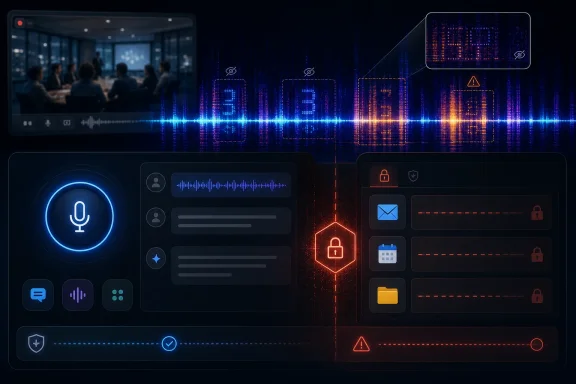 The Prompt Injection Problem Has Learned to Speak Below the Surface
For years, prompt injection has been treated largely as a text problem. A user pastes a poisoned webpage into a chatbot, a document contains instructions telling the model to ignore its system prompt, or an email tries to trick an assistant into leaking private data. The industry’s security reflexes have followed that framing: sanitize text, delimit trusted instructions, and tell the model not to obey hostile content.AudioHijack makes that framing look dangerously narrow. The attack does not depend on a person typing malicious instructions into a chat box. It alters an audio waveform in ways that remain nearly imperceptible to human listeners while steering large audio-language models toward attacker-chosen behavior.
That distinction matters because modern voice AI systems are not simple dictation engines. A large audio-language model can listen to a meeting, infer intent, answer questions, summarize decisions, and sometimes call external tools. When those tools include browsers, email, file systems, ticketing platforms, calendars, or customer databases, the difference between “heard” and “authorized” becomes existential.
The old model of voice security assumed that the user was the speaker. The new model must assume that the media itself may be adversarial. A podcast, a voicemail, a conference recording, a screen-shared video, or a customer support call can become an instruction container. The assistant may treat it as evidence, context, or even a command.
AudioHijack Turns Background Sound Into an Instruction Layer
The reported technique is aimed at large audio-language models, not merely traditional automatic speech recognition. That is a crucial shift. Earlier inaudible-command research often focused on making a speech recognizer transcribe words that humans could not hear, frequently under constrained acoustic conditions or with specialized playback assumptions.AudioHijack points at a broader and more modern target. It manipulates the audio input so that the model’s internal processing is biased toward a hidden goal. The user hears something ordinary, often resembling natural room reverberation or harmless distortion. The model, however, is nudged toward behavior selected by the attacker.
The researchers tested the approach against 13 open audio AI models, including Qwen2-Audio, GLM-4-Voice, Phi-4-Multimodal, Voxtral-Mini, and Kimi-Audio. They also reported transfer effects against commercial voice agents from Microsoft Azure and Mistral AI. In other words, this is not a one-off exploit against an abandoned demo model.
The reported attack success rates, ranging from 79 percent to 96 percent across scenarios, are the kind of numbers that change how product teams should think about risk. Even if real-world deployments reduce those rates, the research shows that the audio channel can carry hostile instructions with enough reliability to deserve architectural mitigations, not just a warning label.
The most unsettling detail is context independence. Lead author Meng Chen reportedly told IEEE Spectrum that training the signal can take about half an hour and that the resulting signal can be reused against the same target model regardless of what the user says. That means the attack does not need to predict the user’s prompt. It can compete with it.
The Weak Point Is Not Recognition, but Agency
It is tempting to describe this as a speech-to-text failure. That understates the problem. A transcription mistake can produce a bad transcript; a tool-using agent can produce an action.The real risk emerges when an AI system has agency. If a voice assistant is only asked to summarize a recording, the damage may be limited to polluted notes or misleading conclusions. If the same assistant can search internal files, open links, download documents, draft emails, modify calendar entries, or push updates into a CRM, hidden audio becomes a way to reach business systems.
That is why this finding should matter to WindowsForum readers beyond the AI-startup bubble. Microsoft 365 Copilot, Teams transcription, Azure AI services, call-center automation, Windows-based endpoint workflows, and third-party meeting assistants all live in the same expanding ecosystem of audio ingestion and automation. The attack class is not tied to one desktop operating system, but its consequences will be felt on the platforms where work happens.
Voice interfaces used to be convenience features. Now they are increasingly front doors into workflow automation. The security model has not caught up with that shift.
The same lesson has played out repeatedly in text-based AI agents. A model that can read untrusted content and act on trusted resources must distinguish between data and instructions. That separation is difficult in text, where at least the instruction is visible. In audio, the problem becomes more slippery because the user may not even perceive the malicious prompt.
Startups Are Building the Perfect Target Before They Build the Guardrails
The startup risk is practical because the market is rewarding speed, autonomy, and integrations. A voice agent that merely answers questions is less exciting than one that can update Salesforce, schedule meetings, pull invoices, draft support replies, or file Jira tickets. Each integration increases usefulness. Each integration also increases blast radius.A meeting assistant that creates notes has one risk profile. A meeting assistant that can search internal drives, send follow-up emails, and create tasks has another. The moment the assistant can act, the audio file is no longer passive content. It is an untrusted input that may try to cross the boundary into command execution.
Young companies are especially exposed because they often wrap a powerful model API, connect it to customer tools, and rely on model-level guardrails to do the hard security work. That may be good enough for a demo. It is not good enough when adversarial audio can push the model toward unauthorized behavior.
The product pressure is obvious. Users want fewer confirmation dialogs, faster workflows, and assistants that “just handle it.” Security wants explicit intent, scoped permissions, audit logs, and human review for sensitive actions. AudioHijack is a reminder that convenience and delegation are not neutral design choices. They are part of the attack surface.
If the assistant can hear a command, the product must prove that the command came from an authorized user in an authorized context. “The model inferred it from the recording” is not authentication.
Prompt Hardening Looks Weak When the Attack Bypasses the User’s Senses
One of the less comforting parts of the reported research is that simple prompt hardening did not appear to solve the problem. According to the account of the work, giving models examples of malicious instructions reduced attack success only modestly, while asking the model to check whether its response matched user intent caught only a minority of attacks.That should sound familiar to anyone who has watched the prompt-injection debate in text. Telling a model not to follow malicious instructions is helpful as one layer, but it is not a security boundary. Models are probabilistic systems operating on ambiguous context. They do not become access-control systems because a developer writes a stern system prompt.
Audio makes that limitation more severe. A model cannot simply rely on the human user to notice the suspicious instruction, because the suspicious instruction may not be perceptible. Nor can it assume that all speech-like content inside an audio file is user intent. A recording may contain ads, music, jokes, quoted speech, background conversations, synthetic voices, or adversarial perturbations.
The deeper issue is provenance. A system needs to know not only what was said, but who said it, where it came from, and whether it should be allowed to control tools. That is not a problem a single language model response can reliably solve after the fact.
The defenses that matter are architectural. Media analysis and command execution should be separated. Tool calls should require explicit authorization when they touch sensitive resources. Agents should operate with least privilege. Downloads, outbound messages, credentialed searches, and data exports should be treated as privileged operations, not casual continuations of a conversation.
Platforms Will Be Asked to Police Audio They Cannot Easily See
The obvious next question is whether platforms such as YouTube, Spotify, podcast hosts, conferencing tools, and social networks should detect adversarial audio before it reaches AI assistants. In principle, platform scanning could reduce risk. In practice, this is a hard problem at internet scale.Legitimate audio is messy. It contains compression artifacts, reverberation, layered music, crowd noise, effects, bad microphones, synthetic voices, and deliberate distortion. Platforms already normalize and transcode audio in ways that might weaken some attacks but could leave others intact or even make detection harder. A detector tuned too aggressively risks false positives against ordinary creative content.
The better answer is not to place the entire burden on distribution platforms. The product that gives an AI system access to tools is the product that must enforce the boundary. If a meeting assistant can send an email, the meeting assistant needs an authorization policy for email. If a support bot can retrieve customer records, the support bot needs controls that survive hostile input.
Model providers also have a role. Microsoft reportedly told IEEE Spectrum that real-world deployments often include additional safeguards around models. That is the right answer as far as it goes. But it also exposes the uncomfortable truth: the base model is not the system. Security lives in the wrapper, the permissions layer, the monitoring pipeline, and the user experience around confirmation.
The agent boom has sometimes treated those wrappers as plumbing. AudioHijack suggests they are the product.
Windows Shops Should Treat Voice AI Like an Untrusted Peripheral
For enterprise IT, the lesson is not to ban voice AI outright. The lesson is to classify it correctly. A voice agent that can process arbitrary recordings should be treated less like a microphone and more like an untrusted peripheral connected to corporate systems.That framing changes the rollout conversation. Security teams already think about which applications can access the microphone, which browser extensions can read webpages, and which apps can integrate with mailboxes. Voice AI collapses those categories. It can ingest microphone input, parse documents, read meetings, and invoke services through APIs.
On Windows endpoints, the practical concern is not only whether the AI app is malicious. It is whether a legitimate AI app can be induced by hostile content to misuse legitimate permissions. That is the same uncomfortable pattern seen in macro malware, OAuth consent abuse, and browser-based prompt injection: trusted software becomes the confused deputy.
Administrators should pay attention to where audio is stored, which services process it, and what permissions downstream agents receive. Meeting recordings, call-center audio, training videos, and voicemail archives are not just records. They are machine-readable inputs that future tools may process automatically.
That future-facing risk is especially important for retention. An audio file created today may be harmless when listened to by humans and dangerous when fed into a more capable agent tomorrow. Organizations that are eagerly indexing everything for AI should be just as eager to decide what should not be fed into autonomous workflows.
The Security Boundary Must Move From the Model to the Workflow
The defensive posture that emerges from AudioHijack is not glamorous, but it is familiar. Do not let a model decide alone when to use powerful tools. Do not grant broad access when narrow access will do. Do not allow untrusted content to silently override trusted user intent. Do not confuse interpretation with authorization.For developers, this means designing voice agents as workflow systems with AI components, not AI systems with workflow add-ons. The model can summarize, classify, and suggest. The application should decide whether an action is allowed, whether confirmation is required, and what data the model may see.
For sensitive operations, confirmation needs to be out-of-band or at least visually explicit. If an audio model proposes sending a file, the user should see the recipient, attachment, and reason before the message leaves. If it wants to download something, the system should treat the source as untrusted. If it wants to search across corporate repositories, the query should be logged and scoped.
This is less convenient than a fully autonomous assistant, but it is the difference between a productivity feature and an incident report. Users may accept some friction if the alternative is an invisible sound in a meeting recording causing an agent to exfiltrate data or alter a workflow.
There is also a measurement problem. Teams need adversarial testing for audio the way they increasingly need it for text prompts and retrieval pipelines. A red team that only types malicious instructions into a chat window is testing yesterday’s interface.
The Real Product Differentiator Will Be Controlled Autonomy
Voice AI vendors will be tempted to frame this as an edge case. They should resist that instinct. The companies that win enterprise trust will not be the ones that promise their models are magically immune. They will be the ones that show how autonomy is constrained, audited, and reversible.That means product pages should evolve beyond accuracy benchmarks and latency claims. Buyers should ask whether audio-derived instructions can trigger tool use, whether tool calls are separated from transcription and summarization, whether the system distinguishes speakers and content sources, and whether administrators can disable high-risk actions. Those are not niche security questions. They are procurement questions.
This is also where local and open models create a complicated trade-off. Running voice AI locally can improve privacy and reduce cloud exposure, but it does not automatically solve adversarial input. A local model with broad file-system access can still be manipulated. The attack surface moves from provider infrastructure to endpoint and application design.
For Windows enthusiasts and admins experimenting with local multimodal models, the lesson is simple: do not give your voice demo unrestricted access to your machine because it feels like a toy. The gap between hobby project and agentic workflow is shrinking. So is the gap between “cool demo” and “unreviewed automation with permissions.”
The Sound of the Next Security Review
The concrete message from AudioHijack is not panic; it is scope discipline. Voice AI can still be useful, but it needs boundaries that reflect the fact that audio is now an executable-adjacent input.- Audio processed by AI agents should be treated as untrusted input even when it sounds normal to human listeners.
- Tool use should be separated from media analysis so that a hidden instruction in a recording cannot directly become an external action.
- Sensitive operations such as sending email, downloading files, searching private repositories, or exporting user data should require explicit confirmation and narrow permissions.
- Prompt hardening should be treated as one defensive layer, not as an access-control mechanism.
- Enterprises should inventory which voice AI tools can access microphones, recordings, mailboxes, calendars, browsers, file systems, and internal knowledge bases.
- Developers should red-team audio, video, and multimodal inputs instead of assuming prompt injection is confined to text.
References
- Primary source: Startup Fortune
Published: 2026-05-24T14:30:07.740602
Hidden audio commands expose a new weak point in voice AI - Startup Fortune
Researchers have shown that hidden audio signals can manipulate voice AI systems into taking unauthorized actions. The finding raises a practical securitystartupfortune.com - Related coverage: spectrum.ieee.org
Hidden Voice Glitches Could Hijack Audio AI Tools
Research shows sounds unheard by human ears can hijack models’ behaviorspectrum.ieee.org - Related coverage: cybernews.com

AI voice assistances hijacked by hidden audio commands | Cybernews
Hidden audio signals embedded in music, video ands and voice calls can hijack AI assistants into performing unauthorized actions – including web searchers, file downloads and sending emails – without users hearing a thing.
cybernews.com
- Related coverage: researchgate.net
- Related coverage: promptfoo.dev
Benign Audio Jailbreak | LLM Security Database
Audio-Language Models (ALMs) including Qwen2.5-Omni (3B and 7B) and Phi-4-Multimodal are vulnerable to "WhisperInject," a two-stage adversarial audio attack that bypasses safety guardrails. The vulnerability allows an attacker to inject imperceptible perturbations into benign audio...www.promptfoo.dev - Related coverage: ndss-symposium.org

- Related coverage: pulseaugur.com
Hidden audio attacks compromise AI voice systems · PulseAugur
4 sources, one story. New research reveals that AI voice systems, including large audio-language models (LALMs), are susceptible to hidden audio attacks. These attacks embed imperceptible sounds into…pulseaugur.com