

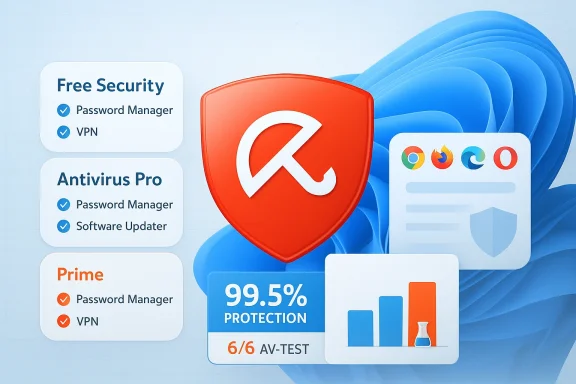
Consumer reporting and a spate of lab results have pushed Avira back into the spotlight as one of the most compelling antivirus options for Windows users — but the headline “best antivirus” needs context. Recent syndicated coverage summarized Consumer Reports’ pick of Avira Free Security Suite for free protection and Avira Antivirus Pro for paid protection, which rekindled debate about whether a third‑party antivirus still beats the built‑in defenses in Windows. s those claims, verifies them against independent lab data, and explains what Avira actually delivers — including where it shines, where it compromises, and which kinds of Windows users should consider it (or stick with Microsoft Defender). I cross‑checked the most important technical claims against AV‑Comparatives and AV‑TEST, and I flag the items that couldn’t be verified directly from primary consumer‑report databases.
Background / Overview
Antivirus choices have shifted from raw detection rate headline wars to a more nuanced comparison of detection, false positives, system impact, and feature mix. Consumer‑facing writeups recently pointed readers to Avira’s free and paid offerings as top picks — a shorthand that doesn’t tell the whole story about tradeoffs and costs.Independent testinge technical conversation:
- AV‑Comparatives’ Real‑World Protection Test (July–October 2025) placed Avira in the top protection cluster, reporting a 99.5% protection rate in that test window and listing Avira’s false‑positive count alongside other vendors. (av-comparatives.org
- AV‑TEST continuous testing shows Avira’s Windows builds regularly achieving top scores (6/6) across Protection, Performance, and Usability in several 2025 test cycles, reinforcing the lab trend. (av-test.org
What Avira actually offers — product and feature breakdown
Avira Free Security (what you get at no cost)
Avira Free Security is more than “just” an antivirus scanner. The free tier typically includes:- Real‑time antivirus engine and on‑demand scanning.
- Browser Safety extensions (blocking malicious pages and some phishing) — note: the extensions protect only the browsers where they’re installed, not all web traffic on the system. Tech reviews have shown browser protection is effective when the extension is used, but system‑wide web filtering is limited in the free plan. (techradar.com
- A software updater tool that nudges you to install app/driver updates.
- A password manager (basic).
- A VPN with a small free allowance (commonly a 500 MB/month cap in promotional or baseline configurations).
- System tune‑up helpers (startup optimizer, junk cleaner).
Avira Antivirus Pro (paid, focused protection)
Avira Antivirus Pro is the lean paid option designed for users who want to upgrade core protection without a full feature bundle. Typical characteristics:- Adds web and email traffic protection at the system level (not just browser extensions).
- Enhanced ransomware defense and improved mail scanning.
- Removes most of the aggressive upgrade prompts present in the free app.
- Often sold with a promotional first‑year price and a higher renewal rate thereafter — real prices vary by region and retailer; expect typical renewal pricing to hover in the low‑to‑mid‑$60s per year for a single device, though first‑year discounts often drop that figure to ~$27–$35 in promotions. Pricing and bundles vary widely; check current offers before buying. (pcrisk.com
Avira Internet Security / Avira Prime (all‑in bundles)
Higher tiers bring:- Unlimited VPN in Prime.
- Premium password manager features.
- Automatic software updates, dark‑web monitoring (regional), multi‑device coverage.
Prime is positioned as the “one subscription for everything” option for households and power users. It’s convenient, but the incremental value depends on whether you actually need the unlimited VPN or the premium password features. Tech reviews typically call Prime useful but note that some competing suites may offer stronger identity or family features for similar money. (techradar.com
Lab evidence: detection, false positives, and performance
AV‑Comparatives: real‑world blocking
AV‑Comparatives’ Real‑World Protection Test (July–October 2025) is a prominent reference point. In that test Avira recorded a 99.5% protection rate across hundreds of real‑world attack cases in the reporting window, placing it in the highest protection cluster alongside several other vendors. The AV‑Comparatives report also lists false‑positive counts, and Avira’s count in that window was reported as 7 — low relative to many vendors but important to consider because false positives can significantly affect usability in day‑to‑day computing. (av-comparatives.orgWhy this matters: Real‑world protection tests simulate browsing and download scenarios that reflect how everyday users encounter threats, so the high blocking rate is a meaningful indicator that Avira’s engine and cloud services are effective in practical conditions. The false‑positive figure explains why multiple vendors can share a protection cluster even with minute protection differences — labs penalize products with large FP counts to avoid rewarding overzealous blocking. (av-comparatives.org
AV‑TEST: consistent top marks
AV‑TEST’s continuous product assessments for 2025 show Avira Internet Security delivering 6/6 in Protection, Performance, and Usability across several months, which is the best possible composite rating in that lab’s scheme. That pattern supports the narrative that Avira balances strong detection with low system impact (fast scans, low slowdown) and relatively few false alarms in many test cycles. (av-test.orgIndependent reviews and in‑house testing: nuance and variance
Editorial reviews (TechRadar, PCWorld, Cybernews) and some in‑house tests sometimes show variance: while labs trend highly for Avira, some outlets flag differences in particular metrics (scan speed, occasional usability quirks, or lower scores in certain individual lab windows). That variance is common across vendors; the key takeaway is that Avira’s core engine performs at or near the top of the field in most major lab cycles. (techradar.comStrengths — why Avira deserves consideration
- Outstanding lab performance: Multiple independent labs have placed Avira in the top tiers for protection and usability in 2025 testing windows. AV‑Comparatives’ real‑world blocking and AV‑TEST’s 6/6 cycles back this up. (av-comparatives.org
- Light system impact: AV‑TEST and reviewers consistently note Avira’s low performance overhead, which matters for older machines and power users who require maximum responsiveness. (av-test.org
- A very capable free tier: Avira Free Security includes several utilities (software updater, password manager, browser safety, and limited VPN) that are genuinely useful for users who do not want recurring fees. For many casual users, the free tier plus careful browser hygiene is sufficient. (techradar.com
- Flexible product segmentation: Avira’s paid tiers let you choose a slim, protection‑focused Pro product or buy Prime for an all‑in experience. That flexibility helps users avoid paying for tools they don’t need. (pcrisk.com
- promotions**: Avira often runs strong first‑year discounts, making it economical to evaluate paid tiers before renewal pricing kicks in. However, remember renewal price increases are common. (cloudwards.net
Risks, trade‑offs, and practical caveats
1) Consumer Reports claim — a caution
Several syndicated outlets paraphrased Consumer Reports as naming Avira Free Security Suite and Avira Antivirus Pro as top free and paid picks. The secondary reporting is clear and was the trigger for renewed interest, but I could not find the specific Consumer Reports page that lists Avira as the single definitive winner during this article’s fact‑check window. Until you can view the CR ranking directly, treat the CR citation in secondary stories as reported rather than directly confirmed. In short: the syndicated writeups are accurate in reporting what they saw, but you should consult Consumer Reports’ site or their latest magazine for the authoritative ranking.2) Upsell volume and UX friction in the free tier
Avira’s free app is intentionally a conversion funnel. Expect frequent upgrade prompts, some in‑app ads, and nudges to enable premium features. For many users this is tolerable, but for those who prize a distraction‑free security UI, the paid Pro or Prime editions are often worth the modest cost. Tech reviews document this behavior repeatedly. (techradar.com3) VPN limitations on free tier
The bundled VPN in the free version is convenient but severely capped (commonly around 500 MB per month) and is not a substitute for a dedicated VPN when privacy, speed, or multi‑device coverage matters. Don’t rely on the free VPN for streaming, large downloads, or constant privacy needs. If you need an unlimited, high‑speed VPN, Prime or a standalone VPN provider is the better option. (pcworld.com4) False positives, occasional variability
Although AV‑Comparatives recorded only 7 false positives for Avira in the July–October 2025 window — a low number relative to the industry average — false positives still occur and can disrupt workflows if you frequently install niche or newly released software. If you rely on unusual tools (developer builds, betas), be prepared to whitelist or manage exceptions. (av-comparatives.org5) Industry consolidation and privacy posture
Avira is part of a broader consolidation wave in consumer cyber safety. The company was acquired by NortonLifeLock (now under the Gen Digital umbrella) in late 2020, which has implications for corporate practices, data handling, and feature integration across sibling brands. Ownership consolidation doesn’t automatically mean worse privacy, but it’s worth noting who owns the software you trust to scan your files and monitor your network. If corporate governance or data‑sharing policies matter to you, review Avira’s privacy policy and the parent company disclosures. (techcrunch.com6) Microsoft Defender has closed the gap
Microsoft Defender has become a competent, low‑impact baseline protector that suits many users who avoid risky downloads and use Edge with SmartScreen enabled. Several labs give Defender competitive scores; for casual users or those who prefer no third‑party software, Defender plus cautious behavior remains a defensible choice. If you need system‑level email scanning, advanced web filtering, or multi‑device privacy tools, a third‑party suite like Avira can add real value. (techradar.comWho should choose Avira, and which tier fits which user?
Choose Avira Free Security if:
- You want solid antivirus detection without spending money.
- You value an included password manager, software updater, and a small VPN allowance.
- You accept occasional upsell prompts and don’t need system‑wide web filtering beyond browser protection. (techradar.com
Choose Avira Antivirus Pro if:
- You want system‑level web and email protection and fewer nags.
- You prefer a lean, protection‑focused paid tier rather than a full suite of add‑ons.
- You value cleaner UX and quicker access to guaranteed support channels. (pcrisk.com
Choose Avira Prime (or Internet Security) if:
- You need unlimited VPN, a premium password manager, automatic software updates, and multi‑device coverage for a household.
- You prefer an “all‑in” experience and want fewer vendors to manage. Be prepared to compare Prime’s total cost against competing bundles from Bitdefender, Norton, and others before committing. (techradar.com
Practical setup and recommended configuration for Windows users
- If you currently use Microsoft Defender and want to try Avira Free:
- Install Avira Free, keep Defender enabled initially until Avira’s installer completes and confirms it will take over active protection.
- Install Avira’s Browser Safety extension in your primary browsers for the best immediate web protection.
- If you need system‑level web filtering and email scanning, choose Avira Antivirus Pro or Internet Security rather than relying on the free browser extension alone.
- If you accept the free tier, disable intrusive notifications and turn off features you won’t use (e.g., if you already use a different password manager or VPN).
- For business or heavy‑use scenarios where false positives are problematic, stage Avira in a test environment first and build an exclusion policy for internal apps.
- Monitor renewal pricing closely: promotional first‑year rates are attractive, but standard renewals often jump significantly — plan your subscription accordingly. (cloudwards.net
Final verdict: “Best” depends on what you need
Calling any single product “the best antivirus for Windows” is too blunt for an ecosystem where labs show multiple vendors scoring at the top, and where feature sets and pricing influence real‑world suitability as much as detection numbers.The measured, evidence‑based conclusion is:
- Avira is one of the best value propositions for Windows users who want strong detection, low system impact, and a generous free tier. Independent labs (AV‑Comparatives and AV‑TEST) support this claim with top cluster rankings and repeated perfect scores in protection/performance/usability. (av-comparatives.org
- It is not the single best solution for every user. If you require enterprise‑grade features, fully unlimited VPNs without performance tradeoffs, or the lowest possible false positive rate in every case, other vendors may be a better fit.
- The Consumer Reports‑based headlines are useful prompts but verify: those syndicated writeups propelled Avira back into the headlines, but you should check primary lab reports and the consumer organization’s own page for the official ranking details before making a purchase decision.
Avira’s mix of strong, independently verified protection, light system impact, and a genuinely useful free tier make it an excellent choice for many Windows users — provided you understand the limits (VPN caps, upsell behavior) and verify pricing and feature maps for the edition you choose. If your needs are modest and you value a low‑friction experience, start with Avira Free Security and consider upgrading to Pro or Prime only if you need system‑wide web/email protection or unlimited privacy tools.
Source: AOL.com This Is The Best Antivirus For Windows, According To Consumer Reports
