

The Server Side’s AZ‑400 practice‑test roundup is a measured, practical resource that goes beyond rote Q&A: it parses common Azure Devops exam distractors, calls out numeric limits and product behaviors you should memorize, and repeatedly urges hands‑on labs over “brain‑dump” memorization. The coverage pairs short correct/incorrect explanations with the reasoning candidates need to make exam‑quality decisions — and it flags several precise, testable facts (for example: the TFVC import history window is capped at 180 days, the IT Service Management connector is the managed path to create incidents in ServiceNow, and Variable groups may be linked to Azure Key Vault for secret retrieval). These clarifications are practical and action‑oriented, but the piece also warns that static question banks age quickly and that some answers require cross‑checking official docs before you treat them as immutable exam trivia.
The Server Side article is not a pure question dump; it is a study guide that stitches short scenario explanations into a study philosophy: learn by doing, use timed practice tests for pacing, and treat every mistaken answer as a remediation ticket that leads to a short lab. The author frames practice tests as diagnostics, not a shortcut to success, and repeatedly admonishes candidates to prefer vendor‑aligned practice providers and Microsoft Learn as canonical sources. That ethical and pedagogical stance is the central theme of the coverage.
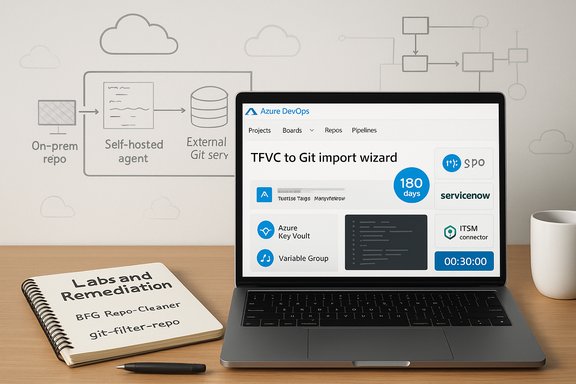
The practical Q&A set addresses dozens of Azure DevOps scenarios you’ll see on the AZ‑400 / related Azure DevOps skill exams: migration limits, alert integration with ServiceNow, agent topologies for on‑prem repos, branch policies and status checks, secret management in pipelines, pipeline stage dependencies, and tools for rewriting Git history. The article’s approach is concise: it states the exam distractor, explains why it’s wrong, then supplies the correct concept and the reasoning you should memorize.
Caveat emptor: confirm product details against official documentation before the exam or production rollout. The Server Side itself warns about the staleness risk of third‑party materials and directs readers to Microsoft Learn for authoritative updates — good practice you should adopt.
Conclusion: study with the Server Side Q&A as a tactical toolkit — memorize the numeric limits and feature‑to‑tool mappings it highlights, but always validate live configuration steps and evolving product behaviors against vendor docs and run short hands‑on labs so the knowledge becomes operational rather than purely mnemonic.
Source: The Server Side AZ-400 Practice Tests on Azure DevOps Engineer Exam Topics
 Background / Overview
The Server Side article is not a pure question dump; it is a study guide that stitches short scenario explanations into a study philosophy: learn by doing, use timed practice tests for pacing, and treat every mistaken answer as a remediation ticket that leads to a short lab. The author frames practice tests as diagnostics, not a shortcut to success, and repeatedly admonishes candidates to prefer vendor‑aligned practice providers and Microsoft Learn as canonical sources. That ethical and pedagogical stance is the central theme of the coverage.The practical Q&A set addresses dozens of Azure DevOps scenarios you’ll see on the AZ‑400 / related Azure DevOps skill exams: migration limits, alert integration with ServiceNow, agent topologies for on‑prem repos, branch policies and status checks, secret management in pipelines, pipeline stage dependencies, and tools for rewriting Git history. The article’s approach is concise: it states the exam distractor, explains why it’s wrong, then supplies the correct concept and the reasoning you should memorize.
Key technical clarifications and verification
Below are the most load‑bearing claims from the Server Side piece, summarized, verified against vendor documentation, and analyzed for exam and real‑world relevance.TFVC → Git import: 180 days is the hard ceiling
- What the Server Side says: The Azure DevOps Import repository tool for TFVC will convert up to 180 days of history (the most recent 180 days), and you must memorize that numeric limit for exam scenarios.
- Verification: Microsoft’s own documentation and product blog state the same 180‑day limit for the TFVC import wizard. The official import guidance explicitly documents that you can migrate “up to 180 days of history” when using the built‑in Import repository tool.
- Why it matters: For exam questions that ask exactly how much history you can migrate with the Import repository wizard, the correct numeric answer is 180 days. In production, this limit matters because for longer histories you must choose an alternate migration tool (git‑tfs / git‑tfs/git‑tf / scripted exports) that rewrites history more fully.
Azure Monitor → ServiceNow: use the IT Service Management connector
- What the Server Side says: To have Application Insights or Azure Monitor alerts create incidents in ServiceNow you should use the built‑in IT Service Management connector rather than ad‑hoc action groups or custom webhooks.
- Verification: Microsoft documentation describes the ITSM connector (ITSMC) as the supported, managed integration that syncs templates and maps Azure alerts to work items (incidents, change requests) in ServiceNow; it’s the recommended path for creating incidents from Azure alerts. The docs also note a transition and deprecation schedule for older behaviors — so pay attention to the product‑level notices.
- Why it matters: For exam scenarios that ask “Which Azure capability should be used to create ServiceNow incidents from alerts?” the answer is the IT Service Management connector. In practice, review the exact connector prerequisites and supported ServiceNow versions before you implement.
On‑prem Git + Azure DevOps: combine External Git service connection with self‑hosted agents
- What the Server Side says: If your on‑prem Git server blocks inbound Internet connections, use a self‑hosted agent that runs inside the network and configure an External Git service connection in Azure DevOps so pipelines can clone and build from the internal repo.
- Why it matters: Microsoft hosted agents cannot reach a firewall‑protected, inbound‑blocked Git host; self‑hosted agents run in the same network as your Git service and can access internal endpoints without changing firewall rules. This pairing is the standard exam‑level answer and the correct production architecture when your VCS is shielded.
Secrets in pipelines: Variable groups + Azure Key Vault is the supported pattern
- What the Server Side says: Use Variable groups in the Library and link them to Azure Key Vault to provide secrets to multiple pipelines securely; this supports managed identities and masks secrets.
- Verification: Azure DevOps documentation and many community guides show the same pattern: create a variable group and enable “Link secrets from an Azure Key Vault as variables,” using a service connection to authorize retrieval. This is the recommended approach for centralized secret management in Azure Pipelines.
- Why it matters: For exam questions about secure secret retrieval and centralized pipeline configuration, Variable group + Key Vault is the exam‑grade answer. In production, ensure least‑privilege service connections and validate access‑policy alignment (managed identities or service principals).
Rewriting Git history to remove secrets: prefer BFG or git‑filter‑repo
- What the Server Side says: To erase a file like secrets.log from all commits you should use tools that rewrite history such as BFG Repo‑Cleaner or git filter‑repo, and then force‑push the rewritten history and coordinate with your team.
- Verification: The BFG project and community guidance recommend BFG for fast, simple history scrubs and git‑filter‑repo as the modern, flexible history‑rewriting tool; both approaches require a force push and team coordination to avoid divergent histories. Atlassian and core Git community posts endorse this workflow.
- Why it matters: For exam scenarios asking which tools will remove a file from all history, select BFG Repo‑Cleaner and git‑filter‑repo (or git‑filter‑branch as a legacy alternative, but fewer exams prefer the deprecated tool). In production, remember residual copies (reflogs, forks, archived clones, backups) still need consideration.
Static analysis / code scanning (CodeQL) and GitHub Actions
- What the Server Side says: Enabling CodeQL scanning requires adding the CodeQL Action workflow to the repository — enabling a license or feature alone won’t run the scans; the GitHub Actions workflow triggers the analysis.
- Why it matters: For exam questions that ask “What must be done to activate CodeQL scanning for a repo?” the tested action is to add or enable a CodeQL GitHub Actions workflow in each repository. This is both an exam and a practical operational requirement.
SonarQube + Java: use Gradle or Maven tasks
- What the Server Side says: SonarQube requires the Java build tool (Gradle or Maven) to produce compiled classes, test results, and coverage artifacts that the scanner needs; for an Azure Pipelines Java project you should use a Gradle task (or Maven) rather than MSBuild or a container‑only task.
- Why it matters: In the exam, if the question relates to running SonarQube for Java, pick Gradle or Maven. In production, integrate SonarScanner into the build lifecycle (Gradle/Maven plugin) for accurate analysis.
Application Insights: Funnels vs. Impact vs. User Flows
- What the Server Side says: Use Funnels to analyze ordered step sequences and drop‑off; use Impact view to correlate performance failures with business outcomes (conversion rate impacts); User Flows show navigation paths but not conversion drop‑off metrics in a funnel sense.
- Verification: Azure Application Insights features document Funnels for step‑by‑step conversion and Impact for business‑level prioritization of telemetry issues. Use Funnels for stepwise conversion rate analysis; use Impact to prioritize issues that affect conversions.
- Why it matters: For questions that ask “which feature shows drop‑off between ordered steps?” pick Funnels. For which feature correlates performance issues to business impact, pick Impact.
Strengths of the Server Side approach
- Practical, exam‑usable answers that map to real configuration steps: The Q&A repeatedly names the precise feature or numeric limit you’ll be tested on (for example, 180 days for TFVC import). That candor reduces ambiguity when you’re deciding which option matches the exam stem.
- Emphasis on reasoning over memorization: Each “correct / incorrect” pair explains why an option fails, which trains you to apply the platform reasoning Microsoft expects on role‑based exams. The coverage recommends turning wrong answers into remediation labs — a study habit that produces durable knowledge.
- Ethical stance and vendor guidance: The piece repeatedly warns against exam dumps and emphasizes Microsoft Learn and reputable practice vendors. That reduces the risk of certification revocation and produces stronger on‑the‑job skills.
Risks, blind spots, and cautionary notes
- Staleness risk for product details: Cloud features and UI dialogs change; even numeric limits can shift in product updates. The Server Side itself flags that you should validate any command, API, or numeric detail against Microsoft docs before relying on it for production or exam recall. For example, while the TFVC 180‑day limit is well documented today, always confirm the live docs before answering time‑sensitive exam questions.
- Over‑simplification of architecture trade‑offs: The Q&A provides the exam‑correct choice in constrained scenarios; in production, you may need hybrid patterns (for example, Event Grid + Service Bus for event routing with durable replay guarantees). Don’t treat the short exam rationale as the only valid architecture in complex systems.
- Coordination overhead for history rewrites and secrets removal: The advice to use BFG or git‑filter‑repo is correct, but the article’s short answer does not fully expand on the operational fallout: force pushes will disrupt collaborators, tags, forks, and CI references; you must coordinate reclones, update CI hooks, and validate backups. The Server Side does mention coordination but exam scenarios rarely test the full remediation checklist — still, in real operations, plan the cutover carefully.
How to use the Server Side material to study (practical checklist)
- Map each Q&A item to a Microsoft Learn module or an official doc page. Convert every incorrect practice answer into a 30–90 minute hands‑on lab.
- Memorize the numeric limits and which tool they apply to (examples from the material: 180 days for TFVC Import; which feature requires an Advanced Security license before enabling push‑time secret scanning; the correct branch policy types).
- Maintain a short “remediation repo” (GitHub): for each failed question write a 200–400 word note, include commands/screenshots, and keep the repo public as interview evidence.
- Before any exam attempt, re‑verify any vendor‑specific numbers or UI behaviors against official Microsoft docs; the Server Side recommends this exact verification to avoid learning stale facts.
Selected exam‑focused examples (with short rationales you should memorize)
- TFVC import limit: 180 days (Import repository wizard). Memorize that number and the reason you’d choose an external tool (need full history).
- Create ServiceNow incidents from alerts: IT Service Management connector (ITSMC) is the managed integration for Azure Monitor → ServiceNow incident creation.
- On‑prem repo behind firewall: use self‑hosted agent + External Git service connection. This lets agents inside the network clone the internal repo.
- Share secrets across pipelines: Variable group linked to Azure Key Vault via service connection. This centralizes secrets and supports runtime retrieval.
- Remove file from all Git history: BFG Repo‑Cleaner OR git‑filter‑repo --invert-paths (then force push all branches and coordinate).
- Java + SonarQube: run Gradle (or Maven) build tasks and SonarScanner as part of the build to ensure compiled artifacts and coverage data are available to the scanner.
- Application Insights step sequences: Funnels for ordered step conversion; Impact for correlating telemetry to business conversion effects.
Critical perspective and recommendation for instructors and hiring managers
- For instructors: use the Server Side material as a companion to Microsoft Learn labs. It’s excellent for highlighting common exam distractors and for teaching why incorrect options fail, but pair it with live demos and official docs to guard against staleness.
- For hiring managers: treat a certification as one signal among many. The Server Side recommends verifying digital badges and asking candidates for small, role‑relevant take‑home labs or short live demos that show applied competence rather than rote recall. This reduces the false positives that come from practice‑test memorization.
Final assessment
The Server Side AZ‑400 practice set is a high‑utility study aid when used exactly as it’s intended: not as a verbatim question bank, but as a compact explanation engine that clarifies exam‑style trade‑offs and points you to the right features and numeric limits to memorize. Its strongest value is in highlighting precise facts you will be asked to recall (the 180‑day TFVC import window is a poster child), and in promoting a learn‑by‑doing cycle that converts wrong answers into short remediation labs.Caveat emptor: confirm product details against official documentation before the exam or production rollout. The Server Side itself warns about the staleness risk of third‑party materials and directs readers to Microsoft Learn for authoritative updates — good practice you should adopt.
Conclusion: study with the Server Side Q&A as a tactical toolkit — memorize the numeric limits and feature‑to‑tool mappings it highlights, but always validate live configuration steps and evolving product behaviors against vendor docs and run short hands‑on labs so the knowledge becomes operational rather than purely mnemonic.
Source: The Server Side AZ-400 Practice Tests on Azure DevOps Engineer Exam Topics
