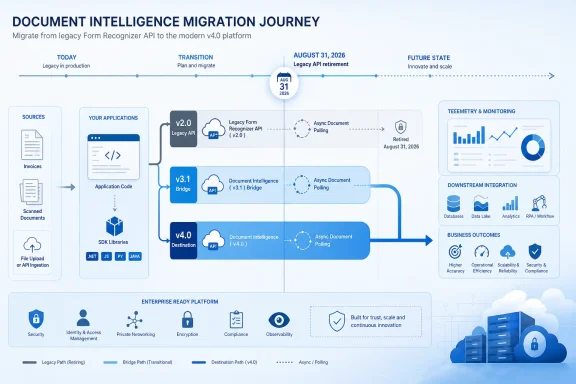
Microsoft will end support for the Azure AI Document Intelligence v2.0 cloud API and the Document Intelligence v2.1 container on August 31, 2026, but that date does not retire every v2.x workload. Administrators should inventory cloud calls and container deployments separately, then move containerized Read and Layout workloads to v4.0 while using v3.1 as the practical landing zone for ID Document, Receipt, and Invoice deployments that v4.0 containers do not yet support.
Microsoft’s lifecycle documentation identifies two products at the August deadline: the former Azure Form Recognizer v2.0 API and the v2.1 container. The Document Intelligence v2.1 REST API remains supported until September 15, 2027, according to Microsoft’s current product documentation.
That distinction changes both the urgency and the migration plan. A cloud application calling the v2.1 REST API has more time than a Kubernetes cluster, Docker host, or disconnected deployment running a v2.1 container—even if both are casually described inside the organization as “Form Recognizer v2.”
The first job is not upgrading an SDK. It is establishing whether each dependency is a cloud API call, a container invocation, or an application abstraction hiding one of those underneath.
Repository searches should cover source code, configuration files, deployment templates, build pipelines, and operational scripts. On a Windows administration workstation, PowerShell can provide an initial sweep:
Organizations using Git repositories can run a broader search with
The results should be classified rather than immediately replaced. Record the calling application, endpoint type, model, API or container version, authentication method, owner, deployment environment, and whether the workload can be tested without production documents.
Container discovery needs its own pass because an application may call an internal service name without revealing the underlying image version. Docker administrators can begin with:
For Kubernetes, inspect live workloads as well as the manifests stored in source control:
Search Helm values, Kustomize overlays, YAML manifests, Terraform, Bicep, Azure DevOps pipelines, and GitHub Actions for the same Form Recognizer and container-image strings. A cluster inspection alone can miss a retired image tag that will return during the next rollback, disaster-recovery deployment, or environment rebuild.
The final inventory should therefore include dormant artifacts. An unused deployment template is still a migration risk if it remains the documented recovery path.
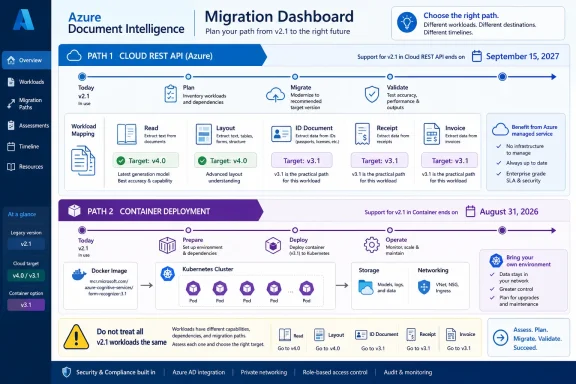
Container support is narrower than cloud API support, however. Microsoft’s current matrix lists:
A v2.1 Read or Layout container is a direct candidate for v4.0 evaluation. Administrators still need compatibility testing, but there is no model-availability reason to stop at v3.1.
A v2.1 ID Document, Receipt, or Invoice container cannot simply be reassigned to a v4.0 container because those models are not in the current v4.0 container set. For these workloads, v3.1 is the available newer container generation listed by Microsoft.
Business Card, General Document, and Custom container deployments require additional care. The documented v3.0 container generation has the broader model coverage, while the newer v3.1 and v4.0 container sets do not provide every one of those models. Administrators should not interpret the August deadline as evidence that every workload has a feature-equivalent v4.0 image.
This creates a two-track policy:
Build the migration around captured contracts. For each workload, retain sanitized examples of the request, response, expected extracted fields, and application-visible output before changing versions.
The test plan should cover at least these areas:
Authentication deserves separate testing because cloud and container deployments have different operational boundaries. Cloud applications may obtain credentials from application configuration or a managed secret store, while containers require their runtime billing and key settings to be valid. A migration that succeeds on a developer laptop can fail in production when secret names, environment variables, network access, or deployment policies differ.
An internal asset labeled “v2.1” is therefore not classified well enough. The inventory must say v2.1 REST API or v2.1 container, along with the model being used.
The same discipline applies to the v2.0 cloud API. Teams should inspect code for explicit legacy paths, but also examine SDK packages and internal wrappers that construct requests dynamically. API gateways, reverse proxies, workflow products, desktop utilities, scheduled PowerShell tasks, and integration services may conceal calls that do not appear in the primary application repository.
Azure Advisor retirement recommendations can supplement this work, but they should not be treated as a complete software bill of materials. Microsoft’s Advisor documentation currently identifies the v2.0 API retirement while indicating that impacted-resource availability is still to be updated. Direct inspection of applications and deployments remains necessary.
Where possible, separate client changes from container changes. First make the application capable of selecting an endpoint and handling the new contract; then redirect a controlled share of traffic. Keep rollback bounded and temporary, because restoring a v2.1 container after August 31 would not restore Microsoft support.
Operational documentation must change with the deployment. Update image references, API-version settings, model mappings, secret names, health checks, dashboards, alerts, recovery procedures, and support runbooks. Remove obsolete v2.1 manifests and cached assumptions once rollback is closed so that the retired generation cannot quietly return.
The August 31, 2026 retirement is ultimately two deadlines sharing one date, not a blanket shutdown of Document Intelligence v2.1. Administrators who identify the execution model and document model separately can move Read and Layout directly toward v4.0, use v3.1 where current container coverage requires it, and avoid forcing unsupported workloads into a migration path chosen only because it has the highest version number.
Microsoft’s lifecycle documentation identifies two products at the August deadline: the former Azure Form Recognizer v2.0 API and the v2.1 container. The Document Intelligence v2.1 REST API remains supported until September 15, 2027, according to Microsoft’s current product documentation.
That distinction changes both the urgency and the migration plan. A cloud application calling the v2.1 REST API has more time than a Kubernetes cluster, Docker host, or disconnected deployment running a v2.1 container—even if both are casually described inside the organization as “Form Recognizer v2.”
 Split the Inventory Before Choosing a Target
The first job is not upgrading an SDK. It is establishing whether each dependency is a cloud API call, a container invocation, or an application abstraction hiding one of those underneath.Repository searches should cover source code, configuration files, deployment templates, build pipelines, and operational scripts. On a Windows administration workstation, PowerShell can provide an initial sweep:
Code:
Get-ChildItem -Path . -Recurse -File |
    Select-String -Pattern `
        "formrecognizer",
        "documentintelligence",
        "/v2.0/",
        "/v2.1/",
        "api-version",
"azure-cognitive-services/form-recognizer"git grep:git grep -n -i -E "formrecognizer|documentintelligence|/v2\.(0|1)/|api-version|azure-cognitive-services/form-recognizer"The results should be classified rather than immediately replaced. Record the calling application, endpoint type, model, API or container version, authentication method, owner, deployment environment, and whether the workload can be tested without production documents.
Container discovery needs its own pass because an application may call an internal service name without revealing the underlying image version. Docker administrators can begin with:
Code:
docker ps -a --format "{{.Names}} {{.Image}}"
docker image ls --format "{{.Repository}}:{{.Tag}}"
Code:
kubectl get deployments,statefulsets,daemonsets -A -o yaml
kubectl get pods -A -o jsonpath="{range .items
- }{.metadata.namespace}{'\t'}{.metadata.name}{'\t'}{range .spec.containers
- }{.image}{'\n'}{end}{end}"The final inventory should therefore include dormant artifacts. An unused deployment template is still a migration risk if it remains the documented recovery path.
V4.0 Is the Default, Not the Universal Container Replacement
Microsoft recommends the v4.0 API version2024-11-30 for new development, and the current SDK generation defaults to that version. That makes v4.0 the sensible starting point for cloud modernization and for container workloads whose model is already available.Container support is narrower than cloud API support, however. Microsoft’s current matrix lists:
- V4.0 containers for Read and Layout.
- V3.1 containers for Read, Layout, ID Document, Receipt, and Invoice.
- V3.0 containers for the broader set that includes Read, Layout, General Document, Business Card, and Custom models.
A v2.1 Read or Layout container is a direct candidate for v4.0 evaluation. Administrators still need compatibility testing, but there is no model-availability reason to stop at v3.1.
A v2.1 ID Document, Receipt, or Invoice container cannot simply be reassigned to a v4.0 container because those models are not in the current v4.0 container set. For these workloads, v3.1 is the available newer container generation listed by Microsoft.
Business Card, General Document, and Custom container deployments require additional care. The documented v3.0 container generation has the broader model coverage, while the newer v3.1 and v4.0 container sets do not provide every one of those models. Administrators should not interpret the August deadline as evidence that every workload has a feature-equivalent v4.0 image.
This creates a two-track policy:
- Move eligible Read and Layout containers toward v4.0.
- Place workloads requiring ID Document, Receipt, or Invoice on v3.1 while monitoring Microsoft’s v4.0 container expansion.
- Treat Business Card, General Document, and Custom deployments as model-specific architecture decisions rather than routine version bumps.
Find the Contract Changes, Not Just the Version String
Changing an image tag or installing the current SDK proves little by itself. Document-processing integrations often embed assumptions about operation paths, model identifiers, asynchronous polling, JSON structure, confidence values, field locations, and authentication configuration.Build the migration around captured contracts. For each workload, retain sanitized examples of the request, response, expected extracted fields, and application-visible output before changing versions.
The test plan should cover at least these areas:
- Confirm that the new request path, API version, HTTP method, headers, content type, and request body match the selected API or container generation.
- Verify every model name rather than assuming an old prebuilt or custom-model identifier remains interchangeable.
- Test the initial analysis request and the result-polling operation, including how the application obtains and stores the operation location or result identifier.
- Compare response nesting, page information, tables, selection marks, key-value pairs, documents, fields, confidence values, and error objects against the application’s parser.
- Revalidate API-key handling and container billing configuration without copying secrets into manifests or test logs.
- Run representative documents through both versions and compare business outputs, not merely successful HTTP status codes.
- Exercise malformed files, unsupported formats, empty documents, timeouts, retries, and partial downstream failures.
- Test container restarts, node replacement, image pulls, health probes, scaling, and rollback procedures.
- Rebuild the deployment from source-controlled manifests to prove that recovery automation no longer restores v2.1.
Authentication deserves separate testing because cloud and container deployments have different operational boundaries. Cloud applications may obtain credentials from application configuration or a managed secret store, while containers require their runtime billing and key settings to be valid. A migration that succeeds on a developer laptop can fail in production when secret names, environment variables, network access, or deployment policies differ.
The September 2027 Date Is Not an Extension for Containers
The most dangerous planning error is attaching the Document Intelligence v2.1 REST API date to a v2.1 container. Microsoft lists September 15, 2027 for the v2.1 cloud REST API, but the v2.1 container is named separately on the lifecycle page with support ending August 31, 2026.An internal asset labeled “v2.1” is therefore not classified well enough. The inventory must say v2.1 REST API or v2.1 container, along with the model being used.
The same discipline applies to the v2.0 cloud API. Teams should inspect code for explicit legacy paths, but also examine SDK packages and internal wrappers that construct requests dynamically. API gateways, reverse proxies, workflow products, desktop utilities, scheduled PowerShell tasks, and integration services may conceal calls that do not appear in the primary application repository.
Azure Advisor retirement recommendations can supplement this work, but they should not be treated as a complete software bill of materials. Microsoft’s Advisor documentation currently identifies the v2.0 API retirement while indicating that impacted-resource availability is still to be updated. Direct inspection of applications and deployments remains necessary.
Make the Cutover Reversible
The remaining time before August 31 should be used to remove uncertainty, not to schedule a single in-place production upgrade. Stand up the selected v3.1 or v4.0 target beside the legacy deployment, replay representative documents, and compare outputs before changing callers.Where possible, separate client changes from container changes. First make the application capable of selecting an endpoint and handling the new contract; then redirect a controlled share of traffic. Keep rollback bounded and temporary, because restoring a v2.1 container after August 31 would not restore Microsoft support.
Operational documentation must change with the deployment. Update image references, API-version settings, model mappings, secret names, health checks, dashboards, alerts, recovery procedures, and support runbooks. Remove obsolete v2.1 manifests and cached assumptions once rollback is closed so that the retired generation cannot quietly return.
The August 31, 2026 retirement is ultimately two deadlines sharing one date, not a blanket shutdown of Document Intelligence v2.1. Administrators who identify the execution model and document model separately can move Read and Layout directly toward v4.0, use v3.1 where current container coverage requires it, and avoid forcing unsupported workloads into a migration path chosen only because it has the highest version number.
References
- Primary source: learn.microsoft.com
What's new in Document Intelligence - Foundry Tools | Microsoft Learn
Learn the latest updates to the Azure Document Intelligence in Foundry Tools.learn.microsoft.com - Primary source: WindowsForum
Azure AD Graph API Retirement: Essential Migration Guide for 2025 | Windows Forum
Microsoft’s looming retirement of the Azure AD Graph API is no longer a warning on the horizon—it’s now a fixed endpoint for IT departments, software...windowsforum.com