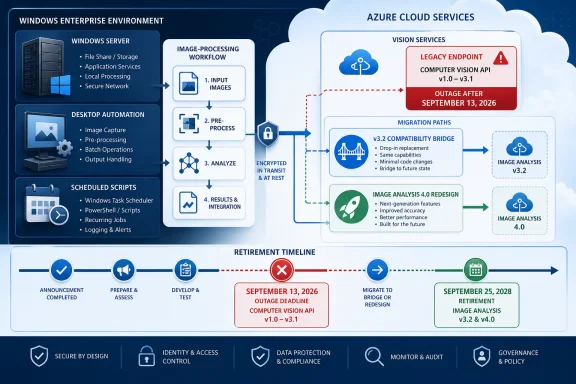
Microsoft will retire Azure Computer Vision API versions 1.0 through 3.1 on September 13, 2026, and calls to those versions will fail after that date. Most affected workloads should evaluate the generally available Computer Vision 3.2 API first; choose the
The retirement applies to the API version requested by an application, not simply to the Vision or Cognitive Services resource displayed in Azure. A current resource can still receive calls from an old application that explicitly requests a retiring API version.
Microsoft lists five affected versions:
That dependency-first approach reflects a recurring lesson in WindowsForum’s Azure retirement coverage. Reports on Azure API for FHIR emphasized endpoint discovery before database migration, while the Azure AI Document Intelligence guide distinguished the affected cloud API and container instead of treating every v2.x workload as identical. The same precision is required here: identify the caller, requested version, operation, and expected response contract.
Computer Vision 3.2 is generally the lower-risk choice when the objective is to remove the 2026 retirement dependency without redesigning the application. The newer REST implementation is an architectural choice, not an automatic replacement for every legacy caller.
Keep unknown values visible rather than guessing. “Vendor confirmation pending” or “traffic capture required” is more actionable than a blank field.
Choose 3.2 first when:
Treat 3.2 as a controlled compatibility migration, not an exemption from future lifecycle planning. Record the exact deployed dependency and continue monitoring Microsoft’s lifecycle guidance.
When
The current Image Analysis SDK calls the generally available Computer Vision REST API version
Choose
A preview dependency must be recorded separately from a GA migration. Give it an owner, justification, test plan, monitoring plan, and replacement trigger. Do not conceal it behind a generic task such as “move to the new SDK.”
Also include the September 25, 2028 retirement of Image Analysis 4.0 in the architecture decision. Moving from an API that retires in 2026 can resolve the immediate outage risk while creating another planned migration within the application’s expected operating life. That does not automatically rule out the newer implementation, but it does rule out treating it as a universally permanent destination.
2023-10-01 Image Analysis REST implementation or direct preview REST only when verified feature requirements justify the additional contract and lifecycle risk.
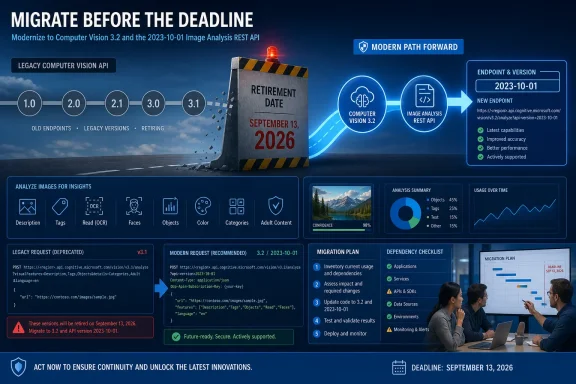 Why the Azure resource name will not identify the risk
The retirement applies to the API version requested by an application, not simply to the Vision or Cognitive Services resource displayed in Azure. A current resource can still receive calls from an old application that explicitly requests a retiring API version.Microsoft lists five affected versions:
- Computer Vision API v1.0
- Computer Vision API v2.0
- Computer Vision API v2.1
- Computer Vision API v3.0
- Computer Vision API v3.1
That dependency-first approach reflects a recurring lesson in WindowsForum’s Azure retirement coverage. Reports on Azure API for FHIR emphasized endpoint discovery before database migration, while the Azure AI Document Intelligence guide distinguished the affected cloud API and container instead of treating every v2.x workload as identical. The same precision is required here: identify the caller, requested version, operation, and expected response contract.
Choose the target before changing code
Use this compact matrix to classify each caller:| Workload or target | Supported decision |
|---|---|
| Computer Vision API versions 1.0, 2.0, 2.1, 3.0, or 3.1 | Evaluate the generally available Computer Vision 3.2 API first; Microsoft recommends 3.2 for affected customers |
| Current Image Analysis SDK | It calls the generally available 2023-10-01 Computer Vision REST API |
| Custom-model analysis or segmentation requirement | Direct 2023-04-01-preview REST calls may be required; record this as a preview dependency |
| Image Analysis 4.0 | Account for its scheduled retirement on September 25, 2028 |
Inventory legacy Computer Vision calls
Do not globally replace version strings before establishing what each caller does.- Check Azure Advisor without assuming it has found the dependency.
In the Azure portal, go to Advisor > Reliability > Service Upgrade and Retirement. Select the relevant subscription scope, review available recommendations, and verify whether a recommendation for the affected service or resource actually exists. The retirement-recommendation area is useful evidence, but the absence of a recommendation does not prove that no application calls an old API. - Export potentially relevant Azure resources.
Record the subscription, resource group, resource name, region, environment, owner, endpoint, and associated business application for each Vision or Cognitive Services resource. - Search source code and configuration.
Search repositories, deployment templates, pipeline variables, configuration stores, and scripts for:/vision/v1.0//vision/v2.0//vision/v2.1//vision/v3.0//vision/v3.1/api-version=- Computer Vision endpoint hostnames
- Vision subscription-key references
- Computer Vision client construction
- Relevant SDK and package references
- Inspect compiled and externally maintained applications.
A vendor tool, desktop utility, Windows service, or line-of-business application may store only the resource endpoint and credential while selecting the API version internally. Ask its maintainer to identify the exact REST version, operation, and SDK or package version. - Inspect operational traffic.
Use available application, proxy, gateway, and diagnostic logs to identify request paths and active callers. This can uncover test utilities, old automation hosts, or scheduled tasks that are absent from expected repositories. - Document each operation.
Do not record only “Computer Vision.” Identify whether the caller performs image analysis, object detection, tagging, OCR, custom-model analysis, segmentation, or another operation. - Capture the consumed contract.
Record the status codes, headers, JSON properties, arrays, coordinates, confidence values, operation identifiers, and asynchronous behavior on which the application depends. - Assign a target and owner.
Every caller needs a named owner, selected target, test evidence, cutover date, and rollback plan.
Use this caller-register template
Create one row per independently deployable caller. Duplicate rows when the same application uses different operations, versions, or targets.| Application | Owner | Endpoint/API version | Operation | SDK/package version | Consumed response fields | Target | Preview dependency | Test evidence | Cutover date |
|---|---|---|---|---|---|---|---|---|---|
| Example: image-processing service | Team or person | Current endpoint and exact version | Exact business operation | Package name and pinned version, or direct REST | Required properties, headers, identifiers, and error fields | 3.2, 2023-10-01, or approved preview | Yes/No, with justification | Test run, comparison, and approval location | Planned/actual date |
When Computer Vision 3.2 is the safer choice
Computer Vision 3.2 is the default candidate when a workload already uses a retiring Computer Vision API and does not require capabilities that force a different implementation. Microsoft recommends the generally available 3.2 API for affected customers.Choose 3.2 first when:
- The goal is to remove the September 13, 2026 dependency with minimal redesign.
- The required operation has a documented 3.2 equivalent.
- Downstream systems depend closely on the existing response structure.
- The current client can be updated without adopting a different programming model.
- The team requires a generally available target and has no verified preview-only requirement.
Treat 3.2 as a controlled compatibility migration, not an exemption from future lifecycle planning. Record the exact deployed dependency and continue monitoring Microsoft’s lifecycle guidance.
When 2023-10-01 makes more sense
The current Image Analysis SDK calls the generally available Computer Vision REST API version 2023-10-01. Consider this route when the team has deliberately selected the newer Image Analysis contract and verified that it supports the required workload.Choose
2023-10-01 when:- The application is already undergoing redesign rather than a minimal retirement patch.
- Every required operation is supported by the generally available REST version.
- Developers can update request construction, serialization, result handling, and tests as necessary.
- The team can compare output against representative production images.
- The resulting API version is recorded explicitly in the dependency register.
2023-10-01 makes the actual deployed dependency auditable.Handle custom models and segmentation separately
Custom-model analysis or segmentation requirements may require direct calls to the2023-04-01-preview REST API rather than the current SDK’s generally available 2023-10-01 implementation. Confirm the required capability against Microsoft’s current operation-level documentation before selecting the target.A preview dependency must be recorded separately from a GA migration. Give it an owner, justification, test plan, monitoring plan, and replacement trigger. Do not conceal it behind a generic task such as “move to the new SDK.”
Also include the September 25, 2028 retirement of Image Analysis 4.0 in the architecture decision. Moving from an API that retires in 2026 can resolve the immediate outage risk while creating another planned migration within the application’s expected operating life. That does not automatically rule out the newer implementation, but it does rule out treating it as a universally permanent destination.
Verify the migration end to end
A successful HTTP response is not sufficient evidence that the application still works.- Build a representative image set.
Include production formats, resolutions, languages, orientations, content types, and image-delivery methods. - Capture baseline results.
Protect credentials and sensitive images, but retain enough request and response data to compare behavior. - Run identical inputs against each candidate.
Test 3.2 and2023-10-01separately if both remain under consideration. Test preview REST separately when required. - Compare contracts and behavior.
Check property names, missing or null values, arrays, coordinates, confidence values, headers, errors, and asynchronous handling—not only visual accuracy. - Exercise failure paths.
Test invalid images, unsupported media, inaccessible image locations, authentication failures, timeouts, and throttling according to the application’s test policy. - Test downstream consumers.
Confirm that databases, queues, search indexes, user interfaces, exports, and automation accept the new results. - Deploy to nonproduction.
Keep target configuration separate so testing does not overwrite the known production path. - Perform a controlled production cutover.
Monitor errors and result quality, save test evidence in the register, and retain the previous deployment artifact until verification is complete.
Troubleshooting incomplete inventories
- Advisor shows no recommendation: Continue source, configuration, vendor, and traffic searches. Lack of a visible recommendation is not proof of safety.
- The endpoint contains no obvious version: Inspect the SDK/package version, generated client, request logs, or vendor documentation.
- A request succeeds but the application fails: Compare response fields, null handling, coordinates, identifiers, and polling behavior.
- Only the primary repository is clean: Search Windows services, scheduled tasks, test tools, deployment variables, and third-party applications.
- The preferred SDK lacks a required capability: Reassess 3.2 or document a justified direct-preview REST dependency.
- No owner can be identified: Escalate the caller as an operational risk instead of marking it complete.
Frequently Asked Questions
Will the Azure Computer Vision resource disappear on September 13, 2026?
The stated impact is that calls to API versions 1.0, 2.0, 2.1, 3.0, and 3.1 will fail. Determine exposure from application requests, not from the resource name alone.Is Computer Vision 3.2 the recommended replacement?
Yes. Microsoft recommends the generally available Computer Vision 3.2 API for affected customers. It is usually the first target to evaluate when equivalent operations meet the workload’s needs.Does the current Image Analysis SDK use a preview API?
No. It calls the generally available2023-10-01 REST API. Custom-model analysis or segmentation may require direct 2023-04-01-preview REST calls.Should teams move directly to Image Analysis 4.0?
Only after validating required operations, contracts, preview exposure, and the September 25, 2028 retirement risk. For many legacy callers, Computer Vision 3.2 remains the more controlled first migration.References
- Primary source: learn.microsoft.com
What's new in Azure Vision in Foundry Tools? - Foundry Tools | Microsoft Learn
Stay up to date on recent releases and updates to Azure Vision in Foundry Tools.learn.microsoft.com - Primary source: WindowsForum
Azure AD Graph API Retirement: Essential Migration Guide for 2025 | Windows Forum
Microsoft’s looming retirement of the Azure AD Graph API is no longer a warning on the horizon—it’s now a fixed endpoint for IT departments, software...windowsforum.com