

Microsoft is pushing Azure DevOps deeper into the age of agentic AI, and the most interesting part is not the novelty of the features but the kind of work they are meant to erase. In Microsoft Digital’s internal engineering environment, the company says its new DevOps Assistant and AI Work Item Assistant are cutting out repetitive chores such as breaking down work, retrieving status, and managing permissions, while keeping engineers inside the Azure DevOps experience instead of forcing them to bounce across tools. Microsoft frames the change as a productivity reset: less time spent managing artifacts, more time spent building software. (microsoft.com)
Azure DevOps has long been Microsoft’s own proof that a single platform can coordinate planning, code, test, release, and reporting across a sprawling enterprise. But at Microsoft scale, even a strong platform can become a magnet for friction when tens of thousands of users repeatedly perform small administrative tasks that add up to large losses of focus. The company says its Engineering Systems Platform team saw engineers and product managers burning time on work item creation, sprint scoping, query writing, and access requests, and that these chores were still expensive even after conventional automation was introduced.
The new initiative matters because it reflects a broader shift in Microsoft’s enterprise software strategy: the company is no longer treating AI as a layer on top of productivity tools, but as the control surface for operational work. That is consistent with Microsoft’s current product direction in Copilot Studio, where agents can be orchestrated to choose tools, knowledge, and actions based on context, and where Microsoft Foundry models can be used behind the scenes for structured AI outputs. (learn.microsoft.com)
What Microsoft Digital is doing inside Azure DevOps also tells us something important about the market. The industry has spent years talking about copilots that write code, but the least glamorous and often most costly part of software delivery is not code generation. It is the surrounding administration: the handoffs, the clarifications, the template work, the backlog hygiene, and the permission wrangling that keep teams busy without necessarily making products better. Microsoft is betting that the next wave of AI value comes from reducing that invisible tax. (microsoft.com)
There is also a strategic enterprise message embedded in the rollout. Microsoft says its internal Azure DevOps environment serves roughly 15,000 active users, and its public Azure DevOps ecosystem continues to be a major DevOps platform with deep integration into the Microsoft stack. That makes Microsoft’s internal use case a kind of living reference architecture: if the company can safely deploy AI in a platform this large and permission-sensitive, it can make a credible case to customers who are still deciding whether agentic DevOps is practical or merely fashionable.
Microsoft Digital says the team first explored automation three years ago, but earlier attempts still left decision-making and synthesis work to humans. That distinction matters. It is easy to automate a button click; it is much harder to automate the meaning behind a request, especially when a user’s ask depends on project context, permission boundaries, and the current state of a backlog. AI became relevant when the problem stopped being about rote action and started being about interpretation. (microsoft.com)
Microsoft’s argument is that if AI can standardize the first draft of that work, everything else gets better: estimates become more consistent, handoffs become clearer, and coding assistants can work from better-structured inputs. That creates a feedback loop in which AI is not merely assisting human labor but improving the quality of the system that receives human labor later. It is a subtle but important distinction. (microsoft.com)
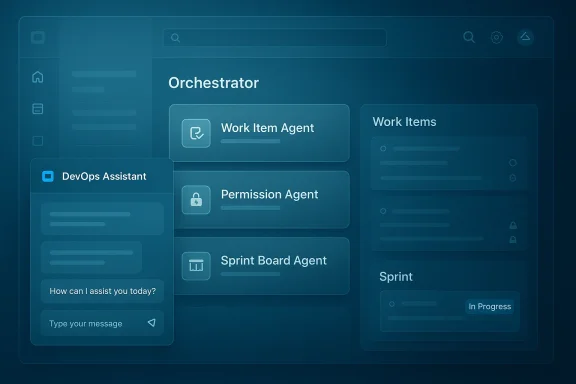
Microsoft says the assistant is actually a distributed set of specialized agents rather than a single monolithic bot. The Work Item Agent handles creation and refinement, the Knowledge Board Agent surfaces DevOps knowledge, the Permission Agent handles access requests, the Bulk Complete Agent automates repetitive updates, and the Sprint Board Agent summarizes sprint status and provides on-demand insights. This modular approach is more scalable than a generic chatbot because it maps AI behavior to distinct operational domains. (microsoft.com)
This matters because orchestration is what turns a conversational interface into an operational one. A plain chatbot can answer questions; an orchestrated agent can do things while respecting role-based access and existing enterprise processes. That is the threshold Microsoft is trying to cross, and it is why the company emphasizes that the assistant stays aligned with Azure DevOps permissions rather than bypassing them. (microsoft.com)
In other words, Microsoft is not trying to make AI omniscient. It is trying to make it situationally aware and carefully bounded. That is the right instinct for enterprise DevOps, where the risk of exposing too much context can outweigh the convenience of a clever answer. (learn.microsoft.com)
That matters because product and program managers frequently begin with incomplete, high-level requirements. The assistant’s job is to help shape those rough ideas into sprint-ready objects with better consistency and less manual cleanup. Microsoft says the experience is powered by Microsoft Foundry, which gives it access to the model layer needed for context-aware generation and structured output. (microsoft.com)
The payoff is not only speed. It is also standardization. Standardization means reporting becomes cleaner, sprint planning becomes more comparable across teams, and the whole system produces data that is easier to reason about later. That is where AI-assisted work item creation can have effects far beyond the authoring moment itself. (learn.microsoft.com)
The first loop is about quality. If AI helps create better-structured work items, then downstream tools, including GitHub Copilot, can generate better code and more predictable outcomes because they are starting from cleaner inputs. This is a classic garbage in, garbage out problem turned inside out: better upstream context leads to better downstream automation. (microsoft.com)
The third loop is capacity reinvestment. Once tactical DevOps mechanics consume fewer hours, teams can spend more time on design, estimation, technical decisions, and learning. That is where the real enterprise value lies, because engineering organizations rarely suffer from a lack of activity; they suffer from too much activity spent on the wrong layer of the problem. (microsoft.com)
That emphasis is not incidental. Work item data is often sensitive enough that even within the same organization, not everyone should see everything. Microsoft’s connector documentation explicitly notes permission-aware visibility and Entra-backed identity mapping, which shows the broader platform pattern: AI can be useful only if it inherits the governance model rather than sidestepping it. (learn.microsoft.com)
For customers, that means the question is no longer whether an AI assistant can be built. The question is whether it can be built in a way that respects the enterprise’s real constraints: identity, access control, auditability, and data boundaries. Microsoft is signaling that these are not afterthoughts but core design requirements. (learn.microsoft.com)
The competitive pressure is not only against other DevOps tools, but also against generic copilots that live outside the workflow. A standalone assistant may be useful for drafting, summarizing, or querying, but it does not have the same leverage as an embedded agent operating where the work already lives. That is why Microsoft keeps stressing in-context experiences instead of detached chat windows. (microsoft.com)
It also helps Microsoft defend the relevance of Azure DevOps in an era when the center of gravity in developer tooling increasingly includes GitHub, Copilot, and agent-based workflows. Rather than treating Azure DevOps as a legacy planning tool, Microsoft is positioning it as a command center for agentic software delivery. That is a smart way to extend the platform’s life and importance. (azure.microsoft.com)
The challenge is especially acute in product planning. Planning is not merely a clerical task; it is also a negotiation among priorities, constraints, and tradeoffs. If an assistant is too aggressive in “helping,” it can flatten nuance or over-standardize work that actually needs human judgment. That is why the company’s emphasis on user control is such an important part of the design philosophy. (microsoft.com)
The best enterprise agents are not the ones that seem magical for a demo. They are the ones that produce repeatable outcomes, respect policies, and reduce the number of tiny decisions workers must make every day. Microsoft’s approach is noteworthy because it seems to be built around that practical truth rather than around headline-grabbing novelty. (microsoft.com)
That broader strategy also helps explain why Microsoft keeps investing in connectors and agent tooling that preserve context. The Azure DevOps Work Items connector can surface work data in Microsoft 365 experiences, and Copilot Studio can use orchestrators and tools to route tasks to the right place. The long-term play is an ecosystem in which one agent can answer, act, and hand off across business systems without losing governance. (learn.microsoft.com)
If the company can keep the system useful, secure, and low-friction across a large internal audience, it gains both product credibility and implementation lessons. That is especially valuable in agentic systems, where edge cases, permission issues, and user trust tend to surface only after broad deployment. (microsoft.com)
It also opens a broader opportunity for Microsoft to connect planning, execution, and analysis in a more coherent agentic workflow. If the assistants can continue to improve structure at the source, then downstream code generation, reporting, and release coordination all become more effective. That is where the value compounds. (microsoft.com)
Another concern is governance drift. Even if permissions are respected at launch, enterprises need long-term clarity about model behavior, auditability, and how updates alter outcomes. There is also the familiar issue of user trust: if a few early experiences are wrong, brittle, or hard to correct, adoption can stall quickly. (learn.microsoft.com)
It will also be worth watching how tightly Microsoft integrates the assistants with the rest of its agent stack. The company has already made clear that Copilot Studio orchestration, Microsoft Foundry models, and governed connectors are central to the future of its AI tools. The question is whether Azure DevOps becomes a showcase for that vision or simply one more example of it. (learn.microsoft.com)
Source: Microsoft Reclaiming engineering time with AI in Azure DevOps at Microsoft - Inside Track Blog
 Overview
Azure DevOps has long been Microsoft’s own proof that a single platform can coordinate planning, code, test, release, and reporting across a sprawling enterprise. But at Microsoft scale, even a strong platform can become a magnet for friction when tens of thousands of users repeatedly perform small administrative tasks that add up to large losses of focus. The company says its Engineering Systems Platform team saw engineers and product managers burning time on work item creation, sprint scoping, query writing, and access requests, and that these chores were still expensive even after conventional automation was introduced.The new initiative matters because it reflects a broader shift in Microsoft’s enterprise software strategy: the company is no longer treating AI as a layer on top of productivity tools, but as the control surface for operational work. That is consistent with Microsoft’s current product direction in Copilot Studio, where agents can be orchestrated to choose tools, knowledge, and actions based on context, and where Microsoft Foundry models can be used behind the scenes for structured AI outputs. (learn.microsoft.com)
What Microsoft Digital is doing inside Azure DevOps also tells us something important about the market. The industry has spent years talking about copilots that write code, but the least glamorous and often most costly part of software delivery is not code generation. It is the surrounding administration: the handoffs, the clarifications, the template work, the backlog hygiene, and the permission wrangling that keep teams busy without necessarily making products better. Microsoft is betting that the next wave of AI value comes from reducing that invisible tax. (microsoft.com)
There is also a strategic enterprise message embedded in the rollout. Microsoft says its internal Azure DevOps environment serves roughly 15,000 active users, and its public Azure DevOps ecosystem continues to be a major DevOps platform with deep integration into the Microsoft stack. That makes Microsoft’s internal use case a kind of living reference architecture: if the company can safely deploy AI in a platform this large and permission-sensitive, it can make a credible case to customers who are still deciding whether agentic DevOps is practical or merely fashionable.
Why Microsoft Chose Azure DevOps as an AI Target
Azure DevOps is a particularly revealing place to apply AI because it sits at the intersection of intent and execution. It is where product goals become work items, where work items become sprint plans, and where those plans become releases. Any friction in that chain can ripple downstream into missed deadlines, ambiguous ownership, and rework, which is why automating the “boring middle” of the SDLC is so attractive. (microsoft.com)Microsoft Digital says the team first explored automation three years ago, but earlier attempts still left decision-making and synthesis work to humans. That distinction matters. It is easy to automate a button click; it is much harder to automate the meaning behind a request, especially when a user’s ask depends on project context, permission boundaries, and the current state of a backlog. AI became relevant when the problem stopped being about rote action and started being about interpretation. (microsoft.com)
The hidden cost of work item hygiene
Work item hygiene sounds trivial until you multiply it by a large engineering organization. A sprint planning session that requires an hour of manual breakdown, followed by dozens or hundreds of task creations in inconsistent styles, is not just a productivity issue; it is a quality issue. The downstream cost is ambiguity, and ambiguity in DevOps often becomes delay. (microsoft.com)Microsoft’s argument is that if AI can standardize the first draft of that work, everything else gets better: estimates become more consistent, handoffs become clearer, and coding assistants can work from better-structured inputs. That creates a feedback loop in which AI is not merely assisting human labor but improving the quality of the system that receives human labor later. It is a subtle but important distinction. (microsoft.com)
- Less time spent inventing structure from scratch
- Fewer inconsistent task descriptions
- Better acceptance criteria at the outset
- Reduced clarification cycles later
- More predictable sprint planning outcomes
How the DevOps Assistant Works
The DevOps Assistant is Microsoft’s chat-based, in-context support layer inside the Azure DevOps UI. Rather than sending users to a separate portal or a generic chatbot, the experience lives in a side panel where people can ask natural-language questions, retrieve project status, and trigger routine DevOps actions without leaving the screen they are already using. That design choice is not cosmetic; it reduces context switching, which is one of the biggest hidden costs in enterprise work. (microsoft.com)Microsoft says the assistant is actually a distributed set of specialized agents rather than a single monolithic bot. The Work Item Agent handles creation and refinement, the Knowledge Board Agent surfaces DevOps knowledge, the Permission Agent handles access requests, the Bulk Complete Agent automates repetitive updates, and the Sprint Board Agent summarizes sprint status and provides on-demand insights. This modular approach is more scalable than a generic chatbot because it maps AI behavior to distinct operational domains. (microsoft.com)
Orchestration, not just conversation
The Orchestrator Agent sits at the center, deciding where a user request should go. If someone asks to create or refine work items, the request is routed to the Work Item Agent. If the user asks about access, the Permission Agent takes over. That orchestration model mirrors current guidance in Copilot Studio, where the orchestrator selects tools, topics, and knowledge based on system instructions, user input, and contextual signals. (microsoft.com)This matters because orchestration is what turns a conversational interface into an operational one. A plain chatbot can answer questions; an orchestrated agent can do things while respecting role-based access and existing enterprise processes. That is the threshold Microsoft is trying to cross, and it is why the company emphasizes that the assistant stays aligned with Azure DevOps permissions rather than bypassing them. (microsoft.com)
- Chat is the user interface
- Routing is the intelligence layer
- Permissions remain the governance layer
- Specialized agents reduce task confusion
- In-context operation reduces friction
Why the architecture matters
The architecture also helps explain Microsoft’s emphasis on security and confidentiality. Azure DevOps data is sensitive by definition: it contains roadmap intent, defect details, engineering priorities, and often customer-specific references. Microsoft’s public documentation for the Azure DevOps Work Items connector notes that access can be trimmed to people with Azure DevOps permissions, and identity mapping is handled through Microsoft Entra ID. That same logic is central to the assistant story. (learn.microsoft.com)In other words, Microsoft is not trying to make AI omniscient. It is trying to make it situationally aware and carefully bounded. That is the right instinct for enterprise DevOps, where the risk of exposing too much context can outweigh the convenience of a clever answer. (learn.microsoft.com)
The AI Work Item Assistant and the Battle for Better Inputs
The AI Work Item Assistant is the more quietly transformative of the two features because it attacks the earliest, least glamorous stage of the SDLC: turning ideas into structured backlog items. Microsoft says the assistant lives directly inside Azure DevOps work items and helps users create and refine items, generate child work from parent work, and keep planning work centered in the same interface where the actual project data already exists. (microsoft.com)That matters because product and program managers frequently begin with incomplete, high-level requirements. The assistant’s job is to help shape those rough ideas into sprint-ready objects with better consistency and less manual cleanup. Microsoft says the experience is powered by Microsoft Foundry, which gives it access to the model layer needed for context-aware generation and structured output. (microsoft.com)
The value of structured defaults
In enterprise software, defaults are powerful. If an AI assistant can consistently suggest a sane task breakdown, a useful acceptance criterion, or a clean work item hierarchy, then the organization benefits from a better starting point every time. That reduces the amount of downstream correction required and makes backlog quality less dependent on the individual habits of whoever happened to write the item first. (microsoft.com)The payoff is not only speed. It is also standardization. Standardization means reporting becomes cleaner, sprint planning becomes more comparable across teams, and the whole system produces data that is easier to reason about later. That is where AI-assisted work item creation can have effects far beyond the authoring moment itself. (learn.microsoft.com)
- Faster first drafts
- More consistent task hierarchy
- Better downstream analytics
- Cleaner acceptance criteria
- Less rework during sprint planning
Microsoft’s Three Feedback Loops
One of the most compelling parts of Microsoft’s story is its insistence that reclaimed time has to be reinvested deliberately. The company describes three reinforcing loops: upstream quality amplification, acceleration of execution, and capacity reinvestment. That is a more mature framing than the usual productivity narrative, because it recognizes that time saved only matters if it changes behavior afterward. (microsoft.com)The first loop is about quality. If AI helps create better-structured work items, then downstream tools, including GitHub Copilot, can generate better code and more predictable outcomes because they are starting from cleaner inputs. This is a classic garbage in, garbage out problem turned inside out: better upstream context leads to better downstream automation. (microsoft.com)
From planning to code generation
The second loop is execution speed. Microsoft cites a sprint-planning scenario in which a team of eight engineers might spend an hour or more manually breaking down user stories into more than 100 tasks. With AI assistance, that work can be reduced to a prompt-driven action that takes only minutes. The exact savings will vary by team, but the principle is clear: reduce the time spent translating intent into structure, and the sprint begins with less drag. (microsoft.com)The third loop is capacity reinvestment. Once tactical DevOps mechanics consume fewer hours, teams can spend more time on design, estimation, technical decisions, and learning. That is where the real enterprise value lies, because engineering organizations rarely suffer from a lack of activity; they suffer from too much activity spent on the wrong layer of the problem. (microsoft.com)
- Better inputs improve output quality
- Faster planning reduces delivery lag
- Reclaimed hours can fund higher-value work
- Teams can spend more time on judgment
- Learning and experimentation become easier to justify
The strategic implication
This is also a subtle argument about organizational maturity. Microsoft is not portraying AI as a replacement for DevOps discipline; it is portraying AI as a way to amplify that discipline. That stance is likely more persuasive to enterprise buyers than a bold claim of full automation, because it preserves the human role where judgment still matters most. (microsoft.com)Security, Permissions, and Trust
Any AI feature inside Azure DevOps lives or dies on trust. If the assistant were to ignore permissions, leak roadmap details, or fabricate action outcomes, the entire proposition would collapse quickly in an enterprise environment. Microsoft’s framing repeatedly stresses that the assistant acts securely and in context, and that it stays aligned with existing Azure DevOps permission models. (microsoft.com)That emphasis is not incidental. Work item data is often sensitive enough that even within the same organization, not everyone should see everything. Microsoft’s connector documentation explicitly notes permission-aware visibility and Entra-backed identity mapping, which shows the broader platform pattern: AI can be useful only if it inherits the governance model rather than sidestepping it. (learn.microsoft.com)
Secure context is the product
This is where Microsoft’s internal and external story converge. The company’s public Azure DevOps guidance now sits alongside broader agent tooling in Copilot Studio and Azure AI Foundry, while its Azure DevOps platform strategy emphasizes agentic workflows across the software lifecycle. The market is moving toward AI systems that do not just answer questions, but execute tasks through governed interfaces. (learn.microsoft.com)For customers, that means the question is no longer whether an AI assistant can be built. The question is whether it can be built in a way that respects the enterprise’s real constraints: identity, access control, auditability, and data boundaries. Microsoft is signaling that these are not afterthoughts but core design requirements. (learn.microsoft.com)
- Permission-aware responses are essential
- Identity mapping must be explicit
- Sensitive backlog data needs governance
- Auditability matters as much as speed
- Trust is a prerequisite for adoption
Competitive and Market Implications
Microsoft’s move places Azure DevOps in a broader competitive category: not just as a repository of work, but as an operational platform for AI-assisted delivery. That has implications for rivals in the DevOps space, particularly those trying to keep work tracking, planning, and coding assistance separate. Microsoft’s view is that those layers are converging, and that the company can win by unifying them inside one governed ecosystem. (azure.microsoft.com)The competitive pressure is not only against other DevOps tools, but also against generic copilots that live outside the workflow. A standalone assistant may be useful for drafting, summarizing, or querying, but it does not have the same leverage as an embedded agent operating where the work already lives. That is why Microsoft keeps stressing in-context experiences instead of detached chat windows. (microsoft.com)
Why embedded AI beats after-the-fact AI
Embedded AI is more powerful because it lowers the number of decisions a user must make before getting help. Instead of copying data into a chat box, users ask within the system of record and then act on the result immediately. That small usability difference becomes a major adoption advantage when scaled across thousands of employees. (microsoft.com)It also helps Microsoft defend the relevance of Azure DevOps in an era when the center of gravity in developer tooling increasingly includes GitHub, Copilot, and agent-based workflows. Rather than treating Azure DevOps as a legacy planning tool, Microsoft is positioning it as a command center for agentic software delivery. That is a smart way to extend the platform’s life and importance. (azure.microsoft.com)
- Integrated AI is harder to displace
- Workflow-native tools reduce switching costs
- Permissions-aware design strengthens enterprise trust
- Agentic systems favor platforms with existing context
- DevOps vendors now compete on orchestration, not just tracking
Enterprise Adoption Challenges
Even if the technical architecture is sound, adoption will not be automatic. Enterprise users are often skeptical of AI that appears to simplify work they already know how to do, especially if they fear loss of control or inconsistent outputs. Microsoft’s own guidance implies that adoption depends on clear use cases, precise routing, and the ability to keep humans in the loop. (learn.microsoft.com)The challenge is especially acute in product planning. Planning is not merely a clerical task; it is also a negotiation among priorities, constraints, and tradeoffs. If an assistant is too aggressive in “helping,” it can flatten nuance or over-standardize work that actually needs human judgment. That is why the company’s emphasis on user control is such an important part of the design philosophy. (microsoft.com)
Consumer simplicity versus enterprise reality
Consumer AI succeeds when it is delightful. Enterprise AI succeeds when it is dependable. That difference often gets lost in vendor messaging, but Microsoft’s Azure DevOps story is strongest when it acknowledges the complexity instead of pretending the problem is merely one of interface design. (learn.microsoft.com)The best enterprise agents are not the ones that seem magical for a demo. They are the ones that produce repeatable outcomes, respect policies, and reduce the number of tiny decisions workers must make every day. Microsoft’s approach is noteworthy because it seems to be built around that practical truth rather than around headline-grabbing novelty. (microsoft.com)
- Users need predictable behavior
- Planners need editability, not automation theater
- Teams need visibility into what the agent did
- Humans must retain final judgment
- Change management is as important as model quality
Why This Matters for Microsoft’s Broader AI Strategy
This Azure DevOps work is part of a wider pattern across Microsoft’s AI portfolio. Copilot Studio now emphasizes orchestrated multi-agent systems, tools, and connectors, while Microsoft’s Azure DevOps and agentic DevOps messaging increasingly frames software delivery as an AI-augmented lifecycle. The company is clearly building a stack in which agents can operate across work surfaces instead of living in isolated experiments. (learn.microsoft.com)That broader strategy also helps explain why Microsoft keeps investing in connectors and agent tooling that preserve context. The Azure DevOps Work Items connector can surface work data in Microsoft 365 experiences, and Copilot Studio can use orchestrators and tools to route tasks to the right place. The long-term play is an ecosystem in which one agent can answer, act, and hand off across business systems without losing governance. (learn.microsoft.com)
Microsoft’s internal dogfooding advantage
Microsoft has always benefited from dogfooding, but in the AI era that advantage is more strategic than ever. The company can test whether a workflow works at scale inside its own massive IT environment before asking customers to trust it with their own operations. That makes the internal Azure DevOps deployment more than a case study; it is a proving ground.If the company can keep the system useful, secure, and low-friction across a large internal audience, it gains both product credibility and implementation lessons. That is especially valuable in agentic systems, where edge cases, permission issues, and user trust tend to surface only after broad deployment. (microsoft.com)
- Internal scale tests product reliability
- Real users reveal edge cases quickly
- Feedback can shape external release plans
- Trust increases when Microsoft uses its own tools
- Product credibility improves with measurable results
Strengths and Opportunities
The strongest thing about Microsoft’s Azure DevOps AI initiative is that it focuses on work people actually dislike doing and that organizations often underestimate. It is not chasing vague inspiration; it is targeting the administrative friction that quietly taxes engineering organizations every day. That gives it a practical center of gravity and a credible path to ROI. (microsoft.com)It also opens a broader opportunity for Microsoft to connect planning, execution, and analysis in a more coherent agentic workflow. If the assistants can continue to improve structure at the source, then downstream code generation, reporting, and release coordination all become more effective. That is where the value compounds. (microsoft.com)
- Reduces repetitive administrative work
- Improves work item consistency
- Keeps users in context
- Aligns with enterprise permissions
- Supports a broader agentic workflow strategy
- Creates reusable patterns for other Microsoft products
- Makes ROI easier to measure than broad AI experiments
Risks and Concerns
The biggest risk is overconfidence. AI that handles planning and workflow tasks can make teams feel faster before they are actually better, and that can hide quality regressions until later in the delivery cycle. If an assistant generates tidy-looking work items that still miss crucial nuance, the organization may only discover the problem after downstream rework begins. (microsoft.com)Another concern is governance drift. Even if permissions are respected at launch, enterprises need long-term clarity about model behavior, auditability, and how updates alter outcomes. There is also the familiar issue of user trust: if a few early experiences are wrong, brittle, or hard to correct, adoption can stall quickly. (learn.microsoft.com)
- AI-generated structure can hide missing nuance
- Over-automation may reduce human vigilance
- Permissions bugs would be highly damaging
- Poor auditability could block enterprise rollout
- Users may resist if output quality is inconsistent
- Benefits may be uneven across team types
- Governance must keep pace with feature growth
What to Watch Next
The most important next signal is whether Microsoft moves the DevOps Assistant beyond internal environments and into customer-facing availability on a meaningful timeline. If that happens, the company will have to prove the experience is not merely useful in a Microsoft-only context, but broadly applicable across different organizations, processes, and maturity levels. That external validation will matter as much as the demo itself. (microsoft.com)It will also be worth watching how tightly Microsoft integrates the assistants with the rest of its agent stack. The company has already made clear that Copilot Studio orchestration, Microsoft Foundry models, and governed connectors are central to the future of its AI tools. The question is whether Azure DevOps becomes a showcase for that vision or simply one more example of it. (learn.microsoft.com)
Key things to monitor
- External customer rollout timing
- Measured productivity gains over time
- Quality of generated work items
- Permission and governance behavior
- Integration with Teams and Microsoft 365
- Broader agent support across the SDLC
- Evidence that saved time is actually reinvested
Source: Microsoft Reclaiming engineering time with AI in Azure DevOps at Microsoft - Inside Track Blog
