

Microsoft’s Azure Linux has gained an offline ISO for local testing, but anyone expecting a Microsoft-branded alternative to Ubuntu, Fedora, or Windows will find a deliberately narrow server operating system instead.
MakeUseOf tested the Azure Linux 4.0 preview in a virtual machine and found a console-first install with no desktop environment, a limited package selection, and few concessions to general-purpose computing. That is not an omission so much as the point: Azure Linux exists to run cloud workloads, Kubernetes nodes, containers, and Azure virtual machines—not to replace a Windows desktop.
Azure Linux is Microsoft’s open-source, RPM-based distribution, developed for its cloud platform. Microsoft’s documentation describes version 4.0 as a preview intended strictly for evaluation and testing, not production. It includes dnf5 package management and a Linux 6.18 LTS kernel, but its role is firmly cloud-native rather than consumer-facing.
The distribution can be deployed as an Azure VM image, an Azure Kubernetes Service container host, or a container base image. Microsoft’s supported scenarios are similarly focused: Azure VMs, VM scale sets, AKS hosts, and container images. Bare-metal deployments, local ISO installations, on-premises use, and other clouds are explicitly outside Microsoft’s support commitments.
That makes the new ISO useful for admins, developers, and curious enthusiasts who want to inspect the platform locally. It does not turn Azure Linux into a supported home-lab server distribution, much less a desktop OS.
Azure Linux shares RPM ecosystem roots with Fedora, but it is not Fedora with Microsoft branding. Its package set, build process, update model, security posture, and Azure integrations are tuned around predictable cloud operation. A small footprint and constrained software supply chain are advantages for an appliance-like container host or VM base image; they are drawbacks for someone looking to browse the web, play games, or build a general Linux workstation.
For Windows users, the comparison is straightforward. Windows remains Microsoft’s client platform, while Azure Linux is part of the company’s infrastructure stack alongside Hyper-V, Azure, AKS, .NET, and container tooling. The fact that it can be installed locally does not change that division of labor.
Otherwise, use a mainstream desktop Linux distribution for Linux desktop work, Windows Server for Microsoft-centric server roles, or WSL when the goal is Linux tooling on a Windows machine.
Azure Linux 4.0 is best treated as an Azure evaluation target until Microsoft moves it beyond preview and expands its supported deployment model.
MakeUseOf tested the Azure Linux 4.0 preview in a virtual machine and found a console-first install with no desktop environment, a limited package selection, and few concessions to general-purpose computing. That is not an omission so much as the point: Azure Linux exists to run cloud workloads, Kubernetes nodes, containers, and Azure virtual machines—not to replace a Windows desktop.
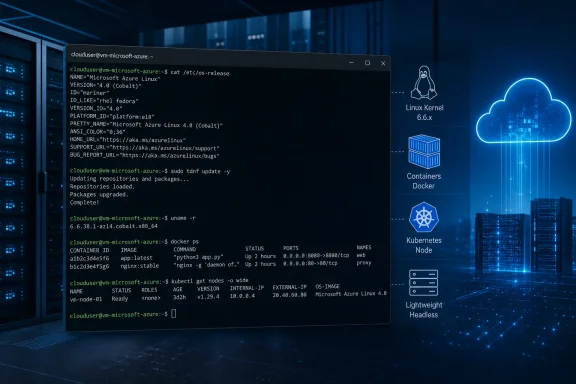 A Linux distribution for Microsoft’s infrastructure
Azure Linux is Microsoft’s open-source, RPM-based distribution, developed for its cloud platform. Microsoft’s documentation describes version 4.0 as a preview intended strictly for evaluation and testing, not production. It includes dnf5 package management and a Linux 6.18 LTS kernel, but its role is firmly cloud-native rather than consumer-facing.The distribution can be deployed as an Azure VM image, an Azure Kubernetes Service container host, or a container base image. Microsoft’s supported scenarios are similarly focused: Azure VMs, VM scale sets, AKS hosts, and container images. Bare-metal deployments, local ISO installations, on-premises use, and other clouds are explicitly outside Microsoft’s support commitments.
That makes the new ISO useful for admins, developers, and curious enthusiasts who want to inspect the platform locally. It does not turn Azure Linux into a supported home-lab server distribution, much less a desktop OS.
Why the desktop experience is intentionally absent
The MakeUseOf test highlights the practical result. Installation is performed from the command line, and the installed system boots to a text console. There is no graphical desktop, display stack, or broad repository catalog comparable to a full Fedora workstation install.Azure Linux shares RPM ecosystem roots with Fedora, but it is not Fedora with Microsoft branding. Its package set, build process, update model, security posture, and Azure integrations are tuned around predictable cloud operation. A small footprint and constrained software supply chain are advantages for an appliance-like container host or VM base image; they are drawbacks for someone looking to browse the web, play games, or build a general Linux workstation.
For Windows users, the comparison is straightforward. Windows remains Microsoft’s client platform, while Azure Linux is part of the company’s infrastructure stack alongside Hyper-V, Azure, AKS, .NET, and container tooling. The fact that it can be installed locally does not change that division of labor.
What Windows admins should do
There is little reason to deploy Azure Linux on a PC simply because Microsoft publishes it. Test it if you manage Azure workloads, build containers, validate application compatibility, or want to understand the operating system beneath an Azure service.Otherwise, use a mainstream desktop Linux distribution for Linux desktop work, Windows Server for Microsoft-centric server roles, or WSL when the goal is Linux tooling on a Windows machine.
Azure Linux 4.0 is best treated as an Azure evaluation target until Microsoft moves it beyond preview and expands its supported deployment model.
References
- Primary source: MakeUseOf
Published: 2026-07-13T14:30:15+00:00
I installed Microsoft's own Linux distro and immediately understood why it exists
If you can't beat them, join them. www.makeuseof.com
- Official source: learn.microsoft.com
Get started with Azure Linux | Microsoft Learn
Learn about resources you can use to quickly deploy and start using Azure Linux in your environment.learn.microsoft.com
