

Azure Migrate projects should split physical Windows servers into two tracks immediately: cut over only machines whose final Classic recovery point is usable, validated, and acceptable as a migration source; re-replicate everything else through the simplified appliance. A server requiring current data, newly enabled replication, or a schedule extending beyond September 30, 2026 does not belong in an expedited Classic cutover plan.
Microsoft’s Azure Migrate documentation says Classic replications stopped creating recovery points after May 31, although migrations from existing recovery points remain supported until September 30. As of July 19, even the newest possible Classic recovery point is nearly seven weeks old, making data age—not appliance installation—the first decision administrators must address.
The Classic retirement creates two fundamentally different projects. One is a controlled recovery from a frozen replicated state; the other is a fresh migration using the simplified Azure Migrate experience.
Do not combine them under one generic “Azure migration” milestone. They have different data-loss exposure, validation requirements, rollback plans, and deadlines.
Use this decision process now:
That sequence matters. Classic has not remained a normally functioning migration path with a future shutdown date; it has already lost its ability to produce current replicas.
The candidate must pass more than a portal-status check. Administrators should prove that the replicated operating system boots, required Windows services start, application components communicate correctly, and the recovered data matches the state the business intends to use.
A suitable Classic candidate should have all of the following:
Administrators should also distinguish an application’s data from its server image. A web front end backed by an external database may tolerate an older machine recovery point after configuration review. A physical file server or locally hosted line-of-business database is far less likely to tolerate weeks of missing writes.
Classic should now be treated as a frozen recovery artifact, not an active replication channel. If the migration plan assumes one final synchronization of recent source changes, it is already incompatible with the Classic path.
This track should include:
Where time and infrastructure permit, run the transition in parallel. Keep the existing Classic record available as evidence while deploying the simplified appliance, preparing the required server components, and establishing new replication. Avoid dismantling the old migration configuration merely because the new appliance has registered successfully.
The decisive milestone is not appliance deployment. It is a tested recovery point from the new replication path that satisfies the workload’s recovery and cutover requirements.
Create one migration register with at least these fields:
The audit should also search for workloads that are absent from the expected project. Compare Azure Migrate records against physical-server inventories, monitoring systems, backup catalogs, configuration-management databases, firewall rules, and application documentation. A server discovered after the March 31 Classic enablement block can only begin new agent-based replication through the simplified experience.
Ownership of the appliance itself requires attention. Record who patches and monitors its Windows host, who can access its configuration, which firewall endpoints it relies upon, and who will respond if replication stops. Capture the installed agent state on each source machine rather than assuming that prior discovery proves migration readiness.
Azure Migrate supports an OS upgrade during migration where applicable, with target options including Windows Server 2016, 2019, 2022, or 2025. That capability can reduce duplicated migration and upgrade work, but it expands the validation scope: administrators must test the operating system upgrade, drivers, installed roles, application compatibility, services, authentication, and management tooling.
WindowsForum’s coverage of the end of Windows Server 2008 Premium Assurance and the approaching Windows Server 2012/R2 Extended Security Updates deadline points to the same planning problem. A rushed lift-and-shift can preserve an unsupported application stack while merely changing its location.
For a legacy Windows server, record three separate decisions:
Azure Migrate teams should therefore set an internal Classic completion date substantially earlier than Microsoft’s retirement. That buffer is needed for failed tests, rejected application validation, networking changes, and the possibility that a supposedly usable recovery point proves too old.
The practical choice is now clear. Cut over from Classic only when the frozen May 31-or-earlier state is explicitly acceptable and thoroughly tested; otherwise deploy the simplified appliance and establish a fresh replication chain. By September 30, every physical Windows server should either be migrated successfully or have no remaining operational dependency on the Classic experience.
Microsoft’s Azure Migrate documentation says Classic replications stopped creating recovery points after May 31, although migrations from existing recovery points remain supported until September 30. As of July 19, even the newest possible Classic recovery point is nearly seven weeks old, making data age—not appliance installation—the first decision administrators must address.
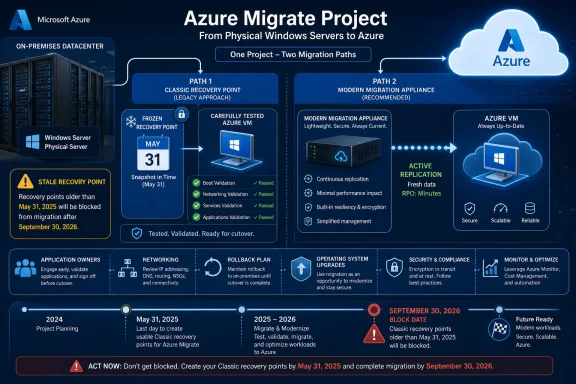 Divide the Estate Before Scheduling Any Cutovers
The Classic retirement creates two fundamentally different projects. One is a controlled recovery from a frozen replicated state; the other is a fresh migration using the simplified Azure Migrate experience.Do not combine them under one generic “Azure migration” milestone. They have different data-loss exposure, validation requirements, rollback plans, and deadlines.
Use this decision process now:
- Inventory every Azure Migrate project containing physical or agent-based Windows Server migration work.
- Identify each server still associated with a Classic Replication Appliance and record its final recovery-point date.
- Confirm whether the recovery point contains an operationally usable copy of the workload, not merely whether Azure still displays it.
- Assign servers with acceptable frozen states to a tightly controlled Classic final-migration track.
- Assign servers needing current data, new replication, additional migration time, or unresolved application validation to the simplified-appliance track.
- Remove servers with unknown owners or uncertain dependencies from the expedited track until those gaps are resolved.
- Complete Classic migrations well before September 30 rather than treating that date as an available maintenance window.
That sequence matters. Classic has not remained a normally functioning migration path with a future shutdown date; it has already lost its ability to produce current replicas.
Which Servers Can Still Use the Classic Cutover Path?
A Classic cutover remains defensible only when the final recovery point represents a state the organization can knowingly deploy. That may include an effectively static server, a workload whose authoritative data resides elsewhere, or a machine that stopped changing before May 31.The candidate must pass more than a portal-status check. Administrators should prove that the replicated operating system boots, required Windows services start, application components communicate correctly, and the recovered data matches the state the business intends to use.
A suitable Classic candidate should have all of the following:
- The owner accepts the exact recovery-point date and the resulting gap from the current source server.
- Application data created after that recovery point can be discarded, reconstructed, or restored through a separately tested process.
- A test migration has verified boot behavior, networking, authentication, services, and application operation.
- The team can complete migration, validation, and cleanup before September 30.
- The rollback evidence identifies what will happen if the Azure VM fails acceptance testing.
- No unresolved dependency requires the source and migrated copies to remain synchronized.
Administrators should also distinguish an application’s data from its server image. A web front end backed by an external database may tolerate an older machine recovery point after configuration review. A physical file server or locally hosted line-of-business database is far less likely to tolerate weeks of missing writes.
Classic should now be treated as a frozen recovery artifact, not an active replication channel. If the migration plan assumes one final synchronization of recent source changes, it is already incompatible with the Classic path.
Which Servers Must Be Re-Replicated?
Any server that needs an up-to-date copy belongs on the simplified appliance, even if a Classic recovery point remains visible. Re-replication is also the correct route for newly discovered workloads, machines whose Classic state cannot be proven, and migrations expected to run past September 30.This track should include:
- Windows servers that have continued receiving application or user data since May 31.
- Systems whose final Classic recovery point failed testing or lacks documented validation.
- Servers discovered after Classic replication enablement was blocked on March 31.
- Workloads awaiting application remediation, procurement, security approval, or a later maintenance window.
- Machines whose owners cannot accept the data gap represented by the final recovery point.
- Projects requiring continued replication or migration management after September 30.
Where time and infrastructure permit, run the transition in parallel. Keep the existing Classic record available as evidence while deploying the simplified appliance, preparing the required server components, and establishing new replication. Avoid dismantling the old migration configuration merely because the new appliance has registered successfully.
The decisive milestone is not appliance deployment. It is a tested recovery point from the new replication path that satisfies the workload’s recovery and cutover requirements.
Audit Projects, Appliances, Vaults, and Servers as One Dependency Chain
An Azure Migrate project-level inventory alone can miss the operational relationships that matter. The audit should connect the project, replication appliance, relevant Azure resources, source Windows server, application owner, and planned target VM.Create one migration register with at least these fields:
- Azure Migrate project and subscription.
- Replication experience: Classic or simplified.
- Appliance identity, owner, and operational status.
- Source server name, Windows Server version, and application role.
- Mobility service or related agent state and responsible support team.
- Final Classic recovery-point date, where applicable.
- Test-migration result and date.
- Required network and firewall access.
- Application owner and migration approver.
- Cutover track, maintenance window, and rollback evidence.
- Target Windows Server version if an OS upgrade is planned.
The audit should also search for workloads that are absent from the expected project. Compare Azure Migrate records against physical-server inventories, monitoring systems, backup catalogs, configuration-management databases, firewall rules, and application documentation. A server discovered after the March 31 Classic enablement block can only begin new agent-based replication through the simplified experience.
Ownership of the appliance itself requires attention. Record who patches and monitors its Windows host, who can access its configuration, which firewall endpoints it relies upon, and who will respond if replication stops. Capture the installed agent state on each source machine rather than assuming that prior discovery proves migration readiness.
Do Not Hide an OS-Lifecycle Decision Inside the Cutover
Microsoft flags Windows Server 2008, Windows Server 2008 R2, Windows Server 2012, and Windows Server 2012 R2 as end-of-support systems whose continued use and migration plans require review. Moving one of these systems to an Azure VM does not make the underlying operating system modern.Azure Migrate supports an OS upgrade during migration where applicable, with target options including Windows Server 2016, 2019, 2022, or 2025. That capability can reduce duplicated migration and upgrade work, but it expands the validation scope: administrators must test the operating system upgrade, drivers, installed roles, application compatibility, services, authentication, and management tooling.
WindowsForum’s coverage of the end of Windows Server 2008 Premium Assurance and the approaching Windows Server 2012/R2 Extended Security Updates deadline points to the same planning problem. A rushed lift-and-shift can preserve an unsupported application stack while merely changing its location.
For a legacy Windows server, record three separate decisions:
- Whether its current replication path is Classic or simplified.
- Whether the workload should be moved, rebuilt, replaced, or retired.
- Whether the migration should retain the current OS or perform a supported target upgrade.
The Deadline Is an Operational Boundary, Not a Target Date
September 30 is also the retirement date for other Microsoft services discussed by WindowsForum, including Azure Virtual Desktop Classic and Azure API for FHIR. Shared dates can create competition for change windows, cloud engineers, network teams, and application testers even when the technologies are unrelated.Azure Migrate teams should therefore set an internal Classic completion date substantially earlier than Microsoft’s retirement. That buffer is needed for failed tests, rejected application validation, networking changes, and the possibility that a supposedly usable recovery point proves too old.
The practical choice is now clear. Cut over from Classic only when the frozen May 31-or-earlier state is explicitly acceptable and thoroughly tested; otherwise deploy the simplified appliance and establish a fresh replication chain. By September 30, every physical Windows server should either be migrated successfully or have no remaining operational dependency on the Classic experience.
References
- Primary source: learn.microsoft.com
Migrate machines as physical servers to Azure with Azure Migrate and Modernize - Azure Migrate | Microsoft Learn
This article describes how to migrate physical machines to Azure with Azure Migrate and Modernize.learn.microsoft.com - Primary source: WindowsForum
Azure Virtual Desktop Classic: Migrate Before September 30, 2026 | Windows Forum
Azure Virtual Desktop (classic) retires on September 30, 2026, and most organizations should not treat the deadline as a one-click control-plane upgrade...windowsforum.com