

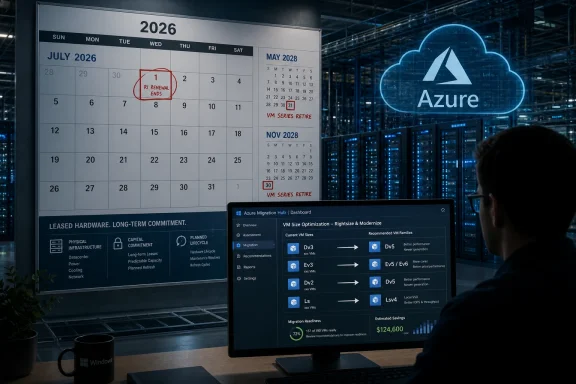
Microsoft will stop new purchases and renewals of selected Azure Reserved VM Instances on July 1, 2026, ending one-year reservations for 14 older VM series and one- and three-year reservations for four Dv3/Ev3-era series while retiring many of those older sizes in 2028. The immediate story is a billing change, but the real story is asset turnover in the cloud. Azure is not an abstraction floating above hardware; it is a giant leased computer estate, and Microsoft has just reminded customers that the landlord eventually renovates the building. For Windows shops and cloud-heavy enterprises, the calendar now matters almost as much as the SKU.
The cleanest way to describe Microsoft’s move is that it is narrowing the runway before it closes part of it. Starting July 1, 2026, customers will no longer be able to buy or renew one-year Azure Reserved VM Instances for Av2, Amv2, Bv1, D, Ds, Dv2, Dsv2, F, Fs, Fsv2, G, Gs, Ls, and Lsv2. For Dv3, Dsv3, Ev3, and Esv3, Microsoft is going further on the commercial side: both one-year and three-year reservations disappear for new purchases and renewals.
That does not mean all of those virtual machines shut off in July 2026. Existing reservations continue through their terms, and the Dv3/Ev3 families remain operational beyond 2028. But the shift means Microsoft is withdrawing one of the main tools customers use to make cloud bills predictable.
The retiring families are not obscure curiosities. They are the kind of VM sizes that accumulated inside Azure estates because they were good enough, familiar, and available when migrations happened years ago. Many enterprises did not choose them as a strategic platform; they inherited them through lift-and-shift projects, application templates, old marketplace images, or teams that copied a deployment pattern and never revisited it.
That is why the move matters. A VM reservation may look like a discount, but in practice it is a budget promise. When Microsoft stops selling that promise for older families, it is nudging customers away from legacy hardware before the actual retirement date arrives.
But abstraction is not annihilation. Under every Azure VM family sits a generation of processors, memory, storage controllers, network adapters, host firmware, hypervisor support, spare-parts planning, power envelopes, and datacenter floor space. Microsoft can hide that machinery from the average developer, but Microsoft cannot hide it from itself.
The affected VM series mostly come from an earlier Azure era, when Intel Xeon generations such as Haswell, Skylake, and Cascade Lake defined much of the commodity server market. Those chips were respectable in their day, and many workloads running on them today are not suddenly broken. The issue is that hyperscale fleets age differently from individual servers.
An enterprise with a few racks of aging hardware can decide to sweat those assets for another year. A hyperscaler managing global capacity has to decide whether an old platform deserves space, power, staff time, firmware attention, and inventory risk across dozens of regions. At Azure scale, the difference between “still works” and “still worth operating” is enormous.
Microsoft’s public guidance frames the migration in terms of better price-performance, broader regional availability, and access to newer hardware capabilities. That is the customer-friendly phrasing. The operator-friendly phrasing is simpler: newer machines let Microsoft pack more useful work into less operational pain.
That is a classic cloud-provider maneuver. Before a platform disappears, the provider stops encouraging customers to make long commitments to it. The billing system becomes an early-warning system for the hardware lifecycle.
For customers, this changes the risk profile. A workload might continue running just fine on pay-as-you-go pricing after a reservation expires, but the economics change. A team that had budgeted around reserved capacity may discover that doing nothing is not a neutral act; it is a decision to accept higher and less predictable costs.
This is where the cloud’s convenience becomes politically complicated inside companies. Application owners care that their service stays up. Finance cares that committed-use discounts continue. Platform engineering cares that the migration does not break assumptions about CPU, memory, disk throughput, licensing, or availability zones. Microsoft has moved the decision from “someday before retirement” to “before your reservation strategy falls apart.”
That is a much more effective prompt than a retirement notice buried in a lifecycle page. Nobody wants to be the team that explains a surprise pay-as-you-go spike because an old VM family could no longer be renewed.
The first retirement wave affects D, Ds, Dv2, Dsv2, and Ls on May 1, 2028. Another wave follows on November 15, 2028 for Av2, Amv2, and Bv1. Microsoft’s migration guidance makes clear that after retirement, unsupported VMs can be deallocated, temporary and in-memory data can be lost, and workloads need to be resized to supported sizes before resuming.
That last point deserves attention. Cloud retirement is not the same as a gentle reminder to modernize. At the end of the road, the old size is no longer a supported place to run.
The affected VM families are old enough that many organizations should already have expected this. But “should have expected” is not the same as “has a funded migration plan.” Enterprises are full of systems that run because nobody has touched them, and nobody touches them because they run.
Those are precisely the systems most likely to be living on older VM sizes. They are also the systems most likely to surprise everyone when a routine resize reveals an operating-system dependency, a hard-coded hostname, a storage latency assumption, or a vendor support matrix last updated when Windows Server 2012 R2 still felt modern.
Most VM migrations are not hard because the destination is mysterious. They are hard because the source is undocumented.
A properly managed workload with infrastructure-as-code templates, CI/CD deployment pipelines, current operating systems, telemetry, tested backups, and a known owner should be able to move with measured effort. Resize, validate, benchmark, adjust reservations or savings plans, and move on. That is the cloud operating model Microsoft would like customers to inhabit.
The messier reality is that many Azure estates contain long-lived pets disguised as cattle. A VM might be part of an availability set no one wants to touch. It might run a third-party application licensed by host characteristics. It might have performance tuned around a particular disk layout. It might be the only place an old certificate chain, scheduled task, or integration agent still lives.
For those systems, the phrase “migrate to a newer VM series” does a lot of work. It compresses discovery, testing, change approval, outage planning, licensing review, rollback planning, and post-migration tuning into a single verb.
There is also the AI-shaped elephant in the datacenter. Every major cloud provider is under pressure to find power, cooling, and floor space for accelerator-heavy infrastructure. Retiring older general-purpose fleets is not the same thing as installing GPUs overnight, but capacity is capacity. In a world where datacenter constraints have become a strategic bottleneck, legacy compute has to justify its footprint.
That does not make Microsoft uniquely ruthless. It makes Microsoft a hyperscaler. AWS and Google face similar fleet-management pressures, and each provider has its own version of previous-generation instance families that eventually become less attractive to support.
The difference is that Azure has a large Windows-heavy enterprise base with long application lifecycles. Those customers do not always move at cloud-native speed, and they often brought legacy workloads to Azure precisely to avoid touching them. Microsoft is now forcing some of that deferred maintenance back onto the calendar.
This is the cloud’s awkward bargain. The provider absorbs the hardware refresh cycle, but customers do not get to opt out of it forever. They merely experience it through SKUs, reservation rules, migration guides, and retirement dates instead of purchase orders and loading docks.
That distinction is easy to miss, and it may be the most revealing part of the change. Microsoft is not saying these VM families are dead. It is saying customers should stop treating them as a long-term reservation target.
For Dv3 and Ev3 users, the operational urgency may be lower but the financial urgency is still real. If a workload remains on those families after its reservation expires, it may continue to run normally while losing access to the familiar RI discount model. Microsoft’s preferred answer is likely an Azure Savings Plan for compute or migration to newer VM families.
That moves customers from instance-specific commitment toward spend-based commitment. Savings Plans are more flexible because they cover eligible compute spend rather than a particular VM family in a particular way. They are also a different kind of bet: customers commit to a level of spend, not to a fleet shape.
For some organizations, that flexibility is welcome. For others, especially those with stable fleets and highly modeled reservations, the change complicates financial governance. The cloud bill was already a negotiation between engineering and finance; now Microsoft is changing which instruments are available.
The result is a subtle but important shift in power. Microsoft is making it less attractive to keep money locked to older VM families and more attractive to align commitments with Azure’s current infrastructure direction.
This Azure change belongs in that category. It is not just a cloud operations notice; it is a governance event.
The first task for IT teams is not resizing anything. It is inventory. Which subscriptions contain the affected VM families? Which reservations map to them? Which workloads are business-critical? Which are dev/test leftovers? Which are covered by automation, and which are manual snowflakes? Which owners can approve change?
The second task is separating billing urgency from retirement urgency. A VM family losing reservation availability in 2026 does not necessarily stop in 2026. A VM family retiring in 2028 may still have a reservation story that changes earlier. Treating those as one date is how organizations create confusion.
The third task is testing the migration path before the migration becomes mandatory. A small resize exercise in 2026 is a project. A forced resize in 2028 during a business-critical outage is an incident.
For sysadmins, the key lesson is brutally familiar: old infrastructure does not become less risky because it runs in someone else’s datacenter. The console changed. The lifecycle problem did not.
That is useful. It is also necessarily generic.
No Microsoft document can tell you whether a particular line-of-business app behaves differently under a newer CPU generation. No migration table can know whether a licensing server keys itself to virtual hardware details. No recommended replacement can guarantee that regional capacity, zone placement, disk throughput, accelerated networking, image generation, operating-system support, or maintenance-window politics line up cleanly in your environment.
There are also edge cases in newer Azure VM generations that deserve sober review. Some newer families expect modern VM generation support, newer networking assumptions, or operating systems that can use current drivers and adapters. A migration that looks like a simple size change may become an OS modernization project if the guest is old enough.
That does not mean customers should cling to legacy sizes. It means they should resist the temptation to treat the migration guide as a project plan. The guide tells you where the exits are. It does not walk your building, label the locked doors, or find the server someone put behind a bookcase.
The right response is a portfolio exercise: categorize, test, move, reserve, and repeat. The wrong response is waiting until Microsoft’s final notice transforms a manageable modernization into a scramble.
But this is still discipline, not generosity. Microsoft is disciplining its installed base into a healthier shape for Microsoft’s infrastructure roadmap. Customers may benefit, but they are not the only beneficiaries.
That duality is important because it keeps the conversation honest. If an Azure customer can move from an old Dv2 VM to a newer D-series size, gain performance, reduce risk, and keep commitment discounts, the migration can be a win. If a customer must spend months validating an application that nobody budgeted to touch, the same policy becomes an unplanned tax on technical debt.
Both things can be true. Cloud providers are right to retire aging hardware, and customers are right to complain when the abstraction leaks into their roadmaps.
The smart enterprise response is not outrage. It is leverage. Use Microsoft’s deadline to get funding for cleanup that should have happened anyway. Use the reservation cutoff to force cost-modeling discipline. Use the 2028 retirement date to prioritize workloads that are too old, too undocumented, or too important to be left on autopilot.
The worst outcome is pretending this is merely an Azure billing footnote. Billing is the lever, but infrastructure modernization is the object being moved.
That means the date Microsoft assigns to a VM family should be visible in planning artifacts. It should appear in cloud governance reports. It should influence landing-zone standards and approved-SKU lists. It should affect how new workloads are reviewed, especially when teams copy old templates because they are convenient.
The same logic applies to reservations. A reservation is not just a discount purchase; it is a statement that the organization expects a workload pattern to persist. If Microsoft is no longer willing to sell that commitment for a VM family, customers should ask why they are still willing to build plans around it.
There is a cultural shift hiding here. Cloud teams have spent years telling application groups to modernize for elasticity, resilience, and automation. Now they have a more concrete argument: if you sit too long on old shapes, the economics will move first and the platform will move later.
That argument will land differently in different organizations. A startup can refactor and redeploy. A regulated enterprise may need months of evidence and approvals. A public-sector shop may need a procurement cycle. The deadline is the same; the ability to respond is not.
Source: theregister.com Microsoft to stop reservations for 17 Azure VMs, kill 13
 Microsoft Turns an Infrastructure Sunset Into a Billing Deadline
The cleanest way to describe Microsoft’s move is that it is narrowing the runway before it closes part of it. Starting July 1, 2026, customers will no longer be able to buy or renew one-year Azure Reserved VM Instances for Av2, Amv2, Bv1, D, Ds, Dv2, Dsv2, F, Fs, Fsv2, G, Gs, Ls, and Lsv2. For Dv3, Dsv3, Ev3, and Esv3, Microsoft is going further on the commercial side: both one-year and three-year reservations disappear for new purchases and renewals.That does not mean all of those virtual machines shut off in July 2026. Existing reservations continue through their terms, and the Dv3/Ev3 families remain operational beyond 2028. But the shift means Microsoft is withdrawing one of the main tools customers use to make cloud bills predictable.
The retiring families are not obscure curiosities. They are the kind of VM sizes that accumulated inside Azure estates because they were good enough, familiar, and available when migrations happened years ago. Many enterprises did not choose them as a strategic platform; they inherited them through lift-and-shift projects, application templates, old marketplace images, or teams that copied a deployment pattern and never revisited it.
That is why the move matters. A VM reservation may look like a discount, but in practice it is a budget promise. When Microsoft stops selling that promise for older families, it is nudging customers away from legacy hardware before the actual retirement date arrives.
The Cloud Still Has a Supply Chain, Even When the Console Hides It
Public cloud marketing has always encouraged customers to think in APIs, regions, zones, and abstractions. You ask for a VM, Azure gives you a VM, and the physical server beneath it becomes someone else’s problem. That bargain is real, and it is one of the reasons cloud computing swallowed so much enterprise infrastructure.But abstraction is not annihilation. Under every Azure VM family sits a generation of processors, memory, storage controllers, network adapters, host firmware, hypervisor support, spare-parts planning, power envelopes, and datacenter floor space. Microsoft can hide that machinery from the average developer, but Microsoft cannot hide it from itself.
The affected VM series mostly come from an earlier Azure era, when Intel Xeon generations such as Haswell, Skylake, and Cascade Lake defined much of the commodity server market. Those chips were respectable in their day, and many workloads running on them today are not suddenly broken. The issue is that hyperscale fleets age differently from individual servers.
An enterprise with a few racks of aging hardware can decide to sweat those assets for another year. A hyperscaler managing global capacity has to decide whether an old platform deserves space, power, staff time, firmware attention, and inventory risk across dozens of regions. At Azure scale, the difference between “still works” and “still worth operating” is enormous.
Microsoft’s public guidance frames the migration in terms of better price-performance, broader regional availability, and access to newer hardware capabilities. That is the customer-friendly phrasing. The operator-friendly phrasing is simpler: newer machines let Microsoft pack more useful work into less operational pain.
Reservations Are the Canary in the Datacenter
The interesting part of the announcement is not only which VM sizes will retire. It is the sequencing. Microsoft is not merely saying that certain VMs go away in May or November 2028; it is first removing long-term reservation options in 2026.That is a classic cloud-provider maneuver. Before a platform disappears, the provider stops encouraging customers to make long commitments to it. The billing system becomes an early-warning system for the hardware lifecycle.
For customers, this changes the risk profile. A workload might continue running just fine on pay-as-you-go pricing after a reservation expires, but the economics change. A team that had budgeted around reserved capacity may discover that doing nothing is not a neutral act; it is a decision to accept higher and less predictable costs.
This is where the cloud’s convenience becomes politically complicated inside companies. Application owners care that their service stays up. Finance cares that committed-use discounts continue. Platform engineering cares that the migration does not break assumptions about CPU, memory, disk throughput, licensing, or availability zones. Microsoft has moved the decision from “someday before retirement” to “before your reservation strategy falls apart.”
That is a much more effective prompt than a retirement notice buried in a lifecycle page. Nobody wants to be the team that explains a surprise pay-as-you-go spike because an old VM family could no longer be renewed.
The 2028 Date Is Comfortable Until It Isn’t
May 2028 and November 2028 sound comfortably distant. In consumer technology, two years is an eternity. In enterprise IT, two years is often just enough time to discover who owns the application, whether the original vendor still exists, and why the test environment was decommissioned during a cost-cutting exercise.The first retirement wave affects D, Ds, Dv2, Dsv2, and Ls on May 1, 2028. Another wave follows on November 15, 2028 for Av2, Amv2, and Bv1. Microsoft’s migration guidance makes clear that after retirement, unsupported VMs can be deallocated, temporary and in-memory data can be lost, and workloads need to be resized to supported sizes before resuming.
That last point deserves attention. Cloud retirement is not the same as a gentle reminder to modernize. At the end of the road, the old size is no longer a supported place to run.
The affected VM families are old enough that many organizations should already have expected this. But “should have expected” is not the same as “has a funded migration plan.” Enterprises are full of systems that run because nobody has touched them, and nobody touches them because they run.
Those are precisely the systems most likely to be living on older VM sizes. They are also the systems most likely to surprise everyone when a routine resize reveals an operating-system dependency, a hard-coded hostname, a storage latency assumption, or a vendor support matrix last updated when Windows Server 2012 R2 still felt modern.
The Easy Migration Is Still a Migration
Microsoft’s recommended replacements are sensible on paper. D and Dv2-style general-purpose workloads can move toward Dv5, Dasv5, Dsv6, or related families. Memory-oriented Ev3 estates have newer Ev5 and Ev6 options. Storage-optimized L-series users have Lsv4 and Lasv4 paths. The broad story is not one of architectural impossibility.Most VM migrations are not hard because the destination is mysterious. They are hard because the source is undocumented.
A properly managed workload with infrastructure-as-code templates, CI/CD deployment pipelines, current operating systems, telemetry, tested backups, and a known owner should be able to move with measured effort. Resize, validate, benchmark, adjust reservations or savings plans, and move on. That is the cloud operating model Microsoft would like customers to inhabit.
The messier reality is that many Azure estates contain long-lived pets disguised as cattle. A VM might be part of an availability set no one wants to touch. It might run a third-party application licensed by host characteristics. It might have performance tuned around a particular disk layout. It might be the only place an old certificate chain, scheduled task, or integration agent still lives.
For those systems, the phrase “migrate to a newer VM series” does a lot of work. It compresses discovery, testing, change approval, outage planning, licensing review, rollback planning, and post-migration tuning into a single verb.
Microsoft’s Silence on Motive Says Plenty
Microsoft does not need to publish a confessional memo explaining why it wants older Azure hardware drained. The economics are obvious enough. Old server platforms consume space and power that could be used for newer, denser, more efficient equipment. Newer CPUs deliver more cores, better performance per watt, modern security features, newer virtualization capabilities, and better alignment with current Azure networking and storage designs.There is also the AI-shaped elephant in the datacenter. Every major cloud provider is under pressure to find power, cooling, and floor space for accelerator-heavy infrastructure. Retiring older general-purpose fleets is not the same thing as installing GPUs overnight, but capacity is capacity. In a world where datacenter constraints have become a strategic bottleneck, legacy compute has to justify its footprint.
That does not make Microsoft uniquely ruthless. It makes Microsoft a hyperscaler. AWS and Google face similar fleet-management pressures, and each provider has its own version of previous-generation instance families that eventually become less attractive to support.
The difference is that Azure has a large Windows-heavy enterprise base with long application lifecycles. Those customers do not always move at cloud-native speed, and they often brought legacy workloads to Azure precisely to avoid touching them. Microsoft is now forcing some of that deferred maintenance back onto the calendar.
This is the cloud’s awkward bargain. The provider absorbs the hardware refresh cycle, but customers do not get to opt out of it forever. They merely experience it through SKUs, reservation rules, migration guides, and retirement dates instead of purchase orders and loading docks.
The Dv3 and Ev3 Decision Is a Different Kind of Warning
The Dv3, Dsv3, Ev3, and Esv3 families are not being retired on the same 2028 schedule. Microsoft’s guidance says they remain active until further notice. Yet their one-year and three-year reservations are being cut off after July 1, 2026.That distinction is easy to miss, and it may be the most revealing part of the change. Microsoft is not saying these VM families are dead. It is saying customers should stop treating them as a long-term reservation target.
For Dv3 and Ev3 users, the operational urgency may be lower but the financial urgency is still real. If a workload remains on those families after its reservation expires, it may continue to run normally while losing access to the familiar RI discount model. Microsoft’s preferred answer is likely an Azure Savings Plan for compute or migration to newer VM families.
That moves customers from instance-specific commitment toward spend-based commitment. Savings Plans are more flexible because they cover eligible compute spend rather than a particular VM family in a particular way. They are also a different kind of bet: customers commit to a level of spend, not to a fleet shape.
For some organizations, that flexibility is welcome. For others, especially those with stable fleets and highly modeled reservations, the change complicates financial governance. The cloud bill was already a negotiation between engineering and finance; now Microsoft is changing which instruments are available.
The result is a subtle but important shift in power. Microsoft is making it less attractive to keep money locked to older VM families and more attractive to align commitments with Azure’s current infrastructure direction.
Windows Shops Should Read This as a Governance Story
WindowsForum readers know the pattern. The technical deadline is rarely the only deadline that matters. There is the budget deadline, the procurement deadline, the audit deadline, the change-freeze deadline, the vendor-support deadline, and the “the only admin who understood this retired last quarter” deadline.This Azure change belongs in that category. It is not just a cloud operations notice; it is a governance event.
The first task for IT teams is not resizing anything. It is inventory. Which subscriptions contain the affected VM families? Which reservations map to them? Which workloads are business-critical? Which are dev/test leftovers? Which are covered by automation, and which are manual snowflakes? Which owners can approve change?
The second task is separating billing urgency from retirement urgency. A VM family losing reservation availability in 2026 does not necessarily stop in 2026. A VM family retiring in 2028 may still have a reservation story that changes earlier. Treating those as one date is how organizations create confusion.
The third task is testing the migration path before the migration becomes mandatory. A small resize exercise in 2026 is a project. A forced resize in 2028 during a business-critical outage is an incident.
For sysadmins, the key lesson is brutally familiar: old infrastructure does not become less risky because it runs in someone else’s datacenter. The console changed. The lifecycle problem did not.
The Migration Guide Is Useful, but It Cannot Know Your Estate
Microsoft’s migration guidance does the responsible vendor thing. It lists affected series, names target families, describes reservation options, and explains what happens if customers do nothing. It points RI customers toward reviewing reservation inventory, exchanging or trading in reservations where applicable, and considering Savings Plans.That is useful. It is also necessarily generic.
No Microsoft document can tell you whether a particular line-of-business app behaves differently under a newer CPU generation. No migration table can know whether a licensing server keys itself to virtual hardware details. No recommended replacement can guarantee that regional capacity, zone placement, disk throughput, accelerated networking, image generation, operating-system support, or maintenance-window politics line up cleanly in your environment.
There are also edge cases in newer Azure VM generations that deserve sober review. Some newer families expect modern VM generation support, newer networking assumptions, or operating systems that can use current drivers and adapters. A migration that looks like a simple size change may become an OS modernization project if the guest is old enough.
That does not mean customers should cling to legacy sizes. It means they should resist the temptation to treat the migration guide as a project plan. The guide tells you where the exits are. It does not walk your building, label the locked doors, or find the server someone put behind a bookcase.
The right response is a portfolio exercise: categorize, test, move, reserve, and repeat. The wrong response is waiting until Microsoft’s final notice transforms a manageable modernization into a scramble.
The Economics Will Be Sold as Optimization, but It Is Also Discipline
Microsoft will pitch the move as a chance to improve performance and cost efficiency. In many cases, that will be true. Newer VM families can deliver better price-performance, and some customers will find they can downsize after moving because newer cores do more work.But this is still discipline, not generosity. Microsoft is disciplining its installed base into a healthier shape for Microsoft’s infrastructure roadmap. Customers may benefit, but they are not the only beneficiaries.
That duality is important because it keeps the conversation honest. If an Azure customer can move from an old Dv2 VM to a newer D-series size, gain performance, reduce risk, and keep commitment discounts, the migration can be a win. If a customer must spend months validating an application that nobody budgeted to touch, the same policy becomes an unplanned tax on technical debt.
Both things can be true. Cloud providers are right to retire aging hardware, and customers are right to complain when the abstraction leaks into their roadmaps.
The smart enterprise response is not outrage. It is leverage. Use Microsoft’s deadline to get funding for cleanup that should have happened anyway. Use the reservation cutoff to force cost-modeling discipline. Use the 2028 retirement date to prioritize workloads that are too old, too undocumented, or too important to be left on autopilot.
The worst outcome is pretending this is merely an Azure billing footnote. Billing is the lever, but infrastructure modernization is the object being moved.
The Calendar Now Belongs in the Architecture Diagram
Here is the practical read for Azure customers staring at this announcement: the VM size is no longer just a performance and pricing choice. It is a lifecycle dependency. Architects should treat it the same way they treat operating-system versions, database engines, runtime frameworks, and vendor-support windows.That means the date Microsoft assigns to a VM family should be visible in planning artifacts. It should appear in cloud governance reports. It should influence landing-zone standards and approved-SKU lists. It should affect how new workloads are reviewed, especially when teams copy old templates because they are convenient.
The same logic applies to reservations. A reservation is not just a discount purchase; it is a statement that the organization expects a workload pattern to persist. If Microsoft is no longer willing to sell that commitment for a VM family, customers should ask why they are still willing to build plans around it.
There is a cultural shift hiding here. Cloud teams have spent years telling application groups to modernize for elasticity, resilience, and automation. Now they have a more concrete argument: if you sit too long on old shapes, the economics will move first and the platform will move later.
That argument will land differently in different organizations. A startup can refactor and redeploy. A regulated enterprise may need months of evidence and approvals. A public-sector shop may need a procurement cycle. The deadline is the same; the ability to respond is not.
The Numbers That Should Move First
The most useful response is not panic; it is a controlled audit that turns vague risk into named work. Microsoft has given customers enough time to avoid drama, but not enough time to waste a year deciding whether the problem is real.- Customers should identify every Azure VM running on Av2, Amv2, Bv1, D, Ds, Dv2, Dsv2, F, Fs, Fsv2, G, Gs, Ls, Lsv2, Dv3, Dsv3, Ev3, or Esv3.
- Customers should match those VMs against reservation expiration dates before July 1, 2026 creates a renewal cliff.
- Workloads on VM families retiring in 2028 should be tested on recommended newer families well before change freezes and budget cycles narrow the window.
- Dv3, Dsv3, Ev3, and Esv3 users should not assume “not retired” means “financially unchanged,” because reservation availability is still ending.
- Savings Plans may be a better bridge for variable estates, but stable workloads should still be modeled carefully before abandoning instance-specific reservation habits.
- Any VM that cannot be easily resized is not merely an Azure problem; it is an application ownership, documentation, and operational-resilience problem.
Source: theregister.com Microsoft to stop reservations for 17 Azure VMs, kill 13
