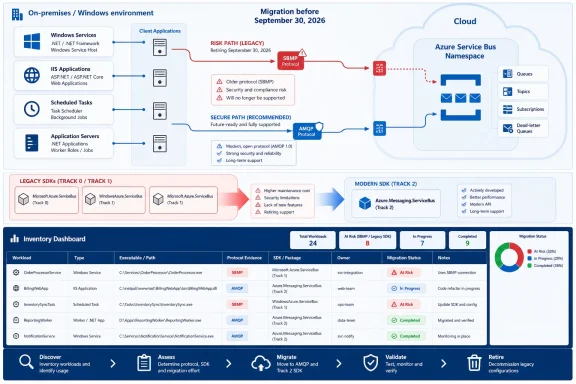
Microsoft’s September 30, 2026 Azure Service Bus deadline creates two different risks: Windows workloads still using SBMP will stop communicating, while applications already using AMQP through a legacy SDK may continue running without Microsoft support or updates. Teams should validate confirmed or suspected SBMP workloads now, use AMQP as a tested continuity measure where necessary, and plan migration to Azure.Messaging.ServiceBus according to operational risk.
Microsoft’s Azure Service Bus retirement notice confirms that WindowsAzure.ServiceBus, Microsoft.Azure.ServiceBus, and com.microsoft.azure.servicebus retire on September 30, 2026. Microsoft also states that the proprietary SBMP protocol will no longer be supported after that date, that WindowsAzure.ServiceBus uses SBMP by default, and that version 2.1 and later can use AMQP 1.0 when explicitly configured. Microsoft identifies Azure.Messaging.ServiceBus as the current .NET SDK.
The libraries do not necessarily become unusable immediately, but SBMP communication does. That distinction should drive every inventory and remediation decision. Finding an old package identifies technical debt; finding an effective SBMP connection identifies a looming outage.
The first task is not opening every Visual Studio solution. It is mapping the Windows processes that send to or receive from Service Bus, including applications whose source repositories, owners, or deployment documentation may be incomplete.
Use this sequence to build an inventory:
Treat configuration separately from code. An effective transport selection may come from an environment-specific transform, generated deployment configuration, or a shared component outside the application repository.
PowerShell inventory is discovery only. Package names and configuration strings identify candidates for inspection; they do not prove which protocol a running process uses.
Do not add an AMQP-looking value to configuration and assume remediation is complete. For WindowsAzure.ServiceBus, verify that the deployed package is version 2.1 or later by checking package records, project references, deployment records, or the deployed assembly version. Then confirm how that specific application selects its transport. The correct implementation depends on its client-construction and configuration path.
This is a continuity measure, not a completed migration. Azure.Messaging.ServiceBus is the current SDK, while the older packages will receive no official support or updates after retirement.
WindowsForum’s coverage of the Azure Update Delivery service-tag deprecation illustrates the broader inventory lesson. That retirement concerned a component used to facilitate Windows Update delivery through Azure Firewall, not Windows Update as a whole. Likewise, checking only the Service Bus namespace can miss a Windows client’s dependency on a retiring protocol or SDK.
WindowsForum recommends validating the first production rollout through application-level outcomes, not just Windows service state. Record whether representative sends and receives succeed, whether expected processing completes, and whether the application reports messaging failures.
The migration review should locate:
For legacy .NET Framework services, WindowsForum recommends considering an adapter behind the application’s existing messaging interface. This can limit changes to the messaging layer, but teams should choose the design according to the application’s architecture and test coverage.
WindowsForum’s 2025 sunsetting guide frames Microsoft retirement planning as a sustained cross-product concern spanning operating systems, developer tools, applications, Azure services, and enterprise servers. Its Microsoft 365 retirement coverage similarly emphasizes that administrators must identify affected components rather than treating every announcement as a product-wide shutdown. The editorial lesson is straightforward: attach Service Bus remediation to a named application, owner, deployment path, and date—not merely to an Azure subscription.
Whether that is acceptable temporarily is an organizational risk decision. Rank each workload by verified protocol, business criticality, deployment difficulty, source availability, owner, and test coverage. Confirmed or suspected SBMP applications require urgent validation and remediation; legacy AMQP applications require controlled modernization.
By September 30, 2026, every Service Bus-connected Windows workload should either run on Azure.Messaging.ServiceBus or have documented evidence of AMQP use, a named owner, validated operational checks, and a dated migration plan. Package inventory finds candidates, but protocol validation identifies which services face the communications cutoff.
Microsoft’s Azure Service Bus retirement notice confirms that WindowsAzure.ServiceBus, Microsoft.Azure.ServiceBus, and com.microsoft.azure.servicebus retire on September 30, 2026. Microsoft also states that the proprietary SBMP protocol will no longer be supported after that date, that WindowsAzure.ServiceBus uses SBMP by default, and that version 2.1 and later can use AMQP 1.0 when explicitly configured. Microsoft identifies Azure.Messaging.ServiceBus as the current .NET SDK.
The libraries do not necessarily become unusable immediately, but SBMP communication does. That distinction should drive every inventory and remediation decision. Finding an old package identifies technical debt; finding an effective SBMP connection identifies a looming outage.
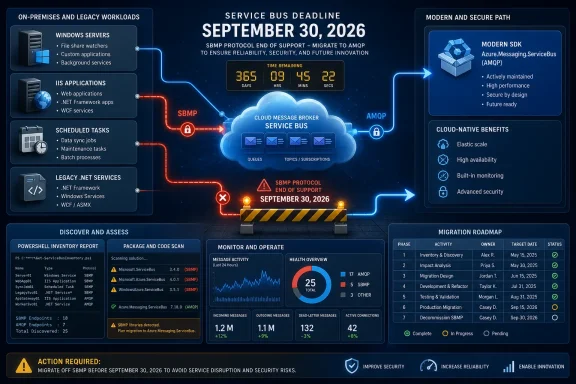 Find the Workload Before Judging the Package
The first task is not opening every Visual Studio solution. It is mapping the Windows processes that send to or receive from Service Bus, including applications whose source repositories, owners, or deployment documentation may be incomplete.Use this sequence to build an inventory:
- Export installed Windows services and capture their executable paths and service accounts.
Code:
Get-CimInstance Win32_Service |
    Select-Object Name, State, StartName, PathName |
Export-Csv .\windows-services.csv -NoTypeInformation- Export scheduled tasks and identify executables, PowerShell scripts, batch files, and command-line arguments that may launch messaging jobs.
Code:
Get-ScheduledTask | ForEach-Object {
    $task = $_
    foreach ($action in $task.Actions) {
        [pscustomobject]@{
            TaskPath  = $task.TaskPath
            TaskName  = $task.TaskName
            Execute   = $action.Execute
            Arguments = $action.Arguments
        }
    }
} | Export-Csv .\scheduled-task-actions.csv -NoTypeInformation- On IIS servers, enumerate applications and their physical paths rather than searching only the default website directory.
Code:
Import-Module WebAdministration

Get-WebApplication |
    Select-Object Site, Path, PhysicalPath |
Export-Csv .\iis-applications.csv -NoTypeInformation- Search source trees, deployment directories, configuration repositories, and build artifacts for retiring and current package names.
Code:
$roots = @(
    'C:\inetpub',
    'C:\Apps',
    'C:\Services',
    'D:\Apps'
)

Get-ChildItem $roots -Recurse -File -ErrorAction SilentlyContinue |
    Where-Object {
        $_.Extension -in '.config', '.json', '.xml', '.csproj', '.props',
        '.targets', '.cs', '.ps1'
    } |
    Select-String -Pattern `
        'WindowsAzure\.ServiceBus',
        'Microsoft\.Azure\.ServiceBus',
        'Microsoft\.ServiceBus\.Messaging',
        'Azure\.Messaging\.ServiceBus' |
Select-Object Path, LineNumber, Line- Inspect application
binfolders, publishing output,.deps.jsonfiles,packages.config, and project files. A clean source search does not prove that an older deployed Windows service was rebuilt from the repository under review.
Treat configuration separately from code. An effective transport selection may come from an environment-specific transform, generated deployment configuration, or a shared component outside the application repository.
PowerShell inventory is discovery only. Package names and configuration strings identify candidates for inspection; they do not prove which protocol a running process uses.
The Package Name Is Only Half the Diagnosis
The highest-risk result is WindowsAzure.ServiceBus without verified AMQP use. Microsoft says this package uses SBMP by default; version 2.1 and later can use AMQP 1.0 when explicitly configured.Implementation decision box
| Finding | Decision |
|---|---|
| WindowsAzure.ServiceBus with no verified AMQP configuration | Treat it as an emergency validation and transport-remediation case. Confirm the deployed package version, test AMQP, and deploy only after end-to-end validation. |
| WindowsAzure.ServiceBus explicitly configured for AMQP | SBMP retirement is not the immediate protocol risk when the deployed client is verified to use AMQP, but the application still needs migration because the SDK is retiring. |
| Azure.Messaging.ServiceBus | The application is on the current .NET SDK. Check the rest of the message path for separate legacy producers, consumers, or tools. |
Emergency continuity runbook
For each suspected SBMP workload:- Assign one named owner with authority to coordinate testing and deployment.
- Capture the deployed assembly or package version from the running application’s files or deployment record.
- Record the effective transport configuration, including deployment transforms and external configuration sources.
- Test AMQP in a representative environment using real message shapes and relevant network controls.
- Deploy through normal change control, with a rollback plan and an agreed validation window.
- Record the migration date to Azure.Messaging.ServiceBus; do not treat the AMQP bridge as permanent remediation.
| Finding | September 30 impact | Immediate response |
|---|---|---|
| WindowsAzure.ServiceBus with no verified AMQP setting | Communication is at risk because its default is SBMP. | Verify the deployed version and effective configuration, then test AMQP immediately. |
| WindowsAzure.ServiceBus explicitly using AMQP | SBMP retirement is not the immediate protocol risk for the verified client, but the SDK becomes unsupported. | Keep the bridge temporary and schedule migration. |
| Microsoft.Azure.ServiceBus | Package presence alone does not establish an SBMP outage. | Confirm actual connectivity and prioritize migration by operational risk. |
| Azure.Messaging.ServiceBus | The workload uses the current SDK. | Verify that no legacy component remains in the same message path. |
This is a continuity measure, not a completed migration. Azure.Messaging.ServiceBus is the current SDK, while the older packages will receive no official support or updates after retirement.
A Protocol Change Still Needs Application Testing
WindowsForum recommends treating an AMQP change as a production change rather than relying on a successful connection test. Validate the complete message path:- Send representative production-shaped messages from the changed client.
- Receive them with every active consumer version.
- Verify message bodies, application properties, identifiers, and content types.
- Exercise the settlement and failure paths the application actually uses.
- Test sessions, transactions, scheduled delivery, and duplicate-handling logic where applicable.
- Run mixed-version tests when old and new producers or consumers will overlap.
- Test the transport route permitted by the representative firewall or proxy policy.
- Confirm that retry behavior does not duplicate business operations.
- Include representative messages already waiting in queues or subscriptions.
WindowsForum’s coverage of the Azure Update Delivery service-tag deprecation illustrates the broader inventory lesson. That retirement concerned a component used to facilitate Windows Update delivery through Azure Firewall, not Windows Update as a whole. Likewise, checking only the Service Bus namespace can miss a Windows client’s dependency on a retiring protocol or SDK.
WindowsForum recommends validating the first production rollout through application-level outcomes, not just Windows service state. Record whether representative sends and receives succeed, whether expected processing completes, and whether the application reports messaging failures.
Plan the Full SDK Migration Separately
Moving to Azure.Messaging.ServiceBus should be managed as an application migration, not a blind package-reference replacement. Review the responsibilities of the existing integration and preserve the established message contract while the SDK changes.The migration review should locate:
- Outgoing message construction.
- Body serialization and deserialization.
- Custom application properties.
- Receive and settlement behavior.
- Lock handling and long-running processing.
- Sessions and session state.
- Retry configuration and exception handling.
- Client creation, reuse, disposal, and shutdown.
- Queue, topic, subscription, and other management operations.
For legacy .NET Framework services, WindowsForum recommends considering an adapter behind the application’s existing messaging interface. This can limit changes to the messaging layer, but teams should choose the design according to the application’s architecture and test coverage.
WindowsForum’s 2025 sunsetting guide frames Microsoft retirement planning as a sustained cross-product concern spanning operating systems, developer tools, applications, Azure services, and enterprise servers. Its Microsoft 365 retirement coverage similarly emphasizes that administrators must identify affected components rather than treating every announcement as a product-wide shutdown. The editorial lesson is straightforward: attach Service Bus remediation to a named application, owner, deployment path, and date—not merely to an Azure subscription.
Unsupported Does Not Mean Equally Safe
A legacy SDK application verified to use AMQP does not face the same immediate protocol risk as a confirmed SBMP client. It may continue communicating after the deadline, but it will run on a retired SDK without official Microsoft support or updates.Whether that is acceptable temporarily is an organizational risk decision. Rank each workload by verified protocol, business criticality, deployment difficulty, source availability, owner, and test coverage. Confirmed or suspected SBMP applications require urgent validation and remediation; legacy AMQP applications require controlled modernization.
By September 30, 2026, every Service Bus-connected Windows workload should either run on Azure.Messaging.ServiceBus or have documented evidence of AMQP use, a named owner, validated operational checks, and a dated migration plan. Package inventory finds candidates, but protocol validation identifies which services face the communications cutoff.
Frequently Asked Questions
Does finding WindowsAzure.ServiceBus prove that an application uses SBMP?
No. It identifies a high-priority candidate. Check the deployed package version, client-construction path, environment-specific configuration, and effective connectivity. WindowsAzure.ServiceBus defaults to SBMP, but version 2.1 and later can be explicitly configured for AMQP.Is switching a legacy application to AMQP a complete migration?
No. It can provide continuity beyond the SBMP cutoff, but the legacy SDK still retires on September 30, 2026. The long-term migration target is Azure.Messaging.ServiceBus.Can PowerShell package searches prove the runtime protocol?
No. They are discovery tools. They can find package references, but generated configuration, deployment transforms, wrappers, and stale binaries can make source results differ from the running application.Should teams test messages already waiting in queues or subscriptions?
Yes. Include representative queued messages in end-to-end validation so the changed client is tested against the real backlog and every active consumer. This is a prudent validation step, not an assertion that AMQP inherently breaks existing messages.What should be remediated first?
Start with WindowsAzure.ServiceBus workloads that have no verified AMQP configuration, especially critical services with difficult deployment procedures or weak ownership. Assign one owner, capture the deployed version and transport configuration, test AMQP, deploy through change control, and record the Azure.Messaging.ServiceBus migration date.References
- Primary source: learn.microsoft.com
Message Transfers, Locks, and Settlement - Azure Service Bus | Microsoft Learn
Learn how Azure Service Bus handles message transfers, locks, and settlement operations to ensure reliable message delivery and processing.learn.microsoft.com - Primary source: WindowsForum
Important Changes: Azure Update Delivery Service Tag to Be Deprecated in 2024 | Windows Forum
Azure Update Delivery service tag is a component that assists in facilitating the delivery of Windows updates to Azure Firewall. As of July 1, 2024, the...windowsforum.com