

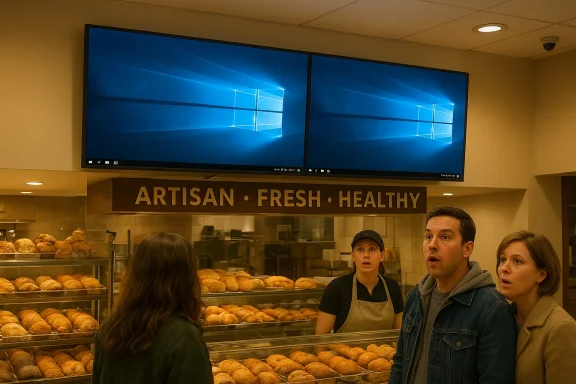
Showing the Windows 10 desktop was the yeast they could do, and the joke works because the embarrassment is so ordinary. A bakery in Ontario managed to turn a simple screen mistake into a very public bit of digital signage slapstick: instead of polished menu content, customers saw three Windows 10 desktops on display, complete with the familiar light-through-the-window wallpaper. The Register’s framing makes the story feel like a punchline, but the deeper point is the same one WindowsForum readers know well: when consumer software escapes into public-facing hardware, the result is often less “artisan” than accidental. The incident is funny precisely because it feels so avoidable.
The immediate appeal of this story is obvious. A bakery promises bread, pastries, and wholesome charm, yet the screen above or behind the counter appears to have wandered in from a break room. That collision between expectation and reality is what gives the image its punch. The Register’s report describes a reader spotting the display in Ontario, Canada, and calling out the mismatch between the bakery’s branding and the raw Windows 10 desktops on view.
But the joke lands for a reason beyond visual absurdity. Windows 10 is now living in that awkward twilight where it is both familiar and, for many readers, oddly comforting. It is the version of Windows people remember as stable enough, flexible enough, and still recognizably “desktop” in the old sense, before the current era of more intrusive prompts, more obvious nudges, and more AI-laden interface ambitions. That nostalgia gives the image an extra layer of irony: the bakery unintentionally advertised not just a desktop OS, but a simpler time in Microsoft’s product history.
What makes the incident worth more than a chuckle is the lesson it tells about public screens. A digital menu board, signage panel, or kiosk is only valuable if the audience sees the intended content. The second a desktop wallpaper appears, the illusion of appliance-like reliability collapses. This is why signage failures are so meme-friendly: they expose the ordinary machine under the polished surface.
There is also a broader Windows story here. Microsoft’s own recent messaging has emphasized greater reliability, fewer intrusive elements, and more control over the desktop experience, but the platform’s sheer reach means its mistakes remain highly visible when they occur. That makes a bakery screen like this more than a local oops; it becomes a tiny referendum on how much trust organizations place in general-purpose operating systems to behave like dedicated appliances. The Register’s piece captures that tension neatly, even while leaning into the bakery-themed wordplay.
That distinction matters in public environments. A home PC can afford to ask whether it should be discoverable on a network, whether updates should be installed now, or whether the user wants to sign in again. A bakery screen cannot. In a public display, every interruption is visible, and every visible interruption becomes a failure of presentation. The audience does not care whether the prompt is sensible in a technical sense; they care that the display stopped doing its actual job.
This is why these stories recur with such reliable comic timing. A desktop wallpaper, error screen, login prompt, or configuration dialog is all perfectly normal on a desk. Put the same image in a public-facing context and it becomes accidental theater. Windows 10’s default wallpaper, in particular, is instantly recognizable, which means it reads as a confession: this is not menu software, this is just a PC.
There is a historical echo here too. Windows 10 became widely loved not because it was flashy, but because it was largely dependable and unpretentious. For many users it represented the end of a particularly chaotic stretch of Windows design identity, with the taskbar, Start menu, and classic desktop model still largely intact. That is part of why this image is so funny now: it evokes a version of Windows that people remember as competent, even as the context makes the competence look embarrassingly exposed.
The bakery itself adds a layer of contrast. “Artisan, Fresh, and Healthy” is a carefully curated brand promise. A naked Windows desktop above that promise is the opposite of curated. It says nothing about sourdough, ingredients, or skill; it says something went wrong in the content pipeline, and the machine chose the worst possible moment to be itself.
The other reason these incidents travel is that they feel human. They suggest someone meant to make a display run, someone thought it was running, and someone else only discovered the problem after the public did. That is a very modern kind of embarrassment, and one that turns ordinary IT slippage into a story people want to share.
This is a classic case of the wrong layer leaking through. A display can be technically on, connected, and functioning, yet still be visibly broken from the audience’s point of view. That is what makes signage different from ordinary desktop computing: the “health” of the machine is not enough. The only metric that matters is whether the customer sees the right thing.
There are many ways a system like this can slip. It may have rebooted, crashed, updated, lost its launch configuration, or failed to auto-start the intended signage app. It may also simply have been left too open, with the default Windows shell still available in the background. Whatever the trigger, the result is the same: the public sees the machine underneath the experience.
The bakery photo is especially effective because it suggests a low-friction environment where users would expect things to just work. Nobody walks into a bakery expecting to see a maintenance state. They expect pastry, not patch notes. That mismatch is why the scene feels funnier than, say, a computer lab or office lobby would.
That is the trap. The more invisible the system is supposed to be, the more embarrassing it becomes when it reveals itself.
That broad deployment footprint is a strength and a weakness. It is a strength because Windows can be adapted to many roles without specialized training. It is a weakness because a desktop OS does not naturally behave like a sealed appliance. It has opinions. It has prompts. It expects people to respond to things.
The bakery incident neatly exposes that contradiction. Windows 10 is familiar enough that the wallpaper itself feels almost comforting, but familiarity is not the same thing as suitability. A screen that is meant to be a menu board should be stubbornly boring. Windows, by design, is rarely boring for long if something goes wrong.
This is one reason signage operators so often invest in kiosk modes, locked-down images, and watchdog processes. They are not just trying to make the content look good. They are trying to suppress every other possible identity the device might adopt. That is a hard job because Windows is fundamentally a full operating system, not a purpose-built display appliance.
The public also reads these failures as evidence of broader competence. A bakery screen that shows a desktop creates a subconscious question: if they can’t manage the sign, what else is being improvised? That is unfair in a strict technical sense, but it is exactly how trust works in public environments.
That means the same Windows behavior can be harmless, annoying, or disastrous depending on where it appears. The software has not changed; the context has.
That makes the image of a Windows 10 desktop feel oddly affectionate even as it is embarrassing. The wallpaper is iconic enough to be recognized at a glance, and the layout is familiar enough to trigger a kind of reflexive recognition. The joke, then, is not just “look, a PC,” but “look, a PC from the era people stopped complaining about as much.”
There is a second layer to the humor. Windows 10 now occupies a transitional moment in public conversation, where it is being compared with newer versions, extended support questions, and migration pressure. Seeing it in the wild, on a bakery screen, turns the OS into a relic that has escaped its proper habitat. It is like seeing a once-trusted tool hanging on the wall in a place where nobody expected to need it.
The irony is especially sharp because Windows 10’s desktop aesthetic is so understated. There is no flashy interface flourish to hide behind. Just a clean wallpaper, a taskbar, and a sense that a machine is waiting for someone to use it. In a bakery, that waiting becomes the joke.
That memory creates a weird emotional mix: embarrassment for the operator, but also a faint sense of recognition for the audience. The screen feels less like a stranger and more like a known acquaintance caught in the wrong room.
When the screen instead shows a desktop, the mismatch becomes almost absurdly theatrical. It is not just a technical failure; it is a branding collision. “Artisan, Fresh, and Healthy” is a promise of quality, while a desktop wallpaper is a confession of plumbing.
The humor here is partly linguistic too. Bread, yeast, dough, and Windows all lend themselves to easy puns, but the visual gag is strong enough that the puns are almost redundant. The store is supposed to sell the sensory perfection of baking, yet the image on display is purely digital and utterly unappetizing in comparison.
There is also a security undertone that the article hints at without overplaying it. The presence of a camera and public-facing screen suggests a modern retail environment that mixes customer experience with operational surveillance. That combination is common, but it reinforces the sense that the shop is not just selling bread; it is running an information system.
The bakery’s Windows desktop is funny because it is the opposite of seamless. It reveals the machine, the operating system, and the maintenance path all at once.
It is also a reminder that legacy software lingers everywhere. Even after newer versions arrive, older installs remain in embedded systems, legacy workstations, and purpose-built deployments that do not get refreshed as quickly as consumer PCs. Public-facing environments often keep these systems around longer than anyone would like to admit, because they work just well enough until they don’t.
There is a subtle cautionary tale there for IT operators. A machine that is “good enough” in a back office may be entirely inappropriate for signage. The same operating system can be perfectly serviceable in one role and hilariously exposed in another. That distinction is easy to forget when the same platform is everywhere.
The nostalgia factor should not be overstated, though. Windows 10 was not flawless, and many people associated it with update frustrations, telemetry debates, and interface compromises of its own. Still, compared with the more overtly pushy, AI-forward, or recommendation-heavy image that has increasingly attached itself to newer Windows branding, the old desktop can seem almost serene.
That serenity is probably why the bakery image works so well. It is a screen from a calmer era, appearing where calm is not enough.
That is how public embarrassment happens: not because the software changed dramatically, but because nobody kept watching the assumptions underneath it.
Even a harmless desktop leak can reveal useful information. It may show installed software, the structure of the kiosk setup, user icons, or the fact that a machine is being managed in a very ad hoc way. In other words, embarrassment can become intelligence. That is one reason these incidents should be treated as more than memes.
The broader lesson is that signage systems need to be designed like appliances, not like temporary PC projects. A device that can show a desktop can usually show other unexpected things as well: update dialogs, login screens, error reports, or recovery prompts. Once that happens, the public-facing promise is gone.
There is also an operational cost beyond embarrassment. Every visible failure chips away at confidence in the venue’s technology stack. The audience may not know what went wrong, but they know something did. That can matter more than the fix itself, because trust is harder to restore than uptime.
This is also a reminder that Windows remains useful because it is so adaptable. The ecosystem, tools, and vendor support around it still make it attractive for commercial deployment. The opportunity is to match that flexibility with stricter public-display discipline so the system’s power stays hidden where it belongs.
There is also a more serious governance concern. If the system can show a desktop, it may also be capable of showing other sensitive or distracting content, which means the display layer has not been isolated strongly enough. That is a classic sign of weak boundary control, even if nothing malicious is happening.
But the broader trend will not go away. As more retail, transit, and hospitality environments rely on general-purpose PCs for specialized tasks, these moments will keep happening. The challenge is to make the public layer so robust that the machine underneath never gets a chance to become the show.
What to watch next:
Source: theregister.com Showing the Windows 10 desktop was the yeast they could do
 Overview
The immediate appeal of this story is obvious. A bakery promises bread, pastries, and wholesome charm, yet the screen above or behind the counter appears to have wandered in from a break room. That collision between expectation and reality is what gives the image its punch. The Register’s report describes a reader spotting the display in Ontario, Canada, and calling out the mismatch between the bakery’s branding and the raw Windows 10 desktops on view.But the joke lands for a reason beyond visual absurdity. Windows 10 is now living in that awkward twilight where it is both familiar and, for many readers, oddly comforting. It is the version of Windows people remember as stable enough, flexible enough, and still recognizably “desktop” in the old sense, before the current era of more intrusive prompts, more obvious nudges, and more AI-laden interface ambitions. That nostalgia gives the image an extra layer of irony: the bakery unintentionally advertised not just a desktop OS, but a simpler time in Microsoft’s product history.
What makes the incident worth more than a chuckle is the lesson it tells about public screens. A digital menu board, signage panel, or kiosk is only valuable if the audience sees the intended content. The second a desktop wallpaper appears, the illusion of appliance-like reliability collapses. This is why signage failures are so meme-friendly: they expose the ordinary machine under the polished surface.
There is also a broader Windows story here. Microsoft’s own recent messaging has emphasized greater reliability, fewer intrusive elements, and more control over the desktop experience, but the platform’s sheer reach means its mistakes remain highly visible when they occur. That makes a bakery screen like this more than a local oops; it becomes a tiny referendum on how much trust organizations place in general-purpose operating systems to behave like dedicated appliances. The Register’s piece captures that tension neatly, even while leaning into the bakery-themed wordplay.
Background
Windows has long been a platform that can do almost anything, which is exactly why it shows up in places it was never really designed to be seen. Retail kiosks, ticket machines, menu boards, meeting-room displays, and industrial dashboards often rely on Windows because it is familiar, supported, and easy to integrate with vendor tooling. That convenience has a cost: the operating system still thinks in terms of users, sessions, prompts, updates, and recoveries, not just content loops.That distinction matters in public environments. A home PC can afford to ask whether it should be discoverable on a network, whether updates should be installed now, or whether the user wants to sign in again. A bakery screen cannot. In a public display, every interruption is visible, and every visible interruption becomes a failure of presentation. The audience does not care whether the prompt is sensible in a technical sense; they care that the display stopped doing its actual job.
This is why these stories recur with such reliable comic timing. A desktop wallpaper, error screen, login prompt, or configuration dialog is all perfectly normal on a desk. Put the same image in a public-facing context and it becomes accidental theater. Windows 10’s default wallpaper, in particular, is instantly recognizable, which means it reads as a confession: this is not menu software, this is just a PC.
There is a historical echo here too. Windows 10 became widely loved not because it was flashy, but because it was largely dependable and unpretentious. For many users it represented the end of a particularly chaotic stretch of Windows design identity, with the taskbar, Start menu, and classic desktop model still largely intact. That is part of why this image is so funny now: it evokes a version of Windows that people remember as competent, even as the context makes the competence look embarrassingly exposed.
The bakery itself adds a layer of contrast. “Artisan, Fresh, and Healthy” is a carefully curated brand promise. A naked Windows desktop above that promise is the opposite of curated. It says nothing about sourdough, ingredients, or skill; it says something went wrong in the content pipeline, and the machine chose the worst possible moment to be itself.
Why signage mistakes spread so fast
Digital signage errors are ideal internet material because they are instantly legible. You do not need specialist knowledge to understand why a Windows desktop is wrong on a bakery screen. The visual joke is immediate, and the context is even better: a place associated with freshness and craft accidentally running a screen that looks like it came from the office stockroom.The other reason these incidents travel is that they feel human. They suggest someone meant to make a display run, someone thought it was running, and someone else only discovered the problem after the public did. That is a very modern kind of embarrassment, and one that turns ordinary IT slippage into a story people want to share.
The Signage Problem
The fundamental issue is not that Windows 10 exists on the screen. It is that the public saw the desktop layer at all. In a properly configured signage deployment, the operating system should be invisible, almost irrelevant. The content management system, kiosk app, or playback software should be the only thing customers notice. When the OS background appears, the abstraction has failed.This is a classic case of the wrong layer leaking through. A display can be technically on, connected, and functioning, yet still be visibly broken from the audience’s point of view. That is what makes signage different from ordinary desktop computing: the “health” of the machine is not enough. The only metric that matters is whether the customer sees the right thing.
There are many ways a system like this can slip. It may have rebooted, crashed, updated, lost its launch configuration, or failed to auto-start the intended signage app. It may also simply have been left too open, with the default Windows shell still available in the background. Whatever the trigger, the result is the same: the public sees the machine underneath the experience.
The bakery photo is especially effective because it suggests a low-friction environment where users would expect things to just work. Nobody walks into a bakery expecting to see a maintenance state. They expect pastry, not patch notes. That mismatch is why the scene feels funnier than, say, a computer lab or office lobby would.
Hidden fragility in “simple” systems
A public sign looks simple because its user experience is simple. In reality, it may be running a chain of dependencies: hardware, drivers, storage, network connectivity, auto-login, a shell launcher, a signage app, and a remote content feed. Any one of those layers can fail, and once the chain breaks the user interface underneath can surface.That is the trap. The more invisible the system is supposed to be, the more embarrassing it becomes when it reveals itself.
Why Windows Keeps Ending Up in Public
Windows is still the default general-purpose answer for a huge amount of commercial hardware. Vendors know it, technicians know it, and organizations often already have the tooling to manage it. That means the platform shows up in places that need broad compatibility and low procurement friction, even when the role is not “desktop computer.”That broad deployment footprint is a strength and a weakness. It is a strength because Windows can be adapted to many roles without specialized training. It is a weakness because a desktop OS does not naturally behave like a sealed appliance. It has opinions. It has prompts. It expects people to respond to things.
The bakery incident neatly exposes that contradiction. Windows 10 is familiar enough that the wallpaper itself feels almost comforting, but familiarity is not the same thing as suitability. A screen that is meant to be a menu board should be stubbornly boring. Windows, by design, is rarely boring for long if something goes wrong.
This is one reason signage operators so often invest in kiosk modes, locked-down images, and watchdog processes. They are not just trying to make the content look good. They are trying to suppress every other possible identity the device might adopt. That is a hard job because Windows is fundamentally a full operating system, not a purpose-built display appliance.
The public also reads these failures as evidence of broader competence. A bakery screen that shows a desktop creates a subconscious question: if they can’t manage the sign, what else is being improvised? That is unfair in a strict technical sense, but it is exactly how trust works in public environments.
Consumer OS, enterprise expectations
A consumer can tolerate a prompt, a crash, or a reboot because there is usually a keyboard in front of them and a chance to recover. Enterprises can tolerate those things only if they are controlled and predictable. Public signage is stricter still: there is no room for visible recovery at all.That means the same Windows behavior can be harmless, annoying, or disastrous depending on where it appears. The software has not changed; the context has.
- A home user sees a desktop prompt and can answer it.
- A managed workstation sees a prompt and may violate policy.
- A public display sees a prompt and becomes a headline.
The Humor of Windows 10 Specifically
The choice of Windows 10 matters because it carries emotional baggage that Windows 11 still does not entirely share. Windows 10 is widely remembered as the version that restored a sense of normality after the more divisive interface upheavals of the previous era. It was the OS many people settled into and stayed with for years because it felt predictable.That makes the image of a Windows 10 desktop feel oddly affectionate even as it is embarrassing. The wallpaper is iconic enough to be recognized at a glance, and the layout is familiar enough to trigger a kind of reflexive recognition. The joke, then, is not just “look, a PC,” but “look, a PC from the era people stopped complaining about as much.”
There is a second layer to the humor. Windows 10 now occupies a transitional moment in public conversation, where it is being compared with newer versions, extended support questions, and migration pressure. Seeing it in the wild, on a bakery screen, turns the OS into a relic that has escaped its proper habitat. It is like seeing a once-trusted tool hanging on the wall in a place where nobody expected to need it.
The irony is especially sharp because Windows 10’s desktop aesthetic is so understated. There is no flashy interface flourish to hide behind. Just a clean wallpaper, a taskbar, and a sense that a machine is waiting for someone to use it. In a bakery, that waiting becomes the joke.
Nostalgia and brand memory
One reason these incidents resonate is that operating systems are not just software; they are memory banks. Users remember how a system felt in daily use, not just what its version number was. A Windows 10 desktop in public instantly recalls a decade of work PCs, school labs, remote offices, and consumer laptops.That memory creates a weird emotional mix: embarrassment for the operator, but also a faint sense of recognition for the audience. The screen feels less like a stranger and more like a known acquaintance caught in the wrong room.
The Bakery Angle
The setting matters as much as the software. A bakery is one of the most image-conscious retail environments imaginable. Customers are drawn by warmth, smell, display, craftsmanship, and a sense of care. The environment is supposed to feel deliberate down to the smallest detail, which makes any technical misstep more visible.When the screen instead shows a desktop, the mismatch becomes almost absurdly theatrical. It is not just a technical failure; it is a branding collision. “Artisan, Fresh, and Healthy” is a promise of quality, while a desktop wallpaper is a confession of plumbing.
The humor here is partly linguistic too. Bread, yeast, dough, and Windows all lend themselves to easy puns, but the visual gag is strong enough that the puns are almost redundant. The store is supposed to sell the sensory perfection of baking, yet the image on display is purely digital and utterly unappetizing in comparison.
There is also a security undertone that the article hints at without overplaying it. The presence of a camera and public-facing screen suggests a modern retail environment that mixes customer experience with operational surveillance. That combination is common, but it reinforces the sense that the shop is not just selling bread; it is running an information system.
Retail technology and the invisible layer
Modern retail often depends on systems customers never think about. The menu board, payment terminal, stock display, and security camera all sit behind a seamless front. When one layer becomes visible, the whole illusion changes.The bakery’s Windows desktop is funny because it is the opposite of seamless. It reveals the machine, the operating system, and the maintenance path all at once.
What This Says About Windows 10’s Legacy
Windows 10 has always been a platform people describe in practical rather than romantic terms. It was the OS that simply got out of the way for a lot of users. That reputation is one reason the desktop image in the bakery lands as a kind of cultural shorthand: this is the version people still recognize as “real Windows.”It is also a reminder that legacy software lingers everywhere. Even after newer versions arrive, older installs remain in embedded systems, legacy workstations, and purpose-built deployments that do not get refreshed as quickly as consumer PCs. Public-facing environments often keep these systems around longer than anyone would like to admit, because they work just well enough until they don’t.
There is a subtle cautionary tale there for IT operators. A machine that is “good enough” in a back office may be entirely inappropriate for signage. The same operating system can be perfectly serviceable in one role and hilariously exposed in another. That distinction is easy to forget when the same platform is everywhere.
The nostalgia factor should not be overstated, though. Windows 10 was not flawless, and many people associated it with update frustrations, telemetry debates, and interface compromises of its own. Still, compared with the more overtly pushy, AI-forward, or recommendation-heavy image that has increasingly attached itself to newer Windows branding, the old desktop can seem almost serene.
That serenity is probably why the bakery image works so well. It is a screen from a calmer era, appearing where calm is not enough.
A reminder about lifecycle drift
The longer a platform lives, the more likely it is to escape into contexts that were never part of the original plan. Signage is one of those contexts. Once a PC is installed and left alone, it can survive for years with little visible attention.That is how public embarrassment happens: not because the software changed dramatically, but because nobody kept watching the assumptions underneath it.
The Security and Operational Readings
The funny part of the story is visual. The serious part is operational. A public display showing a Windows desktop implies that the configuration may not be as locked down as it should be. That does not automatically mean the system is compromised, but it does suggest the line between the public layer and the machine layer may be too thin.Even a harmless desktop leak can reveal useful information. It may show installed software, the structure of the kiosk setup, user icons, or the fact that a machine is being managed in a very ad hoc way. In other words, embarrassment can become intelligence. That is one reason these incidents should be treated as more than memes.
The broader lesson is that signage systems need to be designed like appliances, not like temporary PC projects. A device that can show a desktop can usually show other unexpected things as well: update dialogs, login screens, error reports, or recovery prompts. Once that happens, the public-facing promise is gone.
There is also an operational cost beyond embarrassment. Every visible failure chips away at confidence in the venue’s technology stack. The audience may not know what went wrong, but they know something did. That can matter more than the fix itself, because trust is harder to restore than uptime.
What a better setup would look like
A properly hardened display should behave like a closed loop. It should boot straight into the intended content, recover automatically after interruption, and suppress user-visible Windows behaviors wherever possible. It should be monitored for visible-state problems, not just service uptime.- Auto-launch the signage application on boot.
- Lock down the shell and hide desktop access.
- Test power-loss recovery before deployment.
- Monitor for dialogs, login screens, and crash states.
- Validate the visible output, not just the process health.
- Keep the public display image fixed and reproducible.
Strengths and Opportunities
The upside of a story like this is that it reminds operators just how much value there is in boring, disciplined deployment. A public display that never draws attention to itself is doing its job perfectly, and incidents like the bakery screen show how close that line can be. The good news is that the fix is usually not exotic; it is mostly about better process, better locking, and better monitoring.This is also a reminder that Windows remains useful because it is so adaptable. The ecosystem, tools, and vendor support around it still make it attractive for commercial deployment. The opportunity is to match that flexibility with stricter public-display discipline so the system’s power stays hidden where it belongs.
- Windows compatibility makes it easy to integrate with common commercial hardware.
- Kiosk-style deployment can sharply reduce user-visible interruptions.
- Watchdog monitoring can catch visible failures before customers do.
- Locked-down images help prevent stray desktop exposure.
- Operational familiarity lowers training and support costs.
- Vendor support remains stronger than in many niche signage stacks.
- Public embarrassment analysis can drive real hardening improvements.
Risks and Concerns
The core risk is reputational. A bakery is not supposed to look like an office IT lab, and a screen showing a desktop can make even a small venue seem technically sloppy. In retail and hospitality, perception matters almost as much as actual performance, because customers equate polish with care.There is also a more serious governance concern. If the system can show a desktop, it may also be capable of showing other sensitive or distracting content, which means the display layer has not been isolated strongly enough. That is a classic sign of weak boundary control, even if nothing malicious is happening.
- Public trust damage can spread faster than the incident itself.
- Visible prompts suggest weak separation between kiosk and desktop layers.
- Update dialogs could be even more disruptive than a desktop.
- Login screens can expose user and workflow details.
- Crash behavior may reveal broader maintenance problems.
- Network or sharing prompts can hint at loose configuration discipline.
- Repeat incidents make the venue look less competent over time.
Looking Ahead
The most likely outcome is mundane: someone will tighten the configuration, the desktop will disappear, and the bakery will go back to selling bread. That banality is part of the story’s charm. Public technology incidents are often funniest when the resolution is simple and the embarrassment is fleeting.But the broader trend will not go away. As more retail, transit, and hospitality environments rely on general-purpose PCs for specialized tasks, these moments will keep happening. The challenge is to make the public layer so robust that the machine underneath never gets a chance to become the show.
What to watch next:
- More public-facing systems using kiosk lockdown and shell replacement.
- Better visible-state monitoring for signage and retail displays.
- Ongoing pressure on operators to treat signage like an appliance, not a desktop.
- More examples of desktop OSes leaking into places where they should stay hidden.
- Stronger emphasis on recovery testing after updates and power loss.
Source: theregister.com Showing the Windows 10 desktop was the yeast they could do
