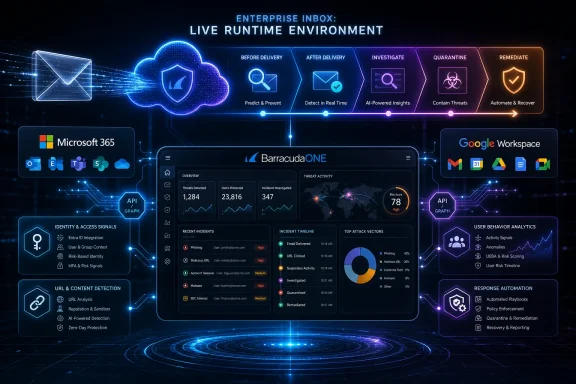
Barracuda has launched Barracuda Integrated Email Protection for Microsoft 365 and Google Workspace environments in June 2026, positioning the cloud service as an AI-driven layer that detects, explains, and removes email threats before and after they reach user inboxes. The important word is not “AI,” which every security vendor now applies liberally; it is “after.” Barracuda is making the case that email defense has moved beyond the gateway-era fantasy that a bad message can always be stopped at the front door. For Windows shops living inside Microsoft 365, that is both a product pitch and a useful admission about how modern attacks actually work.
For years, email security marketing revolved around prevention: block the phish, detonate the attachment, rewrite the URL, quarantine the malware, and send the user on their way. That model still matters, but it is increasingly incomplete. The most damaging email attacks are not always defined by the first message; they are defined by what happens after the click, the login, the token theft, or the compromised account’s first believable internal reply.
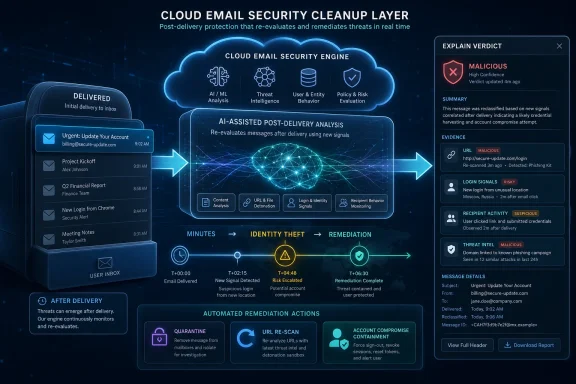
Barracuda Integrated Email Protection is built around that post-delivery reality. The service watches Microsoft 365 and Google Workspace through APIs, re-evaluates messages as new signals emerge, and can remove threats that were previously allowed into a mailbox. In Microsoft terms, that puts it in the same operational universe as post-delivery remediation and zero-hour auto purge, but Barracuda is trying to broaden the lens beyond the mail item itself.
That distinction matters for administrators. A phishing email is often only the visible artifact of a larger intrusion chain, and by the time a help desk ticket arrives, the question is no longer “why did this message get through?” It is “who clicked, what identity was used, where did the attacker persist, and what else did the account send?” Barracuda is pitching a platform that tries to answer those questions from one place rather than forcing security teams to stitch together mail logs, identity events, URL telemetry, endpoint alerts, and user reports under pressure.
The launch also reflects a quiet shift in buyer expectations. Organizations are no longer satisfied with a secure email gateway that sits in the mail path and judges messages once. They want systems that can keep changing their mind.
That timeline should feel plausible to anyone who has watched phishing kits mature. Modern credential theft does not require a lone attacker manually logging into a portal and poking around. Phishing-as-a-service kits, adversary-in-the-middle infrastructure, session token theft, device-code abuse, and automation have compressed the time between lure and compromise. The human victim may spend more time deciding whether an email looks legitimate than the attacker spends converting the credential into access.
This is where the old training-versus-technology debate becomes stale. Security awareness still reduces risk, but it cannot be the load-bearing wall in an environment where attackers can replay sessions, bypass weak MFA patterns, and weaponize legitimate cloud workflows. If one message can become an identity incident in minutes, then email security has to behave less like a mailroom scanner and more like part of the incident response system.
Barracuda’s research claim that one in seven compromised accounts is used to launch further attacks reinforces the same argument. Compromised accounts are not just trophies; they are infrastructure. Once an attacker controls a legitimate mailbox, the next phish can come from a trusted sender, inherit real conversation context, and evade defenses tuned to spot suspicious external mail.
That is the core threat model behind Integrated Email Protection. The product is not merely trying to decide whether an incoming message is bad. It is trying to recognize when the meaning of that message changes because a URL has turned malicious, an identity starts behaving strangely, or the same campaign begins appearing across tenants.
Microsoft is not blind to this. Defender for Office 365 includes native controls for quarantine, automated investigation and response, post-delivery remediation, user reporting, Threat Explorer, and zero-hour auto purge. Microsoft’s own stack can remove malicious mail after delivery and tie email investigation into the broader Defender XDR environment. For many organizations, especially those already licensed for E5-class capabilities, those native tools are powerful and increasingly integrated.
That creates the central tension for Barracuda and every other third-party email security vendor. They are not selling into a vacuum. They are selling into a Microsoft environment that already has a security story, a portal, telemetry, automation, and a licensing bundle that procurement may already be paying for.
Barracuda’s answer is to argue that native protection is necessary but not always sufficient. The company is leaning on cross-domain correlation, multi-tenant management, explainability, and support for both Microsoft 365 and Google Workspace as differentiators. That pitch will resonate most with managed service providers, hybrid collaboration estates, and organizations that want a security control plane that is not wholly dependent on Microsoft’s interpretation of Microsoft’s own environment.
The risk, of course, is console sprawl. Every additional security product promises unification and adds another interface. The products that win in this category will not be the ones with the most impressive AI adjectives; they will be the ones that reduce the number of minutes between detection, confidence, and action.
The rise of integrated cloud email security reflects how cloud mail has changed the defensive perimeter. Traditional secure email gateways sat inline, often before Exchange, and made decisions before a message reached the mailbox. API-based tools plug into Microsoft 365 or Google Workspace directly, inspect mail and user behavior inside the tenant, and take action after delivery when necessary.
The trade-off is architectural. Inline gateways are strong at pre-delivery enforcement because traffic passes through them first. API-based tools are strong at post-delivery visibility because they can observe the mailbox, user state, and evolving signals after the fact. Many enterprises now run both patterns in some combination, which is exactly why the market is messy.
Barracuda’s product tries to turn that mess into a virtue. It can consolidate Microsoft-quarantined messages into its own interface, rescan messages before release, and provide a unified quarantine view. For an MSP managing dozens or hundreds of tenants, that matters more than a glossy dashboard screenshot. Tenant-by-tenant triage is where good security intentions go to die.
Still, API-based security is not magic. It depends on permissions, platform APIs, event latency, vendor reliability, and clear administrative boundaries. A tool that can claw back mail at tenant scale is valuable precisely because it is powerful, and powerful remediation needs auditability, role design, and rollback procedures. Barracuda’s emphasis on explainable decisions is partly a trust feature and partly a recognition that automated cleanup without context can make administrators nervous.
Security products have become very good at generating events and less good at telling a tired analyst why any one of them deserves attention. A verdict that says “malicious” is not enough when the next step might be deleting mail across a tenant, disabling a user session, or telling the CFO that a trusted partner’s account was compromised. Analysts need a chain of reasoning: which signal changed, what the user did, which URL resolved differently, whether the message resembles a known campaign, and what action the system already took.
If Bailey can give administrators that story clearly, it could make automation more acceptable. The problem with black-box AI in security is not merely philosophical. It is operational. When a tool removes mail or reverses a quarantine decision, the administrator needs to defend that action to users, auditors, and sometimes legal teams.
The word “explainable” will be tested in the details. A useful assistant does not just paraphrase an alert. It distinguishes evidence from inference, separates Barracuda telemetry from Microsoft or Google signals, and makes uncertainty visible. It should be able to say, in effect, “this message was allowed at delivery, then removed because the destination URL was later associated with credential harvesting and two recipients showed suspicious authentication attempts.” Anything less risks becoming a conversational wrapper around the same opaque scoring systems customers already distrust.
This is where AI may be genuinely helpful, but only if it is humble. Security teams do not need a chatbot with confidence. They need a tireless junior analyst that can summarize evidence, preserve provenance, and get out of the way when a human decision is required.
For MSPs, the value proposition is less about having one more detection engine and more about repeatable response. They need to search across tenants, identify whether a campaign is spreading, remediate mail at scale, and produce customer-facing explanations that do not require a senior analyst to manually reconstruct the chain every time. A unified quarantine and reporting layer is not glamorous, but it is the stuff of service margins.
That also explains the emphasis on BarracudaONE. Barracuda has been building the platform as a broader security control plane spanning email, backup, data, network access, and AI-era risk. Integrated Email Protection is therefore not just an email SKU; it is another argument for BarracudaONE as the place where partners and customers should spend their working day.
The challenge is that MSPs are skeptical for good reason. Every vendor wants to be the platform. Every platform promises fewer consoles. Many deliver a new dashboard that sits beside all the old dashboards. Barracuda’s credibility will depend on whether Integrated Email Protection actually reduces repetitive work: fewer manual hunts, fewer tenant-by-tenant remediations, fewer ambiguous alerts, and fewer customer escalations that require digging through three portals.
For smaller organizations without a mature SOC, that could be the real benefit. They may not care whether Barracuda’s model architecture is elegant. They care whether a clicked phish is removed from everyone else’s mailbox before it becomes a second compromise.
Attackers have also learned from the tools arrayed against them. They use legitimate services to host lures, compromise real accounts instead of spoofing them, delay weaponization of links until after delivery, and rely on social engineering that does not always include a malicious attachment. They exploit the fact that business communication is messy and that employees are conditioned to approve, share, sign, reset, verify, and authenticate all day long.
That is why post-delivery controls matter. A clean verdict at 9:03 a.m. can become wrong at 9:17 a.m. A sender can be legitimate on Monday and compromised on Wednesday. A URL can redirect through benign infrastructure before the campaign operator flips the switch. Email security that cannot revisit earlier decisions is at a disadvantage.
But the crowded market also means buyers should be skeptical of feature parity masquerading as transformation. The test is not whether a vendor claims AI or account takeover detection. The test is whether it can demonstrate lower dwell time, faster remediation, fewer false positives, cleaner workflows, and better evidence for the decisions it makes.
Barracuda’s “full attack lifecycle” language is ambitious. It is also the right battlefield. The mailbox is no longer a destination; it is a sensor, a lure delivery mechanism, a credential theft launchpad, and, after compromise, an attacker-controlled distribution system.
For some organizations, Microsoft Defender for Office 365 may be enough, especially if they have skilled staff, strong identity hygiene, consistent policy enforcement, and the licensing tier needed for advanced investigation. For others, the native stack may be powerful but underused, either because administrators lack time, the environment is multi-tenant, or security operations are outsourced. In those cases, a third-party layer can be less about raw detection superiority and more about workflow, independence, and managed response.
Barracuda is trying to occupy that space. Its pitch assumes Microsoft 365 and Google Workspace will remain the dominant collaboration platforms, but that customers will want additional intelligence and control wrapped around them. That is not an anti-Microsoft argument. It is an argument that security teams need a view of risk that spans the platform’s own boundaries.
There is also a governance angle. Some organizations are uncomfortable relying entirely on the same vendor for productivity, identity, mail hosting, threat detection, and remediation. A third-party system can provide a second opinion, especially in cases where a compromised identity is abusing legitimate platform behavior rather than triggering a simple malware verdict.
Still, third-party protection should not become an excuse for weak Microsoft 365 basics. Conditional Access, phishing-resistant MFA where possible, mailbox auditing, safe attachment and link policies, user reporting, hardened admin roles, external sender labeling, and disciplined incident response remain foundational. An email security platform can reduce risk, but it cannot compensate indefinitely for an identity plane that is too permissive.
Barracuda’s emphasis on explainable AI is therefore more than a marketing flourish. Enterprise security buyers are increasingly asking not just “did the tool stop the threat?” but “can we prove why it acted, who approved it, what changed, and how we restore normal operations if it was wrong?” This is especially important in regulated environments where message retention, legal discovery, and audit trails matter.
For WindowsForum’s sysadmin audience, the practical question is how these explanations surface in daily work. A useful product should make it obvious why a message was clawed back, which users were affected, whether anyone interacted with it, and what follow-up action is recommended. It should also make it easy to tell the difference between a vendor verdict, a Microsoft quarantine state, a Google Workspace signal, and a customer-defined policy action.
The worst version of AI security is a confident assistant that says “trust me.” The best version is a system that compresses hours of log review into a coherent narrative without hiding the raw evidence. Barracuda is promising the latter. Customers should demand demonstrations that prove it.
That changes the job of administrators. A suspicious message can no longer be closed out with “blocked” or “delivered.” The important states are more fluid: delivered then removed, benign then malicious, clicked but contained, account compromised but not used, account compromised and used for lateral phishing. These distinctions determine whether an incident is a nuisance or a breach.
Barracuda’s 1.5-billion-URLs-a-day telemetry claim is part of that story. At cloud scale, vendors can observe infrastructure shifts that no single customer would see quickly enough. The value of that telemetry depends on how fast it turns into customer-specific action and how clearly the product explains the action when it arrives.
For Microsoft 365 administrators, the immediate takeaway is not to rip out existing controls or assume a new product solves the problem. It is to audit the time gap between delivery, detection, user interaction, and remediation. If that gap is measured in hours, the organization is operating on a timeline attackers no longer respect.
 Barracuda Is Selling the Cleanup, Not Just the Catch
For years, email security marketing revolved around prevention: block the phish, detonate the attachment, rewrite the URL, quarantine the malware, and send the user on their way. That model still matters, but it is increasingly incomplete. The most damaging email attacks are not always defined by the first message; they are defined by what happens after the click, the login, the token theft, or the compromised account’s first believable internal reply.Barracuda Integrated Email Protection is built around that post-delivery reality. The service watches Microsoft 365 and Google Workspace through APIs, re-evaluates messages as new signals emerge, and can remove threats that were previously allowed into a mailbox. In Microsoft terms, that puts it in the same operational universe as post-delivery remediation and zero-hour auto purge, but Barracuda is trying to broaden the lens beyond the mail item itself.
That distinction matters for administrators. A phishing email is often only the visible artifact of a larger intrusion chain, and by the time a help desk ticket arrives, the question is no longer “why did this message get through?” It is “who clicked, what identity was used, where did the attacker persist, and what else did the account send?” Barracuda is pitching a platform that tries to answer those questions from one place rather than forcing security teams to stitch together mail logs, identity events, URL telemetry, endpoint alerts, and user reports under pressure.
The launch also reflects a quiet shift in buyer expectations. Organizations are no longer satisfied with a secure email gateway that sits in the mail path and judges messages once. They want systems that can keep changing their mind.
The Five-Minute Phish Is the Product Brief
Barracuda’s most striking claim around the launch is not a feature checklist but a simulation: in a controlled red-team exercise, a single phishing email reportedly led to identity theft, multifactor authentication bypass, persistence, and endpoint compromise within five minutes. Vendor-sponsored attack simulations are designed to make a point, and this one makes it with a stopwatch. The point is that “user clicked link” is no longer the end of the incident report; it is the start of the timer.That timeline should feel plausible to anyone who has watched phishing kits mature. Modern credential theft does not require a lone attacker manually logging into a portal and poking around. Phishing-as-a-service kits, adversary-in-the-middle infrastructure, session token theft, device-code abuse, and automation have compressed the time between lure and compromise. The human victim may spend more time deciding whether an email looks legitimate than the attacker spends converting the credential into access.
This is where the old training-versus-technology debate becomes stale. Security awareness still reduces risk, but it cannot be the load-bearing wall in an environment where attackers can replay sessions, bypass weak MFA patterns, and weaponize legitimate cloud workflows. If one message can become an identity incident in minutes, then email security has to behave less like a mailroom scanner and more like part of the incident response system.
Barracuda’s research claim that one in seven compromised accounts is used to launch further attacks reinforces the same argument. Compromised accounts are not just trophies; they are infrastructure. Once an attacker controls a legitimate mailbox, the next phish can come from a trusted sender, inherit real conversation context, and evade defenses tuned to spot suspicious external mail.
That is the core threat model behind Integrated Email Protection. The product is not merely trying to decide whether an incoming message is bad. It is trying to recognize when the meaning of that message changes because a URL has turned malicious, an identity starts behaving strangely, or the same campaign begins appearing across tenants.
Microsoft 365 Changed the Email Security Battlefield
Microsoft 365 is now the default productivity substrate for many WindowsForum readers: Exchange Online, Entra ID, Defender, Teams, SharePoint, OneDrive, and an ever-expanding layer of automation. That consolidation is convenient, but it also makes the Microsoft account the hinge of the enterprise. If email is compromised, identity, files, collaboration, and business workflows are often nearby.Microsoft is not blind to this. Defender for Office 365 includes native controls for quarantine, automated investigation and response, post-delivery remediation, user reporting, Threat Explorer, and zero-hour auto purge. Microsoft’s own stack can remove malicious mail after delivery and tie email investigation into the broader Defender XDR environment. For many organizations, especially those already licensed for E5-class capabilities, those native tools are powerful and increasingly integrated.
That creates the central tension for Barracuda and every other third-party email security vendor. They are not selling into a vacuum. They are selling into a Microsoft environment that already has a security story, a portal, telemetry, automation, and a licensing bundle that procurement may already be paying for.
Barracuda’s answer is to argue that native protection is necessary but not always sufficient. The company is leaning on cross-domain correlation, multi-tenant management, explainability, and support for both Microsoft 365 and Google Workspace as differentiators. That pitch will resonate most with managed service providers, hybrid collaboration estates, and organizations that want a security control plane that is not wholly dependent on Microsoft’s interpretation of Microsoft’s own environment.
The risk, of course, is console sprawl. Every additional security product promises unification and adds another interface. The products that win in this category will not be the ones with the most impressive AI adjectives; they will be the ones that reduce the number of minutes between detection, confidence, and action.
API-Based Security Is Winning Because Mail Flow Is Too Fragile to Touch
Barracuda says the new service deploys through an API-based architecture rather than requiring mail exchange record changes. That is not a small operational detail. For administrators who have lived through mail routing cutovers, DNS propagation windows, journaling quirks, transport rule conflicts, and angry executives waiting for delayed email, “no MX change” is a very practical selling point.The rise of integrated cloud email security reflects how cloud mail has changed the defensive perimeter. Traditional secure email gateways sat inline, often before Exchange, and made decisions before a message reached the mailbox. API-based tools plug into Microsoft 365 or Google Workspace directly, inspect mail and user behavior inside the tenant, and take action after delivery when necessary.
The trade-off is architectural. Inline gateways are strong at pre-delivery enforcement because traffic passes through them first. API-based tools are strong at post-delivery visibility because they can observe the mailbox, user state, and evolving signals after the fact. Many enterprises now run both patterns in some combination, which is exactly why the market is messy.
Barracuda’s product tries to turn that mess into a virtue. It can consolidate Microsoft-quarantined messages into its own interface, rescan messages before release, and provide a unified quarantine view. For an MSP managing dozens or hundreds of tenants, that matters more than a glossy dashboard screenshot. Tenant-by-tenant triage is where good security intentions go to die.
Still, API-based security is not magic. It depends on permissions, platform APIs, event latency, vendor reliability, and clear administrative boundaries. A tool that can claw back mail at tenant scale is valuable precisely because it is powerful, and powerful remediation needs auditability, role design, and rollback procedures. Barracuda’s emphasis on explainable decisions is partly a trust feature and partly a recognition that automated cleanup without context can make administrators nervous.
Bailey Is the Most Interesting Part if It Actually Explains
Barracuda has tied Integrated Email Protection to Bailey, its AI assistant, which is meant to explain security verdicts in plain language and help users review or reverse automated actions. That framing is smarter than another generic “AI detects phishing” claim. Detection is expected. Explanation is where security teams are drowning.Security products have become very good at generating events and less good at telling a tired analyst why any one of them deserves attention. A verdict that says “malicious” is not enough when the next step might be deleting mail across a tenant, disabling a user session, or telling the CFO that a trusted partner’s account was compromised. Analysts need a chain of reasoning: which signal changed, what the user did, which URL resolved differently, whether the message resembles a known campaign, and what action the system already took.
If Bailey can give administrators that story clearly, it could make automation more acceptable. The problem with black-box AI in security is not merely philosophical. It is operational. When a tool removes mail or reverses a quarantine decision, the administrator needs to defend that action to users, auditors, and sometimes legal teams.
The word “explainable” will be tested in the details. A useful assistant does not just paraphrase an alert. It distinguishes evidence from inference, separates Barracuda telemetry from Microsoft or Google signals, and makes uncertainty visible. It should be able to say, in effect, “this message was allowed at delivery, then removed because the destination URL was later associated with credential harvesting and two recipients showed suspicious authentication attempts.” Anything less risks becoming a conversational wrapper around the same opaque scoring systems customers already distrust.
This is where AI may be genuinely helpful, but only if it is humble. Security teams do not need a chatbot with confidence. They need a tireless junior analyst that can summarize evidence, preserve provenance, and get out of the way when a human decision is required.
MSPs Are the Natural Audience for the Platform Pitch
The product’s single-tenant and multi-tenant design is not incidental. Managed service providers are one of the clearest audiences for Barracuda Integrated Email Protection because MSPs feel the operational pain of modern email attacks multiplied across customer environments. A threat that appears in one tenant may show up in another minutes later, and a compromised account in a small customer can become a business-wide crisis before anyone opens the ticket.For MSPs, the value proposition is less about having one more detection engine and more about repeatable response. They need to search across tenants, identify whether a campaign is spreading, remediate mail at scale, and produce customer-facing explanations that do not require a senior analyst to manually reconstruct the chain every time. A unified quarantine and reporting layer is not glamorous, but it is the stuff of service margins.
That also explains the emphasis on BarracudaONE. Barracuda has been building the platform as a broader security control plane spanning email, backup, data, network access, and AI-era risk. Integrated Email Protection is therefore not just an email SKU; it is another argument for BarracudaONE as the place where partners and customers should spend their working day.
The challenge is that MSPs are skeptical for good reason. Every vendor wants to be the platform. Every platform promises fewer consoles. Many deliver a new dashboard that sits beside all the old dashboards. Barracuda’s credibility will depend on whether Integrated Email Protection actually reduces repetitive work: fewer manual hunts, fewer tenant-by-tenant remediations, fewer ambiguous alerts, and fewer customer escalations that require digging through three portals.
For smaller organizations without a mature SOC, that could be the real benefit. They may not care whether Barracuda’s model architecture is elegant. They care whether a clicked phish is removed from everyone else’s mailbox before it becomes a second compromise.
The Crowded Market Is a Sign the Old Model Broke
Barracuda’s launch lands in a crowded field that includes Microsoft’s native Defender stack, Proofpoint, Mimecast, Abnormal Security, Avanan/Check Point, Cloudflare Area 1, and a long tail of email security specialists. That crowding can make every launch sound interchangeable: AI, behavioral analysis, post-delivery remediation, account takeover detection, URL protection, automated response. The sameness is not accidental. It reflects a broad industry consensus that email defense has become an identity and response problem.Attackers have also learned from the tools arrayed against them. They use legitimate services to host lures, compromise real accounts instead of spoofing them, delay weaponization of links until after delivery, and rely on social engineering that does not always include a malicious attachment. They exploit the fact that business communication is messy and that employees are conditioned to approve, share, sign, reset, verify, and authenticate all day long.
That is why post-delivery controls matter. A clean verdict at 9:03 a.m. can become wrong at 9:17 a.m. A sender can be legitimate on Monday and compromised on Wednesday. A URL can redirect through benign infrastructure before the campaign operator flips the switch. Email security that cannot revisit earlier decisions is at a disadvantage.
But the crowded market also means buyers should be skeptical of feature parity masquerading as transformation. The test is not whether a vendor claims AI or account takeover detection. The test is whether it can demonstrate lower dwell time, faster remediation, fewer false positives, cleaner workflows, and better evidence for the decisions it makes.
Barracuda’s “full attack lifecycle” language is ambitious. It is also the right battlefield. The mailbox is no longer a destination; it is a sensor, a lure delivery mechanism, a credential theft launchpad, and, after compromise, an attacker-controlled distribution system.
The Native-versus-Third-Party Debate Is Becoming the Wrong Debate
Windows and Microsoft 365 administrators often frame security buying decisions as a choice between native Microsoft controls and third-party overlays. That framing is understandable because budgets are finite and Microsoft licensing is already expensive. But the more useful question is what operational gap remains after native controls are configured correctly.For some organizations, Microsoft Defender for Office 365 may be enough, especially if they have skilled staff, strong identity hygiene, consistent policy enforcement, and the licensing tier needed for advanced investigation. For others, the native stack may be powerful but underused, either because administrators lack time, the environment is multi-tenant, or security operations are outsourced. In those cases, a third-party layer can be less about raw detection superiority and more about workflow, independence, and managed response.
Barracuda is trying to occupy that space. Its pitch assumes Microsoft 365 and Google Workspace will remain the dominant collaboration platforms, but that customers will want additional intelligence and control wrapped around them. That is not an anti-Microsoft argument. It is an argument that security teams need a view of risk that spans the platform’s own boundaries.
There is also a governance angle. Some organizations are uncomfortable relying entirely on the same vendor for productivity, identity, mail hosting, threat detection, and remediation. A third-party system can provide a second opinion, especially in cases where a compromised identity is abusing legitimate platform behavior rather than triggering a simple malware verdict.
Still, third-party protection should not become an excuse for weak Microsoft 365 basics. Conditional Access, phishing-resistant MFA where possible, mailbox auditing, safe attachment and link policies, user reporting, hardened admin roles, external sender labeling, and disciplined incident response remain foundational. An email security platform can reduce risk, but it cannot compensate indefinitely for an identity plane that is too permissive.
Explainable Automation Is the Real Enterprise Feature
The more automation security teams deploy, the more important accountability becomes. It is one thing for a system to flag a message as suspicious. It is another for that system to remove messages across an entire tenant, consolidate quarantine decisions, or reverse an action. The blast radius of a mistake grows with the speed of the tool.Barracuda’s emphasis on explainable AI is therefore more than a marketing flourish. Enterprise security buyers are increasingly asking not just “did the tool stop the threat?” but “can we prove why it acted, who approved it, what changed, and how we restore normal operations if it was wrong?” This is especially important in regulated environments where message retention, legal discovery, and audit trails matter.
For WindowsForum’s sysadmin audience, the practical question is how these explanations surface in daily work. A useful product should make it obvious why a message was clawed back, which users were affected, whether anyone interacted with it, and what follow-up action is recommended. It should also make it easy to tell the difference between a vendor verdict, a Microsoft quarantine state, a Google Workspace signal, and a customer-defined policy action.
The worst version of AI security is a confident assistant that says “trust me.” The best version is a system that compresses hours of log review into a coherent narrative without hiding the raw evidence. Barracuda is promising the latter. Customers should demand demonstrations that prove it.
The Inbox Is Now Part of the Incident Response Surface
The biggest lesson from Barracuda’s launch is not that Barracuda has a new product. It is that the inbox has become an active part of incident response. Email security used to be treated as a preventive control at the edge of the organization. Now it is a continuous detection and response surface tied to identity, endpoint posture, cloud application behavior, and user actions.That changes the job of administrators. A suspicious message can no longer be closed out with “blocked” or “delivered.” The important states are more fluid: delivered then removed, benign then malicious, clicked but contained, account compromised but not used, account compromised and used for lateral phishing. These distinctions determine whether an incident is a nuisance or a breach.
Barracuda’s 1.5-billion-URLs-a-day telemetry claim is part of that story. At cloud scale, vendors can observe infrastructure shifts that no single customer would see quickly enough. The value of that telemetry depends on how fast it turns into customer-specific action and how clearly the product explains the action when it arrives.
For Microsoft 365 administrators, the immediate takeaway is not to rip out existing controls or assume a new product solves the problem. It is to audit the time gap between delivery, detection, user interaction, and remediation. If that gap is measured in hours, the organization is operating on a timeline attackers no longer respect.
The Barracuda Launch Is Really a Test of Your Microsoft 365 Response Clock
Barracuda’s new service is best read as a symptom of where email security has moved: away from single-message filtering and toward continuous, cross-domain response. The specific buying decision will vary by tenant size, licensing, staffing, and MSP involvement, but the operational questions are broadly the same.- Organizations should measure how quickly they can find and remove a malicious message after it has already landed in Microsoft 365 or Google Workspace inboxes.
- Administrators should verify whether post-delivery actions are visible, auditable, and understandable to the people who must defend them.
- Security teams should treat compromised mailboxes as attack infrastructure, not merely as affected user accounts.
- MSPs should prioritize tools that reduce tenant-by-tenant investigation time rather than simply adding another alert feed.
- Buyers should ask vendors to demonstrate explainability with real incident evidence, not canned AI summaries.
- Native Microsoft defenses and third-party email platforms should be compared against practical response outcomes, not just feature matrices.
References
- Primary source: SecurityBrief Australia
Published: Thu, 18 Jun 2026 01:52:00 GMT
Barracuda launches AI email protection for Microsoft 365
A single phishing email can now compromise identities, bypass multifactor authentication and hit endpoints within five minutes, Barracuda said. securitybrief.com.au
- Related coverage: barracuda.com
- Related coverage: blog.barracuda.com
- Related coverage: insight.com
Barracuda Email Protection | Insight
Learn how Barracuda Email Protection Complete Security for Microsoft 365 can help defend your organization from malware, spam and zero-day threats. www.insight.com
- Related coverage: documentation.campus.barracuda.com
- Related coverage: assets.barracuda.com
- Related coverage: campus.barracuda.com
How to Deploy the Barracuda Email Protection Add-In
How to Deploy the Barracuda Email Protection Add-Incampus.barracuda.com