

Buy the Beelink EQi if you want proven 10GbE and 2.5GbE networking, fast Wi-Fi, quiet low-power operation, and support for three displays in a compact Windows 11 Pro system. Do not buy it specifically for an eGPU or mission-critical Thunderbolt expansion until Beelink verifies a fix for the connection failures documented by CNX Software.
That distinction defines the entire machine. CNX Software’s July 12, 2026 review found that the $509 pre-order EQi combines Intel’s five-core Core 3 304 “Wildcat Lake” processor with excellent networking, responsive single-core performance, low power consumption, and near-background noise levels. It also found that an NVIDIA eGPU was not detected through either rear USB-C port, while a Thunderbolt storage enclosure connected inconsistently and achieved full performance only through the second port.
The EQi is therefore an appealing low-power network workstation, administration PC, media system, or three-display desktop—but not yet a dependable platform for Thunderbolt-dependent expansion.
The Core 3 304 is not designed to win a conventional core-count contest. It combines one performance core with four low-power efficiency cores, giving the EQi five cores and five threads within a 15W processor envelope. Intel specifies a 1.50GHz base frequency for the performance core, but the verified review information does not establish a maximum turbo frequency.
That asymmetrical design explains both the system’s strengths and its limits. The single performance core gives short, lightly threaded Windows tasks a disproportionate amount of responsiveness, while the four efficiency cores handle background activity and modest parallel workloads without pushing the machine into the thermal and acoustic territory of a conventional performance mini PC. It is an architecture optimized for perceived speed, efficiency, and compact systems—not sustained rendering or heavily threaded production work.
CNX Software measured the processor’s configured limits at 15W PL1, 35W PL2, and 80W PL4. Those figures describe a system permitted to accelerate sharply but expected to settle into a much lower sustained operating range. Wall measurements reflected that behavior: Cinebench R23 briefly drove consumption to between 30W and 32.2W before longer runs stabilized at 19.5W.
Cinebench R23 produced 1,732 points in the single-core test. The 4,863-point multi-core result and 2.81x MP ratio exposed the cost of having only one performance core. The EQi’s strongest CPU result belongs to the type of workload Windows users encounter constantly: opening applications, processing browser code, navigating complex interfaces, and completing short bursts of work.
The multi-core score places a practical ceiling on more demanding uses. The EQi can handle office applications, browser-heavy work, management tools, light development, and modest background services, but it should not be mistaken for a rendering workstation or a dense virtualization host. Five heterogeneous cores cannot provide the sustained throughput of a modern processor with more full-sized cores and simultaneous multithreading.
The important change from older low-power Intel platforms is responsiveness. Wildcat Lake gives Beelink a foundation that can support ambitious networking and display features without making ordinary Windows use feel secondary to power savings. The processor is not the headline reason to buy the EQi, but it is fast enough to keep the machine’s specialized interfaces useful.
The reviewed motherboard was the AZW EQi variant with four 4GB Micron LPDDR5 SDRAM packages soldered to the board. Beelink also produced an alternative motherboard with a DDR5 SO-DIMM socket for the 24GB and 32GB configurations. Buyers are therefore choosing more than a memory capacity: the 16GB model uses fixed LPDDR5, while the higher-capacity configurations use a physically different, socketed-memory design.
That distinction matters for serviceability and standardization. The 16GB LPDDR5 model provides a compact fixed configuration, but its memory cannot be upgraded like a SO-DIMM. Organizations considering multiple EQi systems should record which motherboard variant they receive rather than assuming every capacity uses the same internal layout.
Windows showed 342MB of hardware-reserved RAM, with 128MB reported as used by the integrated GPU. CNX Software suggested that some of the remaining reservation might be associated with the Intel AI Boost NPU, but the allocation was not definitively established.
The integrated Intel “FD81” graphics device was new enough that GPU-Z did not identify it properly. HWiNFO reported one Xe core operating at 1000MHz, with a stated maximum of 2300MHz. Intel rates the Core 3 304’s graphics capability at up to 9 TOPS, while the Intel AI Boost NPU is rated at up to 15 TOPS.
Those theoretical figures confirm that dedicated acceleration hardware is present, but they do not establish application-level performance. The EQi should be treated as a light local-inference platform whose practical value will depend on software support, model format, and workload. The verified facts do not support a broader claim that its NPU dramatically outperforms its integrated GPU in a particular benchmark.
A more immediate concern is that Secure Boot was disabled by default on the reviewed unit. That does not make the machine unusable, but it is a poor default for a Windows 11 Pro computer likely to be considered for business, edge, or network-appliance roles. Administrators should verify the setting before deployment instead of assuming that every expected platform-security control is active simply because Windows 11 Pro is installed.
Graphics performance remains entry-level. The machine scored 1,940 points in 3DMark Fire Strike, while Unigine Heaven 4.0 averaged 19.6 frames per second and returned 495 points at 1920×1080. That is enough for desktop acceleration, media tasks, basic visualization, and undemanding games, but not enough to make the EQi a credible 1080p gaming system by itself.
The available evidence supports a comparison by platform character more strongly than it supports a detailed benchmark shootout.
Beelink cannot justify the EQi solely as a faster small computer. At its pre-order price, and especially at its stated MSRP, it has to win through connectivity, efficiency, acoustics, and specialized deployment value. The Core 3 304 supplies enough performance to prevent those features from being trapped behind a sluggish host, but the interfaces must deliver consistently.
For general desktop buyers, a conventional Ryzen mini PC may remain the more balanced choice when CPU throughput and graphics performance matter most. The EQi’s stronger argument appears when a buyer can make direct use of 10GbE, a separate 2.5GbE interface, high wireless throughput, or three simultaneous displays.
It remains a compromise relative to a good primary NVMe drive. Buyers moving large files, compiling substantial projects, maintaining local databases, or running storage-intensive virtual machines are more likely to notice the difference than someone using the EQi for browsers, office applications, dashboards, and administration tools.
Beelink partly compensates with two M.2 sockets. CNX Software installed 128GB and 256GB PCIe Gen3 x4 drives, but the available links constrained them. The 128GB SSD used a PCIe Gen4 x1 interface and delivered roughly 880MB/s, consistent with Gen3 x1-class performance. The 256GB drive used a PCIe Gen4 x2 interface and approached roughly 1,600MB/s, consistent with Gen3 x2-class performance.
A suitable PCIe Gen4 SSD in the x2 socket can provide substantially better application or data-drive performance than the built-in UFS device, although the socket still does not offer a full x4 link. That gives administrators an obvious deployment strategy: retain UFS for Windows and routine software while placing storage-sensitive applications, databases, working data, or virtual-machine images on an appropriate NVMe SSD.
The concern is product positioning rather than basic usability. A mini PC sold on advanced networking and external expansion should not force customers to work around its primary storage medium to obtain conventional NVMe behavior. UFS may save board space and contribute to efficiency, but it shifts part of the platform’s cost toward specialized interfaces. Those interfaces consequently carry more responsibility for justifying the price.
The hardware layout is important: this is one 10GbE port plus one separate 2.5GbE port, not two 2.5GbE interfaces.
The 2.5GbE connection produced 2.35Gbits/sec in both the download and upload tests over approximately 60 seconds, transferring 16.4GB with no retransmissions during the download run. Those are effectively line-rate one-direction results after protocol overhead.
Its bidirectional result was less consistent. One direction retained 2.35Gbits/sec, while the other fell to 177Mbits/sec. That does not erase the excellent one-direction measurements, but anyone planning simultaneous high-rate traffic in both directions should repeat the full-duplex test with the intended operating-system image, switch, cabling, peer hardware, and network configuration.
The 10GbE controller made the more convincing case. Tested against an iKOOLCORE R2 Max running the QWRT OpenWrt fork, the EQi reached 9.41Gbits/sec in both download and upload runs, transferring 65.7GB over roughly 60 seconds. There were no retransmissions in the reported download result.
Simultaneous traffic reached 7.08Gbits/sec in one direction and 9.36Gbits/sec in the other. Moving to two parallel streams improved the lower side to 7.84Gbits/sec while the opposite direction remained at 9.34Gbits/sec. Those figures show that the 10GbE port is not merely present on the specification sheet; it can operate close to line rate and sustain heavy two-way traffic.
Wireless performance was equally impressive. Over 5GHz Wi-Fi 6, CNX Software recorded 1.77Gbits/sec download and 1.65Gbits/sec upload. Real-world wireless results will vary with access point, channel width, interference, distance, and client placement, but the supplied measurements show that the EQi’s wireless implementation can deliver unusually high throughput under favorable conditions.
This is where the machine begins to justify its architecture. It could serve as a compact administration workstation, network-monitoring node, lab controller, high-speed backup endpoint, or front end for network-attached storage. Its 15W processor is not built for large virtualization clusters, but the network interfaces provide room for traffic and storage services that ordinary entry-level PCs cannot accommodate as cleanly.
Networking is the finished feature here. The 10GbE results in particular convert the specification into measured capability. Buyers who need both 10GbE and 2.5GbE in a small Windows system have a concrete reason to consider the EQi even if they could obtain more raw CPU performance elsewhere.
An ORICO M234C3-U4 M.2 NVMe enclosure was initially not detected on the first rear USB-C port. After retries and a reboot, that connection operated as USB 3.1 Gen1 at 5Gbps, producing 428MB/s reads and 413MB/s writes rather than Thunderbolt-class performance.
The second rear USB-C port did establish a Thunderbolt connection with the ORICO enclosure. Performance was excellent once connected: 3,135MB/s reads and 2,478MB/s writes. That proves the reviewed system can deliver high Thunderbolt storage throughput through that port under at least one tested configuration.
It does not prove dependable connection behavior. A storage device that reaches approximately 3GB/s only through one of two expected high-speed ports, after the other port requires retries or falls back to ordinary USB speed, raises a deployment concern. Administrators care not only about peak benchmark results but also about whether a device reconnects after a reboot, cold start, cable change, sleep cycle, or power interruption.
Several explanations are plausible, including firmware, software, compatibility, cable behavior, port-specific implementation details, or connection negotiation. None was conclusively demonstrated by the supplied test results. Those possibilities should therefore be treated as troubleshooting hypotheses, not diagnoses.
The eGPU test produced the clearest warning. CNX Software connected a Khadas Mind Graphics 2 dock containing an NVIDIA GeForce RTX 5060 Ti, but neither rear USB-C port exposed the graphics card to Windows. The operating system displayed a warning that the display connection might be limited, Device Manager did not show the GPU, and the graphics card’s HDMI output produced no video.
The dock’s built-in speakers remained usable when the mini PC’s own HDMI output supplied the display signal, indicating that some functions associated with the connected dock were available. The evidence does not identify exactly why the graphics device failed or which layer was responsible. What matters to a buyer is the observed result: the tested eGPU could not be used through either rear port.
The test should not be generalized into a claim that every PCIe-tunneled peripheral will fail. It does mean that untested docks and specialized devices cannot be assumed to work. Anyone considering capture equipment, audio hardware, external storage, docking stations, or other high-value peripherals should qualify the exact model and configuration before deploying the EQi.
This is not a minor inconvenience if external expansion is the reason for choosing the machine. A buyer purchasing the EQi primarily for an eGPU should wait for Beelink to reproduce the failure, explain its scope, and verify a remedy. The same caution applies to mission-critical Thunderbolt installations where intermittent connection behavior could interrupt work or leave a system unavailable after an unattended restart.
The successful storage result on rear USB-C port number two leaves room for a firmware, software, or compatibility resolution. That is encouraging, but a possible future correction cannot be counted as a feature available today.
The test combined a 14-inch Crowview portable monitor at 1920×1080, a Khadas Mind xPlay at 2880×1920, and a 32-inch KTC A32Q8 4K smart monitor. Getting all three running required changing the cable arrangement after the initial configuration left the KTC monitor without a USB-C signal, but the final three-display setup worked.
That is a meaningful result for office, monitoring, signage, and administrative deployments. It also shows why USB-C testing must be feature-specific. A connector can successfully carry DisplayPort video or ordinary USB data while behaving differently with a Thunderbolt storage device or eGPU. Successful monitor output does not settle questions about other protocols using the same physical connector.
The front ports were more straightforward. The front USB-A connection ran at USB 3.2 Gen2 speed, reaching 1,060MB/s reads and 1,043MB/s writes. The front USB-C port produced 1,058MB/s reads and 1,040MB/s writes, also consistent with a 10Gbps USB 3.2 Gen2 connection.
Both rear USB-A ports were limited to USB 2.0 high-speed operation, returning approximately 44MB/s reads and between 43MB/s and 44MB/s writes. They are suitable for keyboards, mice, license dongles, printers, and other low-bandwidth accessories, but they should not be used for performance-sensitive external storage.
The port arrangement is therefore more specialized than it first appears. Fast conventional USB storage belongs on the front ports, low-bandwidth peripherals fit the rear USB-A connections, and display output can use the rear USB-C connectors. Thunderbolt-dependent equipment requires individual verification.
A separate VP9 video at 3840×2160 and 60FPS played without dropped frames. The supplied facts do not establish equivalent behavior in Chrome, so the browser conclusion should remain limited to the documented Firefox and VP9 results.
Those results make the EQi attractive as a presentation computer, digital-signage controller, home-theater system, multi-display monitoring station, or compact office desktop. It can decode demanding modern video without requiring the 3D horsepower, physical size, or power draw of a discrete GPU.
Power consumption supports those roles. The review measured 5.7W to 6.2W at idle over Wi-Fi, 6.0W to 6.4W with 2.5GbE, and 6.8W to 7.2W with 10GbE. Playing a 4K60 YouTube video in Firefox consumed between 13.4W and 15.3W.
Sleep consumption ranged from 3.2W to 3.3W, while the powered-off system drew 1.1W in the default configuration. Moving the motherboard’s USB-power jumper did not materially improve the measurements. The powered-off reading changed to 1.7W in that test, while idle consumption shifted slightly to between 5.4W and 6.0W.
Acoustics are another major advantage. At a distance of 5cm, CNX Software measured 38.2 to 38.5dBA during idle and light workloads and 39.8 to 40.4dBA during the Cinebench R23 multi-core test. The room itself measured between 36.4 and 37.0dBA, making the fan barely distinguishable from the ambient noise under the test conditions.
Thermally, the processor reached 86°C under both the combined CPU-and-GPU Fire Strike workload and a Cinebench R23 multi-core run. HWiNFO reported power-limit activity but no thermal throttling. The cooling design therefore appears to be doing what the architecture requires: allowing short bursts, containing the sustained load, and avoiding the intrusive fan behavior that undermines many compact PCs.
A mainstream Ryzen mini PC may provide stronger sustained multi-core and integrated-graphics performance. The Beelink responds with one 10GbE port, one 2.5GbE port, exceptionally fast measured Wi-Fi, three-display operation, two M.2 sockets, low consumption, and quiet cooling. Its value is concentrated in capabilities that can be awkward or expensive to add to another compact system.
That is why the rear USB-C problem carries so much weight. The $509 price can make sense for a buyer who needs the proven network interfaces and accepts the processor’s throughput limits. It is much harder to justify when the purchase depends on reliable Thunderbolt expansion.
The $609 MSRP raises the standard further. At that price, buyers should not have to gamble on whether a headline high-speed interface will consistently detect a chosen enclosure or expose an eGPU. Beelink needs to clarify the capabilities of each rear USB-C port, reproduce the review failures, and provide a verified remedy or compatibility guidance.
The EQi makes more sense as an unusually responsive, low-power network workstation. Its measured 9.41Gbits/sec one-direction 10GbE results, 2.35Gbits/sec 2.5GbE results, 1.77Gbits/sec Wi-Fi download speed, 5.7W-to-7.2W idle ranges, near-ambient fan noise, and successful three-display test form a coherent buyer proposition. Those are not speculative capabilities: they are the strongest measured reasons to choose this machine.
The buyer verdict is consequently narrower than Beelink may prefer but more useful than a simple recommendation score.
Buy the EQi for proven high-speed networking, fast wireless connectivity, quiet low-power operation, modern media decoding, and three-display use. It is especially interesting for network administration, monitoring dashboards, lab control, compact office installations, backup endpoints, signage, and other roles where interface capability matters more than maximum multi-core throughput.
Do not buy it specifically for an eGPU or mission-critical Thunderbolt expansion yet. One rear USB-C port delivered excellent Thunderbolt storage performance, but the first port’s inconsistent enclosure behavior and the failure of both ports to expose the tested NVIDIA eGPU prevent a broader reliability conclusion.
Beelink may be able to correct or explain the issue through firmware, software, documentation, or compatibility guidance. Until it does—and until the remedy is independently verified—the safest recommendation is to treat Thunderbolt expansion as unqualified rather than guaranteed.
That leaves the EQi tantalizingly close to being a standout specialist mini PC. Its processor is responsive enough, its networking is genuinely excellent, its storage can be expanded, its media capabilities are strong, and its cooling is exceptionally restrained. Finish the rear USB-C story, and Beelink will have a distinctive compact workstation. Leave it unresolved, and the EQi remains a strong network-focused system whose most ambitious expansion promise cannot yet be trusted.
That distinction defines the entire machine. CNX Software’s July 12, 2026 review found that the $509 pre-order EQi combines Intel’s five-core Core 3 304 “Wildcat Lake” processor with excellent networking, responsive single-core performance, low power consumption, and near-background noise levels. It also found that an NVIDIA eGPU was not detected through either rear USB-C port, while a Thunderbolt storage enclosure connected inconsistently and achieved full performance only through the second port.
The EQi is therefore an appealing low-power network workstation, administration PC, media system, or three-display desktop—but not yet a dependable platform for Thunderbolt-dependent expansion.
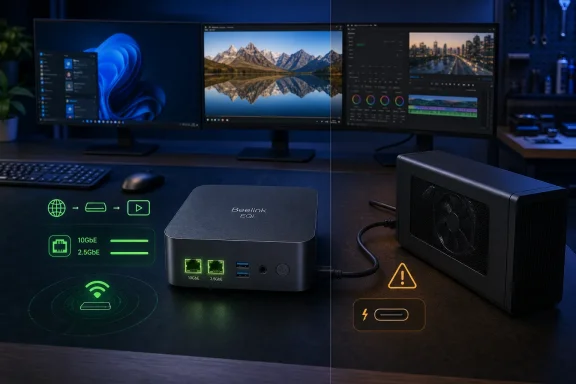 Wildcat Lake Changes What an Entry-Level Intel PC Can Be
The Core 3 304 is not designed to win a conventional core-count contest. It combines one performance core with four low-power efficiency cores, giving the EQi five cores and five threads within a 15W processor envelope. Intel specifies a 1.50GHz base frequency for the performance core, but the verified review information does not establish a maximum turbo frequency.That asymmetrical design explains both the system’s strengths and its limits. The single performance core gives short, lightly threaded Windows tasks a disproportionate amount of responsiveness, while the four efficiency cores handle background activity and modest parallel workloads without pushing the machine into the thermal and acoustic territory of a conventional performance mini PC. It is an architecture optimized for perceived speed, efficiency, and compact systems—not sustained rendering or heavily threaded production work.
CNX Software measured the processor’s configured limits at 15W PL1, 35W PL2, and 80W PL4. Those figures describe a system permitted to accelerate sharply but expected to settle into a much lower sustained operating range. Wall measurements reflected that behavior: Cinebench R23 briefly drove consumption to between 30W and 32.2W before longer runs stabilized at 19.5W.
Cinebench R23 produced 1,732 points in the single-core test. The 4,863-point multi-core result and 2.81x MP ratio exposed the cost of having only one performance core. The EQi’s strongest CPU result belongs to the type of workload Windows users encounter constantly: opening applications, processing browser code, navigating complex interfaces, and completing short bursts of work.
The multi-core score places a practical ceiling on more demanding uses. The EQi can handle office applications, browser-heavy work, management tools, light development, and modest background services, but it should not be mistaken for a rendering workstation or a dense virtualization host. Five heterogeneous cores cannot provide the sustained throughput of a modern processor with more full-sized cores and simultaneous multithreading.
The important change from older low-power Intel platforms is responsiveness. Wildcat Lake gives Beelink a foundation that can support ambitious networking and display features without making ordinary Windows use feel secondary to power savings. The processor is not the headline reason to buy the EQi, but it is fast enough to keep the machine’s specialized interfaces useful.
Windows 11 Pro Exposes a Capable but Uneven Platform
The reviewed EQi arrived with Windows 11 Pro. Windows reported 16GB of memory operating at 6400 MT/s and 834GB of total storage across the internal UFS device and the reviewer’s two installed SSDs.The reviewed motherboard was the AZW EQi variant with four 4GB Micron LPDDR5 SDRAM packages soldered to the board. Beelink also produced an alternative motherboard with a DDR5 SO-DIMM socket for the 24GB and 32GB configurations. Buyers are therefore choosing more than a memory capacity: the 16GB model uses fixed LPDDR5, while the higher-capacity configurations use a physically different, socketed-memory design.
That distinction matters for serviceability and standardization. The 16GB LPDDR5 model provides a compact fixed configuration, but its memory cannot be upgraded like a SO-DIMM. Organizations considering multiple EQi systems should record which motherboard variant they receive rather than assuming every capacity uses the same internal layout.
Windows showed 342MB of hardware-reserved RAM, with 128MB reported as used by the integrated GPU. CNX Software suggested that some of the remaining reservation might be associated with the Intel AI Boost NPU, but the allocation was not definitively established.
The integrated Intel “FD81” graphics device was new enough that GPU-Z did not identify it properly. HWiNFO reported one Xe core operating at 1000MHz, with a stated maximum of 2300MHz. Intel rates the Core 3 304’s graphics capability at up to 9 TOPS, while the Intel AI Boost NPU is rated at up to 15 TOPS.
Those theoretical figures confirm that dedicated acceleration hardware is present, but they do not establish application-level performance. The EQi should be treated as a light local-inference platform whose practical value will depend on software support, model format, and workload. The verified facts do not support a broader claim that its NPU dramatically outperforms its integrated GPU in a particular benchmark.
A more immediate concern is that Secure Boot was disabled by default on the reviewed unit. That does not make the machine unusable, but it is a poor default for a Windows 11 Pro computer likely to be considered for business, edge, or network-appliance roles. Administrators should verify the setting before deployment instead of assuming that every expected platform-security control is active simply because Windows 11 Pro is installed.
Beelink Spends Its Silicon Budget on Responsiveness, Not Throughput
The benchmark results reveal a consistent personality. PCMark 10 returned 5,294 points, while PassMark PerformanceTest 11.1 scored the system at 2,806 points. Those are credible general-computing results for a 15W platform and reinforce the impression that the EQi is well suited to office applications, browser-heavy work, media consumption, management consoles, and lightweight development.Graphics performance remains entry-level. The machine scored 1,940 points in 3DMark Fire Strike, while Unigine Heaven 4.0 averaged 19.6 frames per second and returned 495 points at 1920×1080. That is enough for desktop acceleration, media tasks, basic visualization, and undemanding games, but not enough to make the EQi a credible 1080p gaming system by itself.
The available evidence supports a comparison by platform character more strongly than it supports a detailed benchmark shootout.
| System class | Processor example | Primary strength | Principal trade-off |
|---|---|---|---|
| Beelink EQi | Core 3 304, 1P+4E | 10GbE, 2.5GbE, fast Wi-Fi, three displays, low power | Limited multi-core and integrated-graphics performance; unreliable tested Thunderbolt expansion |
| Alder Lake-N mini PC | Intel N100 or Core i3-N305 | Efficient basic computing | Generally less emphasis on high-end networking and expansion |
| Mainstream Ryzen mini PC | Ryzen 5 7530U-class processor | Stronger sustained multi-core and graphics capability | Different priorities from the EQi’s network-focused design |
For general desktop buyers, a conventional Ryzen mini PC may remain the more balanced choice when CPU throughput and graphics performance matter most. The EQi’s stronger argument appears when a buyer can make direct use of 10GbE, a separate 2.5GbE interface, high wireless throughput, or three simultaneous displays.
UFS Storage Is Fast Enough to Hide Its Compromise—Until It Is Compared With NVMe
The internal UFS 3.1 storage is another example of Beelink optimizing around the system rather than maximizing a familiar component specification. CrystalDiskMark measured 2,013.58MB/s sequential reads and 831.01MB/s sequential writes. That is far ahead of typical eMMC storage and fast enough that routine Windows activity should not feel as though it is running from bargain-grade flash.It remains a compromise relative to a good primary NVMe drive. Buyers moving large files, compiling substantial projects, maintaining local databases, or running storage-intensive virtual machines are more likely to notice the difference than someone using the EQi for browsers, office applications, dashboards, and administration tools.
Beelink partly compensates with two M.2 sockets. CNX Software installed 128GB and 256GB PCIe Gen3 x4 drives, but the available links constrained them. The 128GB SSD used a PCIe Gen4 x1 interface and delivered roughly 880MB/s, consistent with Gen3 x1-class performance. The 256GB drive used a PCIe Gen4 x2 interface and approached roughly 1,600MB/s, consistent with Gen3 x2-class performance.
A suitable PCIe Gen4 SSD in the x2 socket can provide substantially better application or data-drive performance than the built-in UFS device, although the socket still does not offer a full x4 link. That gives administrators an obvious deployment strategy: retain UFS for Windows and routine software while placing storage-sensitive applications, databases, working data, or virtual-machine images on an appropriate NVMe SSD.
The concern is product positioning rather than basic usability. A mini PC sold on advanced networking and external expansion should not force customers to work around its primary storage medium to obtain conventional NVMe behavior. UFS may save board space and contribute to efficiency, but it shifts part of the platform’s cost toward specialized interfaces. Those interfaces consequently carry more responsibility for justifying the price.
The Networking Hardware Delivers the EQi’s Strongest Argument
If external high-speed expansion is the EQi’s largest disappointment, networking is its clearest success. The machine combines a Realtek RTL8127 10GbE controller, an Intel I226-V 2.5GbE controller, and a MediaTek MT7922 module providing Wi-Fi 6E and Bluetooth.The hardware layout is important: this is one 10GbE port plus one separate 2.5GbE port, not two 2.5GbE interfaces.
The 2.5GbE connection produced 2.35Gbits/sec in both the download and upload tests over approximately 60 seconds, transferring 16.4GB with no retransmissions during the download run. Those are effectively line-rate one-direction results after protocol overhead.
Its bidirectional result was less consistent. One direction retained 2.35Gbits/sec, while the other fell to 177Mbits/sec. That does not erase the excellent one-direction measurements, but anyone planning simultaneous high-rate traffic in both directions should repeat the full-duplex test with the intended operating-system image, switch, cabling, peer hardware, and network configuration.
The 10GbE controller made the more convincing case. Tested against an iKOOLCORE R2 Max running the QWRT OpenWrt fork, the EQi reached 9.41Gbits/sec in both download and upload runs, transferring 65.7GB over roughly 60 seconds. There were no retransmissions in the reported download result.
Simultaneous traffic reached 7.08Gbits/sec in one direction and 9.36Gbits/sec in the other. Moving to two parallel streams improved the lower side to 7.84Gbits/sec while the opposite direction remained at 9.34Gbits/sec. Those figures show that the 10GbE port is not merely present on the specification sheet; it can operate close to line rate and sustain heavy two-way traffic.
Wireless performance was equally impressive. Over 5GHz Wi-Fi 6, CNX Software recorded 1.77Gbits/sec download and 1.65Gbits/sec upload. Real-world wireless results will vary with access point, channel width, interference, distance, and client placement, but the supplied measurements show that the EQi’s wireless implementation can deliver unusually high throughput under favorable conditions.
This is where the machine begins to justify its architecture. It could serve as a compact administration workstation, network-monitoring node, lab controller, high-speed backup endpoint, or front end for network-attached storage. Its 15W processor is not built for large virtualization clusters, but the network interfaces provide room for traffic and storage services that ordinary entry-level PCs cannot accommodate as cleanly.
Networking is the finished feature here. The 10GbE results in particular convert the specification into measured capability. Buyers who need both 10GbE and 2.5GbE in a small Windows system have a concrete reason to consider the EQi even if they could obtain more raw CPU performance elsewhere.
Thunderbolt Turns the Headline Feature Into the Purchase Risk
The verified review results establish a 40Gbps Thunderbolt connection on the second rear USB-C port during testing with an NVMe enclosure. They do not, by themselves, establish that both rear connectors are certified Thunderbolt 4 ports or that every Thunderbolt feature works reliably through both ports. The safest description is that the EQi has two rear high-speed USB-C connections, with rear USB-C port number two successfully establishing a 40Gbps Thunderbolt link in the reviewer’s storage test.An ORICO M234C3-U4 M.2 NVMe enclosure was initially not detected on the first rear USB-C port. After retries and a reboot, that connection operated as USB 3.1 Gen1 at 5Gbps, producing 428MB/s reads and 413MB/s writes rather than Thunderbolt-class performance.
The second rear USB-C port did establish a Thunderbolt connection with the ORICO enclosure. Performance was excellent once connected: 3,135MB/s reads and 2,478MB/s writes. That proves the reviewed system can deliver high Thunderbolt storage throughput through that port under at least one tested configuration.
It does not prove dependable connection behavior. A storage device that reaches approximately 3GB/s only through one of two expected high-speed ports, after the other port requires retries or falls back to ordinary USB speed, raises a deployment concern. Administrators care not only about peak benchmark results but also about whether a device reconnects after a reboot, cold start, cable change, sleep cycle, or power interruption.
Several explanations are plausible, including firmware, software, compatibility, cable behavior, port-specific implementation details, or connection negotiation. None was conclusively demonstrated by the supplied test results. Those possibilities should therefore be treated as troubleshooting hypotheses, not diagnoses.
The eGPU test produced the clearest warning. CNX Software connected a Khadas Mind Graphics 2 dock containing an NVIDIA GeForce RTX 5060 Ti, but neither rear USB-C port exposed the graphics card to Windows. The operating system displayed a warning that the display connection might be limited, Device Manager did not show the GPU, and the graphics card’s HDMI output produced no video.
The dock’s built-in speakers remained usable when the mini PC’s own HDMI output supplied the display signal, indicating that some functions associated with the connected dock were available. The evidence does not identify exactly why the graphics device failed or which layer was responsible. What matters to a buyer is the observed result: the tested eGPU could not be used through either rear port.
The test should not be generalized into a claim that every PCIe-tunneled peripheral will fail. It does mean that untested docks and specialized devices cannot be assumed to work. Anyone considering capture equipment, audio hardware, external storage, docking stations, or other high-value peripherals should qualify the exact model and configuration before deploying the EQi.
This is not a minor inconvenience if external expansion is the reason for choosing the machine. A buyer purchasing the EQi primarily for an eGPU should wait for Beelink to reproduce the failure, explain its scope, and verify a remedy. The same caution applies to mission-critical Thunderbolt installations where intermittent connection behavior could interrupt work or leave a system unavailable after an unattended restart.
The successful storage result on rear USB-C port number two leaves room for a firmware, software, or compatibility resolution. That is encouraging, but a possible future correction cannot be counted as a feature available today.
DisplayPort Works Where the Tested eGPU Did Not
The rear-port trouble did not mean the USB-C connections were universally unusable. The EQi supports three video outputs through one HDMI 2.0 port and two USB-C connections with DisplayPort Alt Mode, and CNX Software ultimately drove three displays simultaneously.The test combined a 14-inch Crowview portable monitor at 1920×1080, a Khadas Mind xPlay at 2880×1920, and a 32-inch KTC A32Q8 4K smart monitor. Getting all three running required changing the cable arrangement after the initial configuration left the KTC monitor without a USB-C signal, but the final three-display setup worked.
That is a meaningful result for office, monitoring, signage, and administrative deployments. It also shows why USB-C testing must be feature-specific. A connector can successfully carry DisplayPort video or ordinary USB data while behaving differently with a Thunderbolt storage device or eGPU. Successful monitor output does not settle questions about other protocols using the same physical connector.
The front ports were more straightforward. The front USB-A connection ran at USB 3.2 Gen2 speed, reaching 1,060MB/s reads and 1,043MB/s writes. The front USB-C port produced 1,058MB/s reads and 1,040MB/s writes, also consistent with a 10Gbps USB 3.2 Gen2 connection.
Both rear USB-A ports were limited to USB 2.0 high-speed operation, returning approximately 44MB/s reads and between 43MB/s and 44MB/s writes. They are suitable for keyboards, mice, license dongles, printers, and other low-bandwidth accessories, but they should not be used for performance-sensitive external storage.
The port arrangement is therefore more specialized than it first appears. Fast conventional USB storage belongs on the front ports, low-bandwidth peripherals fit the rear USB-A connections, and display output can use the rear USB-C connectors. Thunderbolt-dependent equipment requires individual verification.
Media Playback Shows Why This Chip Could Excel in Quiet Desktops
The integrated graphics may not be strong enough for demanding 3D work, but its media engine is a much better fit for the system. CNX Software tested 4K and 8K YouTube playback at 30 and 60 frames per second in Firefox, with all four tests using AV1. The machine handled the decoding, while occasional freezes during the 60FPS tests were attributed by the reviewer to exhausted buffer health rather than confirmed processor limitations.A separate VP9 video at 3840×2160 and 60FPS played without dropped frames. The supplied facts do not establish equivalent behavior in Chrome, so the browser conclusion should remain limited to the documented Firefox and VP9 results.
Those results make the EQi attractive as a presentation computer, digital-signage controller, home-theater system, multi-display monitoring station, or compact office desktop. It can decode demanding modern video without requiring the 3D horsepower, physical size, or power draw of a discrete GPU.
Power consumption supports those roles. The review measured 5.7W to 6.2W at idle over Wi-Fi, 6.0W to 6.4W with 2.5GbE, and 6.8W to 7.2W with 10GbE. Playing a 4K60 YouTube video in Firefox consumed between 13.4W and 15.3W.
Sleep consumption ranged from 3.2W to 3.3W, while the powered-off system drew 1.1W in the default configuration. Moving the motherboard’s USB-power jumper did not materially improve the measurements. The powered-off reading changed to 1.7W in that test, while idle consumption shifted slightly to between 5.4W and 6.0W.
Acoustics are another major advantage. At a distance of 5cm, CNX Software measured 38.2 to 38.5dBA during idle and light workloads and 39.8 to 40.4dBA during the Cinebench R23 multi-core test. The room itself measured between 36.4 and 37.0dBA, making the fan barely distinguishable from the ambient noise under the test conditions.
Thermally, the processor reached 86°C under both the combined CPU-and-GPU Fire Strike workload and a Cinebench R23 multi-core run. HWiNFO reported power-limit activity but no thermal throttling. The cooling design therefore appears to be doing what the architecture requires: allowing short bursts, containing the sustained load, and avoiding the intrusive fan behavior that undermines many compact PCs.
The $509 Price Buys Interfaces Before It Buys Raw Speed
At the July 12, 2026 pre-order price of $509, with a stated MSRP of $609, the EQi competes with mainstream mini PCs rather than merely with entry-level Intel boxes. That means buyers must decide whether they value its particular combination of network, display, storage-expansion, power, and acoustic characteristics more than conventional CPU and graphics performance.A mainstream Ryzen mini PC may provide stronger sustained multi-core and integrated-graphics performance. The Beelink responds with one 10GbE port, one 2.5GbE port, exceptionally fast measured Wi-Fi, three-display operation, two M.2 sockets, low consumption, and quiet cooling. Its value is concentrated in capabilities that can be awkward or expensive to add to another compact system.
That is why the rear USB-C problem carries so much weight. The $509 price can make sense for a buyer who needs the proven network interfaces and accepts the processor’s throughput limits. It is much harder to justify when the purchase depends on reliable Thunderbolt expansion.
The $609 MSRP raises the standard further. At that price, buyers should not have to gamble on whether a headline high-speed interface will consistently detect a chosen enclosure or expose an eGPU. Beelink needs to clarify the capabilities of each rear USB-C port, reproduce the review failures, and provide a verified remedy or compatibility guidance.
Action checklist for admins
- Open Settings > Windows Update and select Check for updates. Review Settings > Windows Update > Advanced options > Optional updates for any applicable driver packages, while preferring Beelink or component-vendor packages when the deployment requires a specific validated version.
- Open Settings > Windows Update > Update history and record the installed Windows, driver, and firmware-related updates before beginning qualification tests.
- Open Device Manager and inspect the display, network, Bluetooth, storage, USB, and system-device categories for warnings or unidentified hardware.
- Verify Secure Boot before deployment. Because the supplied facts do not establish an exact EQi BIOS menu name or navigation path, consult the EQi BIOS manual or Beelink’s model-specific instructions rather than relying on a generic procedure.
- Test each rear USB-C port separately with the exact docks, storage devices, displays, cables, and Thunderbolt-dependent peripherals intended for production.
- Perform warm restarts, full shutdowns, cold starts, sleep-and-resume cycles, and cable reconnections with the required external devices attached.
- Confirm that every required peripheral appears in Device Manager and remains functional after each power-state transition.
- Validate simultaneous transmit-and-receive network performance rather than relying only on one-direction throughput.
- Reproduce network tests using the intended switch, cabling, peer systems, VLAN configuration, security software, and production Windows image.
- Place applications with demanding storage workloads on a suitable NVMe SSD instead of assuming that the UFS system drive will match a conventional high-performance NVMe installation.
- Record the motherboard memory variant before standardizing an image, spare-parts policy, or service procedure, because the 16GB LPDDR5 board differs from the 24GB and 32GB SO-DIMM versions.
- Do not approve the EQi for eGPU-dependent work until the intended enclosure and graphics card have completed repeatable detection, restart, load, display-output, and recovery tests.
The EQi Is a Network Appliance Trapped in an Unfinished Docking Story
The most compelling version of this product is not a tiny gaming PC. Its integrated graphics are intended for desktop acceleration, media, displays, and light 3D work, while the tested external GPU was not detected. Nor is it the obvious choice for heavily threaded creation work, where processors with more full-sized cores and threads have an architectural advantage.The EQi makes more sense as an unusually responsive, low-power network workstation. Its measured 9.41Gbits/sec one-direction 10GbE results, 2.35Gbits/sec 2.5GbE results, 1.77Gbits/sec Wi-Fi download speed, 5.7W-to-7.2W idle ranges, near-ambient fan noise, and successful three-display test form a coherent buyer proposition. Those are not speculative capabilities: they are the strongest measured reasons to choose this machine.
The buyer verdict is consequently narrower than Beelink may prefer but more useful than a simple recommendation score.
Buy the EQi for proven high-speed networking, fast wireless connectivity, quiet low-power operation, modern media decoding, and three-display use. It is especially interesting for network administration, monitoring dashboards, lab control, compact office installations, backup endpoints, signage, and other roles where interface capability matters more than maximum multi-core throughput.
Do not buy it specifically for an eGPU or mission-critical Thunderbolt expansion yet. One rear USB-C port delivered excellent Thunderbolt storage performance, but the first port’s inconsistent enclosure behavior and the failure of both ports to expose the tested NVIDIA eGPU prevent a broader reliability conclusion.
Beelink may be able to correct or explain the issue through firmware, software, documentation, or compatibility guidance. Until it does—and until the remedy is independently verified—the safest recommendation is to treat Thunderbolt expansion as unqualified rather than guaranteed.
That leaves the EQi tantalizingly close to being a standout specialist mini PC. Its processor is responsive enough, its networking is genuinely excellent, its storage can be expanded, its media capabilities are strong, and its cooling is exceptionally restrained. Finish the rear USB-C story, and Beelink will have a distinctive compact workstation. Leave it unresolved, and the EQi remains a strong network-focused system whose most ambitious expansion promise cannot yet be trusted.
References
- Primary source: CNX Software
Published: Sun, 12 Jul 2026 09:58:16 GMT
Loading…
www.cnx-software.com - Related coverage: intel.com
Loading…
www.intel.com - Related coverage: bee-link.com
Loading…
www.bee-link.com - Related coverage: edc.intel.com
Loading…
edc.intel.com - Related coverage: itzine.ru
Loading…
itzine.ru - Related coverage: tomshardware.com
Loading…
www.tomshardware.com
