

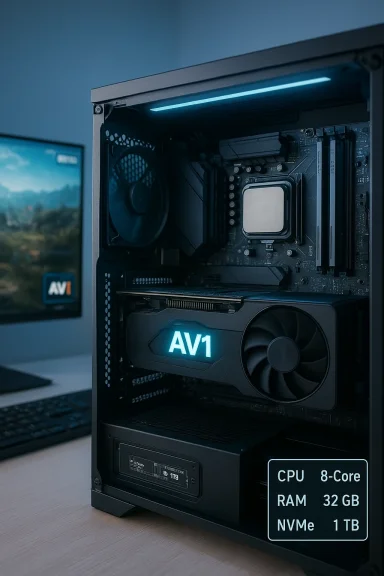
If you buy one new component in 2026, make it a balanced one: a modern multi‑core CPU with strong single‑thread boost, 32 GB of fast system memory for serious multitasking, a PCIe/NVMe SSD for the OS and active projects, and a GPU that supports hardware AV1 encoding and at least 8 GB of VRAM — that combination hits the sweet spot for gaming, creative work, and futureproofing without overspending on a single bottleneck. //www.pcgamer.com/best-cheap-gaming-pc/)
The message from developers and hardware vendors heading into 2026 is consistent: modern games and productivity workloads increasingly tax more than just the GPU. Titles that blend local simulation with rendering, larger install and save footprints, and creator workflows that demand low‑latency, high‑quality capture have shifted system requirements toward balanced rigs — not GPU‑dominant machines. Hypixel’s public guidance for Hytale, for example, codifies this by giving three realistic tiers (Minimum, Recommended, Creator/Streamer) and explaining how view distance, local simulation, and capture workloads move the performance needle across CPetwork bandwidth.
At the same time, live streaming and high‑quality capture are being reshaped by AV1 hardware encoding, which lowers bandwidth needs while improving image quality — a practical benefit for creators and viewers alike. GPU and platform vendors now advertise AV1 support as a first‑class feature for creator‑centric rigs.
This article unpacks what “optimal for 2026” actually means across component classes, offers practical build profiles, highlights risks you should know, and shows where to spend (and where to save) for the best real‑world value.
Recommendation:
Recommendation:
Recommendation:
Recommendation:
Recommendation:
Source: Inbox.lv News feed at Inbox.lv -
 Background
The message from developers and hardware vendors heading into 2026 is consistent: modern games and productivity workloads increasingly tax more than just the GPU. Titles that blend local simulation with rendering, larger install and save footprints, and creator workflows that demand low‑latency, high‑quality capture have shifted system requirements toward balanced rigs — not GPU‑dominant machines. Hypixel’s public guidance for Hytale, for example, codifies this by giving three realistic tiers (Minimum, Recommended, Creator/Streamer) and explaining how view distance, local simulation, and capture workloads move the performance needle across CPetwork bandwidth. At the same time, live streaming and high‑quality capture are being reshaped by AV1 hardware encoding, which lowers bandwidth needs while improving image quality — a practical benefit for creators and viewers alike. GPU and platform vendors now advertise AV1 support as a first‑class feature for creator‑centric rigs.
This article unpacks what “optimal for 2026” actually means across component classes, offers practical build profiles, highlights risks you should know, and shows where to spend (and where to save) for the best real‑world value.
Overview: Why 2026 specs look different
Games are more than shaders now
Modern game engines increasingly mix heavy CPU simulation with rendering. Sandbox games and open‑world titles stream world data, simulate entities, and run background AI logic on the client in singleplayer modes — workloads that amplify CPU core and memory demands relative to pure render‑bound titles. Hypixel’s Hytale guidance explicitly points to CPU and RAM sensrk bandwidth directly to view distance, making the point that one setting (view distance) can multiply CPU, RAM, VRAM and bandwidth requirements.Creators force different tradeoffs
If you record or stream, your hardware must sustain consistent frametimes while also encoding to disk or to a live service. Hardware AV1/HEVC encoders on modern GPUs and media engines on Arc/Intel and AMD silicon materially reduce CPU load and offer bitrate efficiency — which in practice lets you stream higher‑quality video at lower upload speeds. Nvidia and Intel documentation confirm that AV1 hardware encode support is now mainstream on current discrete and integrated GPUs, making it a practical selection criterion for creator rigs.Storage and install sizes are nontrivial
Modern AAA and large‑scale PC titles now commonly require tens of gigabytes for installs and significantly more headroom for saved worlds, mods, and captured footage. Several developer documents and late‑2025 / early‑2026 publisher guidance put install footprints between ~20 GB for lighter titles and 50–80 GB or more for heavier releases; creators should reserve additional NVMe space for capture and editing. Hypixel, Arknights: Endfield, and other recent titles explicitly recommend NVMe SSDs and separate capture drives to avoid IO contention.Case studies: what recent requirements reveal
Hytale — a textbook example of balanced requirements
Hypixel’s published tiers are instructive because they connect an explicit experience goal to a hardware list: Minimum for playable 1080p/30, Recommended for comfortable 1080p/60, and Creator/Streamer targets for 1440p/60 capture. The guidance stresses:- CPU: A modern 6‑core or better for recommended play; higher core counts for creators.
- RAM: 8 GB minsingleplayer, 16 GB recommended, 32 GB for creator workflows.
- Storage: NVMe suggested; reserve ~20 GB free for the game and far more for captured video.
- Network: Bandwidth scales with view distance — from ~2 Mbit/s minimum to 8–10 Mbit/s at higher view distances.
Arknights: Endfield — mid‑range PC common sense
Arknights: Endfield’s PC requirements (launched January 2026) confirm the mid‑range trend: a GTX 1060 / RTX 2060‑class target, 16 GB baseline RAM, and 60 GB install size are typical for modern PC releases that aim to be broadly accessible while offering a better experience on newer hardware. Multiple publisher and community summaries converge on these numbers, reinforcing that 16 GB is the new practical minimum for mainstream PC gaming in 2026, with creators and power users needing more.Component guidance — what to buy and why
Below I translate the evidence from developers and vendors into concrete buying priorities. Each component entry gives the rationale, practical guidance, and where to spend.CPU — the new bottleneck for many titles
Why it matters: Modern engines run simulation and AI alongside rendering; single‑thread speed still counts for UI and frame spikes, but multi‑core throughput matters more than before.Recommendation:
- Minimum: 6 cores / 12 threads with strong per‑core boost (e.g., current midrange Core i5 or Ryzen 5 class).
- Optimal: 8 cores or more (Core i7 / Ryzen 7 class or equivalent) if you stream, record, or multi‑task.
- Prioritize single‑thread boost and modern architecture IPC; avoid chasing core count without per‑core performance.
RAM — from 16 GB baseline to 32 GB comfort
Why it matters: RAM headroom prevents paging during large worlds, multiple browser tabs, and long video capture sessions.Recommendation:
- Gamers: 16 GB DDR5 (or DDR4 if constrained) is the practical minimum.
- Creators / Power Users: 32 GB is the sensible default; 64 GB only for heavy editing, virtual machines, or enormous datasets.
- Use matched dual/dual‑rank kits where practical for better bandwidth and latency.
GPU — balance VRAM, encode support, and IPC
Why it matters: For many 1080p/1440p players, midrange GPUs are sufficient; creators need GPUs with fast hardware encoders.Recommendation:
- Gamers (1080p/60): A midrange GPU with 8+ GB VRAM (RTX 5060 / RX 9060 class or equivalent) hits the performance/price balance.
- High‑end / 1440p & ray tracing: Move to high‑tier 40/50‑series‑class cards with 12–16 GB VRAM.
- Creators: Choose GPUs with hardware AV1/HEVC encoding (e.g., modern RTX 40/50 family or Intel/AMD parts with AV1 support) to reduce CPU usage and upload bandwidth during streaming.
Storage — NVMe is no longer optional for smoothness
Why it matters: Fast SSD streaming reduces hitching, lowers load times, and keeps background asset streaming from blocking the game loop.Recommendation:
- System drive: NVMe SSD (PCIe 3.0 or 4.0); 1 TB recommended for most users to avoid constant cleanup.
- Capture drive: Use a second NVMe or SATA SSD for video captures to avoid IO contention.
- Reserve headroom: Keep 20 GB minimum free for game installs and updates; creators should reserve 50 GB or more on capture drives.
Networking — not just for multiplayer
Why it matters: Titles that stream world data dynamically (view distance) require more upstream/downstream bandwidth. Streaming video also needs consistent upload capacity.Recommendation:
- Home broadband: Aim for symmetric or at least higher upload speeds if you stream (10 Mbps upload is a practical target for good 1080p/60 AV1 streams; 4–10 Mbps may be workable for many scenarios).
- For games with dynamic streaming, lower view distances materially reduce bandwidth and CPU pressure.
Motherboard, PSU, and cooling — pragmatic choices
- Motherboard: Pick a modern socket with at least one M.2 NVMe slot and support for DDR5 if you want longer upgrade headroom.
- PSU: Quality over headroom — choose a reliable brand with ample wattage for your GPU and CPU combined, plus a 80+ Gold efficiency rating for long‑term stability.
- Cooling: For small form factor or laptop builds, thermal throttling can negate peak performance claims; prioritize sustained cooling for long sessions.
Build examples: three practical configurations
Below are high‑level profiles (component classes not specific shopping SKUs), with the goal of matching expected real‑world use rather than peak synthetic benchmarks.1) Practical Budget Gamer ($700–$1,000 range)
- CPU: Modern 6‑core CPU (midrange Intel Core i5 or Ryzen 5).
- RAM: 16 GB DDR5 (or 16 GB DDR4 if on a tight budget).
- GPU: RTX 5060 / RX 9060 class with 8 GB VRAM.
- Storage: 1 TB NVMe (OS + games).
- Why: Comfortable 1080p/60 gaming and room to upgrade later. PC Gamer’s market data shows strong midrange options cluster in this price band.
2) Balanced Creator / Gamer ($1,300–$1,800 range)
- CPU: 8‑core Core i7 / Ryzen 7 class.
- RAM: 32 GB DDR5.
- GPU: RTX 5070 / RX 9070 class with AV1 encode support and 12 GB VRAM.
- Storage: 1 TB NVMe system + 1 TB NVMe for capture/editing.
- Why: Smooth game performance, robust streaming/recording, and adequate editing throughput without premium flagship cost. Hypixel and other creator guidance put 32 GB + NVMe + AV1 encoder squarely in this category.
3) High‑end workstation/gaming flagship ($2,000+)
- CPU: 12–16 core high‑end Ryzen 7000/9000 or Intel equivalent for heavy multitasking.
- RAM: 64 GB if you edit 4K/8K video or run VMs.
- GPU: RTX 50/40 series top‑tier with multiple NVENC/AV1 encoders and 16+ GB VRAM.
- Storage: 2 TB NVMe + large RAID or external archive.
- Why: For professionals, creators with heavy timelines, and enthusiasts who want futureproof headroom.
Risks, tradeoffs, and gotchas
1. Platform and driver fragility
Vendor features can be deprecated; Intel’s Deep Link feature was quietly discontinued in 2025, showing that ecosystem promises can vanish and leave mixed‑feature user experiences. Rely on broadly supported features (e.g., AV1 hardware encoding supported across major GPU families) rather than niche integrations.2. Overinvesting in GPU at the expense of CPU/RAM
Many builders still assume GPU is the single lever. For simulation‑heavy games and capture workflows, a weak CPU and limited RAM will throttle performance even with a powerful GPU. Developer guidance on sandbox titles repeatedly confirms this balance.3. Thermal throttling and thin laptops
Thin gaming laptops can show excellent peak metrics in short tests but throttle over long sessions, reducing sustained performance. If you plan long gaming or recording sessions, prioritize chassis cooling or a desktop with better thermal headroom.4. Storage planning and backups
Install sizes and saved‑world footprints grow over time. Expect to buy more storage than initial install numbers suggest and maintain a backup strategy for captures and important saves. Hypixel and other developer notes recommend planning for large saved‑world growth and capture headroom.How to future‑proof your next PC
- Prioritize upgrade paths: buy a motherboar and spare DIMM slots.
- Choose a CPU socket and chipset that will accept at least one future generation (unless you plan to replace the whole platform).
- Favor PCIe/NVMe storage and plan for at lVMe slot for capture drives.
- Buy a GPU with AV1/HEVC hardware encodecord — codec support is now a differentiator for creator workflows.
- Aim for 32 GB RAM today if you frequently multitask, run browsers with dozens of tabs, or do mid‑weight creative work.
Quick checklist before you buy
- Confirm the exact SKU (CPU model, RAM configuration, SSD type and M.2 slot count) — similar model names can hide different parts.
- If you stream, verify your GPU or platform supports hardware AV1/HEVC encoding.
- Reserve extra NVMe space for captures and updates (50 GB+ for creators).
- CB RAM for gamers and 32 GB** for creators.
- Check your upload bandwidth if you plan to live stream high‑quality video — AV1 helps, but you still need consistent upstream capacity.
Final analysis: the optimal spec for 2026 (concise)
If you want a single, practical specification that covers gaming, content creation, and futureproofing without overspending, aim for the following baseline:- CPU: 8 cores (modern Core i7 / Ryzen 7 class) with strong per‑core boost.
- RAM: 32 GB DDR5 (or DDR4 if constrained).
- GPU: Mid‑to‑high tier with AV1 hardware encoding and ≥8 GB VRAM (preferably 12+ GB for 1440p).
- Storage: 1 TB NVMe for OS/games + separate NVMe or SSD for capture.
- Network: Internet with reliable upload speed (10 Mbps+ recommended for higher‑quality streams, lower acceptable with AV1).
Conclusion
The “optimal” PC for 2026 is less about the single fastest GPU and more about a measured, balanced system: a multi‑core CPU that prevents simulation stalls, enough RAM to avoid paging, NVMe storage to eliminate hitching, and a GPU that supports modern encoders like AV1 to make streaming practical and efficient. Developers and builders alike are converging on the same lesson: plan for CPU + memory + storage headroom first, then match a GPU with the right features for your workflows. Buy smart, prioritize upgradeability, and reserve some budget for fast NVMe storage and RAM — that combination will deliver the most durable value as games and creator tools continue to push beyond single‑component bottlenecks.Source: Inbox.lv News feed at Inbox.lv -
