

As of 2026, the strongest business AI stack is not a single “best” product but a layered mix of general-purpose assistants, workflow automation, meeting intelligence, analytics platforms, and customer-support agents chosen around specific business processes. That is the uncomfortable truth behind the increasingly crowded rankings of Claude, ChatGPT, Copilot, Zapier, Power BI, Notion AI, Zendesk AI, and their rivals. AI has crossed from experiment to operating expense, but the market is still selling tools faster than many companies can absorb them. The winners will not be the firms that buy the most AI; they will be the ones that redesign work around the few tools that actually remove friction.
The 2026 business AI market has matured past the “which chatbot should we use?” phase. ChatGPT and Claude still dominate the conversational layer, but most organizations now need more than a smart text box. They need AI inside documents, meetings, dashboards, support queues, knowledge bases, and workflow engines.
That shift matters because the buying decision has changed. A small business can start with ChatGPT, Claude, or Microsoft Copilot and see immediate gains in writing, summarization, brainstorming, and analysis. A larger organization, however, quickly discovers that the real challenge is not generating more words or prettier slides. It is connecting AI output to accountable business processes.
This is why the most useful 2026 rankings group tools by function rather than pretending that Jasper, Tableau AI, Fireflies.ai, and Zendesk AI are competing in the same lane. They are not. Jasper is built around marketing production, Tableau around visual analytics, Fireflies around meeting capture, and Zendesk around support operations. The category has become less like office software and more like infrastructure.
The practical consequence is that every AI purchase now creates an integration question. If a tool does not fit your existing Microsoft 365, Google Workspace, CRM, help desk, analytics, or project-management environment, its novelty fades quickly. AI that lives outside daily work becomes another tab to ignore.
For businesses, ChatGPT’s appeal is its flexibility. A team can use it to draft a proposal, summarize meeting notes, analyze a spreadsheet, generate code snippets, rewrite a customer email, or produce a first-pass market brief. That versatility makes it the easiest starting point for small businesses that do not yet know where AI will matter most.
Claude is more compelling when the work involves long documents and high-context writing. Policy drafts, board memos, grant applications, strategic reports, and research summaries are exactly the kind of tasks where structure and tone matter as much as speed. In those workflows, a model that produces fewer throwaway paragraphs can be worth more than one with a broader feature menu.
The important distinction is that neither tool should be treated as a records system, compliance platform, or decision-maker. They are accelerators, not authorities. Their best role is to compress the time between a blank page and a useful draft, or between a pile of material and a coherent interpretation.
That integration changes user behavior. Employees do not have to invent a new workflow to ask for a meeting summary, draft a follow-up email, turn notes into slides, or inspect a spreadsheet. Copilot’s pitch is that AI should appear where work already happens.
For IT departments, this is both attractive and complicated. Microsoft can wrap Copilot in familiar enterprise controls, identity management, compliance structures, and administrative policies. But the same deep integration also raises the stakes for permissions, file hygiene, SharePoint sprawl, and data governance. If your Microsoft 365 tenant is messy, Copilot may make that mess more visible.
The headline price also understates the operational reality. Per-user AI subscriptions are easy to understand in procurement documents, but the real cost includes licensing prerequisites, training, governance, change management, and support. Copilot may be the right answer for many Microsoft-first organizations, but it is not a magic layer sprinkled over bad information architecture.
Jasper remains strongest in the first camp. It is designed for marketing teams that need repeatable content production across channels. Its value is not that it can produce a blog post; nearly every AI assistant can do that. Its value is that it gives teams a framework for brand voice, campaign workflows, and repeatable marketing output.
Grammarly Business sits in the second camp. It is less glamorous than a generative AI platform that can produce pages of copy on command, but it solves a real organizational problem: inconsistent writing. For companies with distributed teams, multiple departments, and customer-facing communications, style consistency can be a meaningful business asset.
The split reveals a broader lesson about AI adoption. Some tools create new material; others reduce the risk and variability of existing work. The second category may sound less exciting, but for many companies it will be easier to deploy, easier to govern, and easier to justify.
Zapier’s strength is that non-technical teams can connect common business applications without writing code. A new web lead can trigger a CRM entry, a Slack notification, a follow-up task, and an email sequence. AI makes those workflows easier to describe and build, but the core value remains the same: fewer manual handoffs.
n8n appeals to a different buyer. It is open-source, more customizable, and better suited to teams that want self-hosting or deeper control over workflow logic. The trade-off is complexity. A technical operations team may prefer n8n precisely because it exposes more of the machinery; a small business owner may prefer Zapier because it hides it.
This distinction will only grow more important as AI agents become more common. Automating a task is one thing. Allowing software to make multi-step decisions across systems is another. The more powerful the automation, the more businesses need logging, permissions, testing, rollback plans, and human review.
Fireflies.ai is especially useful for teams that need post-meeting summaries, action items, and searchable transcripts across recurring calls. Sales teams, customer-success groups, recruiters, consultants, and project managers can all benefit from a tool that remembers what was said and what was promised.
Otter.ai’s strength is real-time capture. Live transcription and meeting notes reduce the burden on participants while a conversation is happening. That makes it useful not only after the meeting, but during it, especially when teams need quick alignment on decisions and next steps.
The risk is that meeting AI can encourage more meetings if organizations are not careful. Capturing everything is not the same as deciding better. The best deployments use meeting tools to reduce ambiguity, not to create a searchable archive of every rambling calendar invite.
Notion AI works best when teams already use Notion as a shared workspace. In that environment, AI can help draft pages, summarize project material, answer questions from internal documents, and reduce the time employees spend searching for context. Its value depends heavily on whether the workspace is structured enough to trust.
This is the hidden problem in many AI rollouts. Companies want AI to “know the business,” but their internal knowledge is stale, duplicated, contradictory, or locked in private silos. AI does not fix that by itself. It may simply expose how poorly the organization has managed information.
Knowledge management will therefore become one of the unglamorous foundations of useful AI. The companies that clean up their documentation, permissions, and ownership models will get better results from AI assistants than those that merely buy another add-on.
ThoughtSpot’s pitch is natural-language analytics. Instead of building a report manually, users ask questions about sales, operations, customers, or trends and receive a data-backed answer. This is powerful when the underlying data model is clean and trusted.
Power BI with Copilot is the obvious choice for Microsoft-centric enterprises. It combines familiar reporting tools with AI-assisted summaries, visualization support, and integration into the broader Microsoft data estate. For organizations already standardized on Microsoft, that proximity can outweigh flashier standalone features.
Tableau AI remains compelling where visual storytelling matters. Some businesses do not merely need to query data; they need to persuade stakeholders with it. Tableau’s strength has always been turning complex information into visual narratives, and AI enhances that by helping explain patterns and surface insights.
Still, analytics AI has a hard ceiling without governance. If users ask natural-language questions of messy datasets, they may receive confident nonsense faster than before. The limiting factor is not the prompt box. It is whether the business has defined metrics, maintained data quality, and agreed on what “revenue,” “active customer,” or “churn” actually means.
Zendesk AI is strongest for larger support operations that already need ticket management, omnichannel workflows, knowledge-base integration, and agent assistance. It is less about replacing the help desk and more about making the help desk faster and more consistent.
Intercom Fin is more directly positioned as an AI customer-support agent. Its value is in resolving customer conversations without immediately involving a human, while still handing off when needed. For software companies and digital businesses with strong documentation, that can reduce repetitive workload substantially.
Tidio addresses the lower end of the market, where small businesses need live chat, lead capture, automation, and basic AI support without buying an enterprise platform. Its appeal is practicality. A small retailer, service business, or startup may not need a full customer-experience suite; it may need a chatbot that answers common questions and captures prospects after hours.
The caution is that customer support is where AI mistakes become public quickly. A bad internal summary wastes time. A bad customer answer can damage trust, trigger refunds, or create legal exposure. The more autonomous the support agent, the more important the guardrails.
The better approach starts with workflows. Where does work slow down? Where do employees copy information between systems? Where do customers wait? Where do managers lack visibility? Where do meetings produce confusion? These questions produce better AI decisions than comparing feature grids.
A marketing department may need Jasper, Grammarly Business, and a general assistant. A sales organization may get more value from Fireflies, ChatGPT, CRM automation, and a support knowledge base. A Microsoft-heavy enterprise may prioritize Copilot, Power BI, and governance work before adding more standalone tools.
The real test is whether the AI tool removes a step, reduces a delay, improves quality, or makes a decision easier. If it merely produces more content to review, more dashboards to ignore, or more automations to debug, it is not productivity. It is theater.
Enterprise-grade controls matter. Businesses should look for encryption, administrative oversight, access controls, audit logs, retention policies, compliance posture, and clear commitments about whether customer data is used for training. They should also understand how tools handle uploaded files, meeting recordings, transcripts, and integrations with third-party systems.
The risk is not limited to the AI vendor. An assistant integrated into a messy document repository may surface information that employees technically have access to but should not casually see. Permission hygiene becomes AI hygiene.
This is where IT departments need to be involved early rather than called in after employees have already adopted shadow AI. Blocking every tool rarely works. Providing approved tools with clear rules, training, and monitoring is more realistic.
Pilots are useful, but only if they are designed to answer a business question. A good pilot has a defined workflow, a baseline, a success metric, a user group, and a decision date. It asks whether AI reduces response time, increases output quality, cuts manual work, improves customer satisfaction, or shortens reporting cycles.
A bad pilot gives employees access to a tool and waits for productivity to happen. That usually produces anecdotes, not evidence. One person saves time drafting emails, another creates mediocre content faster, and a manager declares the experiment “promising” without knowing whether anything improved.
The companies that succeed will be more disciplined. They will start small, measure honestly, expand what works, and shut down what does not. AI budgets will not stay experimental forever.
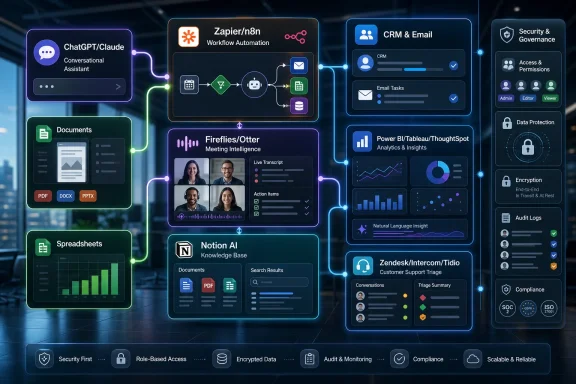 The AI Tool Stack Has Replaced the AI Tool
The 2026 business AI market has matured past the “which chatbot should we use?” phase. ChatGPT and Claude still dominate the conversational layer, but most organizations now need more than a smart text box. They need AI inside documents, meetings, dashboards, support queues, knowledge bases, and workflow engines.That shift matters because the buying decision has changed. A small business can start with ChatGPT, Claude, or Microsoft Copilot and see immediate gains in writing, summarization, brainstorming, and analysis. A larger organization, however, quickly discovers that the real challenge is not generating more words or prettier slides. It is connecting AI output to accountable business processes.
This is why the most useful 2026 rankings group tools by function rather than pretending that Jasper, Tableau AI, Fireflies.ai, and Zendesk AI are competing in the same lane. They are not. Jasper is built around marketing production, Tableau around visual analytics, Fireflies around meeting capture, and Zendesk around support operations. The category has become less like office software and more like infrastructure.
The practical consequence is that every AI purchase now creates an integration question. If a tool does not fit your existing Microsoft 365, Google Workspace, CRM, help desk, analytics, or project-management environment, its novelty fades quickly. AI that lives outside daily work becomes another tab to ignore.
ChatGPT and Claude Still Define the General-Purpose Layer
The broadest business use case remains the general-purpose AI assistant. This is where ChatGPT and Claude continue to set the pace, though their strengths differ enough that many teams now use both. ChatGPT’s advantage is breadth: writing, research support, file handling, data analysis, coding help, and general office productivity. Claude’s advantage is often depth: long-form writing, careful summarization, and sustained reasoning over lengthy material.For businesses, ChatGPT’s appeal is its flexibility. A team can use it to draft a proposal, summarize meeting notes, analyze a spreadsheet, generate code snippets, rewrite a customer email, or produce a first-pass market brief. That versatility makes it the easiest starting point for small businesses that do not yet know where AI will matter most.
Claude is more compelling when the work involves long documents and high-context writing. Policy drafts, board memos, grant applications, strategic reports, and research summaries are exactly the kind of tasks where structure and tone matter as much as speed. In those workflows, a model that produces fewer throwaway paragraphs can be worth more than one with a broader feature menu.
The important distinction is that neither tool should be treated as a records system, compliance platform, or decision-maker. They are accelerators, not authorities. Their best role is to compress the time between a blank page and a useful draft, or between a pile of material and a coherent interpretation.
Microsoft’s Advantage Is Distribution, Not Just Intelligence
Microsoft Copilot occupies a different position from ChatGPT and Claude because its primary strength is not merely model quality. It is location. Copilot sits inside Word, Excel, Outlook, Teams, PowerPoint, and the broader Microsoft 365 environment, which makes it unusually powerful for organizations already living in Microsoft’s ecosystem.That integration changes user behavior. Employees do not have to invent a new workflow to ask for a meeting summary, draft a follow-up email, turn notes into slides, or inspect a spreadsheet. Copilot’s pitch is that AI should appear where work already happens.
For IT departments, this is both attractive and complicated. Microsoft can wrap Copilot in familiar enterprise controls, identity management, compliance structures, and administrative policies. But the same deep integration also raises the stakes for permissions, file hygiene, SharePoint sprawl, and data governance. If your Microsoft 365 tenant is messy, Copilot may make that mess more visible.
The headline price also understates the operational reality. Per-user AI subscriptions are easy to understand in procurement documents, but the real cost includes licensing prerequisites, training, governance, change management, and support. Copilot may be the right answer for many Microsoft-first organizations, but it is not a magic layer sprinkled over bad information architecture.
Writing Tools Are Splitting Between Creation and Control
The business writing category now has two distinct jobs. One is creation: generating campaigns, blog posts, sales copy, emails, and long-form drafts. The other is control: keeping tone, grammar, style, and brand language consistent across an organization.Jasper remains strongest in the first camp. It is designed for marketing teams that need repeatable content production across channels. Its value is not that it can produce a blog post; nearly every AI assistant can do that. Its value is that it gives teams a framework for brand voice, campaign workflows, and repeatable marketing output.
Grammarly Business sits in the second camp. It is less glamorous than a generative AI platform that can produce pages of copy on command, but it solves a real organizational problem: inconsistent writing. For companies with distributed teams, multiple departments, and customer-facing communications, style consistency can be a meaningful business asset.
The split reveals a broader lesson about AI adoption. Some tools create new material; others reduce the risk and variability of existing work. The second category may sound less exciting, but for many companies it will be easier to deploy, easier to govern, and easier to justify.
Workflow Automation Is Where AI Becomes Operational
Workflow automation is the point where AI stops being a writing assistant and starts becoming operational machinery. Zapier AI and n8n represent two sides of this market. Zapier is built for accessibility, while n8n is built for flexibility and control.Zapier’s strength is that non-technical teams can connect common business applications without writing code. A new web lead can trigger a CRM entry, a Slack notification, a follow-up task, and an email sequence. AI makes those workflows easier to describe and build, but the core value remains the same: fewer manual handoffs.
n8n appeals to a different buyer. It is open-source, more customizable, and better suited to teams that want self-hosting or deeper control over workflow logic. The trade-off is complexity. A technical operations team may prefer n8n precisely because it exposes more of the machinery; a small business owner may prefer Zapier because it hides it.
This distinction will only grow more important as AI agents become more common. Automating a task is one thing. Allowing software to make multi-step decisions across systems is another. The more powerful the automation, the more businesses need logging, permissions, testing, rollback plans, and human review.
Meeting AI Is Becoming the Corporate Memory Layer
Fireflies.ai and Otter.ai solve a problem that predates generative AI: meetings create decisions, but organizations are bad at preserving them. Remote and hybrid work made that problem worse. AI transcription and summarization tools now promise to turn conversations into searchable institutional memory.Fireflies.ai is especially useful for teams that need post-meeting summaries, action items, and searchable transcripts across recurring calls. Sales teams, customer-success groups, recruiters, consultants, and project managers can all benefit from a tool that remembers what was said and what was promised.
Otter.ai’s strength is real-time capture. Live transcription and meeting notes reduce the burden on participants while a conversation is happening. That makes it useful not only after the meeting, but during it, especially when teams need quick alignment on decisions and next steps.
The risk is that meeting AI can encourage more meetings if organizations are not careful. Capturing everything is not the same as deciding better. The best deployments use meeting tools to reduce ambiguity, not to create a searchable archive of every rambling calendar invite.
Knowledge Management Is the Quiet Battleground
Notion AI highlights another emerging battleground: the company knowledge base. Businesses have spent years scattering information across documents, email, chat, wikis, tickets, and project tools. AI makes that fragmentation more painful because the assistant is only as useful as the knowledge it can access.Notion AI works best when teams already use Notion as a shared workspace. In that environment, AI can help draft pages, summarize project material, answer questions from internal documents, and reduce the time employees spend searching for context. Its value depends heavily on whether the workspace is structured enough to trust.
This is the hidden problem in many AI rollouts. Companies want AI to “know the business,” but their internal knowledge is stale, duplicated, contradictory, or locked in private silos. AI does not fix that by itself. It may simply expose how poorly the organization has managed information.
Knowledge management will therefore become one of the unglamorous foundations of useful AI. The companies that clean up their documentation, permissions, and ownership models will get better results from AI assistants than those that merely buy another add-on.
Analytics AI Promises Self-Service, but Governance Still Wins
ThoughtSpot, Power BI with Copilot, and Tableau AI all attack the same business frustration: companies have more data than usable insight. Executives want answers quickly, managers want dashboards without waiting for analysts, and analysts want to spend less time building repetitive reports. AI promises to make data more conversational.ThoughtSpot’s pitch is natural-language analytics. Instead of building a report manually, users ask questions about sales, operations, customers, or trends and receive a data-backed answer. This is powerful when the underlying data model is clean and trusted.
Power BI with Copilot is the obvious choice for Microsoft-centric enterprises. It combines familiar reporting tools with AI-assisted summaries, visualization support, and integration into the broader Microsoft data estate. For organizations already standardized on Microsoft, that proximity can outweigh flashier standalone features.
Tableau AI remains compelling where visual storytelling matters. Some businesses do not merely need to query data; they need to persuade stakeholders with it. Tableau’s strength has always been turning complex information into visual narratives, and AI enhances that by helping explain patterns and surface insights.
Still, analytics AI has a hard ceiling without governance. If users ask natural-language questions of messy datasets, they may receive confident nonsense faster than before. The limiting factor is not the prompt box. It is whether the business has defined metrics, maintained data quality, and agreed on what “revenue,” “active customer,” or “churn” actually means.
Customer Support AI Is Moving From Deflection to Resolution
Zendesk AI, Intercom Fin, and Tidio show how quickly customer-support AI has evolved. Early chatbots were mostly scripted deflection systems. Modern support agents can read knowledge bases, answer common questions, assist human agents, route tickets, and escalate complex cases.Zendesk AI is strongest for larger support operations that already need ticket management, omnichannel workflows, knowledge-base integration, and agent assistance. It is less about replacing the help desk and more about making the help desk faster and more consistent.
Intercom Fin is more directly positioned as an AI customer-support agent. Its value is in resolving customer conversations without immediately involving a human, while still handing off when needed. For software companies and digital businesses with strong documentation, that can reduce repetitive workload substantially.
Tidio addresses the lower end of the market, where small businesses need live chat, lead capture, automation, and basic AI support without buying an enterprise platform. Its appeal is practicality. A small retailer, service business, or startup may not need a full customer-experience suite; it may need a chatbot that answers common questions and captures prospects after hours.
The caution is that customer support is where AI mistakes become public quickly. A bad internal summary wastes time. A bad customer answer can damage trust, trigger refunds, or create legal exposure. The more autonomous the support agent, the more important the guardrails.
The Best Stack Starts With Workflows, Not Vendor Demos
The most common AI mistake in 2026 is buying tools because they look impressive in isolation. A demo shows a chatbot drafting an email, generating a dashboard, or resolving a ticket, and the business assumes productivity will follow. It often does not.The better approach starts with workflows. Where does work slow down? Where do employees copy information between systems? Where do customers wait? Where do managers lack visibility? Where do meetings produce confusion? These questions produce better AI decisions than comparing feature grids.
A marketing department may need Jasper, Grammarly Business, and a general assistant. A sales organization may get more value from Fireflies, ChatGPT, CRM automation, and a support knowledge base. A Microsoft-heavy enterprise may prioritize Copilot, Power BI, and governance work before adding more standalone tools.
The real test is whether the AI tool removes a step, reduces a delay, improves quality, or makes a decision easier. If it merely produces more content to review, more dashboards to ignore, or more automations to debug, it is not productivity. It is theater.
Security Is No Longer a Procurement Footnote
AI buying also forces companies to revisit data security. Employees are often eager to paste documents, contracts, customer notes, code, financial details, and internal strategy into whichever assistant gives the fastest answer. That behavior may be convenient, but it creates obvious risk.Enterprise-grade controls matter. Businesses should look for encryption, administrative oversight, access controls, audit logs, retention policies, compliance posture, and clear commitments about whether customer data is used for training. They should also understand how tools handle uploaded files, meeting recordings, transcripts, and integrations with third-party systems.
The risk is not limited to the AI vendor. An assistant integrated into a messy document repository may surface information that employees technically have access to but should not casually see. Permission hygiene becomes AI hygiene.
This is where IT departments need to be involved early rather than called in after employees have already adopted shadow AI. Blocking every tool rarely works. Providing approved tools with clear rules, training, and monitoring is more realistic.
Pilots Must Graduate or Die
The source material’s most important warning is not about which tool ranks first. It is that many organizations still struggle to turn AI adoption into measurable business impact. That gap between usage and value is the defining enterprise AI problem of 2026.Pilots are useful, but only if they are designed to answer a business question. A good pilot has a defined workflow, a baseline, a success metric, a user group, and a decision date. It asks whether AI reduces response time, increases output quality, cuts manual work, improves customer satisfaction, or shortens reporting cycles.
A bad pilot gives employees access to a tool and waits for productivity to happen. That usually produces anecdotes, not evidence. One person saves time drafting emails, another creates mediocre content faster, and a manager declares the experiment “promising” without knowing whether anything improved.
The companies that succeed will be more disciplined. They will start small, measure honestly, expand what works, and shut down what does not. AI budgets will not stay experimental forever.
The 2026 Shortlist Belongs to Buyers Who Know Their Bottlenecks
The strongest AI choices this year are less about universal rankings and more about fit. A business that knows its bottleneck can choose well; a business that does not will drown in options.- ChatGPT and Claude are the safest starting points for general writing, analysis, brainstorming, and document-heavy knowledge work.
- Microsoft Copilot is most compelling when the organization already depends on Microsoft 365 and has enough governance maturity to support deep integration.
- Zapier AI and n8n are the practical automation choices, with Zapier favoring no-code accessibility and n8n favoring control, customization, and self-hosting.
- Fireflies.ai, Otter.ai, and Notion AI are strongest when the problem is organizational memory rather than raw content generation.
- Power BI with Copilot, Tableau AI, and ThoughtSpot can accelerate analytics, but only when the underlying data is trusted and well modeled.
- Zendesk AI, Intercom Fin, and Tidio can improve customer support, but their success depends on knowledge-base quality, escalation design, and careful monitoring.
References
- Primary source: Memeburn
Published: 2026-06-08T05:12:14.976341
16 Best AI Tools for Business in 2026: Tested & Ranked - Memeburn
Discover the best AI tools for business in 2026. We tested 16 leading platforms for automation, analytics, productivity, and growth.memeburn.com - Related coverage: aicontentcreate.com

ChatGPT Pricing 2026: Plans, Costs & Which Tier Is Worth It? | AI Content Create
Compare all six ChatGPT plans for 2026 — Free, Go, Plus, Pro, Business and Enterprise. Current prices, what each tier includes, and which one is right for you.
www.aicontentcreate.com
