

Facebook video downloading on Windows 11 in 2026 is less about finding a magic “download” button than choosing the least risky workflow among browser tools, extensions, and desktop apps that save Facebook videos as local files. The practical answer is that browser-based downloaders such as FvidGo, BitDownloader, and Hitube create the least friction, while installed tools such as ByClick Downloader and SnapDownloader offer more automation at the cost of more trust. That tradeoff matters because Windows 11’s security model increasingly treats unfamiliar installers, low-reputation executables, and browser-adjacent utilities as events worth warning about. The best Facebook video downloader, then, is not simply the one that works fastest; it is the one that asks the least from the operating system.
For years, video download utilities lived in the gray zone of Windows software culture: small installers, scattered publisher names, aggressive advertising, and the occasional bundleware surprise. That world has not disappeared, but Windows 11 has made it harder to ignore. Microsoft Defender SmartScreen, reputation-based protection, browser download warnings, and enterprise policy controls all now sit between the user and the executable.
That is not a nuisance layer bolted onto Windows for show. SmartScreen’s core job is to warn users before they run apps or installers that are malicious, suspicious, or simply not common enough to have earned reputation. In practice, that means a niche downloader can still look risky to Windows even if it is benign, especially if it is unsigned, newly updated, or distributed outside a mainstream store.
This is why the “best downloader” argument has shifted. In 2016, the answer might have been the app with the most supported sites. In 2026, the better answer starts with a different question: what does this tool require me to install, grant, bypass, or trust?
For most Windows 11 users, the safest path is the one that never touches system-level execution at all. A browser page that accepts a Facebook link and returns an MP4 download is not automatically virtuous, but it avoids the most dangerous part of the workflow: running unknown code on the PC.
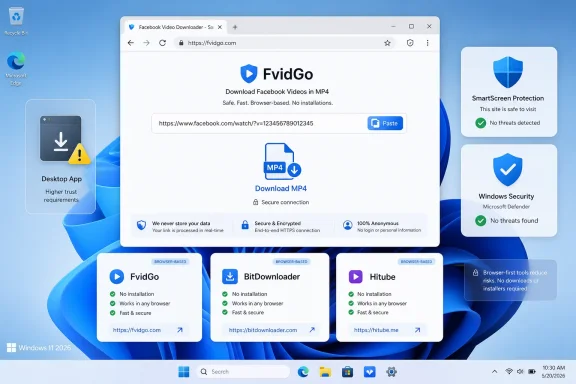
That simplicity is the point. There is no desktop installer, no background process, no service, no browser extension asking for broad site access, and no need to click through “Windows protected your PC.” For users who have been trained to treat those warnings seriously, FvidGo’s no-install workflow is more than a convenience. It is a meaningful reduction in attack surface.
The same logic applies to Facebook Reels and stories when the tool can process them. Short-form Facebook content is often where users most want a quick save-and-go workflow, not a full desktop media manager. If a browser tool can handle the link cleanly, it is the natural first stop.
That does not mean users should suspend judgment. A web downloader still handles a URL you provide, and users should avoid private or copyrighted material they are not entitled to save. But from a Windows 11 security perspective, FvidGo’s strongest feature is that it does not ask the user to weaken the PC in order to complete a simple task.
BitDownloader belongs in that category because it offers a similar link-paste workflow without turning the task into a software installation. Its value is not that it is dramatically different from FvidGo; its value is that redundancy matters. Anyone who has used web download tools knows that platform changes, regional quirks, URL formats, and temporary failures can make one service work while another stumbles.
Hitube plays a similar backup role, particularly for users living in Microsoft Edge. That matters because Edge is not merely “the browser that came with Windows” anymore; for many Windows 11 users, especially in managed environments, it is the default browsing surface tied to work profiles, Microsoft accounts, and enterprise policy. A downloader that behaves predictably in Edge is therefore more useful than one that assumes Chrome is the only desktop browser that matters.
The browser-first model also avoids one of the ugliest habits in the downloader market: turning a tiny utility into a distribution channel. Pop-ups, fake download buttons, notification prompts, and misleading extension offers are the old tax users paid for “free” tools. A clean browser downloader is worth more precisely because it resists that creep.
ByClick’s strongest argument is convenience. A desktop app that detects playable video while you browse can remove the copy-and-paste ritual. For users archiving videos regularly, that kind of passive detection can feel less like a luxury and more like the feature that makes the tool usable.
SnapDownloader’s case is more professional. It is better suited to users who care about resolution choices, orderly queues, and repeatable output settings. If you are collecting material for later editing, research, compliance review, or offline viewing, a full desktop manager is easier to live with than a browser page you repeatedly revisit.
But those advantages come with a real cost: installation creates a trust relationship. The app may be legitimate, signed, and well maintained, but the user is still allowing a third-party executable onto the system. On a personal gaming PC, that may be a normal decision. On a work laptop, a school machine, or any endpoint under policy, it may be a non-starter.
The risk model, however, is different from both web tools and desktop apps. Extensions do not usually trigger Windows SmartScreen the way downloaded executables do, but they can request significant browser permissions. A video detection extension may need access to pages you visit, media requests, or site data in order to do its job.
That does not make extensions inherently unsafe. It does mean users should read the permission prompt rather than treating “Add to browser” as a harmless button. Browser extensions have become one of the most important software categories on modern PCs precisely because they sit close to sensitive activity: sessions, cookies, web apps, private sites, and identity workflows.
Video DownloadHelper’s place is therefore specific. It makes sense for users who want integrated detection and are comfortable managing extension permissions. It is less compelling for someone who downloads a Facebook video twice a year and can get the same result from a single browser tab.
The first filter should be whether the tool requires installation. If not, the user has avoided a large class of Windows-specific friction. The second filter should be whether the page is clean enough to use without fake buttons, forced notifications, or extension traps. The third filter should be whether the output is reliable and understandable.
Only after that should users compare power features. Automatic detection, batch download, format conversion, and high-resolution handling are useful, but they are not free. They expand the tool’s role from “website I used once” to “software I now trust on my machine.”
That is why FvidGo is the sensible starting point, not necessarily the only tool anyone should ever use. It solves the common problem with the fewest Windows consequences. BitDownloader and Hitube provide browser-based alternatives. ByClick and SnapDownloader serve heavier workflows. Video DownloadHelper serves users who prefer the browser-extension model.
There is also a privacy dimension. Facebook videos are not all public broadcasts. Some are shared in groups, among friends, or in contexts where the uploader did not expect a permanent local copy to circulate elsewhere. A downloader cannot infer consent; the user has to.
The same caution applies to private links and account-specific material. If a downloader asks for Facebook credentials, session cookies, unusual permissions, or a login outside Facebook’s own domain, that should be treated as a major warning sign. The safest tools are the ones that work from a normal video URL without asking to become part of your account security story.
For IT professionals, this is where the policy conversation becomes more concrete. The issue is not merely whether employees are downloading videos. It is whether they are installing unknown utilities, bypassing endpoint warnings, or granting broad browser permissions to tools that have no business on managed machines.
A good downloader strategy respects that boundary. If a tool requires disabling antivirus, ignoring reputation warnings, installing a “helper” from an unfamiliar source, or granting permissions that seem unrelated to downloading a single Facebook video, the correct answer is not bravery. The correct answer is to close the tab and choose a less invasive workflow.
This is where browser tools have earned their current advantage. They are not perfect, and they still deserve scrutiny, but they match the scale of the task. A Facebook video download does not usually require a resident Windows application, a startup item, or broad system access.
The best Windows utility is often the one that knows when not to become Windows software at all. In 2026, that principle makes FvidGo the safest starting point, keeps BitDownloader and Hitube useful as lightweight fallbacks, and reserves ByClick, SnapDownloader, and Video DownloadHelper for users whose workflows genuinely need deeper integration. As Microsoft continues tightening reputation checks and endpoint controls, the winning tools will be the ones that make saving a video feel less like installing software and more like using the web.
 Windows 11 Changed the Meaning of “Just Install This”
For years, video download utilities lived in the gray zone of Windows software culture: small installers, scattered publisher names, aggressive advertising, and the occasional bundleware surprise. That world has not disappeared, but Windows 11 has made it harder to ignore. Microsoft Defender SmartScreen, reputation-based protection, browser download warnings, and enterprise policy controls all now sit between the user and the executable.That is not a nuisance layer bolted onto Windows for show. SmartScreen’s core job is to warn users before they run apps or installers that are malicious, suspicious, or simply not common enough to have earned reputation. In practice, that means a niche downloader can still look risky to Windows even if it is benign, especially if it is unsigned, newly updated, or distributed outside a mainstream store.
This is why the “best downloader” argument has shifted. In 2016, the answer might have been the app with the most supported sites. In 2026, the better answer starts with a different question: what does this tool require me to install, grant, bypass, or trust?
For most Windows 11 users, the safest path is the one that never touches system-level execution at all. A browser page that accepts a Facebook link and returns an MP4 download is not automatically virtuous, but it avoids the most dangerous part of the workflow: running unknown code on the PC.
FvidGo Wins by Not Becoming a Windows Problem
FvidGo’s appeal is not that it reinvents Facebook downloading. Its appeal is that it keeps the job inside the browser, where Windows 11 users already spend most of their day and where the security boundary is more familiar. You copy a Facebook video URL, paste it into the site, wait for processing, and download the resulting file through the browser’s normal download manager.That simplicity is the point. There is no desktop installer, no background process, no service, no browser extension asking for broad site access, and no need to click through “Windows protected your PC.” For users who have been trained to treat those warnings seriously, FvidGo’s no-install workflow is more than a convenience. It is a meaningful reduction in attack surface.
The same logic applies to Facebook Reels and stories when the tool can process them. Short-form Facebook content is often where users most want a quick save-and-go workflow, not a full desktop media manager. If a browser tool can handle the link cleanly, it is the natural first stop.
That does not mean users should suspend judgment. A web downloader still handles a URL you provide, and users should avoid private or copyrighted material they are not entitled to save. But from a Windows 11 security perspective, FvidGo’s strongest feature is that it does not ask the user to weaken the PC in order to complete a simple task.
Browser Downloaders Are the New Default for Casual Saves
The broader trend is obvious: casual download jobs have migrated from desktop utilities to web apps. The Windows user who once installed a dozen single-purpose tools now expects the browser to handle conversion, compression, transcription, PDF work, and video extraction. Facebook video downloading fits neatly into that pattern.BitDownloader belongs in that category because it offers a similar link-paste workflow without turning the task into a software installation. Its value is not that it is dramatically different from FvidGo; its value is that redundancy matters. Anyone who has used web download tools knows that platform changes, regional quirks, URL formats, and temporary failures can make one service work while another stumbles.
Hitube plays a similar backup role, particularly for users living in Microsoft Edge. That matters because Edge is not merely “the browser that came with Windows” anymore; for many Windows 11 users, especially in managed environments, it is the default browsing surface tied to work profiles, Microsoft accounts, and enterprise policy. A downloader that behaves predictably in Edge is therefore more useful than one that assumes Chrome is the only desktop browser that matters.
The browser-first model also avoids one of the ugliest habits in the downloader market: turning a tiny utility into a distribution channel. Pop-ups, fake download buttons, notification prompts, and misleading extension offers are the old tax users paid for “free” tools. A clean browser downloader is worth more precisely because it resists that creep.
Desktop Apps Still Have a Place, but It Is a Narrower One
ByClick Downloader and SnapDownloader represent the other side of the tradeoff. They are not aimed at the user who wants to save one clip and move on. They are aimed at people who download frequently enough to justify an installed tool with automatic detection, batch queues, format options, and a more persistent workflow.ByClick’s strongest argument is convenience. A desktop app that detects playable video while you browse can remove the copy-and-paste ritual. For users archiving videos regularly, that kind of passive detection can feel less like a luxury and more like the feature that makes the tool usable.
SnapDownloader’s case is more professional. It is better suited to users who care about resolution choices, orderly queues, and repeatable output settings. If you are collecting material for later editing, research, compliance review, or offline viewing, a full desktop manager is easier to live with than a browser page you repeatedly revisit.
But those advantages come with a real cost: installation creates a trust relationship. The app may be legitimate, signed, and well maintained, but the user is still allowing a third-party executable onto the system. On a personal gaming PC, that may be a normal decision. On a work laptop, a school machine, or any endpoint under policy, it may be a non-starter.
Extensions Sit in the Awkward Middle
Video DownloadHelper is the most interesting tool on the list because it is neither a simple web page nor a traditional desktop app. It lives inside the browser, detects media as the user browses, and can feel more seamless than copy-paste download sites. For Chrome and Firefox users, that makes it a natural candidate.The risk model, however, is different from both web tools and desktop apps. Extensions do not usually trigger Windows SmartScreen the way downloaded executables do, but they can request significant browser permissions. A video detection extension may need access to pages you visit, media requests, or site data in order to do its job.
That does not make extensions inherently unsafe. It does mean users should read the permission prompt rather than treating “Add to browser” as a harmless button. Browser extensions have become one of the most important software categories on modern PCs precisely because they sit close to sensitive activity: sessions, cookies, web apps, private sites, and identity workflows.
Video DownloadHelper’s place is therefore specific. It makes sense for users who want integrated detection and are comfortable managing extension permissions. It is less compelling for someone who downloads a Facebook video twice a year and can get the same result from a single browser tab.
The Real Ranking Is About Trust, Not Just Features
A conventional top-six list invites the wrong kind of comparison. It makes users ask which product supports the most formats, the highest resolution, or the slickest interface. Those things matter, but Windows 11 changes the order of operations.The first filter should be whether the tool requires installation. If not, the user has avoided a large class of Windows-specific friction. The second filter should be whether the page is clean enough to use without fake buttons, forced notifications, or extension traps. The third filter should be whether the output is reliable and understandable.
Only after that should users compare power features. Automatic detection, batch download, format conversion, and high-resolution handling are useful, but they are not free. They expand the tool’s role from “website I used once” to “software I now trust on my machine.”
That is why FvidGo is the sensible starting point, not necessarily the only tool anyone should ever use. It solves the common problem with the fewest Windows consequences. BitDownloader and Hitube provide browser-based alternatives. ByClick and SnapDownloader serve heavier workflows. Video DownloadHelper serves users who prefer the browser-extension model.
Copyright, Privacy, and the Part Most Lists Skip
Any honest discussion of Facebook video downloaders has to include the obvious caveat: just because a tool can save a video does not mean the user has the right to redistribute it. Personal archiving, offline viewing of your own uploads, saving public-domain material, or preserving a clip with permission are different from reposting someone else’s work.There is also a privacy dimension. Facebook videos are not all public broadcasts. Some are shared in groups, among friends, or in contexts where the uploader did not expect a permanent local copy to circulate elsewhere. A downloader cannot infer consent; the user has to.
The same caution applies to private links and account-specific material. If a downloader asks for Facebook credentials, session cookies, unusual permissions, or a login outside Facebook’s own domain, that should be treated as a major warning sign. The safest tools are the ones that work from a normal video URL without asking to become part of your account security story.
For IT professionals, this is where the policy conversation becomes more concrete. The issue is not merely whether employees are downloading videos. It is whether they are installing unknown utilities, bypassing endpoint warnings, or granting broad browser permissions to tools that have no business on managed machines.
The 2026 Shortlist Favors the Tools That Ask for Less
The practical ranking for Windows 11 users is clear, but it should be read as a workflow recommendation rather than a trophy ceremony. Start with the lowest-friction option, escalate only when your use case demands it, and treat every extra permission or installation step as a cost.- FvidGo is the best first choice for most Windows 11 users because it keeps the entire workflow in the browser and avoids installers, SmartScreen prompts, and desktop background processes.
- BitDownloader is a useful browser-based backup when a specific Facebook link does not behave properly in a preferred downloader.
- Hitube is worth keeping in mind for Edge-first users who want a lightweight web tool that does not require switching browsers or installing extensions.
- ByClick Downloader is best for frequent downloaders who value automatic detection enough to justify installing a Windows application.
- SnapDownloader is the stronger fit for organized, high-volume, or high-resolution downloading where batch handling and output controls matter.
- Video DownloadHelper is the extension option for Chrome and Firefox users who want media detection inside the browser and are willing to review permissions carefully.
Windows Users Should Stop Treating Warnings as Obstacles
The most important shift is cultural. Too many download guides still imply that SmartScreen, Defender, and browser warnings are annoyances to be worked around. That is exactly backwards. On Windows 11, those warnings are part of the operating system’s attempt to keep casual utility hunting from becoming malware installation by muscle memory.A good downloader strategy respects that boundary. If a tool requires disabling antivirus, ignoring reputation warnings, installing a “helper” from an unfamiliar source, or granting permissions that seem unrelated to downloading a single Facebook video, the correct answer is not bravery. The correct answer is to close the tab and choose a less invasive workflow.
This is where browser tools have earned their current advantage. They are not perfect, and they still deserve scrutiny, but they match the scale of the task. A Facebook video download does not usually require a resident Windows application, a startup item, or broad system access.
The best Windows utility is often the one that knows when not to become Windows software at all. In 2026, that principle makes FvidGo the safest starting point, keeps BitDownloader and Hitube useful as lightweight fallbacks, and reserves ByClick, SnapDownloader, and Video DownloadHelper for users whose workflows genuinely need deeper integration. As Microsoft continues tightening reputation checks and endpoint controls, the winning tools will be the ones that make saving a video feel less like installing software and more like using the web.
References
- Primary source: Euro Weekly News
Published: 2026-06-04T17:10:29.653544
- Related coverage: snapdownloader.com
Facebook Video Downloader for Windows and macOS - SnapDownloader
With our free Facebook video downloader, you can download videos from Facebook with ease in the best quality and high download speed. snapdownloader.com
- Official source: chromewebstore.google.com
- Official source: addons.mozilla.org
Video Download Helper – Get this Extension for 🦊 Firefox (en-US)
Download Video Download Helper for Firefox. Download videos from the web. Easy, smart, no tracking.addons.mozilla.org - Related coverage: snapany.com
Facebook Downloader - Download Facebook Videos, Images & GIF Online
Download the video, image, and GIF from Pinterest to your device. It is a free, easy-to-use Facebook Media Downloader.snapany.com - Related coverage: extensionfinder.io
Video DownloadHelper — ExtensionFinder.io Review & Ranking
Download Videos from the Web. extensionfinder.io

- Related coverage: sugggest.com
Video DownloadHelper: Browser Extension for Easy Video Downloads | Sugggest
Video DownloadHelper is a browser extension available for Firefox, Chrome, and Edge that allows users to easily download videos from popular websites like YouTube, Facebook, Twitter, and more. It integrates seamlessly into the browser and can detect when there is media playing that can be... sugggest.com
- Related coverage: filecr.com
ByClick Downloader Download (Latest 2026) - FileCR
Free Download ByClick Downloader 2.4.32 Full Version - Latest Offline Installer - Lightweight and intuitive video downloading utility.filecr.com - Related coverage: videohelp.com
Video DownloadHelper 10.5.2.2 Download Free - VideoHelp
Video DownloadHelper is a Firefox, Chrome, Edge browser addon. Using DownloadHelper, you can easily save videos from many video sites.www.videohelp.com
- Related coverage: pace.edu
VT 04 01 15 Creative Commons Digital Storytelling Resources Compilation 02
PDF documentwww.pace.edu
- Related coverage: img1.wsimg.com
To download videos from facebook
To download videos from facebook. <br><br><br><br><br><br><br><br><br><center><h2>How to download videos from facebook comments.  img1.wsimg.com
- Related coverage: 06950171547245494117.googlegroups.com
