

Gizmodo’s 2026 roundup of free antivirus tools for Windows 10 names Avira, Malwarebytes Free, and Microsoft Defender among the options still relevant after Windows 10’s October 14, 2025 support cutoff, but the larger story is that antivirus choice now sits inside a shrinking runway for the operating system itself. The best free antivirus for Windows 10 is no longer just a question of malware scores, upgrade nags, or whether a VPN is bundled into the installer. It is a question of how much risk users are willing to carry on an OS that has crossed from mainstream platform into managed exception. Free antivirus can still matter, but in 2026 it cannot make Windows 10 young again.
For years, “best free antivirus for Windows 10” was a straightforward consumer-service article: compare detection rates, list the extras, warn about pop-ups, and tell cautious users whether Microsoft Defender is enough. Gizmodo’s list follows that familiar template, weighing Avira’s extra tools, Malwarebytes’ cleanup role, and Defender’s built-in convenience. That format is useful, but it risks burying the most important fact in the margin.
Windows 10 is no longer a normally supported consumer operating system. Microsoft ended standard support on October 14, 2025, and the remaining path for most holdouts is Extended Security Updates, a temporary bridge rather than a reprieve. That changes the security conversation from “Which free antivirus should I install?” to “What am I compensating for, and for how long?”
The distinction matters because antivirus software and operating-system servicing solve different problems. Antivirus tries to detect malicious files, behaviors, scripts, websites, and payloads. Operating-system updates close flaws in the platform that malware and attackers use before antivirus ever gets a vote.
That is the hidden weakness in any 2026 Windows 10 antivirus ranking. The products may be capable, and some may be excellent at what they do, but the platform underneath them is aging out of the normal security ecosystem. A strong antivirus on an unsupported or semi-supported OS is not useless. It is just not the same thing as a fully patched machine.
Defender’s basic case is simple: it is built into Windows, enabled by default, integrated with Windows Security, updated through Microsoft’s channels, and quiet enough for ordinary users to forget it exists. For many home PCs, that is not a weakness. Security software that users do not disable, misconfigure, or resent is already ahead of half the market.
The old Windows Defender reputation still lingers from an era when it was widely treated as minimum viable protection. That reputation is increasingly stale. Microsoft’s built-in antivirus has matured into a credible default, especially for users who keep Windows patched, use a modern browser, and avoid installing random utilities from search ads and download portals.
But Defender’s strongest argument is also its boundary. It is not trying to be a privacy suite, identity-monitoring service, family-control dashboard, VPN provider, password manager, and disk cleaner all at once. That makes it less flashy than Avira, Avast, AVG, or paid security bundles, but it also makes the promise cleaner: baseline malware protection without another vendor sitting between the user and the OS.
For Windows 10 in 2026, that is both enough and not enough. Defender can still be a sensible default for a machine enrolled in security updates and used conservatively. It should not be treated as a magic layer that cancels out the broader end-of-support problem.
The trap is that users hear “Malwarebytes” and “free” and assume they have installed continuous protection. In the free version, the product is primarily an on-demand scanner and cleanup tool. That makes it a useful second opinion, not a full-time guard.
This distinction is especially important for less technical Windows 10 users. A tool that only helps when manually launched depends on the user noticing trouble, remembering to run it, and understanding what the results mean. By the time ransomware has encrypted local files or an infostealer has grabbed browser credentials, a cleanup scan may be too late to undo the real damage.
Used properly, Malwarebytes Free fits neatly beside Defender. Defender handles routine real-time protection, while Malwarebytes becomes the after-action sweeper when a machine behaves oddly or after a risky download has been removed. Used improperly, it creates a false sense of coverage.
That is the broader consumer-security problem in miniature. Free software often works well when users understand its limits. It becomes dangerous when the marketing category — “antivirus” — flattens very different tools into the same mental bucket.
The catch is that “free security suite” usually means “freemium funnel.” Some tools are capped, some are teasers for paid tiers, and some features exist as much to demonstrate what the user does not have as to protect what they do. That does not make Avira bad. It makes it part of an industry whose business model depends on converting anxiety into subscriptions.
There is a legitimate consumer benefit here. A limited VPN can help on public Wi-Fi, browser warnings can stop obvious phishing pages, and system-optimization prompts may appeal to users who want a guided experience. But those extras also expand the amount of software running on the PC and the number of vendor decisions the user must trust.
The best way to read Avira’s place in a Windows 10 list is as a tradeoff. It is stronger than bare-bones scanning for users who want a more complete free package, but it asks them to tolerate more upsell pressure and more bundled functionality. Some users will welcome that. Others would be safer with Defender’s boring restraint.
In 2026, the restraint argument is stronger than it used to be. A Windows 10 system near or beyond normal support does not need a carnival of half-enabled features as much as it needs clear patch status, reliable real-time protection, cautious browsing, and backups that ransomware cannot trivially destroy.
That is where the old “free versus paid” comparison becomes less tidy. A free antivirus may catch a known Trojan or block a suspicious executable. A paid suite may add identity alerts, a password manager, parental controls, broader ransomware controls, web filtering, VPN access, and multi-device coverage. Some of those extras are useful; some are duplicative; some are inferior to dedicated tools.
For technically confident WindowsForum readers, the answer may not be a paid suite at all. A hardened browser, a reputable password manager, phishing-resistant multi-factor authentication, standard user accounts, controlled backups, and smart patch discipline can outperform a bloated all-in-one package. But that assumes the user knows how to assemble and maintain the stack.
For ordinary Windows 10 users, free antivirus remains attractive because it reduces one category of risk with minimal cost. The trouble is that attackers do not respect product categories. They do not care whether the credential was stolen by a fake Microsoft login page, a malicious attachment, a browser extension, or a remote-support scam. They care only that the user handed over access.
That makes phishing protection more important than many antivirus roundups admit. Browser and email defenses, reputation services, and user education now matter as much as classic file scanning. If a security product claims excellence but leaves users exposed to obvious credential traps, its malware score tells only part of the story.
Ransomware similarly exposes the limits of a simple ranking. Blocking the initial payload is useful. Preventing unauthorized file changes is useful. But the real survival mechanism is a backup strategy that includes offline or otherwise isolated copies. No free antivirus product should be treated as a substitute for recoverable data.
Those two machines may look identical to a user. Both boot to the same desktop. Both run Chrome, Edge, Steam, Office, and the same printer utility from 2017. Both may show a reassuring green checkmark in a security app. Underneath, however, they are drifting apart.
A Windows 10 PC receiving ESU updates is in a managed grace period. It is still not where Microsoft wants consumers to be, but it continues to receive critical security fixes for a time. A Windows 10 PC outside that channel is increasingly exposed to vulnerabilities that attackers can study from patches issued to newer or supported systems.
This is why any “best antivirus for Windows 10 in 2026” recommendation should begin with update status. If the machine is not eligible for Windows 11 and is staying on Windows 10, the first security decision is not Avast versus AVG or Avira versus Defender. It is whether the machine is receiving the remaining Windows 10 security fixes available to it.
There is also a messaging problem here. Microsoft has said enough over the years to make users aware that Windows 10 is ending, but consumer behavior changes slowly. Many people do not think in lifecycle dates. They think in whether the laptop still opens the browser, whether the battery holds a charge, and whether Windows Update shows anything urgent today.
That gap between lifecycle reality and user perception is where free antivirus brands thrive. They offer a visible action: install this, scan that, turn on protection. Microsoft’s lifecycle guidance asks for a harder action: migrate, replace hardware, enroll in ESU, or accept growing risk. One feels like a download; the other feels like a project.
For gamers, the best product is often the one that stays out of the way. Defender and Bitdefender’s free offering are commonly attractive in that role because they tend to emphasize quiet real-time protection rather than a desktop full of tune-up tools. Performance impact still varies by machine, but interruptions matter as much as CPU cycles.
For families and less technical home users, a product with more visible web protection may be helpful if it does not become noise. AVG, Avast, and Avira can provide more obvious guardrails, but those products also bring more prompts and upgrade surfaces. A warning users ignore because the software nags too often is not much of a warning.
For cleanup, Malwarebytes Free remains easy to recommend as a companion scanner. It is the tool to keep in the drawer, not necessarily the lock on the front door. Pairing it with Defender is often more rational than stacking multiple full real-time antivirus engines, which can create conflicts and performance issues.
For small businesses, the answer should usually be neither “free” nor “whatever came preinstalled.” Business systems need central visibility, policy control, support, device inventory, patch reporting, and incident response. A sole proprietor with one laptop may blur the line, but any organization handling client data should think beyond consumer freeware.
This matters because trust is the scarce resource in endpoint security. Antivirus software runs deeply, updates frequently, inspects files, hooks into browsers, and often influences network behavior. If the product’s interface is constantly steering users toward paid features, users may become less able to distinguish genuine danger from sales copy.
The best free antivirus products are disciplined about that line. They make it clear what is protected, what is not, and which warnings require action. The worst ones turn the dashboard into a permanent anxiety machine, where every missing paid feature is framed as an emergency.
Windows 10 users in 2026 are particularly vulnerable to this dynamic. The operating system’s support status is genuinely concerning, so vendors do not need to invent fear. But there is a difference between explaining risk and monetizing confusion. A good security product helps users make better decisions; a mediocre one makes them feel perpetually one click away from disaster.
This is where Microsoft Defender’s plainness becomes a competitive advantage. It is not immune to Microsoft’s broader ecosystem nudges, and Windows itself is no stranger to prompts. But Defender as an antivirus tool does not generally behave like a third-party freemium storefront. For many users, that quietness is worth more than a limited VPN or a registry cleaner.
Still, lab results are not commandments. A product that scores well in a controlled test may still annoy a user into disabling it. A product with excellent malware blocking may ship a browser extension the user does not need. A tool that performs beautifully on a clean Windows 11 test system may feel different on a five-year-old Windows 10 laptop with 8GB of RAM and a crowded startup folder.
The better way to use lab scores is to eliminate weak candidates, not to crown a universal winner. If a free product consistently performs poorly, produces too many false positives, or causes measurable slowdowns, move on. Once several reputable products clear that bar, the right answer becomes more personal: interface, noise level, features, and compatibility.
That is why Microsoft Defender remains hard to dislodge as the default recommendation. It may not always top every chart, but it is good enough for many users, already integrated, and less likely to create vendor clutter. Replacing it should be a conscious decision, not a ritual inherited from the Windows XP era.
For Windows 10 specifically, lab scores should also be interpreted against the platform’s timeline. A third-party product with excellent 2026 results does not extend the OS lifecycle. It protects within the limits of the OS it is running on. That sentence should appear in every consumer antivirus roundup this year.
Free products intensify the concern because the revenue model is less direct. Some vendors use free tiers mainly as acquisition channels for paid subscriptions. Others may collect diagnostic or threat intelligence data that improves detection but also requires user trust. The average user is not equipped to audit those pipelines.
This does not mean third-party antivirus products are inherently untrustworthy. Many are reputable, mature, and essential in enterprise contexts. It does mean users should not install security software casually just because a listicle calls it free. Security software is not a wallpaper app.
The browser-extension layer deserves special caution. Web protection can be useful, especially against phishing and malicious sites, but browser extensions can also see sensitive browsing activity. Users should ask whether the benefit is worth the access, particularly if their browser already includes strong safe-browsing protections.
Microsoft Defender has its own privacy considerations because it is part of Microsoft’s ecosystem. But the decision is at least bundled into the trust relationship Windows users already have with the OS vendor. Installing another security suite adds a second privileged party. Sometimes that is justified; sometimes it is just habit.
That order is not glamorous, but it is durable. Antivirus is one layer in a defensive stack, not the foundation of the house. A Windows 10 PC with excellent backups, cautious use, ESU updates, and Defender may be safer in practice than a neglected machine running a noisy third-party suite with every warning dismissed.
The software supply chain also deserves attention. Many Windows infections begin with fake installers, cracked software, driver updaters, codec packs, and “free” utilities that users went looking for. Antivirus can catch some of that. Better download hygiene prevents more of it.
Browser choice and configuration matter too. Edge, Chrome, Firefox, and other modern browsers update rapidly and include their own protections against known malicious sites and downloads. Keeping the browser current is as important as keeping the antivirus current, especially on a Windows 10 machine whose OS-level future is constrained.
Backups are the least exciting and most decisive layer. If ransomware hits, the difference between inconvenience and catastrophe is often whether the user has clean, recent, restorable copies of important files. No antivirus ranking can compensate for the absence of that safety net.
The problem is not the list; it is the category. “Best free antivirus for Windows 10 in 2026” sounds like a shopping guide, when it is really a risk-management question. The OS lifecycle has become the context that determines whether any of these tools are enough.
A more honest ranking would start by sorting users into three groups. The first group can upgrade to Windows 11 and should plan to do so. The second group cannot upgrade but can enroll in available Windows 10 security updates while preparing a hardware or platform transition. The third group is running unsupported Windows 10 without a plan, and no free antivirus product should be allowed to make that feel acceptable.
That does not mean panic is warranted. Windows 10 did not become radioactive overnight. Millions of machines remain in use, and many will continue to function safely enough for routine tasks if managed carefully. But the margin for lazy security habits is narrowing.
Free antivirus remains part of the answer, especially for users who cannot spend money on a suite. It is just not the first answer anymore. In 2026, the first answer is whether the PC still belongs on the internet in its current state.
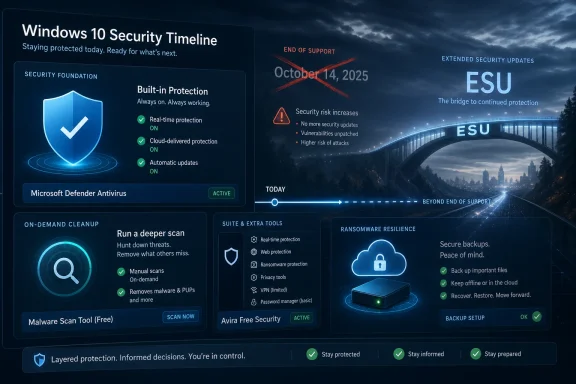 The Antivirus Roundup Arrives After the Operating System’s Sell-By Date
For years, “best free antivirus for Windows 10” was a straightforward consumer-service article: compare detection rates, list the extras, warn about pop-ups, and tell cautious users whether Microsoft Defender is enough. Gizmodo’s list follows that familiar template, weighing Avira’s extra tools, Malwarebytes’ cleanup role, and Defender’s built-in convenience. That format is useful, but it risks burying the most important fact in the margin.Windows 10 is no longer a normally supported consumer operating system. Microsoft ended standard support on October 14, 2025, and the remaining path for most holdouts is Extended Security Updates, a temporary bridge rather than a reprieve. That changes the security conversation from “Which free antivirus should I install?” to “What am I compensating for, and for how long?”
The distinction matters because antivirus software and operating-system servicing solve different problems. Antivirus tries to detect malicious files, behaviors, scripts, websites, and payloads. Operating-system updates close flaws in the platform that malware and attackers use before antivirus ever gets a vote.
That is the hidden weakness in any 2026 Windows 10 antivirus ranking. The products may be capable, and some may be excellent at what they do, but the platform underneath them is aging out of the normal security ecosystem. A strong antivirus on an unsupported or semi-supported OS is not useless. It is just not the same thing as a fully patched machine.
Microsoft Defender Is the Baseline, Not the Surrender Flag
The most interesting entry in Gizmodo’s lineup is not the one with the most features. It is Microsoft Defender, because Defender has become the answer many Windows users resist precisely because it is already there. It lacks the emotional satisfaction of installing a third-party “security suite,” but that lack of ceremony is part of its appeal.Defender’s basic case is simple: it is built into Windows, enabled by default, integrated with Windows Security, updated through Microsoft’s channels, and quiet enough for ordinary users to forget it exists. For many home PCs, that is not a weakness. Security software that users do not disable, misconfigure, or resent is already ahead of half the market.
The old Windows Defender reputation still lingers from an era when it was widely treated as minimum viable protection. That reputation is increasingly stale. Microsoft’s built-in antivirus has matured into a credible default, especially for users who keep Windows patched, use a modern browser, and avoid installing random utilities from search ads and download portals.
But Defender’s strongest argument is also its boundary. It is not trying to be a privacy suite, identity-monitoring service, family-control dashboard, VPN provider, password manager, and disk cleaner all at once. That makes it less flashy than Avira, Avast, AVG, or paid security bundles, but it also makes the promise cleaner: baseline malware protection without another vendor sitting between the user and the OS.
For Windows 10 in 2026, that is both enough and not enough. Defender can still be a sensible default for a machine enrolled in security updates and used conservatively. It should not be treated as a magic layer that cancels out the broader end-of-support problem.
Malwarebytes Free Is a Fire Extinguisher, Not a Sprinkler System
Gizmodo is right to separate Malwarebytes Free from traditional antivirus products. Malwarebytes built its name as the thing you run when something already looks wrong: browser hijacks, adware, suspicious executables, fake alerts, and machines that “feel infected” even when the resident antivirus reports calm seas. That role remains valuable.The trap is that users hear “Malwarebytes” and “free” and assume they have installed continuous protection. In the free version, the product is primarily an on-demand scanner and cleanup tool. That makes it a useful second opinion, not a full-time guard.
This distinction is especially important for less technical Windows 10 users. A tool that only helps when manually launched depends on the user noticing trouble, remembering to run it, and understanding what the results mean. By the time ransomware has encrypted local files or an infostealer has grabbed browser credentials, a cleanup scan may be too late to undo the real damage.
Used properly, Malwarebytes Free fits neatly beside Defender. Defender handles routine real-time protection, while Malwarebytes becomes the after-action sweeper when a machine behaves oddly or after a risky download has been removed. Used improperly, it creates a false sense of coverage.
That is the broader consumer-security problem in miniature. Free software often works well when users understand its limits. It becomes dangerous when the marketing category — “antivirus” — flattens very different tools into the same mental bucket.
Avira’s Free Bundle Shows the Upside and the Cost of Security Suites
Avira Free Security is the kind of product that makes antivirus rankings more complicated than they used to be. It is not just an antivirus engine; it is a package of protection, browser safety, performance tools, and a limited VPN. For users who want a single dashboard with more than malware scanning, that breadth is attractive.The catch is that “free security suite” usually means “freemium funnel.” Some tools are capped, some are teasers for paid tiers, and some features exist as much to demonstrate what the user does not have as to protect what they do. That does not make Avira bad. It makes it part of an industry whose business model depends on converting anxiety into subscriptions.
There is a legitimate consumer benefit here. A limited VPN can help on public Wi-Fi, browser warnings can stop obvious phishing pages, and system-optimization prompts may appeal to users who want a guided experience. But those extras also expand the amount of software running on the PC and the number of vendor decisions the user must trust.
The best way to read Avira’s place in a Windows 10 list is as a tradeoff. It is stronger than bare-bones scanning for users who want a more complete free package, but it asks them to tolerate more upsell pressure and more bundled functionality. Some users will welcome that. Others would be safer with Defender’s boring restraint.
In 2026, the restraint argument is stronger than it used to be. A Windows 10 system near or beyond normal support does not need a carnival of half-enabled features as much as it needs clear patch status, reliable real-time protection, cautious browsing, and backups that ransomware cannot trivially destroy.
Free Antivirus Is Good at Files, but the Threat Model Moved
The consumer antivirus market still talks heavily about malware detection, and for good reason. Malicious files remain part of the attacker’s toolkit. But the most damaging real-world compromises often blend phishing, credential theft, browser abuse, malicious ads, remote-access scams, reused passwords, and social engineering.That is where the old “free versus paid” comparison becomes less tidy. A free antivirus may catch a known Trojan or block a suspicious executable. A paid suite may add identity alerts, a password manager, parental controls, broader ransomware controls, web filtering, VPN access, and multi-device coverage. Some of those extras are useful; some are duplicative; some are inferior to dedicated tools.
For technically confident WindowsForum readers, the answer may not be a paid suite at all. A hardened browser, a reputable password manager, phishing-resistant multi-factor authentication, standard user accounts, controlled backups, and smart patch discipline can outperform a bloated all-in-one package. But that assumes the user knows how to assemble and maintain the stack.
For ordinary Windows 10 users, free antivirus remains attractive because it reduces one category of risk with minimal cost. The trouble is that attackers do not respect product categories. They do not care whether the credential was stolen by a fake Microsoft login page, a malicious attachment, a browser extension, or a remote-support scam. They care only that the user handed over access.
That makes phishing protection more important than many antivirus roundups admit. Browser and email defenses, reputation services, and user education now matter as much as classic file scanning. If a security product claims excellence but leaves users exposed to obvious credential traps, its malware score tells only part of the story.
Ransomware similarly exposes the limits of a simple ranking. Blocking the initial payload is useful. Preventing unauthorized file changes is useful. But the real survival mechanism is a backup strategy that includes offline or otherwise isolated copies. No free antivirus product should be treated as a substitute for recoverable data.
Windows 10’s ESU Era Creates Two Classes of “Protected” PCs
The Windows 10 end-of-support transition has created an awkward split. Some Windows 10 PCs will continue receiving security updates through Microsoft’s Extended Security Updates program. Others will not, either because the owner ignored the prompts, could not enroll, did not understand the requirement, or assumed antivirus was enough.Those two machines may look identical to a user. Both boot to the same desktop. Both run Chrome, Edge, Steam, Office, and the same printer utility from 2017. Both may show a reassuring green checkmark in a security app. Underneath, however, they are drifting apart.
A Windows 10 PC receiving ESU updates is in a managed grace period. It is still not where Microsoft wants consumers to be, but it continues to receive critical security fixes for a time. A Windows 10 PC outside that channel is increasingly exposed to vulnerabilities that attackers can study from patches issued to newer or supported systems.
This is why any “best antivirus for Windows 10 in 2026” recommendation should begin with update status. If the machine is not eligible for Windows 11 and is staying on Windows 10, the first security decision is not Avast versus AVG or Avira versus Defender. It is whether the machine is receiving the remaining Windows 10 security fixes available to it.
There is also a messaging problem here. Microsoft has said enough over the years to make users aware that Windows 10 is ending, but consumer behavior changes slowly. Many people do not think in lifecycle dates. They think in whether the laptop still opens the browser, whether the battery holds a charge, and whether Windows Update shows anything urgent today.
That gap between lifecycle reality and user perception is where free antivirus brands thrive. They offer a visible action: install this, scan that, turn on protection. Microsoft’s lifecycle guidance asks for a harder action: migrate, replace hardware, enroll in ESU, or accept growing risk. One feels like a download; the other feels like a project.
The Best Free Choice Depends Less on Brand Than on User Behavior
There is no single free antivirus answer that survives contact with every Windows 10 user. The technically careful user who runs as a standard account, keeps browsers updated, uses a password manager, avoids pirated software, and maintains good backups can reasonably live with Defender. That same advice may be too thin for a user who clicks sponsored download buttons, opens unsolicited attachments, and treats browser warnings as obstacles.For gamers, the best product is often the one that stays out of the way. Defender and Bitdefender’s free offering are commonly attractive in that role because they tend to emphasize quiet real-time protection rather than a desktop full of tune-up tools. Performance impact still varies by machine, but interruptions matter as much as CPU cycles.
For families and less technical home users, a product with more visible web protection may be helpful if it does not become noise. AVG, Avast, and Avira can provide more obvious guardrails, but those products also bring more prompts and upgrade surfaces. A warning users ignore because the software nags too often is not much of a warning.
For cleanup, Malwarebytes Free remains easy to recommend as a companion scanner. It is the tool to keep in the drawer, not necessarily the lock on the front door. Pairing it with Defender is often more rational than stacking multiple full real-time antivirus engines, which can create conflicts and performance issues.
For small businesses, the answer should usually be neither “free” nor “whatever came preinstalled.” Business systems need central visibility, policy control, support, device inventory, patch reporting, and incident response. A sole proprietor with one laptop may blur the line, but any organization handling client data should think beyond consumer freeware.
The Upgrade Prompts Are Part of the Product
Free antivirus is rarely free in the philosophical sense. Users pay with attention, telemetry, brand exposure, feature limitations, and recurring reminders that the paid version would do more. Sometimes that is a fair bargain. Sometimes it becomes the security equivalent of a smoke alarm that also tries to sell you batteries every morning.This matters because trust is the scarce resource in endpoint security. Antivirus software runs deeply, updates frequently, inspects files, hooks into browsers, and often influences network behavior. If the product’s interface is constantly steering users toward paid features, users may become less able to distinguish genuine danger from sales copy.
The best free antivirus products are disciplined about that line. They make it clear what is protected, what is not, and which warnings require action. The worst ones turn the dashboard into a permanent anxiety machine, where every missing paid feature is framed as an emergency.
Windows 10 users in 2026 are particularly vulnerable to this dynamic. The operating system’s support status is genuinely concerning, so vendors do not need to invent fear. But there is a difference between explaining risk and monetizing confusion. A good security product helps users make better decisions; a mediocre one makes them feel perpetually one click away from disaster.
This is where Microsoft Defender’s plainness becomes a competitive advantage. It is not immune to Microsoft’s broader ecosystem nudges, and Windows itself is no stranger to prompts. But Defender as an antivirus tool does not generally behave like a third-party freemium storefront. For many users, that quietness is worth more than a limited VPN or a registry cleaner.
Lab Scores Matter, but They Are Not a Personality Test for Your PC
Independent antivirus testing remains useful. AV-TEST, AV-Comparatives, SE Labs, and similar organizations provide a reality check against vendor marketing. Detection, false positives, performance impact, and protection against zero-day or real-world threats are all better measured than guessed.Still, lab results are not commandments. A product that scores well in a controlled test may still annoy a user into disabling it. A product with excellent malware blocking may ship a browser extension the user does not need. A tool that performs beautifully on a clean Windows 11 test system may feel different on a five-year-old Windows 10 laptop with 8GB of RAM and a crowded startup folder.
The better way to use lab scores is to eliminate weak candidates, not to crown a universal winner. If a free product consistently performs poorly, produces too many false positives, or causes measurable slowdowns, move on. Once several reputable products clear that bar, the right answer becomes more personal: interface, noise level, features, and compatibility.
That is why Microsoft Defender remains hard to dislodge as the default recommendation. It may not always top every chart, but it is good enough for many users, already integrated, and less likely to create vendor clutter. Replacing it should be a conscious decision, not a ritual inherited from the Windows XP era.
For Windows 10 specifically, lab scores should also be interpreted against the platform’s timeline. A third-party product with excellent 2026 results does not extend the OS lifecycle. It protects within the limits of the OS it is running on. That sentence should appear in every consumer antivirus roundup this year.
The Privacy Tradeoff Is Bigger Than the Malware Tradeoff
Antivirus products occupy a privileged and uncomfortable position. To protect a machine, they often need visibility into files, processes, websites, downloads, scripts, and suspicious behaviors. That visibility can be handled responsibly, but it is still visibility.Free products intensify the concern because the revenue model is less direct. Some vendors use free tiers mainly as acquisition channels for paid subscriptions. Others may collect diagnostic or threat intelligence data that improves detection but also requires user trust. The average user is not equipped to audit those pipelines.
This does not mean third-party antivirus products are inherently untrustworthy. Many are reputable, mature, and essential in enterprise contexts. It does mean users should not install security software casually just because a listicle calls it free. Security software is not a wallpaper app.
The browser-extension layer deserves special caution. Web protection can be useful, especially against phishing and malicious sites, but browser extensions can also see sensitive browsing activity. Users should ask whether the benefit is worth the access, particularly if their browser already includes strong safe-browsing protections.
Microsoft Defender has its own privacy considerations because it is part of Microsoft’s ecosystem. But the decision is at least bundled into the trust relationship Windows users already have with the OS vendor. Installing another security suite adds a second privileged party. Sometimes that is justified; sometimes it is just habit.
The Old Windows Advice Still Wins: Patch, Back Up, Then Choose Antivirus
The hierarchy of Windows security has not changed as much as the product pages imply. Patch the operating system and applications. Use supported software. Back up important data. Use strong, unique passwords and multi-factor authentication. Avoid running unknown installers. Then choose antivirus.That order is not glamorous, but it is durable. Antivirus is one layer in a defensive stack, not the foundation of the house. A Windows 10 PC with excellent backups, cautious use, ESU updates, and Defender may be safer in practice than a neglected machine running a noisy third-party suite with every warning dismissed.
The software supply chain also deserves attention. Many Windows infections begin with fake installers, cracked software, driver updaters, codec packs, and “free” utilities that users went looking for. Antivirus can catch some of that. Better download hygiene prevents more of it.
Browser choice and configuration matter too. Edge, Chrome, Firefox, and other modern browsers update rapidly and include their own protections against known malicious sites and downloads. Keeping the browser current is as important as keeping the antivirus current, especially on a Windows 10 machine whose OS-level future is constrained.
Backups are the least exciting and most decisive layer. If ransomware hits, the difference between inconvenience and catastrophe is often whether the user has clean, recent, restorable copies of important files. No antivirus ranking can compensate for the absence of that safety net.
Gizmodo’s List Is Useful, but the Frame Is Too Small
Gizmodo’s recommendations are sensible within the familiar boundaries of a consumer antivirus roundup. Avira is a reasonable pick for users who want a broader free package. Malwarebytes Free is a valuable cleanup companion. Microsoft Defender is the built-in answer that many users should simply leave enabled.The problem is not the list; it is the category. “Best free antivirus for Windows 10 in 2026” sounds like a shopping guide, when it is really a risk-management question. The OS lifecycle has become the context that determines whether any of these tools are enough.
A more honest ranking would start by sorting users into three groups. The first group can upgrade to Windows 11 and should plan to do so. The second group cannot upgrade but can enroll in available Windows 10 security updates while preparing a hardware or platform transition. The third group is running unsupported Windows 10 without a plan, and no free antivirus product should be allowed to make that feel acceptable.
That does not mean panic is warranted. Windows 10 did not become radioactive overnight. Millions of machines remain in use, and many will continue to function safely enough for routine tasks if managed carefully. But the margin for lazy security habits is narrowing.
Free antivirus remains part of the answer, especially for users who cannot spend money on a suite. It is just not the first answer anymore. In 2026, the first answer is whether the PC still belongs on the internet in its current state.
The 2026 Windows 10 Security Decision Comes Down to Discipline
The practical advice for Windows 10 users is less exciting than a winner’s badge, but more useful. Pick one real-time antivirus product, understand what it does not cover, and do not mistake a green checkmark for a supported platform. If you add a second tool, make it a scanner like Malwarebytes rather than another full-time engine fighting for the same territory.- Microsoft Defender is the simplest free choice for many Windows 10 users because it is built in, quiet, and adequate as a baseline when the system is otherwise maintained.
- Malwarebytes Free is best treated as an on-demand cleanup and second-opinion scanner, not as the only active protection layer on a Windows 10 PC.
- Avira, AVG, Avast, and Bitdefender can make sense for users who want third-party features, but the extra tools and upgrade prompts should be weighed against simplicity and trust.
- Windows 10 users should confirm whether their machines are receiving Extended Security Updates before treating any antivirus setup as sufficient.
- No free antivirus product replaces patched software, phishing-resistant sign-ins, cautious download habits, and backups that can survive ransomware.
- Small businesses and anyone handling sensitive client data should move beyond consumer free antivirus and use managed endpoint protection with support and policy controls.
References
- Primary source: Gizmodo
Published: Tue, 26 May 2026 14:37:42 GMT

Best Free Antivirus for Windows 10 in 2026: Top Free Protection Options
Compare the best free antivirus tools for Windows 10 in 2026, including real-time malware protection, phishing defense, ransomware protection, VPN limits,
gizmodo.com
- Related coverage: tomsguide.com
Bitdefender review: The ultimate antivirus software for all-round protection | Tom's Guide
Bitdefender offers excellent protection with Full Scanning, Anti-Theft, Scam Protection Pro, and many other goodies which make it fantastic value for money.www.tomsguide.com - Related coverage: techradar.com
Best Antivirus Software in 2026 for PC: Ranked and Reviewed | TechRadar
TechRadar Pro have tested and ranked all the best antivirus software: Bitdefender remains the top choice.www.techradar.com - Official source: microsoft.com
End of support for Windows 10, Windows 8.1, and Windows 7 | Microsoft Windows
Make a smooth transition to Windows 11 from your unsupported operating system with help from Microsoft. Enjoy the benefits of upgrading to a Windows 11 PC.www.microsoft.com - Official source: learn.microsoft.com
Windows 10 - release information | Microsoft Learn
Learn release information for Windows 10 releaseslearn.microsoft.com - Official source: support.microsoft.com
Windows 10 notification: "You're not receiving security updates" | Microsoft Support
Windows 10 notification: "You're not receiving security updates"support.microsoft.com
- Related coverage: windowslatest.com
Microsoft gives up, extends Windows 10's support for free if you meet the requirements
Windows 10 support is NOT ending on October 14, 2025, if you're ready to link your Microsoft account and sync Settings to the cloud. www.windowslatest.com
- Related coverage: windowscentral.com
Windows 10 reaches end of support: Discover how to keep your device secure beyond October 2025 | Windows Central
Windows 10 support ended on Tuesday, October 14. That means Windows 10 PCs will no longer receive security updates automatically, and you must take action to ensure these devices remain secure when connected to the internet.www.windowscentral.com - Official source: techcommunity.microsoft.com
End of Windows 10 Support: What Defender Customers Need to Know | Microsoft Community Hub
As of today, October 14, 2025, Microsoft is officially ending support for Windows 10. This means that Windows 10 devices will no longer receive security or... techcommunity.microsoft.com
- Related coverage: tomshardware.com
Microsoft no longer permits local Windows 10 accounts if you want Consumer Extended Security Updates — support beyond EOL requires a Microsoft Account link-up even if you pay $30 | Tom's Hardware
$30 covers up to 10 machines for one yearwww.tomshardware.com - Related coverage: allthings.how
Windows 10 security updates free in the EEA through Oct 2026
Microsoft drops cloud backup requirements and waives ESU fees in Europe, with updates running until October 14th, 2026.allthings.how - Official source: news.microsoft.com
Bleiben Sie sicher: mit Windows 11, Copilot+ PCs und Windows 365, bevor der Support für Windows 10 endet | News Center Microsoft
Der Support für Windows 10 endet am 14. Oktober 2025. Microsoft hat im Windows-Blog Aktualisierungen zum Extended Security Updates (ESU)-Programm für Windows 10 veröffentlicht, das im Oktober 2024 angekündigt wurde. Die Aktualisierungen sind: Für Privatnutzer*innen...news.microsoft.com - Related coverage: atomicdata.com
- Related coverage: transparity.com
