

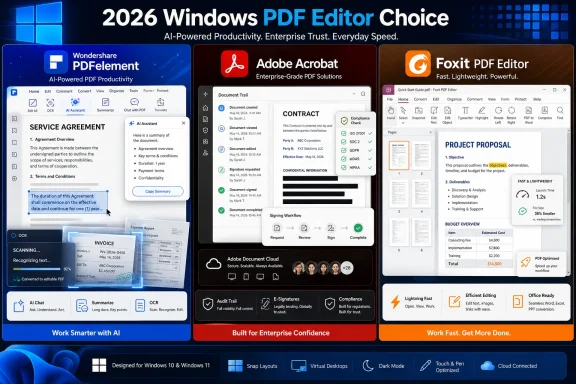
Windows 11 and Windows 10 users choosing a PDF editor in 2026 are effectively choosing among three mature paths: Wondershare PDFelement for approachable AI-assisted editing, Adobe Acrobat for enterprise-standard document workflows, and Foxit PDF Editor for fast, practical office productivity.
That is the useful reading of the BBN Times comparison, but it is not the whole story. The PDF editor market has stopped being about whether a program can change text in a file; nearly all serious contenders can. The real contest is now about who controls the document workflow after the PDF opens.
Every few years, someone declares the PDF obsolete. Then a contract arrives, a school form needs signing, a scanned invoice must be cleaned up, or a résumé has to survive someone else’s printer settings. The format persists not because it is elegant, but because it is dependable across chaotic environments.
Windows users feel this more than most. Microsoft Edge can open PDFs, Windows can print to PDF, and Office can export documents into the format. But the moment a user needs OCR, redaction, conversion fidelity, form editing, bulk processing, or a legally meaningful signature workflow, the free layer starts to look thin.
That gap is where PDFelement, Acrobat, and Foxit now compete. They are not simply selling PDF editing. They are selling different theories of how people should handle documents in a world where paperwork is digital, fragmented, and increasingly AI-mediated.
The BBN Times piece frames PDFelement as the most approachable of the three, and that is a fair position. Editing text, rearranging pages, adding comments, converting files, creating forms, and running OCR are the tasks that ordinary Windows users actually need. If those tools are buried or intimidating, they might as well not exist.
The newer twist is AI. PDFelement markets tools for summarizing PDFs, translating content, rewriting passages, and chatting with documents. Those features are not gimmicks if they are applied to the right material. A student reading a dense handout, a freelancer reviewing a client brief, or an office worker trying to extract action items from a long report can save real time.
Still, the AI pitch needs a little discipline. A PDF editor does not become better simply because it has a chatbot attached. It becomes better if the AI works inside the existing document workflow without making users distrust the output or leak sensitive material into places they do not understand.
Acrobat’s strengths are clearest in teams. Shared review, signing, permissions, cloud workflows, compliance expectations, and integration with Adobe’s broader ecosystem all matter in organizations where documents move through multiple hands. A PDF editor in that environment is not a utility; it is part of the recordkeeping system.
Adobe has also pushed Acrobat deeper into AI-assisted work. Its recent positioning around AI Assistant, PDF Spaces, and broader Acrobat productivity tools shows where the company wants the product to go. Adobe is trying to turn the PDF from a static endpoint into a workspace where users ask questions, generate summaries, and repurpose content.
The catch is that Acrobat can feel like too much machine for a simple job. If you edit three PDFs a month, Acrobat may be overbuilt. If your company routes contracts, HR files, approval packets, and customer documents through Acrobat every day, the heaviness starts to look more like infrastructure.
That makes Foxit especially attractive to small businesses and office users. These are the people who open large PDFs all day, annotate drafts, sign vendor forms, convert files, and need the software to stay out of the way. Performance is not a luxury in that setting; it is part of the user experience.
Foxit also has the core features expected from a modern paid PDF editor: editing, organizing, OCR, collaboration, security controls, and e-signature options depending on plan. Its PDF Editor+ tier adds more bundled productivity and signing capabilities, which can make sense for teams trying to avoid stitching together separate tools.
The caution is packaging. Foxit’s product line can require closer comparison than buyers may expect, especially when deciding between standard PDF Editor plans and PDF Editor+. That does not undermine the software, but it does mean procurement should read the feature matrix instead of assuming every advertised capability is in every tier.
That does not mean all AI features are equal. Some are genuinely useful for summarizing a long document or finding specific information. Others are convenience wrappers around tasks users could already do with search, bookmarks, or careful reading.
For Windows users, the right question is not “Which PDF editor has AI?” It is “Which AI features fit the documents I actually handle?” A student may benefit from summarization and translation. A lawyer may care more about privacy, auditability, and whether generated answers can be trusted. A sysadmin may be less impressed by AI than by silent deployment, licensing clarity, and update behavior.
There is also a security dimension that vendors sometimes underplay. PDFs often contain contracts, pay records, medical documents, tax forms, invoices, and internal reports. Any AI feature that processes document contents should be evaluated with the same suspicion IT teams bring to cloud storage and email retention.
That difference is enormous. It changes whether an invoice number can be found instantly, whether a scanned contract can be searched for a clause, and whether a stack of paper forms can become usable digital material. For many offices, OCR is not an advanced feature; it is the line between a document archive and a pile of images.
PDFelement’s emphasis on OCR, including batch use cases, fits its all-in-one pitch. Acrobat has long been strong in this area, particularly for professional workflows. Foxit also covers OCR for office productivity and document conversion.
The lesson is that buyers should not treat OCR as a footnote. If your PDFs are mostly scanned, OCR quality may matter more than AI summaries, interface polish, or brand recognition. A beautiful editor that struggles with scans will disappoint the first time someone imports a copier dump.
This is where Acrobat’s enterprise role is easiest to understand. Adobe’s signing and document workflow tools fit naturally into companies that already standardize around Adobe services. For procurement, legal, HR, and sales departments, the surrounding process can matter more than the editor itself.
Foxit’s eSign integration gives it a strong practical case for smaller teams that want signing without the full Adobe commitment. If a business needs to send agreements and collect signatures but does not need Acrobat’s entire ecosystem, Foxit can be a compelling alternative.
PDFelement also supports e-sign workflows, which helps make it more than a personal editing tool. But users choosing PDFelement primarily for signing should still compare the exact workflow they need. A solo freelancer signing client forms has different needs from a company managing multi-party approvals.
For everyday users, the most visible security features are password protection and redaction. But even redaction deserves care. Covering text with a black rectangle is not the same thing as removing it from the document. A serious PDF editor must permanently remove sensitive content, not merely hide it visually.
For businesses, the security conversation expands. Administrators care about deployment, patch cadence, identity integration, data handling, and whether cloud or AI features can be governed. This is one reason Acrobat remains entrenched in larger environments: not always because it is lighter or cheaper, but because it is easier to explain to auditors and decision-makers.
Foxit and PDFelement can still be reasonable choices, especially where budgets and user experience matter. But organizations should match the tool to the risk profile of the documents. A PDF editor used for lunch menus and flyers is not the same category of decision as one used for legal filings or employee records.
A student does not need the same PDF platform as a compliance department. A freelance designer does not need the same workflow as a law firm. A small business may want something faster and less expensive than Acrobat, while still needing more than a browser viewer.
Windows 11 and Windows 10 also complicate the picture. Many organizations are still supporting mixed environments, older hardware, and users who do not live entirely in the browser. Desktop performance, offline access, and predictable file handling continue to matter.
That is why “best PDF editor” is the wrong universal question. The better question is which editor fails least often in your normal day. For many users, that will be PDFelement. For many teams, it will still be Acrobat. For many small offices, Foxit may hit the cleanest balance.
PDFelement’s value proposition depends heavily on usability. If users actually take advantage of its editing, OCR, conversion, and AI tools, it can justify itself quickly. If they only need occasional markup, it may be more than they need.
Acrobat’s value is easiest to defend when standardization matters. A company may pay more because Acrobat reduces friction with clients, vendors, and internal departments. That is not glamorous, but enterprise software rarely wins on glamour.
Foxit’s value tends to show up in daily speed and practical capability. If it performs well on the machines people already use and covers the signing, editing, and collaboration tasks the office needs, it can be the sensible middle path. But buyers should watch tier differences carefully so the cheaper plan does not omit the feature that prompted the purchase.
PDFelement’s strength is reducing intimidation. It is the editor for people who want strong features without feeling like they enrolled in a document-management certification course. Its AI tools make the most sense when they accelerate reading and review rather than replace judgment.
Acrobat’s strength is legitimacy at scale. It remains the safest recommendation for organizations that need a standard everyone recognizes and that procurement can defend. It is not always the most pleasant choice, but it is often the least controversial one.
Foxit’s strength is momentum. It gives users much of what they need in a faster, practical package, especially for offices that want a serious Adobe alternative. It may not carry the same default aura, but software does not need aura when it reliably gets documents signed and shipped.
That is the useful reading of the BBN Times comparison, but it is not the whole story. The PDF editor market has stopped being about whether a program can change text in a file; nearly all serious contenders can. The real contest is now about who controls the document workflow after the PDF opens.
 The PDF Refuses to Die Because Work Refuses to Simplify
Every few years, someone declares the PDF obsolete. Then a contract arrives, a school form needs signing, a scanned invoice must be cleaned up, or a résumé has to survive someone else’s printer settings. The format persists not because it is elegant, but because it is dependable across chaotic environments.Windows users feel this more than most. Microsoft Edge can open PDFs, Windows can print to PDF, and Office can export documents into the format. But the moment a user needs OCR, redaction, conversion fidelity, form editing, bulk processing, or a legally meaningful signature workflow, the free layer starts to look thin.
That gap is where PDFelement, Acrobat, and Foxit now compete. They are not simply selling PDF editing. They are selling different theories of how people should handle documents in a world where paperwork is digital, fragmented, and increasingly AI-mediated.
PDFelement Wins by Making the Advanced Stuff Feel Ordinary
Wondershare PDFelement’s strongest argument is not that it has the longest feature list. Its argument is that the features most people avoid in heavyweight PDF software are presented in a way that feels usable. That matters because PDF editors have historically punished casual users with interfaces that look like procurement departments designed them.The BBN Times piece frames PDFelement as the most approachable of the three, and that is a fair position. Editing text, rearranging pages, adding comments, converting files, creating forms, and running OCR are the tasks that ordinary Windows users actually need. If those tools are buried or intimidating, they might as well not exist.
The newer twist is AI. PDFelement markets tools for summarizing PDFs, translating content, rewriting passages, and chatting with documents. Those features are not gimmicks if they are applied to the right material. A student reading a dense handout, a freelancer reviewing a client brief, or an office worker trying to extract action items from a long report can save real time.
Still, the AI pitch needs a little discipline. A PDF editor does not become better simply because it has a chatbot attached. It becomes better if the AI works inside the existing document workflow without making users distrust the output or leak sensitive material into places they do not understand.
Acrobat Remains the Default Because Defaults Matter
Adobe Acrobat’s advantage is institutional gravity. It is the PDF name that buyers recognize, the tool many legal and administrative workflows already assume, and the platform that large organizations can justify more easily than a cheaper but less familiar alternative. That does not automatically make it the best choice for every user, but it makes it difficult to dislodge.Acrobat’s strengths are clearest in teams. Shared review, signing, permissions, cloud workflows, compliance expectations, and integration with Adobe’s broader ecosystem all matter in organizations where documents move through multiple hands. A PDF editor in that environment is not a utility; it is part of the recordkeeping system.
Adobe has also pushed Acrobat deeper into AI-assisted work. Its recent positioning around AI Assistant, PDF Spaces, and broader Acrobat productivity tools shows where the company wants the product to go. Adobe is trying to turn the PDF from a static endpoint into a workspace where users ask questions, generate summaries, and repurpose content.
The catch is that Acrobat can feel like too much machine for a simple job. If you edit three PDFs a month, Acrobat may be overbuilt. If your company routes contracts, HR files, approval packets, and customer documents through Acrobat every day, the heaviness starts to look more like infrastructure.
Foxit’s Case Is Speed, Not Spectacle
Foxit PDF Editor occupies the pragmatic middle of the market. It is not trying to be the cultural default in the way Acrobat is, and it does not lean as heavily on approachability as PDFelement. Its appeal is that it does serious PDF work quickly and with less ceremony.That makes Foxit especially attractive to small businesses and office users. These are the people who open large PDFs all day, annotate drafts, sign vendor forms, convert files, and need the software to stay out of the way. Performance is not a luxury in that setting; it is part of the user experience.
Foxit also has the core features expected from a modern paid PDF editor: editing, organizing, OCR, collaboration, security controls, and e-signature options depending on plan. Its PDF Editor+ tier adds more bundled productivity and signing capabilities, which can make sense for teams trying to avoid stitching together separate tools.
The caution is packaging. Foxit’s product line can require closer comparison than buyers may expect, especially when deciding between standard PDF Editor plans and PDF Editor+. That does not undermine the software, but it does mean procurement should read the feature matrix instead of assuming every advertised capability is in every tier.
AI Is Now the Feature Everyone Sells and Nobody Should Trust Blindly
The most important shift in 2026 is that AI has moved from novelty to expected checkbox. PDFelement has AI summaries and PDF chat. Adobe is building AI more deeply into Acrobat and adjacent document experiences. Foxit also offers AI assistance across parts of its PDF ecosystem.That does not mean all AI features are equal. Some are genuinely useful for summarizing a long document or finding specific information. Others are convenience wrappers around tasks users could already do with search, bookmarks, or careful reading.
For Windows users, the right question is not “Which PDF editor has AI?” It is “Which AI features fit the documents I actually handle?” A student may benefit from summarization and translation. A lawyer may care more about privacy, auditability, and whether generated answers can be trusted. A sysadmin may be less impressed by AI than by silent deployment, licensing clarity, and update behavior.
There is also a security dimension that vendors sometimes underplay. PDFs often contain contracts, pay records, medical documents, tax forms, invoices, and internal reports. Any AI feature that processes document contents should be evaluated with the same suspicion IT teams bring to cloud storage and email retention.
OCR Is Still the Boring Feature That Saves the Most Time
AI gets the marketing copy, but OCR remains one of the most practically important features in a PDF editor. A scanned PDF is often just a picture of a document. OCR turns it into searchable, selectable, and sometimes editable text.That difference is enormous. It changes whether an invoice number can be found instantly, whether a scanned contract can be searched for a clause, and whether a stack of paper forms can become usable digital material. For many offices, OCR is not an advanced feature; it is the line between a document archive and a pile of images.
PDFelement’s emphasis on OCR, including batch use cases, fits its all-in-one pitch. Acrobat has long been strong in this area, particularly for professional workflows. Foxit also covers OCR for office productivity and document conversion.
The lesson is that buyers should not treat OCR as a footnote. If your PDFs are mostly scanned, OCR quality may matter more than AI summaries, interface polish, or brand recognition. A beautiful editor that struggles with scans will disappoint the first time someone imports a copier dump.
Signing Has Become a Workflow, Not a Button
Electronic signatures used to feel like an add-on. In 2026, they are central to why many people pay for PDF software at all. The work is not merely placing a scribble on a page; it is sending documents, tracking status, managing recipients, preserving records, and satisfying organizational requirements.This is where Acrobat’s enterprise role is easiest to understand. Adobe’s signing and document workflow tools fit naturally into companies that already standardize around Adobe services. For procurement, legal, HR, and sales departments, the surrounding process can matter more than the editor itself.
Foxit’s eSign integration gives it a strong practical case for smaller teams that want signing without the full Adobe commitment. If a business needs to send agreements and collect signatures but does not need Acrobat’s entire ecosystem, Foxit can be a compelling alternative.
PDFelement also supports e-sign workflows, which helps make it more than a personal editing tool. But users choosing PDFelement primarily for signing should still compare the exact workflow they need. A solo freelancer signing client forms has different needs from a company managing multi-party approvals.
Security Is Where Casual Reviews Usually Go Soft
PDF security is a slippery phrase. It can mean password protection, redaction, permission controls, digital signatures, certificate handling, sandboxing, update responsiveness, cloud policy, or enterprise compliance. Vendors like to use the word broadly because it sounds reassuring.For everyday users, the most visible security features are password protection and redaction. But even redaction deserves care. Covering text with a black rectangle is not the same thing as removing it from the document. A serious PDF editor must permanently remove sensitive content, not merely hide it visually.
For businesses, the security conversation expands. Administrators care about deployment, patch cadence, identity integration, data handling, and whether cloud or AI features can be governed. This is one reason Acrobat remains entrenched in larger environments: not always because it is lighter or cheaper, but because it is easier to explain to auditors and decision-makers.
Foxit and PDFelement can still be reasonable choices, especially where budgets and user experience matter. But organizations should match the tool to the risk profile of the documents. A PDF editor used for lunch menus and flyers is not the same category of decision as one used for legal filings or employee records.
The Windows Choice Is Really a Workflow Choice
The BBN Times comparison sorts the three products into sensible lanes: PDFelement for approachable all-in-one editing, Acrobat for teams and enterprises, and Foxit for fast productivity. That framing works because it maps to user behavior rather than abstract feature counting.A student does not need the same PDF platform as a compliance department. A freelance designer does not need the same workflow as a law firm. A small business may want something faster and less expensive than Acrobat, while still needing more than a browser viewer.
Windows 11 and Windows 10 also complicate the picture. Many organizations are still supporting mixed environments, older hardware, and users who do not live entirely in the browser. Desktop performance, offline access, and predictable file handling continue to matter.
That is why “best PDF editor” is the wrong universal question. The better question is which editor fails least often in your normal day. For many users, that will be PDFelement. For many teams, it will still be Acrobat. For many small offices, Foxit may hit the cleanest balance.
The Price Tag Is Only Part of the Cost
PDF editors are often judged by subscription price, but that is a narrow view of cost. The real cost includes training, wasted time, failed conversions, missing features, support burden, and the irritation of paying for a tool users avoid.PDFelement’s value proposition depends heavily on usability. If users actually take advantage of its editing, OCR, conversion, and AI tools, it can justify itself quickly. If they only need occasional markup, it may be more than they need.
Acrobat’s value is easiest to defend when standardization matters. A company may pay more because Acrobat reduces friction with clients, vendors, and internal departments. That is not glamorous, but enterprise software rarely wins on glamour.
Foxit’s value tends to show up in daily speed and practical capability. If it performs well on the machines people already use and covers the signing, editing, and collaboration tasks the office needs, it can be the sensible middle path. But buyers should watch tier differences carefully so the cheaper plan does not omit the feature that prompted the purchase.
The Best Editor Is the One That Matches the Mess
The modern PDF is a container for other people’s messes. It holds scanned pages, exported Word documents, flattened forms, embedded images, signatures, comments, stamps, and formatting decisions made years ago by someone who has left the company. A good PDF editor helps users survive that mess without making a new one.PDFelement’s strength is reducing intimidation. It is the editor for people who want strong features without feeling like they enrolled in a document-management certification course. Its AI tools make the most sense when they accelerate reading and review rather than replace judgment.
Acrobat’s strength is legitimacy at scale. It remains the safest recommendation for organizations that need a standard everyone recognizes and that procurement can defend. It is not always the most pleasant choice, but it is often the least controversial one.
Foxit’s strength is momentum. It gives users much of what they need in a faster, practical package, especially for offices that want a serious Adobe alternative. It may not carry the same default aura, but software does not need aura when it reliably gets documents signed and shipped.
The Three-Way Race Leaves Windows Users With a Better Kind of Problem
The good news is that Windows users are not choosing between one serious PDF editor and a field of toys. They are choosing among mature tools with different strengths. That makes the decision less about finding the only acceptable product and more about refusing to overbuy or underbuy.- Wondershare PDFelement is the strongest fit for users who want editing, OCR, conversion, forms, signatures, and AI help in a package that feels approachable.
- Adobe Acrobat remains the safest choice for organizations that need standardization, mature collaboration, security controls, and broad business recognition.
- Foxit PDF Editor is the practical alternative for users and small teams that value speed, signing, and office productivity without fully buying into Adobe’s ecosystem.
- AI features are useful when they summarize, translate, or extract information from real documents, but they should be evaluated against privacy needs and accuracy expectations.
- OCR, redaction, signing workflows, and plan packaging matter more than marketing claims when the software is used for serious work.
- The right PDF editor is the one that fits the documents users actually handle, not the one with the longest feature grid.
References
- Primary source: BBN Times
Published: Mon, 18 May 2026 16:54:01 GMT
Best PDF Editors for Windows 11/10 in 2026
Windows 11 and Windows 10 users still work with PDFs every day, and that has not changed in 2026.www.bbntimes.com
- Related coverage: pdf.wondershare.com
Shop Wondershare PDFelement for Windows (Individuals Plan)
Check Individuals Plan for Wondershare PDFelement for Windows.pdf.wondershare.com
- Related coverage: techradar.com
Best PDF editor 2026: The top PDF editing software we've tested | TechRadar
Document creation and editing, collaboration, eSign, and more - if you need PDF editing software, we've tested the best available toolswww.techradar.com
