

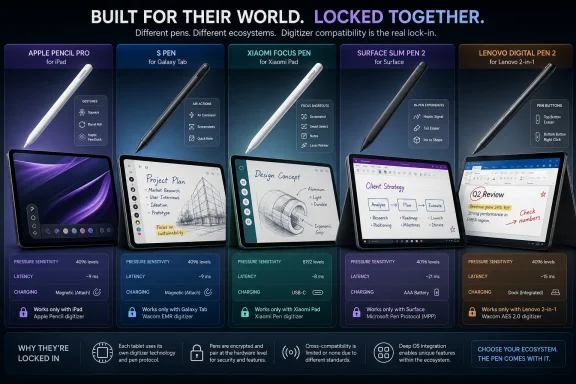
Amazon’s best tablet-pen picks in 2026 are not interchangeable accessories but ecosystem keys: Apple Pencil Pro for modern iPads, Samsung’s S Pen for Galaxy Tabs, Xiaomi Focus Pen for Xiaomi Pads, Surface Slim Pen 2 for Surface devices, and Lenovo Digital Pen 2 for supported Windows hardware. That is the central buying reality hidden beneath the familiar retail language of “stylus pens.” The best pen is usually the one your tablet was designed around, not the one with the biggest pressure-sensitivity number. In 2026, the stylus market is less about universal handwriting and more about platform lock-in, latency, software hooks, and whether your tablet treats pen input as a first-class interface.
The modern tablet pen is no longer a plastic pointer pretending to be a fountain pen. On premium tablets, it is a sensor package, a shortcut remote, a charging accessory, and a software contract between the display digitizer and the operating system. That is why a cheap capacitive stylus can still tap icons, but it cannot become an Apple Pencil Pro, an S Pen, or a Surface Slim Pen 2 simply by looking similar.
The timing matters because tablets have settled into a second life. After the pandemic boom and correction, the category has stabilized around replacement cycles, school deployments, hybrid work, and creator workflows. IDC’s reported 151.9 million tablet shipments in 2025 make clear that the tablet is not disappearing into the smartphone on one side or the laptop on the other.
But the tablet’s growth story is now more specialized. A consumer who buys an iPad for Netflix may never need a pen; a student, architect, nurse, illustrator, engineer, or field technician may find the pen is the feature that turns a slab of glass into a work machine. That division is why the 2026 stylus conversation looks less like a generic accessory roundup and more like a map of competing computing philosophies.
Apple, Samsung, Microsoft, Xiaomi, and Lenovo all sell pens, but they are not selling the same idea. Apple sells precision and creative gesture control. Samsung sells pen-first note-taking as part of the Galaxy Tab identity. Microsoft sells Windows Ink as a bridge between laptop and tablet modes. Xiaomi sells high-spec stylus hardware into a value-focused Android tablet ecosystem. Lenovo sells practical input for students and professionals who need Windows compatibility without Surface pricing.
The squeeze gesture is more than a party trick. In supported apps, it lets users bring up palettes, switch tools, or trigger shortcuts without reaching for the screen. That matters in drawing apps because breaking hand position to change a brush can be as disruptive as reaching for a mouse during handwriting.
Barrel roll is similarly niche until it is not. For artists using shaped brushes, calligraphy tools, or marker-like effects, rotating the stylus to alter stroke orientation makes the digital pen feel less like a blunt coordinate device. Apple is trying to make the Pencil behave less like a peripheral and more like a material instrument.
The catch is compatibility, and it is not a small one. Apple’s Pencil lineup remains one of the more confusing parts of the iPad ecosystem. Apple Pencil Pro works with specific newer iPad Air, iPad Pro, and iPad mini models, while older premium iPads may require Apple Pencil 2, and entry-level or USB-C iPads may support Apple Pencil USB-C instead.
That makes the “best iPad pen” answer conditional. For a new compatible iPad Air or iPad Pro owner who draws, edits, annotates, or works in creative apps, Apple Pencil Pro is the clear high-end choice. For someone taking notes in class or marking up PDFs, Apple Pencil USB-C may be the more rational buy, even though it lacks pressure sensitivity and some of the pro features that make Apple Pencil Pro distinctive.
Its strengths are straightforward: pixel-level precision, tilt support, magnetic attachment, and USB-C charging. That makes it a credible tool for handwriting, document markup, whiteboarding, and light sketching. It also works across a wider range of USB-C iPads than Apple Pencil Pro, which gives it practical value in mixed households and education deployments.
The missing feature is pressure sensitivity. For artists, that omission is decisive. Pressure sensitivity is what allows a pen stroke to vary naturally in width, opacity, and weight, and it is one of the main reasons digital drawing on tablets can feel expressive rather than mechanical.
For note-takers, though, pressure sensitivity is often overrated. If the job is annotating lecture slides, signing PDFs, solving equations, or using Scribble-style handwriting input, accuracy and palm rejection matter more than pressure curves. In that world, Apple Pencil USB-C looks less like a compromised artist tool and more like the iPad pen Apple should have sold years ago.
The biggest practical advantage is that many Samsung tablets include an S Pen in the box. That changes the economics immediately. Where iPad buyers often discover the pen is another line item, Galaxy Tab buyers may start writing on day one without turning a tablet purchase into an accessory hunt.
The S Pen’s technology also suits its purpose. With 4,096 pressure levels, low latency, tilt support, and palm rejection on supported Galaxy Tab models, it is more than good enough for note-taking and serious sketching. For many users, the difference between Samsung’s pen experience and Apple’s is not capability but software preference.
Samsung Notes is a major part of the equation. It gives Galaxy Tab users a mature note-taking environment that benefits directly from the S Pen’s low-friction design. Handwriting, PDF markup, quick notes, screen-off memo-style habits, and multitasking all make sense in Samsung’s tablet interface.
The charging story is frequently misunderstood. Regular writing and drawing with the S Pen do not require charging because the pen technology used for core input is not dependent on a battery in the same way a Bluetooth remote is. On models with Bluetooth Air Actions, charging may be required for those remote-control features, but the basic pen function remains the S Pen’s great strength: it is there, it works, and it does not turn note-taking into battery management.
That specification sheet matters, but it should not be read in isolation. Pressure levels are not a universal scoreboard. A pen with 8,192 pressure levels is not automatically twice as good as a pen with 4,096, because the feel depends on activation force, latency, app support, calibration, screen coating, and how well the tablet’s firmware translates pen data into ink.
Still, Xiaomi deserves attention because it is pushing advanced stylus features into a more affordable tablet segment. For students, casual artists, and productivity users who are already in the Xiaomi Pad ecosystem, the Focus Pen can be a compelling companion. Shortcut buttons are useful in presentations and screenshots, and high sensitivity can make handwriting and sketching feel less constrained.
The drawback is ecosystem narrowness. Xiaomi’s pen is designed for Xiaomi tablets, and compatibility varies by model and region. Buyers looking at Amazon listings need to be especially careful with marketplace language, because a stylus may be branded “for Xiaomi” without supporting the exact Pad generation or feature set a user expects.
This is where the 2026 stylus market punishes casual buying. A Focus Pen bought for the wrong Pad model is not a bargain; it is a small lesson in digitizer fragmentation. Xiaomi’s value proposition is strongest when the buyer treats the pen and tablet as a matched pair.
The hardware is strong. Surface Slim Pen 2 supports 4,096 pressure levels, tilt, wireless charging through supported Surface devices or accessories, and haptic feedback that Microsoft describes through tactile signals. The flat carpenter-pencil shape is divisive, but it makes sense for magnetic storage and reduces the tendency to roll off a desk.
Haptics are Microsoft’s signature bet. In theory, they make glass feel less dead by giving the user feedback while writing, drawing, or triggering supported gestures. In practice, the value depends heavily on device support, Windows settings, and app adoption.
That caveat is the story of Windows pen input in miniature. Surface Slim Pen 2 can feel excellent in the right combination of Surface hardware and software, especially for OneNote, Microsoft Whiteboard, drawing apps, and document markup. But the broader Windows ecosystem remains uneven, because not every touchscreen PC treats pen input with the same priority.
For WindowsForum readers, this is the pen category that deserves the most scrutiny. A Surface Pro owner may reasonably choose Surface Slim Pen 2 as the default answer. A user with a non-Surface Windows tablet or 2-in-1 must verify Microsoft Pen Protocol support and charging options before assuming the same experience will carry over.
That battery choice feels old-fashioned, but it has advantages. In classrooms, offices, and field environments, a replaceable battery can be easier to manage than a proprietary charging cradle. If the pen dies, the user does not need the right magnetic dock; they need the right battery.
Lenovo’s strength is breadth. Its tablets and convertibles serve students, enterprise fleets, and budget-conscious professionals who may not want Surface pricing. In that world, a competent pressure-sensitive pen with long battery life is often more useful than a showcase stylus with haptics and app-specific flourishes.
The trade-off is that Lenovo compatibility can be messy. “Lenovo tablet” is not a sufficient compatibility statement, because different models use different digitizer technologies and pen protocols. Buyers should check the exact machine type, product support page, or Lenovo accessory compatibility list before buying.
In other words, Lenovo Digital Pen 2 is the pen for people who want pen input to be dependable, inexpensive, and boring. That is not faint praise. In enterprise IT, boring accessories are often the ones that survive procurement.
This is especially true on Amazon, where listings often compress compatibility into broad claims that sound more universal than they are. “Works with iPad” may not mean it works with your iPad. “For Android tablet” may mean capacitive input only. “Windows stylus” may mean Microsoft Pen Protocol, Wacom AES, USI, or something else entirely.
The industry has never settled on one universal active stylus standard. Apple uses its own Pencil ecosystem. Samsung’s Galaxy Tab S Pen experience is built around EMR-style technology and Samsung software. Microsoft’s Surface line uses Microsoft Pen Protocol. Lenovo devices vary across product families. Xiaomi’s Focus Pen is tied to Xiaomi’s Pad firmware and supported hardware.
That fragmentation is frustrating, but it is also why first-party pens so often feel better. The closer the pen is to the tablet maker’s own software stack, the more likely users are to get reliable palm rejection, pressure curves, button mapping, magnetic pairing, and low-latency ink. Generic pens can be useful, but they rarely unlock the full tablet experience.
This is where the casual buyer and the power user diverge. A casual buyer wants a pen that “works.” A power user wants a pen that works in the specific apps, gestures, charging locations, shortcuts, and workflows they use daily. The second standard is the one that prevents returns.
Latency is the delay between moving the pen and seeing ink appear. If latency is poor, handwriting feels disconnected from the hand. Even users who cannot define latency can feel it instantly, because the ink seems to chase the pen tip rather than flow from it.
Palm rejection is just as critical. A tablet that mistakes the side of a hand for an input device turns note-taking into a posture exercise. Good palm rejection lets the user write naturally; bad palm rejection makes the most expensive stylus feel broken.
Then there is activation force, the pressure needed before the pen begins registering. A pen that requires too much force can feel scratchy or fatiguing. A pen that activates too easily may create stray marks. Artists care deeply about pressure curves, but students and office users often care more about whether handwriting feels effortless across a long session.
Tilt support sits between practical and creative use. For shading, brush effects, and pencil-like strokes, it matters. For lecture notes and spreadsheet markup, it is nice but not transformative. That is why a cheaper pen with excellent latency and palm rejection can outperform a higher-spec pen in everyday work.
Samsung’s S Pen takes a different path by not requiring charging for basic writing. That is a major advantage for users who treat a tablet like a notebook. If the pen is physically present, the note-taking function is available.
Lenovo’s AAAA battery approach is unfashionable but predictable. It avoids daily charging anxiety, though it does require users or IT departments to keep spare batteries around. In managed environments, that can be simpler than tracking stylus chargers.
USB-C charging, as seen on Apple Pencil USB-C and some other pens, is a practical compromise. It is not as frictionless as magnetic charging, but it uses a cable users are likely to own. The downside is that a pen with a hidden port or awkward charging position may be out of action exactly when it is needed.
The real lesson is that charging style should match workflow. A studio user with a fixed desk can tolerate a dock. A student moving between classes benefits from magnetic charging or battery-free writing. A field worker may prefer replaceable batteries. A tablet pen that is always dead is not a tool; it is a bookmark.
The safest buying strategy is to start with the tablet model, not the pen model. Identify the exact tablet generation, screen size, year, and model number. Then find the manufacturer-supported pen list. Only after that should price, color, charging, and reviews enter the decision.
For iPad users, the decision tree is Apple Pencil Pro versus Apple Pencil USB-C versus older Apple Pencil models, depending on the iPad. For Samsung Galaxy Tab S users, the official S Pen is usually the path of least resistance. For Xiaomi Pad users, the Focus Pen is compelling when explicitly supported. For Surface users, Surface Slim Pen 2 is the premium choice, while other Microsoft Pen Protocol pens may be alternatives. For Lenovo users, Digital Pen 2 can be a good fit if the device compatibility is confirmed.
Reviews help, but they can also mislead. A stylus that works flawlessly on one tablet may perform poorly on another model in the same brand family. Marketplace reviews often combine multiple product variants, making it difficult to know whether praise applies to the exact pen being sold.
That ambiguity is especially risky for Windows tablets and 2-in-1s. Windows machines may support touch but not active pen input, or they may support one pen protocol but not another. The presence of a touchscreen is not proof of stylus compatibility.
Students need something slightly different. For lecture notes, math, PDF markup, and diagrams, the priorities are comfort, palm rejection, battery reliability, and price. Samsung’s included S Pen is hard to beat here, while Apple Pencil USB-C makes sense for compatible iPads where pressure sensitivity is not essential.
Professionals need workflow integration. A lawyer marking documents, a project manager annotating plans, or a sysadmin sketching network diagrams may care more about OneNote, PDF software, Teams, Whiteboard, or cross-device file sync than about brush dynamics. Surface Slim Pen 2 and Lenovo Digital Pen 2 are strongest when Windows remains the center of the workday.
Creative professionals should be more demanding. App support matters enormously. A feature like Apple Pencil Pro’s barrel roll is only valuable if the drawing app uses it well. Haptics on Surface Slim Pen 2 are only meaningful where Windows and the app expose the feedback properly.
The best pen, then, is not merely the most advanced one. It is the pen whose strengths align with the reason the tablet was purchased. A stylus that turns a tablet into the right kind of machine is worth paying for; a stylus bought for specs alone is often an expensive spare part.
 The Stylus Has Become the Tablet’s Second Operating System
The modern tablet pen is no longer a plastic pointer pretending to be a fountain pen. On premium tablets, it is a sensor package, a shortcut remote, a charging accessory, and a software contract between the display digitizer and the operating system. That is why a cheap capacitive stylus can still tap icons, but it cannot become an Apple Pencil Pro, an S Pen, or a Surface Slim Pen 2 simply by looking similar.The timing matters because tablets have settled into a second life. After the pandemic boom and correction, the category has stabilized around replacement cycles, school deployments, hybrid work, and creator workflows. IDC’s reported 151.9 million tablet shipments in 2025 make clear that the tablet is not disappearing into the smartphone on one side or the laptop on the other.
But the tablet’s growth story is now more specialized. A consumer who buys an iPad for Netflix may never need a pen; a student, architect, nurse, illustrator, engineer, or field technician may find the pen is the feature that turns a slab of glass into a work machine. That division is why the 2026 stylus conversation looks less like a generic accessory roundup and more like a map of competing computing philosophies.
Apple, Samsung, Microsoft, Xiaomi, and Lenovo all sell pens, but they are not selling the same idea. Apple sells precision and creative gesture control. Samsung sells pen-first note-taking as part of the Galaxy Tab identity. Microsoft sells Windows Ink as a bridge between laptop and tablet modes. Xiaomi sells high-spec stylus hardware into a value-focused Android tablet ecosystem. Lenovo sells practical input for students and professionals who need Windows compatibility without Surface pricing.
Apple Pencil Pro Is the Creative Benchmark, but Only Inside Apple’s Walled Garden
Apple Pencil Pro is the obvious premium pick for compatible iPads in 2026 because it combines the core expectations of a professional stylus with new interaction layers that older tablet pens never had. Pressure sensitivity, tilt detection, low latency, magnetic pairing, and wireless charging are now table stakes at the top end. Apple’s real differentiators are squeeze gestures, barrel roll, haptic feedback, hover support on compatible iPads, and Find My integration.The squeeze gesture is more than a party trick. In supported apps, it lets users bring up palettes, switch tools, or trigger shortcuts without reaching for the screen. That matters in drawing apps because breaking hand position to change a brush can be as disruptive as reaching for a mouse during handwriting.
Barrel roll is similarly niche until it is not. For artists using shaped brushes, calligraphy tools, or marker-like effects, rotating the stylus to alter stroke orientation makes the digital pen feel less like a blunt coordinate device. Apple is trying to make the Pencil behave less like a peripheral and more like a material instrument.
The catch is compatibility, and it is not a small one. Apple’s Pencil lineup remains one of the more confusing parts of the iPad ecosystem. Apple Pencil Pro works with specific newer iPad Air, iPad Pro, and iPad mini models, while older premium iPads may require Apple Pencil 2, and entry-level or USB-C iPads may support Apple Pencil USB-C instead.
That makes the “best iPad pen” answer conditional. For a new compatible iPad Air or iPad Pro owner who draws, edits, annotates, or works in creative apps, Apple Pencil Pro is the clear high-end choice. For someone taking notes in class or marking up PDFs, Apple Pencil USB-C may be the more rational buy, even though it lacks pressure sensitivity and some of the pro features that make Apple Pencil Pro distinctive.
Apple Pencil USB-C Is the Sensible Pen Apple Rarely Wants to Celebrate
Apple Pencil USB-C occupies the awkward middle of Apple’s stylus family. It is not the cheapest passive pointer one can buy, and it is not Apple’s best pen. But for a large number of iPad owners, it may be the right answer precisely because it avoids over-serving a simple need.Its strengths are straightforward: pixel-level precision, tilt support, magnetic attachment, and USB-C charging. That makes it a credible tool for handwriting, document markup, whiteboarding, and light sketching. It also works across a wider range of USB-C iPads than Apple Pencil Pro, which gives it practical value in mixed households and education deployments.
The missing feature is pressure sensitivity. For artists, that omission is decisive. Pressure sensitivity is what allows a pen stroke to vary naturally in width, opacity, and weight, and it is one of the main reasons digital drawing on tablets can feel expressive rather than mechanical.
For note-takers, though, pressure sensitivity is often overrated. If the job is annotating lecture slides, signing PDFs, solving equations, or using Scribble-style handwriting input, accuracy and palm rejection matter more than pressure curves. In that world, Apple Pencil USB-C looks less like a compromised artist tool and more like the iPad pen Apple should have sold years ago.
Samsung’s S Pen Remains the Best Argument for Android Tablets
Samsung’s S Pen has a different cultural role from Apple Pencil. Apple Pencil is an add-on, often sold separately and marketed as a precision instrument. The S Pen, especially across Galaxy Tab S models, is part of the device’s identity: a reason to buy the tablet in the first place.The biggest practical advantage is that many Samsung tablets include an S Pen in the box. That changes the economics immediately. Where iPad buyers often discover the pen is another line item, Galaxy Tab buyers may start writing on day one without turning a tablet purchase into an accessory hunt.
The S Pen’s technology also suits its purpose. With 4,096 pressure levels, low latency, tilt support, and palm rejection on supported Galaxy Tab models, it is more than good enough for note-taking and serious sketching. For many users, the difference between Samsung’s pen experience and Apple’s is not capability but software preference.
Samsung Notes is a major part of the equation. It gives Galaxy Tab users a mature note-taking environment that benefits directly from the S Pen’s low-friction design. Handwriting, PDF markup, quick notes, screen-off memo-style habits, and multitasking all make sense in Samsung’s tablet interface.
The charging story is frequently misunderstood. Regular writing and drawing with the S Pen do not require charging because the pen technology used for core input is not dependent on a battery in the same way a Bluetooth remote is. On models with Bluetooth Air Actions, charging may be required for those remote-control features, but the basic pen function remains the S Pen’s great strength: it is there, it works, and it does not turn note-taking into battery management.
Xiaomi Focus Pen Shows How Fast the Value Tier Is Moving
The Xiaomi Focus Pen is the disruptive entry in this lineup because it brings headline specifications that once sounded reserved for premium creative hardware. Its 8,192 levels of pressure sensitivity, low-latency claims, shortcut buttons, and Xiaomi Pad integration make it look aggressive next to older Android and Windows pens.That specification sheet matters, but it should not be read in isolation. Pressure levels are not a universal scoreboard. A pen with 8,192 pressure levels is not automatically twice as good as a pen with 4,096, because the feel depends on activation force, latency, app support, calibration, screen coating, and how well the tablet’s firmware translates pen data into ink.
Still, Xiaomi deserves attention because it is pushing advanced stylus features into a more affordable tablet segment. For students, casual artists, and productivity users who are already in the Xiaomi Pad ecosystem, the Focus Pen can be a compelling companion. Shortcut buttons are useful in presentations and screenshots, and high sensitivity can make handwriting and sketching feel less constrained.
The drawback is ecosystem narrowness. Xiaomi’s pen is designed for Xiaomi tablets, and compatibility varies by model and region. Buyers looking at Amazon listings need to be especially careful with marketplace language, because a stylus may be branded “for Xiaomi” without supporting the exact Pad generation or feature set a user expects.
This is where the 2026 stylus market punishes casual buying. A Focus Pen bought for the wrong Pad model is not a bargain; it is a small lesson in digitizer fragmentation. Xiaomi’s value proposition is strongest when the buyer treats the pen and tablet as a matched pair.
Surface Slim Pen 2 Is Still the Windows Pen to Beat
Microsoft’s Surface Slim Pen 2 remains the most interesting Windows tablet pen because it tries to solve a problem Apple and Samsung do not have: Windows was not born as a pen-first operating system. It has accumulated pen features over time, but it must serve desktop apps, touch interfaces, handwriting panels, Office workflows, whiteboards, PDFs, and creative software all at once.The hardware is strong. Surface Slim Pen 2 supports 4,096 pressure levels, tilt, wireless charging through supported Surface devices or accessories, and haptic feedback that Microsoft describes through tactile signals. The flat carpenter-pencil shape is divisive, but it makes sense for magnetic storage and reduces the tendency to roll off a desk.
Haptics are Microsoft’s signature bet. In theory, they make glass feel less dead by giving the user feedback while writing, drawing, or triggering supported gestures. In practice, the value depends heavily on device support, Windows settings, and app adoption.
That caveat is the story of Windows pen input in miniature. Surface Slim Pen 2 can feel excellent in the right combination of Surface hardware and software, especially for OneNote, Microsoft Whiteboard, drawing apps, and document markup. But the broader Windows ecosystem remains uneven, because not every touchscreen PC treats pen input with the same priority.
For WindowsForum readers, this is the pen category that deserves the most scrutiny. A Surface Pro owner may reasonably choose Surface Slim Pen 2 as the default answer. A user with a non-Surface Windows tablet or 2-in-1 must verify Microsoft Pen Protocol support and charging options before assuming the same experience will carry over.
Lenovo Digital Pen 2 Is the Pragmatic Windows Choice
Lenovo Digital Pen 2 is not the glamorous pick in this group, and that is part of its appeal. It is designed for compatible Lenovo tablets and Windows devices, supports up to 4,096 pressure levels, includes side buttons, and uses a replaceable AAAA battery rather than a premium magnetic charging system.That battery choice feels old-fashioned, but it has advantages. In classrooms, offices, and field environments, a replaceable battery can be easier to manage than a proprietary charging cradle. If the pen dies, the user does not need the right magnetic dock; they need the right battery.
Lenovo’s strength is breadth. Its tablets and convertibles serve students, enterprise fleets, and budget-conscious professionals who may not want Surface pricing. In that world, a competent pressure-sensitive pen with long battery life is often more useful than a showcase stylus with haptics and app-specific flourishes.
The trade-off is that Lenovo compatibility can be messy. “Lenovo tablet” is not a sufficient compatibility statement, because different models use different digitizer technologies and pen protocols. Buyers should check the exact machine type, product support page, or Lenovo accessory compatibility list before buying.
In other words, Lenovo Digital Pen 2 is the pen for people who want pen input to be dependable, inexpensive, and boring. That is not faint praise. In enterprise IT, boring accessories are often the ones that survive procurement.
Compatibility Is the Feature Most Buyers Notice Too Late
The most important tablet-pen specification in 2026 is not pressure sensitivity, latency, or charging method. It is compatibility. If the pen does not speak the tablet’s digitizer language, the rest of the spec sheet becomes decorative fiction.This is especially true on Amazon, where listings often compress compatibility into broad claims that sound more universal than they are. “Works with iPad” may not mean it works with your iPad. “For Android tablet” may mean capacitive input only. “Windows stylus” may mean Microsoft Pen Protocol, Wacom AES, USI, or something else entirely.
The industry has never settled on one universal active stylus standard. Apple uses its own Pencil ecosystem. Samsung’s Galaxy Tab S Pen experience is built around EMR-style technology and Samsung software. Microsoft’s Surface line uses Microsoft Pen Protocol. Lenovo devices vary across product families. Xiaomi’s Focus Pen is tied to Xiaomi’s Pad firmware and supported hardware.
That fragmentation is frustrating, but it is also why first-party pens so often feel better. The closer the pen is to the tablet maker’s own software stack, the more likely users are to get reliable palm rejection, pressure curves, button mapping, magnetic pairing, and low-latency ink. Generic pens can be useful, but they rarely unlock the full tablet experience.
This is where the casual buyer and the power user diverge. A casual buyer wants a pen that “works.” A power user wants a pen that works in the specific apps, gestures, charging locations, shortcuts, and workflows they use daily. The second standard is the one that prevents returns.
Pressure Sensitivity Is Important, but Latency Is What Users Feel First
Pressure sensitivity gets the marketing attention because it is easy to quantify. Four thousand ninety-six levels sounds professional; 8,192 sounds even better. But the number can mislead buyers into ignoring the qualities that shape the first five seconds of use.Latency is the delay between moving the pen and seeing ink appear. If latency is poor, handwriting feels disconnected from the hand. Even users who cannot define latency can feel it instantly, because the ink seems to chase the pen tip rather than flow from it.
Palm rejection is just as critical. A tablet that mistakes the side of a hand for an input device turns note-taking into a posture exercise. Good palm rejection lets the user write naturally; bad palm rejection makes the most expensive stylus feel broken.
Then there is activation force, the pressure needed before the pen begins registering. A pen that requires too much force can feel scratchy or fatiguing. A pen that activates too easily may create stray marks. Artists care deeply about pressure curves, but students and office users often care more about whether handwriting feels effortless across a long session.
Tilt support sits between practical and creative use. For shading, brush effects, and pencil-like strokes, it matters. For lecture notes and spreadsheet markup, it is nice but not transformative. That is why a cheaper pen with excellent latency and palm rejection can outperform a higher-spec pen in everyday work.
Charging Design Separates Desk Pens From Bag Pens
Charging is the least glamorous stylus feature until it fails. Apple Pencil Pro’s magnetic charging is elegant because it makes storage, pairing, and charging part of the same gesture. Surface Slim Pen 2 can be similarly convenient when paired with the right Surface keyboard, cradle, or device bay.Samsung’s S Pen takes a different path by not requiring charging for basic writing. That is a major advantage for users who treat a tablet like a notebook. If the pen is physically present, the note-taking function is available.
Lenovo’s AAAA battery approach is unfashionable but predictable. It avoids daily charging anxiety, though it does require users or IT departments to keep spare batteries around. In managed environments, that can be simpler than tracking stylus chargers.
USB-C charging, as seen on Apple Pencil USB-C and some other pens, is a practical compromise. It is not as frictionless as magnetic charging, but it uses a cable users are likely to own. The downside is that a pen with a hidden port or awkward charging position may be out of action exactly when it is needed.
The real lesson is that charging style should match workflow. A studio user with a fixed desk can tolerate a dock. A student moving between classes benefits from magnetic charging or battery-free writing. A field worker may prefer replaceable batteries. A tablet pen that is always dead is not a tool; it is a bookmark.
The Amazon Shelf Rewards Ecosystem Loyalty More Than Spec Hunting
Amazon is useful for availability, price comparisons, reviews, and bundles, but it also flattens differences that matter. A $20 generic stylus may appear beside Apple Pencil Pro in search results, and both may be called “tablet pens.” That naming equivalence is retail convenience, not technical reality.The safest buying strategy is to start with the tablet model, not the pen model. Identify the exact tablet generation, screen size, year, and model number. Then find the manufacturer-supported pen list. Only after that should price, color, charging, and reviews enter the decision.
For iPad users, the decision tree is Apple Pencil Pro versus Apple Pencil USB-C versus older Apple Pencil models, depending on the iPad. For Samsung Galaxy Tab S users, the official S Pen is usually the path of least resistance. For Xiaomi Pad users, the Focus Pen is compelling when explicitly supported. For Surface users, Surface Slim Pen 2 is the premium choice, while other Microsoft Pen Protocol pens may be alternatives. For Lenovo users, Digital Pen 2 can be a good fit if the device compatibility is confirmed.
Reviews help, but they can also mislead. A stylus that works flawlessly on one tablet may perform poorly on another model in the same brand family. Marketplace reviews often combine multiple product variants, making it difficult to know whether praise applies to the exact pen being sold.
That ambiguity is especially risky for Windows tablets and 2-in-1s. Windows machines may support touch but not active pen input, or they may support one pen protocol but not another. The presence of a touchscreen is not proof of stylus compatibility.
The Best Pen Depends on Whether the Tablet Is a Notebook, Canvas, or Workstation
The buyer’s intended use should decide the final choice. Artists need pressure sensitivity, tilt, low latency, reliable brush support, and software that understands the pen’s advanced features. Apple Pencil Pro and Surface Slim Pen 2 are the obvious premium options in their ecosystems, while Samsung’s S Pen and Xiaomi Focus Pen offer strong Android-side alternatives.Students need something slightly different. For lecture notes, math, PDF markup, and diagrams, the priorities are comfort, palm rejection, battery reliability, and price. Samsung’s included S Pen is hard to beat here, while Apple Pencil USB-C makes sense for compatible iPads where pressure sensitivity is not essential.
Professionals need workflow integration. A lawyer marking documents, a project manager annotating plans, or a sysadmin sketching network diagrams may care more about OneNote, PDF software, Teams, Whiteboard, or cross-device file sync than about brush dynamics. Surface Slim Pen 2 and Lenovo Digital Pen 2 are strongest when Windows remains the center of the workday.
Creative professionals should be more demanding. App support matters enormously. A feature like Apple Pencil Pro’s barrel roll is only valuable if the drawing app uses it well. Haptics on Surface Slim Pen 2 are only meaningful where Windows and the app expose the feedback properly.
The best pen, then, is not merely the most advanced one. It is the pen whose strengths align with the reason the tablet was purchased. A stylus that turns a tablet into the right kind of machine is worth paying for; a stylus bought for specs alone is often an expensive spare part.
The 2026 Stylus Shortlist Belongs to the Tablet You Already Own
The practical buying map is narrower than the retail shelf suggests. Most users should not begin by asking which tablet pen is best overall. They should ask which pen is best for the tablet already in their bag.- Apple Pencil Pro is the best premium choice for compatible modern iPads when drawing, design work, advanced gestures, and Find My support matter.
- Apple Pencil USB-C is the more sensible iPad choice for note-taking, annotation, and general productivity when pressure sensitivity is not required.
- Samsung’s S Pen remains the strongest everyday Android tablet stylus because it is tightly integrated, often included, and does not require charging for normal writing.
- Xiaomi Focus Pen is the value-spec contender for supported Xiaomi Pad models, especially for users who want high pressure sensitivity and shortcut controls at a lower ecosystem cost.
- Microsoft Surface Slim Pen 2 is the leading Windows stylus for compatible Surface hardware, particularly when haptics, wireless charging, and Windows Ink workflows are priorities.
- Lenovo Digital Pen 2 is the practical Windows and Lenovo option for students and professionals who want pressure sensitivity, long battery life, and broad productivity use without premium accessory pricing.
References
- Primary source: Analytics Insight
Published: 2026-07-01T20:52:10.175231
Best Tablet Pens for iPad, Android and Windows Devices
Explore the best tablet pens in 2026 for iPad, Android, and Windows devices. Compare features, compatibility, and top Amazon picks before you buy.www.analyticsinsight.net - Related coverage: idc.com
IDC - Worldwide Tablet Shipments Grow 5% in 2025
Tablet shipments rose 5% in 2025 to 151.9M units. IDC analyzes 4Q25 growth drivers, vendor performance, and 2026 market risks.www.idc.com
- Official source: support.apple.com
Draw with Apple Pencil on iPad - Apple Support (KE)
Use Apple Pencil and iPad to draw a sketch, mark up a photo, sign a document, and more.support.apple.com
- Related coverage: macworld.com
New Apple Pencil Pro adds a fourth stylus option for iPads | Macworld
Squeeze, roll, haptic feedback, Find My support—it's the Apple Pencil we always wanted.www.macworld.com - Related coverage: macrumors.com
Apple Pencil Pro: Tips for Using Apple's 2024 iPad Stylus
Apple's latest Apple Pencil Pro is the first major revision to the Apple Pencil lineup since the 2018 launch of the Apple Pencil 2. Alongside staple Apple Pencil features like low latency, tilt sensitivity, and pressure sensitivity, Apple Pencil Pro additionally includes a new squeeze...www.macrumors.com - Related coverage: windowscentral.com
You can feel Windows 11 with the Surface Slim Pen 2 — no need for an overpriced Surface Pro 12 or Surface Laptop 8 | Windows Central
Microsoft’s Slim Pen 2 just gained system‑level haptic support, unlocking Windows 11’s new tactile feedback on older and cheaper Surface hardware.www.windowscentral.com
- Related coverage: techradar.com
Tablet sales are on the rise - could they be the key to unlocking your productivity? | TechRadar
Tablet market sees 5% year-over-year risewww.techradar.com - Related coverage: creativebloq.com
The best iPad for Procreate, fully tested for digital artists | Creative Bloq
Get the most out of this brilliant digital art software, with the best iPad for Procreate. Reviewed by experts.www.creativebloq.com - Related coverage: lenovo.com
- Related coverage: alibaba.com
404-Error
Find quality Manufacturers, Suppliers, Exporters, Importers, Buyers, Wholesalers, Products and Trade Leads from our award-winning International Trade Site. Import & Export on alibaba.comwww.alibaba.com
- Related coverage: psref.lenovo.com
- Related coverage: m.media-amazon.com

