

Lenovo’s ThinkPad X1 2-in-1 Gen 11 moves the optional Slim Pen 2 into a magnetic charging recess near the front underside of the convertible chassis, replacing the less secure edge-mounted pen arrangement used on recent X1 2-in-1 models. That sounds like a small industrial-design tweak, and in one sense it is. But it also exposes a familiar truth about premium Windows convertibles: the best place to store a stylus is rarely the best shape for actually using one.
For years, the ThinkPad Yoga line understood something many detachable and convertible PCs still treat as optional: if a pen is part of the computer’s identity, it has to live with the computer. Not in a bag pocket. Not stuck to the lid by hope and magnets. Not forgotten on a desk after a meeting. With the ThinkPad X1 2-in-1 Gen 11, Lenovo is returning to that old logic, even if the execution has changed.
The new model’s recessed magnetic garage is a cleaner answer than the side-clinging arrangement seen on the ThinkPad X1 2-in-1 Gen 10 and similar designs. When the Slim Pen 2 is docked, it sits nearly flush with the system rather than advertising itself as a detachable accessory waiting to be knocked loose. For anyone who has carried a magnetic pen through airport security, a conference room, or the inside of a backpack, that matters.
It also fits the larger redesign story. The Gen 11 is not merely a processor refresh dressed up as a new machine; it arrives with a visual and functional chassis update after Lenovo had let the previous design carry over. Notebookcheck’s review frames the system as Lenovo’s most compelling recent professional convertible, while university IT testing has similarly described the revised case as an iterative but meaningful move.
Yet the pen garage is the kind of feature that becomes more complicated the moment it succeeds. A secure slot demands a smaller pen. A smaller pen changes the ergonomics. A neater convertible becomes, for some users, a slightly worse writing instrument.
The problem is motion. A business convertible is not a drafting tablet that lives in one place; it is a commuting machine, a meeting-room machine, a couch machine, and a laptop that often gets opened, folded, docked, undocked, and shoved into bags several times a day. A pen attached to an exposed edge is only secure until it meets the wrong sleeve seam, cable, notebook, or human hand.
That makes the Gen 11’s recessed design immediately persuasive. It turns the pen from an external passenger into part of the machine’s body. The visual difference is modest, but the practical difference is obvious: the stylus has a home, and that home is less likely to be disturbed by ordinary handling.
This is exactly the kind of design choice that tends to be underappreciated in spec-sheet comparisons. A processor generation, an OLED option, or a battery capacity figure is easy to rank. “Will the pen still be there when I arrive?” is harder to benchmark, but for the people who annotate PDFs, mark up screenshots, sketch diagrams, or teach from a convertible, it can be the difference between using the feature and abandoning it.
Thin styli are easier to store and harder to love. They can feel precise for quick taps and brief annotations, but extended handwriting or drawing often benefits from a wider barrel. Anyone who has moved from a hotel ballpoint to a decent mechanical pencil, or from a tiny emergency stylus to a Surface Pen, understands the difference immediately.
Notebookcheck’s concern is therefore not nitpicking. Users with larger hands, or users who spend real time writing in OneNote, Whiteboard, Drawboard PDF, Photoshop, Concepts, or other pen-first apps, may notice the smaller diameter more than they notice the cleaner docking. The pen is more available, but potentially less comfortable once it is in use.
That is the awkward geometry of convertible design. If the stylus is big enough to feel good, it becomes difficult to hide. If it is small enough to disappear into the chassis, it risks feeling like an accessory designed around the laptop’s needs rather than the writer’s hand.
But from a buyer’s standpoint, this is where Lenovo’s pen ecosystem starts to feel crowded. The company has used Yoga Pen, Slim Pen, Precision Pen, ThinkPad Pen Pro, and other stylus names across overlapping product families, generations, and digitizer implementations. Some charge by USB-C. Some charge in-device. Some magnetically attach but do not garage. Some work electrically but do not fit physically. Some are “compatible” in the sense that they can write on the screen but not in the sense that they can live with the machine.
For individual buyers, that creates a replacement headache. Lose the Gen 11 pen and you are not merely shopping for “a Lenovo pen”; you are shopping for the right pen for the right chassis. For enterprise IT, the issue scales into procurement, spares, support scripts, and confused help-desk tickets.
This is not unique to Lenovo. The Windows pen market has long been messy because “stylus support” can mean active digitizer protocols, Bluetooth shortcuts, pressure sensitivity, tilt support, charging compatibility, magnetic attachment, garage fit, and vendor-specific software integration. But Lenovo’s own ThinkPad branding raises expectations. A ThinkPad accessory should feel boringly dependable, not like a small compatibility puzzle.
That matters because many convertibles end up being laptops with a party trick. The hinge rotates, the screen accepts touch, and the marketing photos show somebody drawing a flowchart. In real offices, the pen is often missing, dead, uncomfortable, unsupported by the application being used, or simply too annoying to retrieve.
An onboard charging recess attacks several of those failure points at once. The pen is stored with the device. It is charged when docked. It is less visually intrusive. It reduces the likelihood that the stylus becomes another item in the drawer of lost USB dongles and forgotten adapters.
But the same feature also narrows the accessory path. Lenovo has traded openness of physical form for reliability of storage. That is probably the right trade for many corporate fleets, especially where the pen is occasionally useful rather than central to the user’s job. It is less obviously right for artists, heavy note-takers, educators, engineers, and anyone who treats pen input as a primary mode rather than a convenience.
The Windows OEM world is more fragmented. Lenovo, HP, Dell, Asus, and others all sell machines with pen support, but the details shift across families and years. A user can know that a laptop has a touchscreen and still not know whether it supports active pen input, whether the pen is included, whether it charges onboard, whether it magnetically attaches, or whether the writing experience is good enough for real work.
That ambiguity hurts the category. A 2-in-1 is supposed to promise flexibility, but flexibility depends on trust. If users have to research pen compatibility like they are buying RAM for a workstation, the magic wears off quickly.
Lenovo’s recessed garage is therefore both a solution and a symptom. It solves the immediate problem of carrying the pen, but it does so by making the pen more model-specific. The physical integration is welcome. The ecosystem fragmentation remains.
The shift to a recessed pen also restores some of the old ThinkPad Yoga spirit. Earlier garaged stylus designs were not always comfortable either, but they were dependable. You knew where the pen was. You knew it belonged to the machine. You knew it was not just a magnetized afterthought.
The difference is that today’s premium convertibles are thinner, sleeker, and more constrained by modern industrial-design expectations. There is less room for a fat stylus silo, and fewer buyers will tolerate a chunky edge just to improve pen grip. The laptop has to look premium before it can ask anyone to care about how the stylus feels.
That is the tension Lenovo is navigating. The Gen 11’s garage is the kind of feature that photographs well, travels well, and probably reduces lost-pen complaints. Whether it writes well enough depends on the user’s hand, workload, and tolerance for thin tools.
That is why the Gen 11 should be tested in the way buyers actually use it. Not just with a few diagonal lines in a sketch app, but with a full meeting’s worth of notes, several marked-up PDFs, a whiteboard session, and the awkward hand positions that come from writing on a 14-inch convertible folded into tablet mode. The slim pen may be perfectly acceptable for quick work. It may also become tiring after 30 minutes.
This is especially important because the ThinkPad X1 2-in-1 sits in a premium tier. Buyers are not choosing between bargain-bin compromises. They are choosing among high-end business laptops, Surface devices, iPads with keyboards, and other convertibles from HP and Dell. At that price level, the pen experience is not a side note.
Lenovo’s design will likely satisfy the user who wants a pen available for signatures, annotations, diagrams, and the occasional handwritten note. It may disappoint the user who wants the pen to feel like a primary creative or note-taking instrument. Those are different customers, and the Gen 11’s recessed garage is optimized more for the first than the second.
For many organizations, that bet will be correct. IT departments generally prefer accessories that stay attached, charge predictably, and reduce support incidents. A slightly less comfortable pen may be acceptable if it means fewer replacements and fewer users showing up to meetings with dead styli.
The calculus changes for specialist workflows. Designers, lecturers, researchers, field inspectors, healthcare workers, and heavy annotators may care more about grip and long-session comfort than flush storage. In those environments, the “best” pen is not the one that disappears most cleanly into the laptop; it is the one the user still wants to hold after an hour.
This is where procurement should resist the temptation to treat all pen-enabled convertibles as equivalent. A pilot group should include the people who actually use ink input, not just the executives who like the idea of it. The difference between a clever pen garage and a comfortable pen can be invisible in a product brief but obvious by the end of one workday.
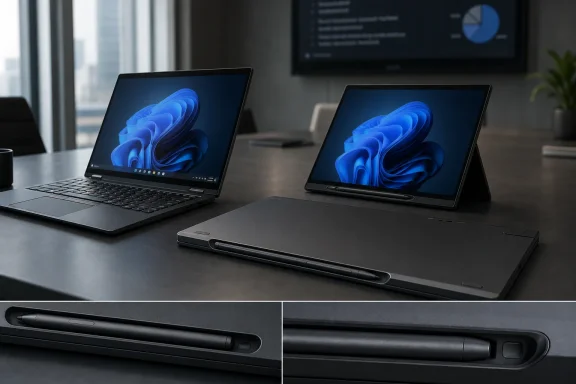 Lenovo Finally Gives the ThinkPad Pen a Home Again
For years, the ThinkPad Yoga line understood something many detachable and convertible PCs still treat as optional: if a pen is part of the computer’s identity, it has to live with the computer. Not in a bag pocket. Not stuck to the lid by hope and magnets. Not forgotten on a desk after a meeting. With the ThinkPad X1 2-in-1 Gen 11, Lenovo is returning to that old logic, even if the execution has changed.The new model’s recessed magnetic garage is a cleaner answer than the side-clinging arrangement seen on the ThinkPad X1 2-in-1 Gen 10 and similar designs. When the Slim Pen 2 is docked, it sits nearly flush with the system rather than advertising itself as a detachable accessory waiting to be knocked loose. For anyone who has carried a magnetic pen through airport security, a conference room, or the inside of a backpack, that matters.
It also fits the larger redesign story. The Gen 11 is not merely a processor refresh dressed up as a new machine; it arrives with a visual and functional chassis update after Lenovo had let the previous design carry over. Notebookcheck’s review frames the system as Lenovo’s most compelling recent professional convertible, while university IT testing has similarly described the revised case as an iterative but meaningful move.
Yet the pen garage is the kind of feature that becomes more complicated the moment it succeeds. A secure slot demands a smaller pen. A smaller pen changes the ergonomics. A neater convertible becomes, for some users, a slightly worse writing instrument.
The Old Magnetic Trick Was Always a Compromise
The previous approach had an appealing simplicity. Attach the pen magnetically to the side or lid, let the user grab it quickly, and avoid carving a slot into an already thin chassis. It is the same basic idea Microsoft popularized with Surface devices, and it works well enough when the device is sitting on a desk.The problem is motion. A business convertible is not a drafting tablet that lives in one place; it is a commuting machine, a meeting-room machine, a couch machine, and a laptop that often gets opened, folded, docked, undocked, and shoved into bags several times a day. A pen attached to an exposed edge is only secure until it meets the wrong sleeve seam, cable, notebook, or human hand.
That makes the Gen 11’s recessed design immediately persuasive. It turns the pen from an external passenger into part of the machine’s body. The visual difference is modest, but the practical difference is obvious: the stylus has a home, and that home is less likely to be disturbed by ordinary handling.
This is exactly the kind of design choice that tends to be underappreciated in spec-sheet comparisons. A processor generation, an OLED option, or a battery capacity figure is easy to rank. “Will the pen still be there when I arrive?” is harder to benchmark, but for the people who annotate PDFs, mark up screenshots, sketch diagrams, or teach from a convertible, it can be the difference between using the feature and abandoning it.
The Slim Pen Solves Storage by Making the Tool Smaller
The catch is right there in the name: Slim Pen 2. To fit into a near-flush recess, the stylus has to be thinner than the older Yoga Pen Lenovo shipped with the Gen 10. That is not a trivial trade-off. Pen comfort is not about luxury; it is about control, fatigue, and whether the device feels like an instrument or a compromise.Thin styli are easier to store and harder to love. They can feel precise for quick taps and brief annotations, but extended handwriting or drawing often benefits from a wider barrel. Anyone who has moved from a hotel ballpoint to a decent mechanical pencil, or from a tiny emergency stylus to a Surface Pen, understands the difference immediately.
Notebookcheck’s concern is therefore not nitpicking. Users with larger hands, or users who spend real time writing in OneNote, Whiteboard, Drawboard PDF, Photoshop, Concepts, or other pen-first apps, may notice the smaller diameter more than they notice the cleaner docking. The pen is more available, but potentially less comfortable once it is in use.
That is the awkward geometry of convertible design. If the stylus is big enough to feel good, it becomes difficult to hide. If it is small enough to disappear into the chassis, it risks feeling like an accessory designed around the laptop’s needs rather than the writer’s hand.
Compatibility Is Where Elegance Becomes Annoyance
The other problem is less tactile and more administrative: the recessed charging bay works with the Slim Pen 2, not the Yoga Pen that shipped with the previous generation. That is understandable from an engineering standpoint. A physical garage is not just a software compatibility layer; it is a shaped, powered, magnet-aligned space.But from a buyer’s standpoint, this is where Lenovo’s pen ecosystem starts to feel crowded. The company has used Yoga Pen, Slim Pen, Precision Pen, ThinkPad Pen Pro, and other stylus names across overlapping product families, generations, and digitizer implementations. Some charge by USB-C. Some charge in-device. Some magnetically attach but do not garage. Some work electrically but do not fit physically. Some are “compatible” in the sense that they can write on the screen but not in the sense that they can live with the machine.
For individual buyers, that creates a replacement headache. Lose the Gen 11 pen and you are not merely shopping for “a Lenovo pen”; you are shopping for the right pen for the right chassis. For enterprise IT, the issue scales into procurement, spares, support scripts, and confused help-desk tickets.
This is not unique to Lenovo. The Windows pen market has long been messy because “stylus support” can mean active digitizer protocols, Bluetooth shortcuts, pressure sensitivity, tilt support, charging compatibility, magnetic attachment, garage fit, and vendor-specific software integration. But Lenovo’s own ThinkPad branding raises expectations. A ThinkPad accessory should feel boringly dependable, not like a small compatibility puzzle.
Business Convertibles Live or Die on the Boring Details
The ThinkPad X1 2-in-1 Gen 11 is aimed at a market that does not buy convertibles merely because they can rotate. Business users want the laptop mode to feel like a proper laptop, the tablet mode to be available when needed, the display to survive fingerprints and pen input, and the accessories to disappear into the workflow. The pen garage is exactly the kind of feature that can make the 2-in-1 premise credible.That matters because many convertibles end up being laptops with a party trick. The hinge rotates, the screen accepts touch, and the marketing photos show somebody drawing a flowchart. In real offices, the pen is often missing, dead, uncomfortable, unsupported by the application being used, or simply too annoying to retrieve.
An onboard charging recess attacks several of those failure points at once. The pen is stored with the device. It is charged when docked. It is less visually intrusive. It reduces the likelihood that the stylus becomes another item in the drawer of lost USB dongles and forgotten adapters.
But the same feature also narrows the accessory path. Lenovo has traded openness of physical form for reliability of storage. That is probably the right trade for many corporate fleets, especially where the pen is occasionally useful rather than central to the user’s job. It is less obviously right for artists, heavy note-takers, educators, engineers, and anyone who treats pen input as a primary mode rather than a convenience.
The ThinkPad’s Pen Problem Is Really a Windows PC Problem
The broader issue is that Windows convertibles still have not settled on a single, obvious pen model. Apple’s iPad line has its own frustrations, but the Apple Pencil is at least culturally legible: buyers generally understand which generation they need, how it attaches, and what kind of experience to expect. Microsoft’s Surface Pen family has also become a recognizable reference point, even as Surface hardware has evolved.The Windows OEM world is more fragmented. Lenovo, HP, Dell, Asus, and others all sell machines with pen support, but the details shift across families and years. A user can know that a laptop has a touchscreen and still not know whether it supports active pen input, whether the pen is included, whether it charges onboard, whether it magnetically attaches, or whether the writing experience is good enough for real work.
That ambiguity hurts the category. A 2-in-1 is supposed to promise flexibility, but flexibility depends on trust. If users have to research pen compatibility like they are buying RAM for a workstation, the magic wears off quickly.
Lenovo’s recessed garage is therefore both a solution and a symptom. It solves the immediate problem of carrying the pen, but it does so by making the pen more model-specific. The physical integration is welcome. The ecosystem fragmentation remains.
The Gen 11 Redesign Shows Lenovo Knows the Details Matter
It would be unfair to treat the pen garage as a design failure. On the contrary, it is evidence that Lenovo is paying attention to the practical irritations that separate a good convertible from a merely flexible laptop. The ThinkPad X1 2-in-1 Gen 11 appears to be a more deliberate machine than its immediate predecessor, with a refreshed chassis, updated Intel platform, and a design language that reviewers have described as more professional.The shift to a recessed pen also restores some of the old ThinkPad Yoga spirit. Earlier garaged stylus designs were not always comfortable either, but they were dependable. You knew where the pen was. You knew it belonged to the machine. You knew it was not just a magnetized afterthought.
The difference is that today’s premium convertibles are thinner, sleeker, and more constrained by modern industrial-design expectations. There is less room for a fat stylus silo, and fewer buyers will tolerate a chunky edge just to improve pen grip. The laptop has to look premium before it can ask anyone to care about how the stylus feels.
That is the tension Lenovo is navigating. The Gen 11’s garage is the kind of feature that photographs well, travels well, and probably reduces lost-pen complaints. Whether it writes well enough depends on the user’s hand, workload, and tolerance for thin tools.
The Best Buyers Will Test the Pen, Not Just the Laptop
Most laptop reviews still privilege the machine over the accessory. That makes sense: CPU performance, battery life, display quality, keyboard feel, thermals, fan noise, ports, webcam quality, and repairability all matter. But for a convertible, the pen is not a bonus item. It is part of the device’s argument for existing.That is why the Gen 11 should be tested in the way buyers actually use it. Not just with a few diagonal lines in a sketch app, but with a full meeting’s worth of notes, several marked-up PDFs, a whiteboard session, and the awkward hand positions that come from writing on a 14-inch convertible folded into tablet mode. The slim pen may be perfectly acceptable for quick work. It may also become tiring after 30 minutes.
This is especially important because the ThinkPad X1 2-in-1 sits in a premium tier. Buyers are not choosing between bargain-bin compromises. They are choosing among high-end business laptops, Surface devices, iPads with keyboards, and other convertibles from HP and Dell. At that price level, the pen experience is not a side note.
Lenovo’s design will likely satisfy the user who wants a pen available for signatures, annotations, diagrams, and the occasional handwritten note. It may disappoint the user who wants the pen to feel like a primary creative or note-taking instrument. Those are different customers, and the Gen 11’s recessed garage is optimized more for the first than the second.
The Small Stylus Tells IT More Than the Spec Sheet Does
The most useful lesson from the ThinkPad X1 2-in-1 Gen 11 is not that the Slim Pen 2 is good or bad. It is that every convertible design makes a bet about which inconvenience users will tolerate. Lenovo has decided that losing, dislodging, or separately charging the pen is a bigger problem than making the pen slimmer.For many organizations, that bet will be correct. IT departments generally prefer accessories that stay attached, charge predictably, and reduce support incidents. A slightly less comfortable pen may be acceptable if it means fewer replacements and fewer users showing up to meetings with dead styli.
The calculus changes for specialist workflows. Designers, lecturers, researchers, field inspectors, healthcare workers, and heavy annotators may care more about grip and long-session comfort than flush storage. In those environments, the “best” pen is not the one that disappears most cleanly into the laptop; it is the one the user still wants to hold after an hour.
This is where procurement should resist the temptation to treat all pen-enabled convertibles as equivalent. A pilot group should include the people who actually use ink input, not just the executives who like the idea of it. The difference between a clever pen garage and a comfortable pen can be invisible in a product brief but obvious by the end of one workday.
The Buying Signal Hidden in Lenovo’s Pen Garage
Lenovo’s new design is worth taking seriously precisely because it is not a gimmick. It is a practical improvement with a practical cost, and that makes it more interesting than another round of vague “AI PC” positioning. The lesson for buyers is straightforward enough, but it deserves to be stated before the spec sheet takes over.- The ThinkPad X1 2-in-1 Gen 11’s recessed magnetic pen garage should be more reliable for travel than the exposed magnetic edge attachment used on recent models.
- The Slim Pen 2’s smaller diameter is the price Lenovo pays for making the stylus sit neatly and securely in the chassis.
- The older Yoga Pen used with the Gen 10 should not be assumed to fit or charge in the Gen 11’s recessed bay.
- Buyers who use a stylus only occasionally are likely to benefit most from the new design because the pen is easier to keep with the machine.
- Heavy note-takers and artists should test the Slim Pen 2 in person before treating the Gen 11 as a direct ergonomic upgrade.
- IT departments should track pen compatibility by exact model and generation rather than assuming Lenovo’s pen accessories are interchangeable.
References
- Primary source: Notebookcheck
Published: 2026-06-29T21:17:10.622150
ThinkPad X1 2-in-1 Gen 11 pen charging is neat, but the drawbacks are evident - Notebookcheck News
The on-board magnetic garage is more reliable than having the pen hang along the edges of the chassis, but the overall smaller diameter is an unfortunate trade-off. www.notebookcheck.net
- Related coverage: download.lenovo.com
Lenovo Yoga Pen of ThinkPad X1 2-in-1 10th Gen (2025)
Learn how to use Lenovo Yoga Pen of ThinkPad X1 2-in-1 10th Gen (2025).download.lenovo.com - Related coverage: isc.upenn.edu
- Related coverage: psref.lenovo.com
- Related coverage: lenovo.com
- Related coverage: notebookcheck.com
Heimatloser Digitizer-Pen findet neue Bleibe: Convertible Lenovo ThinkPad X1 2-in-1 Gen 11 jetzt mit Intel Panther Lake - Notebookcheck News
Convertible-Laptops mit Stift und Touch haben eine lange Tradition in der ThinkPad-Serie. Bei älteren Modellen war der Digitizer-Stift immer in das Notebook eingebettet - aber das war beim X1 2-in-1 Gen 9 und Gen 10 nicht der Fall. Mit dem neuen Lenovo ThinkPad X1 2-in-1 Gen 11 hat Lenovo einen... www.notebookcheck.com
- Related coverage: notebookcheck-cn.com
ThinkPad X1 2-in-1 第11代评测:联想迄今为止最具吸引力的二合一笔记本 - Notebookcheck CN
今年,搭载Panther Lake处理器并焕新设计的14英寸ThinkPad X1重磅回归。这些细微的改动累积起来,带来了明显更佳的用户体验,尤其在不同配置下表现更为显著。 www.notebookcheck-cn.com
- Related coverage: laptopscheck.com
Lenovo ThinkPad X1 2-in-1 Gen 11 Aura Edition Launches: A Premium Business Convertible with Intel Core Ultra Power
Following its showcase at CES 2026 in January, Lenovo has officially launched the ThinkPad X1 2-in-1 Gen 11 Aura Edition, bringing significant upgradewww.laptopscheck.com
- Related coverage: notebookcheck.biz
Le stylo sans domicile fixe trouve un nouvel endroit où vivre : Lenovo ThinkPad X1 2-en-1 Gen 11, plus léger, désormais équipé d'Intel Panther Lake - NotebookCheck.biz News
Les ordinateurs portables convertibles dotés d'un stylet et d'un écran tactile ont une longue tradition dans la gamme ThinkPad. Sur les modèles plus anciens, le stylet numériseur était toujours intégré à l'ordinateur portable, ce qui n'était pas le cas sur les X1 2-en-1 Gen 9... www.notebookcheck.biz
