

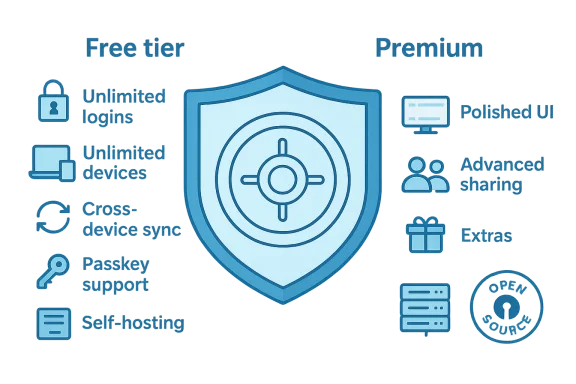
If you’re paying a yearly subscription for a password manager mainly because it looks nicer, it’s time to ask whether that polished interface is worth the ongoing cost — especially when a fully capable, open-source alternative exists that covers the essentials for free. Bitwarden’s free tier now delivers the core security and convenience most users need: unlimited logins, unlimited devices, cross-device sync, passkey management, and the option to self-host. For many people, that means the premium you pay for a prettier UI is paying for cosmetics, not materially better protection.
Password managers exist to solve two core problems: help you create unique, strong credentials for every service, and make those credentials available across your devices without forcing you to memorize them. Over the last decade a handful of commercial products have dominated headlines — names like 1Password, Dashlane, and Keeper — typically offering slick UIs, marketing-heavy bundles, and tiered features behind subscription walls.
Bitwarden entered the market with a different value proposition: open source, auditable, and fundamentally freemium. That model forces a practical question for consumers: what do you actually use a password manager for day to day? If your answer is “store logins, auto-fill credentials, and sync between phone and laptop,” the free tier of a service like Bitwarden is often enough.
This article unpacks what Bitwarden offers today, where paid managers still lead, and a clear, practical playbook if you want to switch (or self-host). Wherever I correct or update claims from other articles, I’ll be explicit about dates and numbers so you can verify against vendor documentation yourself. All price and feature details below are verified as of February 21, 2026.
High-level self-hosting checklist:
That said, paid managers still buy a superior user experience and certain convenience features that matter to less‑technical households and businesses. If silky UX and family admin controls are worth the subscription to you, continuing to pay is a reasonable choice. But before you renew a yearly fee out of habit, evaluate exactly what you use: for many users, switching to a no-cost, open, and auditable platform like Bitwarden will protect the essential assets — and save money in the wallet.
Source: MakeUseOf You're overpaying for a password manager — this free one does everything you need
 Background / Overview
Password managers exist to solve two core problems: help you create unique, strong credentials for every service, and make those credentials available across your devices without forcing you to memorize them. Over the last decade a handful of commercial products have dominated headlines — names like 1Password, Dashlane, and Keeper — typically offering slick UIs, marketing-heavy bundles, and tiered features behind subscription walls.Bitwarden entered the market with a different value proposition: open source, auditable, and fundamentally freemium. That model forces a practical question for consumers: what do you actually use a password manager for day to day? If your answer is “store logins, auto-fill credentials, and sync between phone and laptop,” the free tier of a service like Bitwarden is often enough.
This article unpacks what Bitwarden offers today, where paid managers still lead, and a clear, practical playbook if you want to switch (or self-host). Wherever I correct or update claims from other articles, I’ll be explicit about dates and numbers so you can verify against vendor documentation yourself. All price and feature details below are verified as of February 21, 2026.
Why open source matters — and why it isn’t a silver bullet
Transparency over obscurity
Open-source code means the implementation you run can be inspected, audited, and replicated. For a password manager, that’s a powerful property: cryptography and end-to-end encryption are easier to trust when the code is visible to security researchers and the wider community. Bitwarden publishes its code on public repositories and undergoes regular third-party security audits. That combination — open source plus independent audits — aligns with the cryptographic principle that security should depend on secret keys, not secret algorithms.Faster vulnerability discovery, but also different responsibility
Open-source projects tend to surface vulnerabilities faster because more eyes can review the code, but they also depend on community and vendor responsiveness to patch and distribute fixes. That means open-source does not equal invulnerability. Attack surface, update cadence, and the vendor’s operational security practices remain crucial.What open source buys you practically
- Confidence that the client-side cryptography actually performs the transformations claimed.
- The ability to host your own server or run forks if you prefer full physical control of your data.
- Community tooling and third-party integrations that can extend features faster than some closed-source competitors.
What Bitwarden’s free tier actually includes (as of February 21, 2026)
Bitwarden’s free plan covers the features most average users need. Key items included:- Unlimited passwords and items — store as many logins, notes, cards, and identities as you like.
- Unlimited devices — connect mobile and desktop apps and browser extensions across all your hardware.
- Cross-device sync — changes on one device replicate to others automatically.
- Passkey management and usage — Bitwarden supports passkeys and can store and use FIDO2/WebAuthn credentials as part of the free tier.
- Password generator — create randomized, strong passwords on demand.
- Secure notes and Bitwarden Send — encrypted secure notes and one-off secure sharing.
- Self-hosting option — you can run Bitwarden’s stack on your own servers using supported deployment scripts.
- Free sharing with a single other user — convenient for simple sharing without upgrading.
Security posture: technical facts you can verify
Bitwarden uses industry-standard cryptography and a zero-knowledge design. Practically important points:- Encryption: Vault data is end-to-end encrypted using AES-256 (with HMAC for authentication), with cryptographic key derivation via PBKDF2-SHA256 or Argon2id depending on settings. Encryption and decryption occur locally on your device; Bitwarden servers store only ciphertext.
- Audits: Bitwarden undergoes periodic third-party audits and publishes summaries of these assessments. Regular audits by recognized security firms and an active bug bounty program are part of the trust model.
- License nuance: While many Bitwarden components are fully open source, some server-side aspects and enterprise features follow source-available or special licensing. If you’re evaluating license permissiveness for commercial forks, read the project’s license documents carefully.
Where paid password managers still outperform Bitwarden
1Password, Dashlane, and other paid managers justify their price with quality-of-life features and polish. If the user experience is your primary criterion, paid options win in the following areas:- Refined user interface and discoverability: Search, organization, and multi-step autofill are tuned to reduce friction when you have hundreds of entries. The experience is often more “invisible” — the manager helps you log in without thinking about it.
- Advanced sharing and family/team controls: Enterprise-level roles, granular sharing, and admin workflows are easier and battle-tested in paid suites.
- Bundled extras: Dashlane’s VPN bundling or 1Password’s Travel Mode and specific family-sharing workflows can be decisive for certain users.
- Integrated support and SLA: Paid customers get prioritized support channels, which matters for businesses or less-technical families.
The numbers: price comparison snapshot (verified February 21, 2026)
- Bitwarden (Free): $0 for core features; premium tier with integrated authenticator and additional capabilities is priced at about $1.65/month billed annually (~$19.80/year).
- 1Password (Individual): roughly $2.99/month billed annually (~$35.88/year).
- Dashlane (Individual/Premium): often positioned at roughly $4.99/month billed annually (~$59.88/year) since its free tier was discontinued.
- RoboForm (Individual): many plans advertise roughly $23.88/year for full sync + devices.
When you should still consider paying for a manager
- You want the absolute smoothest, most frictionless daily experience across a very large set of credentials.
- Your household or organization needs advanced sharing, compliance reporting, or admin controls that are only available in paid tiers.
- You value vendor-operated extras like VPNs, identity theft protection, or concierge migration services bundled into the paid plan.
- You want convenience-focused features like built-in password change automation (available in some paid plans).
Real-world UX: the tradeoff between function and polish
Bitwarden’s interface is intentionally utilitarian: clear, functional, and sometimes less forgiving than premium rivals when you’re managing hundreds of entries. Common UX observations:- Autofill works reliably in most cases, but complex multi-page login flows can require manual selection.
- Browsing and tagging large vaults may feel less fluid compared with highly-polished UIs.
- Setup and edge-case recovery sometimes require a more technical comfort level (or reading explicit documentation).
Self-hosting: why it matters and a practical primer
Self-hosting a password manager is the single biggest privacy/sovereignty advantage you can exercise: you control the physical servers, region, and backup policies. Bitwarden supports self-hosting and publishes tooling and a deployment script that simplifies spinning up the stack via Docker.High-level self-hosting checklist:
- Provision a reliable host: a VPS with regular backups, static IP or dynamic DNS, and TLS (Let’s Encrypt or commercial cert).
- Use the official deployment scripts or vetted community projects to install the server stack (API, database, attachments service, etc.).
- Harden the host: enable automatic security updates, configure strong firewall rules, and set up automated backups with encrypted storage.
- Renew and monitor TLS certificates and external endpoints.
- Test updates in a staging environment before applying to production.
- Consider using a community implementation (for example, lightweight forks exist) only if you understand the differences and license implications.
Migration: switching from a paid manager (1Password) to Bitwarden — step-by-step
If you decide to switch, here’s a concise migration path that minimizes risk.- Prepare
- Pick a quiet block of time and ensure your devices have current backups.
- Disable browser auto-fill to avoid race conditions during migration.
- Export from 1Password
- Use the official 1Password app export feature (1Password 8 or 1Password 7 instructions differ).
- Export to the secure 1PUX format or CSV. Note: CSV is plaintext — handle it carefully.
- Store the exported file in a local, offline, encrypted location temporarily.
- Create your Bitwarden account
- Set a strong master password (long, unique, and memorable) and enable multi-factor authentication for the account itself.
- If planning to self-host, deploy your instance and verify the web vault is reachable from the machines you’ll use.
- Import into Bitwarden
- In Bitwarden’s web vault, open Tools → Import Data.
- Select the 1Password import format (or CSV if you exported CSV).
- Import to your personal vault; check for duplicates and completeness.
- Manually recreate any items that didn’t survive the import (attachments or complex custom fields).
- Securely delete the exported file
- After successful import, permanently delete the exported file from all locations (trash, cloud, USB) and empty recoverable storage.
- Reconfigure 2FA and passkeys
- If you used TOTP codes stored in your old manager, confirm whether those codes imported. If not, re-register MFA where possible.
- If you used passkeys, follow platform-specific instructions to migrate or re-register passkeys where needed.
- Test thoroughly
- Log in to a selection of important services using Bitwarden auto-fill.
- Keep 1Password active but offline until you’re comfortable; maintain a backup of the old vault for a short window in a secure location.
- Exported files are unencrypted; treat them like plaintext secrets.
- Some manager-specific fields (security questions, attachments, passkeys) may require manual recreation.
- If your 1Password account uses SSO or enterprise-managed keys, export may be restricted — check administrative policies.
Risks and mitigations — what you must still protect against
Bitwarden’s free tier protects your vault cryptographically, but no product is a silver bullet. Key risks to manage:- Weak master password: your master password is the final gate. Use a long, unique passphrase and enable account 2FA for the vault itself.
- Phishing and social engineering: password managers help, but do not eliminate targeted phishing that captures session tokens or prompts you to approve a malicious push.
- Device compromise: if an attacker gets system-level access to a device, they can potentially extract unlocked vault data or key material; use disk encryption, up-to-date OS patches, and reputable anti-malware tools.
- Unsafe export handling: never store exported CSVs in cloud storage or email. Remove them immediately after import and verify secure deletion.
- Autofill complexity: browser autofill can be manipulated in edge cases by malicious frames or website quirks. Keep autofill disabled for sensitive sites where you prefer manual paste or use of a hardware security key.
- Operational burden for self-hosting: if you self-host, you’re responsible for updates, backups, and incident response.
Alternatives to consider
- KeePass (and its modern forks): fully offline, free, and open-source. Great for users who prefer manual syncing (e.g., via an encrypted cloud folder they control). Requires more hands-on management and lacks native cross-device autofill without third-party bridges.
- Proton Pass: an open-source, privacy-focused competitor that emphasizes total privacy and integrated features; may appeal to users already within that ecosystem.
- Commercial options: if your priority is polish, family-friendly sharing, or bundled extras, 1Password and Dashlane remain strong contenders.
Practical recommendation: what to do next
- Inventory your needs: do you want control/self-hosting, or a frictionless UX for family members?
- If your needs are basic (auto-fill, password generation, cross-device sync), try Bitwarden’s free tier first — set it up, migrate a few critical logins, and evaluate daily use for a week.
- For advanced features like integrated TOTP, emergency access, or enterprise admin controls, evaluate premium tiers using free trials and weigh cost vs benefit.
- Harden your master account: set a long passphrase, enable MFA for the vault, and consider a hardware security key as the next-level protection.
- If control and sovereignty matter, plan a staged self-hosting deployment: dabble on a small VM or container host, test backups and restores, and only migrate your main vault after you’re comfortable with update processes.
Conclusion
The choice of a password manager is rarely binary between “secure” and “not secure.” It’s a balance among security architecture, usability, and operational preferences. Bitwarden’s free tier is the most compelling argument today that you do not need to pay for core cryptographic protections and basic cross-device convenience. Its open-source codebase, audit history, robust encryption, passkey support, and self-hosting option make it a strong choice for privacy-conscious users and everyday people alike.That said, paid managers still buy a superior user experience and certain convenience features that matter to less‑technical households and businesses. If silky UX and family admin controls are worth the subscription to you, continuing to pay is a reasonable choice. But before you renew a yearly fee out of habit, evaluate exactly what you use: for many users, switching to a no-cost, open, and auditable platform like Bitwarden will protect the essential assets — and save money in the wallet.
Source: MakeUseOf You're overpaying for a password manager — this free one does everything you need
