

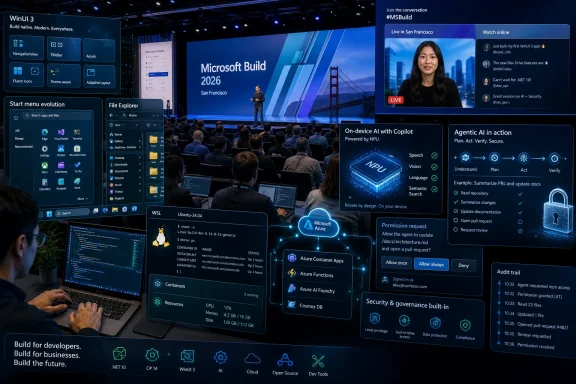
Microsoft Build 2026 will run June 2–3 at Fort Mason Center in San Francisco and online, with Satya Nadella opening a developer conference that Microsoft is framing around AI, enterprise tooling, and hands-on technical sessions rather than a Windows 12 launch. The useful answer is not that Windows 12 is secretly arriving there. It is that Build may show what Microsoft wants the next Windows platform to become before the company dares attach a new version number to it. For Windows users and IT departments, that distinction matters more than the branding.
Windows 12 has become the operating system rumor that refuses to die because Microsoft has left just enough silence around the future of Windows to make speculation profitable. The company has not announced Windows 12, has not published a Windows 12 roadmap, and has not told developers to prepare for a 2026 platform break. Yet every hint about AI PCs, NPUs, Copilot, native app work, or Start menu changes is quickly pulled into the same gravitational field.
That is not entirely the fault of rumor sites. Windows 11 is now old enough to feel familiar but still unloved enough that many users are emotionally ready for a reset. Microsoft has also trained the market to expect Windows to move in eras: Windows 7 as repair, Windows 8 as rupture, Windows 10 as consolidation, Windows 11 as modernization. The next label is therefore treated less as a product and more as a referendum.
The problem is that the best available reporting points away from a 2026 Windows 12 release. The widely circulated claims about “Hudson Valley Next,” CorePC, subscription Windows, and hard NPU requirements appear to have mixed old internal concepts, mistranslated sourcing, and AI-generated slop into a single viral package. Windows Central’s Zac Bowden has since reported that Microsoft is not planning to ship Windows 12 this year, and that Hudson Valley and CorePC belong to earlier internal Windows planning rather than an imminent consumer OS.
That leaves Build 2026 in an awkward but revealing position. Microsoft probably will not use the event to unveil Windows 12. But if the company wants developers to build for the Windows that comes after Windows 11, Build is exactly where it would start laying the track.
That era is gone. Modern Build is an AI, Azure, Microsoft 365, GitHub, and enterprise developer conference with Windows as one important surface among many. The center of gravity has moved from “write an app for the PC” to “build software that runs across cloud services, local devices, managed desktops, and agentic workflows.”
That does not make Windows less important. It makes Windows more revealing when it appears. A Windows session at Build now has to justify itself inside Microsoft’s broader AI-and-cloud narrative, which means the company tends to talk about Windows when it has a platform-level story to tell rather than a cosmetic feature to show.
The 2026 session mix described by Microsoft and reported by TechRadar points to that sort of story. Native Windows development, on-device AI, Windows AI Foundry, WSL, Windows 365, agent security, and developer tooling all sit beneath the consumer-visible layer of Start menus and wallpapers. These are not the bits that make a flashy retail launch. They are the bits that decide what a future Windows launch can credibly promise.
That is why the “no Windows 12 in 2026” reporting is not a dead end. It may be the most important constraint on the whole story. Microsoft cannot credibly launch a new Windows while users are still complaining that Windows 11 feels slower, less coherent, more intrusive, and more web-wrapped than it should.
The reported K2 push looks like an attempt to reset the terms. A rebuilt Start menu, faster File Explorer components, native app work, and a retreat from unsolicited AI integrations are not revolutionary on their own. Together, they suggest Microsoft understands that Windows has a trust problem.
That trust problem is different from the usual upgrade friction. Windows users can tolerate change when it feels like progress. They become hostile when change feels like telemetry, advertising, account nudges, or AI features inserted where local control used to be.
Users noticed. The new Outlook, Teams transitions, settings surfaces, widgets, Copilot experiences, and assorted WebView2-based interfaces trained many Windows enthusiasts to associate Microsoft’s modern app strategy with sluggishness and inconsistency. The irony was painful: the company that owns the platform often appeared less committed to native Windows performance than independent developers shipping lean Win32 tools.
That is why Rudy Huyn’s effort to build “100% native” Windows apps matters. It is a signal that Microsoft knows web wrappers have become a reputational liability. It also aligns with Davuluri’s statement that the Start menu is being rebuilt using WinUI to reduce latency.
If Microsoft uses Build 2026 to turn these individual moves into a coherent platform pitch, it will be one of the clearest indicators of where Windows is going. A future Windows cannot be an AI operating system if its basic shell and inbox apps feel like a browser wearing a Windows costume. The AI layer will only be accepted if the local platform underneath feels fast, native, and controlled.
The developer tooling matters here because Microsoft has repeatedly struggled to make its preferred Windows app frameworks feel inevitable. UWP never replaced Win32. WinUI has promise but not ubiquity. The Windows App SDK has often felt more like a strategy than a settled developer reality.
Build gives Microsoft a chance to say something sharper: this is the stack for modern Windows apps, here are the templates, here is the command-line workflow, here is how Copilot and Claude Code can help generate proper WinUI interfaces, and here is why the company itself is committing to the same model. That would not be Windows 12. It would be more useful.
But a hard Windows 12 install requirement is a different claim entirely. Microsoft learned from Windows 11’s TPM and CPU cutoff that hardware requirements can define the public narrative of an operating system before users even see the software. A future Windows that simply locks out large numbers of recent PCs in order to privilege AI features would invite a backlash Microsoft does not need.
The more likely model is tiering. Basic Windows functionality continues to run broadly, while certain AI features require newer silicon. That is already how much of the PC market works. Games have minimum and recommended specs; creative apps expose GPU-accelerated features when hardware permits; Windows itself can enable or disable experiences based on security and device capability.
For developers, the real issue is not whether a fictional Windows 12 requires an NPU. It is how Microsoft expects applications to behave across a mixed fleet. Some machines will have capable NPUs, some will have GPUs better suited to inference, some will route work to the cloud, and many enterprise PCs will sit somewhere awkwardly in between.
That is where Windows AI Foundry becomes strategically important. If Microsoft can provide a sane abstraction layer for local model execution, fallback paths, model deployment, and hardware-aware performance, developers get something more valuable than a marketing label. They get a way to build AI features without writing separate logic for every chip vendor, accelerator class, and deployment policy.
That is why Build sessions around safe, bounded agent actions on Windows are worth watching. If Microsoft wants AI agents to become a normal part of desktop computing, it has to define what those agents can see, what they can touch, how they request permission, how actions are logged, and how administrators can constrain them. Otherwise, Windows risks recreating the worst parts of macro malware, browser extension overreach, and remote-control software in a more fashionable wrapper.
The challenge is that useful agents need context. They may need to inspect a document, summarize a screen, move data between apps, or automate a workflow across legacy software that was never designed for AI. But every additional permission turns into a possible exfiltration path, social-engineering vector, or compliance problem.
Enterprise IT will not accept hand-waving here. Admins need policy controls, identity integration, audit trails, and predictable failure modes. Security teams need to know whether an agent is acting as the user, as an app, as a service, or as some new hybrid principal that breaks existing assumptions.
A future Windows release branded around AI would live or die on this architecture. The operating system can survive a gimmicky Copilot sidebar. It cannot survive a wave of agents that make endpoint security harder while claiming to make work easier.
The Build 2026 lab on deploying and scaling agents with Windows 365 points directly at that future. Microsoft is not merely saying that agents can run on Windows. It is saying they can operate inside preconfigured computing environments with governance and enterprise controls built in.
That matters because the consumer PC and the enterprise desktop are diverging. Enthusiasts want local control, performance, and fewer nags. Enterprises want manageability, compliance, predictable support, and now AI productivity without data leakage. Microsoft’s answer may not be one Windows experience, but a set of Windows deployment modes that share a core platform while exposing different degrees of agency and control.
Windows 365 gives Microsoft room to move faster because the blast radius is smaller. If an agent workflow misbehaves in a managed Cloud PC environment, administrators have more levers. If the same workflow ships broadly to unmanaged desktops, the support and security consequences become messier.
This is why Build’s enterprise focus should not be dismissed as irrelevant to Windows enthusiasts. Features often enter Windows through enterprise manageability, developer tooling, or cloud-adjacent scenarios before they become consumer-facing defaults. If you want to understand where Windows is going, watch where Microsoft gives IT admins the first switches.
Build 2026’s WSL sessions matter because cross-platform development is now normal, not niche. A modern Windows developer may use Visual Studio Code, PowerShell, Ubuntu under WSL, Docker, Node, Python, Rust, GitHub Copilot, Azure services, and Windows Terminal in the same afternoon. The platform that wins is the one that reduces friction between those worlds.
The reported improvements around file access, networking, localhost reliability, onboarding, and enterprise controls are not glamorous. They are exactly the kind of improvements that determine whether Windows feels like a first-class development environment or a compromise. Developers forgive missing polish more easily than they forgive slow file I/O and broken networking.
Open-sourcing much of WSL at Build 2025 also changed the tone. Microsoft is no longer asking developers simply to trust a black box that bridges Windows and Linux. It is inviting more scrutiny and potentially more contribution, while keeping Windows positioned as the place where multiple toolchains can coexist.
That positioning may be central to any future Windows release. The next Windows does not need to beat Linux at being Linux. It needs to be the best machine for developers who live across Windows apps, Linux tooling, cloud deployment, and AI-assisted coding.
That is why 2027 keeps appearing as the more realistic window for a major Windows announcement. It gives Microsoft time to stabilize Windows 11, mature Copilot+ PCs, expand the AI developer stack, and avoid launching a new OS while the Windows 11 quality conversation is still unresolved. It also gives enterprises more runway to understand what AI hardware requirements mean in practice.
The risk for Microsoft is that waiting too long lets the rumor economy define Windows 12 before the company does. Every ambiguous AI PC statement becomes a fake spec. Every internal codename becomes a supposed SKU. Every subscription feature becomes proof that Windows itself is going behind a paywall.
Microsoft can reduce that uncertainty without announcing a product. It can speak clearly at Build about developer baselines, supported AI APIs, hardware fallback models, native app strategy, and security boundaries. Those are the answers IT pros need. The name can come later.
The Windows audience in particular has become allergic to abstraction. Users want to know whether File Explorer is faster, whether the Start menu is less annoying, whether Copilot can be removed or controlled, whether local AI features respect privacy, and whether native apps will stop losing to web wrappers on Microsoft’s own platform. Developers want to know which APIs are stable, which frameworks Microsoft actually uses, and how to ship software that will not be stranded by another platform pivot.
That is the test for Build. If Microsoft talks about Windows only as a canvas for AI experiences, it will reinforce the suspicion that the PC is being subordinated to a cloud subscription strategy. If it talks about Windows as a performance-sensitive, security-bound, developer-friendly local platform that can also run AI well, it has a stronger case.
The difference is not semantic. It is the difference between AI as an overlay and AI as a platform capability. Windows users have seen enough overlays.
 Microsoft Is Letting the Windows 12 Vacuum Fill Itself
Windows 12 has become the operating system rumor that refuses to die because Microsoft has left just enough silence around the future of Windows to make speculation profitable. The company has not announced Windows 12, has not published a Windows 12 roadmap, and has not told developers to prepare for a 2026 platform break. Yet every hint about AI PCs, NPUs, Copilot, native app work, or Start menu changes is quickly pulled into the same gravitational field.That is not entirely the fault of rumor sites. Windows 11 is now old enough to feel familiar but still unloved enough that many users are emotionally ready for a reset. Microsoft has also trained the market to expect Windows to move in eras: Windows 7 as repair, Windows 8 as rupture, Windows 10 as consolidation, Windows 11 as modernization. The next label is therefore treated less as a product and more as a referendum.
The problem is that the best available reporting points away from a 2026 Windows 12 release. The widely circulated claims about “Hudson Valley Next,” CorePC, subscription Windows, and hard NPU requirements appear to have mixed old internal concepts, mistranslated sourcing, and AI-generated slop into a single viral package. Windows Central’s Zac Bowden has since reported that Microsoft is not planning to ship Windows 12 this year, and that Hudson Valley and CorePC belong to earlier internal Windows planning rather than an imminent consumer OS.
That leaves Build 2026 in an awkward but revealing position. Microsoft probably will not use the event to unveil Windows 12. But if the company wants developers to build for the Windows that comes after Windows 11, Build is exactly where it would start laying the track.
Build Is No Longer a Windows Show, Which Is Why Windows Signals Matter More
There was a time when Build was the Windows developer conference in all but name. Windows 8, Windows 8.1, the Universal Windows Platform, and the Windows 10 app model all used Build as a stage for platform ambition. Developers came to learn which APIs mattered, which UI frameworks Microsoft wanted blessed, and which old assumptions were about to become technical debt.That era is gone. Modern Build is an AI, Azure, Microsoft 365, GitHub, and enterprise developer conference with Windows as one important surface among many. The center of gravity has moved from “write an app for the PC” to “build software that runs across cloud services, local devices, managed desktops, and agentic workflows.”
That does not make Windows less important. It makes Windows more revealing when it appears. A Windows session at Build now has to justify itself inside Microsoft’s broader AI-and-cloud narrative, which means the company tends to talk about Windows when it has a platform-level story to tell rather than a cosmetic feature to show.
The 2026 session mix described by Microsoft and reported by TechRadar points to that sort of story. Native Windows development, on-device AI, Windows AI Foundry, WSL, Windows 365, agent security, and developer tooling all sit beneath the consumer-visible layer of Start menus and wallpapers. These are not the bits that make a flashy retail launch. They are the bits that decide what a future Windows launch can credibly promise.
The Real Windows 12 Preview May Be Windows 11 Getting Its House in Order
If Microsoft is serious about a future Windows release, the first thing it has to fix is Windows 11’s reputation. That is the unglamorous story behind the reported Windows K2 effort and Pavan Davuluri’s public emphasis on performance, reliability, taskbar customization, WinUI improvements, and reduced Copilot clutter. Before Microsoft can sell users on a new Windows, it has to convince them that the current Windows is no longer being used as a delivery mechanism for whatever internal priority won the quarter.That is why the “no Windows 12 in 2026” reporting is not a dead end. It may be the most important constraint on the whole story. Microsoft cannot credibly launch a new Windows while users are still complaining that Windows 11 feels slower, less coherent, more intrusive, and more web-wrapped than it should.
The reported K2 push looks like an attempt to reset the terms. A rebuilt Start menu, faster File Explorer components, native app work, and a retreat from unsolicited AI integrations are not revolutionary on their own. Together, they suggest Microsoft understands that Windows has a trust problem.
That trust problem is different from the usual upgrade friction. Windows users can tolerate change when it feels like progress. They become hostile when change feels like telemetry, advertising, account nudges, or AI features inserted where local control used to be.
Native Apps Are Microsoft’s Quiet Apology for the Web Wrapper Years
The most consequential Windows developer story heading into Build 2026 may not involve Windows 12 at all. It is Microsoft’s renewed push toward native Windows apps using WinUI 3 and the Windows App SDK. If that sounds like inside baseball, it is because Microsoft has spent years making native Windows development feel oddly secondary on its own operating system.Users noticed. The new Outlook, Teams transitions, settings surfaces, widgets, Copilot experiences, and assorted WebView2-based interfaces trained many Windows enthusiasts to associate Microsoft’s modern app strategy with sluggishness and inconsistency. The irony was painful: the company that owns the platform often appeared less committed to native Windows performance than independent developers shipping lean Win32 tools.
That is why Rudy Huyn’s effort to build “100% native” Windows apps matters. It is a signal that Microsoft knows web wrappers have become a reputational liability. It also aligns with Davuluri’s statement that the Start menu is being rebuilt using WinUI to reduce latency.
If Microsoft uses Build 2026 to turn these individual moves into a coherent platform pitch, it will be one of the clearest indicators of where Windows is going. A future Windows cannot be an AI operating system if its basic shell and inbox apps feel like a browser wearing a Windows costume. The AI layer will only be accepted if the local platform underneath feels fast, native, and controlled.
The developer tooling matters here because Microsoft has repeatedly struggled to make its preferred Windows app frameworks feel inevitable. UWP never replaced Win32. WinUI has promise but not ubiquity. The Windows App SDK has often felt more like a strategy than a settled developer reality.
Build gives Microsoft a chance to say something sharper: this is the stack for modern Windows apps, here are the templates, here is the command-line workflow, here is how Copilot and Claude Code can help generate proper WinUI interfaces, and here is why the company itself is committing to the same model. That would not be Windows 12. It would be more useful.
The NPU Requirement Is the Wrong Way to Read the AI PC Shift
The most overheated Windows 12 rumor is the claim that Microsoft will require an NPU with at least 40 TOPS for the next version of Windows. There is a kernel of plausibility buried inside the exaggeration. Copilot+ PCs already use that 40 TOPS class as a meaningful hardware threshold, and Microsoft clearly wants developers to think about local AI acceleration.But a hard Windows 12 install requirement is a different claim entirely. Microsoft learned from Windows 11’s TPM and CPU cutoff that hardware requirements can define the public narrative of an operating system before users even see the software. A future Windows that simply locks out large numbers of recent PCs in order to privilege AI features would invite a backlash Microsoft does not need.
The more likely model is tiering. Basic Windows functionality continues to run broadly, while certain AI features require newer silicon. That is already how much of the PC market works. Games have minimum and recommended specs; creative apps expose GPU-accelerated features when hardware permits; Windows itself can enable or disable experiences based on security and device capability.
For developers, the real issue is not whether a fictional Windows 12 requires an NPU. It is how Microsoft expects applications to behave across a mixed fleet. Some machines will have capable NPUs, some will have GPUs better suited to inference, some will route work to the cloud, and many enterprise PCs will sit somewhere awkwardly in between.
That is where Windows AI Foundry becomes strategically important. If Microsoft can provide a sane abstraction layer for local model execution, fallback paths, model deployment, and hardware-aware performance, developers get something more valuable than a marketing label. They get a way to build AI features without writing separate logic for every chip vendor, accelerator class, and deployment policy.
Agentic Windows Needs a Security Model Before It Needs a Logo
The phrase agentic AI is already suffering from conference fatigue, but on Windows it raises unusually concrete questions. A chatbot that answers questions badly is annoying. An agent that can click through desktop apps, manipulate files, read windows, invoke tools, and act on behalf of a user is a security boundary problem with a friendly name.That is why Build sessions around safe, bounded agent actions on Windows are worth watching. If Microsoft wants AI agents to become a normal part of desktop computing, it has to define what those agents can see, what they can touch, how they request permission, how actions are logged, and how administrators can constrain them. Otherwise, Windows risks recreating the worst parts of macro malware, browser extension overreach, and remote-control software in a more fashionable wrapper.
The challenge is that useful agents need context. They may need to inspect a document, summarize a screen, move data between apps, or automate a workflow across legacy software that was never designed for AI. But every additional permission turns into a possible exfiltration path, social-engineering vector, or compliance problem.
Enterprise IT will not accept hand-waving here. Admins need policy controls, identity integration, audit trails, and predictable failure modes. Security teams need to know whether an agent is acting as the user, as an app, as a service, or as some new hybrid principal that breaks existing assumptions.
A future Windows release branded around AI would live or die on this architecture. The operating system can survive a gimmicky Copilot sidebar. It cannot survive a wave of agents that make endpoint security harder while claiming to make work easier.
Windows 365 Is Where Microsoft Can Test the Future Without Breaking the PC
Windows 365 may look like a separate cloud PC business, but it increasingly resembles Microsoft’s safest laboratory for the next Windows operating model. A Cloud PC is managed, policy-bound, identity-aware, and easier for administrators to reset, monitor, and contain than a random unmanaged laptop. That makes it an obvious place to test agentic workflows.The Build 2026 lab on deploying and scaling agents with Windows 365 points directly at that future. Microsoft is not merely saying that agents can run on Windows. It is saying they can operate inside preconfigured computing environments with governance and enterprise controls built in.
That matters because the consumer PC and the enterprise desktop are diverging. Enthusiasts want local control, performance, and fewer nags. Enterprises want manageability, compliance, predictable support, and now AI productivity without data leakage. Microsoft’s answer may not be one Windows experience, but a set of Windows deployment modes that share a core platform while exposing different degrees of agency and control.
Windows 365 gives Microsoft room to move faster because the blast radius is smaller. If an agent workflow misbehaves in a managed Cloud PC environment, administrators have more levers. If the same workflow ships broadly to unmanaged desktops, the support and security consequences become messier.
This is why Build’s enterprise focus should not be dismissed as irrelevant to Windows enthusiasts. Features often enter Windows through enterprise manageability, developer tooling, or cloud-adjacent scenarios before they become consumer-facing defaults. If you want to understand where Windows is going, watch where Microsoft gives IT admins the first switches.
WSL Remains Microsoft’s Best Argument That Windows Can Still Be a Developer Machine
The Windows Subsystem for Linux is one of Microsoft’s most successful developer moves of the last decade because it acknowledged reality instead of fighting it. Developers wanted Linux tooling. Microsoft could either lose those workflows to Macs and Linux laptops or make Windows a credible host for them.Build 2026’s WSL sessions matter because cross-platform development is now normal, not niche. A modern Windows developer may use Visual Studio Code, PowerShell, Ubuntu under WSL, Docker, Node, Python, Rust, GitHub Copilot, Azure services, and Windows Terminal in the same afternoon. The platform that wins is the one that reduces friction between those worlds.
The reported improvements around file access, networking, localhost reliability, onboarding, and enterprise controls are not glamorous. They are exactly the kind of improvements that determine whether Windows feels like a first-class development environment or a compromise. Developers forgive missing polish more easily than they forgive slow file I/O and broken networking.
Open-sourcing much of WSL at Build 2025 also changed the tone. Microsoft is no longer asking developers simply to trust a black box that bridges Windows and Linux. It is inviting more scrutiny and potentially more contribution, while keeping Windows positioned as the place where multiple toolchains can coexist.
That positioning may be central to any future Windows release. The next Windows does not need to beat Linux at being Linux. It needs to be the best machine for developers who live across Windows apps, Linux tooling, cloud deployment, and AI-assisted coding.
The Support Clock Still Ticks, Even Without a Windows 12 Reveal
Windows 11’s support lifecycle creates a real planning horizon whether or not Microsoft says “Windows 12” at Build. The current version of Windows cannot remain the new thing forever, and enterprise migrations take time. Hardware refresh cycles, app validation, security baselines, driver readiness, and procurement plans all move more slowly than Microsoft’s marketing calendar.That is why 2027 keeps appearing as the more realistic window for a major Windows announcement. It gives Microsoft time to stabilize Windows 11, mature Copilot+ PCs, expand the AI developer stack, and avoid launching a new OS while the Windows 11 quality conversation is still unresolved. It also gives enterprises more runway to understand what AI hardware requirements mean in practice.
The risk for Microsoft is that waiting too long lets the rumor economy define Windows 12 before the company does. Every ambiguous AI PC statement becomes a fake spec. Every internal codename becomes a supposed SKU. Every subscription feature becomes proof that Windows itself is going behind a paywall.
Microsoft can reduce that uncertainty without announcing a product. It can speak clearly at Build about developer baselines, supported AI APIs, hardware fallback models, native app strategy, and security boundaries. Those are the answers IT pros need. The name can come later.
Microsoft’s “No Fluff” Promise Runs Into the Fluffiest Windows Rumor Cycle in Years
Microsoft is billing Build 2026 as a tighter, more hands-on event. That is probably the right move. The company does not need another keynote full of vague AI demos in which everything is an agent, every agent is transformative, and every transformation occurs just offstage.The Windows audience in particular has become allergic to abstraction. Users want to know whether File Explorer is faster, whether the Start menu is less annoying, whether Copilot can be removed or controlled, whether local AI features respect privacy, and whether native apps will stop losing to web wrappers on Microsoft’s own platform. Developers want to know which APIs are stable, which frameworks Microsoft actually uses, and how to ship software that will not be stranded by another platform pivot.
That is the test for Build. If Microsoft talks about Windows only as a canvas for AI experiences, it will reinforce the suspicion that the PC is being subordinated to a cloud subscription strategy. If it talks about Windows as a performance-sensitive, security-bound, developer-friendly local platform that can also run AI well, it has a stronger case.
The difference is not semantic. It is the difference between AI as an overlay and AI as a platform capability. Windows users have seen enough overlays.
The Build 2026 Windows Story Is Smaller Than the Rumor and Bigger Than the Brand
The practical readout for WindowsForum readers is straightforward: do not expect a Windows 12 launch, but do not ignore the event. Build 2026 is likely to show the scaffolding of Microsoft’s next Windows era without calling it that. The useful signals will be technical, not theatrical.- Microsoft has not officially announced Windows 12, and the strongest current reporting says a 2026 launch is not planned.
- Build 2026 is still important because developer APIs, AI runtime decisions, native app tooling, and security boundaries often appear before a branded Windows release.
- WinUI 3 and native Windows app development may be the clearest sign that Microsoft is trying to repair Windows 11’s performance and coherence problems.
- Windows AI Foundry and on-device AI sessions should show how Microsoft expects developers to handle NPUs, local models, cloud fallback, and mixed hardware fleets.
- Agentic AI on Windows will only work at enterprise scale if Microsoft provides strict permissioning, policy controls, identity integration, and auditability.
- Windows 365 is becoming a likely proving ground for managed AI agent workflows before similar ideas reach broader desktop Windows.
References
- Primary source: TechRadar
Published: Tue, 26 May 2026 18:26:18 GMT
Windows 12 at Build 2026: What to expect | TechRadar
What Build 2026 signals about the future of the Windowswww.techradar.com - Official source: build.microsoft.com
Microsoft Build
Go deep on real code and real systems with the teams building and scaling AI at Microsoft Build, June 2–3, 2026, in San Francisco and online.build.microsoft.com
- Related coverage: nvidia.com
- Related coverage: abit.ee
Windows 12 in 2026: Viral Rumours Debunked, Microsoft Focuses on Windows 11
Rumours of a Windows 12 release in 2026 have been debunked. Microsoft is focused on improving Windows 11, with version 26H2 as the next major release in autumn 2026.abit.ee
- Related coverage: windowslatest.com
Microsoft isn’t launching a subscription-based Windows 12 AI OS in 2026. The rumors are just AI hallucinations.
Windows 12 rumors claim Microsoft will launch an AI-first, subscription OS in 2026. But the claims about Hudson Valley and CorePC are false. www.windowslatest.com
- Related coverage: windowsforum.com
Windows 12 Rumor Debunked: Bowden Refutes CorePC Hudson Valley Claims | Windows Forum
The PCWorld story that lit up Reddit — and then almost automatically spread across the web — promised a crisp, alarming narrative: a new, modular, AI‑first...windowsforum.com
- Related coverage: redhat.com
Red Hat at Microsoft Build 2026
Visit Red Hat at Microsoft Build 2026 to speak with our open source experts.www.redhat.com
- Related coverage: reworked.co
Microsoft Build San Francisco 2026
www.reworked.co
- Official source: microsoft.com
Microsoft Build 2026 sessions every startup should attend
Explore the Microsoft Build 2026 sessions every startup should attend, from AI prototyping and agentic workflows to cost optimization, production readiness, and go-to-market growth. www.microsoft.com
- Related coverage: polimetro.com
Microsoft Build 2026: Fechas, sede, novedades y enfoque IA en San Francisco
Descubre todo sobre Microsoft Build 2026: fechas, sede en San Francisco, novedades en IA y cómo participar en el evento más innovador.www.polimetro.com - Official source: blogs.windows.com
Windows 365 for Agents: The Cloud PC’s next chapter
A new chapter for Windows 365 In 2021, Microsoft introduced Windows 365, reimagining the PC as a cloud service that streams a Cloud PC—a complete, secure, personalized Windows experience to any device, anywhere. This innovation gave orgablogs.windows.com - Related coverage: windowscentral.com
No, an AI-focused "Windows 12" is not coming this year — false report gets the facts completely wrong | Windows Central
A new report has caught the internet's attention, claiming that Windows 12 is coming this year and will be a modular, AI-powered OS. Here's why that's wrong.www.windowscentral.com - Related coverage: devintxcontent.blob.core.windows.net
