

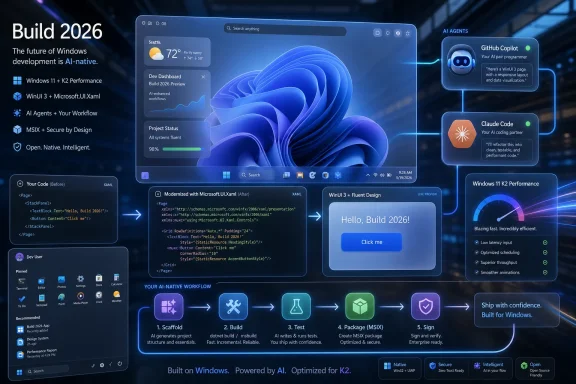
At Build 2026, Microsoft expanded its Windows 11 native-app campaign by releasing WinUI-focused AI agent tooling for GitHub Copilot and Claude Code, previewing WinUI 3 templates, and tying the work to a broader push to rebuild core Windows experiences natively. The announcement is not merely another developer-tooling footnote in a conference dominated by agents. It is Microsoft admitting, in the language of 2026, that the Windows app platform still has a gravity problem. If developers will not naturally choose native Windows, Microsoft is now trying to make native Windows the path of least resistance.
For years, Windows has lived with a strange contradiction. It remains the dominant desktop operating system in much of business computing, gaming, and productivity, yet building a modern native Windows app has often felt like choosing the scenic route through a maze.
Developers could pick Win32, WPF, UWP, WinUI, Windows App SDK, Electron, Progressive Web Apps, React Native, Flutter, Tauri, or some combination of those depending on the year, the target audience, and the tolerance for pain. Microsoft has repeatedly promised a cleaner future, only to leave the ecosystem littered with migration paths, partial abstractions, and frameworks that never quite became the obvious default.
The new WinUI agent plugins are meant to attack that problem from a very 2026 angle. Rather than ask developers to memorize the current shape of Windows UI development, Microsoft is giving AI coding agents a domain-specific map. The pitch is simple: if Copilot or Claude Code already helps developers scaffold apps, refactor code, and write tests, those agents should know the difference between today’s WinUI 3 patterns and yesterday’s UWP muscle memory.
That matters because general-purpose AI coding tools are only as good as the examples they have absorbed. Windows development history is unusually hostile to that model. There is a vast amount of old sample code, old Stack Overflow advice, old namespaces, and old blog guidance that looks plausible until it lands in a modern WinUI 3 project and breaks.
Microsoft’s intervention is therefore less about magic than about curation. The company is not claiming that an agent suddenly understands Windows taste, performance, accessibility, packaging, and distribution like a senior desktop engineer. It is trying to ensure that when an agent reaches for an answer, it reaches into the right decade.
That is an indictment of the platform’s archaeological layers. UWP had enough documentation, tutorials, samples, and forum answers to create a strong statistical pull for AI models. WinUI 3 and the Windows App SDK are the present-tense answer, but the historical corpus is not evenly distributed.
In practical terms, that can mean an agent suggests
Microsoft’s plugin attempts to steer agents through this mess by adding WinUI-specific skills, instructions, tools, and workflows. The agent is supposed to scaffold a project, build it, run it through the correct packaged-app execution path, diagnose common failures, generate UI with Fluent Design in mind, and move toward packaging or testing when needed.
That is exactly the kind of integrated loop Windows development has too often lacked. Web developers take for granted that a modern toolchain can create a project, run it locally, hot-reload or rebuild it, test it, and package it through a familiar path. Native Windows has had powerful pieces, but they have not always composed into a beginner-friendly or agent-friendly experience.
The notable twist is that Microsoft is not only teaching developers. It is teaching the tools that teach developers.
In 2026, a developer may not begin a project by reading a long Microsoft Learn article. They may begin by asking an AI agent to build a prototype. If that prototype fails, uses stale APIs, or produces a brittle mess, the developer’s judgment of the platform forms before they ever reach the official docs.
That makes agent behavior a platform surface. Microsoft appears to understand this. A native Windows app ecosystem cannot be revived solely by publishing new APIs and hoping the training data catches up. The agent has to be guided at the moment of creation.
The WinUI plugin is therefore both a developer tool and a marketing instrument. It says: try Windows again, and this time the first hour might not punish you. That first hour is where many app-platform decisions are made.
This is especially important because Windows is competing not just with macOS or Linux, but with the web as an application runtime. Electron, web wrappers, and browser-first architecture won because they made cross-platform distribution easier, developer hiring easier, and UI iteration faster. Their costs — memory use, startup latency, inconsistent native feel — are real, but they are often paid by users rather than developers.
Microsoft’s native push has to reverse that incentive. It has to make the developer’s life easier before it asks users to enjoy better performance.
If Windows K2 were only an internal quality program, third-party developers could ignore it. But Microsoft’s reported work to rebuild parts of Windows, including the Start menu, using native technology makes the message sharper. Microsoft is trying to say that native is not merely something it recommends to outsiders; it is something Windows itself must practice.
That is a necessary correction. Windows users have spent years complaining about inconsistent UI, sluggish shell surfaces, web-powered components, duplicated settings experiences, and the feeling that Microsoft sometimes treats its own desktop like a container for cloud services. Whether every complaint is technically fair is almost beside the point. The perception hardened because users could feel the seams.
A native Start menu is symbolically powerful because the Start menu is not just another app. It is the front door of Windows. If that experience feels slow, cramped, inconsistent, or over-mediated by recommendations and web content, users blame the operating system as a whole.
By connecting native app development to core Windows renovation, Microsoft is effectively broadening the argument. Native apps are not only about developers building prettier utilities. They are about restoring the expectation that Windows software should feel like it belongs on Windows.
The risk is that Microsoft has made this argument before in different forms. Windows developers have learned to be cautious when a new app model is presented as the future. Some remember Silverlight. Some remember UWP. Some remember the bridge technologies and Store ambitions that never became the universal default. Trust will not be rebuilt with a plugin announcement.
Native app advocates often talk about performance in abstractions: lower overhead, better resource use, tighter OS integration. Users experience those abstractions as whether the Start menu appears instantly, whether search feels responsive, whether animations hitch, and whether battery life suffers under a pile of heavyweight runtimes.
Web technologies are not inherently bad. A well-built web app can be fast, accessible, and maintainable. But on the desktop, web wrappers have become shorthand for a bargain that users did not always consent to: developers get cross-platform velocity, while users donate RAM and patience.
Microsoft’s own choices have reinforced that bargain. When first-party Windows experiences rely heavily on web components, third-party developers receive the obvious signal. Why invest in native Windows if Microsoft itself appears ambivalent?
That is why Windows K2 and the WinUI agent work belong in the same conversation. One speaks to Microsoft’s housecleaning; the other speaks to the neighborhood it wants rebuilt. The company cannot credibly ask developers to move toward native if Windows itself continues to feel like a collage of frameworks.
The real question is who bears friction. Developers choose Electron and similar approaches because they reduce organizational friction. Teams can reuse web skills, share code across platforms, update quickly, and avoid deep platform specialization. For many products, those advantages outweigh the costs.
Native Windows development asks for a different bargain. It promises better integration, performance, accessibility hooks, system resource behavior, and user trust. But it has historically imposed more setup friction, more packaging complexity, more uncertainty about framework direction, and a smaller pool of developers fluent in the current stack.
Microsoft’s AI-agent strategy is an attempt to lower that side of the ledger. If an agent can scaffold the project correctly, pick controls based on current WinUI examples, catch namespace mistakes, guide MSIX packaging, and generate UI automation tests, native development starts to feel less like a niche craft.
That does not eliminate architectural decision-making. A serious commercial app still needs humans to own design, accessibility, security, performance profiling, update strategy, telemetry boundaries, and supportability. But it may change the entry cost enough for more teams to prototype natively before defaulting to web wrappers.
This is where Microsoft’s move is strategically sensible. The company does not need every Windows app to become native overnight. It needs enough developers to believe that native Windows is no longer a productivity trap.
When AI tools can produce a WinUI app in minutes, internal line-of-business app creation becomes easier. That can be a gift for departments still relying on ancient Access databases, fragile spreadsheets, or abandoned WPF tools. It can also become another source of shadow IT if teams generate and distribute apps without proper review.
The plugin’s focus on packaging, signing, Store submission, and UI testing is therefore not incidental. Microsoft knows that Windows app development is not just about drawing controls on a page. The administrative story matters. An app that cannot be packaged, signed, updated, audited, or tested is not a serious enterprise citizen.
Still, AI-generated code is not automatically maintainable code. Enterprises will need policies around generated desktop apps, including source control, dependency review, code signing, accessibility testing, security scanning, and ownership after the original prompt-driven sprint ends. The agent can help create the artifact; it cannot be accountable for it.
There is also a subtle support issue. If Microsoft successfully makes native Windows app creation easier, IT departments may see more internal apps targeting the Windows App SDK and WinUI 3. That increases the importance of stable runtime deployment, clear lifecycle guidance, and predictable compatibility across Windows 11 releases.
The best version of this future is appealing: fewer clunky web portals for tasks that belong on the desktop, more responsive internal tools, and better alignment with Windows management. The worst version is a new generation of prompt-born utilities with no maintainer, no threat model, and no upgrade plan.
AI agents are useful at turning intent into a first draft. They are less reliable at understanding product constraints that are not written down. A prompt can ask for a settings page, a file browser, or a notes app. It cannot infer every enterprise data policy, every accessibility nuance, every localization requirement, or every performance boundary.
This is particularly true for desktop applications, where the operating environment is messy. Native Windows apps may interact with files, devices, identity, notifications, background tasks, local models, shell surfaces, and old enterprise dependencies. The more powerful the app, the more consequences hide behind apparently simple UI.
Microsoft’s plugin can help avoid old API traps, but it cannot remove the need for engineering judgment. A generated WinUI app still deserves code review. It still deserves profiling. It still deserves testing on real hardware, under non-admin accounts, with high contrast themes, screen readers, multiple DPI settings, and the actual deployment mechanism an organization intends to use.
The hopeful reading is that the plugin gives experienced developers leverage while giving newcomers a map. The dangerous reading is that it lets teams confuse a successful demo with a production application. Microsoft’s own documentation and tooling can mitigate that, but only if the culture around agentic development treats verification as part of the workflow rather than a chore after the magic trick.
Windows has suffered from a sample-code economy polluted by its own longevity. Search for how to do almost anything in Windows UI development and you can find advice that was correct for a framework, version, or app model that is no longer the recommended path. Human developers can sometimes recognize the mismatch. Agents often cannot.
By creating WinUI-specific skills and supporting tools that can look up real control usage, API metadata, and workflow expectations, Microsoft is trying to make the agent less dependent on stale memory. That is the right instinct. The future of documentation is not only pages that humans read; it is structured, retrievable knowledge that machines can use without hallucinating their way through a build.
This may become a broader pattern across Microsoft’s developer platforms. If every major framework needs agent skills, current API lookup, migration rules, testing hooks, and packaging playbooks, documentation becomes more operational. It does not just explain the platform. It participates in the build.
For Windows, that shift is overdue. The platform’s biggest developer-experience problem has not been a lack of documentation. It has been the difficulty of knowing which documentation matters now.
Microsoft can lower friction with agents, templates, and CLI tooling, but the broader ecosystem still has to offer reasons to care. That means a healthy Microsoft Store or alternative distribution story, clear monetization options where relevant, stable APIs, credible design guidance, and Windows experiences that make native integration visible to users.
It also means Microsoft must avoid undercutting the message with its own app choices. If flagship Microsoft experiences continue to arrive as web wrappers, half-native hybrids, or inconsistent shells, developers will notice. The platform owner’s behavior is more persuasive than its conference slides.
There is a similar challenge around Windows 10’s long tail. Windows 11 is Microsoft’s current desktop platform, and Windows 10 support is ending for mainstream consumers in October 2025, with paid extended options in certain cases. But many organizations still think in multi-year deployment cycles. A Windows 11-native app strategy must account for the reality that not every customer moves at Microsoft’s preferred speed.
The company also has to be careful with AI branding. Windows users have not uniformly welcomed Copilot-era changes, especially when AI features feel bolted onto the shell or entangled with privacy concerns. Developer-facing AI tools are a more natural fit, but Microsoft should not assume that adding “agent” to a Windows story automatically improves trust.
The best argument for the WinUI plugin is not that it is AI. The best argument is that it may make Windows development less confusing.
That honesty matters. A lot of AI tooling is marketed as if the model can solve any software problem through sufficient prompting. Microsoft’s WinUI plugin suggests a more pragmatic future: agents become useful when they are constrained by domain knowledge, current documentation, testable workflows, and tooling that lets them observe the consequences of their own changes.
That is a better model for serious software development. It treats AI not as an oracle, but as a fast junior collaborator surrounded by guardrails. The guardrails are the product.
For Windows developers, the immediate value will depend on how well the plugin works in real projects rather than demo scenarios. Migration from WPF, for example, is rarely a mechanical translation. Packaging and signing can be straightforward in a sample and maddening in a corporate environment. UI testing is useful, but only if teams maintain tests as the app evolves.
Even so, the direction is meaningful. Microsoft is moving from “here is a framework” to “here is a guided loop that helps you succeed with the framework.” That is the kind of shift Windows development has needed for a long time.
 Microsoft Tries to Make Native Windows Feel Inevitable Again
For years, Windows has lived with a strange contradiction. It remains the dominant desktop operating system in much of business computing, gaming, and productivity, yet building a modern native Windows app has often felt like choosing the scenic route through a maze.Developers could pick Win32, WPF, UWP, WinUI, Windows App SDK, Electron, Progressive Web Apps, React Native, Flutter, Tauri, or some combination of those depending on the year, the target audience, and the tolerance for pain. Microsoft has repeatedly promised a cleaner future, only to leave the ecosystem littered with migration paths, partial abstractions, and frameworks that never quite became the obvious default.
The new WinUI agent plugins are meant to attack that problem from a very 2026 angle. Rather than ask developers to memorize the current shape of Windows UI development, Microsoft is giving AI coding agents a domain-specific map. The pitch is simple: if Copilot or Claude Code already helps developers scaffold apps, refactor code, and write tests, those agents should know the difference between today’s WinUI 3 patterns and yesterday’s UWP muscle memory.
That matters because general-purpose AI coding tools are only as good as the examples they have absorbed. Windows development history is unusually hostile to that model. There is a vast amount of old sample code, old Stack Overflow advice, old namespaces, and old blog guidance that looks plausible until it lands in a modern WinUI 3 project and breaks.
Microsoft’s intervention is therefore less about magic than about curation. The company is not claiming that an agent suddenly understands Windows taste, performance, accessibility, packaging, and distribution like a senior desktop engineer. It is trying to ensure that when an agent reaches for an answer, it reaches into the right decade.
The Plugin Is a Shortcut Around Windows’ Own Archaeology
The most revealing detail in Microsoft’s WinUI plugin work is not that it supports GitHub Copilot and Claude Code. It is that Microsoft explicitly recognizes the failure mode: generic agents tend to produce outdated Windows code.That is an indictment of the platform’s archaeological layers. UWP had enough documentation, tutorials, samples, and forum answers to create a strong statistical pull for AI models. WinUI 3 and the Windows App SDK are the present-tense answer, but the historical corpus is not evenly distributed.
In practical terms, that can mean an agent suggests
Windows.UI.Xaml where a WinUI 3 app needs Microsoft.UI.Xaml. It can mean relying on older dispatcher patterns, older dialog assumptions, or APIs that made sense in a different Windows app model. To a developer casually experimenting with a native Windows app, these are not minor paper cuts. They are the moments when “I’ll just use Electron” starts to sound rational.Microsoft’s plugin attempts to steer agents through this mess by adding WinUI-specific skills, instructions, tools, and workflows. The agent is supposed to scaffold a project, build it, run it through the correct packaged-app execution path, diagnose common failures, generate UI with Fluent Design in mind, and move toward packaging or testing when needed.
That is exactly the kind of integrated loop Windows development has too often lacked. Web developers take for granted that a modern toolchain can create a project, run it locally, hot-reload or rebuild it, test it, and package it through a familiar path. Native Windows has had powerful pieces, but they have not always composed into a beginner-friendly or agent-friendly experience.
The notable twist is that Microsoft is not only teaching developers. It is teaching the tools that teach developers.
Agents Are Microsoft’s New Developer Evangelists
Microsoft has always understood developer evangelism. The company built empires around SDKs, conferences, samples, documentation, certifications, and Visual Studio demos. What has changed is where developers now expect persuasion to happen.In 2026, a developer may not begin a project by reading a long Microsoft Learn article. They may begin by asking an AI agent to build a prototype. If that prototype fails, uses stale APIs, or produces a brittle mess, the developer’s judgment of the platform forms before they ever reach the official docs.
That makes agent behavior a platform surface. Microsoft appears to understand this. A native Windows app ecosystem cannot be revived solely by publishing new APIs and hoping the training data catches up. The agent has to be guided at the moment of creation.
The WinUI plugin is therefore both a developer tool and a marketing instrument. It says: try Windows again, and this time the first hour might not punish you. That first hour is where many app-platform decisions are made.
This is especially important because Windows is competing not just with macOS or Linux, but with the web as an application runtime. Electron, web wrappers, and browser-first architecture won because they made cross-platform distribution easier, developer hiring easier, and UI iteration faster. Their costs — memory use, startup latency, inconsistent native feel — are real, but they are often paid by users rather than developers.
Microsoft’s native push has to reverse that incentive. It has to make the developer’s life easier before it asks users to enjoy better performance.
Windows K2 Gives the Developer Story a Political Edge
The Build 2026 tooling lands against the backdrop of Windows K2, Microsoft’s broader effort to improve Windows 11 performance, reliability, and user trust. That context changes how the WinUI announcement should be read.If Windows K2 were only an internal quality program, third-party developers could ignore it. But Microsoft’s reported work to rebuild parts of Windows, including the Start menu, using native technology makes the message sharper. Microsoft is trying to say that native is not merely something it recommends to outsiders; it is something Windows itself must practice.
That is a necessary correction. Windows users have spent years complaining about inconsistent UI, sluggish shell surfaces, web-powered components, duplicated settings experiences, and the feeling that Microsoft sometimes treats its own desktop like a container for cloud services. Whether every complaint is technically fair is almost beside the point. The perception hardened because users could feel the seams.
A native Start menu is symbolically powerful because the Start menu is not just another app. It is the front door of Windows. If that experience feels slow, cramped, inconsistent, or over-mediated by recommendations and web content, users blame the operating system as a whole.
By connecting native app development to core Windows renovation, Microsoft is effectively broadening the argument. Native apps are not only about developers building prettier utilities. They are about restoring the expectation that Windows software should feel like it belongs on Windows.
The risk is that Microsoft has made this argument before in different forms. Windows developers have learned to be cautious when a new app model is presented as the future. Some remember Silverlight. Some remember UWP. Some remember the bridge technologies and Store ambitions that never became the universal default. Trust will not be rebuilt with a plugin announcement.
The Start Menu Is the Canary in the WebView Mine
The Start menu’s role in this story is worth lingering on because it captures the user-facing stakes. Microsoft can publish all the developer tooling it likes, but ordinary users judge Windows by what opens quickly, what scrolls smoothly, what respects their choices, and what does not feel like an embedded webpage wearing a Windows costume.Native app advocates often talk about performance in abstractions: lower overhead, better resource use, tighter OS integration. Users experience those abstractions as whether the Start menu appears instantly, whether search feels responsive, whether animations hitch, and whether battery life suffers under a pile of heavyweight runtimes.
Web technologies are not inherently bad. A well-built web app can be fast, accessible, and maintainable. But on the desktop, web wrappers have become shorthand for a bargain that users did not always consent to: developers get cross-platform velocity, while users donate RAM and patience.
Microsoft’s own choices have reinforced that bargain. When first-party Windows experiences rely heavily on web components, third-party developers receive the obvious signal. Why invest in native Windows if Microsoft itself appears ambivalent?
That is why Windows K2 and the WinUI agent work belong in the same conversation. One speaks to Microsoft’s housecleaning; the other speaks to the neighborhood it wants rebuilt. The company cannot credibly ask developers to move toward native if Windows itself continues to feel like a collage of frameworks.
The Native Pitch Is Really About Friction, Not Ideology
There is a temptation to frame this as a purist debate: native good, web bad. That is too simple and, frankly, too convenient.The real question is who bears friction. Developers choose Electron and similar approaches because they reduce organizational friction. Teams can reuse web skills, share code across platforms, update quickly, and avoid deep platform specialization. For many products, those advantages outweigh the costs.
Native Windows development asks for a different bargain. It promises better integration, performance, accessibility hooks, system resource behavior, and user trust. But it has historically imposed more setup friction, more packaging complexity, more uncertainty about framework direction, and a smaller pool of developers fluent in the current stack.
Microsoft’s AI-agent strategy is an attempt to lower that side of the ledger. If an agent can scaffold the project correctly, pick controls based on current WinUI examples, catch namespace mistakes, guide MSIX packaging, and generate UI automation tests, native development starts to feel less like a niche craft.
That does not eliminate architectural decision-making. A serious commercial app still needs humans to own design, accessibility, security, performance profiling, update strategy, telemetry boundaries, and supportability. But it may change the entry cost enough for more teams to prototype natively before defaulting to web wrappers.
This is where Microsoft’s move is strategically sensible. The company does not need every Windows app to become native overnight. It needs enough developers to believe that native Windows is no longer a productivity trap.
Enterprise IT Will Like the Ambition and Fear the Blast Radius
For sysadmins and enterprise IT teams, Microsoft’s renewed native push cuts two ways. Better native apps can mean better performance, cleaner deployment, stronger accessibility, and more predictable integration with Windows management surfaces. But agent-generated desktop software also introduces new governance questions.When AI tools can produce a WinUI app in minutes, internal line-of-business app creation becomes easier. That can be a gift for departments still relying on ancient Access databases, fragile spreadsheets, or abandoned WPF tools. It can also become another source of shadow IT if teams generate and distribute apps without proper review.
The plugin’s focus on packaging, signing, Store submission, and UI testing is therefore not incidental. Microsoft knows that Windows app development is not just about drawing controls on a page. The administrative story matters. An app that cannot be packaged, signed, updated, audited, or tested is not a serious enterprise citizen.
Still, AI-generated code is not automatically maintainable code. Enterprises will need policies around generated desktop apps, including source control, dependency review, code signing, accessibility testing, security scanning, and ownership after the original prompt-driven sprint ends. The agent can help create the artifact; it cannot be accountable for it.
There is also a subtle support issue. If Microsoft successfully makes native Windows app creation easier, IT departments may see more internal apps targeting the Windows App SDK and WinUI 3. That increases the importance of stable runtime deployment, clear lifecycle guidance, and predictable compatibility across Windows 11 releases.
The best version of this future is appealing: fewer clunky web portals for tasks that belong on the desktop, more responsive internal tools, and better alignment with Windows management. The worst version is a new generation of prompt-born utilities with no maintainer, no threat model, and no upgrade plan.
Developers Get a Better On-Ramp, Not a Freeway
The WinUI agent plugin sounds most exciting when described as an end-to-end assistant: scaffold, build, run, test, package, migrate. That is the right aspiration. But developers should read “assistant” literally.AI agents are useful at turning intent into a first draft. They are less reliable at understanding product constraints that are not written down. A prompt can ask for a settings page, a file browser, or a notes app. It cannot infer every enterprise data policy, every accessibility nuance, every localization requirement, or every performance boundary.
This is particularly true for desktop applications, where the operating environment is messy. Native Windows apps may interact with files, devices, identity, notifications, background tasks, local models, shell surfaces, and old enterprise dependencies. The more powerful the app, the more consequences hide behind apparently simple UI.
Microsoft’s plugin can help avoid old API traps, but it cannot remove the need for engineering judgment. A generated WinUI app still deserves code review. It still deserves profiling. It still deserves testing on real hardware, under non-admin accounts, with high contrast themes, screen readers, multiple DPI settings, and the actual deployment mechanism an organization intends to use.
The hopeful reading is that the plugin gives experienced developers leverage while giving newcomers a map. The dangerous reading is that it lets teams confuse a successful demo with a production application. Microsoft’s own documentation and tooling can mitigate that, but only if the culture around agentic development treats verification as part of the workflow rather than a chore after the magic trick.
Microsoft Is Trying to Fix the Sample-Code Economy
One underappreciated part of this announcement is the attempt to ground agents in current samples and metadata. For AI coding tools, examples are infrastructure. Bad examples are technical debt at internet scale.Windows has suffered from a sample-code economy polluted by its own longevity. Search for how to do almost anything in Windows UI development and you can find advice that was correct for a framework, version, or app model that is no longer the recommended path. Human developers can sometimes recognize the mismatch. Agents often cannot.
By creating WinUI-specific skills and supporting tools that can look up real control usage, API metadata, and workflow expectations, Microsoft is trying to make the agent less dependent on stale memory. That is the right instinct. The future of documentation is not only pages that humans read; it is structured, retrievable knowledge that machines can use without hallucinating their way through a build.
This may become a broader pattern across Microsoft’s developer platforms. If every major framework needs agent skills, current API lookup, migration rules, testing hooks, and packaging playbooks, documentation becomes more operational. It does not just explain the platform. It participates in the build.
For Windows, that shift is overdue. The platform’s biggest developer-experience problem has not been a lack of documentation. It has been the difficulty of knowing which documentation matters now.
The Catch Is That Windows Still Has to Deserve the Apps
The uncomfortable truth is that developers do not build native apps out of charity. They build them when the platform rewards the effort.Microsoft can lower friction with agents, templates, and CLI tooling, but the broader ecosystem still has to offer reasons to care. That means a healthy Microsoft Store or alternative distribution story, clear monetization options where relevant, stable APIs, credible design guidance, and Windows experiences that make native integration visible to users.
It also means Microsoft must avoid undercutting the message with its own app choices. If flagship Microsoft experiences continue to arrive as web wrappers, half-native hybrids, or inconsistent shells, developers will notice. The platform owner’s behavior is more persuasive than its conference slides.
There is a similar challenge around Windows 10’s long tail. Windows 11 is Microsoft’s current desktop platform, and Windows 10 support is ending for mainstream consumers in October 2025, with paid extended options in certain cases. But many organizations still think in multi-year deployment cycles. A Windows 11-native app strategy must account for the reality that not every customer moves at Microsoft’s preferred speed.
The company also has to be careful with AI branding. Windows users have not uniformly welcomed Copilot-era changes, especially when AI features feel bolted onto the shell or entangled with privacy concerns. Developer-facing AI tools are a more natural fit, but Microsoft should not assume that adding “agent” to a Windows story automatically improves trust.
The best argument for the WinUI plugin is not that it is AI. The best argument is that it may make Windows development less confusing.
The Build 2026 Message Lands Because It Admits a Weakness
There is something refreshing about Microsoft’s implicit admission here. The company is not pretending that general-purpose AI tools already know how to build great WinUI 3 apps. It is saying they need help.That honesty matters. A lot of AI tooling is marketed as if the model can solve any software problem through sufficient prompting. Microsoft’s WinUI plugin suggests a more pragmatic future: agents become useful when they are constrained by domain knowledge, current documentation, testable workflows, and tooling that lets them observe the consequences of their own changes.
That is a better model for serious software development. It treats AI not as an oracle, but as a fast junior collaborator surrounded by guardrails. The guardrails are the product.
For Windows developers, the immediate value will depend on how well the plugin works in real projects rather than demo scenarios. Migration from WPF, for example, is rarely a mechanical translation. Packaging and signing can be straightforward in a sample and maddening in a corporate environment. UI testing is useful, but only if teams maintain tests as the app evolves.
Even so, the direction is meaningful. Microsoft is moving from “here is a framework” to “here is a guided loop that helps you succeed with the framework.” That is the kind of shift Windows development has needed for a long time.
The Practical Read for WindowsForum Readers
Microsoft’s WinUI agent push is not a guarantee that the Windows app ecosystem is about to bloom. It is, however, one of the more coherent attempts in recent years to connect platform quality, developer experience, and AI-assisted coding into a single strategy.- Microsoft is using Build 2026 to position WinUI 3 and the Windows App SDK as the preferred route for modern native Windows 11 apps.
- The new agent tooling is designed to stop Copilot and Claude Code from defaulting to older UWP-era patterns that remain overrepresented in online training data.
- Windows K2 gives the effort higher stakes because Microsoft is reportedly rebuilding core Windows experiences, including Start menu work, with a stronger native focus.
- Developers should treat the tools as an on-ramp that can scaffold, test, package, and migrate, not as a replacement for engineering review.
- Enterprise IT should welcome better native app tooling while preparing governance for prompt-generated internal Windows applications.
- The success of the push depends less on the novelty of AI agents than on whether Microsoft keeps Windows’ own app model stable, documented, and visibly better for users.
References
- Primary source: 디지털투데이
Published: Wed, 03 Jun 2026 19:15:16 GMT
Microsoft steps up push to expand Windows 11 native app ecosystem
Microsoft has unveiled a range of AI agent tools to support Windows 11 native app development at its annual Build 2026 developer conference, Windows Central reported on June 3. The company released WinUI agent plugins for GitHub Copilot and Claude Code, the report said. The plugins include...www.digitaltoday.co.kr - Related coverage: windowscentral.com
4 Start menu changes are coming to Windows 11, and they will shape how you use your PC | Windows Central
Microsoft is finally fixing some of the biggest frustrations with the Windows 11 Start menu, including resizing and better customization controls.www.windowscentral.com - Related coverage: techradar.com
Windows 11 is finally getting the Start menu changes we all wanted — and a surprise bonus | TechRadar
The new Start menu looks excellent, and Microsoft is tackling issues with rusty old parts of the Windows 11 interfacewww.techradar.com - Related coverage: tomsguide.com
Biggest Microsoft Build 2026 announcements — agentic AI, RTX Spark Dev Box, GitHub Copilot app, new MAI models, and more | Tom's Guide
All the big news from Microsoft's AI-focused eventwww.tomsguide.com - Official source: learn.microsoft.com
WinUI agent plugin for GitHub Copilot CLI and Claude Code - Windows apps | Microsoft Learn
Use the winui@awesome-copilot plugin to give the GitHub Copilot CLI or Claude Code accurate WinUI 3 knowledge — including 8 specialized skills and a dedicated winui-dev agent for end-to-end Windows app development.learn.microsoft.com - Official source: support.microsoft.com
Customize the Windows Start Menu - Microsoft Support
Learn how to customize the Windows Start menu, pin or unpin apps, adjust the layout, and personalize its appearance to enhance your productivity and user experience.support.microsoft.com
- Official source: devblogs.microsoft.com
Introducing WinUI agent plugin for GitHub Copilot and Claude Code - #ifdef Windows
iscover AI-powered WinUI development with GitHub Copilot and Claude Code. These new agent skills help you scaffold, build, run, test, and ship native Windows apps with WinUI 3 and the Windows App SDK faster than ever.devblogs.microsoft.com - Related coverage: techspot.com
Microsoft's "Windows K2" plan promises a faster Start menu, instant search, and fewer botched updates | TechSpot
Sources tell Windows Central that recent Windows 11 updates are only a sliver of a much larger internal effort to stabilize the operating system after a string...www.techspot.com - Related coverage: windowslatest.com
Microsoft pledges to make Windows 11 the OS for building AI, after years of Copilot backlash
Microsoft is turning Windows 11 into agent-native at Build 2026, adding local AI models and OS-level security to fix its developer platform. www.windowslatest.com
- Official source: blogs.microsoft.com
Microsoft Build 2026: Be yourself at work - The Official Microsoft Blog
Platforms shift when developers build. We explore, choose tools, dream, create. This platform shift comes with more information than ever, ready at your fingertips. This shift, it’s about building fast AND THEN: it’s about building, operating, optimizing and observing. Securing your...blogs.microsoft.com
