

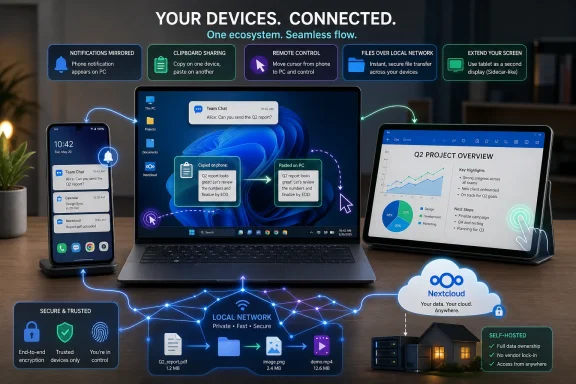
Apple’s ecosystem is still the cleanest cross-device story in consumer tech, but a Windows PC, an Android phone, and an Android tablet can now reproduce much of that experience with free apps including KDE Connect, LocalSend, Spacedesk, Phone Link, and Nextcloud. The difference is not whether the Windows-Android side can do the job. It can. The difference is that Apple sells integration as a default, while the Windows-Android world still makes users assemble it themselves.
That distinction matters because “ecosystem” has become one of the most powerful words in personal computing. It is no longer just about which laptop has the faster chip, which phone has the better camera, or which tablet has the nicer display. It is about whether your devices feel like one computer with several screens, or several computers constantly asking you to mediate between them.
Apple’s advantage has always been packaging. AirDrop, Handoff, Universal Clipboard, Continuity Camera, Sidecar, iCloud, iMessage, and device handoff all speak the same design language: sign in, stay nearby, and let the machines negotiate the rest. The user rarely needs to know what protocol is involved, what port is open, or whether a service is running in the tray.
That is powerful because it changes expectations. A Mac user who copies text on an iPhone and pastes it on a Mac does not think of that as a “feature.” It becomes the normal behavior of computing. Once that happens, any competing setup that requires installation, pairing, permissions, or troubleshooting feels less refined even when it delivers the same practical result.
Windows and Android have historically suffered from being excellent individually and awkward collectively. Windows is still the default workhorse desktop platform for gaming, enterprise software, custom hardware, and mixed workloads. Android is the most flexible mobile platform, especially for users who care about file systems, default apps, background services, sideloading, automation, and hardware diversity. But together, they have often felt like neighbors rather than family.
The How-To Geek setup built around a Windows PC, a Pixel phone, and a Xiaomi Mi Pad is interesting because it refuses the usual premise that ecosystem quality must come from one vendor. Instead, it treats integration as a software layer. That is both the great strength and the obvious weakness of the Windows-Android approach: it is modular, replaceable, and surprisingly powerful, but it is not frictionless out of the box.
The important detail is that KDE Connect did not begin as a Windows-first product. It came out of the Linux desktop world, where users have long been accustomed to building elegant systems from independent pieces. Its arrival on Windows is a quiet victory for the open-source model: a tool designed to make Linux and Android behave like companions now helps Windows users escape some of the platform isolation that Apple has spent years exploiting.
Its remote input feature is more than a party trick. Using a phone or tablet as a trackpad for a PC, or using a desktop keyboard and mouse to interact with a mobile device, changes the posture of work. The phone stops being a slab you pick up and put down every few minutes and becomes another endpoint in the same control surface.
The command execution feature is where KDE Connect moves beyond Apple mimicry. Apple’s ecosystem is polished, but often paternalistic; it offers a carefully chosen set of cross-device behaviors. KDE Connect can feel rougher, but it lets a user trigger scripts, launch applications, and automate workflows from another device. For power users, sysadmins, and tinkerers, that is not merely an AirDrop substitute. It is a remote-control plane.
The catch is trust. KDE Connect asks for permissions that make sense for what it does but still deserve scrutiny: notifications, clipboard access, input control, local network presence, and in some cases accessibility privileges. In an Apple setup, those decisions are hidden inside a larger trust relationship with Apple. In a Windows-Android setup, the user is assembling trust app by app.
LocalSend proves the underlying idea does not need to be locked to one vendor’s hardware. It is open source, cross-platform, and built around local peer-to-peer transfer rather than cloud relay. It runs across Windows, Android, macOS, Linux, and iOS, which makes it more philosophically interesting than AirDrop even when it lacks Apple’s native polish.
That matters in mixed homes and workplaces. The world is full of Windows laptops, Android phones, iPads, old Macs, Linux machines, and corporate devices with weird management profiles. A tool that treats all of them as peers solves a more realistic problem than a tool that assumes everyone bought into the same hardware family.
The author’s point that KDE Connect can transfer files but LocalSend is often better for large batches is exactly how healthy modular ecosystems work. One tool does not have to do everything. KDE Connect can be the always-on device bridge, while LocalSend becomes the deliberate, high-confidence file mover.
This is also where the Windows-Android ecosystem begins to look less like an inferior Apple clone and more like a different philosophy. Apple optimizes for the person who wants the fewest choices. The cross-platform stack optimizes for the person who wants the least lock-in. Those are not the same customer, and pretending they are has distorted too many ecosystem debates.
Spacedesk brings that general idea to Windows and Android. Install the Windows driver, install the Android viewer, connect over the local network or USB, and an Android tablet can become an extended or mirrored display. On paper, that sounds like a familiar Sidecar clone. In practice, it reveals one of the Windows-Android stack’s recurring advantages: hardware abundance.
An older Android tablet that might be unimpressive as a modern tablet can still be an excellent secondary display. The Mi Pad 5 example is telling. A 2021 Android tablet with a good LCD, plenty of storage, and enough processor headroom can remain useful long after its original software support window becomes the most uncomfortable part of the device.
That software support caveat should not be waved away. Running custom ROMs is normal in enthusiast circles but not realistic for most people. Apple’s long OS support remains a real advantage for mainstream users, especially those who do not want to unlock bootloaders, read XDA threads, or risk breaking a device that still works.
But as a desk accessory, an Android tablet’s value equation can be excellent. Spacedesk’s support for touch input over the extended Windows desktop is especially interesting because Apple’s Sidecar remains constrained by macOS’s non-touch assumptions. Apple gives iPad users Pencil input and special controls; Spacedesk gives Windows users a more direct, if less elegant, touch-enabled secondary screen experience.
That does not make Phone Link irrelevant. It makes it situational. In the setup described here, KDE Connect handles much of the daily integration better, but Phone Link earns its place because it can turn a linked Android phone’s camera into a Windows webcam.
That feature matters more than it sounds. Laptop webcams remain one of the most stubborn embarrassments in modern computing, and even many external webcams are easily beaten by a recent phone camera. Continuity Camera gave Apple users a clean answer: use the iPhone camera you already own. Microsoft’s Android answer is less iconic, but the practical result is similar.
For Windows users, this is the right kind of platform feature. It does not require buying a Surface phone that no longer exists, and it does not pretend Microsoft controls the whole mobile stack. It accepts reality: the Windows phone is dead, Android won, and the best thing Microsoft can do is make Android feel less foreign on the Windows desktop.
The limitation is that Phone Link still carries the baggage of partial support and vendor variation. Some Android features work better on some brands than others. Samsung has historically enjoyed deeper Microsoft integration than many competitors. Pixels often get clean Android features first. Enterprise policies can disable or complicate phone-to-PC features. That unevenness is the tax users pay for choice.
Nextcloud answers those questions with a very different bargain from iCloud, Google Drive, OneDrive, or Dropbox. It does not magically hand you storage in someone else’s data center. It gives you software to make storage you control available across devices. That is empowering, but it also moves responsibility back to the user.
For WindowsForum readers, that trade-off is familiar. A self-hosted Nextcloud instance on a NAS, mini PC, home server, or Docker host is not merely a cloud replacement. It is a small act of infrastructure ownership. You decide the disks, the backups, the remote access method, the update cadence, and the risk model.
That autonomy is also why Nextcloud should not be oversold to casual users. Self-hosting is easier than it used to be, especially with containerized installation methods, but it is still self-hosting. Certificates, ports, reverse proxies, backups, storage health, updates, and account security are not imaginary concerns. If iCloud is a serviced apartment, Nextcloud is a house you own. That is liberating until the roof leaks.
Still, the direction of travel favors tools like this. As subscription fatigue grows and users accumulate more devices, the appeal of a personal cloud increases. A Windows PC, an Android phone, and an Android tablet become more coherent when there is a shared place for documents, photos, notes, and syncable app data that does not depend entirely on a hyperscaler.
But the Windows-Android stack gains something from being unfinished. Because it is not vertically controlled, it can route around vendor decisions. If KDE Connect is better than Phone Link for clipboard and remote input, use KDE Connect. If LocalSend is better than KDE Connect for bulk file transfer, use LocalSend. If Spacedesk is better than buying another monitor for occasional use, use Spacedesk. If Nextcloud is better than renting storage indefinitely, self-host.
That flexibility is exactly what Apple’s ecosystem intentionally suppresses. Apple does not want the user comparing five independent tools for each function. It wants the platform feature to be the answer. For many users, that is a blessing. For enthusiasts and administrators, it can feel like a velvet rope.
The Windows-Android model also lets users buy best-in-category hardware without seeking permission from a product matrix. A gaming PC can coexist with a Pixel. A budget Android tablet can coexist with a custom NAS. A Linux boot partition can coexist with Windows. That kind of arrangement is messy from a branding perspective but rational from a user perspective.
The result is not “better than Apple” in the universal sense. It is better for a certain kind of user: someone willing to trade setup time for control, defaults for optionality, and vendor polish for replaceable parts. That is a narrower claim, but it is a stronger one.
Apple’s model says the best experience comes when one company designs the devices, operating systems, services, authentication model, and handoff layer together. That model works. It reduces support complexity and lets Apple ship features that feel uncannily seamless because the company controls the assumptions underneath them.
The Windows-Android model says the best experience comes when the user can assemble the right tools for the job. That model also works, but it demands more knowledge. It rewards people who understand local networks, permissions, background services, and the difference between file sync and backup. It punishes people who just want the laptop and phone to “know” each other.
For IT departments, the second model is both attractive and frightening. Open tools can reduce lock-in and improve interoperability, but they also create governance questions. Which apps are allowed? How are they updated? What permissions do they request? Are local file-transfer tools acceptable on managed networks? Does self-hosted sync comply with retention and security policies?
For home users, the questions are softer but still real. A cross-device setup is only as good as its reliability. If clipboard sync fails one day, if the tablet display lags, if Windows firewall prompts get in the way, or if a phone permission resets after an update, the magic evaporates. Apple’s ecosystem is not immune to bugs, but its integration benefits from being part of the platform’s mainstream test path.
That is why Microsoft’s role remains so important. The company does not need to recreate Apple’s walled garden, and it probably could not if it tried. But it should make the best Windows-Android bridges feel less like side projects and more like first-class Windows capabilities.
Phone Link is the visible part of that strategy, but the bigger story is Windows increasingly treating the phone as a nearby device rather than a rival platform. Mobile photos in File Explorer, Android camera support, messages, notifications, calls, and app streaming all point toward a desktop that expects the user’s phone to be Android.
That is strategically sensible. Microsoft does not need to make the phone if it can make Windows the best desktop companion for the phone. The problem is that Microsoft’s execution has often been inconsistent, with features arriving unevenly, changing names, depending on device partners, or feeling scattered across Settings, Phone Link, the Microsoft Store, and Windows shell integrations.
The five-app ecosystem described here is almost a rebuke to that inconsistency. Users are not waiting for Microsoft to perfect the story. They are assembling the story themselves from open-source tools, free utilities, and selective Microsoft features. That should both encourage and embarrass Redmond.
It should encourage Microsoft because the demand is obvious. Windows users want Continuity-like features. They want local file transfer, phone-as-webcam, shared clipboards, mirrored notifications, remote control, and cloud sync. It should embarrass Microsoft because independent developers and open-source projects have filled gaps that should have been treated as strategic platform work years ago.
But there is an equally lazy enthusiast counterargument that says open source automatically means safe. It does not. Permissions still matter. Update sources matter. Network exposure matters. User behavior matters. A tool that can mirror notifications, sync clipboards, execute commands, or expose files across devices deserves careful configuration.
Command execution in KDE Connect is a good example. In the hands of a knowledgeable user, it is powerful automation. In a careless setup, it could become a sharp edge. The right conclusion is not to avoid it, but to treat it like any other administrative convenience: restrict it, understand it, and do not expose more capability than you need.
Nextcloud raises a different kind of risk. Self-hosting can improve control, but it also makes the user responsible for patching and backups. A poorly maintained personal cloud is not more private in any meaningful sense if it is exposed to the internet with weak credentials, neglected updates, or no recovery plan.
The Apple ecosystem reduces many of these decisions by centralizing them. That is convenient, but it also centralizes dependency. The Windows-Android approach distributes responsibility. That is empowering, but it requires maturity.
KDE Connect covers the ambient relationship between devices. LocalSend covers deliberate transfer. Spacedesk covers screen expansion. Phone Link covers the official Windows-Android bridge where Microsoft has unique platform access. Nextcloud covers the personal cloud layer for users who want ownership rather than tenancy.
That division of labor is surprisingly clean. It also suggests why one company rarely satisfies everyone. Apple optimizes the whole. Microsoft integrates what it can. Open-source communities solve what bothers them. Users then decide whether they prefer a finished product or a toolkit.
For WindowsForum readers, the practical message is clear:
That distinction matters because “ecosystem” has become one of the most powerful words in personal computing. It is no longer just about which laptop has the faster chip, which phone has the better camera, or which tablet has the nicer display. It is about whether your devices feel like one computer with several screens, or several computers constantly asking you to mediate between them.
 Apple Won the Word “Ecosystem,” Not the Whole Idea
Apple’s advantage has always been packaging. AirDrop, Handoff, Universal Clipboard, Continuity Camera, Sidecar, iCloud, iMessage, and device handoff all speak the same design language: sign in, stay nearby, and let the machines negotiate the rest. The user rarely needs to know what protocol is involved, what port is open, or whether a service is running in the tray.That is powerful because it changes expectations. A Mac user who copies text on an iPhone and pastes it on a Mac does not think of that as a “feature.” It becomes the normal behavior of computing. Once that happens, any competing setup that requires installation, pairing, permissions, or troubleshooting feels less refined even when it delivers the same practical result.
Windows and Android have historically suffered from being excellent individually and awkward collectively. Windows is still the default workhorse desktop platform for gaming, enterprise software, custom hardware, and mixed workloads. Android is the most flexible mobile platform, especially for users who care about file systems, default apps, background services, sideloading, automation, and hardware diversity. But together, they have often felt like neighbors rather than family.
The How-To Geek setup built around a Windows PC, a Pixel phone, and a Xiaomi Mi Pad is interesting because it refuses the usual premise that ecosystem quality must come from one vendor. Instead, it treats integration as a software layer. That is both the great strength and the obvious weakness of the Windows-Android approach: it is modular, replaceable, and surprisingly powerful, but it is not frictionless out of the box.
KDE Connect Is the Unofficial Glue Microsoft Should Have Built
KDE Connect is the most important app in this stack because it attacks the everyday seams between phone and PC. Notification mirroring, clipboard sharing, file browsing, remote input, media control, and device-to-device commands all sit in the same general category: small interruptions that feel trivial until they happen fifty times a day. When they work automatically, the whole setup feels calmer.The important detail is that KDE Connect did not begin as a Windows-first product. It came out of the Linux desktop world, where users have long been accustomed to building elegant systems from independent pieces. Its arrival on Windows is a quiet victory for the open-source model: a tool designed to make Linux and Android behave like companions now helps Windows users escape some of the platform isolation that Apple has spent years exploiting.
Its remote input feature is more than a party trick. Using a phone or tablet as a trackpad for a PC, or using a desktop keyboard and mouse to interact with a mobile device, changes the posture of work. The phone stops being a slab you pick up and put down every few minutes and becomes another endpoint in the same control surface.
The command execution feature is where KDE Connect moves beyond Apple mimicry. Apple’s ecosystem is polished, but often paternalistic; it offers a carefully chosen set of cross-device behaviors. KDE Connect can feel rougher, but it lets a user trigger scripts, launch applications, and automate workflows from another device. For power users, sysadmins, and tinkerers, that is not merely an AirDrop substitute. It is a remote-control plane.
The catch is trust. KDE Connect asks for permissions that make sense for what it does but still deserve scrutiny: notifications, clipboard access, input control, local network presence, and in some cases accessibility privileges. In an Apple setup, those decisions are hidden inside a larger trust relationship with Apple. In a Windows-Android setup, the user is assembling trust app by app.
LocalSend Shows Why AirDrop Should Never Have Been a Walled Garden
AirDrop’s brilliance is not that file transfer over a local network is technically exotic. Its brilliance is that Apple turned a historically irritating task into a social reflex. Open the share sheet, tap a nearby person or device, and the file moves. That simplicity made every other transfer method look antique.LocalSend proves the underlying idea does not need to be locked to one vendor’s hardware. It is open source, cross-platform, and built around local peer-to-peer transfer rather than cloud relay. It runs across Windows, Android, macOS, Linux, and iOS, which makes it more philosophically interesting than AirDrop even when it lacks Apple’s native polish.
That matters in mixed homes and workplaces. The world is full of Windows laptops, Android phones, iPads, old Macs, Linux machines, and corporate devices with weird management profiles. A tool that treats all of them as peers solves a more realistic problem than a tool that assumes everyone bought into the same hardware family.
The author’s point that KDE Connect can transfer files but LocalSend is often better for large batches is exactly how healthy modular ecosystems work. One tool does not have to do everything. KDE Connect can be the always-on device bridge, while LocalSend becomes the deliberate, high-confidence file mover.
This is also where the Windows-Android ecosystem begins to look less like an inferior Apple clone and more like a different philosophy. Apple optimizes for the person who wants the fewest choices. The cross-platform stack optimizes for the person who wants the least lock-in. Those are not the same customer, and pretending they are has distorted too many ecosystem debates.
Spacedesk Turns the Cheap Android Tablet Into a Real Desk Accessory
Sidecar is one of Apple’s best ecosystem features because it gives the iPad a second life next to a Mac. It turns a tablet into a portable monitor without making the user think much about display adapters, capture cards, or network streaming. For many Mac users, it is the difference between a cramped laptop screen and a workable travel setup.Spacedesk brings that general idea to Windows and Android. Install the Windows driver, install the Android viewer, connect over the local network or USB, and an Android tablet can become an extended or mirrored display. On paper, that sounds like a familiar Sidecar clone. In practice, it reveals one of the Windows-Android stack’s recurring advantages: hardware abundance.
An older Android tablet that might be unimpressive as a modern tablet can still be an excellent secondary display. The Mi Pad 5 example is telling. A 2021 Android tablet with a good LCD, plenty of storage, and enough processor headroom can remain useful long after its original software support window becomes the most uncomfortable part of the device.
That software support caveat should not be waved away. Running custom ROMs is normal in enthusiast circles but not realistic for most people. Apple’s long OS support remains a real advantage for mainstream users, especially those who do not want to unlock bootloaders, read XDA threads, or risk breaking a device that still works.
But as a desk accessory, an Android tablet’s value equation can be excellent. Spacedesk’s support for touch input over the extended Windows desktop is especially interesting because Apple’s Sidecar remains constrained by macOS’s non-touch assumptions. Apple gives iPad users Pencil input and special controls; Spacedesk gives Windows users a more direct, if less elegant, touch-enabled secondary screen experience.
Phone Link Is Better When It Stops Trying to Be Everything
Microsoft’s Phone Link has always occupied an awkward space. It is the official bridge between Windows and phones, but it has often felt less coherent than Apple’s Continuity suite and less flexible than third-party tools. Its feature set has also shifted over time, with Microsoft moving pieces around Windows as it rethinks how phones should appear inside the desktop.That does not make Phone Link irrelevant. It makes it situational. In the setup described here, KDE Connect handles much of the daily integration better, but Phone Link earns its place because it can turn a linked Android phone’s camera into a Windows webcam.
That feature matters more than it sounds. Laptop webcams remain one of the most stubborn embarrassments in modern computing, and even many external webcams are easily beaten by a recent phone camera. Continuity Camera gave Apple users a clean answer: use the iPhone camera you already own. Microsoft’s Android answer is less iconic, but the practical result is similar.
For Windows users, this is the right kind of platform feature. It does not require buying a Surface phone that no longer exists, and it does not pretend Microsoft controls the whole mobile stack. It accepts reality: the Windows phone is dead, Android won, and the best thing Microsoft can do is make Android feel less foreign on the Windows desktop.
The limitation is that Phone Link still carries the baggage of partial support and vendor variation. Some Android features work better on some brands than others. Samsung has historically enjoyed deeper Microsoft integration than many competitors. Pixels often get clean Android features first. Enterprise policies can disable or complicate phone-to-PC features. That unevenness is the tax users pay for choice.
Nextcloud Is iCloud for People Who Do Not Want a Landlord
Cloud storage is the least glamorous part of ecosystem design and probably the most important. Clipboard sharing and second-screen tricks are delightful, but files are where trust becomes material. Where are your documents? Who can access them? What happens if you stop paying? What happens if a provider changes terms, breaks sync, flags an account, or deprecates a feature?Nextcloud answers those questions with a very different bargain from iCloud, Google Drive, OneDrive, or Dropbox. It does not magically hand you storage in someone else’s data center. It gives you software to make storage you control available across devices. That is empowering, but it also moves responsibility back to the user.
For WindowsForum readers, that trade-off is familiar. A self-hosted Nextcloud instance on a NAS, mini PC, home server, or Docker host is not merely a cloud replacement. It is a small act of infrastructure ownership. You decide the disks, the backups, the remote access method, the update cadence, and the risk model.
That autonomy is also why Nextcloud should not be oversold to casual users. Self-hosting is easier than it used to be, especially with containerized installation methods, but it is still self-hosting. Certificates, ports, reverse proxies, backups, storage health, updates, and account security are not imaginary concerns. If iCloud is a serviced apartment, Nextcloud is a house you own. That is liberating until the roof leaks.
Still, the direction of travel favors tools like this. As subscription fatigue grows and users accumulate more devices, the appeal of a personal cloud increases. A Windows PC, an Android phone, and an Android tablet become more coherent when there is a shared place for documents, photos, notes, and syncable app data that does not depend entirely on a hyperscaler.
The Windows-Android Ecosystem Is More Powerful Because It Is Less Finished
The most honest criticism of this five-app setup is also the most obvious: normal people should not have to build it. Apple users do not install five utilities to get the Apple ecosystem. They sign in with an Apple ID, enable a few toggles, and trust the defaults. That simplicity is not cosmetic; it is the product.But the Windows-Android stack gains something from being unfinished. Because it is not vertically controlled, it can route around vendor decisions. If KDE Connect is better than Phone Link for clipboard and remote input, use KDE Connect. If LocalSend is better than KDE Connect for bulk file transfer, use LocalSend. If Spacedesk is better than buying another monitor for occasional use, use Spacedesk. If Nextcloud is better than renting storage indefinitely, self-host.
That flexibility is exactly what Apple’s ecosystem intentionally suppresses. Apple does not want the user comparing five independent tools for each function. It wants the platform feature to be the answer. For many users, that is a blessing. For enthusiasts and administrators, it can feel like a velvet rope.
The Windows-Android model also lets users buy best-in-category hardware without seeking permission from a product matrix. A gaming PC can coexist with a Pixel. A budget Android tablet can coexist with a custom NAS. A Linux boot partition can coexist with Windows. That kind of arrangement is messy from a branding perspective but rational from a user perspective.
The result is not “better than Apple” in the universal sense. It is better for a certain kind of user: someone willing to trade setup time for control, defaults for optionality, and vendor polish for replaceable parts. That is a narrower claim, but it is a stronger one.
The Real Competition Is Between Defaults and Agency
The ecosystem debate is often framed as Apple versus Microsoft or iPhone versus Android. That misses the bigger split. The real competition is between default integration and user agency.Apple’s model says the best experience comes when one company designs the devices, operating systems, services, authentication model, and handoff layer together. That model works. It reduces support complexity and lets Apple ship features that feel uncannily seamless because the company controls the assumptions underneath them.
The Windows-Android model says the best experience comes when the user can assemble the right tools for the job. That model also works, but it demands more knowledge. It rewards people who understand local networks, permissions, background services, and the difference between file sync and backup. It punishes people who just want the laptop and phone to “know” each other.
For IT departments, the second model is both attractive and frightening. Open tools can reduce lock-in and improve interoperability, but they also create governance questions. Which apps are allowed? How are they updated? What permissions do they request? Are local file-transfer tools acceptable on managed networks? Does self-hosted sync comply with retention and security policies?
For home users, the questions are softer but still real. A cross-device setup is only as good as its reliability. If clipboard sync fails one day, if the tablet display lags, if Windows firewall prompts get in the way, or if a phone permission resets after an update, the magic evaporates. Apple’s ecosystem is not immune to bugs, but its integration benefits from being part of the platform’s mainstream test path.
That is why Microsoft’s role remains so important. The company does not need to recreate Apple’s walled garden, and it probably could not if it tried. But it should make the best Windows-Android bridges feel less like side projects and more like first-class Windows capabilities.
Microsoft’s Best Mobile Strategy Is Admitting Android Is the Mobile Strategy
Microsoft spent years trying to own the phone. Windows Phone had taste, coherence, and a loyal following, but not enough apps, hardware momentum, or carrier leverage. The modern Microsoft posture is less romantic and more useful: make Windows excellent with Android because Android is where the users are.Phone Link is the visible part of that strategy, but the bigger story is Windows increasingly treating the phone as a nearby device rather than a rival platform. Mobile photos in File Explorer, Android camera support, messages, notifications, calls, and app streaming all point toward a desktop that expects the user’s phone to be Android.
That is strategically sensible. Microsoft does not need to make the phone if it can make Windows the best desktop companion for the phone. The problem is that Microsoft’s execution has often been inconsistent, with features arriving unevenly, changing names, depending on device partners, or feeling scattered across Settings, Phone Link, the Microsoft Store, and Windows shell integrations.
The five-app ecosystem described here is almost a rebuke to that inconsistency. Users are not waiting for Microsoft to perfect the story. They are assembling the story themselves from open-source tools, free utilities, and selective Microsoft features. That should both encourage and embarrass Redmond.
It should encourage Microsoft because the demand is obvious. Windows users want Continuity-like features. They want local file transfer, phone-as-webcam, shared clipboards, mirrored notifications, remote control, and cloud sync. It should embarrass Microsoft because independent developers and open-source projects have filled gaps that should have been treated as strategic platform work years ago.
The Security Story Is Better Than It Looks, and Riskier Than Fans Admit
There is a lazy version of this argument that says Apple is safe and third-party Windows-Android tooling is dangerous. That is too simple. Open-source tools such as KDE Connect and LocalSend can be inspected, packaged by trusted channels, and used without routing everything through a remote cloud service. Local-first transfer can be better for privacy than uploading files to a commercial cloud just to move them across a room.But there is an equally lazy enthusiast counterargument that says open source automatically means safe. It does not. Permissions still matter. Update sources matter. Network exposure matters. User behavior matters. A tool that can mirror notifications, sync clipboards, execute commands, or expose files across devices deserves careful configuration.
Command execution in KDE Connect is a good example. In the hands of a knowledgeable user, it is powerful automation. In a careless setup, it could become a sharp edge. The right conclusion is not to avoid it, but to treat it like any other administrative convenience: restrict it, understand it, and do not expose more capability than you need.
Nextcloud raises a different kind of risk. Self-hosting can improve control, but it also makes the user responsible for patching and backups. A poorly maintained personal cloud is not more private in any meaningful sense if it is exposed to the internet with weak credentials, neglected updates, or no recovery plan.
The Apple ecosystem reduces many of these decisions by centralizing them. That is convenient, but it also centralizes dependency. The Windows-Android approach distributes responsibility. That is empowering, but it requires maturity.
The Five-App Setup Draws a Map Microsoft Should Study
The lesson from this Windows-Pixel-Mi Pad setup is not that every user should install exactly these five apps. The lesson is that the desired shape of a modern personal ecosystem is now obvious. Users want their devices to share input, files, cameras, notifications, displays, and storage without making brand loyalty the price of admission.KDE Connect covers the ambient relationship between devices. LocalSend covers deliberate transfer. Spacedesk covers screen expansion. Phone Link covers the official Windows-Android bridge where Microsoft has unique platform access. Nextcloud covers the personal cloud layer for users who want ownership rather than tenancy.
That division of labor is surprisingly clean. It also suggests why one company rarely satisfies everyone. Apple optimizes the whole. Microsoft integrates what it can. Open-source communities solve what bothers them. Users then decide whether they prefer a finished product or a toolkit.
For WindowsForum readers, the practical message is clear:
- A Windows and Android setup can reproduce many of Apple’s most valued ecosystem behaviors without buying into a single hardware brand.
- KDE Connect is the strongest general-purpose bridge for notifications, clipboard sync, remote input, media control, and power-user automation.
- LocalSend is a better fit when the job is simple, fast, cross-platform file transfer over a local network.
- Spacedesk can make an Android tablet useful as an extended Windows display, especially when touch input matters.
- Phone Link remains worth keeping because Microsoft can expose Windows features, such as Android phone webcam support, that third-party tools cannot always match.
- Nextcloud is compelling for users who want self-hosted sync, but it should be treated as real infrastructure rather than a casual app install.
References
- Primary source: How-To Geek
Published: 2026-06-07T14:31:11.094640
My Windows-Android ecosystem is better than Apple’s—thanks to these 5 free apps
Apple isn’t the only game in town when it comes to seamless cross-device integration. www.howtogeek.com
- Official source: support.microsoft.com
Use your mobile device's camera | Microsoft Support
Use your mobile device's camerasupport.microsoft.com - Official source: play.google.com
KDE Connect - Apps on Google Play
KDE Connect integrates your smartphone and computerplay.google.com
- Related coverage: pcworld.com
LocalSend: A free, super fast way to transfer files over Wi-Fi | PCWorld
LocalSend: Fast local file transfers over Wi-Fi with a free, open-source appwww.pcworld.com - Related coverage: apps.kde.org
- Related coverage: windowscentral.com
How to use your Android phone as a webcam on Windows | Windows Central
If you have an Android phone, you likely have a better webcam than the disappointing lens built into your laptop.www.windowscentral.com
- Related coverage: techradar.com
Microsoft stops breaking Windows 11 – instead it just made Phone Link even better with Android apps | TechRadar
Fed up of Android apps running in tiny windows? A solution is now inboundwww.techradar.com - Related coverage: cse6040.gatech.edu
Microsoft Word - android_windows_sideview_camera_instructions_20250106.docx
PDF documentcse6040.gatech.edu
- Related coverage: macrumors.com
Sidecar in macOS Catalina Brings Touch Bar Controls to Non-Touch Bar Mac Users
In macOS Catalina, it seems whether or not you own a MacBook with a Touch Bar, Apple still wants you to be able to access those virtual controls,...www.macrumors.com - Official source: discussions.apple.com
Security Verification
Security verification page to protect against malicious bots.discussions.apple.com
- Official source: support.apple.com
Use iPad as a second display for your Mac – Apple Support (UK)
With Sidecar, you can use your iPad as a display that extends or mirrors your Mac desktop.support.apple.com - Official source: apps.apple.com
Expand Your View With Sidecar - App Store
Your Mac and iPad already make an incredibly powerful pair. With the Sidecar feature in macOS and iPadOS, they… Learn more tips and how-tos on the App Store. apps.apple.com
- Official source: apple.com
- Official source: training.apple.com
