

CachyOS released its June 2026 ISO snapshot on June 28, 2026, adding a Hyprland Noctalia desktop option, refreshed KDE Plasma packages, Linux 7.1 for installed systems, installer refinements, DNS-over-QUIC support, and several performance and hardware-detection changes for the Arch-based distribution. The headline feature is not merely another desktop choice in a crowded Linux installer. It is a signal that the performance-first distribution is trying to turn the enthusiast Linux stack into something closer to a product. CachyOS is still speaking to tinkerers, but this release shows it wants fewer of them to feel punished for wanting polish.
For years, the Linux desktop’s most visually ambitious setups lived in screenshots, dotfile repositories, and “here is my config” threads that were more invitation than product. Hyprland, the Wayland compositor favored by a large slice of the tiling-window-manager crowd, has benefited from that culture. It is fast, modern, visually flexible, and often intimidating in exactly the way that attracts power users and repels newcomers.
The June 2026 CachyOS snapshot tries to collapse that gap. By adding a CachyOS Hyprland Noctalia option to the installer, the project is not just shipping Hyprland; it is shipping an opinionated Hyprland experience. That matters because the difference between “the compositor is available” and “the desktop is ready to use” is the difference between a toolkit and an operating system.
Noctalia is important here because it wraps part of the Hyprland experience in the language of a desktop shell. Users who want a sleek Wayland environment but do not want to assemble panels, launchers, notification behavior, keybindings, terminal defaults, and screenshot tooling from scratch now have a more coherent on-ramp. For a distribution like CachyOS, whose brand is built around speed and tuned packages, this is a sensible move: performance is easier to appreciate when the first hour is not spent fighting the session.
The risk, of course, is that preconfigured tiling setups age differently from conventional desktops. KDE Plasma and GNOME are large projects with release engineering, documentation gravity, and predictable user expectations. A curated Hyprland shell is more agile, but it is also more dependent on the cohesion of smaller components moving quickly under Wayland’s still-evolving ecosystem.
This is a familiar bargain in rolling and rolling-adjacent Linux distributions. The ISO must be boring enough to get you installed. The system it installs must be fresh enough to justify choosing it over a slower-moving base. CachyOS has always leaned toward the latter side of that bargain, but it is careful not to make the live environment the riskiest part of the experience.
The move away from Linux 7.0 is also less dramatic than it sounds. Once a kernel series is marked end-of-life upstream, distributions that want to remain current have little incentive to keep nudging users along an abandoned track. For an Arch-based system, the question is not whether change arrives; it is whether the distribution gives users a clear enough path through it.
That is where CachyOS’ identity becomes both strength and liability. The project’s tuned kernels, compiler choices, and package variants are its appeal. They are also the reason cautious administrators will treat it differently from Debian, Ubuntu LTS, or even stock Arch. CachyOS is not selling maximum stasis. It is selling the idea that rapid movement can still be engineered rather than improvised.
The updated stack includes KDE Plasma 6.7, KDE Frameworks 6.27, and KDE Gear 26.04.2. For most users, those version numbers are less important than what they imply: CachyOS is staying close to the front of the KDE release train. This is exactly what many users want from an Arch-based distribution that does more hand-holding than Arch itself.
Plasma is also the right default for a distribution that wants to appeal beyond the command-line enthusiast. It offers familiar desktop metaphors, strong Wayland progress, robust settings panels, and enough customization to keep Linux users from feeling trapped. Hyprland Noctalia can be the showroom. Plasma remains the front door.
That split lets CachyOS have its cake. It can tell mainstream desktop users that the default is recognizable and full-featured, while telling the performance-and-aesthetics crowd that the distribution understands where the culture is moving. In 2026, that culture is increasingly Wayland-native, animation-conscious, and unapologetically visual.
The GCC patch for generic x86 branch-misprediction tuning on modern Intel and AMD CPUs points in the same direction. This is not the kind of feature that produces a screenshot. It is the kind of feature that reinforces CachyOS’ argument that a distribution can extract more from common hardware by making different build-time choices than the big general-purpose distros.
That pitch deserves a little skepticism. Performance claims in Linux distributions are often workload-dependent, hardware-dependent, and difficult for ordinary users to separate from placebo, scheduler behavior, desktop smoothness, or simply the freshness of the package set. A system can feel faster because it is faster, because its compositor is better tuned, because the kernel behaves better on a particular CPU, or because the user just reinstalled and shed three years of cruft.
Still, CachyOS’ advantage is that it does not have to prove every optimization transforms every workload. It only has to make a credible cumulative case. The June release strengthens that case by showing performance work across compiler behavior, package builds, kernel policy, and desktop responsiveness rather than leaning on one magic switch.
Hardware detection improvements matter even more. CachyOS’ hardware detection tool now handles 32-bit Vulkan driver needs for virtual machines, adds a Turkish translation, and resolves certain multi-GPU driver conflicts by choosing the best common driver or falling back to the primary GPU. That is the sort of work that turns a distribution from “great on my machine” into “less likely to embarrass itself on yours.”
Multi-GPU systems are especially treacherous territory. Laptops with hybrid graphics, desktops with mismatched cards, and setups that straddle vendor driver branches can expose the limits of installer automation. When the wrong driver branch is selected, the user does not experience it as a nuanced dependency problem; they experience it as a broken OS.
CachyOS is not alone in trying to smooth this out, but its user base makes the problem more visible. Gamers, workstation users, and performance enthusiasts are more likely to have the sort of hardware combinations that punish simplistic assumptions. If CachyOS wants to be the distribution those users recommend, the installer has to be almost boringly competent.
The important part is not that every user should enable DNS-over-QUIC immediately. The important part is that CachyOS is treating network privacy as a user-facing configuration choice rather than a wiki scavenger hunt. That is the kind of integration that differentiates a curated distribution from a pile of packages.
There is also a subtle support benefit. When a project exposes these settings in its own interface, it can shape the user’s path and terminology. That makes troubleshooting easier than if every user arrives with a different resolver, daemon, configuration file, and half-remembered tutorial. The new dedicated Troubleshooting page in CachyOS Welcome points in the same direction.
Welcome apps are easy to dismiss as first-run decoration, but in enthusiast distributions they can become control panels for project philosophy. CachyOS is using its Welcome app to say: here are the knobs we think matter, and here is where you should look before spelunking through forum posts.
Arch-based distributions live in a complicated relationship with the Arch User Repository. The AUR is one of the reasons users choose the ecosystem, but it is also a place where convenience, trust, and risk collide. Recommending a particular helper is therefore more than a tooling preference; it is a statement about the workflow the distribution wants to support.
CachyOS’ move suggests a desire to standardize its user experience around tools it considers better aligned with the project. That may be the right call, but it also creates a migration moment. Existing users who are comfortable with paru are unlikely to panic, but new users will learn the distribution through Shelly’s assumptions, commands, and failure modes.
The broader pattern is clear. CachyOS is reducing randomness. It is picking a Hyprland experience, a login manager for MangoWM, a system monitor for GNOME, a package-management path, and a troubleshooting surface. A distribution that once might have been evaluated mainly by benchmark-minded users is behaving more like a product organization.
GNOME Resources has been gaining attention because it presents resource usage in a more modern and readable way than the older System Monitor. For a distribution that courts users who care about performance, the default monitoring tool matters. If you tell users your system is tuned, you should also give them a clean way to watch it behave.
This is another example of CachyOS choosing polish over mere availability. GNOME users could always install alternatives. The question is what the distribution believes should be there on day one. The answer, increasingly, is not just “whatever upstream historically shipped.”
SDDM becoming the default login manager for MangoWM fits the same theme. Login managers are not exciting until they fail, conflict, or feel inconsistent with the rest of the system. Standardizing around SDDM gives CachyOS one fewer edge to explain.
CachyOS has built part of its reputation among gamers and performance-minded desktop users, so even small packaging choices in this area carry weight. Linux gaming in 2026 is far more mature than it was a decade ago, but it is not simple. Users still juggle kernel versions, Mesa, NVIDIA drivers, Proton builds, launch options, anticheat compatibility, and storefront integration.
The June release does not reinvent that stack. It does, however, continue the work of making CachyOS feel like a distribution that notices gamers’ practical pain points. Real-time privileges in the updated audio package group also belong in this category, because audio latency and scheduling behavior are not abstract concerns for users doing gaming, recording, streaming, or music production.
That said, CachyOS should resist the temptation to let gaming become a catch-all justification for aggressive defaults. The same changes that help one machine can expose regressions on another. The project’s real value will come from making performance options discoverable and reversible, not merely from shipping the newest moving parts as fast as possible.
That tension is visible in this release. On one side are features designed to lower friction: Noctalia in the installer, better hardware detection, Welcome app troubleshooting, improved keyboard detection, and more coherent defaults. On the other side are changes that assume users can tolerate a moving stack: Linux 7.1, new KDE packages, compiler patches, and evolving package-manager guidance.
This is not a contradiction. It is the defining challenge of modern enthusiast distributions. They want to package the thrill of the rolling-release world without delivering the traditional initiation ritual of breakage, forum archaeology, and “you should have read the news before updating.”
CachyOS is better positioned than many because its users already expect a certain amount of technical motion. But growth changes expectations. The more approachable the installer becomes, the more users will arrive who judge the system like a finished consumer OS rather than a community-maintained performance platform.
CachyOS is not trying to replace every Windows desktop in an enterprise fleet. It is not trying to be the OS for payroll clerks, kiosk deployments, or compliance-bound line-of-business apps. It is making a sharper pitch to users who want performance, gaming, Wayland-native desktops, fast package movement, and a sense that their OS is tuned for the hardware they bought.
That is a narrower market, but it overlaps with the people who build communities, write guides, recommend machines, and influence what technically curious users try next. Microsoft does not need to lose the mass market for Linux to matter. It only needs to lose mindshare among the people who used to treat Windows as the default power-user playground.
Windows still has enormous advantages: application compatibility, commercial support, hardware vendor attention, device management, and enterprise identity integration. But the enthusiast desktop is no longer a space where Windows wins by being the only practical option. CachyOS and distributions like it are making Linux feel not just viable, but designed for a certain kind of user.
Hyprland Noctalia may be delightful on a clean install, but users will judge it by how well it survives updates and customization. Linux 7.1 may bring benefits, but users will remember suspend failures, GPU regressions, or peripheral oddities more vividly than marginal performance wins. DNS-over-QUIC support may be welcome, but users will blame the OS if resolver choices break local networking assumptions.
This is where communication becomes part of engineering. CachyOS’ release notes are detailed enough to show intent, but the project’s long-term credibility will depend on how clearly it explains tradeoffs when things go wrong. Enthusiast users do not require perfection. They do require candor.
The June snapshot suggests a project that understands that. The addition of a Troubleshooting page in the Welcome app is not glamorous, but it is culturally significant. It acknowledges that a fast-moving system needs a visible path from problem to explanation.
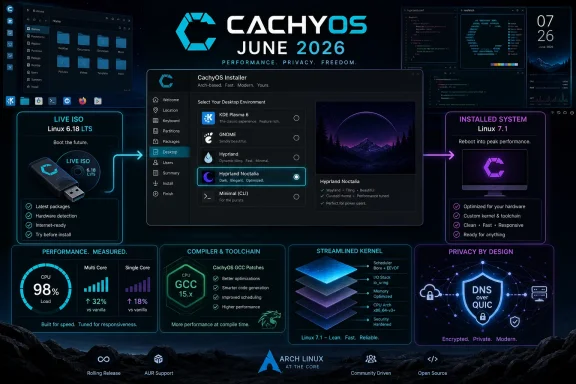 CachyOS Turns the Rice Into an Installable Product
For years, the Linux desktop’s most visually ambitious setups lived in screenshots, dotfile repositories, and “here is my config” threads that were more invitation than product. Hyprland, the Wayland compositor favored by a large slice of the tiling-window-manager crowd, has benefited from that culture. It is fast, modern, visually flexible, and often intimidating in exactly the way that attracts power users and repels newcomers.The June 2026 CachyOS snapshot tries to collapse that gap. By adding a CachyOS Hyprland Noctalia option to the installer, the project is not just shipping Hyprland; it is shipping an opinionated Hyprland experience. That matters because the difference between “the compositor is available” and “the desktop is ready to use” is the difference between a toolkit and an operating system.
Noctalia is important here because it wraps part of the Hyprland experience in the language of a desktop shell. Users who want a sleek Wayland environment but do not want to assemble panels, launchers, notification behavior, keybindings, terminal defaults, and screenshot tooling from scratch now have a more coherent on-ramp. For a distribution like CachyOS, whose brand is built around speed and tuned packages, this is a sensible move: performance is easier to appreciate when the first hour is not spent fighting the session.
The risk, of course, is that preconfigured tiling setups age differently from conventional desktops. KDE Plasma and GNOME are large projects with release engineering, documentation gravity, and predictable user expectations. A curated Hyprland shell is more agile, but it is also more dependent on the cohesion of smaller components moving quickly under Wayland’s still-evolving ecosystem.
The Kernel Story Is Really a Trust Story
The live ISO remains powered by the long-term supported Linux 6.18 LTS kernel series, while installed systems move to the newer Linux 7.1 series. That split says something useful about CachyOS’ priorities. The installer environment needs broad hardware compatibility and predictable boot behavior; the installed system is where the distribution’s appetite for newer performance work becomes visible.This is a familiar bargain in rolling and rolling-adjacent Linux distributions. The ISO must be boring enough to get you installed. The system it installs must be fresh enough to justify choosing it over a slower-moving base. CachyOS has always leaned toward the latter side of that bargain, but it is careful not to make the live environment the riskiest part of the experience.
The move away from Linux 7.0 is also less dramatic than it sounds. Once a kernel series is marked end-of-life upstream, distributions that want to remain current have little incentive to keep nudging users along an abandoned track. For an Arch-based system, the question is not whether change arrives; it is whether the distribution gives users a clear enough path through it.
That is where CachyOS’ identity becomes both strength and liability. The project’s tuned kernels, compiler choices, and package variants are its appeal. They are also the reason cautious administrators will treat it differently from Debian, Ubuntu LTS, or even stock Arch. CachyOS is not selling maximum stasis. It is selling the idea that rapid movement can still be engineered rather than improvised.
Plasma Remains the Default Because Defaults Still Matter
Despite the attention around Hyprland Noctalia, KDE Plasma remains the default desktop environment in the June snapshot. That decision is not conservative so much as strategically obvious. Plasma gives CachyOS a mainstream desktop center of gravity while the project experiments around the edges with tiling, Wayland-first workflows, and handheld-oriented editions.The updated stack includes KDE Plasma 6.7, KDE Frameworks 6.27, and KDE Gear 26.04.2. For most users, those version numbers are less important than what they imply: CachyOS is staying close to the front of the KDE release train. This is exactly what many users want from an Arch-based distribution that does more hand-holding than Arch itself.
Plasma is also the right default for a distribution that wants to appeal beyond the command-line enthusiast. It offers familiar desktop metaphors, strong Wayland progress, robust settings panels, and enough customization to keep Linux users from feeling trapped. Hyprland Noctalia can be the showroom. Plasma remains the front door.
That split lets CachyOS have its cake. It can tell mainstream desktop users that the default is recognizable and full-featured, while telling the performance-and-aesthetics crowd that the distribution understands where the culture is moving. In 2026, that culture is increasingly Wayland-native, animation-conscious, and unapologetically visual.
Performance Tuning Moves From Slogan to Supply Chain
CachyOS has long made performance part of its pitch, but the June snapshot is notable because some of its changes sit lower in the stack than desktop theming or default apps. Python using extended profile-guided optimization is one such change. A faster Python runtime is not glamorous, but on a modern Linux desktop, Python shows up in enough tools, scripts, and application glue that small gains can ripple outward.The GCC patch for generic x86 branch-misprediction tuning on modern Intel and AMD CPUs points in the same direction. This is not the kind of feature that produces a screenshot. It is the kind of feature that reinforces CachyOS’ argument that a distribution can extract more from common hardware by making different build-time choices than the big general-purpose distros.
That pitch deserves a little skepticism. Performance claims in Linux distributions are often workload-dependent, hardware-dependent, and difficult for ordinary users to separate from placebo, scheduler behavior, desktop smoothness, or simply the freshness of the package set. A system can feel faster because it is faster, because its compositor is better tuned, because the kernel behaves better on a particular CPU, or because the user just reinstalled and shed three years of cruft.
Still, CachyOS’ advantage is that it does not have to prove every optimization transforms every workload. It only has to make a credible cumulative case. The June release strengthens that case by showing performance work across compiler behavior, package builds, kernel policy, and desktop responsiveness rather than leaning on one magic switch.
The Installer Is Where Enthusiast Distros Grow Up
The most interesting changes in a distribution release are often the least glamorous, and this snapshot has several that fall into that category. Better keyboard layout and variant detection in the live session is not a marquee feature, but anyone who has typed a password on the wrong layout during installation knows how quickly a small detection bug becomes a trust problem.Hardware detection improvements matter even more. CachyOS’ hardware detection tool now handles 32-bit Vulkan driver needs for virtual machines, adds a Turkish translation, and resolves certain multi-GPU driver conflicts by choosing the best common driver or falling back to the primary GPU. That is the sort of work that turns a distribution from “great on my machine” into “less likely to embarrass itself on yours.”
Multi-GPU systems are especially treacherous territory. Laptops with hybrid graphics, desktops with mismatched cards, and setups that straddle vendor driver branches can expose the limits of installer automation. When the wrong driver branch is selected, the user does not experience it as a nuanced dependency problem; they experience it as a broken OS.
CachyOS is not alone in trying to smooth this out, but its user base makes the problem more visible. Gamers, workstation users, and performance enthusiasts are more likely to have the sort of hardware combinations that punish simplistic assumptions. If CachyOS wants to be the distribution those users recommend, the installer has to be almost boringly competent.
DNS-over-QUIC Is a Small Toggle With a Big Privacy Subtext
The CachyOS Welcome app now supports DNS over QUIC, and that addition fits neatly into the distribution’s effort to make advanced choices more accessible. DNS encryption has moved from niche privacy topic to mainstream browser and OS setting over the past decade, but Linux distributions still vary widely in how visible and approachable they make it. A Welcome app toggle is not a full privacy strategy, but it reduces friction.The important part is not that every user should enable DNS-over-QUIC immediately. The important part is that CachyOS is treating network privacy as a user-facing configuration choice rather than a wiki scavenger hunt. That is the kind of integration that differentiates a curated distribution from a pile of packages.
There is also a subtle support benefit. When a project exposes these settings in its own interface, it can shape the user’s path and terminology. That makes troubleshooting easier than if every user arrives with a different resolver, daemon, configuration file, and half-remembered tutorial. The new dedicated Troubleshooting page in CachyOS Welcome points in the same direction.
Welcome apps are easy to dismiss as first-run decoration, but in enthusiast distributions they can become control panels for project philosophy. CachyOS is using its Welcome app to say: here are the knobs we think matter, and here is where you should look before spelunking through forum posts.
Shelly Replaces Paru as the Project Tightens Its Tooling
The removal of paru from the installation, with Shelly now recommended as the package manager, is the sort of change that will bother some Arch-family users precisely because package helpers become muscle memory. On paper, replacing one helper recommendation with another sounds minor. In practice, it changes the first layer of interaction many users have with the broader Arch ecosystem.Arch-based distributions live in a complicated relationship with the Arch User Repository. The AUR is one of the reasons users choose the ecosystem, but it is also a place where convenience, trust, and risk collide. Recommending a particular helper is therefore more than a tooling preference; it is a statement about the workflow the distribution wants to support.
CachyOS’ move suggests a desire to standardize its user experience around tools it considers better aligned with the project. That may be the right call, but it also creates a migration moment. Existing users who are comfortable with paru are unlikely to panic, but new users will learn the distribution through Shelly’s assumptions, commands, and failure modes.
The broader pattern is clear. CachyOS is reducing randomness. It is picking a Hyprland experience, a login manager for MangoWM, a system monitor for GNOME, a package-management path, and a troubleshooting surface. A distribution that once might have been evaluated mainly by benchmark-minded users is behaving more like a product organization.
GNOME Resources Signals a Better Kind of Default
Replacing GNOME System Monitor with GNOME Resources as the default system monitor app for the GNOME desktop is a small but telling desktop decision. System monitor applications are where users go when something feels wrong. They are diagnostic tools, reassurance tools, and sometimes the only reason a user discovers what their system is actually doing.GNOME Resources has been gaining attention because it presents resource usage in a more modern and readable way than the older System Monitor. For a distribution that courts users who care about performance, the default monitoring tool matters. If you tell users your system is tuned, you should also give them a clean way to watch it behave.
This is another example of CachyOS choosing polish over mere availability. GNOME users could always install alternatives. The question is what the distribution believes should be there on day one. The answer, increasingly, is not just “whatever upstream historically shipped.”
SDDM becoming the default login manager for MangoWM fits the same theme. Login managers are not exciting until they fail, conflict, or feel inconsistent with the rest of the system. Standardizing around SDDM gives CachyOS one fewer edge to explain.
Gaming Gets a Rename, Not a Revolution
The proton-cachyos package being renamed to proton-cachyos-native is one of those changes that looks administrative but matters because names teach users how to think. Proton is already a crowded namespace, spanning Valve’s Proton builds, community variants, compatibility tools, launchers, and distribution-specific packaging. A clearer name can reduce confusion, especially for users trying to understand which compatibility layer they are actually running.CachyOS has built part of its reputation among gamers and performance-minded desktop users, so even small packaging choices in this area carry weight. Linux gaming in 2026 is far more mature than it was a decade ago, but it is not simple. Users still juggle kernel versions, Mesa, NVIDIA drivers, Proton builds, launch options, anticheat compatibility, and storefront integration.
The June release does not reinvent that stack. It does, however, continue the work of making CachyOS feel like a distribution that notices gamers’ practical pain points. Real-time privileges in the updated audio package group also belong in this category, because audio latency and scheduling behavior are not abstract concerns for users doing gaming, recording, streaming, or music production.
That said, CachyOS should resist the temptation to let gaming become a catch-all justification for aggressive defaults. The same changes that help one machine can expose regressions on another. The project’s real value will come from making performance options discoverable and reversible, not merely from shipping the newest moving parts as fast as possible.
The Arch Base Is an Advantage Until It Becomes a Burden
CachyOS’ Arch foundation gives it access to freshness, flexibility, and a user culture comfortable with reading logs. It also gives the project a perpetual support challenge. Users drawn by a polished installer and attractive desktop may not always understand what it means to run a system that inherits much of Arch’s velocity.That tension is visible in this release. On one side are features designed to lower friction: Noctalia in the installer, better hardware detection, Welcome app troubleshooting, improved keyboard detection, and more coherent defaults. On the other side are changes that assume users can tolerate a moving stack: Linux 7.1, new KDE packages, compiler patches, and evolving package-manager guidance.
This is not a contradiction. It is the defining challenge of modern enthusiast distributions. They want to package the thrill of the rolling-release world without delivering the traditional initiation ritual of breakage, forum archaeology, and “you should have read the news before updating.”
CachyOS is better positioned than many because its users already expect a certain amount of technical motion. But growth changes expectations. The more approachable the installer becomes, the more users will arrive who judge the system like a finished consumer OS rather than a community-maintained performance platform.
Windows Users Should Read This as a Warning Shot, Not a Threat
For WindowsForum readers, the obvious temptation is to treat CachyOS as part of the endless “Linux desktop is coming” narrative. That framing is stale and usually wrong. The more interesting story is that Linux distributions are becoming better at targeting specific user psychologies that Windows increasingly serves only in generic form.CachyOS is not trying to replace every Windows desktop in an enterprise fleet. It is not trying to be the OS for payroll clerks, kiosk deployments, or compliance-bound line-of-business apps. It is making a sharper pitch to users who want performance, gaming, Wayland-native desktops, fast package movement, and a sense that their OS is tuned for the hardware they bought.
That is a narrower market, but it overlaps with the people who build communities, write guides, recommend machines, and influence what technically curious users try next. Microsoft does not need to lose the mass market for Linux to matter. It only needs to lose mindshare among the people who used to treat Windows as the default power-user playground.
Windows still has enormous advantages: application compatibility, commercial support, hardware vendor attention, device management, and enterprise identity integration. But the enthusiast desktop is no longer a space where Windows wins by being the only practical option. CachyOS and distributions like it are making Linux feel not just viable, but designed for a certain kind of user.
The Real Test Starts After the ISO Boots
An ISO snapshot is a promise made at install time. The real product is the system that exists after three months of updates, kernel changes, driver churn, package rebuilds, and user customization. CachyOS’ June release looks strong because it pays attention to both the first boot and the long tail, but those two goals are not always aligned.Hyprland Noctalia may be delightful on a clean install, but users will judge it by how well it survives updates and customization. Linux 7.1 may bring benefits, but users will remember suspend failures, GPU regressions, or peripheral oddities more vividly than marginal performance wins. DNS-over-QUIC support may be welcome, but users will blame the OS if resolver choices break local networking assumptions.
This is where communication becomes part of engineering. CachyOS’ release notes are detailed enough to show intent, but the project’s long-term credibility will depend on how clearly it explains tradeoffs when things go wrong. Enthusiast users do not require perfection. They do require candor.
The June snapshot suggests a project that understands that. The addition of a Troubleshooting page in the Welcome app is not glamorous, but it is culturally significant. It acknowledges that a fast-moving system needs a visible path from problem to explanation.
The June Snapshot Shows CachyOS Choosing Its Battles
CachyOS’ June 2026 release is not one big feature so much as a set of choices pointing in the same direction. The project is betting that the next phase of enthusiast Linux is not raw configurability alone, but curated configurability. Users still get the sharp tools, but the distribution increasingly decides which ones should be on the workbench first.- CachyOS now offers a Hyprland Noctalia installer option, turning a once-DIY style of Wayland desktop into a more approachable first-class session.
- Installed systems move to the Linux 7.1 kernel series, while the live ISO keeps the steadier Linux 6.18 LTS base for installation reliability.
- KDE Plasma remains the default desktop, giving the distribution a mainstream center while it expands into more experimental Wayland workflows.
- Performance work continues below the surface through Python optimization and GCC branch-prediction tuning for modern x86 CPUs.
- Hardware and installer fixes, especially around keyboard detection and multi-GPU driver handling, matter as much as the visible desktop changes.
- The Welcome app is becoming a real control surface for CachyOS, adding DNS-over-QUIC support, troubleshooting help, and terminal integration.
References
- Primary source: 9to5Linux
Published: Sun, 28 Jun 2026 14:43:33 GMT
- Related coverage: cachyos.org
CachyOS June 2026 Release — CachyOS
Hyprland Noctalia, DNS-over-QUIC, GCC Branch Predictioncachyos.org - Related coverage: phoronix.com
- Related coverage: packages.cachyos.org

CachyOS | cachyos-hypr-noctalia - cachyos (any)
CachyOS Hyprland Noctalia settings
packages.cachyos.org
- Related coverage: linuxiac.com
CachyOS Brings a Polished Hyprland Noctalia Experience in June Update
CachyOS’ June 2026 ISO refresh introduces a new Hyprland Noctalia option, DNS-over-QUIC support, performance tweaks, and installer fixes.linuxiac.com - Related coverage: dashboard.cachyos.org

CachyOS | hyprland - cachyos-extra-v3 (x86_64_v3)
a highly customizable dynamic tiling Wayland compositor
dashboard.cachyos.org
- Related coverage: discuss.cachyos.org
A CachyOS Hyprland Starter Kit - #70 by Dirge - FAQ and Tutorials - CachyOS Forum
Overview After living in window manager/wayland compositor land for almost a year now, I feel pretty comfortable with what I’m running, but I was pretty lost when I first started out and it was cachyos-hyprland-settings … discuss.cachyos.org
